2015 LEXUS RC350 driver
[x] Cancel search: driverPage 121 of 684

1212. Instrument cluster
2
Instrument cluster
RC350/RCF_U (OM24636U)
■Suspension of the settings display
In the following situations, operation of the settings display will be temporarily sus-
pended.
●When a warning message appears on the multi-information display
●When the vehicle begins to move
■Tire pressure
●It may take a few minutes to display the tire inflation pressure after the engine switch is
turned to IGNITION ON mode. It may also take a few minutes to display the tire infla-
tion pressure after inflation pressure has been adjusted.
●“---” may be displayed if the tire position information cannot be determined due to
unfavorable radio wave conditions.
●Tire inflation pressure changes with temperat ure. The displayed values may also be dif-
ferent from the values measured using a tire pressure gauge.
■When disconnecting and reconnecting battery terminals
The following information data will be reset:
●Drive information
●Lap timer: Measured lap times, history
●G-force: Record of the maximum G-forces
■Using the lap timer
If the engine is stopped while a lap is being timed, the lap timer will stop and the lap time
up to that point will be recorded.
■Liquid crystal display
P. 1 0 2
WA R N I N G
■Caution for use while driving
●When operating the multi-information display while driving, pay extra attention to the
safety of the area around the vehicle.
●Do not look continuously at the multi-info rmation display while driving as you may fail
to see pedestrians, objects on the road, etc. ahead of the vehicle.
■The information display at low temperatures
Allow the interior of the vehicle to warm up before using the liquid crystal information
display. At extremely low temperatures, th e information display monitor may respond
slowly, and display changes may be delayed.
For example, there is a lag between the driver’s shifting and the new gear number
appearing on the display. This lag could cau se the driver to downshift again, causing
rapid and excessive engine braking and po ssibly an accident resulting in death or
injury.
■Cautions during setting up the display
As the engine needs to be running during sett ing up the display, ensure that the vehicle
is parked in a place with adequate ventila tion. In a closed area such as a garage,
exhaust gases including harmful carbon mo noxide (CO) may collect and enter the
vehicle. This may lead to death or a serious health hazard.
Page 134 of 684

1343-1. Key information
RC350/RCF_U (OM24636U)
NOTICE
■To prevent key damage
●Do not drop the keys, subject them to strong shocks or bend them.
●Do not expose the keys to high temp eratures for long periods of time.
●Do not get the keys wet or wash them in an ultrasonic washer etc.
●Do not attach metallic or magnetic materials to the keys or place the keys close to
such materials.
●Do not disassemble the keys.
●Do not attach a sticker or anything else to the surface of the electronic key.
●Do not place the keys near objects that pr oduce magnetic fields, such as TVs, audio
systems and induction cookers, or medical electrical equipment, such as low-fre-
quency therapy equipment.
■Carrying the electronic key on your person
Carry the electronic key 3.9 in. (10 cm) or mo re away from electric appliances that are
turned on. Radio waves emitted from electric appliances within 3.9 in. (10 cm) of the
electronic key may interfere with the key, causing the key to not function properly.
■In case of a smart access system with push-button start malfunction or other key-
related problems
Take your vehicle with all the electronic keys provided with your vehicle, including the
card key, to your Lexus dealer.
■When an electronic key is lost
If the electronic key remains lost, the risk of vehicle theft increases significantly. Visit
your Lexus dealer immediately with all rema ining electronic keys and the card key that
were provided with your vehicle.
■Handling the card key (if equipped)
●Do not apply excess force when inserting th e mechanical key into the card key. Doing
so may damage the card key.
●If the battery or card key terminals get wet, the battery may corrode.
If the key is dropped into water, or if drin king water etc. is spilled on the key, immedi-
ately remove the battery cover and wipe the battery and terminals. (To remove the
battery cover, lightly grasp and pull it.) If the battery is corroded, have your Lexus
dealer replace the battery.
●Do not crush the battery cover or use a screwdriver to remove the battery cover.
Forcibly removing the battery co ver may bend or damage the key.
●If the battery cover is frequently removed, the battery cover may become loose.
●When installing the battery, make sure to check the direction of the battery.
Installing the battery in the wrong direction may cause the battery to deplete rapidly.
●The surface of the card key may be damaged, or its coating may peel off in the follow-
ing situations:
• The card key is carried together with hard objects, such as coins and keys.
• The card key is scraped with a sharp object , such as the tip of a mechanical pencil.
• The surface of the card key is wiped with thinner or benzene.
Page 135 of 684

135
3
Operation of each component
RC350/RCF_U (OM24636U)3-2. Opening, closing and locking the doors and trunk
◆Smart access system with push-button start
Carry the electronic key to enable this function.
Grip the driver’s door handle to
unlock the door. Grip the passen-
ger’s door handle to unlock both
side doors.
*
Make sure to touch the sensor on the
back of the handle.
The doors cannot be unlocked for 3
seconds after the doors are locked.
*: The door unlock settings can bechanged. ( P. 1 3 9 , 6 3 5 )
Touch the lock sensor (indentation on the side of the door handle) to lock
both side doors.
Check that the door is securely locked.
◆Wireless remote control
Locks both side doors
Check that the door is securely
locked.
Unlocks both side doors
Pressing the button unlocks the
driver’s door. Pressing the button
again within 5 seconds unlocks the
other door.
Press and hold to open the windows
and moon roof.
*
*
: This setting must be customized at
your Lexus dealer.
Doors
Unlocking and locking the doors from the outside
1
2
1
2
Page 138 of 684
1383-2. Opening, closing and locking the doors and trunk
RC350/RCF_U (OM24636U)
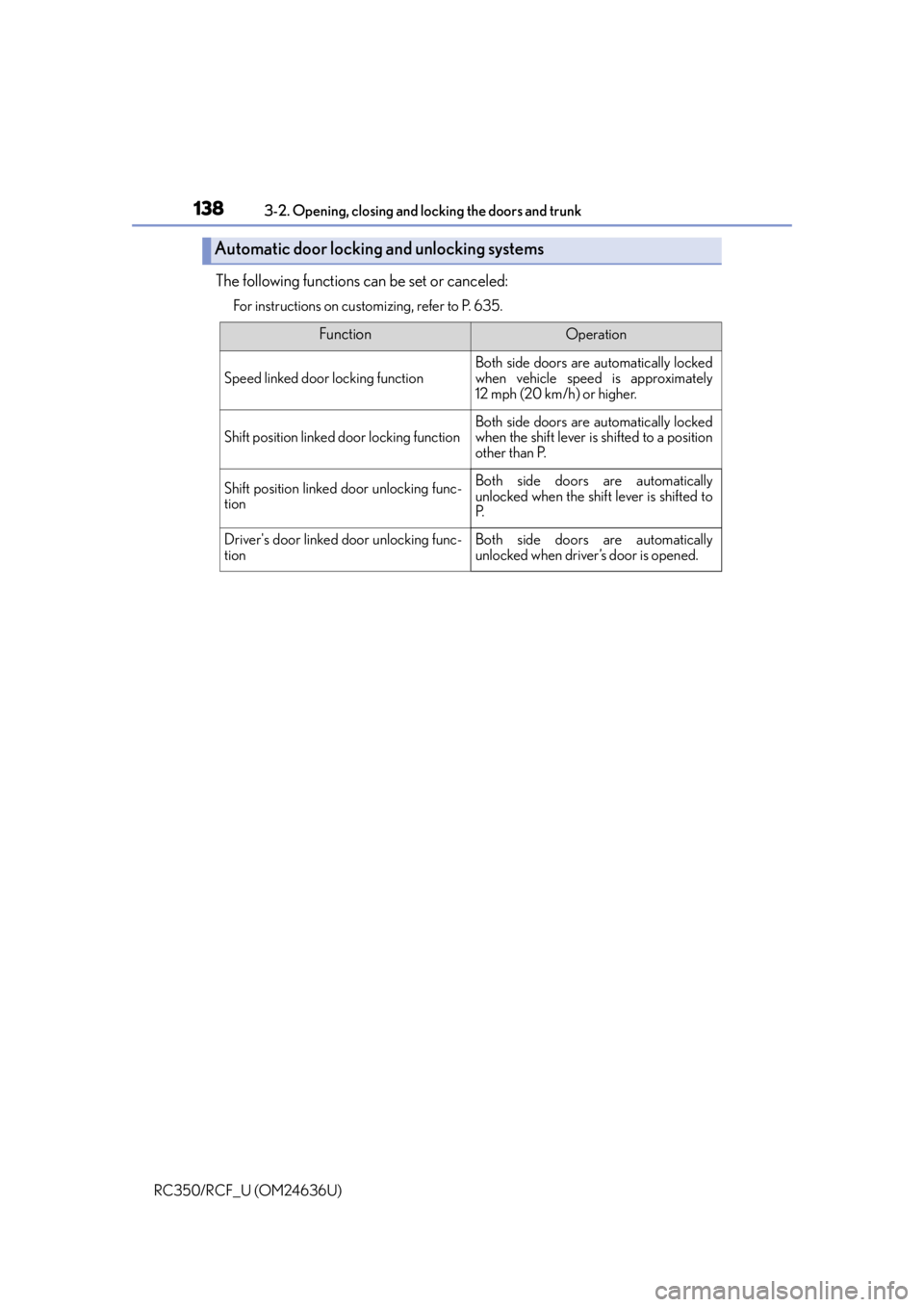
The following functions can be set or canceled:
For instructions on customizing, refer to P. 635.
Automatic door locking and unlocking systems
FunctionOperation
Speed linked door locking function
Both side doors are automatically locked
when vehicle speed is approximately
12 mph (20 km/h) or higher.
Shift position linked door locking functionBoth side doors are automatically locked
when the shift lever is shifted to a position
other than P.
Shift position linked door unlocking func-
tionBoth side doors are automatically
unlocked when the shif t lever is shifted to
P.
Driver's door linked door unlocking func-
tionBoth side doors are automatically
unlocked when driver’s door is opened.
Page 139 of 684

1393-2. Opening, closing and locking the doors and trunk
3
Operation of each component
RC350/RCF_U (OM24636U)
■Side window open/close function linked to door operation
When a door is opened, its window opens slightly. When a door is closed, its window
closes completely.
■Switching the door unlock function
It is possible to set which doors the entry function unlocks using the wireless remote con-
trol.
Turn the engine switch off.
When the indicator light on the key su rface is not on, press and hold , or
for approximately 5 seconds while pressing and holding .
The setting changes each time an operatio n is performed, as shown below. (When
changing the setting continuously, release the buttons, wait for at least 5 seconds, and
repeat step .)
To prevent unintended triggering of the alarm, unlock the doors using the wireless
remote control and open and close a door once after the settings have been changed. (If
a door is not opened within 60 seconds af ter is pressed, the doors will be locked
again and the alarm will automatically be set.)
In a case that the alarm is triggered, immediately stop the alarm. ( P. 7 8 )
■Impact detection door lock release system
In the event that the vehicle is subject to a strong impact, both side doors are unlocked.
Depending on the force of the impact or the type of accident, however, the system may
not operate.
■Using the mechanical key
The doors can also be unlocked with the mechanical key. (P. 5 9 0 )
■Conditions affecting the operation of the sm art access system with push-button start
or wireless remote control
P. 1 4 8
■Customization
Settings (e.g. unlocking function using a key) can be changed.
(Customizable features: P. 6 3 5 )
1
2
2
Multi-information
displayUnlocking functionBeep
Holding the driver’s door handle
unlocks only the driver’s door.
Exterior: Beeps 3 times
Interior: Pings once
Holding the passenger’s door
handle unlocks both side doors.
Holding either door handle
unlocks both side doors.Exterior: Beeps twice
Interior: Pings once
Page 146 of 684

1463-2. Opening, closing and locking the doors and trunk
RC350/RCF_U (OM24636U)
●Locks and unlocks the doors ( P. 1 3 5 )
●Opens the trunk (P. 1 4 1 )
●Starts the engine ( P. 1 9 3 )
■Antenna location
■Effective range (areas within whic h the electronic key is detected)
Smart access system with push-button start
The following operations can be performed simply by carrying the electronic
key (including the card key) on your person, for example in your pocket. The
driver should always carry the electronic key.
Antennas outside the cabin
Antennas inside the cabin
Antenna inside the trunk
Antenna outside the trunk
When locking or unlocking the doors
The system can be operated when the elec-
tronic key is within about 2.3 ft. (0.7 m) of
an outside door handle. (Only the doors
detecting the key can be operated.)
When opening the trunk
The system can be operated when the elec-
tronic key is within about 2.3 ft. (0.7 m) of
the trunk release button.
When starting the engine or changing engine switch modes
The system can be operated when the electronic key is inside the vehicle.1
2
3
4
Page 147 of 684

1473-2. Opening, closing and locking the doors and trunk
3
Operation of each component
RC350/RCF_U (OM24636U)
■Alarms and warning indicators
An alarm sounds and warning messages are displayed on the multi-information display
to protect against unexpected accidents or theft of the vehicle resulting from erroneous
operation. When a warning message is disp layed, take appropriate measures based on
the displayed message. ( P. 5 3 9 )
When only an alarm sounds, circumstances and correction procedures are as follows.
■Battery-saving function
The battery-saving function will be activated in order to prevent the electronic key bat-
tery and the vehicle battery from being discharged while the vehicle is not in operation
for a long time.
●In the following situations, the smart access system with push-button start may take
some time to unlock the doors.
• The electronic key has been left within approximately 6 ft. (2 m) of the outside of the
vehicle for 10 minutes or longer.
• The smart access system with push-butto n start has not been used for 5 days or
longer.
●If the smart access system with push-butto n start has not been used for 14 days or
longer, the doors cannot be unlocked at the passenger door. In this case, hold the
driver’s door handle, or use the wireless re mote control or mechanical key, to unlock
the doors.
AlarmSituationCorrection procedure
Exterior alarm sounds
once for 5 seconds
The trunk was closed while
the electronic key was still
inside the trunk and both
side doors were locked.Retrieve the electronic key
from the trunk and close
the trunk lid.
An attempt was made to
lock the vehicle while a
door was open.Close both side doors and
lock the doors again.
Interior alarm sounds con-
tinuously
The engine switch was
turned to ACCESSORY
mode while the driver’s
door was open (or the
driver’s door was opened
while the engine switch
was in ACCESSORY
mode).
Turn the engine switch off
and close the driver’s door.
The engine switch was
turned off while the driver’s
door was open.
Close the driver’s door.
Page 153 of 684

1533-3. Adjusting the seats
3
Operation of each component
RC350/RCF_U (OM24636U)
Fold the seatback completely for-
ward.
The front seat will move forward
automatically.
■Returning the front seat to its original position
Move the seatback backward until it locks. The front seat will return to its orig-
inal position automatically.
■When adjusting the seat
●Take care when adjusting the seat so that the head restraint does not touch the ceiling.
●RC350: When folding down a rear seatback, if it interferes with a front seatback, adjust
the front seat position so that the seats no longer interfere with each other. However, if
adjusting the front seat position causes th e correct driving posture to not be main-
tained, return the rear seatback to its original position. ( P. 1 5 5 )
■Lever-operated “Front, Fold & Return” seat
●After the front seat is moved forward by operating the “Front, Fold & Return” seat lever,
if a power seat adjusting switch or a driving position memory switch is pressed, the front
seat will not return to its original position even if the front seatback is moved backward
until it locks.
●The lever-operated “Front, Fold & Return” se at will not operate in the following situa-
tions:
• The front seat belt of the seat to be operated is fastened.
• The engine switch is in IGNITION ON mode and the shift lever is in a position other
than P (driver' s seat only).
●Operation of the lever-operated “Front, Fold & Return” seat will stop in the following sit-
uations:
• A power seat adjusting switch or a driv ing position memory switch is pressed.
• The front seat belt of the seat which is operating is fastened.
• The engine switch is in IGNITION ON mode and the shift lever is moved to a posi-
tion other than P (driver's seat only).
■Jam protection function
While the lever-operated “Front, Fold & Return” seat is operating or a seat position mem-
ory is being recalled ( P. 157), if an object is stuck eith er in front of or behind the front
seat, the front seat will stop and then mo ve in the opposite direction slightly.
2