2015 LEXUS RC350 driver
[x] Cancel search: driverPage 44 of 684

441-1. For safe use
RC350/RCF_U (OM24636U)
WA R N I N G
■SRS airbag precautions
●Do not allow a child to stand in front of the
SRS front passenger airbag unit or sit on the
knees of a front passenger.
●Do not allow the front seat occupants to hold
items on their knees.
●Do not lean against the door, the roof side rail
or the front, side and rear pillars.
●Do not allow anyone to kneel on the passen-
ger seats toward the door or put their head or
hands outside the vehicle.
●Do not attach anything to or lean anything
against areas such as the dashboard, steering
wheel pad and lower portion of the instru-
ment panel.
These items can become projectiles when the
SRS driver, front passenger and knee airbags
deploy.
●Do not attach anything to areas such as a
door, windshield, side windshield, front or rear
pillar, roof side rail and assist grip.
(Except for the speed limit sticker P. 5 8 0 )
Page 63 of 684
631-1. For safe use
1
For safety and security
RC350/RCF_U (OM24636U)
When using a child restraint system on a rear seat
WA R N I N G
■When installing a child restraint system
Observe the following precautions.
Failure to do so may result in death or serious injury.
●Use child restraint system suitable to the age and size of the child and install it to the
rear seat.
●Do not allow the child to lean his/her head or any part of his/her body against the
door or the area of the seat, rear pillars or roof side rails from which the SRS curtain
shield airbag deploys even if the child is seated in the child restraint system. It is dan-
gerous if the SRS curtain shield airbag in flates, and the impact could cause death or
serious injury to the child.
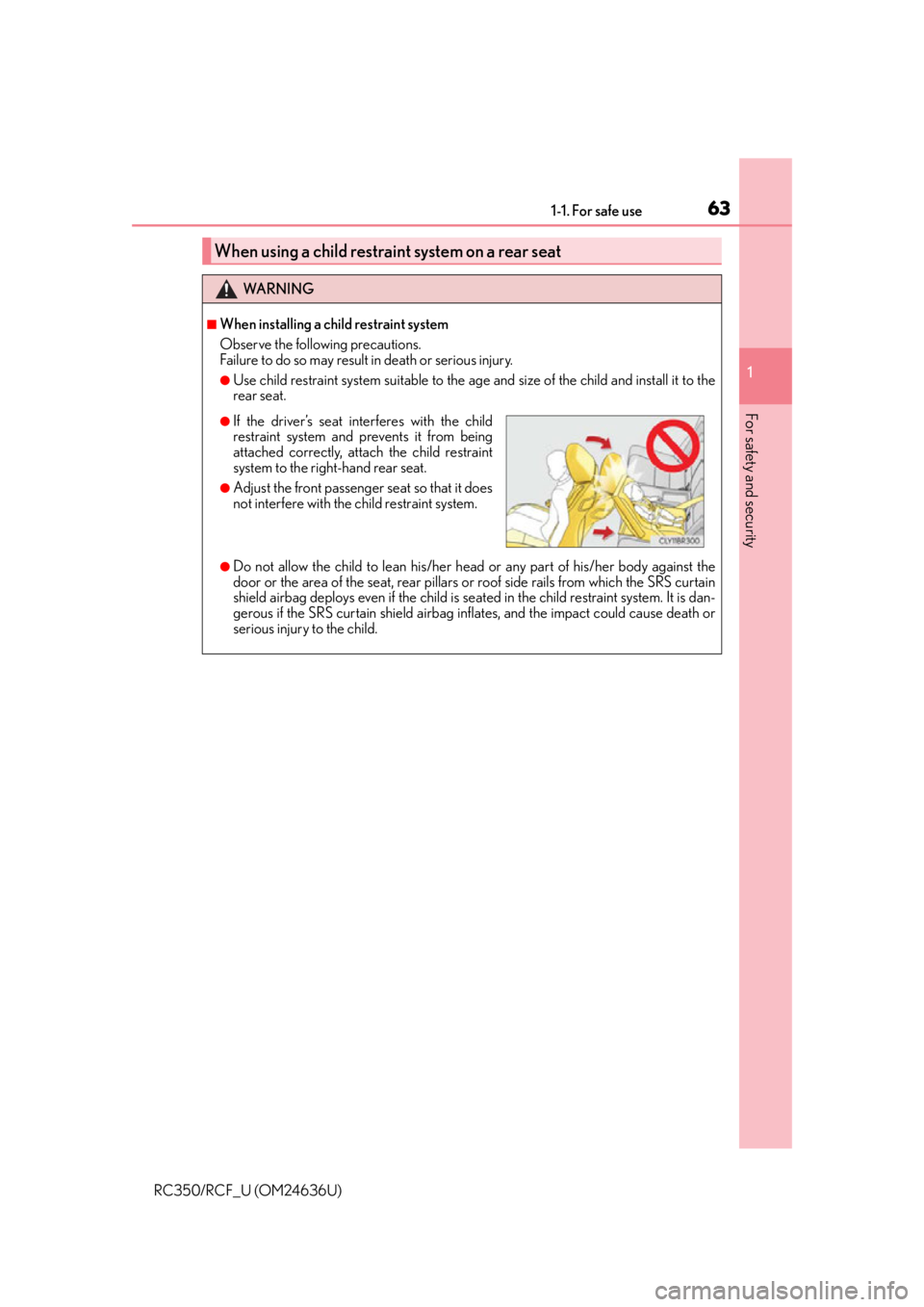
●If the driver’s seat interferes with the child
restraint system and prevents it from being
attached correctly, attach the child restraint
system to the right-hand rear seat.
●Adjust the front passenger seat so that it does
not interfere with the child restraint system.
Page 84 of 684

842. Instrument cluster
RC350/RCF_U (OM24636U)
Warning lights inform the driver of malfun ctions in the indicated vehicle systems.
Warning lights
*1
(U.S.A.)
Brake system warning light
( P. 5 3 3 )
*1, 2
(if equipped)
Pre-collision system warn-
ing light
( P. 5 3 4 )
*1
(Canada)
Brake system warning light
( P. 5 3 3 )*1
Slip indicator ( P. 5 3 4 )
*1Charging system warning
light ( P. 5 3 3 )*1 Automatic headlight level-
ing system warning light
( P. 5 3 4 )
*1
(U.S.A.)
Malfunction indicator lamp
( P. 5 3 3 )Open door warning light
( P. 5 3 4 )
*1
(Canada)
Malfunction indicator lamp
( P. 5 3 3 )Low fuel level warning light
( P. 5 3 4 )
*1SRS warning light
( P. 5 3 3 )Seat belt reminder light
( P. 5 3 4 )
*1
(U.S.A.)
ABS warning light
( P. 5 3 3 )*1Master warning light
( P. 5 3 4 )
*1
(Canada)
ABS warning light
( P. 5 3 3 )*1Tire pressure warning light
( P. 5 3 5 )
*1Electric power steering sys-
tem warning light
( P. 5 3 4 )
Page 85 of 684

852. Instrument cluster
2
Instrument cluster
RC350/RCF_U (OM24636U)
*1: These lights turn on when the engine switch is turned to IGNITION ON mode toindicate that a system check is being perfor med. They will turn off after the engine is
on, or after a few seconds. There may be a malfunction in a system if a light does not
come on, or turn off. Have the vehi cle inspected by your Lexus dealer.
*2: The light flashes to indicate a malfunction.
The indicators inform the driver of the operating state of the vehicle’s various sys-
tems.
Indicators
Turn signal indicator
( P. 2 0 4 )
(if equipped)
LDA (Lane Departure
Alert) indicator ( P. 2 4 8 )
(U.S.A.)
Headlight indicator
( P. 2 0 8 )
(if equipped)
Intuitive parking assist indi-
cator ( P. 2 5 5 )
(Canada)
Tail light indicator
( P. 2 0 8 ) *1, 2 Slip indicator ( P. 2 8 4 )
Headlight high beam indi-
cator ( P. 2 0 9 )
*1VSC OFF indicator
( P. 2 8 5 )
(if equipped)
Automatic High Beam indi-
cator ( P. 211)*1, 8TRAC OFF indicator
( P. 2 8 4 )
(if equipped)
Front fog light indicator
( P. 2 1 6 )*1, 3
(if equipped)
Pre-collision system warn-
ing light
( P. 2 9 1 )
Cruise control indicator
( P. 2 2 9 , 2 3 3 )
*4, 6
(if equipped)
BSM (Blind Spot Monitor)
outside rear view mirror
indicators ( P. 2 9 7 )
(if equipped)
Dynamic radar cruise con-
trol indicator ( P. 2 3 3 )*7Security indicator
( P. 76 , 7 8 )
Cruise control “SET” indica-
tor ( P. 229, 233)
*5Low outside temperature
indicator ( P. 9 0 , 9 6 )
Page 91 of 684

912. Instrument cluster
2
Instrument cluster
RC350/RCF_U (OM24636U)
Main meter moved to the right
The units used on the meters may differ depending on the target region.
Engine coolant temperature gauge
Displays the engine coolant temperature
Tachometer
Displays the engine speed in revolutions per minute
Outside temperature
Displays the outside temperature within the range of -40°F (-40°C) to 122°F
(50°C). Low outside temperature indicator comes on when the ambient tempera-
ture is 37°F (3°C) or lower.
Shift position and gear position ( P. 199)
Speedometer
Fuel gauge
Multi-information display
Presents the driver with a variety of vehicle data ( P. 1 0 3 )
Displays warning messages in case of a malfunction ( P. 5 3 9 )
Odometer and trip meter display
Odometer:
Displays the total distance the vehicle has been driven
Tr i p m e t e r :
Displays the distance the vehicle has been driven since the meter was last reset.
Trip meters “A” and “B” can be used to record and display different distances inde-
pendently.
1
2
3
4
5
6
7
8
Page 98 of 684

982. Instrument cluster
RC350/RCF_U (OM24636U)
Multi-information display
Presents the driver with a variety of vehicle data ( P. 1 1 0 )
Displays warning messages in case of a malfunction ( P. 5 3 9 )
Fuel gauge
Engine coolant temperature gauge
Displays the engine coolant temperature. If the engine coolant temperature gauge
indicator ( ) enters the red zone, a buzzer will sound and the indicator will turn red
and start flashing. Also, a warning message will be displayed.
Engine oil temperature gauge
Displays the engine oil temperature. If the engine oil temperature gauge indicator
( ) enters the red zone, the indicator will turn red and start flashing.
Outside temperature
Displays the outside temperature within the range of -40°F (-40°C) to 122°F
(50°C). Low outside temperature indicator comes on when the ambient temperature
is 37°F (3°C) or lower.
Tachometer
Displays the engine speed in revolutions per minute
Digital speedometer
Analog speedometer
Shift position and gear position
( P. 199)
Odometer and trip meter display
Odometer:
Displays the total distance the vehicle has been driven
Tr i p m e t e r :
Displays the distance the vehicle has been driven since the meter was last reset. Trip
meters “A” and “B” can be used to record and display different distances indepen-
dently.
Eco driving meter
Displays the vehicle acceleration. The more rapidly the vehicle is accelerated, the
lower the number of blue segments displayed, indicating that your driving is less eco-
friendly. This meter is designed as a guid eline to show the eco-friendliness of your
driving.
1
2
3
4
5
6
7
8
9
10
11
Page 101 of 684

1012. Instrument cluster
2
Instrument cluster
RC350/RCF_U (OM24636U)
The brightness of the instrument panel lights can be adjusted.
Darker
Brighter
■The meters and display illuminate when
The engine switch is in IGNITION ON mode.
■Welcome illumination of the analog speedometer
●When the driver’s door is opened, th e analog speedometer will illuminate.
Then, when the driver’s door is closed, the analog speedometer will illuminate and go
off (pulsate) 3 times.
●In the following situations, the analog speedometer will no t pulsate even though the
driver’s door is opened and closed:
• Within 60 seconds after the analog meter pulsation completes
• Within 60 seconds of turn ing the engine switch off
■Va r i a b l e r e d z o n e
■Eco driving meter
●The number of blue segments displayed on the eco driving meter decreases/increases
depending on the vehicle acceleration. Use this meter as a guideline when you wish to
drive in an eco-friendly manner that reduces fuel consumption.
However, on a downward grade where the vehicle can accelerate without the acceler-
ator pedal being depressed, the eco driving meter may not display the eco-driving
state correctly.
●When the shift lever is moved to P, N or R, the segments will turn gray and the eco driv-
ing meter will not operate.
Instrument panel light control
1
2
To help protect the engine, the engine speed is
controlled by starting the red zone of the
tachometer at different engine speeds ranging
from 3700 rpm to 7300 rpm depending on the
engine coolant temperature.
Before driving under extremely high load condi-
tions, make sure to sufficiently warm up the
engine.
Page 109 of 684

1092. Instrument cluster
2
Instrument cluster
RC350/RCF_U (OM24636U)
■Suspension of the settings display
In the following situations, operation of the settings display will be temporarily sus-
pended.
●When a warning message appears on the multi-information display
●When the vehicle begins to move
■Tire pressure
●It may take a few minutes to display the tire inflation pressure after the engine switch is
turned to IGNITION ON mode. It may also take a few minutes to display the tire infla-
tion pressure after inflation pressure has been adjusted.
●“---” may be displayed if the tire information cannot be determined due to unfavorable
radio wave conditions.
●Tire inflation pressure changes with temperat ure. The displayed values may also be dif-
ferent from the values measured using a tire pressure gauge.
■When disconnecting and reconnecting battery terminals
The drive information data will be reset.
■Liquid crystal display
P. 9 4
WA R N I N G
■Caution for use while driving
●When operating the multi-information display while driving, pay extra attention to the
safety of the area around the vehicle.
●Do not look continuously at the multi-info rmation display while driving as you may fail
to see pedestrians, objects on the road, etc. ahead of the vehicle.
■The information display at low temperatures
Allow the interior of the vehicle to warm up before using the liquid crystal information
display. At extremely low temperatures, th e information display monitor may respond
slowly, and display changes may be delayed.
For example, there is a lag between the driver’s shifting and the new gear number
appearing on the display. This lag could cau se the driver to downshift again, causing
rapid and excessive engine braking and po ssibly an accident resulting in death or
injury.
■Cautions during setting up the display
As the engine needs to be running during sett ing up the display, ensure that the vehicle
is parked in a place with adequate ventila tion. In a closed area such as a garage,
exhaust gases including harmful carbon mo noxide (CO) may collect and enter the
vehicle. This may lead to death or a serious health hazard.
NOTICE
■While setting up the display
To prevent battery discharge, ensure that th e engine is running while setting up the dis-
play features.