Page 635 of 960
6353-5. Using the hands-free system (for cellular phone)
3
Interior features
LX570_OM_OM60L96U_(U) Touch the desired tab and choose
the desired data from the list.
Touch or press on the
steering wheel.
■ Calling using voice recognition
You can call by giving a voice command. (
P. 431)
Talk switch
Without dynamic radar cruise
control
With dynamic radar cruise con-
trol
The “Call ” and “Dial ” operating procedures are
explained here. Other operating procedures are also similar. STEP 3
STEP 4
A
B
Page 636 of 960
6363-5. Using the hands-free sy stem (for cellular phone)
LX570_OM_OM60L96U_(U) ● Calling by name
You can call by giving a name registered in the phonebook.
( P. 650)
Press or .
Following the system guidance,
wait for the beep and then after
saying “Call” say the desired name,
or the name and type of phone.
Following the system guidance, wa it for the beep and then say
“Dial”. (You can also call by pressing on the steering
wheel.)
● Calling by dial number
You can call by giving a phone number
Press or .
Following the system guidance,
wait for the beep and then after
saying “Dial” sa y the phone num-
ber.STEP 1
STEP 2
STEP 3
STEP 1
STEP 2
Page 637 of 960
6373-5. Using the hands-free system (for cellular phone)
3
Interior features
LX570_OM_OM60L96U_(U) Following the system guidance, wa it for the beep and then say
“Dial”. (You can also call by pressing on the steering
wheel.) STEP 3
Page 638 of 960
6383-5. Using the hands-free sy stem (for cellular phone)
LX570_OM_OM60L96U_(U) ■ Calling using SMS/MMS message
You can call using the SMS (Sho rt Message Service)/MMS (Multime-
dia Messaging Service) message sender’s phone number.
Display the “Phone” screen. ( P. 625)
Touch “Messages”. When “Message Transfer” is set to
“Off”, a confirmation screen will be
displayed. Touch “Yes”.
Touch the “SMS/MMS” tab and th en touch the desired received
message from the list. The tab display may vary depending on the type of cellular phone.
Touch or press on the steering wheel.
■ Calling using POI
You can make a call using a Point Of Interest. STEP 1
STEP 2
STEP 3
STEP 4
Page 640 of 960

6403-5. Using the hands-free sy stem (for cellular phone)
LX570_OM_OM60L96U_(U) ■
When calling by phone number ●
Say the phone number one digit at a time . For example, if the phone number is
2345678, say “two three fo ur five six seven eight”.●
The system can recognize the following types of phone numbers:
• 3 digit numbers (911, 411, 611)
• 7 digit numbers (Local phone numbers)
• 10 digit numbers (Area code + Local phone number)
• 11 digit phone numbers (1 + Area code + Local phone number) ●
As the system cannot recognize additional numbers, say the complete number
without stopping. ●
When the system recognizes multiple phone numbers, a phone number candi-
date list will be displayed on the screen. If the desired phone number is not dis-
played on the top of the screen, say the number of the desired phone number
from the candidate list (number 1 and numb er 2) to select a phone number from
the candidate list■
International calls
To dial a phone number that is not a 3, 7, 10 or 11 digit number, for example an inter-
national number, use “International Call”.
Press or on the steering wheel to display the “Shortcut
Menu” screen and saying “Mai n menu” or touch “Main Menu”.
Say “Use a phone”.
Say “International call”.
Up to 24 digits can be recognized when using the international call function. The
number can also be divided into multiple groups and recognized.
You may not be able to make international calls, depending on the cellular phone in
use. STEP 1
STEP 2
STEP 3
Page 641 of 960
6413-5. Using the hands-free system (for cellular phone)
3
Interior features
LX570_OM_OM60L96U_(U) ■
Calling by using the latest call history item
Press on the steering wheel to display the “Phone” screen.
Press on the steering wheel to display the “Call History” screen.
Press on the steering wheel to sele ct the most recent number in the
history.
Touch or press on the steering wheel. ■
To cancel voice recognition ●
Press and hold or on the steering wheel. ●
Touch “Cancel”. ■
When using voice recognition
Use correct commands and speak clearly, otherwise the system may not correctly
recognize the command. Wind or other noises may also cause the system not to
recognize the desired command. STEP 1
STEP 2
STEP 3
STEP 4
Page 642 of 960
6423-5. Using the hands-free sy stem (for cellular phone)
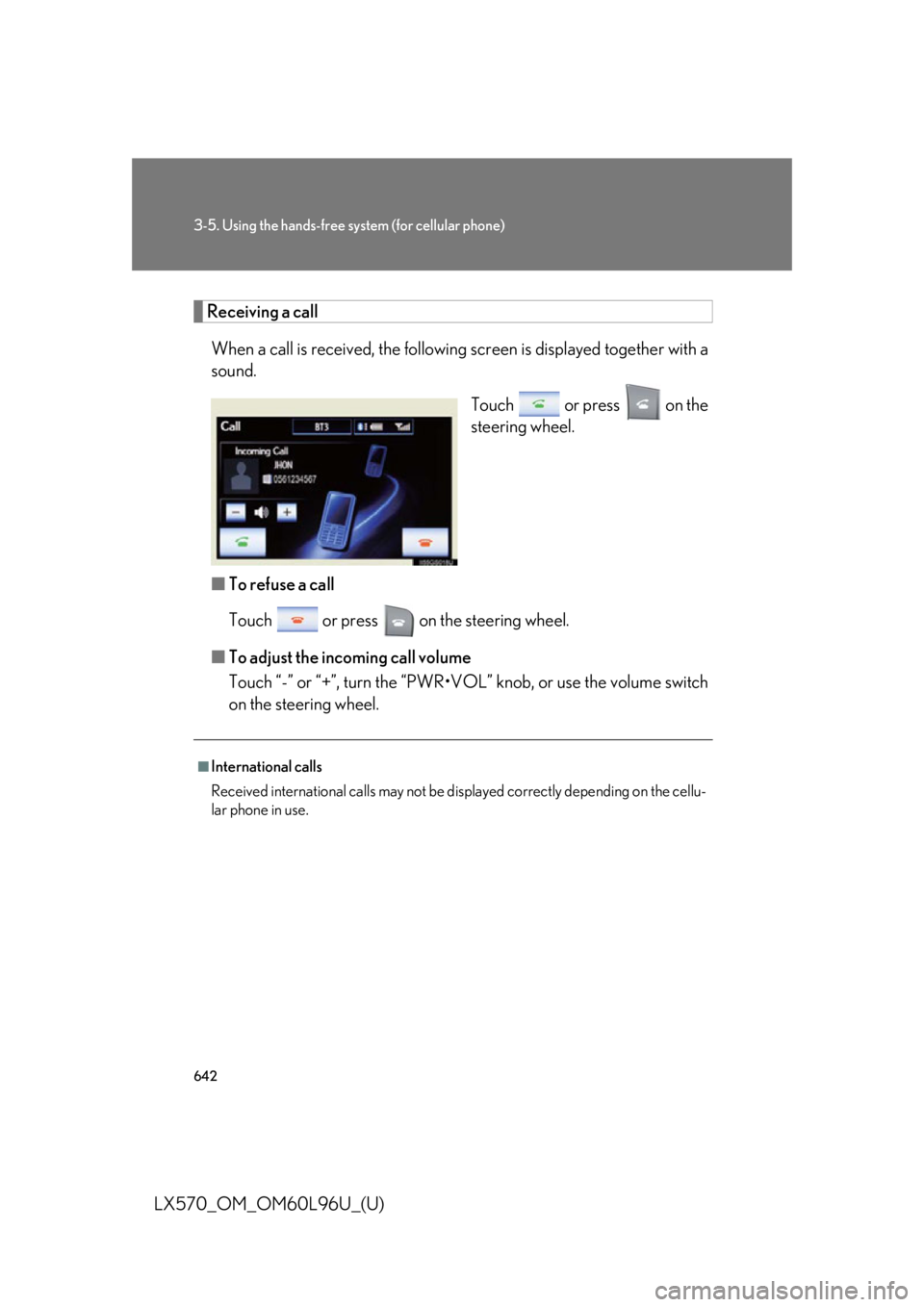
LX570_OM_OM60L96U_(U) Receiving a call
When a call is received, the following screen is d isplayed together with a
sound.
Touch or press on the
steering wheel.
■ To refuse a call
Touch or press on the steering wheel.
■ To adjust the incoming call volume
Touch “-” or “+”, turn the “PWR•VOL” knob, or use the volume switch
on the steering wheel. ■
International calls
Received international calls may not be displayed correctly depending on the cellu-
lar phone in use.
Page 643 of 960
6433-5. Using the hands-free system (for cellular phone)
3
Interior features
LX570_OM_OM60L96U_(U) Speaking on the phone
The following screen is displaye d when speaking on the phone.
■ To adjust the incoming call volume
Touch “-” or “+”, turn the “PWR•VOL” knob, or use the volume switch
on the steering wheel.
■ To prevent the other party from hearing your voice
Touch “Mute”.