Page 644 of 960
6443-5. Using the hands-free sy stem (for cellular phone)
LX570_OM_OM60L96U_(U) ■ Inputting tones
When using phone services such as an answering service or a bank,
you can store phone numbers and code numbers in the phonebook.
Touch “0-9” on the “Call” screen.
Input the number. If repeated tone symbols
* are
stored in the phonebook, “Send”
and “Clear” are displayed on the
right side of the screen.
* : Repeated tone symbols are sym-
bols or numbers displayed as p
or w, that come after the phone
number.
(e.g. 056133w0123p#1 ✽ )
Confirm the number displayed on the screen, and touch “Send”. If you touch “Clear”, this function will end.
■ To transfer a call
Touch “Handset Mode” to change from hands-free call to cellular
phone call. Touch “Handsfree Mode” to change from cellular phone
call to hands-free call.
■ To hang up
Touch or press on the steering wheel. STEP 1
STEP 2
STEP 3
Page 645 of 960

6453-5. Using the hands-free system (for cellular phone)
3
Interior features
LX570_OM_OM60L96U_(U) ■ Call waiting
When a connected call is interrupted by the third party, the incoming
call message will be displayed.
● To talk with the other party : Touch or press on the
steering wheel.
● To refuse the call: Touch or press on the steering wheel.
Everytime you touch or press on the steering wheel after
a call is interrupted, you will be switched to the other party.
If your cellular phone is not accepted in HFP Ver. 1.5, this function can-
not be used. ■
Incoming call ●
The ring tone that has been set in th e “Phone Sound Settings” screen sounds
when there is an incoming call. ( P. 649)●
Depending on the type of Bluetooth ®
phone, both the system and Bluetooth ®
phone may sound simultaneously wh en there is an incoming call.■
Transferring calls ●
It is not possible to transfer from hand s-free to a cellular phone while driving.●
If you transfer from a cellular phone to hands-free, the hands-free screen will be
displayed, and you can operate the system using the screen. ●
Transfer method and operation may vary according to the cellular phone used.●
For operation of the cellular phone in use, see the phone’s manual.■
Repeated tone symbols
When the “p” pause tone is used, after wait ing 2 seconds the tone data up until the
next pause tone will be automatically sent. When the “w” pause tone is used, the
tone data up until the next pause tone will be automatically sent after user opera-
tion.
Page 647 of 960
6473-5. Using the hands-free system (for cellular phone)
3
Interior features
LX570_OM_OM60L96U_(U) ■ To adjust the message reading out volume
Touch “-” or “+”, turn the “PWR•VOL” knob, or use the volume switch
on the steering wheel.
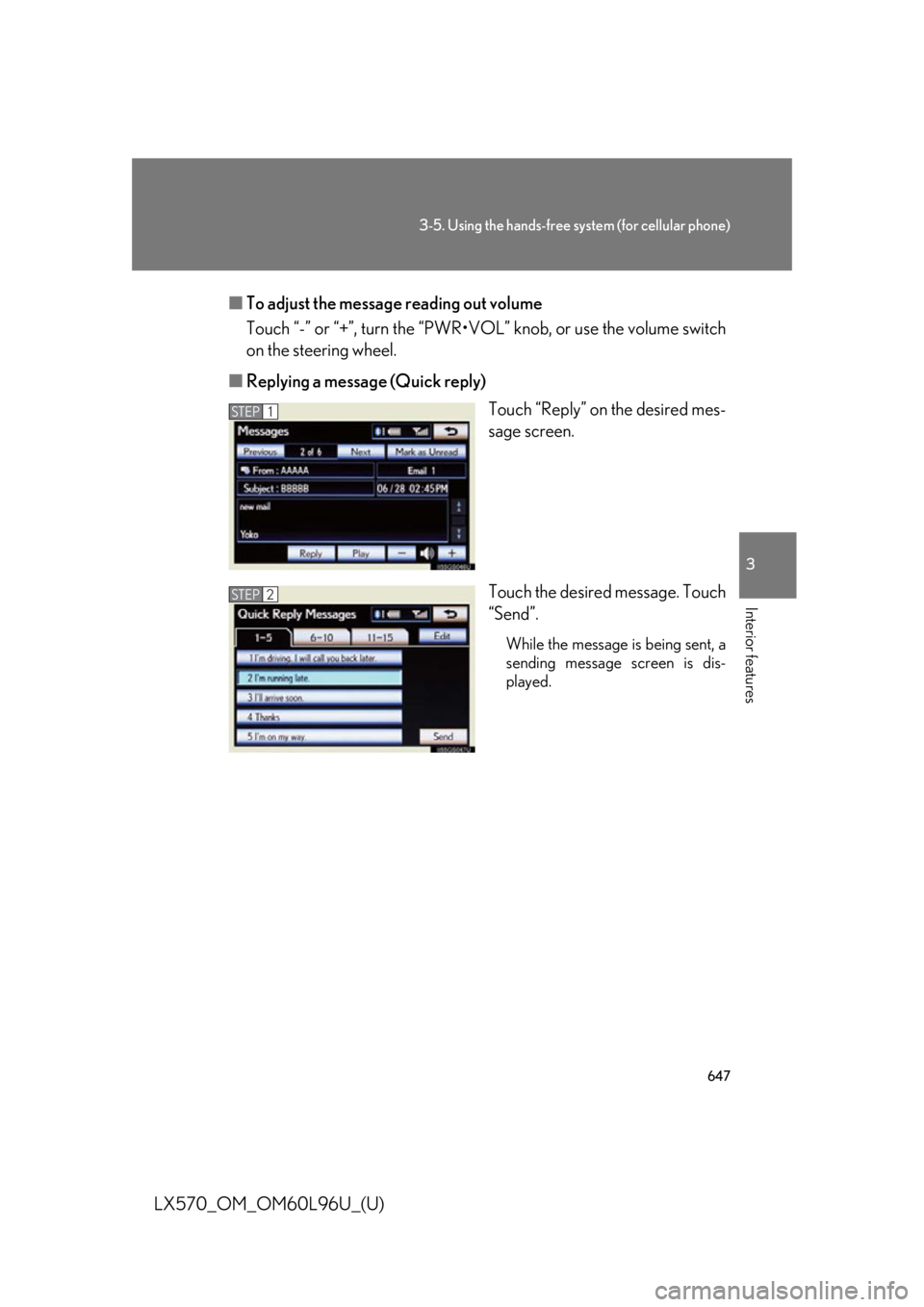
■ Replying a message (Quick reply)
Touch “Reply” on the desired mes-
sage screen.
Touch the desired message. Touch
“Send”. While the message is being sent, a
sending message screen is dis-
played.STEP 1
STEP 2
Page 709 of 960
7073-8. Other interior features
3
Interior features
LX570_OM_OM60L96U_(U) Heated steering wheel
: If equipped■
The heated steering wheel can be used when
The “ENGINE START STOP” switch is in IGNITION ON mode. ■
Timer
The heated steering wheel will automatically turn off after about 30 minutes. ■
If the indicator light flashes
Press the switch to turn the heated steering wheel off and then press the switch
again. If the indicator light still flashes, a malfunction may be occurring. Turn the
heated steering wheel off and have the vehicle inspected by your Lexus dealer.The heated steering wheel can be used to heat the leather portion of the
steering wheel.
On/Off The indicator light comes on
when the heater is operating.
Page 710 of 960
7083-8. Other interior features
LX570_OM_OM60L96U_(U) CAUTION■
Burns ●
Only appropriately qualified and capable non-impaired persons should operate
the vehicle. However, care should be taken to prevent injury if anyone in the fol-
lowing categories comes into contact with the steering wheel when the heated
steering wheel is on:
• Babies, small children, the elderly, the sick and the disabled
• Persons with sensitive skin
• Persons who are fatigued
• Persons who have taken alcohol or drugs that induce sleep (sleeping drugs,
cold remedies, etc.)●
Do not use the heated steering wheel more than necessary. Doing so may cause
minor burns or overheating.
NOTICE■
To prevent battery discharge
Turn the switch off when the engine is not running.
Page 735 of 960
Maintenance and care
4
733
LX570_OM_OM60L96U_(U) 4-1. Maintenance and care
Cleaning and protecting
the vehicle exterior ............ 734
Cleaning and protecting
the vehicle interior ............. 737
4-2. Maintenance
Maintenance
requirements ....................... 740
General maintenance.......... 743
Emission inspection and
maintenance (I/M)
programs ............................... 746
4-3. Do-it-yourself maintenance
Do-it-yourself service
precautions ............................ 747
Hood .......................................... 750
Engine compartment ............ 751
Tires ............................................ 766
Tire inflation pressure .......... 775
Wheels ....................................... 779
Air conditioning filter ............ 781
Electronic key battery ......... 784
Checking and
replacing fuses..................... 786
Light bulbs ................................ 803
Page 736 of 960

734
LX570_OM_OM60L96U_(U) 4-1. Maintenance and care
Cleaning and protecting the vehicle exterior
■
Automatic car washes ●
Fold the mirrors back be fore washing the vehicle.●
Brushes used in automatic car washes may scratch the vehicle surface and
harm your vehicle’s paint. ●
Rear spoiler may not be washable in some automatic car washes. There may
also be an increased risk of damage to vehicle.■
High pressure car washes ●
Do not allow the nozzles of the car wash to come within close proximity of the
windows. ●
Before car wash, check that the fuel filler door on your vehicle is closed prop-
erly.Perform the following to protect the ve hicle and maintain it in prime condi-
tion.
● Working from top to bottom, lib erally apply water to the vehicle
body, wheel wells and underside of the vehicle to remove any dirt
and dust.
Wash the vehicle body using a sponge or soft cloth, such as a
chamois.
● For hard-to-remove marks, use car wash soap and rinse thor-
oughly with water.
● Wipe away any water.
● Wax the vehicle when the wa terproof coating deteriorates.If water does not bead on a clean surface, apply wax when the vehicle
body is cool.
Page 737 of 960

7354-1. Maintenance and care
4
Maintenance and care
LX570_OM_OM60L96U_(U) ■
Aluminum wheels ●
Remove any dirt immediately by using a neutral detergent. Do not use hard
brushes or abrasive cleaners. Do not us e strong or harsh chemical cleaners.
Use the same mild detergent an d wax as used on the paint.●
Do not use detergent on the wheels when they are hot, for example after driving
for long distance in the hot weather. ●
Wash detergent from the wheels immediately after use.■
Bumpers and side moldings
Do not scrub with abrasive cleaners.
CAUTION■
When cleaning the windshield
●
When the upper part of the windshield where the raindrop sensor is located is
touched by hand ●
When a wet rag or similar is he ld close to the raindrop sensor●
If something bumps against the windshield ●
If you directly touch the raindrop sensor body or if something bumps into the
raindrop sensor■
Caution about the exhaust pipe
Exhaust gasses cause the exhaus t pipe to become quite hot.
When washing the vehicle, be careful not to touch the pipe until it has cooled suffi-
ciently, as touching a hot exhaust pipe can cause burns. Set the wiper switch to off.
If the wiper switch is in “AUTO”, the wipers
may operate unexpectedly in the following
situations, and may result in hands being
caught or other serious injuries and cause
damage to the wiper blades.OFF