Page 700 of 960
6983-7. Using the storage features
LX570_OM_OM60L96U_(U) Second seats
Pull down the armrest.
Press the button to release the
lock.
Third seats STEP 1
STEP 2
CAUTION■
While driving
Except for the third seats: Do not leave the auxiliary box open while driving.
Items stored in it may fall out and cause de ath or serious injury in case of an acci-
dent or sudden stop. Auxiliary boxes
Page 701 of 960
6993
Interior features
LX570_OM_OM60L96U_(U) 3-8. Other interior features
Cool box
: If equipped■
While the cool box is on
The front air conditioning system cannot be turned off. ■
When the outside temperature is 32°F (0°C) or below
The cool box may not operate.While the engine is running, the cool bo x, which is cooled by the air condi-
tioning, can be used.
Lift the lid while pulling up the
lower lever to release the lock.
On/off When on, the indicator light
comes on.
If the front air conditioning sys-
tem is not in use, the front air
conditioning system is automati-
cally turned on when the cool
box is turned on.STEP 1
STEP 2
Page 711 of 960
7093-8. Other interior features
3
Interior features
LX570_OM_OM60L96U_(U) Seat heaters and ventilators The seat heaters and ventilators heat the seats and maintain good airflow
by blowing air from the seats.
■ Front seat heaters/ventilators (if equipped)
Press the knob to release it. Press the knob back in when fin-
ished adjusting the temperature
or the seat air flow.
Off
Blows air from the seat The further you turn the knob
counterclockwise, the stronger
the airflow becomes.
Turns the seat heater on The further you turn the knob
clockwise, the warmer the seat
becomes.
Page 712 of 960
7103-8. Other interior features
LX570_OM_OM60L96U_(U) ■ Front seat heaters
Press the knob to release it. Press the knob back in when fin-
ished adjusting the temperature.
On
Adjusts the seat temperature The further you turn the knob
clockwise, the warmer the seat
becomes.
■ Second seat heaters (if equipped)
For left second seat
For right second seat
High heating temperature
Low heating temperature To turn on the seat heater, press
“HI” or “LO”.
The indicator light on “HI” or
“LO” switch indicates that the
seat heater is on.
Off To turn off, press “OFF”.
Page 714 of 960
7123-8. Other interior features
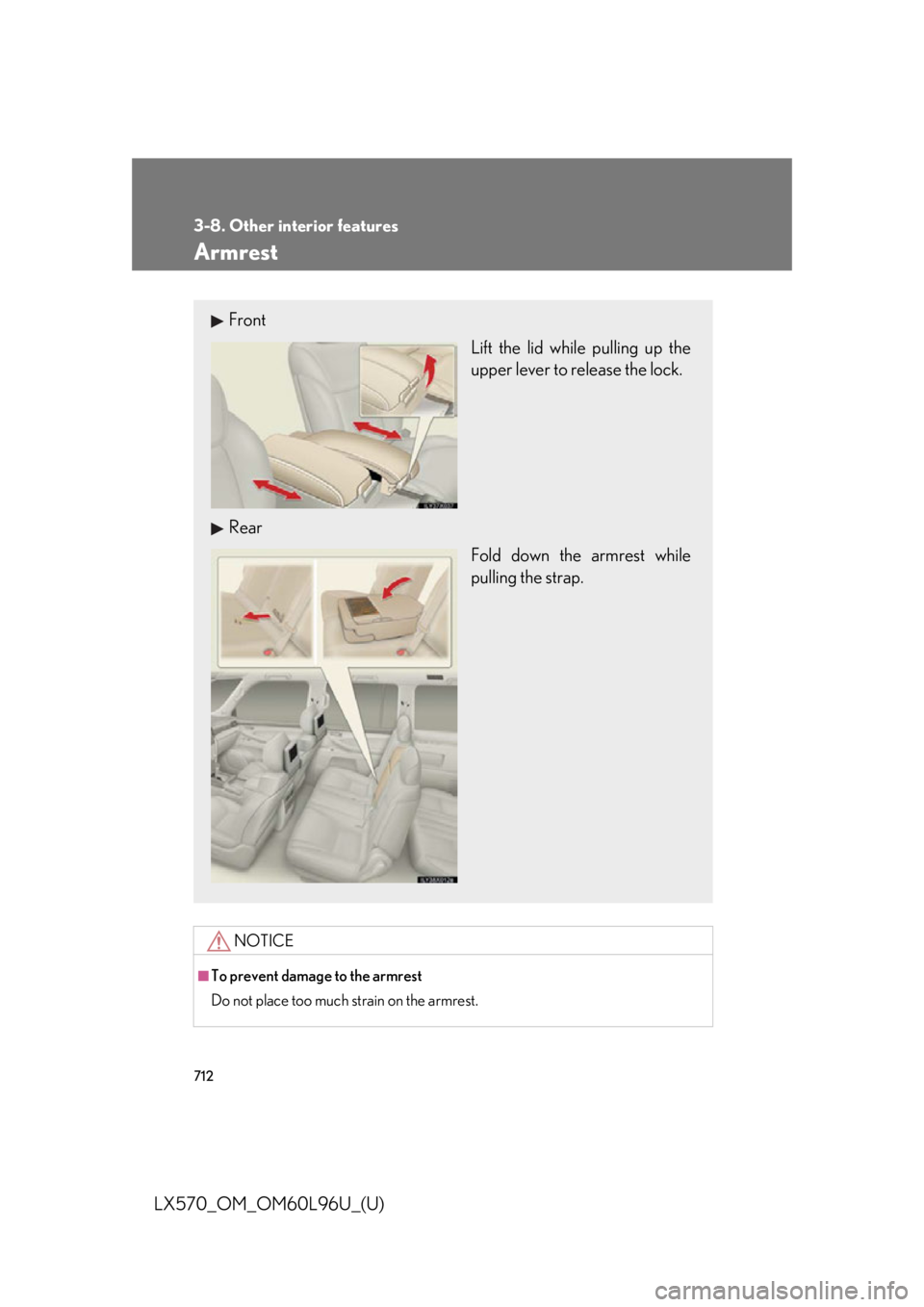
LX570_OM_OM60L96U_(U) Armrest
NOTICE■
To prevent damage to the armrest
Do not place too much strain on the armrest.Front
Lift the lid while pulling up the
upper lever to release the lock.
Rear
Fold down the armrest while
pulling the strap.
Page 720 of 960
7183-8. Other interior features
LX570_OM_OM60L96U_(U) Garage door opener The garage door opener (HomeLink ®
Universal Transceiver) is manufactured
under license from HomeLink ®
.
Programming HomeLink ®
(for U.S.A. owners)
The HomeLink ®
compatible transceiver in your vehicle has 3 buttons
which can be programmed to operate 3 different devices. Refer to the
programming method below appropriate for the device.
Indicator
ButtonsThe garage door opener can be pr ogrammed to operate garage doors,
gates, entry doors, door locks, home lighting systems, security systems, and
other devices.
Page 724 of 960

7223-8. Other interior features
LX570_OM_OM60L96U_(U) ■ Programming an entry gate (for U .S.A. owners)/Programming all
devices in the Canadian market
Place your transmitter 1 to 3 in. (25 to 75 mm) away from the sur-
face of the HomeLink ®
.Keep the HomeLink ®
indicator light in view while programming.
Press and hold the selected HomeLink ®
button.
Repeatedly press and release (cycle) the device’s remote control
button for two seconds each until step 4 is completed.
When the indicator light on the HomeLink ®
compatible trans-
ceiver starts to flash rapidly, release the buttons.
Test the operation of the HomeLink ®
by pressing the newly pro-
grammed button. Check to see if the gate/device operates cor-
rectly.
Repeat the steps above to program another device for each of
the remaining HomeLink ®
buttons.
■ Programming other devices
To program other devices such as home security systems, home door
locks or lighting, contact yo ur Lexus dealer for assistance.
■ Reprogramming a button
The individual HomeLink ®
buttons cannot be erased but can be
reprogrammed. To reprogram a butto n, follow the “Reprogramming a
HomeLink ®
button” instructions.STEP 1
STEP 2
STEP 3
STEP 4
STEP 5
STEP 6
Page 745 of 960
7434-2. Maintenance
4
Maintenance and care
LX570_OM_OM60L96U_(U) General maintenance
Engine compartment Items Check points
Battery • Maintenance-free ( P. 762)
Brake fluid • At the correct level? ( P. 759)
Engine coolant • At the correct level? ( P. 757)
Engine oil • At the correct level? ( P. 753)
Exhaust system • No fumes or strange sounds?
Power steering fluid • At the correct level? ( P. 761)
Radiator/condenser/hoses • Not blocked with foreign matter?
( P. 758)
Washer fluid • At the correct level? ( P. 765)Listed below are the general maintenance items that should be performed
at the intervals specified in the “Warranty and Services Guide” or
“Owner’s Manual Supplement”. It is recommended that any problem you
notice should be brought to the attent ion of your Lexus dealer or qualified
service shop for advice.