Page 389 of 960
3892-5. Driving information
2
When driving
LX570_OM_OM60L96U_(U) Selecting trailer ball
Use the correct trailer ball for your application.
Trailer ball load rating Matches or exceeds the gross
trailer weight rating of the trailer.
Ball diameter Matches the size of the trailer cou-
pler. Most couplers are stamped
with the required trailer ball size.
Shank length Protrudes beyond the bottom of
the lock washer and nut by at least
2 threads.
Shank diameter Matches the ball mount hole diam-
eter size.Trailer class Typical trailer ball
size
IV 2 5/16 in.
II and III 2 in.
I 1 7/8 in.
Page 395 of 960

3952-5. Driving information
2
When driving
LX570_OM_OM60L96U_(U) ● Always place wheel blocks under bo th the vehicle’s and the trailer’s
wheels when parking. Apply the pa rking brake firmly, and put the
transmission in “P”. Avoid parking on a slope, but if unavoidable, do so
only after performing the following:
Apply the brakes and keep them applied.
Have someone place wheel blocks under both the vehicle’s and
trailer’s wheels.
When the wheel blocks are in pl ace, release the brakes slowly
until the blocks absorb the load.
Apply the parking brake firmly.
Shift into “P” and turn off the engine.
● When restarting after parking on a slope:
With the transmission in “P”, start the engine. Be sure to keep the
brake pedal pressed.
Shift into “D” or “R” (if reversing).
Release the parking brake and brake pedal, and slowly pull or
back away from the wheel blocks. Stop and apply the brakes.
Have someone retrieve the blocks. STEP 1
STEP 2
STEP 3
STEP 4
STEP 5
STEP 1
STEP 2
STEP 3
STEP 4
Page 414 of 960
4143-1. Using the touch screen
LX570_OM_OM60L96U_(U) General settings
This screen is used for language se lection and the on/off settings of oper-
ation sounds and automatic screen change, etc.
Touch “General” on the “Setup” screen.
Clock settings
Selecting a language
Unit of measurement
Beep on/off
Selecting a button color
Selecting keyboard layout
Changing the startup image
Changing the screen off image
Auto screen change
Delete personal data
Software update
*Gracenote database update
*Touch “Save” after changing set-
tings.
* : For details, contact your Lexus
dealer.
Page 415 of 960
4153-1. Using the touch screen
3
Interior features
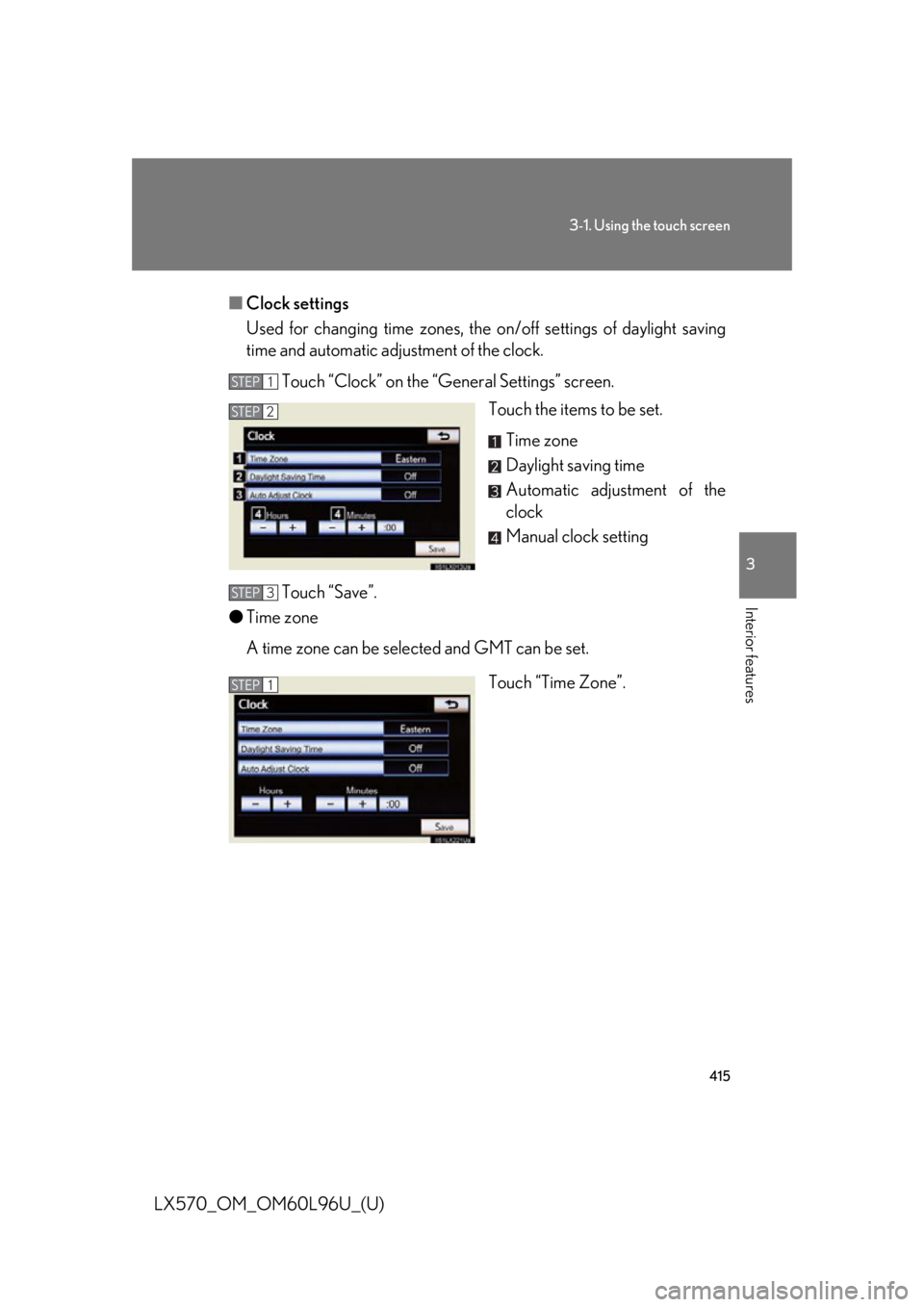
LX570_OM_OM60L96U_(U) ■ Clock settings
Used for changing time zones, the on/off sett ings of daylight saving
time and automatic adjustment of the clock.
Touch “Clock” on the “General Settings” screen.
Touch the items to be set.
Time zone
Daylight saving time
Automatic adjustment of the
clock
Manual clock setting
Touch “Save”.
● Time zone
A time zone can be selected and GMT can be set.
Touch “Time Zone”.STEP 1
STEP 2
STEP 3
STEP 1
Page 416 of 960
4163-1. Using the touch screen
LX570_OM_OM60L96U_(U) Touch the desired time zone.
If “Other” is touche d, the zone can
be adjusted manually. Touch “+” or
“-” to adjust the time zone and then
touch “OK”.
● Daylight saving time
Touch to select “On” or “Off” for daylight saving time.
● Automatic adjustment of the clock
Touch to select “On” or “Off” for automatic adjustment of the clock. STEP 2
Page 417 of 960
4173-1. Using the touch screen
3
Interior features
LX570_OM_OM60L96U_(U) ● Manual clock settings
When “Auto Adjust Clock” is turned “Off”, the clock can be manually
adjusted.
Touch the items to be set.
Adjust hours
Adjust minutes
Round to the nearest hour
*
* : e.g. 1:00 to 1:29 1:00
1:30 to 1:59 2:00
■ Selecting a language
The language can be changed.
Touch “Language” on the “General Settings” screen.
Touch the desired screen button.
Touch “Yes”. The previous screen will be displayed.
Touch “Save”. STEP 1
STEP 2
STEP 3
STEP 4
Page 454 of 960
4543-2. Using the air conditio ning system and defogger
LX570_OM_OM60L96U_(U) CAUTION■
To prevent the windshield from fogging up
Do not use during cool air operation in extremely humid weather. The differ-
ence between the temperature of the outs ide air and that of the windshield can
cause the outer surface of the windshield to fog up, blocking your vision.
NOTICE■
To prevent battery discharge
Do not leave the air conditioning system on longer than necessary when the engine
is stopped.
Page 503 of 960
5033-3. Using the audio system
3
Interior features
LX570_OM_OM60L96U_(U) ■
XM Radio Services — Legal Disclaimers and Warnings
Fees and Taxes — Subscription fee, taxes, one time activation fee, and other fees
may apply. Subscription fee is consumer only. All fees and programming subject to
change. Subscriptions subject to Customer Agreement available at
www.siriusxm.com (U.S.A.) or www.xmradio.ca (Canada). XM service only
available in the 48 contiguo us United States and Canada
* .
* : Canada — some deterioration of servic e may occur in extreme northern lati-
tudes. This is beyond the co ntrol of XM Satellite Radio.
Explicit Language Notice — Channels with frequent explicit la nguage are indicated
with an “XL” preceding the channel name. Channel blocking is available for XM
Satellite Radio receivers by notifying XM at;
U.S.A. Customers:
Visit.www.siriusxm.com or calling 1-877-515-3987
Canadian Customers:
Visit www.xmradio.ca or calling 1-877-438-9677
It is prohibited to copy, decompile, disassemble, reverse engineer, hack, manipu-
late, or otherwise make available any te chnology or software incorporated in
receivers compatible with the XM Satell ite Radio System or that support the XM
website, the Online Service or any of its content. Furthermore, the AMBE ®
voice
compression software included in this pr oduct is protected by intellectual property
rights including patent righ ts, copyrights, and trade se crets of Digital Voice Sys-
tems, Inc.
Note: this applies to XM receivers only and not XM Ready devices. ■
Receiving XM ®
Satellite Radio
Radio ID
You will need the radio ID when activating XM ®
service or report ing a problem. If
“CH 000” is selected usin g the “TUNE•SCROLL ” knob, the ID code, which is 8
alphanumeric characters, will be displayed. If another channel is selected, the ID
code will no longer be displayed. The channel (000) alternat es between displaying
the radio ID and the specific radio code.