Page 510 of 960
5103-3. Using the audio system
LX570_OM_OM60L96U_(U) Selecting, fast forwarding or rewinding a track (Audio CD)
■ Selecting a track
Press “ ” or “ ” on the “PRST•TRACK” button or turn the
“TUNE•SCROLL” knob to select the desired track number.
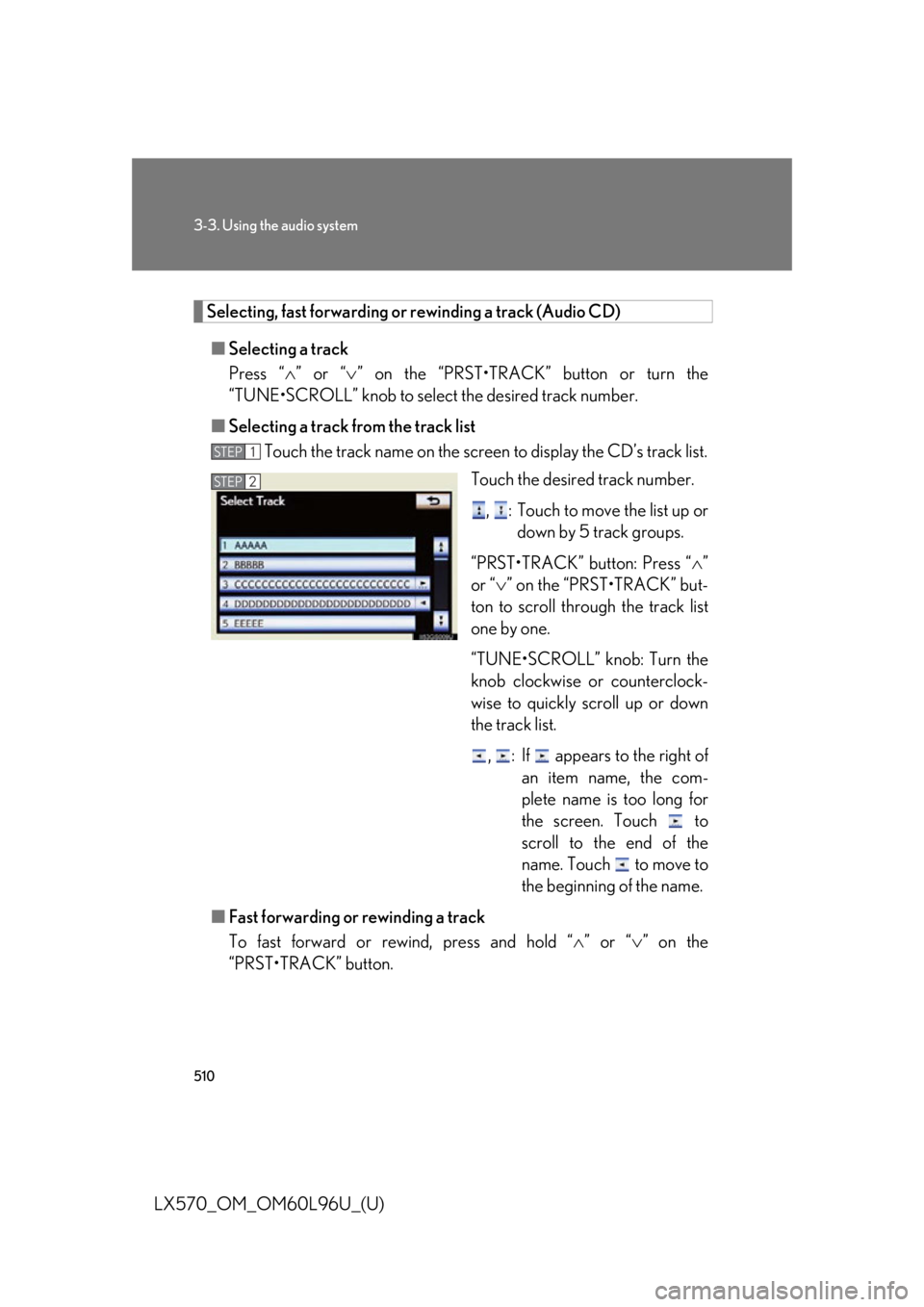
■ Selecting a track from the track list
Touch the track name on the screen to display the CD’s track list.
Touch the desired track number.
, : Touch to move the list up or
down by 5 track groups.
“PRST•TRACK” button: Press “ ”
or “ ” on the “PRST•TRACK” but-
ton to scroll thro ugh the track list
one by one.
“TUNE•SCROLL” knob: Turn the
knob clockwise or counterclock-
wise to quickly scroll up or down
the track list.
, : If appears to the right of
an item name, the com-
plete name is too long for
the screen. Touch to
scroll to the end of the
name. Touch to move to
the beginning of the name.
■ Fast forwarding or rewinding a track
To fast forward or rew ind, press and hold “ ” or “ ” on the
“PRST•TRACK” button. STEP 1
STEP 2
Page 511 of 960
5113-3. Using the audio system
3
Interior features
LX570_OM_OM60L96U_(U) Selecting a folder (MP3/WMA discs)
■ Selecting a folder
Touch “ >
” or “ <
” on the screen to select the next/previous folder.
■ Selecting a folder from the folder list
Touch the folder name on the sc reen to display the following
folder list screen.
Touch the desired folder number
to display the folder’s file list. From
the file list, select the desired file
number.
, : Touch to move the list up or
down by 5 folder groups.
“TUNE•SCROLL” knob: Turn the
knob clockwise or counterclock-
wise to quickly sc roll up or down
the folder list.
, : If appears to the right of
an item name, the com-
plete name is too long for
the screen. Touch to
scroll to the end of the
name. Touch to move to
the beginning of the name.STEP 1
STEP 2
Page 512 of 960

5123-3. Using the audio system
LX570_OM_OM60L96U_(U) Selecting, fast forwarding or rewinding a file (MP3/WMA discs)
■ Selecting a file
Press “ ” or “ ” on the “PRST•TRACK” button or turn the
“TUNE•SCROLL” knob to select the desired file number.
■ Selecting a file from the file list
Touch the file name on the screen to display the follo wing file list
screen.
Touch the desired file number.
, : Touch to move the list up or
down by 5 file groups.
“PRST•TRACK” button: Press “ ”
or “ ” on the “PRST•TRACK” but-
ton to scroll through the file list one
by one.
“TUNE•SCROLL” knob: Turn the
knob clockwise or counterclock-
wise to quickly scroll up or down
the file list.
, : If appears to the right of
an item name, the com-
plete name is too long for
the screen. Touch to
scroll to the end of the
name. Touch to move to
the beginning of the name.
■ Fast forwarding or rewinding a file
To fast forward or rew ind, press and hold “ ” or “ ” on the
“PRST•TRACK” button. STEP 1
STEP 2
Page 524 of 960

5243-3. Using the audio system
LX570_OM_OM60L96U_(U) ■ Setting audio language
Touch “Audio Language” on the “DVD Settings” screen.
Touch the desired language to be heard on the “Audio Lan-
guage” screen. If you cannot find the desired lang uage, touch “Other” and input the
desired language code. ( P. 526)
■ Setting subtitle language
Touch “Subtitle Language” on the “DVD Settings” screen.
Touch the desired language to be read on the “Subtitle
Language” screen. If you cannot find the desired lang uage, touch “Other” and input the
desired language code. ( P. 526)
■ Setting menu language
Touch “Menu Language” on the “DVD Settings” screen.
Touch the desired language to be read on the “Menu Language”
screen. If you cannot find the desired lang uage, touch “Other” and input the
desired language code. ( P. 526)
■ Setting angle mark
If the DVD has angle options, you can turn the angle mark on or off.
Touch “Angle Mark” on the “DVD Settings” screen.
Select “On” or “Off”.
■ Parental lock
Touch “Parental Lock” on the “DVD Settings” screen.
Input the 4-digit personal code on the “Key Code” screen. If you enter wrong numbers, touch to delete the numbers.
Select a parental level (1-8) on the “Select Restriction Level”
screen. ( P. 532)STEP 1
STEP 2
STEP 1
STEP 2
STEP 1
STEP 2
STEP 1
STEP 2
STEP 1
STEP 2
STEP 3
Page 528 of 960
5283-3. Using the audio system
LX570_OM_OM60L96U_(U) Setup operation from the rear seat (vehicles with rear seat entertain-
ment system)
Touch “Play” to cancel this setup
operation from the rear seat. This screen appears when a rear
passenger setting selects the setup
menu.Code Language Code Language Code Language
2023 Twi 2209 Vietnamese 2515 Yoruba
2111 Ukrainian 2215 Volapük 2621 Zulu
2118 Urdu 2315 Wolof
2126 Uzbek 2408 Xhosa
■
When a rear passenger selects set up menu
Follow the directions on the wa rning screen that is displayed.
Under the same condition, the rear passenger can cancel the set up operation from
the front seat. ■
Rear system lock
P. 582■
Error messages
If “Region Code Error” is displayed, ch eck if the region code printed on the DVD
matches the player’s region code.
If a different message is displayed: P. 529
Page 546 of 960
5463-3. Using the audio system
LX570_OM_OM60L96U_(U) Touch the desired track name on
the screen. ,
: Touch to move the list up
or down by 5 track/folder
groups.
“PRST•TRACK” button: Press “ ”
or “ ” on the “PRST•TRACK” but-
ton to scroll through the track/
folder list one by one.
“TUNE•SCROLL” knob: Turn the
knob clockwise or counterclock-
wise to quickly scroll up or down
the track/folder list.
, : If appears to the right of
an item name, the com-
plete name is too long for
the screen. Touch to
scroll to the end of the
name. Touch to move to
the beginning of the name.STEP 3
Page 547 of 960
5473-3. Using the audio system
3
Interior features
LX570_OM_OM60L96U_(U) Selecting, fast forwarding or rewinding a track
■ On the audio top screen
Turn the “TUNE•SCROLL” knob or press “ ” or “ ” on the
“PRST•TRACK” button to select the desired track number.
■ On the track list screen
Touch the track name on the
screen to display the track list
screen.
Touch the desired track number. ,
: Touch to move the list up or down by 5 track groups.
“PRST•TRACK” button: Press “
” or “
” on the “PRST•TRACK” but-
ton to scroll through the track list one by one.
“TUNE•SCROLL” knob: Turn the knob clockwise or counterclockwise
to quickly scroll up or down the track list.
, : If appears to the right of an item name, the complete name is
too long for the screen. Touch to scroll to the end of the
name. Touch to move to the beginning of the name.
■ Fast forwarding and rewinding a track
Press and hold “ ” or “ ” on the “PRST•TRACK”
button to fast forward
or rewind. STEP 1
STEP 2
Page 555 of 960
5553-3. Using the audio system
3
Interior features
LX570_OM_OM60L96U_(U) Touch the desired tab and select
the desired folder, artist or album. Character screen buttons, “ABC”,
“DEF” etc., allow a direct jump to
list entries that begin with the same
letter as the character button.
Each time the same character
screen button is touched, the list
starting with the subsequent char-
acter is displayed. ,
: Touch to move the list up
or down by 5 folder/artist/
album groups.
“TUNE
• SCROLL” knob: Turn the
knob clockwise or counterclock-
wise to quickly scroll up or down
the folder/artist/album list.
, : If appears to the right of
an item name, the com-
plete name is too long for
the screen. Touch to
scroll to the end of the
name. Touch to move to
the beginning of the name.STEP 2


