Page 268 of 620

2664-5. Using the driving support systems
LS600hL_U(OM50E41U)Adjusting the speed setting:
P. 2 5 9
Canceling and resuming the speed
setting: P. 2 6 2
■Dynamic radar cruise control with full-speed range can be set when
●The shift lever is in D or range 4 or higher of S has been selected.
●Vehicle speed is above approximately 30 mph (50 km/h).
■Accelerating after setting the vehicle speed
The vehicle can accelerate normally. After acceleration, the set speed resumes.
However, during vehicle-to-vehicle distance control mode, the vehicle speed may
decrease below the set speed in order to maintain the distance to the vehicle ahead.
■Automatic cancelation of vehicle-to-vehicle distance control
Vehicle-to-vehicle distance control driving is automatically canceled in the following
situations:
●Actual vehicle speed falls below approximately 25 mph (40 km/h) when there are
no vehicle ahead.
●The preceding vehicle leaves the lane when your vehicle is following at a speed
below 25 mph (40 km/h).
●VSC is activated.
●TRAC is activated for a period of time.
●When the VSC or TRAC system is turn ed off by pressing the VSC OFF switch.
●The sensor cannot operate correctly because it is covered in some way.
●The windshield wipers are operating at hi gh speed (when the wiper switch is set to
the “AUTO” mode or the high speed wiper operation position).
●When snow mode is set.
●The parking brake is operated.
●The vehicle is stopped by system control on a steep incline.
●Pre-collision brake assist is activated.
●The following are detected when the vehi cle has been stopped by system control:
• The driver is not wearing a seat belt.
• The driver’s door is opened.
• The trunk or hood is opened.
• The vehicle has been stopped for about 3 minutes.
If vehicle-to-vehicle distance control driv ing is automatically canceled for any other
reason, there may be a malfunction in the system. Contact your Lexus dealer.
Page 328 of 620
3264-6. Driving tips
LS600hL_U(OM50E41U)
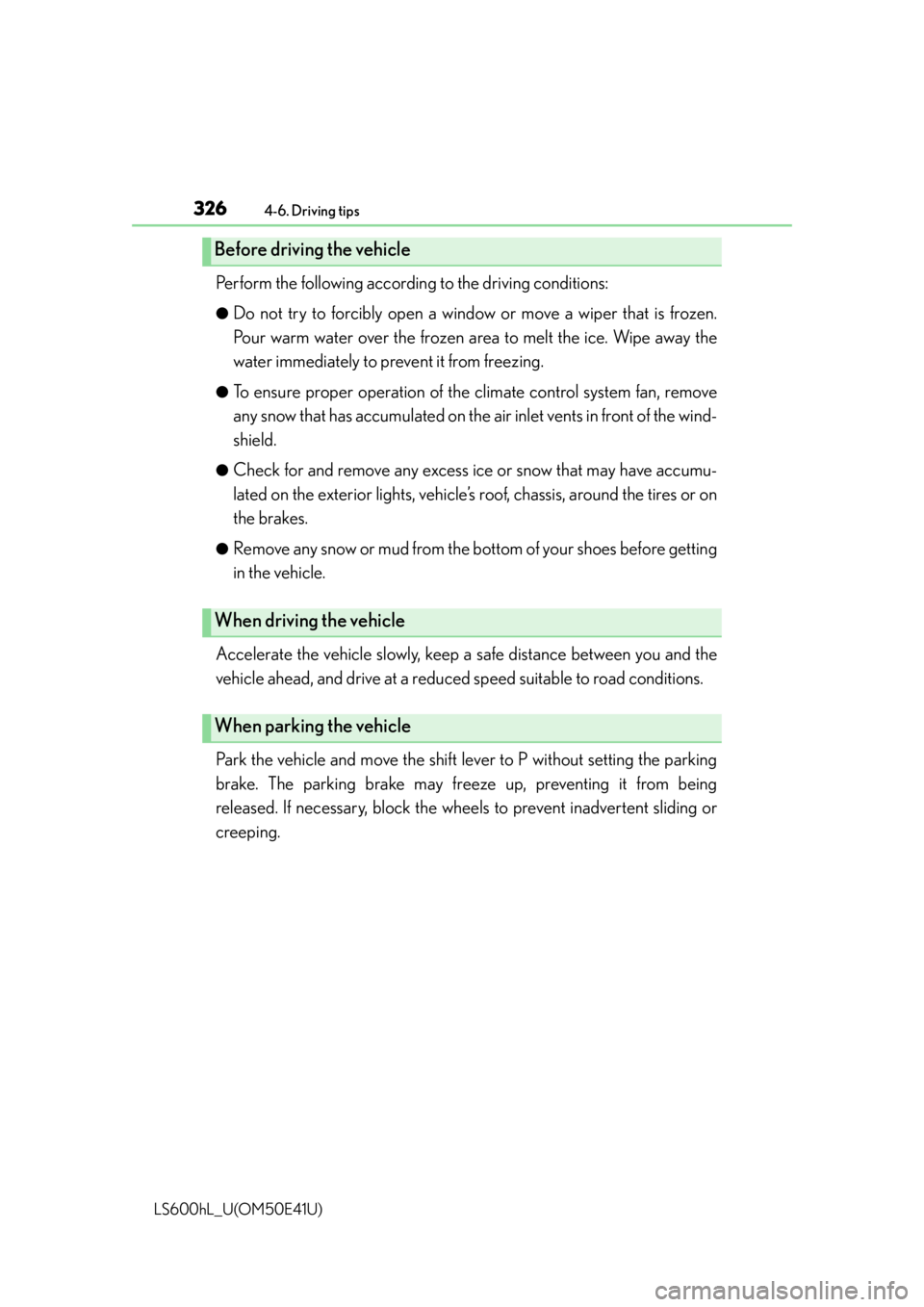
Perform the following according to the driving conditions:
●Do not try to forcibly open a window or move a wiper that is frozen.
Pour warm water over the frozen area to melt the ice. Wipe away the
water immediately to prevent it from freezing.
●To ensure proper operation of the climate control system fan, remove
any snow that has accumulated on the air inlet vents in front of the wind-
shield.
●Check for and remove any excess ice or snow that may have accumu-
lated on the exterior lights, vehicle’s roof, chassis, around the tires or on
the brakes.
●Remove any snow or mud from the bo ttom of your shoes before getting
in the vehicle.
Accelerate the vehicle slowly, keep a safe distance between you and the
vehicle ahead, and drive at a reduced speed suitable to road conditions.
Park the vehicle and move the shift lever to P without setting the parking
brake. The parking brake may freeze up, preventing it from being
released. If necessary, block the wheels to prevent inadvertent sliding or
creeping.
Before driving the vehicle
When driving the vehicle
When parking the vehicle
Page 432 of 620
4306-2. Maintenance
LS600hL_U(OM50E41U)
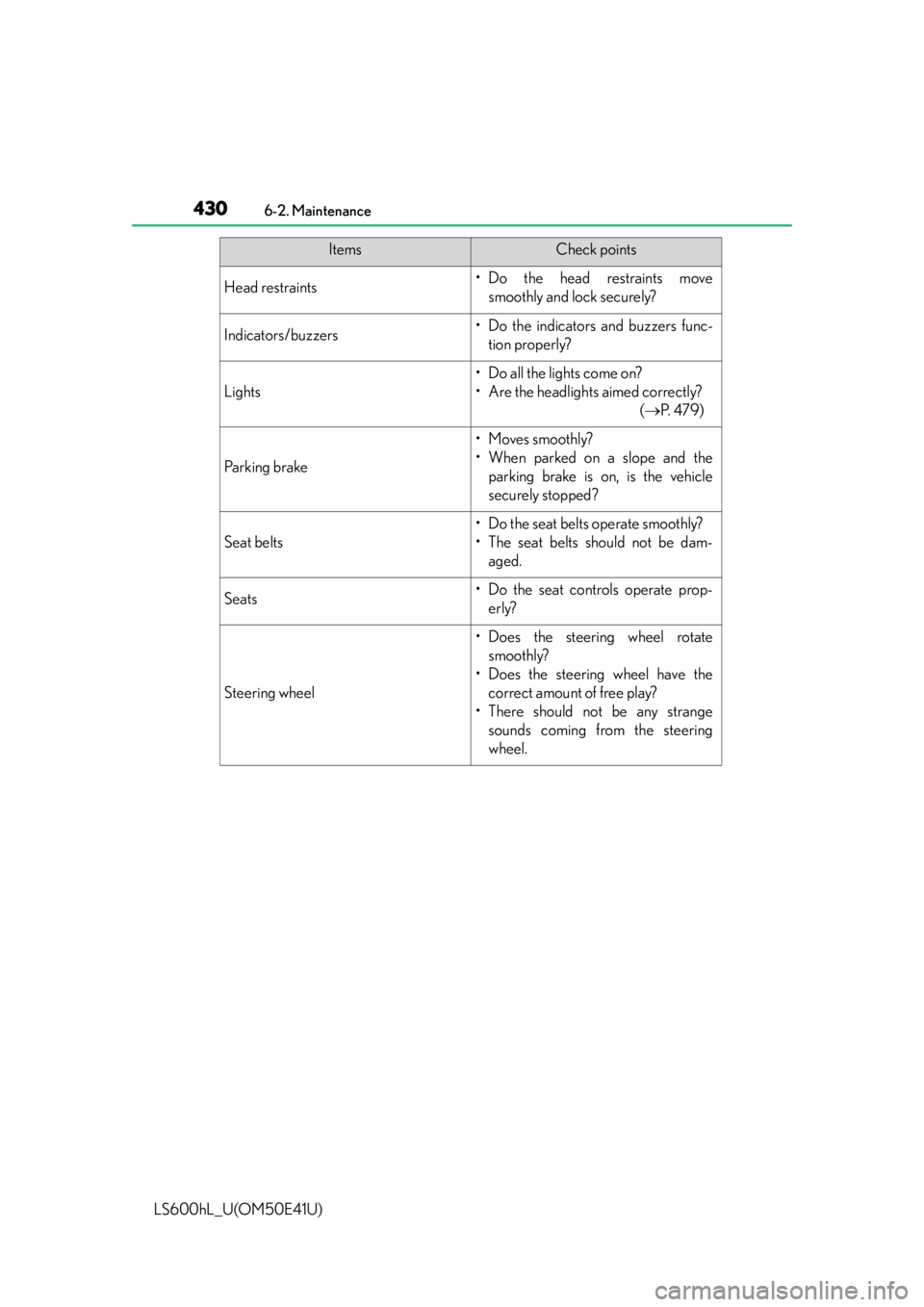
Head restraints•Do the head restraints movesmoothly and lock securely?
Indicators/buzzers• Do the indicators and buzzers func-tion properly?
Lights
• Do all the lights come on?
• Are the headlights aimed correctly? ( P. 4 7 9 )
Parking brake
• Moves smoothly?
• When parked on a slope and the
parking brake is on, is the vehicle
securely stopped?
Seat belts
• Do the seat belts operate smoothly?
• The seat belts should not be dam-aged.
Seats• Do the seat controls operate prop-erly?
Steering wheel
• Does the steering wheel rotatesmoothly?
• Does the steering wheel have the correct amount of free play?
• There should not be any strange sounds coming from the steering
wheel.
ItemsCheck points
Page 440 of 620

4386-3. Do-it-yourself maintenance
LS600hL_U(OM50E41U)
CAUTION
■When raising your vehicle
Make sure to observe the following precautions to reduce the possibility of death
or serious injury:
●When using a floor jack, follow the instructions of the manual provided with the
jack.
●Do not use the jack that was supplied with your vehicle.
●Do not put any part of your body underneath the vehicle when it is supported
only by the floor jack.
●Always use floor jack and/or automotive jack stands on a solid, flat, level surface.
●Do not start the hybrid system while the vehicle is supported by the floor jack.
●Stop the vehicle on level, firm ground, firmly set the parking brake and shift the
shift lever to P.
●Make sure to set the floor jack properly at the jack point.
Raising the vehicle with an improperly positioned floor jack will damage the vehi-
cle and may cause the vehicle to fall off the floor jack.
●Do not raise the vehicle while someone is in the vehicle.
●When raising the vehicle, do not place any object on top of or underneath the
floor jack.
●Be sure to turn off the height control an d stop the hybrid system. Otherwise, the
vehicle height may change in the automatic leveling function. ( P. 2 8 7 )
●Lift up the vehicle using a floor jack such as
the one shown in the illustration.
Page 485 of 620

483
When trouble arises7
LS600hL_U(OM50E41U)7-1. Essential information
Emergency flas hers.................. 484
If your vehicle has to be stopped in an
emergency ................................ 485 7-2. Steps to take in an
emergency
If your vehicle needs to be towed ...........................................486
If you think something is wrong ........................................... 492
If a warning light turns on or a warning buzzer
sounds.......................................... 493
If a warning message is displayed.....................................503
If you have a flat tire (vehicles with
a spare tire)................................506
If you have a flat tire (vehicles with
run-flat tires)............................... 515
If the hybrid system will not start .........................................517
If the shift lever cannot be shifted from P............................. 519
If the parking brake cannot be released................. 520
If the electronic key does not operate properly ............. 524
If the 12-volt battery is discharged ................................. 527
If your vehicle overheats .........530
If the vehicle becomes stuck ............................................. 535
Page 491 of 620
4897-2. Steps to take in an emergency
7
When trouble arises
LS600hL_U(OM50E41U)
Take out the towing eyelet. (P. 507, 516)
Remove the eyelet cover using a
flathead screwdriver.
To protect the bodywork, place a rag
between the screwdriver and the vehi-
cle body as shown in the illustration.
Insert the towing eyelet into the
hole and tighten partially by hand.
Tighten down the towing eyelet
securely using a wheel nut
wrench or hard metal bar.
Securely attach a cable or chain to the towing eyelet.
Take care not to damage the vehicle body.
Enter the vehicle being towed and start the hybrid system.
If the hybrid system does not start, turn the power switch to ON mode.
Shift the shift lever to N and release the parking brake.
When the shift lever cannot be shifted: P. 5 1 9
Emergency towing procedure
1
2
3
4
5
6
7
Page 497 of 620
4957-2. Steps to take in an emergency
7
When trouble arises
LS600hL_U(OM50E41U)
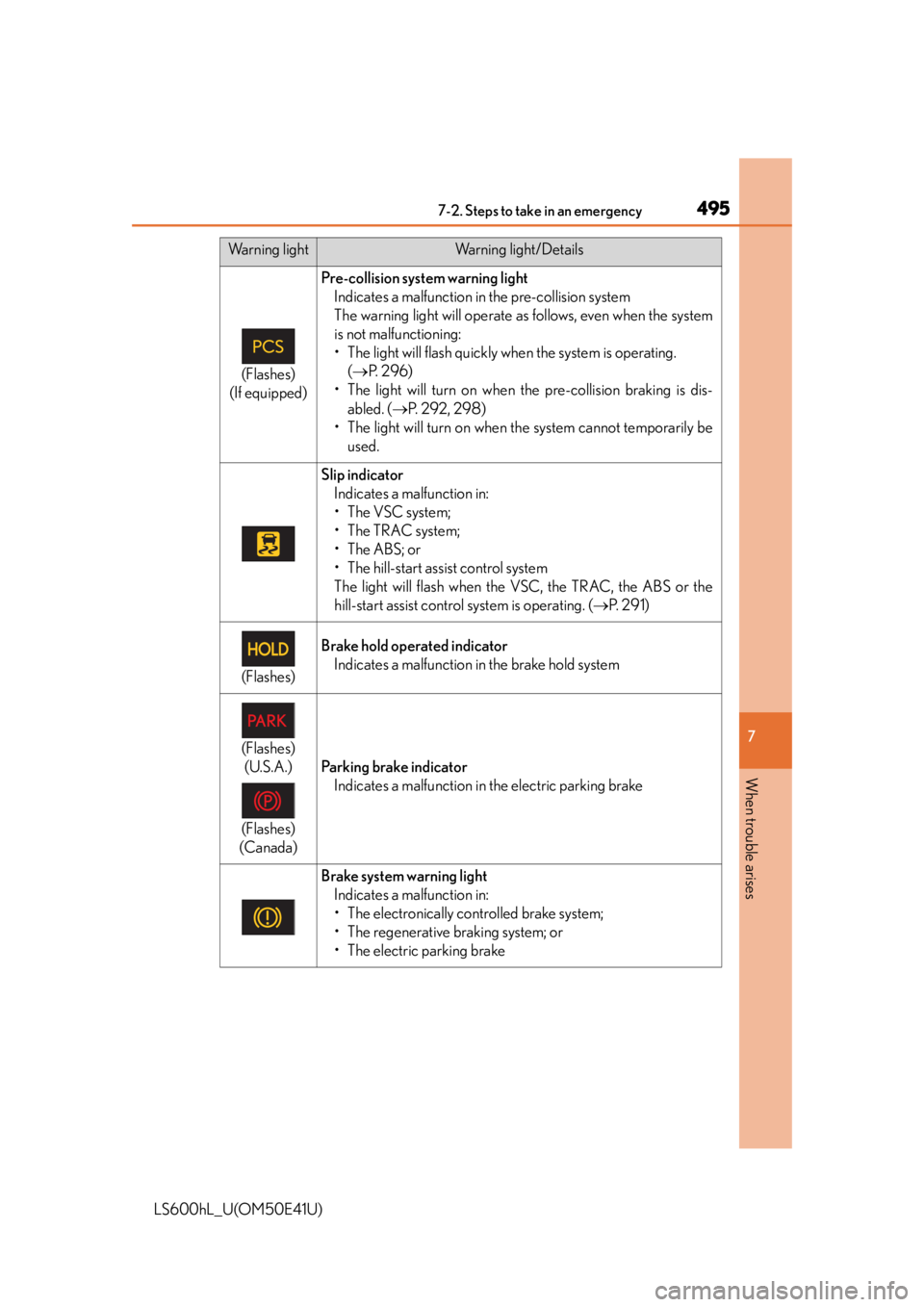
(Flashes)
(If equipped)
Pre-collision system warning light Indicates a malfunction in the pre-collision system
The warning light will operate as follows, even when the system
is not malfunctioning:
• The light will flash quickly when the system is operating. ( P. 2 9 6 )
• The light will turn on when the pre-collision braking is dis-
abled. ( P. 2 9 2 , 2 9 8 )
• The light will turn on when the system cannot temporarily be used.
Slip indicatorIndicates a malfunction in:
• The VSC system;
•The TRAC system;
•The ABS; or
• The hill-start assist control system
The light will flash when the VSC, the TRAC, the ABS or the
hill-start assist control system is operating. ( P. 2 9 1 )
(Flashes)
Brake hold operated indicator
Indicates a malfunction in the brake hold system
(Flashes)(U.S.A.)
(Flashes)
(Canada)
Parking brake indicator Indicates a malfunction in the electric parking brake
Brake system warning light Indicates a malfunction in:
• The electronically controlled brake system;
• The regenerative braking system; or
• The electric parking brake
Warning lightWarning light/Details
Page 507 of 620

5057-2. Steps to take in an emergency
7
When trouble arises
LS600hL_U(OM50E41U)
■The LKA (Lane-Keeping Assist) lane departure warning function (if equipped)
In the following cases, the warning message will not be displayed even if a lane line is
crossed.
●When the vehicle speed deviates from the operating range of the LKA system
functions
●When the lane lines cannot be recognized
●When the steering wheel is turned as far as necessary to cause the vehicle to
change lanes
■System warning lights
The master warning light does not come on or flash in the following cases. Instead, a
separate system warning light will come on or flash along with the message shown
on the multi-information display.
●Malfunction of the brake system
The brake system warning light (red indicator) comes on. ( P. 4 9 3 )
●Malfunction of the regenerative brake syst em, electronically controlled brake sys-
tem or electric parking brake
The brake system warning light (yellow indicator) comes on. ( P. 495)
●Malfunction of the ABS
The ABS warning light comes on. ( P. 4 9 4 )
●Malfunction of the charging system
The charging system warning light comes on. ( P. 4 9 4 )
●Indicates that a door or the trunk is not fully closed
The open door warnin g light comes on. (P. 4 9 6 )
●High engine coolant temperature
The needle of the engine coolant temperature gauge enters the red zone.
( P. 5 3 0 )
■If “Maintenance required ” is shown (U.S.A. only)
Perform the necessary maintenance.
Please reset the message after the maintenance is performed. ( P. 4 2 6 )
■If “Hybrid System Overheat” is shown
Coping method: P. 5 3 0
This message may be displayed when driv ing under severe operating conditions.
(For example, when driving up a long steep hill.)
■Warning buzzer
In some cases, the buzzer may not be hear d due to ambient noise or sounds from the
audio system.