Page 219 of 620
2174-2. Driving procedures
4
Driving
LS600hL_U(OM50E41U)
Stop the vehicle.
Shift the shift lever to P.
Set the parking brake. (P. 2 2 8 )
Press the power switch.
Release the brake pedal and check that the indicator on the power
switch is off.
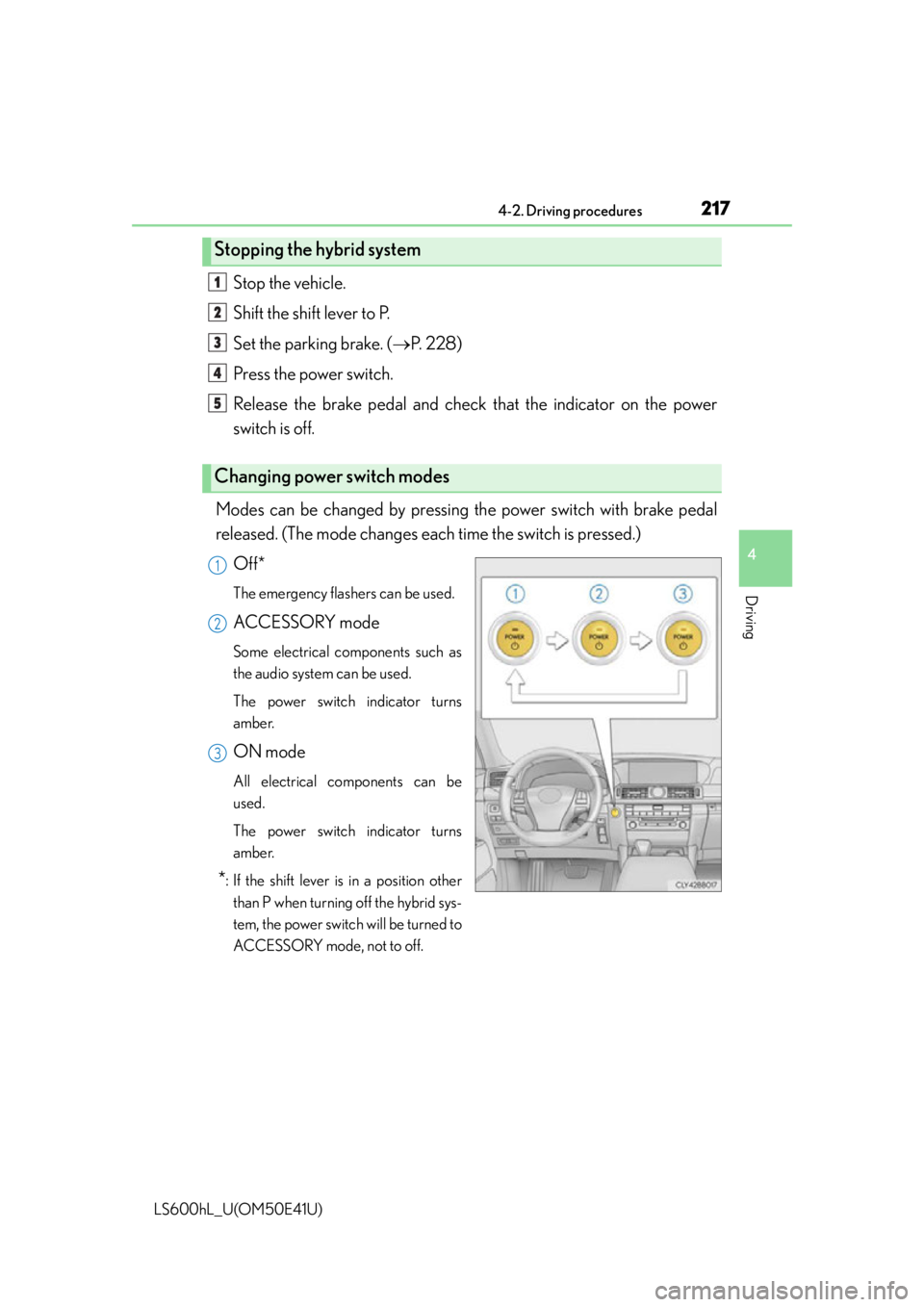
Modes can be changed by pressing th e power switch with brake pedal
released. (The mode changes each time the switch is pressed.)
Off*
The emergency flashers can be used.
ACCESSORY mode
Some electrical components such as
the audio system can be used.
The power switch indicator turns
amber.
ON mode
All electrical components can be
used.
The power switch indicator turns
amber.
*: If the shift lever is in a position otherthan P when turning off the hybrid sys-
tem, the power switch will be turned to
ACCESSORY mode, not to off.
Stopping the hybrid system
Changing power switch modes
1
2
3
4
5
1
2
3
Page 225 of 620
2234-2. Driving procedures
4
Driving
LS600hL_U(OM50E41U)
While the power switch is in ON mode, move the shift lever with the
brake pedal depressed.
When shifting the shift lever between P and D, make sure that the vehicle is
completely stopped.
*1: To improve fuel efficiency and reduce noises, set the shift lever in D for normal
driving.
*2: By selecting shift ranges using S mode, you can control accelerating forces andengine braking forces.
Hybrid transmission
Shifting the shift lever
Shift position purpose
Shift positionPurpose and condition
PParking the vehicle/starting the hybrid system
RReversing
NCondition in which the power is not transmitted
DNormal driving*1
SS mode driving*2 ( P. 2 2 4 )
Page 230 of 620
2284-2. Driving procedures
LS600hL_U(OM50E41U)
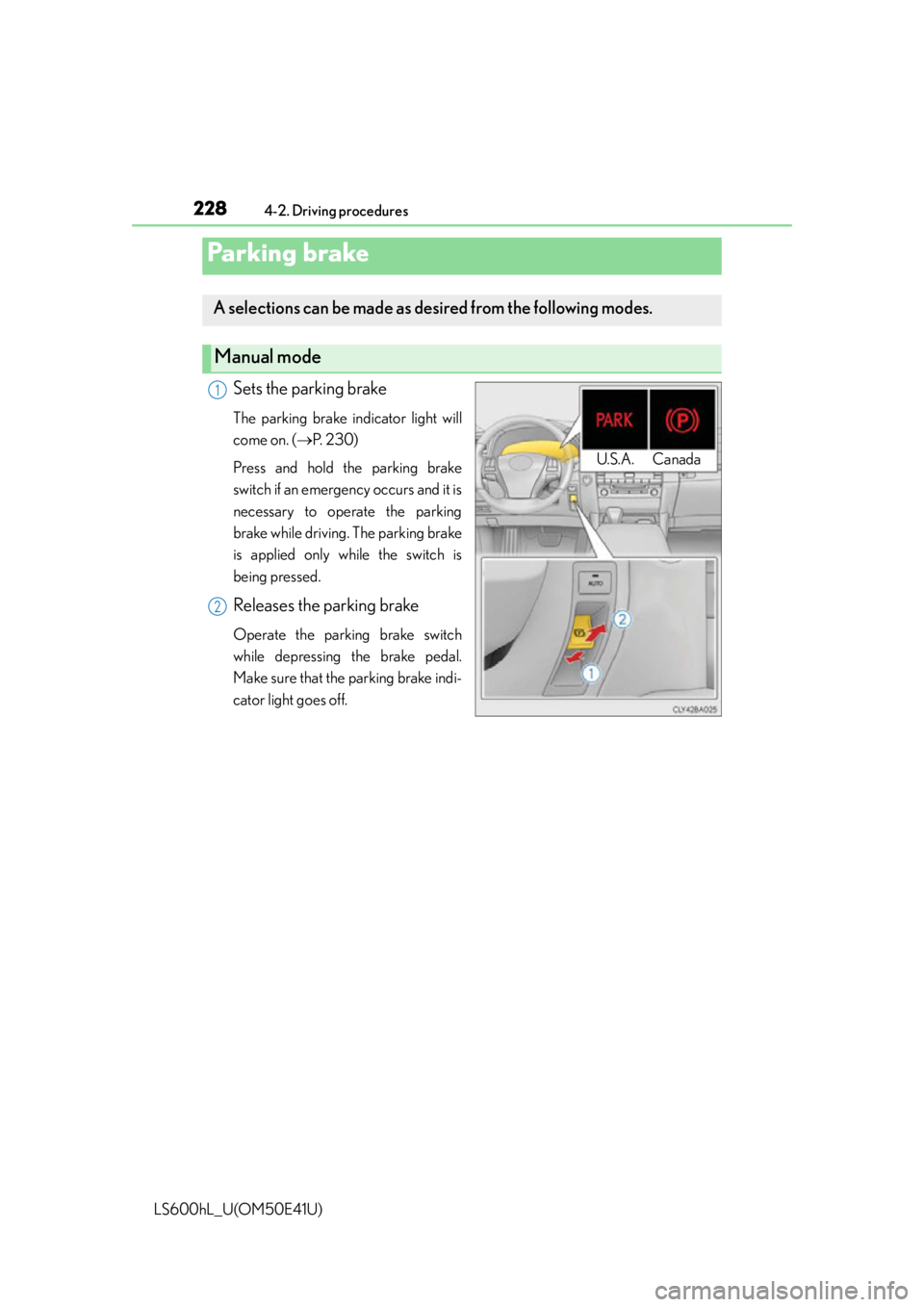
Sets the parking brake
The parking brake indicator light will
come on. (P. 2 3 0 )
Press and hold the parking brake
switch if an emergency occurs and it is
necessary to operate the parking
brake while driving. The parking brake
is applied only while the switch is
being pressed.
Releases the parking brake
Operate the parking brake switch
while depressing the brake pedal.
Make sure that the parking brake indi-
cator light goes off.
Parking brake
A selections can be made as desired from the following modes.
Manual mode
U.S.A. Canada
1
2
Page 231 of 620
2294-2. Driving procedures
4
Driving
LS600hL_U(OM50E41U)
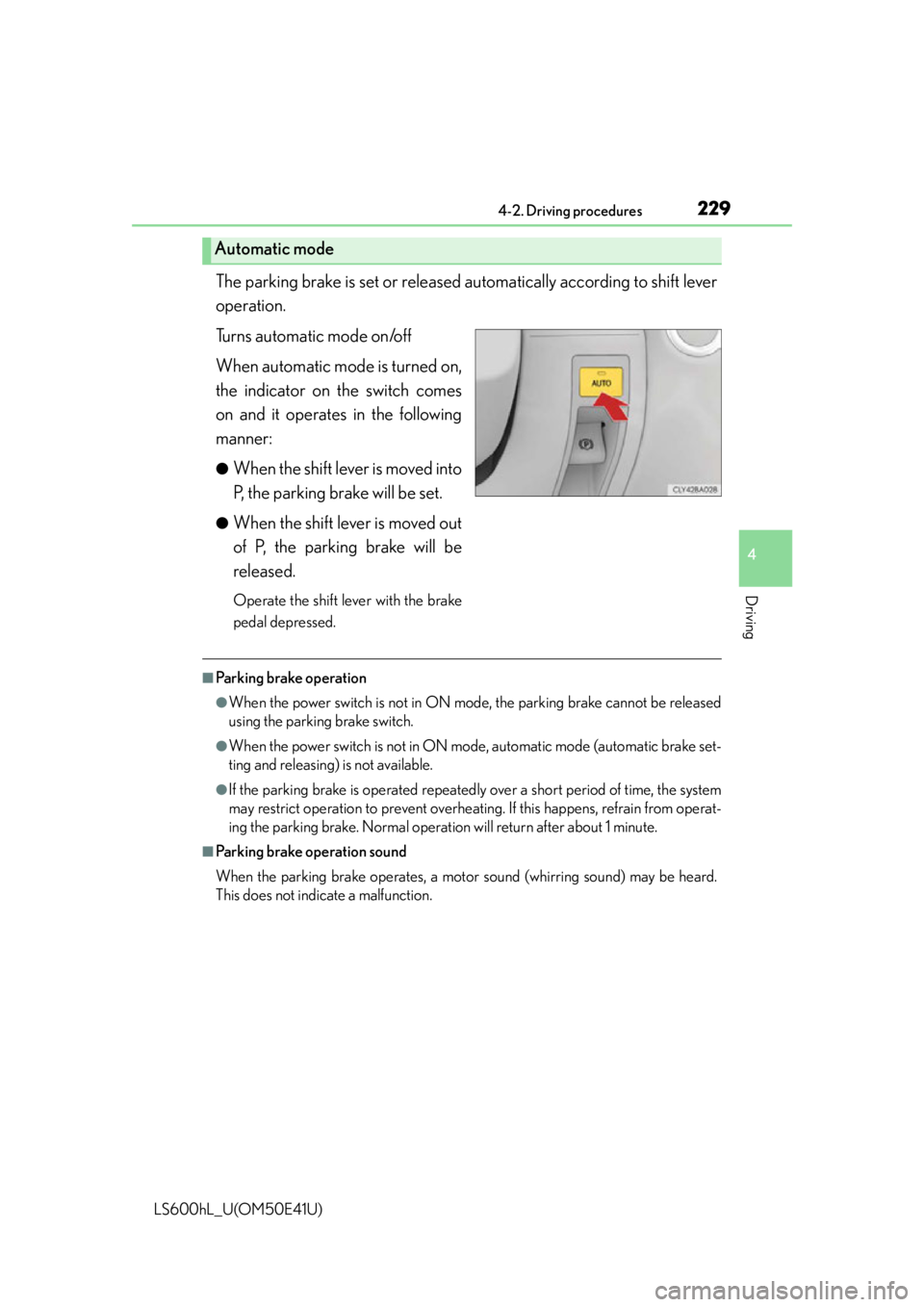
The parking brake is set or released automatically according to shift lever
operation.
Turns automatic mode on/off
When automatic mode is turned on,
the indicator on the switch comes
on and it operates in the following
manner:
●When the shift lever is moved into
P, the parking brake will be set.
●When the shift lever is moved out
of P, the parking brake will be
released.
Operate the shift lever with the brake
pedal depressed.
■Parking brake operation
●When the power switch is not in ON mo de, the parking brake cannot be released
using the parking brake switch.
●When the power switch is not in ON mo de, automatic mode (automatic brake set-
ting and releasing) is not available.
●If the parking brake is operated repeatedly over a short period of time, the system
may restrict operation to prevent overheatin g. If this happens, refrain from operat-
ing the parking brake. Normal operatio n will return after about 1 minute.
■Parking brake operation sound
When the parking brake operates, a moto r sound (whirring sound) may be heard.
This does not indicate a malfunction.
Automatic mode
Page 232 of 620

2304-2. Driving procedures
LS600hL_U(OM50E41U)
■Parking brake indicator light
●Depending on the power switch mode, the parking brake indicator light will come
on and stay on as described below:
ON mode: Comes on until the parking brake is released.
Not in ON mode: Stays on for approximately 15 seconds.
●When the power switch is turned off with the parking brake set, the parking brake
indicator light will stay on for about 15 seconds. This does not indicate a malfunc-
tion.
■Parking brake engaged warning buzzer
A buzzer will sound if the vehicle is dr iven at a speed of approximately 3 mph (5
km/h) or more with the parking brake engaged.
■When there is a malfunction in the system
Warning lights and/or warning message will turn on or flash. ( P. 495, 503)
Depending on the condition, the parking brake indicator light may flash.
■Usage in winter time
P. 3 2 6
NOTICE
■When parking the vehicle
Before you leave the vehicle, set the parking brake, shift the shift lever to P and
make sure that the vehicle does not move.
■When the system malfunctions
Stop the vehicle in a safe place and check the warning messages.
■When the parking brake cannot be released due to a malfunction
Use the parking brake release tool to manually release the parking brake.
( P. 5 2 0 )
Driving the vehicle with the parking brake set will lead to brake components over-
heating, which may affect braking performance and increase brake wear.
Page 233 of 620

2314-2. Driving procedures
4
Driving
LS600hL_U(OM50E41U)
Turns the brake hold system on
The brake hold standby indicator
(green) comes on. While the system is
holding the brake, the brake hold
operated indicator (yellow) comes on.
■Brake hold system operating conditions
The brake hold system cannot be turn ed on in the following conditions:
●The trunk or hood is not closed.
●The driver’s door is not closed.
●The driver is not wearing the seat belt.
If any of the conditions above are detected when the brake hold system is enabled,
the system will turn off and the brake hold standby indicator light will go off. In addi-
tion, if any of the conditions are detected while the system is holding the brake, a
warning buzzer will sound and a message wi ll be shown on the multi-information dis-
play. The parking brake will then be set automatically.
■Brake hold function
●If the brake pedal is left released for a period of about 3 minutes after the system
has started holding the brake, the parking brake will be set automatically. In this
case, a warning buzzer sounds and a message is shown on the multi-information
display.
●To turn the system off while the system is holding the brake, firmly depress the
brake pedal and press the switch again.
●The brake hold function may not hold the vehicle when the vehicle is on a steep
incline. In this situation, it may be nece ssary for the driver to apply the brakes. The
multi-information display will info rm the driver of this situation.
Brake Hold
The brake hold system keeps the brake applied when the shift lever is in
D, S or N with the system on and the brake pedal has been depressed to
stop the vehicle. The system releases the brake when the accelerator
pedal is depressed with the shift lever in D or S to allow smooth start off.
Page 234 of 620

2324-2. Driving procedures
LS600hL_U(OM50E41U)
■When the parking brake is set automatically while the system is holding the brakes
The parking brake will not be released automatically. Release the parking brake by
operating the parking brake switch, making sure that the parking brake indicator
light goes off. ( P. 2 2 8 )
■When there is a malfunction in the system
Warning lights and/or warning mess ages will turn on or flash. (P. 495, 503)
CAUTION
■When the vehicle is on a steep incline
When using the brake hold system on a steep incline exercise caution. The brake
hold function may not hold th e vehicle in such a situation.
■When stopped on a slippery road
The system cannot stop the vehicle when the gripping ability of the tires has been
exceeded. Do not use the system wh en stopped on a slippery road.
NOTICE
■When parking the vehicle
The brake hold system is not designed for use when parking the vehicle for a long
period of time. Turning the power switch off while the system is holding the brake
may release the brake, which would cause the vehicle to move. When operating
the power switch, depress the brake pedal, set the parking brake and shift the shift
lever to P.
Page 238 of 620

2364-3. Operating the lights and wipers
LS600hL_U(OM50E41U)
■Daytime running light system
●To make your vehicle more visible to other drivers, the parking lights turn on auto-
matically (at an increased intensity) whenever the hybrid system is started and the
parking brake is released. Daytime running lights are not designed for use at night.
●Compared to turning on the headlights, the daytime running light system offers
greater durability and consumes less electricity, so it can help improve fuel econ-
omy.
■Headlight control sensor
■Automatic light off system
●When the headlights are on: The headlights and tail lights turn off 30 seconds after
a door is opened and closed if the power switch is turned to ACCESSORY mode
or turned off. (The lights turn off immediat ely if on the key is pressed after all the
doors are closed.)
●When only the tail lights are on: The tail lights turn off automatically if the power
switch is turned to ACCESSORY mode or turned off and the driver’s door is
opened.
To turn the lights on again, turn the power switch to ON mode, or turn the light
switch off once and then back to or .
If any of the doors or trunk lid is kept op en, the lights automatically turn off after 20
minutes.
■Light reminder buzzer
A buzzer sounds when the power switch is turned off or turned to ACCESSORY
mode and the driver’s door is opened while the lights are turned on.
■Automatic headlight leveling system
The level of the headlights is automatically adjusted according to the number of pas-
sengers and the loading conditio n of the vehicle to ensure that the headlights do not
interfere with other road users. The sensor may not func tion properly if an
object is placed on the sensor, or anything
that blocks the sensor is affixed to the wind-
shield.
Doing so interferes with the sensor detecting
the level of ambient light and may cause the
automatic headlight system to malfunction.