Page 117 of 620
1152. Instrument cluster
2
Instrument cluster
LS600hL_U(OM50E41U)
Press the “MENU” button on the Remote Touch, then select on the
“Menu” screen, and then select “Fuel Consumption”.
Consumption
Page 118 of 620
1162. Instrument cluster
LS600hL_U(OM50E41U)
■Trip information
If the “Energy Monitor” or “Past Record” screen is displayed, select
“Trip Information”.
Resetting the consumption
data
Fuel consumption in the past
15 minutes
Current fuel consumption
Regenerated energy in the
past 15 minutes
One symbol indicates 30 Wh. Up
to 5 symbols are shown.
Displays the average vehicle
speed since the hybrid system
was started.
Displays the elapsed time
since the hybrid system was
started.
Cruising range ( P. 117)
Average fuel consumption for the
past 15 minutes is divided by color
into past averages and averages
attained since the power switch
was last turned to ON mode. Use
the displayed average fuel con-
sumption as a reference.
The image is an example only, and
may vary slightly from actual condi-
tions.
1
2
3
4
5
6
7
Page 119 of 620
1172. Instrument cluster
2
Instrument cluster
LS600hL_U(OM50E41U)
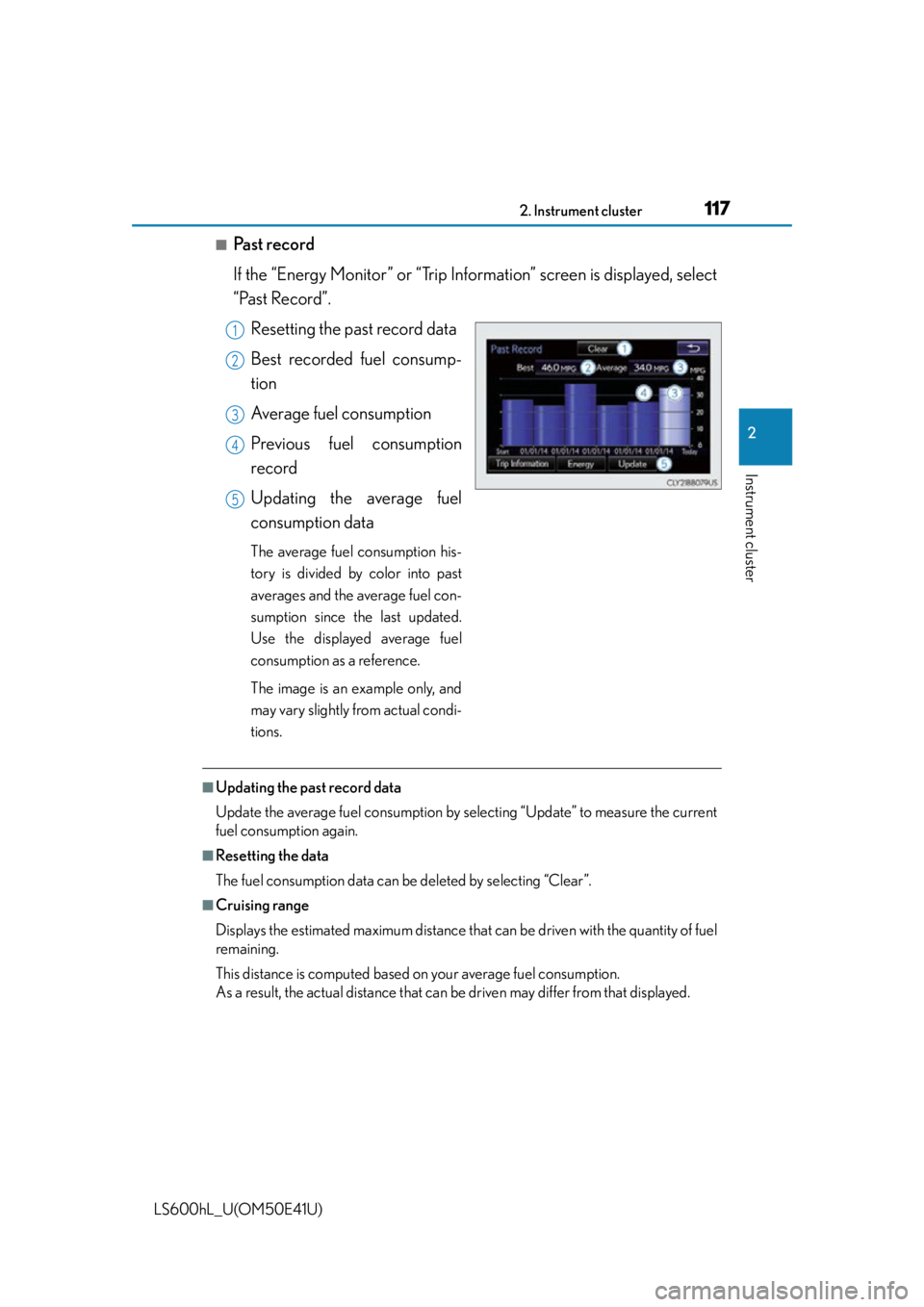
■Past record
If the “Energy Monitor” or “Trip Information” screen is displayed, select
“Past Record”.
Resetting the past record data
Best recorded fuel consump-
tion
Average fuel consumption
Previous fuel consumption
record
Updating the average fuel
consumption data
The average fuel consumption his-
tory is divided by color into past
averages and the average fuel con-
sumption since the last updated.
Use the displayed average fuel
consumption as a reference.
The image is an example only, and
may vary slightly from actual condi-
tions.
■Updating the past record data
Update the average fuel cons umption by selecting “Update” to measure the current
fuel consumption again.
■Resetting the data
The fuel consumption data can be deleted by selecting “Clear”.
■Cruising range
Displays the estimated maximum distance that can be driven with the quantity of fuel
remaining.
This distance is computed based on your average fuel consumption.
As a result, the actual distance that can be driven may differ from that displayed.
1
2
3
4
5
Page 120 of 620
1182. Instrument cluster
LS600hL_U(OM50E41U)
■“Side Display”
Vehicle information can be displayed on the “Side Display”. (P. 3 3 3 )
Select or to select the desired screen.
The image is an example only, and may vary slightly from actual conditions.
●Energy monitor
Displays the hybrid system operation and
energy recovery states.
●Fuel consumption
Displays the average fuel consumption and
regenerated energy for the past 10 minutes
in 1 minute intervals, as well as the cruising
range.
●Trip information
Displays the cruising range, average fuel
consumption and the amount of time
elapsed since the hybrid system was
started.
●Past record
Displays the average fuel consumption and
highest fuel consumption.
Page 197 of 620

1953-5. Opening, closing the windows and moon roof
3
Operation of each component
LS600hL_U(OM50E41U)
■Moon roof open warning buzzer
The buzzer sounds and a message is shown on the multi-information display in the
instrument cluster when the power switch is turned off and the driver’s door is
opened with the moon roof open.
■Customization
Settings (e.g. linked door lock operation) can be changed.
(Customizable features P. 5 6 4 )
CAUTION
Observe the following precautions.
Failure to do so may cause death or serious injury.
■Opening the moon roof
●Do not allow any passengers to put thei r hands or heads outside the vehicle while
it is moving.
●Do not sit on top of the moon roof.
■Closing the moon roof
●The driver is responsible for moon roof opening and closing operations.
In order to prevent accidental operation, especially by a child, do not let a child
operate the moon roof. It is possible for children and other passengers to have
body parts caught in the moon roof.
●Check to make sure that all passengers do not have any part of their body in a
position where it could be caught wh en the moon roof is being operated.
●When using the smart access system with push-button start, wireless remote
control or mechanical key and operating the moon roof, operate the moon roof
after checking to make sure that there is no possibility of any passenger having
any of their body parts caught in the moon roof. Also, do not let a child operate
moon roof by the smart access system wi th push-button start, wireless remote
control or mechanical key. It is possible for children and other passengers to get
caught in the moon roof.
●When exiting the vehicle, turn the power switch off, carry the key and exit the
vehicle along with the child. There may be accidental operation, due to mischief,
etc., that may possibly lead to an accident.
■Jam protection function
●Never use any part of your body to inte ntionally activate the jam protection func-
tion.
●The jam protection function may not work if something gets caught just before
the moon roof fully closes.
Page 253 of 620
2514-4. Refueling
4
Driving
LS600hL_U(OM50E41U)
Press the opener switch.
The fuel filler door will open within
about 10 seconds of the switch being
pressed. Before refueling is possible, a
message will be shown on the multi-
information display in the instrument
cluster to indicate the progress of the
fuel filler door opener.
Turn the fuel tank cap slowly to
open.
Hang the fuel tank cap on the
back of the fuel filler door.
Opening the fuel tank cap
1
2
3
Page 554 of 620

5528-1. Specifications
LS600hL_U(OM50E41U)
■Non-recommendation of the use of gasoline containing MMT
Some gasoline contains an octane enhanc ing additive called MMT (Methylcyclo-
pentadienyl Manganese Tricarbonyl).
Lexus does not recommend the use of gasoli ne that contains MMT. If fuel containing
MMT is used, your emission control system may be adversely affected.
The malfunction indicator lamp on the instrument cluster may come on. If this hap-
pens, contact your Lexus dealer for service.
■If your engine knocks
●Consult your Lexus dealer.
●You may occasionally notice light knocking for a short time while accelerating or
driving uphill. This is normal and there is no need for concern.
NOTICE
■Notice on fuel quality
●Do not use improper fuels. If improper fuels are used, the engine will be dam-
aged.
●Do not use leaded gasoline.
Leaded gasoline can cause damage to your vehicle’s three-way catalytic convert-
ers causing the emission control system to malfunction.
●Do not use gasohol other than the type previously stated.
Other gasohol may cause fuel system damage or vehicle performance problems.
●Using unleaded gasoline with an octane number or rating lower than the level
previously stated will cause persistent heavy knocking.
At worst, this will lead to engine damage.
■Fuel-related poor driveability
If poor driveability is encountered after us ing a different type of fuel (poor hot start-
ing, vaporization, engine knocking, etc.), discontinue the use of that type of fuel.
■When refueling with gasohol
Take care not to spill gasohol. It can damage your vehicle’s paint.