Page 11 of 407
Your vehicle at a glance
42
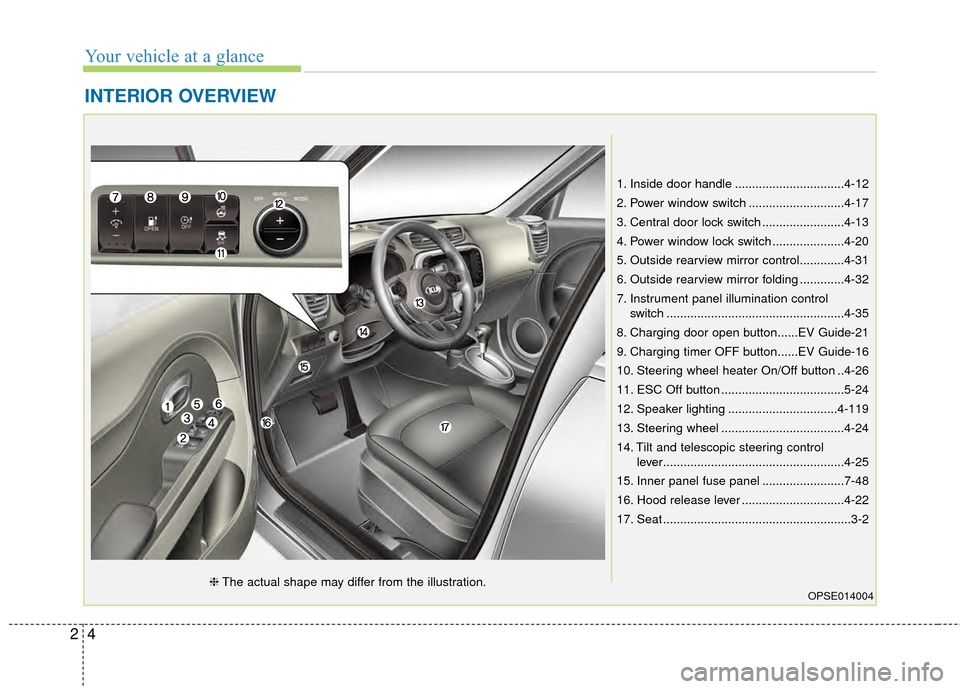
INTERIOR OVERVIEW
1. Inside door handle ................................4-12
2. Power window switch ............................4-17
3. Central door lock switch ........................4-13
4. Power window lock switch .....................4-20
5. Outside rearview mirror control.............4-31
6. Outside rearview mirror folding .............4-32
7. Instrument panel illumination controlswitch ....................................................4-35
8. Charging door open button......EV Guide-21
9. Charging timer OFF button......EV Guide-16
10. Steering wheel heater On/Off button ..4-26
11. ESC Off button ....................................5-24
12. Speaker lighting ................................4-119
13. Steering wheel ....................................4-24
14. Tilt and telescopic steering control lever.....................................................4-25
15. Inner panel fuse panel ........................7-48
16. Hood release lever ..............................4-22
17. Seat .......................................................3-2
OPSE014004❈ The actual shape may differ from the illustration.
Page 118 of 407
Features of your vehicle
48
4
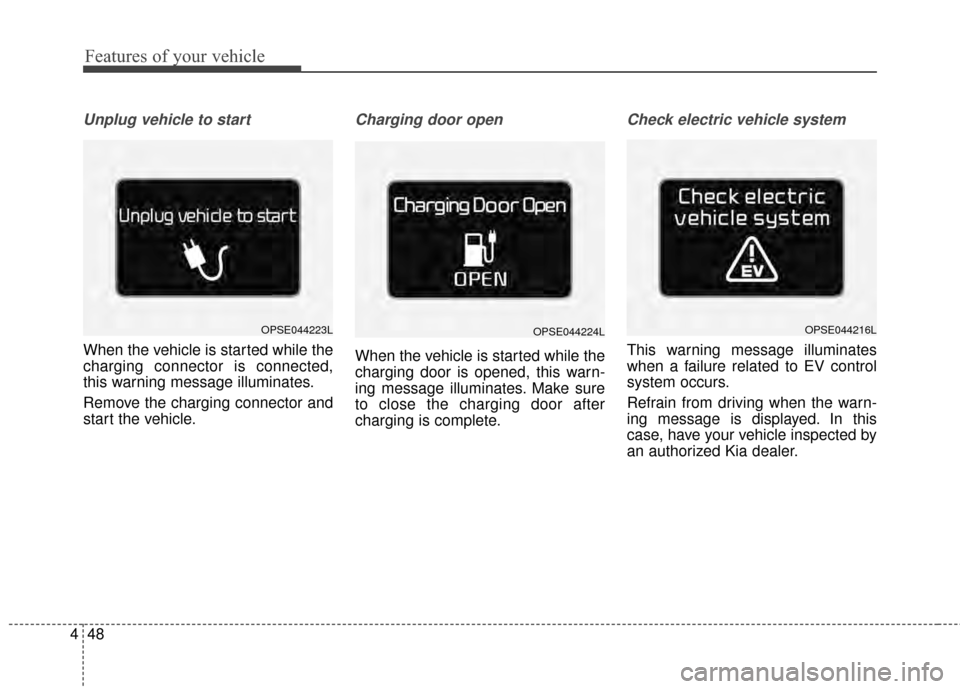
Unplug vehicle to start
When the vehicle is started while the
charging connector is connected,
this warning message illuminates.
Remove the charging connector and
start the vehicle.
Charging door open
When the vehicle is started while the
charging door is opened, this warn-
ing message illuminates. Make sure
to close the charging door after
charging is complete.
Check electric vehicle system
This warning message illuminates
when a failure related to EV control
system occurs.
Refrain from driving when the warn-
ing message is displayed. In this
case, have your vehicle inspected by
an authorized Kia dealer.
OPSE044216LOPSE044224LOPSE044223L
Page 366 of 407
21
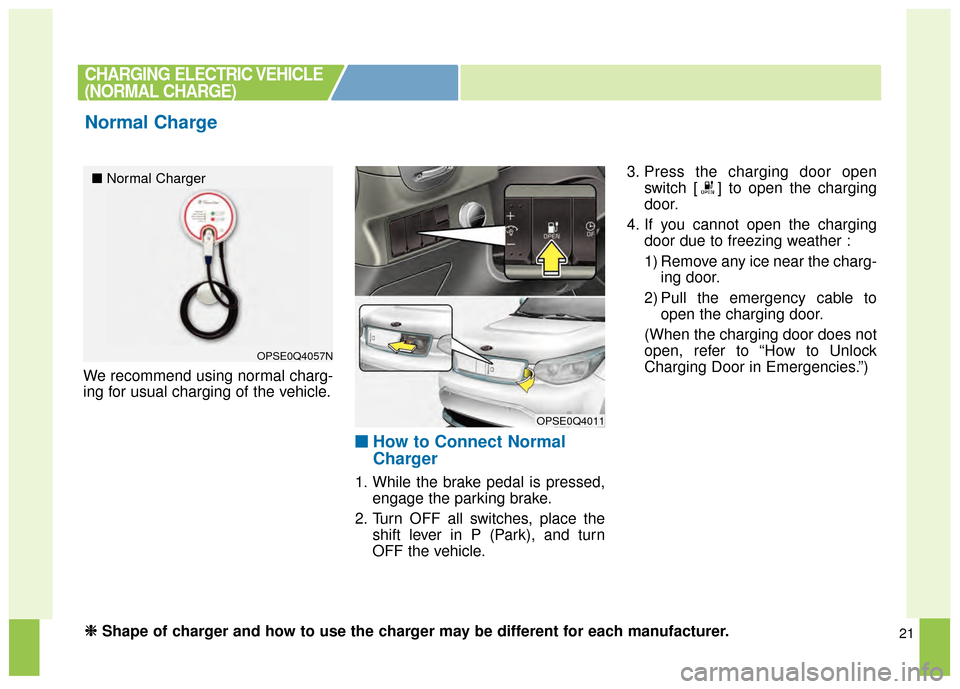
We recommend using normal charg-
ing for usual charging of the vehicle.
■ ■How to Connect Normal
Charger
1. While the brake pedal is pressed,
engage the parking brake.
2. Turn OFF all switches, place the shift lever in P (Park), and turn
OFF the vehicle. 3. Press the charging door open
switch [ ] to open the charging
door.
4. If you cannot open the charging door due to freezing weather :
1) Remove any ice near the charg-ing door.
2) Pull the emergency cable to open the charging door.
(When the charging door does not
open, refer to “How to Unlock
Charging Door in Emergencies.”)
CHARGING ELECTRIC VEHICLE
(NORMAL CHARGE)
Normal Charge
OPSE0Q4057N
OPSE0Q4011
■ Normal Charger
❈
❈
Shape of charger and how to use the charger may be different for each manufacturer.
Page 367 of 407
22
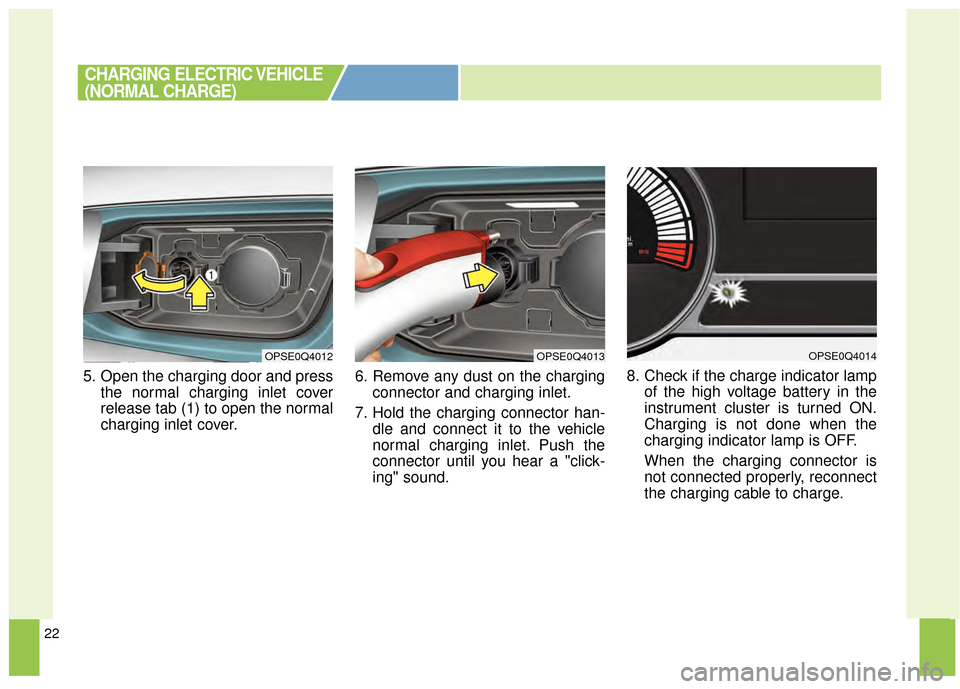
5. Open the charging door and pressthe normal charging inlet cover
release tab (1) to open the normal
charging inlet cover. 6. Remove any dust on the charging
connector and charging inlet.
7. Hold the charging connector han- dle and connect it to the vehicle
normal charging inlet. Push the
connector until you hear a "click-
ing" sound. 8. Check if the charge indicator lamp
of the high voltage battery in the
instrument cluster is turned ON.
Charging is not done when the
charging indicator lamp is OFF.
When the charging connector is
not connected properly, reconnect
the charging cable to charge.
CHARGING ELECTRIC VEHICLE
(NORMAL CHARGE)
OPSE0Q4013OPSE0Q4012OPSE0Q4014
Page 368 of 407

23
You can start charging when thePower button is in the OFF posi-
tion and the shift lever is in P
(Park). After charging has started,
you can use electrical compo-
nents such as the radio by press-
ing the Power button to the ACC or
ON position.
If you move the shift lever from P (Park) to R (Rear), N (Neutral), D
(Drive), charging stops immedi-
ately. If you want to start charging
again, place the shift lever to P
(Park) and press the Power button
to the OFF position. Unplug and
reconnect the charging cable to
start charging again. 9. After charging has started, the
estimated charging time is dis-
played on the instrument cluster
for about 1 minute.
If you open the driver seat door
while charging, the estimated
charging time is also displayed on
the instrument cluster for about 1
minute.
When reserved charging is set,
the estimated charging time is
displayed as “--" . Depending on the condition and
durability of the high voltage battery,
charger specifications, and ambient
temperature, the time required for
charging the battery may vary.
CHARGING ELECTRIC VEHICLE
(NORMAL CHARGE)
OPSE044044L
Page 369 of 407
24
■
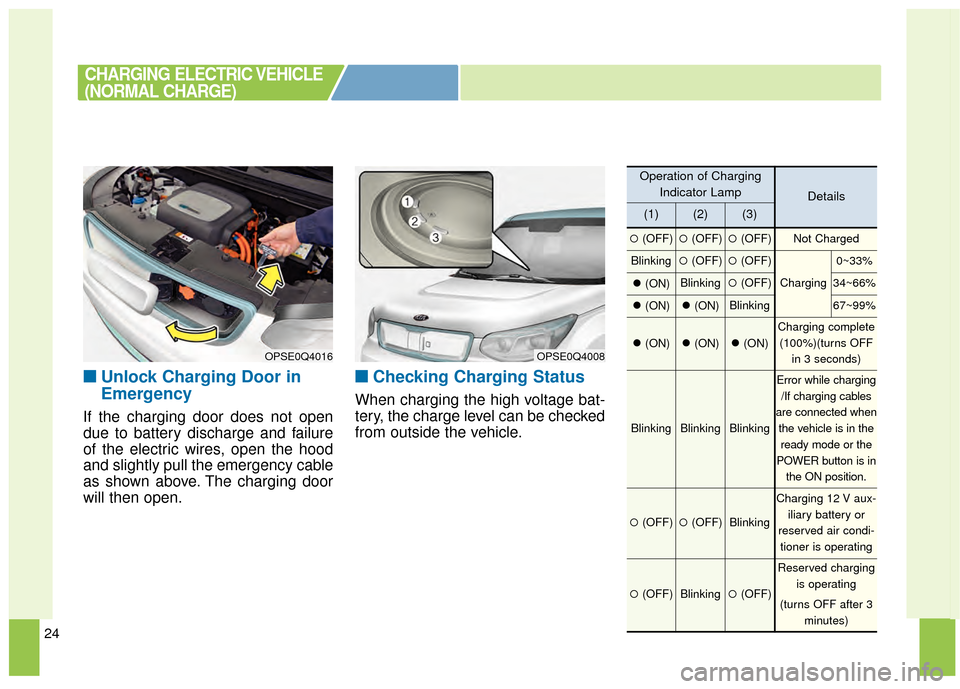
■Unlock Charging Door in
Emergency
If the charging door does not open
due to battery discharge and failure
of the electric wires, open the hood
and slightly pull the emergency cable
as shown above. The charging door
will then open.
■ ■Checking Charging Status
When charging the high voltage bat-
tery, the charge level can be checked
from outside the vehicle.
CHARGING ELECTRIC VEHICLE
(NORMAL CHARGE)
OPSE0Q4016OPSE0Q4008
Operation of Charging
Indicator Lamp
Details
(1)(2)(3)
�(OFF)�(OFF)�(OFF)Not Charged
Blinking�(OFF)�(OFF)
Charging
0~33%
�(ON)Blinking�(OFF)34~66%
�(ON)�(ON)Blinking67~99%
�(ON)�(ON)�(ON)
Charging complete
(100%)(turns OFF in 3 seconds)
BlinkingBlinkingBlinking
Error while charging/If charging cables
are connected when the vehicle is in theready mode or the
POWER button is in the ON position.
�(OFF)�(OFF)Blinking
Charging 12 V aux- iliary battery or
reserved air condi- tioner is operating
�(OFF)Blinking�(OFF)
Reserved charging is operating
(turns OFF after 3 minutes)
Page 371 of 407
26
You can charge at high speeds at pub-
lic charging stations. Refer to the
respective company's manual that is
provided for each quick charger type.
Battery performance and durability can
deteriorate if the quick charge is used
constantly in hot weather conditions
(heat wave, etc.)
Use of quick charge in hot weather
condition should be minimized in order
to help prolong high voltage battery life.
❈Shape of charger and how to use
the charger may be different for
each manufacturer. ❈
If you use a quick charger when
the vehicle is already fully
charged, some quick chargers will
send out an error message. When
the vehicle is fully charged, do not
charge the vehicle.
■ ■
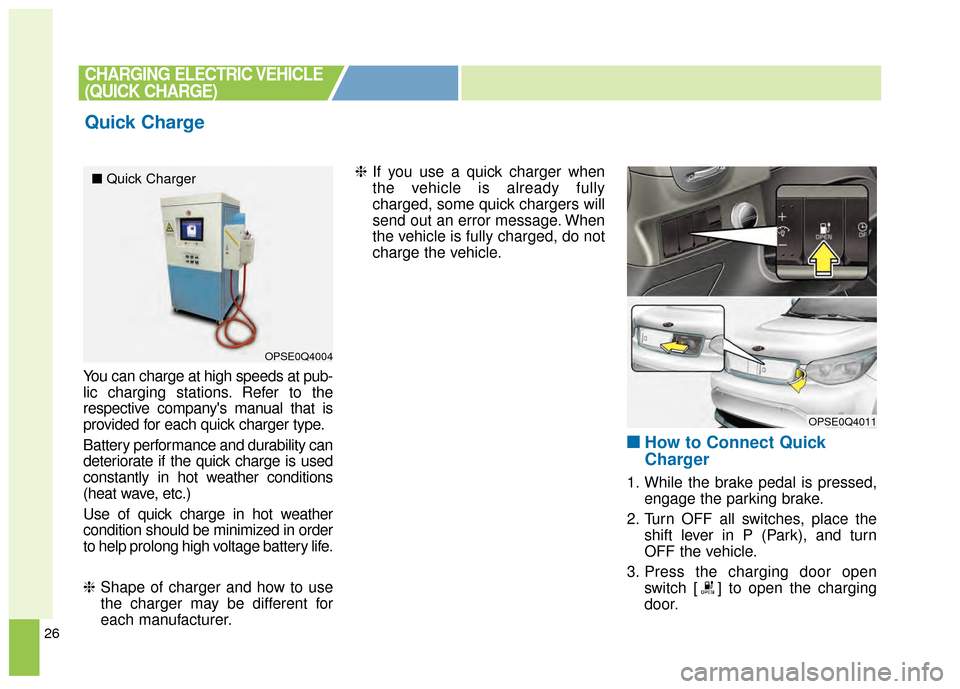
How to Connect Quick
Charger
1. While the brake pedal is pressed,
engage the parking brake.
2. Turn OFF all switches, place the shift lever in P (Park), and turn
OFF the vehicle.
3. Press the charging door open switch [ ] to open the charging
door.
Quick Charge
CHARGING ELECTRIC VEHICLE
(QUICK CHARGE)
OPSE0Q4004
OPSE0Q4011
■ Quick Charger
Page 372 of 407
27
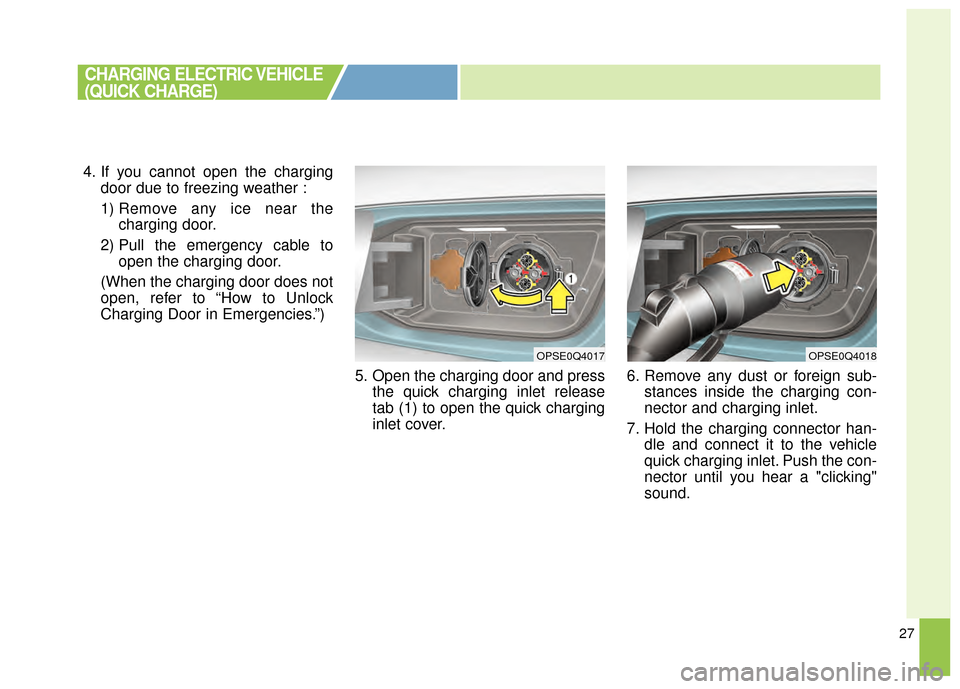
4. If you cannot open the chargingdoor due to freezing weather :
1) Remove any ice near the charging door.
2) Pull the emergency cable to open the charging door.
(When the charging door does not
open, refer to “How to Unlock
Charging Door in Emergencies.”)
5. Open the charging door and pressthe quick charging inlet release
tab (1) to open the quick charging
inlet cover. 6. Remove any dust or foreign sub-
stances inside the charging con-
nector and charging inlet.
7. Hold the charging connector han- dle and connect it to the vehicle
quick charging inlet. Push the con-
nector until you hear a "clicking"
sound.
CHARGING ELECTRIC VEHICLE
(QUICK CHARGE)
OPSE0Q4017OPSE0Q4018