Page 293 of 695

Closing The Sunrider®
Perform the above steps in the opposite order.
NOTE:Failure to fold the fabric rearward will allow the
material to sag and may block the rearview mirror.
FOLDING WINDSHIELD
The fold-down windshield and removable side bars on
your vehicle are structural elements that can provide
some protection in some accidents. The windshield also
provides some protection against weather, road debris
and intrusion of small branches and other objects.
Do not drive your vehicle on-road with the windshield
down and the side bars removed as you lose the protec-
tion these structural elements can provide.
If required for certain off-road uses, the side bars can be
removed and the windshield folded down. However, the
protection afforded by these features is then lost. If you
remove the side bars and fold down the windshield,
drive slowly and cautiously. It is recommended that the
speed of the vehicle be limited to 10 mph (16 km/h), with
low range operation preferred if you are driving off-road
with the windshield folded down.
Raise the windshield and reinstall the side bars as soon as
the task that required their removal is completed and
before you return to on-road driving. Both you and your
passenger should wear seat belts at all times, on-road and
off-road, regardless of whether the windshield is raised
or folded down.
Outside rearview mirrors are mounted on the doors. If
you choose to remove the doors, see your authorized
dealer for a replacement cowl-mounted outside mirror.
Federal law requires outside mirrors on vehicles for
on-road use.
3
UNDERSTANDING THE FEATURES OF YOUR VEHICLE 291
Page 297 of 695
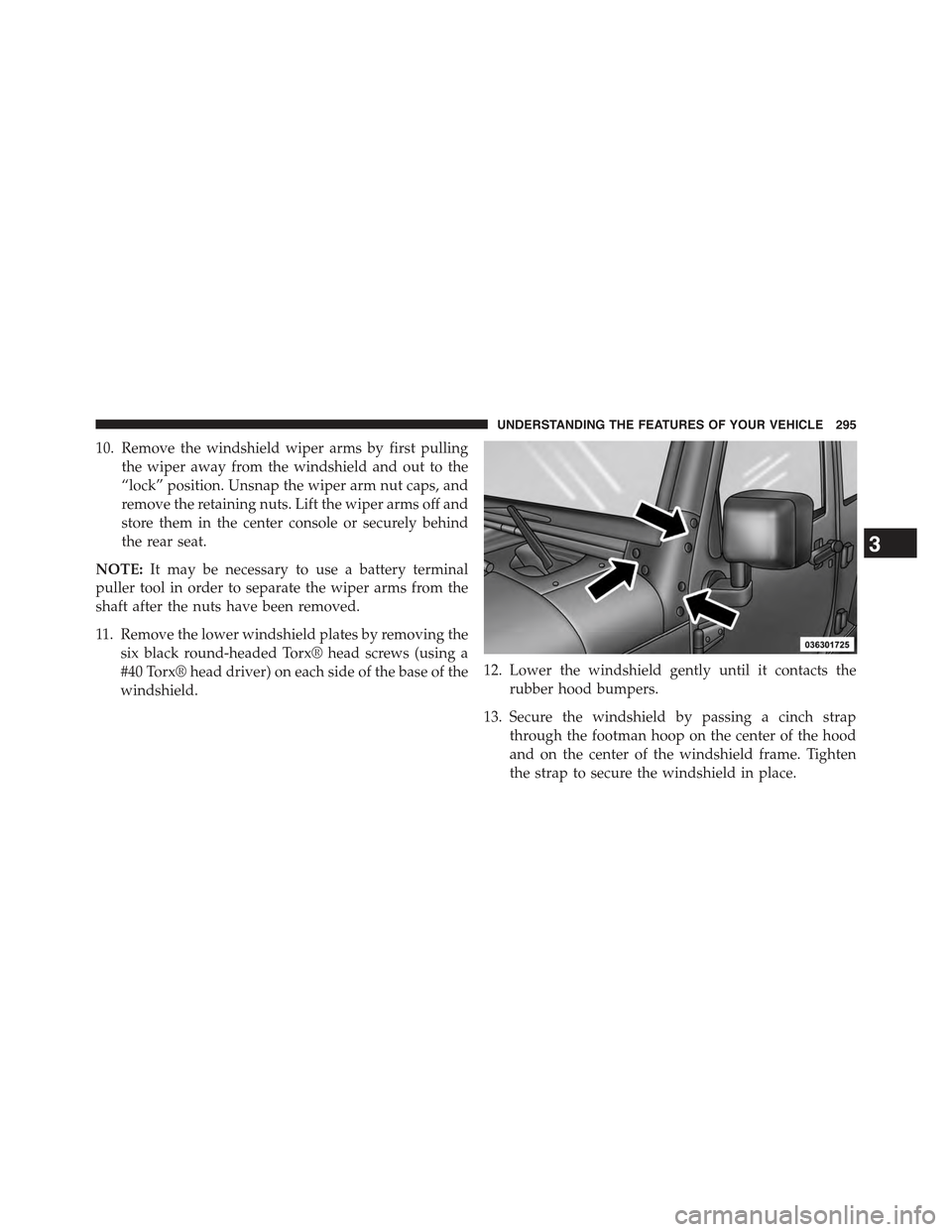
10. Remove the windshield wiper arms by first pulling
the wiper away from the windshield and out to the
“lock” position. Unsnap the wiper arm nut caps, and
remove the retaining nuts. Lift the wiper arms off and
store them in the center console or securely behind
the rear seat.
NOTE:It may be necessary to use a battery terminal
puller tool in order to separate the wiper arms from the
shaft after the nuts have been removed.
11. Remove the lower windshield plates by removing the
six black round-headed Torx® head screws (using a
#40 Torx® head driver) on each side of the base of the
windshield.
12. Lower the windshield gently until it contacts the
rubber hood bumpers.
13. Secure the windshield by passing a cinch strap
through the footman hoop on the center of the hood
and on the center of the windshield frame. Tighten
the strap to secure the windshield in place.
3
UNDERSTANDING THE FEATURES OF YOUR VEHICLE 295
Page 300 of 695

Rotate the switch upward to the first detent
position for rear wiper operation.
Rotate the switch upward past the first detent
to activate the rear washer. The washer pump
and the wiper will continue to operate as long
as the switch is held. Upon release, the wiper
will cycle two to three times before returning to the set
position.
If the rear wiper is operating when the ignition is turned
to the LOCK position, the wiper will automatically return
to the “Park” position. When the vehicle is restarted, the
wiper will resume function at whichever position the
switch is set at.
Rear Window Defroster — If Equipped
The rear window defroster button is located on
the climate controls mode control knob. Push the
button to turn on the rear window defroster. An indicator
in the button will illuminate when the rear window
defroster is on. The rear window defroster automatically
turns off after approximately 10 minutes. For an addi-
tional five minutes of operation, push the button a
second time.
NOTE:To prevent excessive battery drain, use the rear
window defroster only when the engine is operating.
298 UNDERSTANDING THE FEATURES OF YOUR VEHICLE
Page 308 of 695
INSTRUMENT CLUSTER DESCRIPTIONS
1. Fuel Gauge
The pointer shows the level of fuel in the fuel tank when
the ignition switch is in the ON/RUN position.
2. Charging System Light
This light shows the status of the electrical charg-
ing system. The light should come on when the
ignition switch is first turned to ON/RUN, and remain
on briefly as a bulb check. If the light stays on or comes
on while driving, turn off some of the vehicle’s nones-
sential electrical devices or increase engine speed (if at
idle). If the charging system light remains on, it means
that the vehicle is experiencing a problem with the
charging system. Obtain SERVICE IMMEDIATELY. See
an authorized dealer.
If jump starting is required, refer to “Jump Starting
Procedures” in “What To Do In Emergencies”.
3. Front Fog Light Indicator — If Equipped
This indicator will illuminate when the front fog
lights are on.
4. Low Fuel Warning Light
When the fuel level reaches approximately 2.8 gal
(10.6 L) this light will turn on and a single chime
will sound.
5. Speedometer
Indicates vehicle speed.
6. Front Axle Lock Indicator — If Equipped
Indicates when the front axle lock has been
activated.
306 UNDERSTANDING YOUR INSTRUMENT PANEL
Page 309 of 695

7. Seat Belt Reminder Light
When the ignition switch is first turned to ON/
RUN, this light will turn on for four to eight
seconds as a bulb check. During the bulb check, if
the driver’s seat belt is unbuckled, a chime will sound.
After the bulb check or when driving, if the driver seat
belt remains unbuckled, the Seat Belt Reminder Light
will flash or remain on continuously. Refer to “Occupant
Restraints” in “Things To Know Before Starting Your
Vehicle” for further information.
8. Turn Signal Indicators
The left or right arrow will flash with the corre-
sponding exterior turn signal lights when the turn
signal lever is operated. A chime will sound if the vehicle is
driven more than 1 mile (1.6 km) with either turn signal on.
NOTE:If either indicator flashes at a rapid rate, check
for a defective outside light bulb.
9. Oil Pressure Warning Light
This light indicates low engine oil pressure. The
light should turn on momentarily when the engine is
started; if the bulb does not come on, have the system
checked by an authorized dealer. If the light turns on
while driving, stop the vehicle and shut off the engine as
soon as possible. A chime will sound when this light
turns on.
Do not operate the vehicle until the cause is corrected.
This light does not indicate how much oil is in the engine.
The engine oil level must be checked under the hood.
10. Brake Warning Light
This light monitors various brake functions,
including brake fluid level and parking brake
application. If the brake light turns on it may
indicate that the parking brake is applied, that
the brake fluid level is low, or that there is a problem with
the anti-lock brake system reservoir.
4
UNDERSTANDING YOUR INSTRUMENT PANEL 307
Page 310 of 695
If the light remains on when the parking brake has been
disengaged, and the fluid level is at the full mark on the
master cylinder reservoir, it indicates a possible brake
hydraulic system malfunction or that a problem with the
Brake Booster has been detected by the Anti-Lock Brake
System (ABS) / Electronic Stability Control (ESC) system.
In this case, the light will remain on until the condition
has been corrected. If the problem is related to the brake
booster, the ABS pump will run when applying the brake
and a brake pedal pulsation may be felt during each stop.
The dual brake system provides a reserve braking capac-
ity in the event of a failure to a portion of the hydraulic
system. A leak in either half of the dual brake system is
indicated by the Brake Warning Light, which will turn on
when the brake fluid level in the master cylinder has
dropped below a specified level.
The light will remain on until the cause is corrected.
NOTE:The light may flash momentarily during sharp
cornering maneuvers, which change fluid level condi-
tions. The vehicle should have service performed, and
the brake fluid level checked.
If brake failure is indicated, immediate repair is neces-
sary.
WARNING!
Driving a vehicle with the red brake light on is
dangerous. Part of the brake system may have failed.
It will take longer to stop the vehicle. You could have
a collision. Have the vehicle checked immediately.
Vehicles equipped with the Anti-Lock Brake System
(ABS), are also equipped with Electronic Brake Force
Distribution (EBD). In the event of an EBD failure, the
Brake Warning Light will turn on along with the ABS
Light. Immediate repair to the ABS system is required.
308 UNDERSTANDING YOUR INSTRUMENT PANEL
Page 311 of 695

Operation of the Brake Warning Light can be checked by
turning the ignition switch from the OFF position to the
ON/RUN position. The light should illuminate for ap-
proximately two seconds. The light should then turn off
unless the parking brake is applied or a brake fault is
detected. If the light does not illuminate, have the light
inspected by an authorized dealer.
The light also will turn on when the parking brake is
applied with the ignition switch in the ON/RUN posi-
tion.
NOTE:This light shows only that the parking brake is
applied. It does not show the degree of brake application.
11. High Beam Indicator
This indicator shows that the high beam head-
lights are on. Push the multifunction control lever
away from you to switch the headlights to high beam.
Pull the lever toward you to switch the headlights back to
low beam. If the driver’s door is open, and the headlights
or park lights are left on, the high beam indicator light
will remain illuminated and a chime will sound.
12. Anti-Lock Brake (ABS) Light
After the ignition is turned on, the Anti-Lock
Brake System (ABS) light illuminates to indicate
function check at vehicle startup. If the light remains on
after startup or comes on and stays on at road speeds, it
may indicate that the ABS has detected a malfunction or
has become inoperative. The system reverts to standard
non-anti-lock brakes.
If both the Brake Warning Light and the ABS Warning
Light are on, see an authorized dealer immediately. Refer
to “Anti-Lock Brake System” in “Starting And
Operating”.
4
UNDERSTANDING YOUR INSTRUMENT PANEL 309
Page 312 of 695

13. Air Bag Warning Light
This light will turn on for four to eight seconds
as a bulb check when the ignition switch is first
turned to ON/RUN. If the light is either not on
during starting, stays on, or turns on while
driving, have the system inspected at an authorized
dealer as soon as possible. Refer to “Occupant Restraints”
in “Things To Know Before Starting Your Vehicle” for
further information.
14. Rear Axle Lock Indicator — If Equipped
This light indicates when the rear axle lock has
been activated.
15. Tachometer
Indicates the engine speed in revolutions per minute
(RPM x 1000).
CAUTION!
Do not operate the engine with the tachometer
pointer in the red area. Engine damage will occur.
16. Malfunction Indicator Light (MIL)
The Malfunction Indicator Light (MIL) is a part of
an Onboard Diagnostic System called OBD II that
monitors engine and automatic transmission con-
trol systems. The light will illuminate when the ignition
is in the ON position before engine start. If the bulb does
not come on when turning the key from OFF to ON/
RUN, have the condition checked promptly.
Certain conditions, such as a loose or missing gas cap,
poor quality fuel, etc., may illuminate the light after
engine start. The vehicle should be serviced if the light
stays on through several typical driving styles. In most
situations, the vehicle will drive normally and will not
require towing.
310 UNDERSTANDING YOUR INSTRUMENT PANEL