Page 196 of 653
3-110
Convenient features of your vehicle
✽✽NOTICE
Prolonged operation of the heater in
the recirculated air position (with-
out air conditioning selected) may
cause fogging of the windshield and
side windows and the air within the
passenger compartment may
become stale.
In addition, prolonged use of the air
conditioning with the recirculated
air position selected will result in
excessively dry air in the passenger
compartment.Fan speed control
The fan speed can be set to the
desired speed by operating the fan
speed control switches.
To change the fan speed, press the (
�) the switch for higher speed, or
press the (
⊳) switch for lower
speed. To turn the fan speed control
off, press the front blower OFF button.
Continued use of the climate
control system operation in
the recirculated air position(without the air conditioning
selected) may allow humidity
to increase inside the vehicle
which may fog the glass and
obscure visibility.
Do not sleep in a vehicle with the air conditioning or heating
system on. It may cause seri-
ous injury or death due to a
drop in the oxygen level
and/or body temperature.
Continued use of the climate
control system operation in
the recirculated air position
can cause drowsiness or
sleepiness, that may cause
loss of vehicle control result-
ing in an accident. Set the air
intake control to the outside
(fresh) air position as much as
possible while driving.
WARNING
OLMB043130
Page 197 of 653
3-111
Convenient features of your vehicle
3
Air conditioning
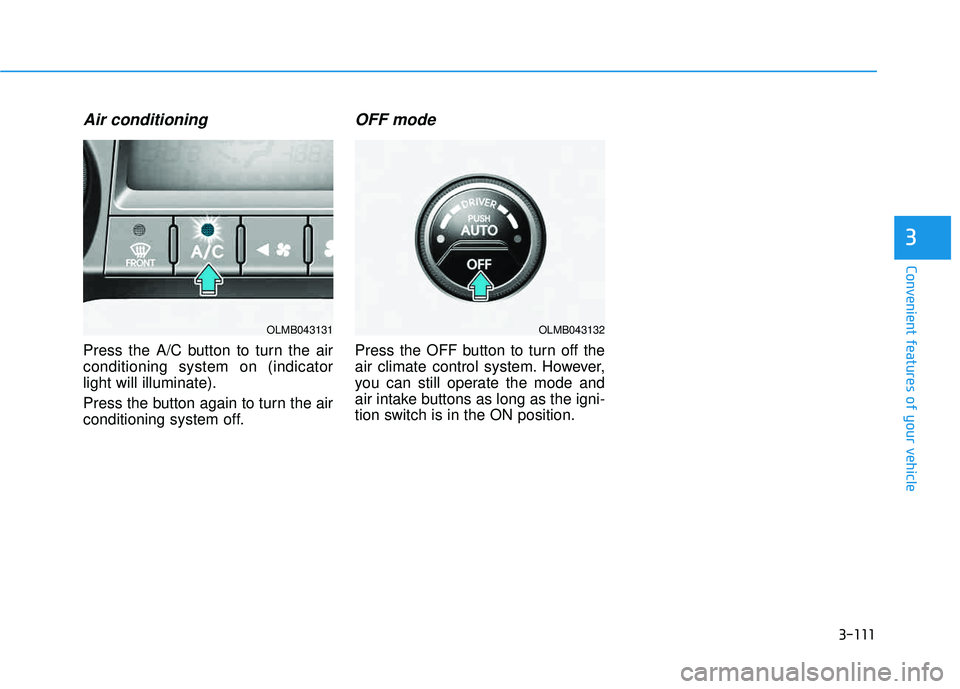
Press the A/C button to turn the air conditioning system on (indicatorlight will illuminate).
Press the button again to turn the air
conditioning system off.
OFF mode
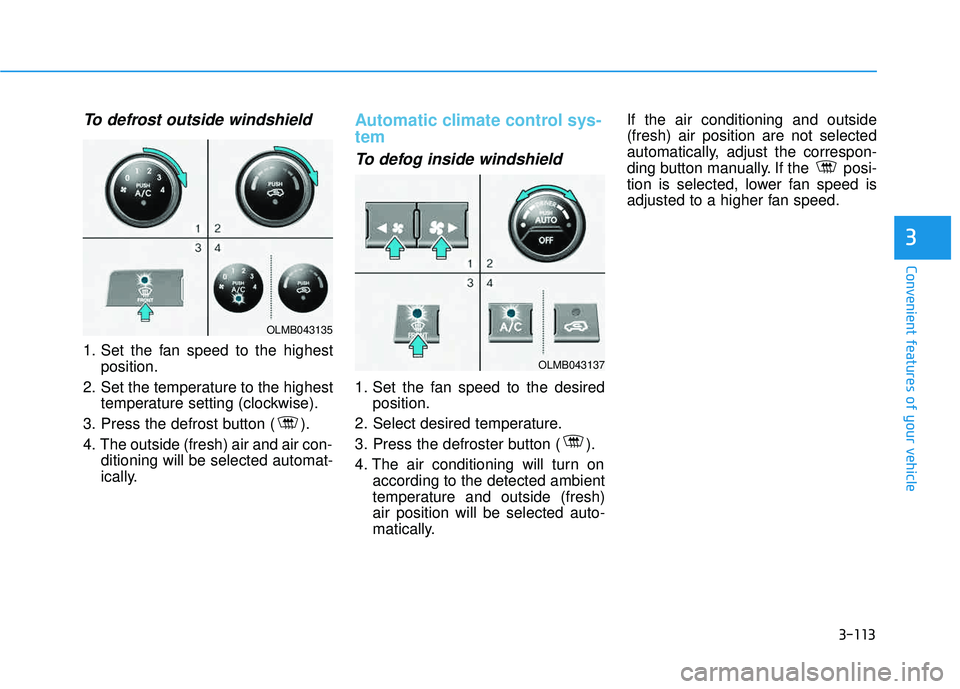
Press the OFF button to turn off the
air climate control system. However,
you can still operate the mode and
air intake buttons as long as the igni-
tion switch is in the ON position.
OLMB043132OLMB043131
Page 198 of 653
3-112
Convenient features of your vehicle
For maximum defrosting, set thetemperature control to the maxi-
mum clockwise setting (hot), and
the fan speed control to the highestspeed.
If warm air to the floor is desired while defrosting or defogging, setthe mode to the floor-defrost posi-tion.
Before driving, clear all snow and ice from the windshield, rear win-
dow, outside rear view mirrors, and
all side windows.
Clear all snow and ice from the hood and air inlet in the cowl grill to
improve heater and defroster effi-ciency and to reduce the probabili-
ty of fogging up the inside of thewindshield.Manual climate control system
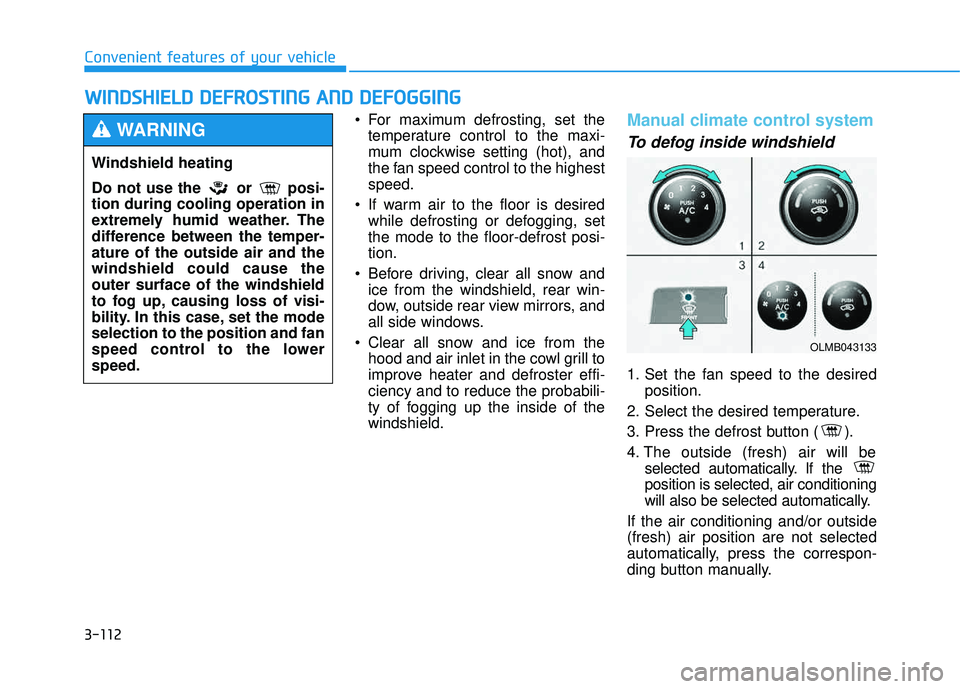
To defog inside windshield
1. Set the fan speed to the desired position.
2. Select the desired temperature.
3. Press the defrost button ( ).
4. The outside (fresh) air will be selected automatically. If the position is selected, air conditioning
will also be selected automatically.
If the air conditioning and/or outside(fresh) air position are not selected
automatically, press the correspon-
ding button manually.
WW IINN DDSSHH IIEE LLDD DD EEFFRR OO SSTT IINN GG AA NN DD DD EEFFOO GGGGIINN GG
Windshield heating
Do not use the or posi- tion during cooling operation in
extremely humid weather. The
difference between the temper-ature of the outside air and thewindshield could cause theouter surface of the windshield
to fog up, causing loss of visi-
bility. In this case, set the modeselection to the position and fan
speed control to the lowerspeed.
WARNING
OLMB043133
Page 199 of 653
3-113
Convenient features of your vehicle
3
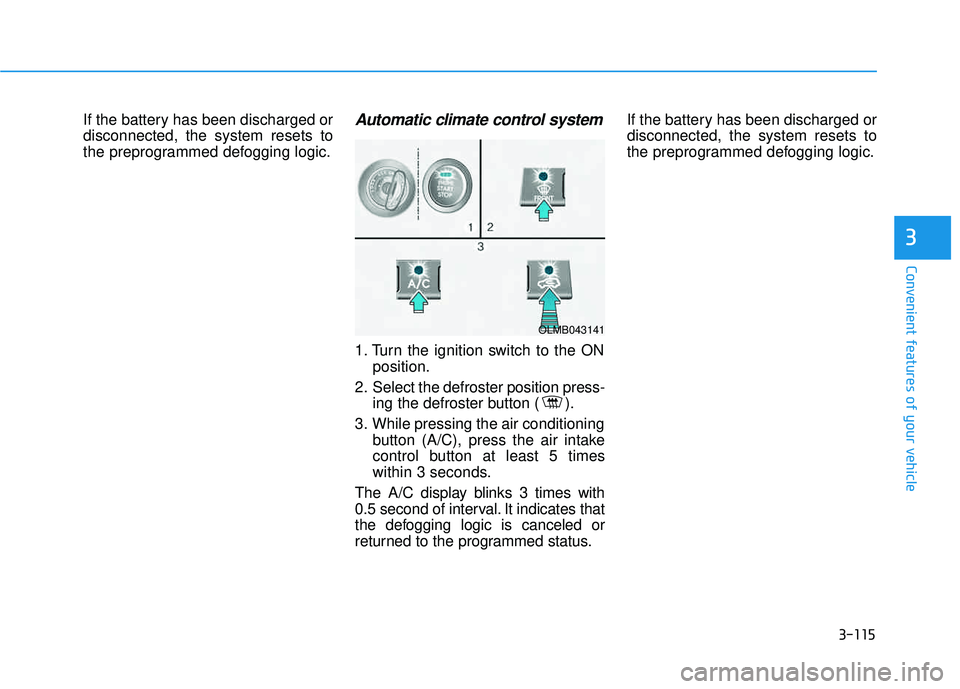
To defrost outside windshield
1. Set the fan speed to the highestposition.
2. Set the temperature to the highest temperature setting (clockwise).
3. Press the defrost button ( ).
4. The outside (fresh) air and air con- ditioning will be selected automat-
ically.
Automatic climate control sys- tem
To defog inside windshield
1. Set the fan speed to the desiredposition.
2. Select desired temperature.
3. Press the defroster button ( ).
4. The air conditioning will turn on according to the detected ambient
temperature and outside (fresh)air position will be selected auto-
matically. If the air conditioning and outside(fresh) air position are not selected
automatically, adjust the correspon-
ding button manually. If the posi-
tion is selected, lower fan speed is
adjusted to a higher fan speed.
OLMB043135
OLMB043137
Page 200 of 653
3-114
Convenient features of your vehicle
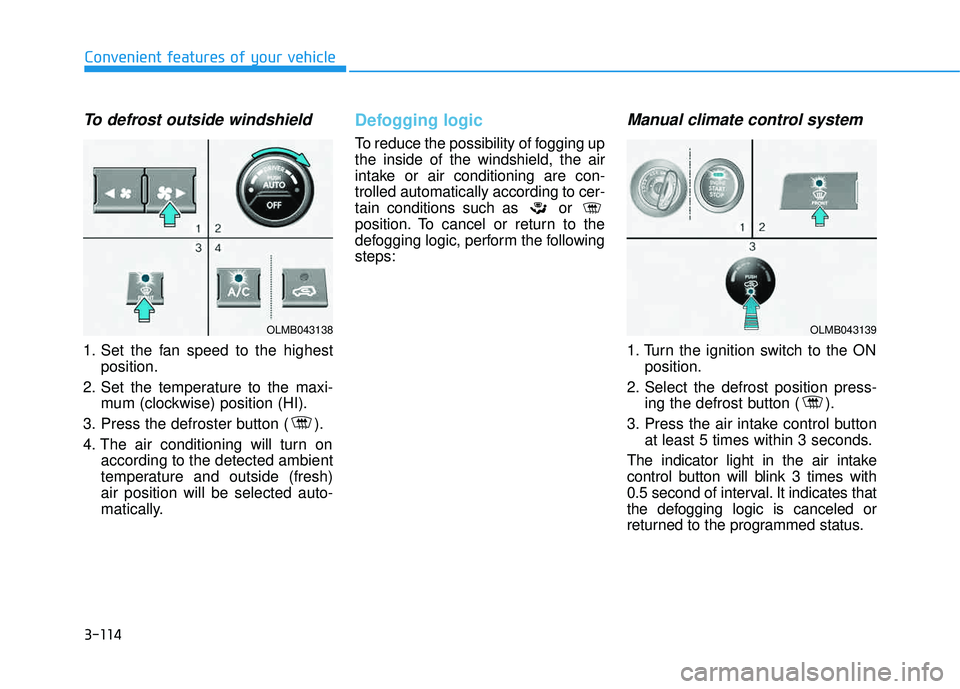
To defrost outside windshield
1. Set the fan speed to the highestposition.
2. Set the temperature to the maxi- mum (clockwise) position (HI).
3. Press the defroster button ( ).
4. The air conditioning will turn on according to the detected ambient
temperature and outside (fresh)air position will be selected auto-
matically.
Defogging logic
To reduce the possibility of fogging up the inside of the windshield, the air
intake or air conditioning are con-trolled automatically according to cer-
tain conditions such as or
position. To cancel or return to the
defogging logic, perform the followingsteps:
Manual climate control system
1. Turn the ignition switch to the ONposition.
2. Select the defrost position press- ing the defrost button ( ).
3. Press the air intake control button at least 5 times within 3 seconds.
The indicator light in the air intake
control button will blink 3 times with
0.5 second of interval. It indicates that
the defogging logic is canceled or
returned to the programmed status.
OLMB043138OLMB043139
Page 201 of 653
3-115
Convenient features of your vehicle
3
If the battery has been discharged or disconnected, the system resets to
the preprogrammed defogging logic.Automatic climate control system
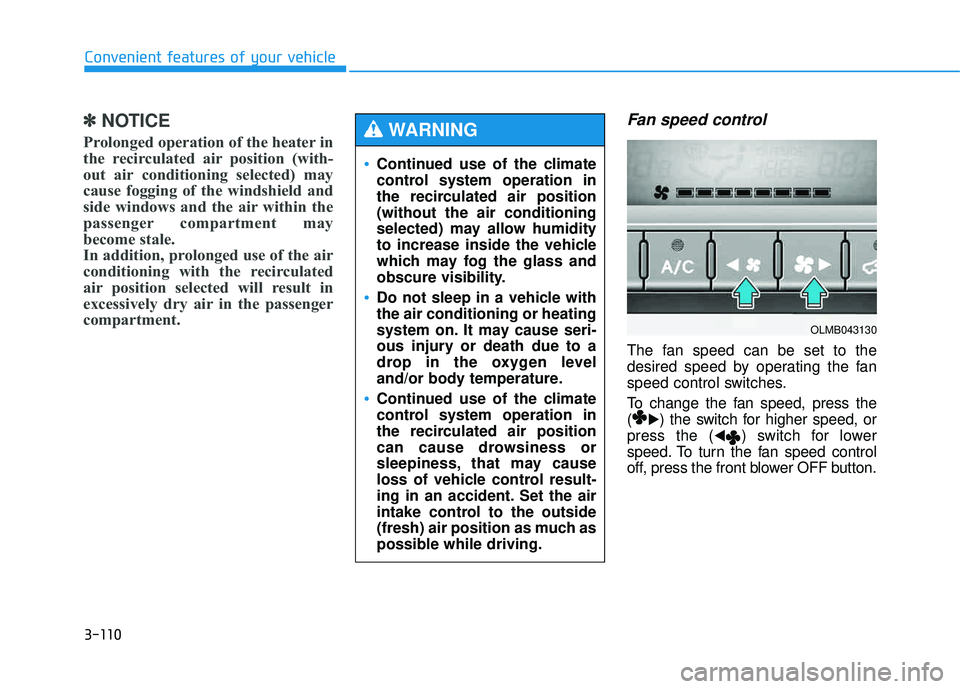
1. Turn the ignition switch to the ONposition.
2. Select the defroster position press- ing the defroster button ( ).
3. While pressing the air conditioning button (A/C), press the air intake
control button at least 5 times
within 3 seconds.
The A/C display blinks 3 times with
0.5 second of interval. It indicates that
the defogging logic is canceled or
returned to the programmed status. If the battery has been discharged ordisconnected, the system resets to
the preprogrammed defogging logic.
OLMB043141
Page 207 of 653
3-121
Convenient features of your vehicle
3
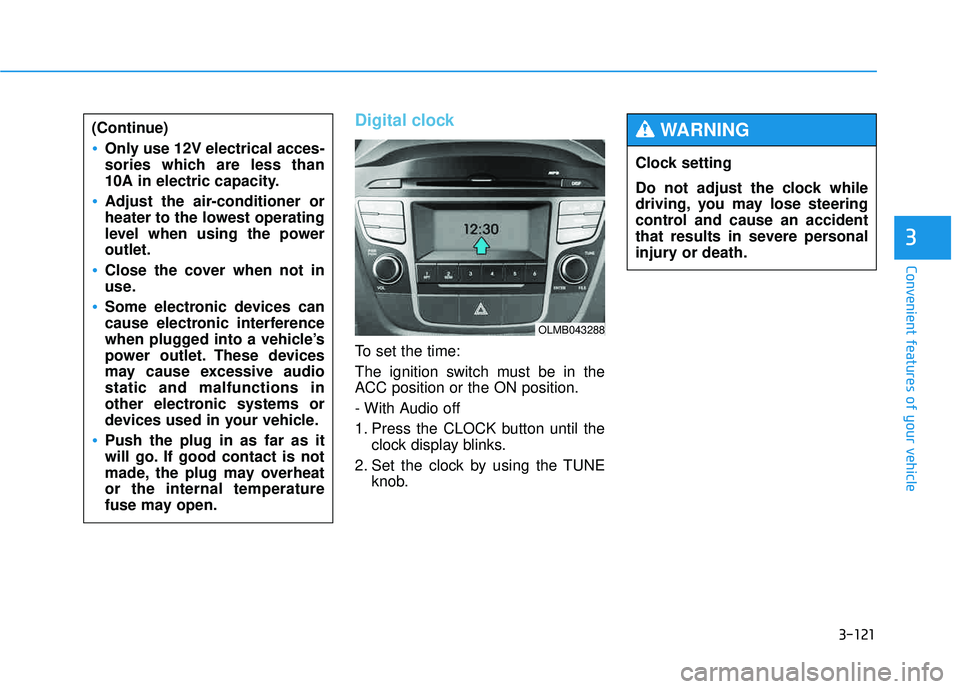
Digital clock
To set the time:
The ignition switch must be in the
ACC position or the ON position.
- With Audio off
1. Press the CLOCK button until theclock display blinks.
2. Set the clock by using the TUNE knob.
(Continue)
Only use 12V electrical acces-
sories which are less than
10A in electric capacity.
Adjust the air-conditioner or
heater to the lowest operating
level when using the poweroutlet.
Close the cover when not in
use.
Some electronic devices can
cause electronic interference
when plugged into a vehicle’s
power outlet. These devices
may cause excessive audiostatic and malfunctions in
other electronic systems or
devices used in your vehicle.
Push the plug in as far as it
will go. If good contact is not
made, the plug may overheator the internal temperature
fuse may open.
OLMB043288
Clock setting
Do not adjust the clock while
driving, you may lose steering
control and cause an accident
that results in severe personal
injury or death.
WARNING
Page 219 of 653
4-8
Multimedia System
(Continued)
Please refrain from use if the
screen is blank or no sound
can be heard as these signs
may indicate product malfunc-
tion. Continued use in suchconditions could lead to acci-
dents(fires, electric shock) or
product malfunctions.
Do not touch the antenna dur- ing thunder or lightening as
such acts may lead to light-
ning induced electric shock.
Do not stop or park in park- ing-restricted areas to operate
the product. Such acts couldlead to traffic accidents.
Use the system with the vehi-
cle ignition turned on.
Prolonged use with the igni- tion turned off could result in
battery discharge.
Do not stare at the screen
while driving. Staring at the
screen for prolonged periodsof time could lead to trafficaccidents.
Do not disassemble, assem-
ble, or modify the audio sys-
tem. Such acts could result in
accidents, fire, or electric
shock.
Using the phone while driving
may lead to a lack of attention oftraffic conditions and increasethe likelihood of accidents.
Use the phone feature after
parking the vehicle.
Heed caution not to spill water
or introduce foreign objects
into the device. Such acts
could lead to smoke, fire, or
product malfunction.(Continued)
WARNING
Operating the device while driving could lead to accidents
due to a lack of attention to
external surroundings. First
park the vehicle before operat-
ing the device.
Adjust the volume to levels that
allow the driver to hear sounds
from outside of the vehicle.
Driving in a state where exter-
nal sounds cannot be heard
may lead to accidents.
Pay attention to the volume setting when turning the
device on. A sudden output of
extreme volume upon turning
the device on could lead to
hearing impairment. (Adjust
the volume to a suitable level
before turning off the device.)(Continued)
CAUTION