2015 Hyundai Santa Fe Sport boot
[x] Cancel search: bootPage 276 of 785
4183
Features of your vehicle
(Continued)
• Park the vehicle when connecting
the head unit with the mobile
phone.
•Bluetooth
®connection may
become intermittently disconnect-
ed in some mobile phones. Follow
these steps to try again.
1. Within the mobile phone, turn
the Bluetooth
®function off/on
and try again.
2. Turn the mobile phone power
Off/On and try again.
3. Completely remove the mobile
phone battery, reboot, and then
again.
4. Reboot the Audio System and
try again.
5. Delete all paired devices, pair
and try again.
• Handsfree call quality and volume
may differ depending on the
model of your mobile phone.
✽NOTICE - USING THE
Voice Recognition
• When using the voice recognition
feature, only commands listed
within the user's manual are sup-
ported.
• Be aware that during the opera-
tion of the voice recognition sys-
tem, pressing any key other than
the key terminate voice recog-
nition mode.
• For superior voice recognition
performance, position the micro-
phone used for voice recognition
above the head of the driver’s seat
and maintain a proper position
when saying commands.
• Within the following situations,
voice recognition may not function
properly due to external sound.
- When the windows and sunroof
are open
- When the wind of the cooling /
heating device is strong
- When entering and passing
through tunnels
(Continued)(Continued)
- When driving on rugged and
uneven roads
- During severe rain (heavy rains,
windstorms)
• Phone related voice commands
can be used only when a
Bluetooth
®Wireless Technology
device is connected.
• When making calls by stating a
name, the corresponding contact
must be downloaded and stored
within the audio system.
• After downloading the Bluetooth
®
Wireless Technology phone book,
it takes some time to convert the
phone book data into voice infor-
mation. During this time, voice
recognition may not properly
operate.
• Pronounce the voice commands
naturally and clearly as if in a nor-
mal conversation.
Page 286 of 785
![Hyundai Santa Fe Sport 2015 Owners Manual 4193
Features of your vehicle
SYSTEM SETTINGS
Press the key Select
[System] through tune knob or
key Select menu through TUNE
knob
Memory Information
Displays currently used memory and
total system](/manual-img/35/16759/w960_16759-285.png "Hyundai Santa Fe Sport 2015 Owners Manual 4193
Features of your vehicle
SYSTEM SETTINGS
Press the key Select
[System] through tune knob or
key Select menu through TUNE
knob
Memory Information
Displays currently used memory and
total system")
4193
Features of your vehicle
SYSTEM SETTINGS
Press the key Select
[System] through tune knob or
key Select menu through TUNE
knob
Memory Information
Displays currently used memory and
total system memory.
Select [Memory Information] OK
The currently used memory is dis-
played on the left side while the total
system memory is displayed on the
right side.
Prompt Feedback
This feature is used to change voice
command feedback between Normal
and Expert modes.
Select [Prompt Feedback] Set
through
TUNEknob
• On : This mode is for beginner
users and provides detailed
instructions during voice command
operation.• Off : This mode is for expert users
and omits some information during
voice command operation. (When
using Expert mode, guidance
instructions can be heard through
the [Help] or [Menu] commands.
Language
This menu is used to set the display
and voice recognition language.
Select [Language]
Set through TUNE knob
❈ The system will reboot after the
language is changed.
❈ Language support by region
- English, Francais, Espanol
5
SETUP
Page 449 of 785
Features of your vehicle
356 4
✽NOTICE -WHEN CON-
NECTING A
Bluetooth®
PHONE
• Before connecting the head unit
with the mobile phone, check to
see that the mobile phone supports
Bluetooth
®features.
• Even if the phone supports
Bluetooth
®, the phone will not be
found during device searches if the
phone has been set to hidden state
or the Bluetooth
®power is turned
off. Disable the hidden state or
turn on the Bluetooth
®power
prior to searching/connecting with
the Head unit.
• Bluetooth phone is automatically
connected when the ignition on.
• If you do not want automatic con-
nection with yourBluetooth
®
device, turn off the Bluetooth®fea-
ture within your mobile phone.
• The Handsfree call volume and
quality may differ depending on
the mobile phone.
(Continued)(Continued)
• Park the vehicle when connecting
the head unit with the mobile
phone.
•Bluetooth
®connection may
become intermittently disconnect-
ed in some mobile phones. Follow
these steps to try again.
1.Within the mobile phone, turn
the Bluetooth
®function off/on
and try again.
2.Turn the mobile phone power
Off/On and try again.
3.Completely remove the mobile
phone battery, reboot, and then
again.
4.Reboot the Audio System and
try again.
5.Delete all paired devices, pair
and try again.
• Handsfree call quality and volume
may differ depending on the
model of your mobile phone.
Page 459 of 785
![Hyundai Santa Fe Sport 2015 Owners Manual Features of your vehicle
366 4
SYSTEM SETTINGS
Press the key Select
[System] through tune knob or
key Select menu through TUNE
knob
Memory Information
Displays currently used memory and
total syste](/manual-img/35/16759/w960_16759-458.png "Hyundai Santa Fe Sport 2015 Owners Manual Features of your vehicle
366 4
SYSTEM SETTINGS
Press the key Select
[System] through tune knob or
key Select menu through TUNE
knob
Memory Information
Displays currently used memory and
total syste")
Features of your vehicle
366 4
SYSTEM SETTINGS
Press the key Select
[System] through tune knob or
key Select menu through TUNE
knob
Memory Information
Displays currently used memory and
total system memory.
Select [Memory Information] OK
The currently used memory is dis-
played on the left side while the total
system memory is displayed on the
right side.
Prompt Feedback
This feature is used to change voice
command feedback between Normal
and Expert modes.
Select [Prompt Feedback] Set
through
TUNEknob
• On : This mode is for beginner
users and provides detailed
instructions during voice command
operation.• Off : This mode is for expert users
and omits some information during
voice command operation. (When
using Expert mode, guidance
instructions can be heard through
the [Help] or [Menu] commands.
Language
This menu is used to set the display
and voice recognition language.
Select [Language]
Set through TUNE knob
❈The system will reboot after the
language is changed.
❈ Language support by region
- English, Francais, Espanol
5
SETUP
Page 576 of 785
57
Driving your vehicle
Starting the engine
1. Make sure the parking brake is
applied.
2.Automatic Transaxle- Place the
transaxle shift lever in P (Park).
Depress the brake pedal fully.
You can also start the engine
when the shift lever is in the N
(Neutral) position.
3. Turn the ignition switch to START
and hold it there until the engine
starts (a maximum of 10 seconds),
then release the key.
It should be started without
depressing the accelerator pedal.
4. Do not wait for the engine to warm
up while the vehicle remains sta-
tionary.
Start driving at moderate engine
speeds. (Steep accelerating and
decelerating should be avoided.)WARNING
Always wear appropriate shoes
when operating your vehicle.
Unsuitable shoes (high heels,
ski boots,etc.) may interfere
with your ability to use the
brake, accelerator pedal.
CAUTION
If the engine stalls while you are
in motion, do not attempt to
move the shift lever to the P
(Park) position. If traffic and
road conditions permit, you may
put the shift lever in the N
(Neutral) position while the
vehicle is still moving and turn
the ignition switch to the START
position in an attempt to restart
the engine.
CAUTION
Do not engage the starter for
more than 10 seconds. If the
engine stalls or fails to start, wait
5 to 10 seconds before re-engag-
ing the starter. Improper use of
the starter may damage it.
Page 580 of 785
511
Driving your vehicle
Starting the engine
1. Carry the smart key or leave it
inside the vehicle.
2. Make sure the parking brake is
firmly applied.
3.Automatic Transaxle- Place the
transaxle shift lever in P (Park).
Depress the brake pedal fully.
You can also start the engine when
the shift lever is in the N (Neutral)
position.
4. Press the engine start/stop button.It should be started without depress-
ing the accelerator pedal.
5. Do not wait for the engine to warm
up while the vehicle remains sta-
tionary.
Start driving at moderate engine
speeds. (Steep accelerating and
decelerating should be avoided.)• Even if the smart key is in the vehi-
cle, if it is far away from you, the
engine may not start.
• When the engine start/stop button
is in the ACC position or above, if
any door is opened, the system
checks for the smart key. If the
smart key is not in the vehicle, the
“ ” indicator and a message
“Key not in vehicle” will appear on
the instrument cluster and LCD dis-
play. And if all doors are closed, the
chime will sound for 5 seconds. The
indicator or warning will turn off
while the vehicle is moving. Always
have the smart key with you.
WARNING
The engine will start, only when
the smart key is in the vehicle.
Never allow children or any per-
son who is unfamiliar with the
vehicle touch the engine
start/stop button or related parts.
WARNING
Always wear appropriate shoes
when operating your vehicle.
Unsuitable shoes (high heels,
ski boots,etc.) may interfere with
your ability to use the brake,
accelerator pedal.
Page 685 of 785
Maintenance
10 7
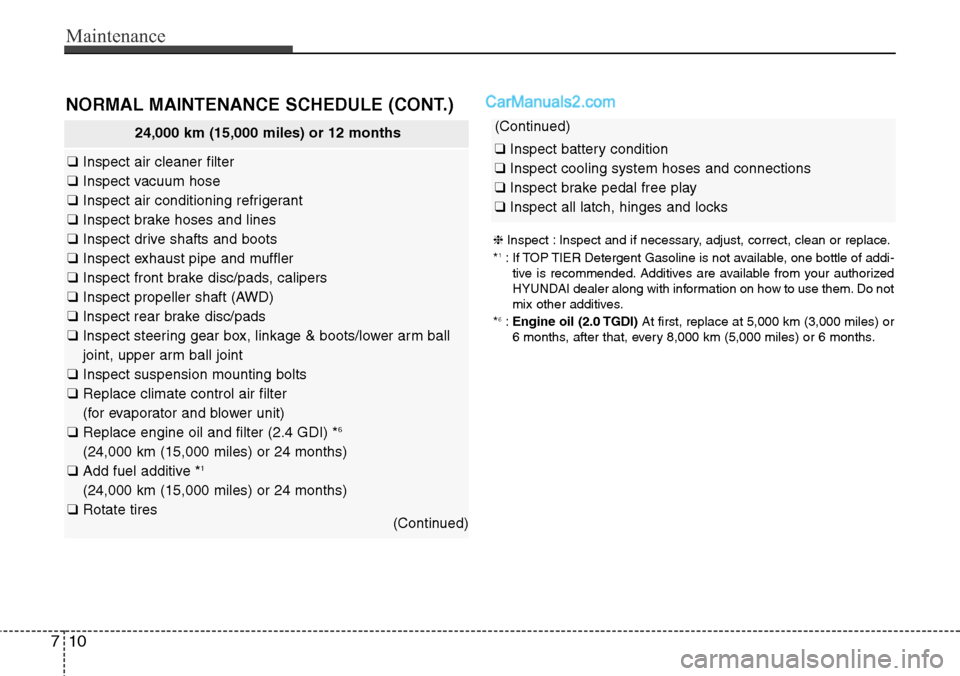
24,000 km (15,000 miles) or 12 months
❑Inspect air cleaner filter
❑Inspect vacuum hose
❑Inspect air conditioning refrigerant
❑Inspect brake hoses and lines
❑Inspect drive shafts and boots
❑Inspect exhaust pipe and muffler
❑Inspect front brake disc/pads, calipers
❑Inspect propeller shaft (AWD)
❑Inspect rear brake disc/pads
❑Inspect steering gear box, linkage & boots/lower arm ball
joint, upper arm ball joint
❑Inspect suspension mounting bolts
❑Replace climate control air filter
(for evaporator and blower unit)
❑Replace engine oil and filter (2.4 GDI) *
6
(24,000 km (15,000 miles) or 24 months)
❑Add fuel additive *1
(24,000 km (15,000 miles) or 24 months)
❑Rotate tires
(Continued)
NORMAL MAINTENANCE SCHEDULE (CONT.)
❈Inspect : Inspect and if necessary, adjust, correct, clean or replace.
*1: If TOP TIER Detergent Gasoline is not available, one bottle of addi-
tive is recommended. Additives are available from your authorized
HYUNDAI dealer along with information on how to use them. Do not
mix other additives.
*
6:Engine oil (2.0 TGDI)At first, replace at 5,000 km (3,000 miles) or
6 months, after that, every 8,000 km (5,000 miles) or 6 months.
(Continued)
❑Inspect battery condition
❑Inspect cooling system hoses and connections
❑Inspect brake pedal free play
❑Inspect all latch, hinges and locks
Page 687 of 785
Maintenance
12 7
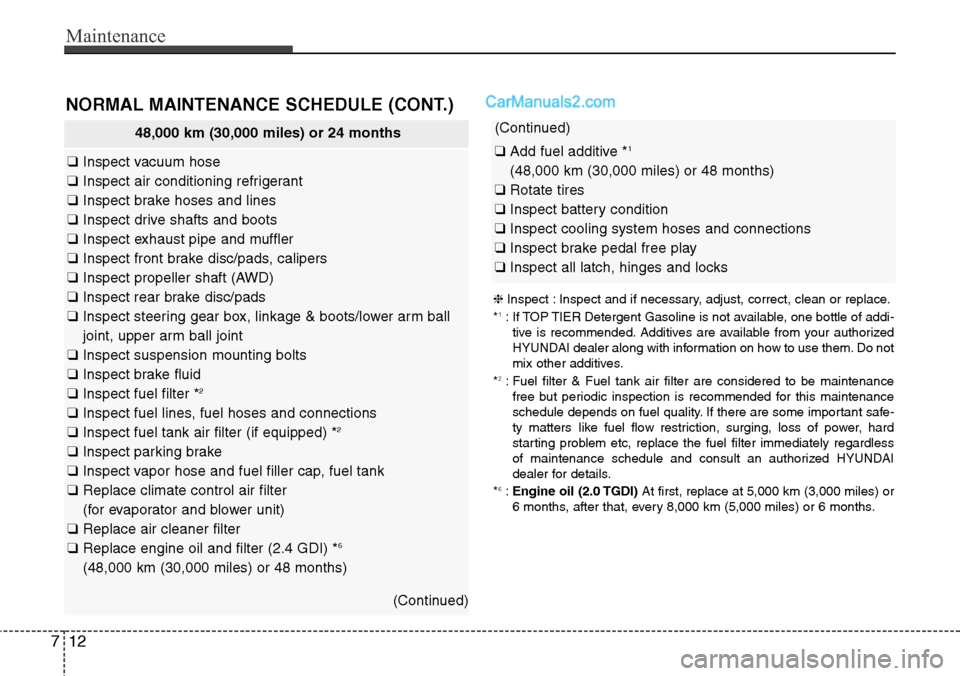
48,000 km (30,000 miles) or 24 months
❑Inspect vacuum hose
❑Inspect air conditioning refrigerant
❑Inspect brake hoses and lines
❑Inspect drive shafts and boots
❑Inspect exhaust pipe and muffler
❑Inspect front brake disc/pads, calipers
❑Inspect propeller shaft (AWD)
❑Inspect rear brake disc/pads
❑Inspect steering gear box, linkage & boots/lower arm ball
joint, upper arm ball joint
❑Inspect suspension mounting bolts
❑Inspect brake fluid
❑Inspect fuel filter *
2
❑Inspect fuel lines, fuel hoses and connections
❑Inspect fuel tank air filter (if equipped) *2
❑Inspect parking brake
❑Inspect vapor hose and fuel filler cap, fuel tank
❑Replace climate control air filter
(for evaporator and blower unit)
❑Replace air cleaner filter
❑Replace engine oil and filter (2.4 GDI) *
6
(48,000 km (30,000 miles) or 48 months)
(Continued)
NORMAL MAINTENANCE SCHEDULE (CONT.)
(Continued)
❑Add fuel additive *1
(48,000 km (30,000 miles) or 48 months)
❑Rotate tires
❑Inspect battery condition
❑Inspect cooling system hoses and connections
❑Inspect brake pedal free play
❑Inspect all latch, hinges and locks
❈Inspect : Inspect and if necessary, adjust, correct, clean or replace.
*1: If TOP TIER Detergent Gasoline is not available, one bottle of addi-
tive is recommended. Additives are available from your authorized
HYUNDAI dealer along with information on how to use them. Do not
mix other additives.
*
2: Fuel filter & Fuel tank air filter are considered to be maintenance
free but periodic inspection is recommended for this maintenance
schedule depends on fuel quality. If there are some important safe-
ty matters like fuel flow restriction, surging, loss of power, hard
starting problem etc, replace the fuel filter immediately regardless
of maintenance schedule and consult an authorized HYUNDAI
dealer for details.
*
6:Engine oil (2.0 TGDI)At first, replace at 5,000 km (3,000 miles) or
6 months, after that, every 8,000 km (5,000 miles) or 6 months.