2015 Hyundai Azera sensor
[x] Cancel search: sensorPage 166 of 473
489
Features of your vehicle
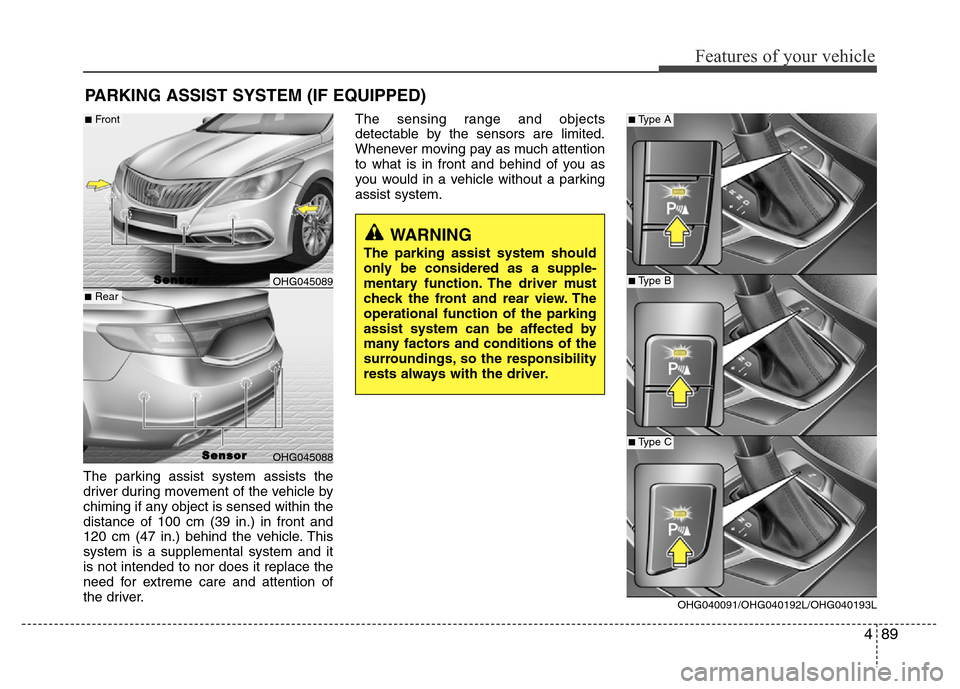
The parking assist system assists the
driver during movement of the vehicle by
chiming if any object is sensed within the
distance of 100 cm (39 in.) in front and
120 cm (47 in.) behind the vehicle. This
system is a supplemental system and it
is not intended to nor does it replace the
need for extreme care and attention of
the driver.The sensing range and objects
detectable by the sensors are limited.
Whenever moving pay as much attention
to what is in front and behind of you as
you would in a vehicle without a parking
assist system.
PARKING ASSIST SYSTEM (IF EQUIPPED)
WARNING
The parking assist system should
only be considered as a supple-
mentary function. The driver must
check the front and rear view. The
operational function of the parking
assist system can be affected by
many factors and conditions of the
surroundings, so the responsibility
rests always with the driver.
OHG045089
OHG045088
S S
e e
n n
s s
o o
r r
■Front
■Rear
S S
e e
n n
s s
o o
r r
OHG040091/OHG040192L/OHG040193L
■Type A
■Type B
■Type C
Page 167 of 473
Features of your vehicle
90 4
Operation of the parking assist
system
Operating condition
• This system activates when the park-
ing assist button is pressed with the
ignition switch ON.
• The parking assist button turns on
automatically and activates the parking
assist system when you shift the gear
to the R (Reverse) position. It will turn
off automatically when you shift out of
R (Reverse) and drive above 20 km/h.
However, the parking assist system will
not activated even if the vehicle speed
is below 20 km/h again. To activate the
system again, press the button.
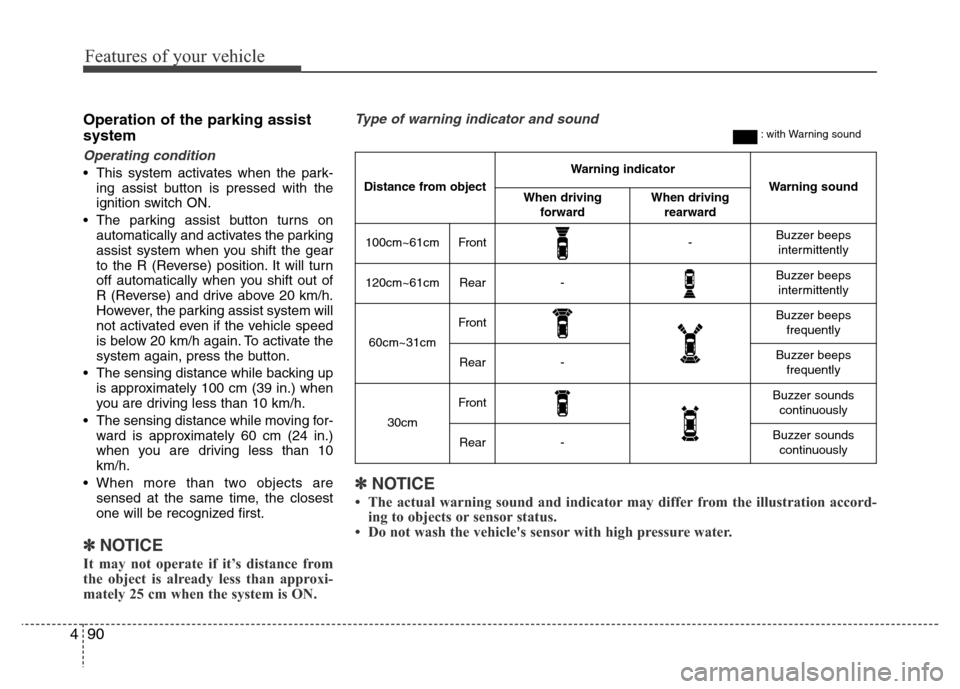
• The sensing distance while backing up
is approximately 100 cm (39 in.) when
you are driving less than 10 km/h.
• The sensing distance while moving for-
ward is approximately 60 cm (24 in.)
when you are driving less than 10
km/h.
• When more than two objects are
sensed at the same time, the closest
one will be recognized first.
✽NOTICE
It may not operate if it’s distance from
the object is already less than approxi-
mately 25 cm when the system is ON.
✽NOTICE
• The actual warning sound and indicator may differ from the illustration accord-
ing to objects or sensor status.
• Do not wash the vehicle's sensor with high pressure water.
Type of warning indicator and sound: with Warning sound
Distance from object
Warning indicator
Warning soundWhen driving
forwardWhen driving
rearward
100cm~61cmFront-Buzzer beeps
intermittently
120cm~61cmRear-Buzzer beeps
intermittently
60cm~31cm
FrontBuzzer beeps
frequently
Rear-Buzzer beeps
frequently
30cm
FrontBuzzer sounds
continuously
Rear-Buzzer sounds
continuously
Page 168 of 473
491
Features of your vehicle
Non-operational conditions of
parking assist system
Parking assist system may not oper-
ate normally when:
1. Moisture is frozen on the sensor. (It will
operate normally when moisture
melts.)
2. Sensor is covered with foreign matter,
such as snow or water, or the sensor
cover is blocked. (It will operate nor-
mally when the material is removed or
the sensor is no longer blocked.)
3. Sensor is stained with foreign matter
such as snow or water. (Sensing range
will return to normal when removed.)
4.The parking assist button is off.
There is a possibility of parking
assist system malfunction when:
1. Driving on uneven road surfaces such
as unpaved roads, gravel, bumps, or
gradient.
2. Objects generating excessive noise
such as vehicle horns, loud motorcycle
engines, or truck air brakes can inter-
fere with the sensor.
3. Heavy rain or water spray.
4. Wireless transmitters or mobile
phones present near the sensor.
5. Sensor is covered with snow.
Detecting range may decrease when:
1. Outside air temperature is extremely
hot or cold.
2. Undetectable objects smaller than 1 m
and narrower than 14 cm in diameter.
The following objects may not be rec-
ognized by the sensor:
1. Sharp or slim objects such as ropes,
chains or small poles.
2. Objects, which tend to absorb sensor
frequency such as clothes, spongy
material or snow.
CAUTION
• This system can only sense
objects within the range and loca-
tion of the sensors;
It can not detect objects in other
areas where sensors are not
installed. Also, small or slim
objects, such as poles or objects
located between sensors may not
be detected by the sensors.
Always visually check behind the
vehicle when backing up.
• Be sure to inform any drivers of
the vehicle that may be unfamiliar
with the system regarding the
systems capabilities and limita-
tions.
Page 169 of 473
Features of your vehicle
92 4
✽NOTICE
1. The warning may not sound sequen-
tially depending on the speed and
shapes of the objects detected.
2. The parking assist system may mal-
function if the vehicle bumper height
or sensor installation has been modi-
fied. Any non-factory installed equip-
ment or accessories may also interfere
with the sensor performance.
3. Sensor may not recognize objects less
than 30 cm from the sensor, or it may
sense an incorrect distance. Use with
caution.
4. When the sensor is frozen or stained
with snow or water, the sensor may be
inoperative until the stains are
removed using a soft cloth.
5. Do not push, scratch or strike the sen-
sor with any hard objects that could
damage the surface of the sensor.
Sensor damage could occur.
✽NOTICE
This system can only sense objects with-
in the range and location of the sensors,
it can not detect objects in other areas
where sensors are not installed. Also,
small or slim objects, or objects located
between sensors may not be detected.
Always visually check in front and
behind the vehicle when driving.
Be sure to inform any drivers in the
vehicle that may be unfamiliar with the
system regarding the systems capabili-
ties and limitations.
Self-diagnosis
When you shift the gear to the R
(Reverse) position and if one or more of
the below occurs you may have a mal-
function in the rear parking assist sys-
tem.
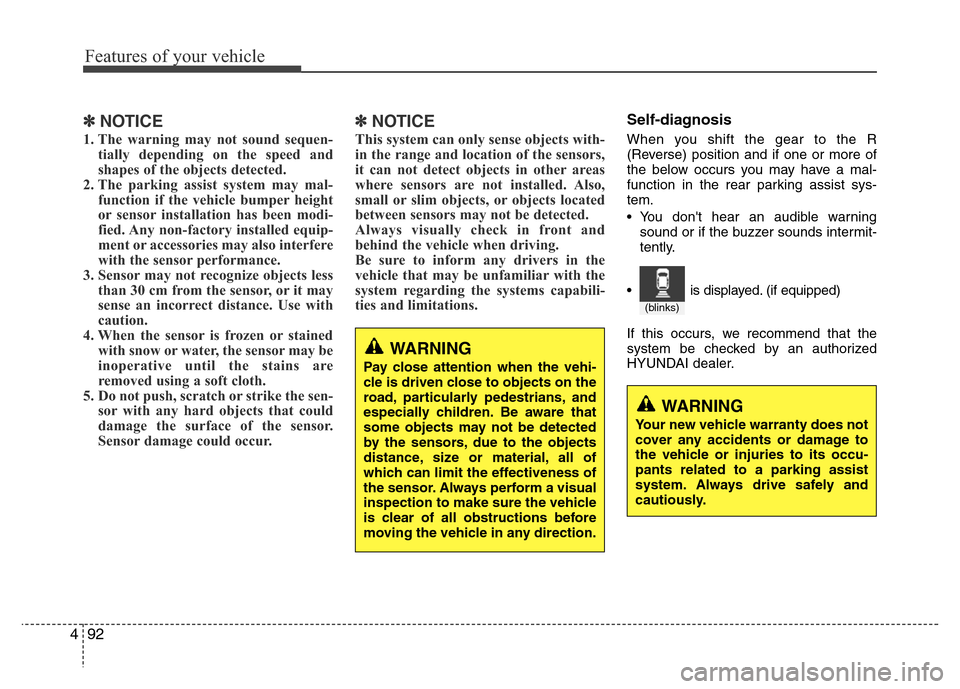
• You don't hear an audible warning
sound or if the buzzer sounds intermit-
tently.
If this occurs, we recommend that the
system be checked by an authorized
HYUNDAI dealer.
WARNING
Your new vehicle warranty does not
cover any accidents or damage to
the vehicle or injuries to its occu-
pants related to a parking assist
system. Always drive safely and
cautiously.
WARNING
Pay close attention when the vehi-
cle is driven close to objects on the
road, particularly pedestrians, and
especially children. Be aware that
some objects may not be detected
by the sensors, due to the objects
distance, size or material, all of
which can limit the effectiveness of
the sensor. Always perform a visual
inspection to make sure the vehicle
is clear of all obstructions before
moving the vehicle in any direction.
(blinks)
• is displayed. (if equipped)
Page 173 of 473
Features of your vehicle
96 4
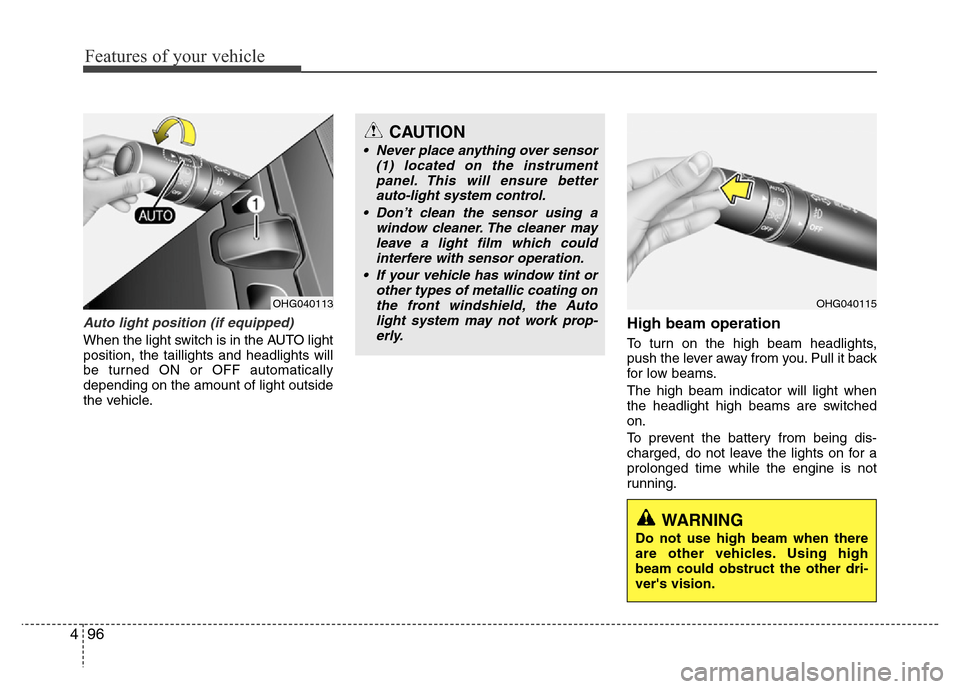
Auto light position (if equipped)
When the light switch is in the AUTO light
position, the taillights and headlights will
be turned ON or OFF automatically
depending on the amount of light outside
the vehicle.
High beam operation
To turn on the high beam headlights,
push the lever away from you. Pull it back
for low beams.
The high beam indicator will light when
the headlight high beams are switched
on.
To prevent the battery from being dis-
charged, do not leave the lights on for a
prolonged time while the engine is not
running.
OHG040113OHG040115
CAUTION
• Never place anything over sensor
(1) located on the instrument
panel. This will ensure better
auto-light system control.
• Don’t clean the sensor using a
window cleaner. The cleaner may
leave a light film which could
interfere with sensor operation.
• If your vehicle has window tint or
other types of metallic coating on
the front windshield, the Auto
light system may not work prop-
erly.
WARNING
Do not use high beam when there
are other vehicles. Using high
beam could obstruct the other dri-
ver's vision.
Page 178 of 473
4101
Features of your vehicle
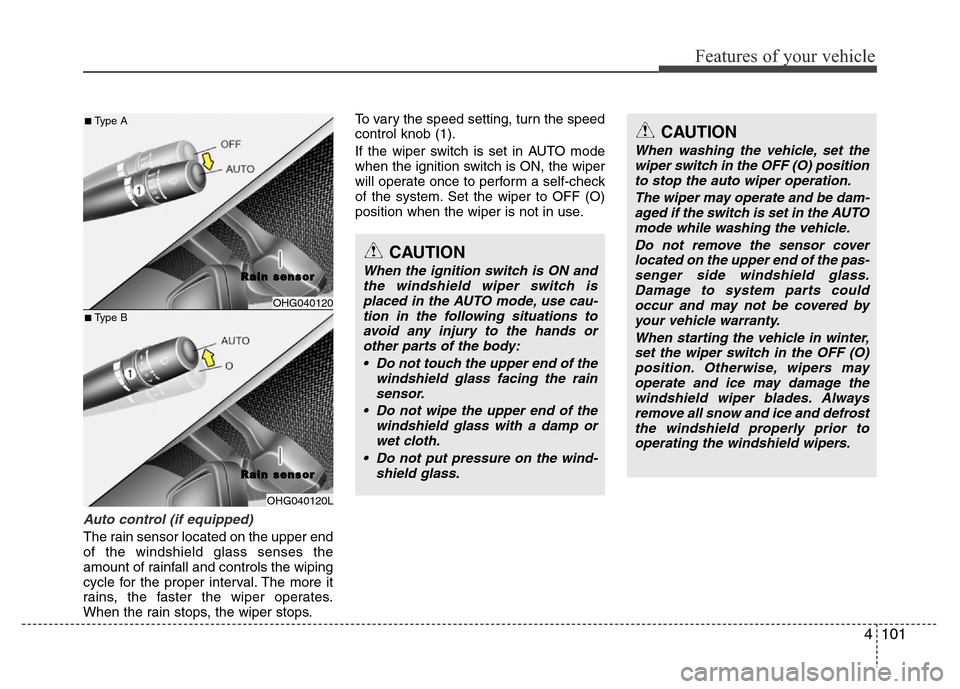
Auto control (if equipped)
The rain sensor located on the upper end
of the windshield glass senses the
amount of rainfall and controls the wiping
cycle for the proper interval. The more it
rains, the faster the wiper operates.
When the rain stops, the wiper stops.To vary the speed setting, turn the speed
control knob (1).
If the wiper switch is set in AUTO mode
when the ignition switch is ON, the wiper
will operate once to perform a self-check
of the system. Set the wiper to OFF (O)
position when the wiper is not in use.
OHG040120
R R
a a
i i
n n
s s
e e
n n
s s
o o
r r
OHG040120L
CAUTION
When the ignition switch is ON and
the windshield wiper switch is
placed in the AUTO mode, use cau-
tion in the following situations to
avoid any injury to the hands or
other parts of the body:
• Do not touch the upper end of the
windshield glass facing the rain
sensor.
• Do not wipe the upper end of the
windshield glass with a damp or
wet cloth.
• Do not put pressure on the wind-
shield glass.
CAUTION
When washing the vehicle, set the
wiper switch in the OFF (O) position
to stop the auto wiper operation.
The wiper may operate and be dam-
aged if the switch is set in the AUTO
mode while washing the vehicle.
Do not remove the sensor cover
located on the upper end of the pas-
senger side windshield glass.
Damage to system parts could
occur and may not be covered by
your vehicle warranty.
When starting the vehicle in winter,
set the wiper switch in the OFF (O)
position. Otherwise, wipers may
operate and ice may damage the
windshield wiper blades. Always
remove all snow and ice and defrost
the windshield properly prior to
operating the windshield wipers.
■Type A
■Type B
R R
a a
i i
n n
s s
e e
n n
s s
o o
r r
Page 196 of 473
4119
Features of your vehicle
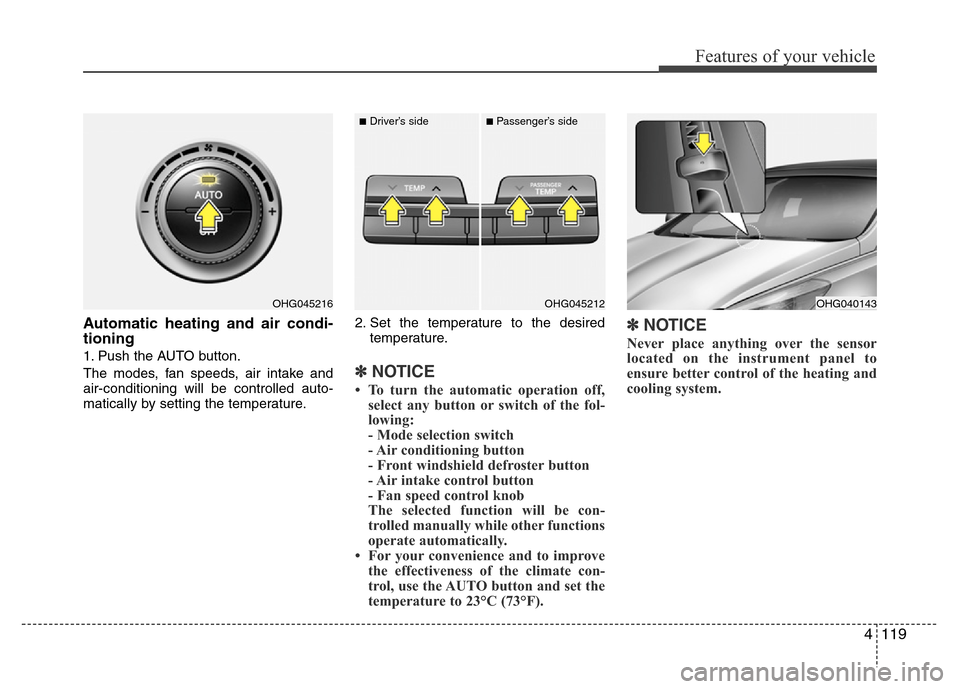
Automatic heating and air condi-
tioning
1. Push the AUTO button.
The modes, fan speeds, air intake and
air-conditioning will be controlled auto-
matically by setting the temperature.2. Set the temperature to the desired
temperature.
✽NOTICE
• To turn the automatic operation off,
select any button or switch of the fol-
lowing:
- Mode selection switch
- Air conditioning button
- Front windshield defroster button
- Air intake control button
- Fan speed control knob
The selected function will be con-
trolled manually while other functions
operate automatically.
• For your convenience and to improve
the effectiveness of the climate con-
trol, use the AUTO button and set the
temperature to 23°C (73°F).
✽NOTICE
Never place anything over the sensor
located on the instrument panel to
ensure better control of the heating and
cooling system.
OHG040143OHG045216OHG045212
■Driver’s side■Passenger’s side
Page 210 of 473
4133
Features of your vehicle
This indicator illuminates
when the auto defogging
system senses the moisture
of inside the windshield and
operates.
If more moisture is in the vehicle, higher
steps operate as follow. For example if
auto defogging does not defog inside the
windshield at step 1 Outside air position,
it tries to defog again at step 2 operating
the air conditioning.
Step 1 : Outside air position
Step 2 : Operating the air conditioning
Step 3 : Blowing air toward the wind-
shield
Step 4 : Increasing air flow toward the
windshield
Step 5 : Maximizing the air conditioning
If your vehicle is equipped with the auto
defogging system, it is automatically acti-
vated when the conditions are met.
However, if you would like to cancel the
auto defogging system, press the front
defroster button for 3 seconds when the
ignition switch or ENGINE START/STOP
button is in the ON position.The indicator of front defroster button will
blink 3 times to notify you that the system
is cancelled. To use the auto defogging
system again, follow the procedures
mentioned above. The indicator of front
defroster button will blink 6 times at inter-
vals of 0.5 seconds to notify you that the
system is set.
If the battery has been disconnected or
discharged, it resets to the auto defog-
ging status.
✽NOTICE
If the A/C off or recirculated air position
is manually selected while the auto
defogging system is on, the auto defog-
ging indicator will blink 3 times to give
notice that the A/C off or recirculated air
position operation cannot be selected.
CAUTION
Do not remove the sensor cover
located on the upper end of the
driver side windshield glass.
Damage to the system parts could
occur and may not be covered by
your vehicle warranty.