2015 FORD TRANSIT light
[x] Cancel search: lightPage 133 of 461

How to Interrupt or Cancel Operator
Commanded Regeneration
If you need to cancel the operator
commanded regeneration, press the brake
pedal or switch the ignition off to stop the
procedure. Depending on the amount of
time you allowed the operator
commanded regeneration to operate, soot
may not have had sufficient time to be
eliminated, but the exhaust system and
exhaust gas may still be hot. If you shut
your vehicle off during operator
commanded regeneration, you will notice
turbo flutter. This is a normal consequence
caused by shutting off a diesel engine
during boosted operation and is considered
normal.
Filter Service and Maintenance
Over time, a slight amount of ash will build
up in the diesel particulate filter, which is
not removed during the regeneration
process. The filter may need to be removed
for ash cleaning at approximately
119900 mi (193,000 km) or greater, actual
mileage can vary greatly depending upon
engine and vehicle operating conditions.
The filter may need to be replaced at
approximately 248500 mi (400,000 km)
depending upon vehicle operating
conditions.
In both cases, the engine control system
will set a service light to inform you to have
your vehicle checked by an authorized
dealer.
If there are any issues with the diesel
particulate filter, the engine control system
will turn on a service light to inform you to
have your vehicle checked by an authorized
dealer. Powertrain fault indicator. Service engine soon indicator.
Resonator and Tailpipe Assembly
Maintenance WARNINGS
Failure to maintain the functional
holes, in the tailpipe section of the
exhaust, clean and free of debris or
foreign material may result in the holes
becoming blocked or plugged. Do not
modify or remove the tail-pipe section.
Blocked or plugged holes or
removal/modification of the system could
result in elevated exhaust gas
temperatures which may result in
vehicle/property damage or personal
injury. The normal operating temperature
of the exhaust system is very high.
Never work around or attempt to
repair any part of the exhaust system until
it has cooled. Use special care when
working around the diesel oxidation
catalytic converter and/or the diesel
particulate filter (DPF). The diesel
oxidation catalytic converter and/or the
DPF heats up to a high temperature after
only a short period of engine operation and
can stay hot even after the engine is turned
off. Failure to follow these instructions may
result in personal injury. Note:
Additions of aftermarket devices or
modifications to the exhaust system can
reduce the effectiveness of the exhaust
system as well as cause damage to the
exhaust system or engine. These actions
may also affect your vehicle ’s warranty. See
the Warranty Guide for more information.
130 Transit (TTH) Canada/United States of America, enUSA, Edition date: 03/2014 Fuel and Refueling
Page 134 of 461

The diesel resonator tail-pipe assembly is
a uniquely functioning device that
accompanies the diesel particulate filter
assembly. The tail-pipe assembly serves
multiple functions. First, it serves as an
acoustic device to attenuate exhaust noise.
Second, it provides an exit path for the
exhaust from your vehicle. It also helps
control the temperature of the exhaust
during diesel particulate filter regeneration
events. The visible holes in each leg of the
twin tip and the holes under the shield just
inboard of the right rear tire(s) are
functional. You need to keep the holes
clear of mud, debris or foreign material to
maintain proper function of the exhaust
system. Clean and remove debris or foreign
material if present as needed. Spraying
with a hose during regular washing of your
vehicle should help keep holes clean and
clear of debris or foreign material.
Emission Control System Laws
WARNING
Do not remove or alter the original
equipment floor covering or
insulation between it and the metal
floor of the vehicle. The floor covering and
insulation protect occupants of the vehicle
from the engine and exhaust system heat
and noise. On vehicles with no original
equipment floor covering insulation, do not
carry passengers in a manner that permits
prolonged skin contact with the metal
floor. Provide adequate insulation. Failure
to follow these instructions may result in
fire or personal injury. In the U.S. federal law and certain state
laws prohibit removing or rendering
inoperative emission control system(s).
Similar federal or provincial laws may
apply in Canada. Ford recommends
against any vehicle modification without
determining applicable law. Tampering with emissions
control systems (including
related sensors and the Diesel
Exhaust Fluid (DEF) injection system) can
result in reduced engine power and the
illumination of the service engine soon
light.
Tampering With a Noise Control
System
Federal law prohibits the following acts:
• The removal or rendering inoperative
by any person other than for purposes
of maintenance, repair or replacement
of any device or element of design
incorporated into any new vehicle for
the purpose of noise control prior to its
sale or delivery to the ultimate
purchaser or while it is in use
• The use of the vehicle after such device
or element of design has been removed
or rendered inoperative by any person.
The U.S. Environmental Protection Agency
may presume to constitute tampering as
follows:
• Removal of hood blanket, fender apron
absorbers, fender apron barriers,
underbody noise shields or acoustically
absorptive material.
• Tampering or rendering inoperative the
engine speed governor, to allow engine
speed to exceed manufacturer ’s
specifications.
The complexity of the diesel engine makes
it so you are not encouraged to carry-out
maintenance other than the services
described in this Owner's Manual.
131 Transit (TTH) Canada/United States of America, enUSA, Edition date: 03/2014 Fuel and Refueling
Page 138 of 461
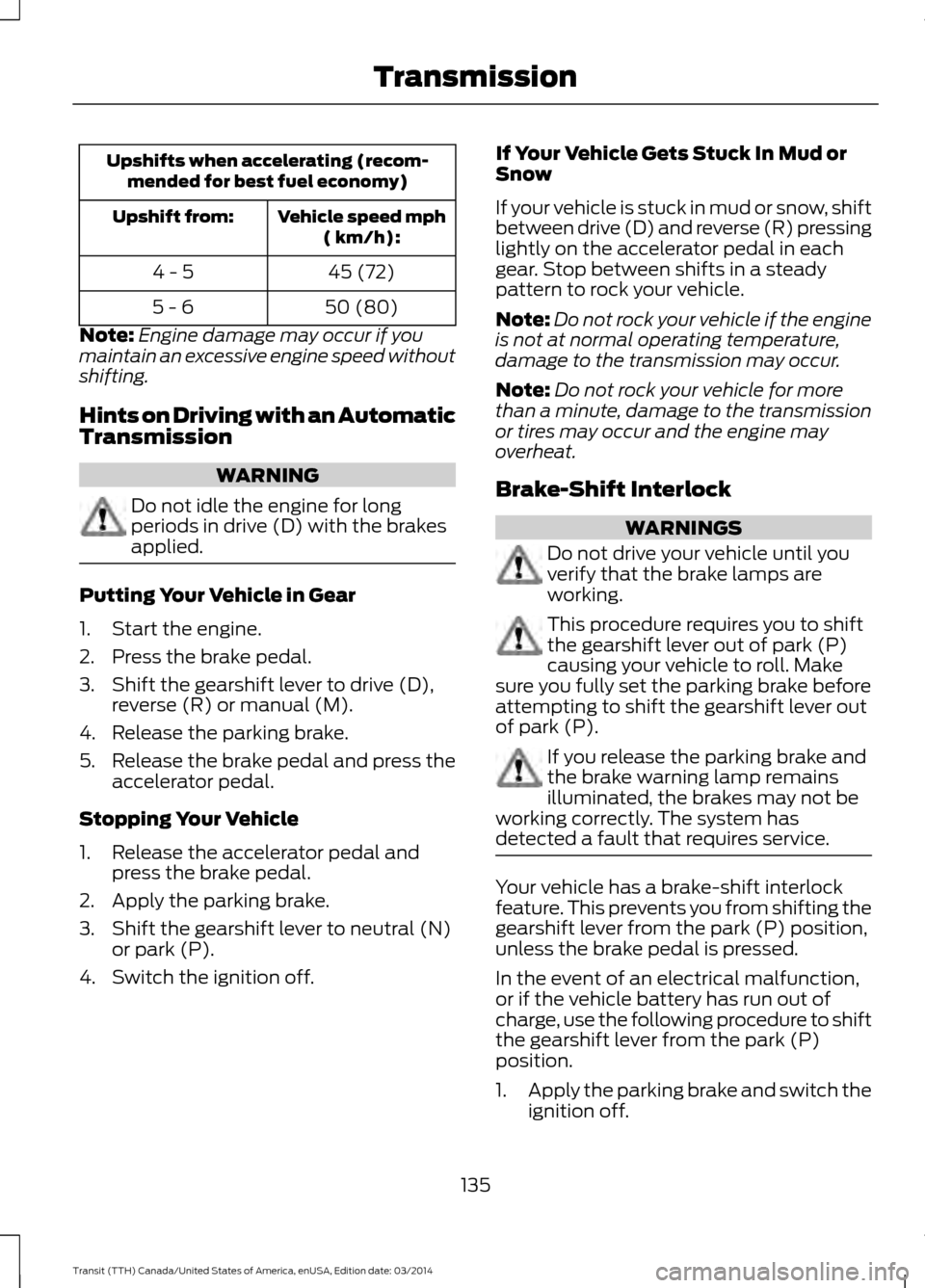
Upshifts when accelerating (recom-
mended for best fuel economy)
Vehicle speed mph( km/h):
Upshift from:
45 (72)
4 - 5
50 (80)
5 - 6
Note: Engine damage may occur if you
maintain an excessive engine speed without
shifting.
Hints on Driving with an Automatic
Transmission WARNING
Do not idle the engine for long
periods in drive (D) with the brakes
applied.
Putting Your Vehicle in Gear
1. Start the engine.
2. Press the brake pedal.
3. Shift the gearshift lever to drive (D),
reverse (R) or manual (M).
4. Release the parking brake.
5. Release the brake pedal and press the
accelerator pedal.
Stopping Your Vehicle
1. Release the accelerator pedal and press the brake pedal.
2. Apply the parking brake.
3. Shift the gearshift lever to neutral (N) or park (P).
4. Switch the ignition off. If Your Vehicle Gets Stuck In Mud or
Snow
If your vehicle is stuck in mud or snow, shift
between drive (D) and reverse (R) pressing
lightly on the accelerator pedal in each
gear. Stop between shifts in a steady
pattern to rock your vehicle.
Note:
Do not rock your vehicle if the engine
is not at normal operating temperature,
damage to the transmission may occur.
Note: Do not rock your vehicle for more
than a minute, damage to the transmission
or tires may occur and the engine may
overheat.
Brake-Shift Interlock WARNINGS
Do not drive your vehicle until you
verify that the brake lamps are
working.
This procedure requires you to shift
the gearshift lever out of park (P)
causing your vehicle to roll. Make
sure you fully set the parking brake before
attempting to shift the gearshift lever out
of park (P). If you release the parking brake and
the brake warning lamp remains
illuminated, the brakes may not be
working correctly. The system has
detected a fault that requires service. Your vehicle has a brake-shift interlock
feature. This prevents you from shifting the
gearshift lever from the park (P) position,
unless the brake pedal is pressed.
In the event of an electrical malfunction,
or if the vehicle battery has run out of
charge, use the following procedure to shift
the gearshift lever from the park (P)
position.
1.
Apply the parking brake and switch the
ignition off.
135 Transit (TTH) Canada/United States of America, enUSA, Edition date: 03/2014 Transmission
Page 140 of 461

GENERAL INFORMATION
Note:
Occasional brake noise is normal. If
a metal-to-metal, continuous grinding or
continuous squeal sound is present, the
brake linings may be worn-out. Have the
system checked by an authorized dealer. If
your vehicle has continuous vibration or
shudder in the steering wheel while braking,
have it checked by an authorized dealer.
Note: Brake dust may accumulate on the
wheels, even under normal driving
conditions. Some dust is inevitable as the
brakes wear and does not contribute to
brake noise. See Cleaning the Alloy
Wheels (page 230). See
Warning Lamps and
Indicators (page 75).
Wet brakes result in reduced braking
efficiency. Gently press the brake pedal a
few times when driving from a car wash or
standing water to dry the brakes.
Brake Over Accelerator
In the event the accelerator pedal
becomes stuck or entrapped, apply steady
and firm pressure to the brake pedal to
slow the vehicle and reduce engine power.
If you experience this condition, apply the
brakes and bring your vehicle to a safe
stop. Move the gearshift lever to park (P),
switch the engine off and apply the parking
brake. Inspect the accelerator pedal for
any interference. If none are found and the
condition persists, have your vehicle towed
to the nearest authorized dealer.
Brake Assist
Brake assist detects when you brake
rapidly by measuring the rate at which you
press the brake pedal. It provides
maximum braking efficiency as long as you
press the pedal, and can reduce stopping
distances in critical situations. Anti-lock Brake System
This system helps you maintain steering
control during emergency stops by keeping
the brakes from locking. This lamp momentarily
illuminates when you turn the
ignition on. If the light does not
illuminate during start up, remains on or
flashes, the system may be disabled. Have
the system checked by an authorized
dealer. If the system is disabled, normal
braking is still effective. If the
brake warning lamp illuminates
when you release the parking brake, have
the system checked by an authorized
dealer.
HINTS ON DRIVING WITH
ANTI-LOCK BRAKES
Note: When the system is operating, the
brake pedal will pulse and may travel
further. Maintain pressure on the brake
pedal. You may also hear a noise from the
system. This is normal.
The anti-lock braking system will not
eliminate the risks when:
• You drive too closely to the vehicle in
front of you.
• Your vehicle is hydroplaning.
• You take corners too fast.
• The road surface is poor.
137 Transit (TTH) Canada/United States of America, enUSA, Edition date: 03/2014 Brakes
Page 141 of 461
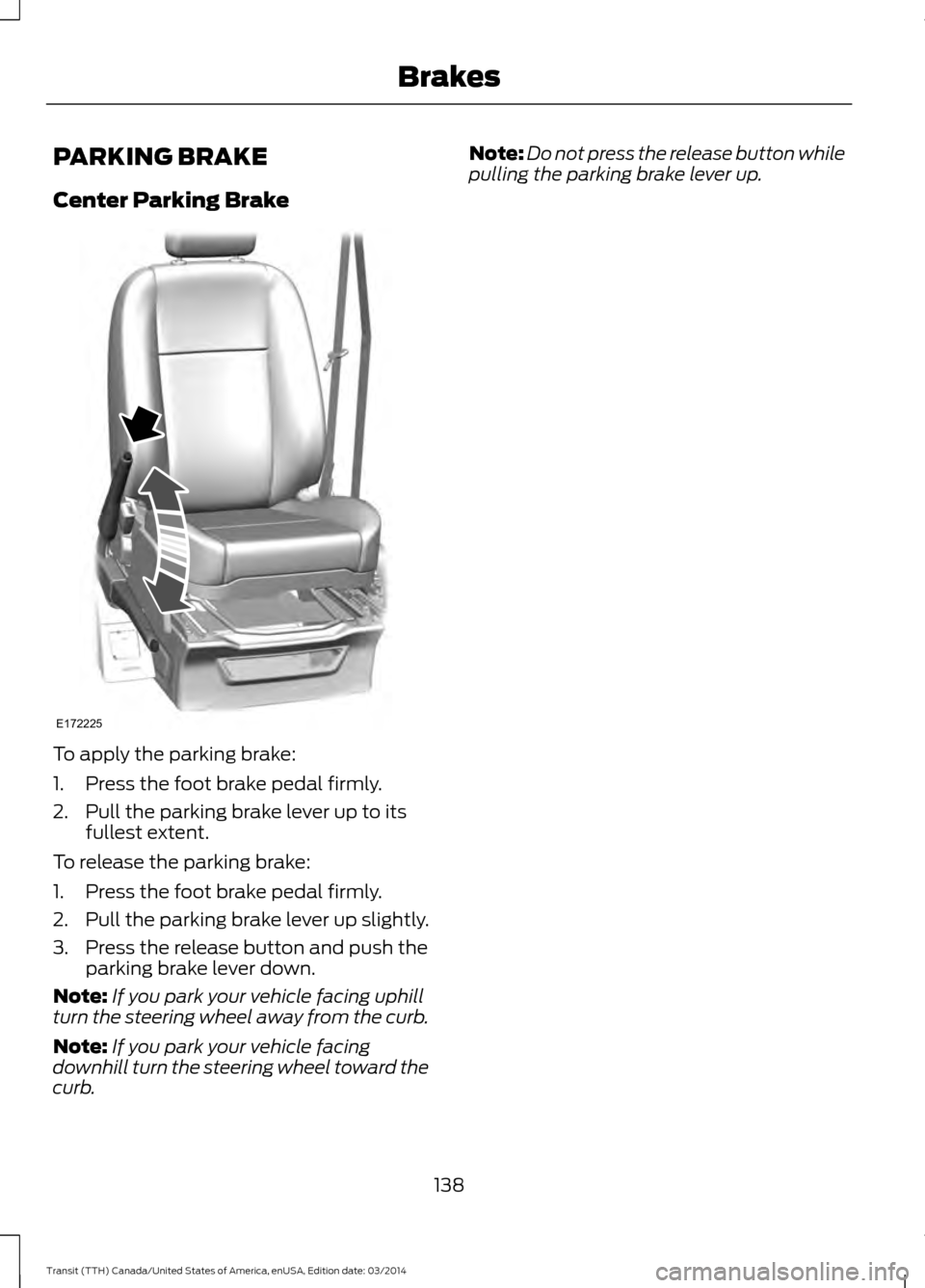
PARKING BRAKE
Center Parking Brake
To apply the parking brake:
1. Press the foot brake pedal firmly.
2. Pull the parking brake lever up to its
fullest extent.
To release the parking brake:
1. Press the foot brake pedal firmly.
2. Pull the parking brake lever up slightly.
3. Press the release button and push the parking brake lever down.
Note: If you park your vehicle facing uphill
turn the steering wheel away from the curb.
Note: If you park your vehicle facing
downhill turn the steering wheel toward the
curb. Note:
Do not press the release button while
pulling the parking brake lever up.
138 Transit (TTH) Canada/United States of America, enUSA, Edition date: 03/2014 BrakesE172225
Page 146 of 461

PRINCIPLE OF OPERATION
WARNINGS
The system does not relieve you of
your responsibility to drive with due
care and attention.
If your vehicles has a non-Ford
approved trailer tow module the
system may not correctly detect
objects. The sensors may not detect objects
in heavy rain or other conditions that
cause disruptive reflections.
The sensors may not detect objects
with surfaces that absorb ultrasonic
waves.
The system does not detect objects
that are moving away from your
vehicle. They will only be detected
shortly after they start to move toward
your vehicle. Take particular care when reversing
with a tow ball arm or a rear fitted
accessory. For example, a bicycle
carrier. The rear parking aid will only
indicate the approximate distance from
the rear bumper to an object. If you use a high pressure spray to
wash your vehicle, only spray the
sensors briefly from a distance not
less than eight inches (20 centimeters). Note:
If your vehicle has a tow ball arm,
switch the system off when you connect
trailer lamps (or lighting boards) to the
13-pin socket through a Ford approved
trailer tow module.
Note: Keep the sensors free from dirt, ice
or snow. Do not clean with sharp objects.
Note: The system may emit false alerts if
it detects a signal using the same frequency
as the sensors or if your vehicle is fully
loaded. Note:
The outer sensors may detect the
side walls of a garage. If the distance
between the outer sensors and the side wall
remains constant for three seconds, the
alert will turn off. As you continue the inner
sensors will detect objects directly behind
your vehicle.
PARKING AID WARNINGS
The parking aid system can only
assist you to detect objects when
your vehicle is moving at parking
speeds. To help avoid personal injury you
must take care when using the parking aid
system. Traffic control systems, inclement
weather, air brakes, external motors
and fans may affect the correct
operation of the sensing system.This may
cause reduced performance or false alerts. The system may not detect small or
moving objects, particularly those
close to the ground.
The system warns you of objects that are
within the detection zone of the bumper
areas. When you switch the ignition on,
the system automatically turns on. The
system becomes active when you shift into
reverse (R) and the speed of your vehicle
is 10 mph (16 km/h) or less.
143 Transit (TTH) Canada/United States of America, enUSA, Edition date: 03/2014 Parking Aids
Page 148 of 461

WARNINGS
The operation of the camera may
vary depending on the ambient
temperature, vehicle and road
conditions. Do not place objects in front of the
camera.
The camera may not detect objects
that are very close to your vehicle.
The camera is on the rear cargo door.
Switching the Rear View Camera
On
Switch the ignition on and shift into reverse
(R). The image will display in the interior
mirror or in the information and
entertainment display.
The camera may not operate correctly in
any of the following conditions:
•
Dark areas.
• Intense light areas.
• If there is a sudden change to the
ambient temperature.
• If the camera is wet.
• If the camera is dirty.
• If the camera is obstructed. Using the Display WARNING
Objects above the camera may not
be visible. Check the area behind
your vehicle when necessary.
The lines show a projected vehicle path
and the approximate distance from the
rear bumper to an object.
Distance markers are only a guide and are
calculated for unloaded vehicles on an
even road surface.
145 Transit (TTH) Canada/United States of America, enUSA, Edition date: 03/2014 Parking AidsE170301
Page 152 of 461

SPEED LIMITER
Engine Speed Limiter
Engine speed is limited to protect the
engine.
Vehicle Speed Limiter - Fixed
The system prevents you from driving
faster than a programmed speed.
DRIVER ALERT
Principle of Operation
WARNINGS
The system does not relieve you of
your responsibility to drive with due
care and attention.
At all times you are responsible for
controlling your vehicle, supervising
the system and intervening if
required. If the sensor becomes blocked the
system may not function.
Take regular rest breaks as required
and do not wait for the system to
warn you if you feel tired.
Take rest breaks only where it is safe
to do so.
Certain driving styles and behavior
may result in the system issuing a
warning even if you are not feeling
tired. In cold and severe weather
conditions the system may not
function. Rain, snow, spray and large
contrasts in lighting can all influence the
sensor. The system will not operate if the
sensor cannot track the road lane
markings. WARNINGS
The system may not operate in areas
during roadwork construction.
The system may not operate on
roads with sharp bends or narrow
lanes.
Do not carry out windshield repairs
in the immediate area surrounding
the sensor.
If your vehicle has a suspension kit
not approved by us, the system may
not function correctly.
Note:
Keep the windshield free from
obstructions such as bird droppings, insects
and snow or ice.
Note: The system assists you when driving
on fast main roads and freeways.
Note: The system calculates an alertness
level at vehicle speeds above approximately
40 mph (65 km/h).
The system automatically monitors your
driving behavior.
The system is designed to alert you if it
detects that you are becoming drowsy or
if your driving deteriorates.
Using Driver Alert
Switching the System On and Off
Note: The system will remain on or off
depending on how it was last set.
Switch the system on using the information
display. See Information Displays (page
79).
T
he system will calculate your alertness
level based upon your driving behavior in
relation to the lane markings and other
factors.
149 Transit (TTH) Canada/United States of America, enUSA, Edition date: 03/2014 Driving Aids