2015 FORD TRANSIT tire pressure
[x] Cancel search: tire pressurePage 258 of 461

Overview
WARNING
To determine the required
pressure(s) for your vehicle, see the
Safety Compliance Certification
Label (affixed to either the door hinge
pillar, door-latch post, or the door edge
that meets the door-latch post, next to the
driver seating position), or Tire Label
located on the B-Pillar or the edge of the
driver door. To maintain your vehicle
’s load carrying
capability, this vehicle requires different
tire pressures in the front tires compared
to the rear tires. The system on your vehicle
is designed to illuminate the warning light
at different pressures for the front and rear
tires.
The tires need to be periodically rotated
to provide consistent performance and
maximum tire life, the system needs to
know when the tires have been rotated to
determine which set of tires are on the
front and rear axles. With this information,
the system can detect and correctly warn
of low tire pressures.
System Reset Tips:
• To reduce the chance of interference
from another vehicle, the system reset
procedure should be carried out at
least three feet (one meter) away from
another Ford vehicle undergoing the
system reset procedure.
• Do not wait more than two minutes
between resetting each tire sensor or
the system will time-out and the entire
procedure will have to be repeated on
all four wheels. A double horn chirp
indicates the need to repeat the
procedure. Carrying Out the System Reset
Procedure
Read the entire procedure before carrying
out a system reset.
1. Drive your vehicle above 20 mph (32
km/h) for at least two minutes and
then park in a safe location where you
can easily get to all four tires and have
access to a tire inflation pump.
2. Switch the ignition off.
3. Switch the ignition on with the engine off.
4. Turn the hazard flashers on then off three times, this must be completed
within 10 seconds. If the reset mode
has been entered successfully, the horn
will chirp once and the system indicator
will flash. If this does not occur, repeat
the procedure from step 2. If after
repeated attempts to enter the reset
mode, the horn does not chirp and the
system indicator does not flash, have
your vehicle checked by an authorized
dealer as soon as possible.
5. Train the system sensors in the tires using the following reset sequence
starting with the left front tire and
following a clockwise order: Left front,
right front, right rear, left rear.
6. Remove the valve cap from the valve stem on the left front tire. Decrease the
air pressure until the horn chirps.
Note: The single horn chirp confirms that
the sensor identification code has been
learned by your vehicle for this position. If a
double horn chirp is heard, the reset
procedure was unsuccessful and must be
repeated.
7. Remove the valve cap from the valve stem on the right front tire. Decrease
the air pressure until the horn chirps.
8. Remove the valve cap from the valve stem on the right rear tire. Decrease the
air pressure until the horn chirps.
255 Transit (TTH) Canada/United States of America, enUSA, Edition date: 03/2014 Wheels and Tires
Page 259 of 461

9. Remove the valve cap from the valve
stem on the left rear tire. Decrease the
air pressure until the horn chirps.
Training is complete when the horn
chirps after the last system sensor (left
rear) has been trained and the system
indicator stops flashing.
10. Switch the ignition off. If two short horn chirps are heard, the reset
procedure was unsuccessful and
must be repeated.
Note: If after repeating the procedure two
short horn chirps are heard again, have your
vehicle checked by an authorized dealer as
soon as possible.
11. Set all four tires to the correct pressure See Maintenance (page
200). or the tire inflation pressure label
(located on the edge of driver door or
the B-Pillar).
CHANGING A ROAD WHEEL WARNINGS
The use of tire sealant may damage
your tire pressure monitoring system
and should only be used in roadside
emergencies. If you must use a sealant, the
Ford Tire Mobility Kit sealant should be
used. The tire pressure monitoring system
sensor and valve stem on the wheel must
be replaced by an authorized dealer after
use of the sealant. If the tire pressure monitor sensor
becomes damaged, it will no longer
function. See
Tire Pressure
Monitoring System (page 251). Note:
The tire pressure monitoring system
indicator light will illuminate when the spare
tire is in use. To restore the full function of
the monitoring system, all road wheels
equipped with tire pressure monitoring
sensors must be mounted on this vehicle. If you get a flat tire while driving, do not
apply the brake heavily. Instead, gradually
decrease your speed. Hold the steering
wheel firmly and slowly move to a safe
place on the side of the road.
Have a flat serviced by an authorized
dealer in order to prevent damage to the
system sensors
See Tire Pressure
Monitoring System (page 251). Replace
the spare tire with a road tire as soon as
possible. During repairing or replacing of
the flat tire, have the authorized dealer
inspect the system sensor for damage.
Dissimilar Spare Wheel and Tire
Assembly Information WARNING
Failure to follow these guidelines
could result in an increased risk of
loss of vehicle control, injury or death.
If you have a dissimilar spare wheel and
tire, then it is intended for temporary use
only. This means that if you need to use it,
you should replace it as soon as possible
with a road wheel and tire assembly that
is the same size and type as the road tires
and wheels that were originally provided
by Ford. If the dissimilar spare tire or wheel
is damaged, it should be replaced rather
than repaired.
A dissimilar spare wheel and tire assembly
is defined as a spare wheel and tire
assembly that is different in brand, size or
appearance from the road tires and wheels
and can be one of three types:
1.
T-type mini-spare: This spare tire
begins with the letter T for tire size and
may have Temporary Use Only molded in
the sidewall.
2. Full-size dissimilar spare with label
on wheel:
This spare tire has a label on
the wheel that states: THIS WHEEL AND
TIRE ASSEMBLY FOR TEMPORARY USE
ONLY
256 Transit (TTH) Canada/United States of America, enUSA, Edition date: 03/2014 Wheels and Tires
Page 261 of 461

Note:
If your vehicle is fitted with a tire
pressure monitoring system, the warning
indicator will flash if you fit the spare wheel
to your vehicle. To restore the correct
operation of the tire pressure monitoring
system, you must have the repaired road
wheel and tire assembly refitted to your
vehicle. See Tire Pressure Monitoring
System (page 251). To prevent damage
occurring to the tire pressure monitoring
system sensors, make sure you have a
damage tire repaired or replaced by a tire
professional. 1. Open the rear doors. Remove the
grommet and insert the flat end of the
lug wrench into the socket. Turn
counterclockwise until the spare wheel
rests on the ground and the cable is
loose. 2. Raise the cable end cover.
3. Rotate the cable through 90 degrees.
Slide the cable through the slot to
release the spare wheel bracket from
the winch.
258 Transit (TTH) Canada/United States of America, enUSA, Edition date: 03/2014 Wheels and TiresE145138 E146811 E146812
12
Page 262 of 461

4. Remove the retaining nut to release
the spare wheel bracket.
Vehicles With a Spare Wheel
Chassis Cab and Cutaway
The spare wheel is under the rear of your
vehicle.
If the spare wheel is the same type and
size as your vehicle road wheel, you can fit
the spare wheel and continue to drive in
the normal manner.
If the spare wheel is not the same type and
size as your vehicle road wheel, it has a
label showing the maximum driving speed
limit.
Note: If your vehicle is fitted with a tire
pressure monitoring system, the warning
indicator will flash if you fit the spare wheel
to your vehicle. To restore the correct
operation of the tire pressure monitoring
system, you must have the repaired road
wheel and tire assembly refitted to your
vehicle. See Tire Pressure Monitoring
System (page 251). To prevent damage
occurring to the tire pressure monitoring
system sensors, make sure you have a
damage tire repaired or replaced by a tire
professional. 1. Insert the flat end of the lug wrench
into the socket. Turn counterclockwise
until the spare wheel rests on the
ground and the cable is loose. 2. Raise the cable end cover.
259 Transit (TTH) Canada/United States of America, enUSA, Edition date: 03/2014 Wheels and TiresE146813 E184880 E146811
Page 266 of 461
WARNINGS
Make sure the wheel and hub
contact surfaces are free from
foreign material.
Never use wheels or lug nuts
different than the original equipment
as this could damage the wheel or
mounting system. This damage could
allow the wheels to come off when your
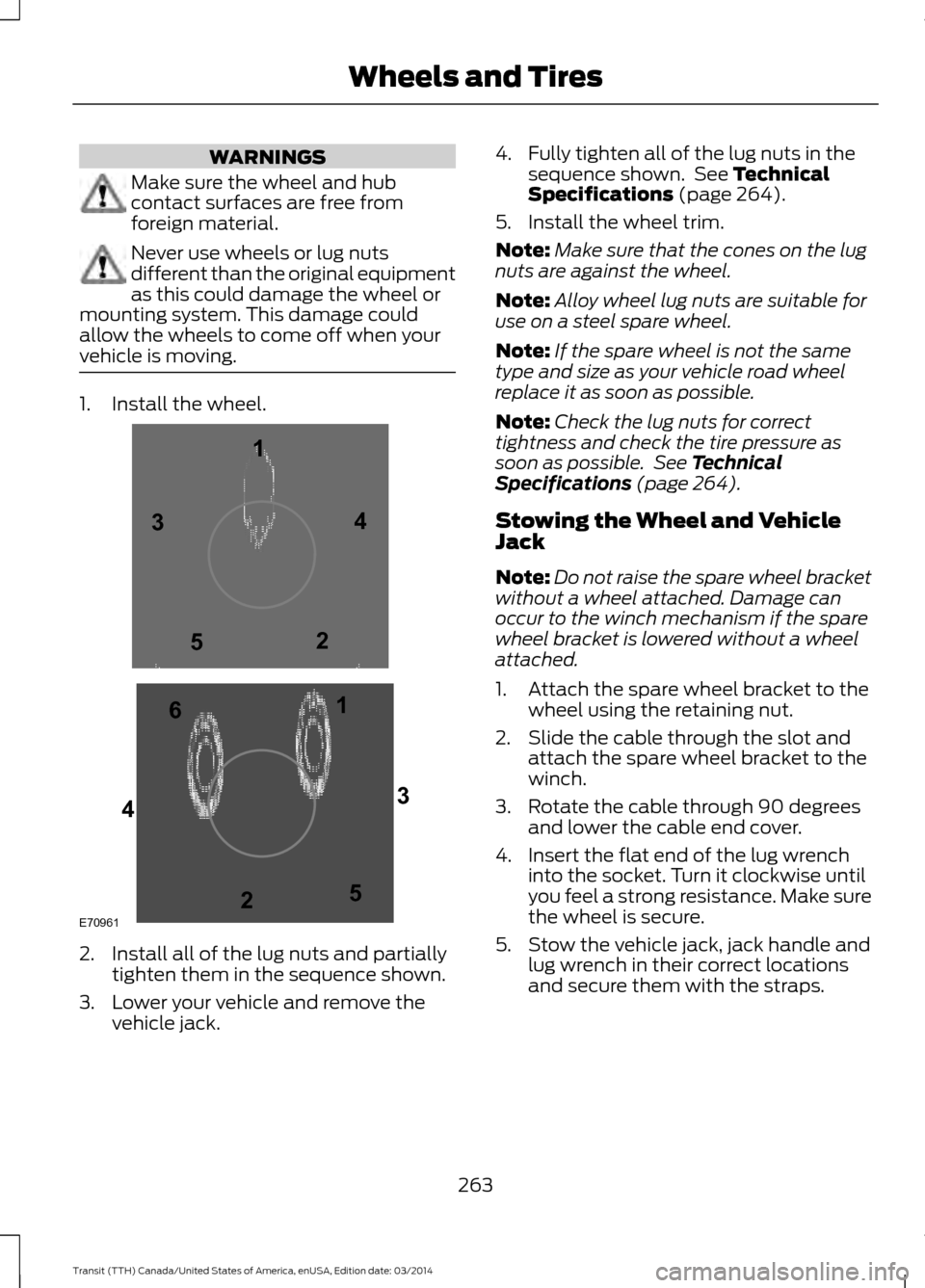
vehicle is moving. 1. Install the wheel.
2. Install all of the lug nuts and partially
tighten them in the sequence shown.
3. Lower your vehicle and remove the vehicle jack. 4. Fully tighten all of the lug nuts in the
sequence shown. See Technical
Specifications (page 264).
5. Install the wheel trim.
Note: Make sure that the cones on the lug
nuts are against the wheel.
Note: Alloy wheel lug nuts are suitable for
use on a steel spare wheel.
Note: If the spare wheel is not the same
type and size as your vehicle road wheel
replace it as soon as possible.
Note: Check the lug nuts for correct
tightness and check the tire pressure as
soon as possible. See Technical
Specifications (page 264).
Stowing the Wheel and Vehicle
Jack
Note: Do not raise the spare wheel bracket
without a wheel attached. Damage can
occur to the winch mechanism if the spare
wheel bracket is lowered without a wheel
attached.
1. Attach the spare wheel bracket to the wheel using the retaining nut.
2. Slide the cable through the slot and attach the spare wheel bracket to the
winch.
3. Rotate the cable through 90 degrees and lower the cable end cover.
4. Insert the flat end of the lug wrench into the socket. Turn it clockwise until
you feel a strong resistance. Make sure
the wheel is secure.
5. Stow the vehicle jack, jack handle and lug wrench in their correct locations
and secure them with the straps.
263 Transit (TTH) Canada/United States of America, enUSA, Edition date: 03/2014 Wheels and TiresE709611
1
2 3
4
5
6
2
3
4
5
Page 333 of 461

SYNC Mobile App Voice Commands
The following voice commands are always available:
Action and Description
Voice command
SYNC prompts you to say the name of an app to start it on
SYNC.
Mobile Apps
SYNC lists all of the currently available mobile apps.
List mobile apps
SYNC searches your connected mobile device for SYNC-
compatible mobile apps.
Find New Apps
At any time you can say the name of a mobile app to start
the mobile app on SYNC.
SYNC lists the available voice commands for the specified
app if the app is running on SYNC.
help
App Permissions
App permissions are organized by groups.
You can grant these group permissions
individually. You can change a permission
group status any time when not driving, by
using the settings menu.
When you launch an app using SYNC, the
system may ask you to grant certain
permissions, for example:
• To allow your vehicle to provide vehicle
information to the app such as, but not
limited to: Fuel level, fuel economy, fuel
consumption, engine speed, rain
sensor, odometer, VIN, external
temperature, gear position, tire
pressure, and head lamp status.
• To allow your vehicle to provide driving
characteristic information such as, but
not limited to: MyKey, seat belt status,
engine revolutions per minute, gear
position, braking events, steering wheel
angle, and accelerator pedal position. •
To allow your vehicle to provide
location information, including: GPS
and speed.
• To allow the app to send push
notifications using the vehicle display
and voice capabilities while running in
a background state. Push notifications
may be particularly useful for news or
location based apps.
Note: You only need to grant permissions
the first time you use an app with SYNC.
Note: Ford is not responsible or liable for
any damages or loss of privacy relating to
usage of an app, or dissemination of any
vehicle data that you approve Ford to
provide to an app.
330 Transit (TTH) Canada/United States of America, enUSA, Edition date: 03/2014 SYNC™
Page 437 of 461

When the oil change message appears in
the information display, it is time for an oil
change. Make sure you perform the oil
change within two weeks or 500 miles
(800 kilometers) of the message
appearing. Make sure you reset the
Intelligent Oil-Life Monitor after each oil
change. See Changing the Engine Oil
and Oil Filter (page 205).
If your information display resets
prematurely or becomes inoperative, you
should perform the oil change interval at
six months or
5000 mi (8,000 km) from
your last oil change. Never exceed one year
or
10000 mi (16,000 km) between oil
change intervals.
All Vehicles
Your vehicle is very sophisticated and built
with multiple, complex, performance
systems. Every manufacturer develops
these systems using different
specifications and performance features.
That is why it is important to rely upon your
dealership to correctly diagnose and repair
your vehicle.
Ford Motor Company has recommended
maintenance intervals for various parts
and component systems based upon
engineering testing. Ford Motor Company
relies upon this testing to determine the
most appropriate mileage for replacement
of oils and fluids to protect your vehicle at
the lowest overall cost to you and
recommends against maintenance
schedules that deviate from the scheduled
maintenance information.
We strongly recommend the use of only
genuine Ford, Motorcraft or
Ford-authorized re-manufactured
replacement parts engineered for your
vehicle. Additives and Chemicals
This owner's manual and the Ford
Workshop Manual list the recommended
additives and chemicals for your vehicle.
We do not recommend using chemicals or
additives not approved by us as part of
your vehicle
’s normal maintenance. Please
consult your warranty information.
Oils, Fluids and Flushing
In many cases, fluid discoloration is a
normal operating characteristic and, by
itself, does not necessarily indicate a
concern or that the fluid needs to be
changed. However, a qualified expert, such
as the factory-trained technicians at your
dealership, should inspect discolored fluids
that also show signs of overheating or
foreign material contamination
immediately.
Make sure to change your vehicle ’s oils and
fluids at the specified intervals or in
conjunction with a repair. Flushing is a
viable way to change fluid for many vehicle
sub-systems during scheduled
maintenance. It is critical that systems are
flushed only with new fluid that is the same
as that required to fill and operate the
system or using a Ford-approved flushing
chemical.
Owner Checks and Services
Make sure you perform the following basic
maintenance checks and inspections every
month or at six-month intervals. Check every month
Engine oil level.
Function of all interior and exterior lights.
Tires (including spare) for wear and
correct pressure.
Windshield washer fluid level.
434 Transit (TTH) Canada/United States of America, enUSA, Edition date: 03/2014 Scheduled Maintenance
Page 438 of 461

Check every six months
Battery connections. Clean if necessary.
Body and door drain holes for obstruc-
tions. Clean if necessary.
Cooling system fluid level and coolant
strength.
Door weatherstrips for wear. Lubricate if
necessary.
Hinges, latches and outside locks for
correct operation. Lubricate if necessary.
Parking brake for correct operation.
Safety belts and seat latches for wear
and function.
Safety warning lamps (brake, ABS, airbag
and safety belt) for operation.
Washer spray and wiper operation. Clean
or replace blades as necessary.
Multi-point Inspection
In order to keep your vehicle running
correctly, it is important to have the
systems on your vehicle checked regularly.
This can help identify potential issues and
prevent major problems. We recommend
having the following multi-point inspection
performed at every scheduled
maintenance interval to help make sure
your vehicle keeps running correctly. Multi-point inspection
Accessory drive belt(s).
Battery performance.
Engine air filter.
Exhaust system. Multi-point inspection
Exterior lamps and hazard warning
system operation.
Fluid levels *
; fill if necessary.
For oil and fluid leaks.
Horn operation.
Radiator, cooler, heater and A/C hoses.
Suspension component for leaks or
damage.
Steering and linkage.
Tires (including spare) for wear and
correct pressure **
.
Windshield for cracks, chips or pits.
Washer spray and wiper operation.
* Brake, coolant recovery reservoir,
automatic transmission, power steering (if
equipped with hydraulic power assist
steering) and window washer.
** If your vehicle is equipped with a
temporary mobility kit, check the tire
sealant expiration Use By date on the
canister. Replace as needed.
Be sure to ask your dealership service
advisor or technician about the multi-point
vehicle inspection. It is a comprehensive
way to perform a thorough inspection of
your vehicle. Your checklist gives you
immediate feedback on the overall
condition of your vehicle.
435 Transit (TTH) Canada/United States of America, enUSA, Edition date: 03/2014 Scheduled Maintenance