2015 FORD TRANSIT flat tire
[x] Cancel search: flat tirePage 261 of 461

Note:
If your vehicle is fitted with a tire
pressure monitoring system, the warning
indicator will flash if you fit the spare wheel
to your vehicle. To restore the correct
operation of the tire pressure monitoring
system, you must have the repaired road
wheel and tire assembly refitted to your
vehicle. See Tire Pressure Monitoring
System (page 251). To prevent damage
occurring to the tire pressure monitoring
system sensors, make sure you have a
damage tire repaired or replaced by a tire
professional. 1. Open the rear doors. Remove the
grommet and insert the flat end of the
lug wrench into the socket. Turn
counterclockwise until the spare wheel
rests on the ground and the cable is
loose. 2. Raise the cable end cover.
3. Rotate the cable through 90 degrees.
Slide the cable through the slot to
release the spare wheel bracket from
the winch.
258 Transit (TTH) Canada/United States of America, enUSA, Edition date: 03/2014 Wheels and TiresE145138 E146811 E146812
12
Page 262 of 461

4. Remove the retaining nut to release
the spare wheel bracket.
Vehicles With a Spare Wheel
Chassis Cab and Cutaway
The spare wheel is under the rear of your
vehicle.
If the spare wheel is the same type and
size as your vehicle road wheel, you can fit
the spare wheel and continue to drive in
the normal manner.
If the spare wheel is not the same type and
size as your vehicle road wheel, it has a
label showing the maximum driving speed
limit.
Note: If your vehicle is fitted with a tire
pressure monitoring system, the warning
indicator will flash if you fit the spare wheel
to your vehicle. To restore the correct
operation of the tire pressure monitoring
system, you must have the repaired road
wheel and tire assembly refitted to your
vehicle. See Tire Pressure Monitoring
System (page 251). To prevent damage
occurring to the tire pressure monitoring
system sensors, make sure you have a
damage tire repaired or replaced by a tire
professional. 1. Insert the flat end of the lug wrench
into the socket. Turn counterclockwise
until the spare wheel rests on the
ground and the cable is loose. 2. Raise the cable end cover.
259 Transit (TTH) Canada/United States of America, enUSA, Edition date: 03/2014 Wheels and TiresE146813 E184880 E146811
Page 265 of 461

Position the head of the vehicle jack under
the rear axle.
Removing a Road Wheel
WARNINGS
Park your vehicle so that you do not
obstruct the flow of traffic or place
yourself in any danger and set up a
warning triangle. Switch the ignition off and apply the
parking brake.
If your vehicle has a manual
transmission, shift into first or reverse
gear. If your vehicle has an automatic
transmission, shift into park (P). Make sure all passengers are out of
your vehicle.
Make sure that your vehicle is on firm
and level ground with the front
wheels pointing straight ahead. WARNINGS
Chock the diagonally opposite wheel
to the punctured tire with an
appropriate block or wheel chock. A
wheel chock may be located in the B-pillar
or in a storage compartment in the front
right-hand side stepwell. Make sure that the arrows on
directional tires point in the direction
of rotation when your vehicle is
moving forward. If you have to fit a spare
tire with the arrows pointing in the opposite
direction have the tire refitted as soon as
possible. 1. Insert the flat end of the lug wrench
between the wheel rim and the wheel
trim and carefully remove the wheel
trim.
2. Use the locking lug nut key to loosen the locking lug nut.
3. Loosen the remaining lug nuts, but do not remove them.
4. Raise your vehicle until the tire is clear of the ground.
5. Remove the lug nuts and the road wheel.
Note: Do not lay alloy road wheels face
down on the ground.
Installing a Road Wheel WARNINGS
Use only approved wheel and tire
sizes. Using other wheel and tire sizes
could damage your vehicle and will
make the National Type Approval invalid. Make sure there is no lubrication
(grease or oil) on the threads or the
surface between the wheel lugs and
nuts. This can cause the lug nuts to loosen
while driving.
262 Transit (TTH) Canada/United States of America, enUSA, Edition date: 03/2014 Wheels and TiresE171406
Page 266 of 461
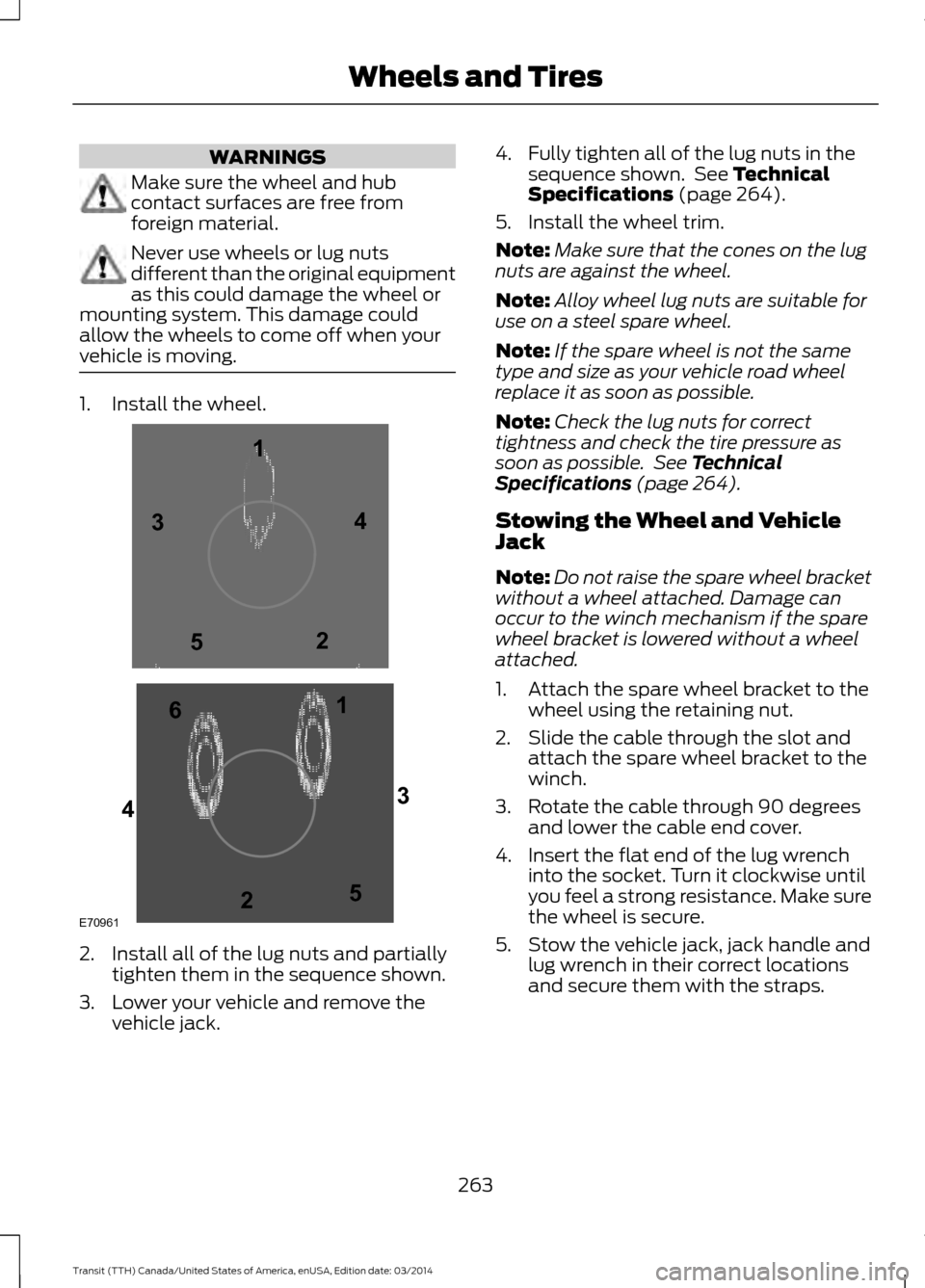
WARNINGS
Make sure the wheel and hub
contact surfaces are free from
foreign material.
Never use wheels or lug nuts
different than the original equipment
as this could damage the wheel or
mounting system. This damage could
allow the wheels to come off when your
vehicle is moving. 1. Install the wheel.
2. Install all of the lug nuts and partially
tighten them in the sequence shown.
3. Lower your vehicle and remove the vehicle jack. 4. Fully tighten all of the lug nuts in the
sequence shown. See Technical
Specifications (page 264).
5. Install the wheel trim.
Note: Make sure that the cones on the lug
nuts are against the wheel.
Note: Alloy wheel lug nuts are suitable for
use on a steel spare wheel.
Note: If the spare wheel is not the same
type and size as your vehicle road wheel
replace it as soon as possible.
Note: Check the lug nuts for correct
tightness and check the tire pressure as
soon as possible. See Technical
Specifications (page 264).
Stowing the Wheel and Vehicle
Jack
Note: Do not raise the spare wheel bracket
without a wheel attached. Damage can
occur to the winch mechanism if the spare
wheel bracket is lowered without a wheel
attached.
1. Attach the spare wheel bracket to the wheel using the retaining nut.
2. Slide the cable through the slot and attach the spare wheel bracket to the
winch.
3. Rotate the cable through 90 degrees and lower the cable end cover.
4. Insert the flat end of the lug wrench into the socket. Turn it clockwise until
you feel a strong resistance. Make sure
the wheel is secure.
5. Stow the vehicle jack, jack handle and lug wrench in their correct locations
and secure them with the straps.
263 Transit (TTH) Canada/United States of America, enUSA, Edition date: 03/2014 Wheels and TiresE709611
1
2 3
4
5
6
2
3
4
5
Page 267 of 461

TECHNICAL SPECIFICATIONS
Wheel Lug Nut Torque Specifications
WARNING
When a wheel is installed, always remove any corrosion, dirt or foreign materials
present on the mounting surfaces of the wheel or the surface of the wheel hub,
brake drum or brake disc that contacts the wheel. Make sure that any fasteners
that attach the rotor to the hub are secured so they do not interfere with the mounting
surfaces of the wheel. Installing wheels without correct metal-to-metal contact at the
wheel mounting surfaces can cause the wheel nuts to loosen and the wheel to come off
while your vehicle is in motion, resulting in loss of control. Ib-ft (Nm)
*
Bolt size
148 lb.ft (200 Nm)
M14 x 1.5
* Torque specifications are for nut and bolt threads free of dirt and rust. Use only Ford
recommended replacement fasteners.
Retighten the lug nuts to the specified torque within 100 miles (160 kilometers) after any
wheel disturbance, for example tire rotation, changing a flat tire or wheel removal. Wheel pilot bore
A
Inspect the wheel pilot bore and
mounting surface prior to installation.
Remove any visible corrosion or loose
particles.
264Transit (TTH) Canada/United States of America, enUSA, Edition date: 03/2014 Wheels and TiresE145950
Page 434 of 461

PROTECT YOURSELF FROM THE RISING
COST OF VEHICLE REPAIRS WITH A FORD
EXTENDED SERVICE PLAN.
SERVICE PLANS (U.S. Only)
More than 32 million Ford owners have
discovered the powerful protection of Ford
Extended Service Plan. It is the only
extended service plan backed by Ford
Motor Company, and provides peace of
mind protection beyond the New Vehicle
Limited Warranty coverage.
Ford ESP Can Quickly Pay for Itself
One service bill – the cost of parts and
labor – can easily exceed the price of your
Ford Extended Service Plan. With Ford ESP
you minimize your risk for unexpected
repair bills and rising repair costs.
Up to 1,000+ Covered Vehicle
Components
There are four Extended Service Plans with
different levels of coverage. Ask your
authorized dealer for details.
1. PremiumCARE - Our most comprehensive coverage. With over
1,000 covered components, this plan
is so complete that we generally only
discuss what
’s not covered.
2. ExtraCARE - Covers 113 components, and includes many high-tech items.
3. BaseCARE - Covers 84 components.
4. PowertrainCARE - Covers 29 critical components.
Ford Extended Service Plan is honored by
all authorized Ford dealers in the U.S. and
Canada. It is the only extended service plan
authorized and backed by Ford Motor
Company. That means you get:
•
Reliable, quality service at any Ford or
Lincoln dealership
• Repairs performed by factory trained
technicians, using genuine parts
Rental Car Reimbursement
1st day Rental Benefit
You take advantage of replacement
transportation if your vehicle is at your
authorized dealer for same day covered
repairs.
Extended Rental Benefits
If your vehicle is kept overnight for covered
repairs, you are eligible for rental car
coverage, including bumper to bumper
warranty repairs, and Field Service Actions.
Roadside Assistance
Exclusive 24/7 roadside assistance,
including:
• Towing, flat-tire change and battery
jump starts
• Out of fuel and lock-out assistance.
• Travel expense reimbursement for
lodging, meals and rental car.
• Destination assistance for taxi, shuttle,
rental car coverage and emergency
transportation.
Transferable Coverage
If you sell your vehicle before your Ford
Extended Service Plan coverage expires,
you can transfer any remaining coverage
to the new owner. Whenever you sell your
vehicle, prospective buyers may have a
higher degree of confidence that vehicle
was properly maintained with Ford ESP,
thereby improving resale value.
431 Transit (TTH) Canada/United States of America, enUSA, Edition date: 03/2014 Extended Service Plan (ESP)
Page 460 of 461

Tire Care..........................................................234
Gl
ossary of Tire Terminology......................... 235
Inflating the Tires............................................... 243
Information About Uniform Tire Quality Grades............................................................... 234
Information Contained on the Tire Sidewall............................................................ 236
Inspecting the Tires and Wheel Valve Stems................................................................ 245
Location of the Tire Label............................... 243
Tire Age................................................................. 246
Tire and Wheel Alignment............................. 249
Tire Damage........................................................ 246
Tire Pressure Monitoring System................248
Tire Replacement Requirements.................247
Tire Rotation........................................................ 249
Tire Safety Practices........................................ 248
Tire Wear............................................................... 246
United States Department of Transportation Tire Quality
Grades............................................................... 234
Tire Pressure Monitoring System............251 Changing Tires With a Tire Pressure
Monitoring System....................................... 252
Tire Pressure Monitoring System Reset Procedure........................................................ 254
Understanding the Tire Pressure Monitoring System ............................................................. 253
Tires See: Wheels and Tires...................................... 233
Towing a Trailer..............................................161 L
oad Placement................................................... 161
Towing the Vehicle on Four Wheels........171 Emergency Towing.............................................. 171
Recreational Vehicle Towing ........................... 171
Towing...............................................................161
Traction Control............................................139 Principle of Operation....................................... 139
Trailer Sway Control
....................................162
Transmission Code Designation..............271
T
ransmission..................................................133
Transmission See: Transmission............................................... 133
Transporting the Vehicle............................170 Trip Computer.................................................82
A
ll Values................................................................. 82
Average Fuel Consumption.............................. 82
Distance to Empty............................................... 83
Outside Air Temperature................................... 83
Resetting the Trip Computer........................... 82
Trip Odometer....................................................... 83
Trip Timer................................................................ 83
U
Under Hood Overview - 3.2L Power Stroke Diesel
..............................................203
Under Hood Overview - 3.5L....................201
Under Hood Overview - 3.7L...................202
USB Port..........................................................297
Using Cruise Control
....................................147
Switching Cruise Control Off.........................148
Switching Cruise Control On........................... 147
Using MyKey With Remote Start Systems
...........................................................51
Vehicles With Ford-Approved Aftermarket
Remote Start Systems................................... 51
Vehicles With Non-Ford-Approved Aftermarket Remote Start Systems.........51
Using Snow Chains......................................251
Using Stability Control................................142 A
dvanceTrac® with Roll Stability Control ™
(RSC®).............................................................. 142
Using SYNC
™ With Your Media
Player.............................................................332
Accessing Your Play Menu.............................. 337
Connecting Your Digital Media Player to the USB Port........................................................... 332
Media Menu Features...................................... 336
Media Voice Commands................................. 334
System Settings................................................. 339
What's Playing?................................................. 333
457 Transit (TTH) Canada/United States of America, enUSA, Edition date: 03/2014 Index