2015 FORD TRANSIT warning light
[x] Cancel search: warning lightPage 84 of 461

Action
Message
Choose your applicable
setting
Measure unit
Choose your applicable
setting
Distance
Choose your applicable
setting
Temp unit
Off
Information
Chimes
Off
Warning
Autolock
Locks
Convenience
Autounlock
Global Unlock
Custom locking
Hold OK to Reset System to Factory Default
System Reset
System Check
All active warnings will display first if
applicable. The system check menu may
appear different based upon equipment
options and current vehicle status. Use the
up and down arrow buttons to scroll
through the list. See
Information
Messages (page 84). Menu Structure - Information and
Entertainment Display
You can access the menu using the
information and entertainment display
control.
Note:
Some options may appear slightly
different or not at all if the items are
optional.
SYNC-Media allows you to access the
SYNC features.
SYNC-Phone Message
Dial a number
Phone Redial
Phonebook Incoming calls
Call History
Outgoing calls
81Transit (TTH) Canada/United States of America, enUSA, Edition date: 03/2014 Information Displays
Page 90 of 461

Lighting
Description and Action
Message
Indicates that a brake lamp bulb has burned out. See Main-
tenance (page 200).
Brake lamp Bulb fault
Indicates that a low beam headlamp bulb has burned out.
See
Maintenance (page 200).
Low beam Bulb fault
The system has detected a fault that requires service.
Headlamp fault Service
required
Maintenance Description and Action
Message
The engine oil has exceeded the service time or distance limit.
Renew the engine oil and oil filter as soon as possible. See
Engine Oil Check
(page 204).
Oil change required
The system has detected a fault that requires service. See
Brake Fluid Check
(page 210).
Brake fluid level low
Service now
Refill the washer fluid reservoir as soon as possible. See
Washer Fluid Check
(page 210).
Washer fluid level low
Parking Aid Description and Action
Message
The system has detected a fault that requires service. See
Parking Aid
(page 143).
Parking aid fault Service
required
Parking Brake Description and Action
Message
The parking brake is applied and your vehicle speed is above
3 mph (5 km/h). If the warning remains on when you have
released the parking brake, the system has detected a fault
that requires service.
Park brake applied
87Transit (TTH) Canada/United States of America, enUSA, Edition date: 03/2014 Information Displays
Page 98 of 461
SITTING IN THE CORRECT
POSITION
WARNINGS
Do not recline the seat backrest too
far as this can cause the occupant
to slide under the safety belt,
resulting in serious injury in the event of a
crash. Sitting improperly, out of position or
with the seat backrest reclined too
far, can result in serious injury or
death in the event of a crash. Always sit
upright against your seat backrest, with
your feet on the floor. Do not place objects higher than the
seat backrest to reduce the risk of
serious injury in the event of a crash
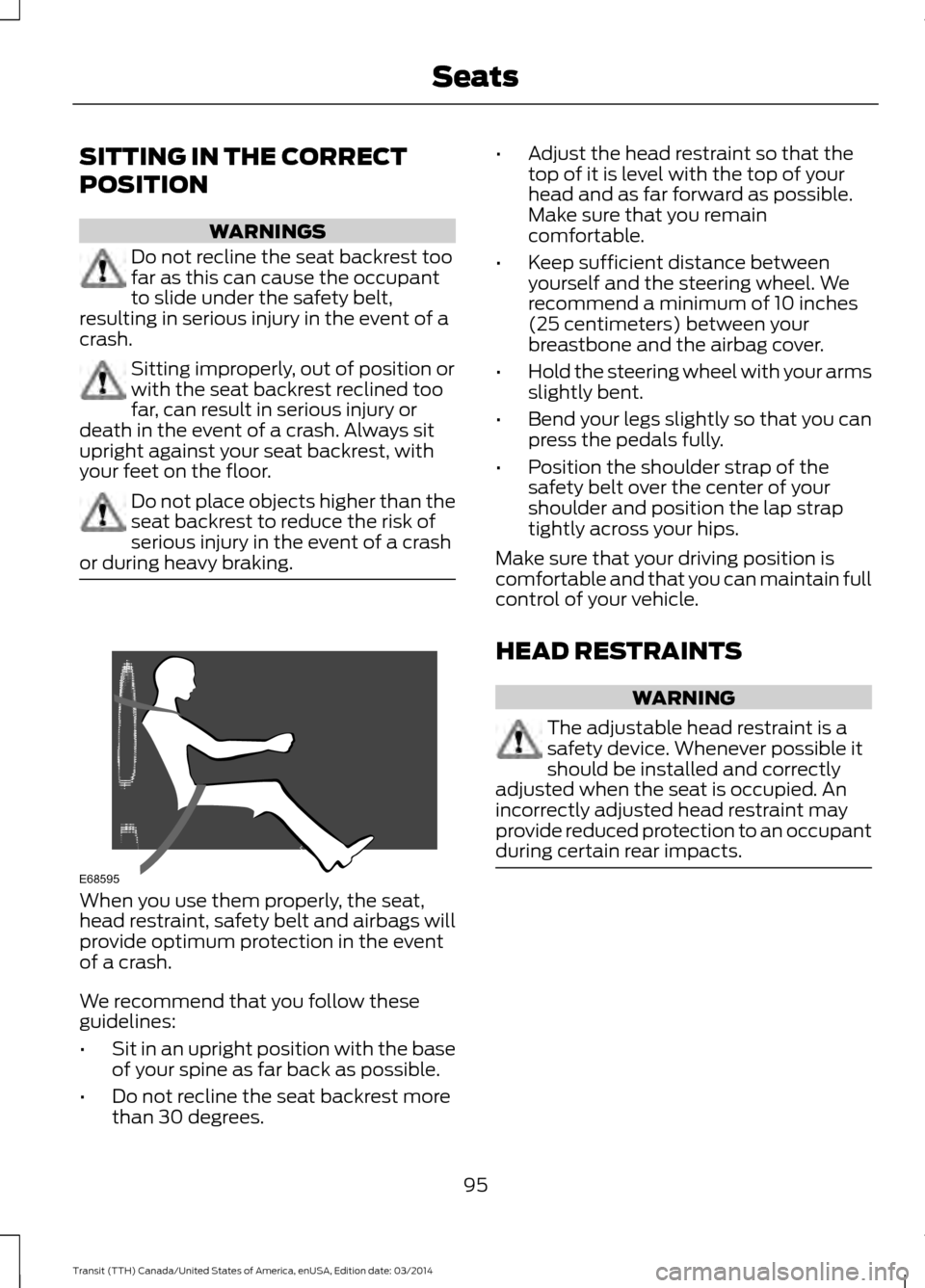
or during heavy braking. When you use them properly, the seat,
head restraint, safety belt and airbags will
provide optimum protection in the event
of a crash.
We recommend that you follow these
guidelines:
•
Sit in an upright position with the base
of your spine as far back as possible.
• Do not recline the seat backrest more
than 30 degrees. •
Adjust the head restraint so that the
top of it is level with the top of your
head and as far forward as possible.
Make sure that you remain
comfortable.
• Keep sufficient distance between
yourself and the steering wheel. We
recommend a minimum of 10 inches
(25 centimeters) between your
breastbone and the airbag cover.
• Hold the steering wheel with your arms
slightly bent.
• Bend your legs slightly so that you can
press the pedals fully.
• Position the shoulder strap of the
safety belt over the center of your
shoulder and position the lap strap
tightly across your hips.
Make sure that your driving position is
comfortable and that you can maintain full
control of your vehicle.
HEAD RESTRAINTS WARNING
The adjustable head restraint is a
safety device. Whenever possible it
should be installed and correctly
adjusted when the seat is occupied. An
incorrectly adjusted head restraint may
provide reduced protection to an occupant
during certain rear impacts. 95
Transit (TTH) Canada/United States of America, enUSA, Edition date: 03/2014 SeatsE68595
Page 106 of 461

WARNINGS
Do not use the power points for
operating a cigar lighter element.
Do not insert objects other than an
accessory plug into the power points.
Run the engine for full capacity use of the
power points.
Note:
Do not use the power points over the
vehicle capacity of 12 volt DC 180 watt or a
fuse may blow.
Note: Do not hang any accessory from the
accessory plug.
Note: Always keep the power point caps
closed when not in use.
Note: Incorrect use of the power points can
cause damage not covered by the vehicle
warranty.
To prevent the battery from running out of
charge:
• Do not use the power points for longer
than necessary when the engine is not
running.
• Do not leave devices plugged in
overnight or when your vehicle is in park
(P) for extended periods of time.
Note: The power point turns off after 30
minutes if you switched the ignition on
without the engine running. Auxiliary Power Point Locations Auxiliary Power Point locations may be:
•
On the instrument panel.
• Inside the floor console storage
compartment.
• Inside the cargo area.
Note: Do not keep electrical devices or
adaptors plugged in to the auxiliary power
point when not in use.
AC Power Point WARNING
Do not use any extension cord with
the AC power point, since it will
defeat the safety protection design
provided by the cap and twist tab. Doing
so may cause the power point to overload
due to powering multiple devices that can
reach beyond the 150 watt load limit and
could result in fire or personal injury. 103
Transit (TTH) Canada/United States of America, enUSA, Edition date: 03/2014 Auxiliary Power PointsE185878
Page 122 of 461

6. Remove the spout from the diesel
exhaust fluid container and replace the
cap.
Note: If there is diesel exhaust fluid left in
the container retain it for later use. The
spout is re-useable. Wash the spout with
clean water prior to storage. Do not use the
diesel exhaust fluid spout with any other
fluid.
Filling the Diesel Exhaust Fluid Tank in
Cold Climates
Diesel exhaust fluid may freeze if the
ambient temperature is below 12°F (-11°C).
Your vehicle has a preheating system
which allows diesel exhaust fluid to
operate below 12°F (-11°C). If you do not
use your vehicle for an extended period
when the ambient temperature is below
12°F (-11°C)
, the fluid in the tank may
freeze. If the tank is overfilled and the fluid
freezes it may damage the tank. This is not
covered by the vehicle warranty.
Contaminated Diesel Exhaust
Fluid or Inoperative Selective
Catalytic Reduction System If the system becomes
contaminated or inoperative, the
diesel exhaust fluid warning
lamp will illuminate and a message will
appear in the information display.
Continued driving without replacing the
fluid or not having the system repaired will
result in:
• Vehicle speed being limited. Prior to
this occurring a message will appear in
the information display.
• Further vehicle operation without
replacing contaminated diesel exhaust
fluid will cause the engine to run at idle
speed. Note:
If the vehicle speed becomes limited
or the engine will only run at idle speed,
normal vehicle operation will not resume
until you have the system repaired. To
service a contaminated or inoperative
system, see an authorized dealer.
Note: You must add a minimum of 3.2 qt
(3 L) for your vehicle to exit the run at idle
speed mode.
Diesel Exhaust Fluid Guidelines
• Do not put diesel exhaust fluid in the
vehicle fuel tank.
• Do not overfill the diesel exhaust fluid
tank.
• Do not dilute diesel exhaust fluid with
water or any other liquid.
• Do not re-use a diesel exhaust fluid
container.
• Do not store in direct sunlight.
• Store at temperatures between 23°F
(-5°C) and 68°F (20°C).
• Do not store a diesel exhaust fluid
container in your vehicle.
• Diesel exhaust fluid is non-flammable,
non-toxic, colorless and water-soluble.
Approximate Diesel Exhaust Fluid
Usage
The chart below illustrates the
approximate diesel exhaust fluid usage for
the given distances traveled under various
driving conditions. Usage may vary
depending on:
• Driving style.
• Towing a trailer.
• Vehicle load.
• Engine idling time.
119 Transit (TTH) Canada/United States of America, enUSA, Edition date: 03/2014 Fuel and RefuelingE163176
Page 130 of 461

System Message
Action and Description
Message
You must maintain the diesel particulate filter for it to
continue to function correctly. Do not disregard a system
maintenance message. The Ford Warranty may not cover
damage caused to your vehicle as a result of disregarding
this message.
Exhaust filter overloaded
Drive to clean
Operator Commanded Regeneration
Precautions and Safe Exhaust Position WARNING
Failure to comply with the following
instructions for operator
commanded regeneration may result
in fire, serious injury, death or property
damage. Before you start operator commanded
regeneration, do the following:
•
You must park your vehicle outside of
any structure.
• Move the gearshift lever to park (P)
with the parking brake set on stable,
level ground.
• Your vehicle must be
9.8 ft (3 m) -
16.4 ft (5 m) away from any
obstructions and must be away from
materials that can easily combust or
melt, for example, paper, leaves,
petroleum products, fuels, plastics and
other dry organic material.
• Make sure there is a minimum of 2.6 gal
(12 L)
of fuel in the fuel tank.
• Make sure all fluids are at the correct
levels.
• Make sure that the louvers located at
the tip of the exhaust are clear of any
obstructions as they are used to
introduce fresh air into the tailpipe to
cool the exhaust gas as it leaves. How to Start Operator Commanded
Regeneration WARNING
Stay clear of exhaust tip during
regeneration. You or others can be
burned.
Note:
You cannot use the operator
commanded regeneration until the diesel
particulate filter load percentage has
reached 100 percent. The diesel particulate
filter load percentage will fluctuate up and
down when driving your vehicle due to active
and passive regenerations.
Note: During the use of operator
commanded regeneration, you may observe
a light amount of white smoke. This is
normal. You cannot use the operator
commanded regeneration if the
service engine soon light is
illuminated.
Using the Information Display
You can start operator commanded
regeneration using the information display.
See General Information
(page 79).
127 Transit (TTH) Canada/United States of America, enUSA, Edition date: 03/2014 Fuel and Refueling
Page 132 of 461

the vehicle over materials that could burn
until the exhaust system has had sufficient
time to cool. Depending on the amount of
soot collected by the diesel particulate
filter, ambient temperature, and altitude,
operator commanded regeneration may
last up to 30 minutes. When the system is at the point
of over saturation, the service
engine soon light will illuminate
and the following message will appear.
System Message Action and Description
Message
You will not be able to allow cleaning. You must have your
vehicle serviced by an authorized dealer.
Exhaust filter over limit
Service now
Operator Commanded Regeneration
with Automatic Regeneration Control
(If Equipped)
If your vehicle is operated with significant
stationary operation, low speed drive
cycles less than 25 mph (40 km/h), short
drive cycles, drive time less than 15 minutes
or the vehicle does not fully warm up,
passive and active regeneration may not sufficiently clean the diesel particulate
filter system. You can switch off automatic
regeneration until better driving conditions
are available, for example steady high
driving. You can then switch automatic
regeneration back on to clean the diesel
particulate filter.
Switching the Automatic Regeneration Control On and Off
To switch the automatic regeneration control on and off, scroll to: Action and Description
Message
Press the
OK button.
Information
Press the
OK button.
Driver Assist
Uncheck the box to switch automatic regeneration off.
Auto Exh.Clean
Check the box to switch automatic regeneration on.
When you switch automatic regeneration off, one of the following warning
messages may be displayed. The diesel particulate filter is full and you should switch the
automatic regeneration control on as soon as possible.
Exhaust Filter Full Clean
Soon
The diesel particulate filter is overloaded you must switch
the automatic regeneration control on as soon as possible.
Exhaust Filter Over-
loaded Clean Now
You must clean the diesel particulate filter immediately.
Failing to do so would cause the diesel particulate filter to
become blocked.
Exhaust filter at limit
Clean now
129Transit (TTH) Canada/United States of America, enUSA, Edition date: 03/2014 Fuel and Refueling
Page 133 of 461

How to Interrupt or Cancel Operator
Commanded Regeneration
If you need to cancel the operator
commanded regeneration, press the brake
pedal or switch the ignition off to stop the
procedure. Depending on the amount of
time you allowed the operator
commanded regeneration to operate, soot
may not have had sufficient time to be
eliminated, but the exhaust system and
exhaust gas may still be hot. If you shut
your vehicle off during operator
commanded regeneration, you will notice
turbo flutter. This is a normal consequence
caused by shutting off a diesel engine
during boosted operation and is considered
normal.
Filter Service and Maintenance
Over time, a slight amount of ash will build
up in the diesel particulate filter, which is
not removed during the regeneration
process. The filter may need to be removed
for ash cleaning at approximately
119900 mi (193,000 km) or greater, actual
mileage can vary greatly depending upon
engine and vehicle operating conditions.
The filter may need to be replaced at
approximately 248500 mi (400,000 km)
depending upon vehicle operating
conditions.
In both cases, the engine control system
will set a service light to inform you to have
your vehicle checked by an authorized
dealer.
If there are any issues with the diesel
particulate filter, the engine control system
will turn on a service light to inform you to
have your vehicle checked by an authorized
dealer. Powertrain fault indicator. Service engine soon indicator.
Resonator and Tailpipe Assembly
Maintenance WARNINGS
Failure to maintain the functional
holes, in the tailpipe section of the
exhaust, clean and free of debris or
foreign material may result in the holes
becoming blocked or plugged. Do not
modify or remove the tail-pipe section.
Blocked or plugged holes or
removal/modification of the system could
result in elevated exhaust gas
temperatures which may result in
vehicle/property damage or personal
injury. The normal operating temperature
of the exhaust system is very high.
Never work around or attempt to
repair any part of the exhaust system until
it has cooled. Use special care when
working around the diesel oxidation
catalytic converter and/or the diesel
particulate filter (DPF). The diesel
oxidation catalytic converter and/or the
DPF heats up to a high temperature after
only a short period of engine operation and
can stay hot even after the engine is turned
off. Failure to follow these instructions may
result in personal injury. Note:
Additions of aftermarket devices or
modifications to the exhaust system can
reduce the effectiveness of the exhaust
system as well as cause damage to the
exhaust system or engine. These actions
may also affect your vehicle ’s warranty. See
the Warranty Guide for more information.
130 Transit (TTH) Canada/United States of America, enUSA, Edition date: 03/2014 Fuel and Refueling