Page 61 of 461

One-Stage Unlocking
You can switch on this function using the
information display. See Information
Displays (page 79).
If you have switched on this function, you
unlock all doors including the rear doors
and the sliding door.
Note: When you unlock the doors, the
direction indicators flash once.
You unlock all of the doors when you:
• Pull either interior handle.
• Turn the key in the driver door lock.
• Press the unlock button on the remote
control once.
• Press the interior unlock button once.
Two-Stage Unlocking
Note: When you unlock the doors, the
direction indicators flash once.
You unlock the front doors when you:
• Pull either interior handle.
• Turn the key in the driver door lock.
• Press the unlock button on the remote
control once.
• Press the interior unlock button once.
You unlock the front doors and cargo area
when you:
• Turn the key in the driver door lock to
the unlock position twice within three
seconds.
• Press the unlock button on the remote
control twice within three seconds.
• Press the interior unlock button twice
within three seconds.
Zone Re-Locking
If you enable zone re-locking and open one
door, all other doors remain locked. See an
authorized dealer for further information. The locks on van, bus or wagon and Kombi
have two zones, cabin and cargo. For van
and Kombi, the cargo area includes the
rear doors and the sliding door. For bus or
wagon, the cargo area includes the rear
doors.
•
Exit your vehicle and press the lock
button.
• Press the unlock button or the cargo
area unlock button once to open the
respective zone.
If you now open a door within the unlocked
zone, the other doors in that zone
automatically lock.
Configurable Unlocking
Configurable unlocking is set when you
purchase your vehicle. It allows you to
select which doors unlock when you press,
once or twice, the unlock button or the
cargo area unlock button on your remote
control. You cannot switch this feature
back on if you had it switched off. See an
authorized dealer for further information.
58 Transit (TTH) Canada/United States of America, enUSA, Edition date: 03/2014 Locks
Page 63 of 461

2.
Switch the ignition from off to on. Keep
the ignition on for at least three
seconds, but no more than 10 seconds.
3. Switch the ignition off and remove the
first correctly coded key from the
ignition.
4. After three seconds but within 10 seconds of switching the ignition off,
insert the second previously correctly
coded key into the ignition.
5. Switch the ignition from off to on. Keep
the ignition on for at least three
seconds, but no more than 10 seconds.
6. Switch the ignition off and remove the
second previously programmed
correctly coded key from the ignition.
7. After three seconds but within 10 seconds of switching the ignition off
and removing the previously
programmed correctly coded key,
insert the new unprogrammed key into
the ignition.
8. Switch the ignition from off to on. Keep
the ignition on for at least six seconds.
9. Remove the newly programmed correctly coded key from the ignition.
If the key has been successfully
programmed it will start the engine and
operate the remote entry system (if the
new key is an integrated keyhead
transmitter).
If the key was not successfully
programmed, wait 10 seconds and repeat
Steps 1 through 8. If you are still
unsuccessful, take your vehicle to an
authorized dealer.
Note: You can program a maximum of eight
coded keys to your vehicle. All eight can be
integrated keyhead transmitters. ANTI-THEFT ALARM (If Equipped)
Alarm System
The perimeter alarm is a deterrent against
unauthorized access to your vehicle
through the doors, luggage compartment
and the hood. It also protects the audio
unit.
Triggering the Alarm
Once armed, the alarm is triggered in any
of the following ways:
• If someone opens a door, cargo area
or the hood without a valid key or
remote control.
• If someone removes the audio or
navigation system.
• If you switch the ignition on without a
valid key.
If the alarm is triggered, the horn will sound
for 30 seconds and the hazard warning
flasher will flash for five minutes.
Any further attempts to perform one of the
above will trigger the alarm again.
Arming the Alarm
To arm the alarm, lock your vehicle. See
Locks
(page 54).
Disarming the Alarm
Disarm and silence the alarm by unlocking
the doors with the key and switching the
ignition on with a correctly coded key
within 12 seconds, or by unlocking the
doors or the cargo area with the remote
control.
60 Transit (TTH) Canada/United States of America, enUSA, Edition date: 03/2014 Security
Page 64 of 461
ADJUSTING THE STEERING
WHEEL
WARNING
Do not adjust the steering wheel
when your vehicle is moving.
Note:
Make sure that you are sitting in the
correct position. See Sitting in the Correct
Position (page 95). 1. Unlock the steering column.
2.
Adjust the steering wheel to the desired
position. 3. Lock the steering column.
AUDIO CONTROL - VEHICLES
WITHOUT: TOUCHSCREEN
DISPLAY
Volume up
A
Seek up or next
B
Volume down
C
Seek down or previous
D
61 Transit (TTH) Canada/United States of America, enUSA, Edition date: 03/2014 Steering Wheel122E95178 3E95179 C
DA
B
E129463
Page 65 of 461
Seek, Next or Previous
Press the seek button to:
•
Tune the radio to the next or previous
stored preset.
• Play the next or the previous track.
Press and hold the seek button to:
• Tune the radio to the next station up
or down the frequency band.
• Seek through a track.
AUDIO CONTROL - VEHICLES
WITH: TOUCHSCREEN
DISPLAY
Select the required source on the audio
unit.
You can operate the following functions
with the control: Volume up
A
Seek up or next
B
Volume down
C
Seek down or previous
D
Mode
E
Press M to select the audio source. VOICE CONTROL - VEHICLES
WITHOUT: TOUCHSCREEN
DISPLAY
Pull the control to select or deselect voice
control. See
SYNC™ (page 300).
VOICE CONTROL - VEHICLES
WITH: TOUCHSCREEN
DISPLAY Pull the control to select or deselect voice
control. See MyFord Touch
™
(page 349).
See MyFord Touch ™ (page 349).
62 Transit (TTH) Canada/United States of America, enUSA, Edition date: 03/2014 Steering WheelE129462
BD
C
A
E E129464 E161798
Page 66 of 461
MyFord Touch® Controls (If Equipped)
Your steering wheel controls may also
have these additional features. Press to go to the home screen.
Press to go to the information
screen.
See
MyFord Touch ™ (page 349).
CRUISE CONTROL See
Cruise Control (page 147). INFORMATION DISPLAY
CONTROL See Information Displays (page 79).
63 Transit (TTH) Canada/United States of America, enUSA, Edition date: 03/2014 Steering WheelE142613 E142608 E142437 E130248
Page 71 of 461
Switching the Rain Lights On and Off
You can switch the rain light feature on
and off using the information display
control on the steering wheel. See
General Information (page 79). See
Information Messages (page 84).
To switch the rain lights feature on and off, scroll to: Action and Description
Message
Press the OK button.
Settings
Press the OK button.
Lighting
Choose your applicable setting.
Rain Light
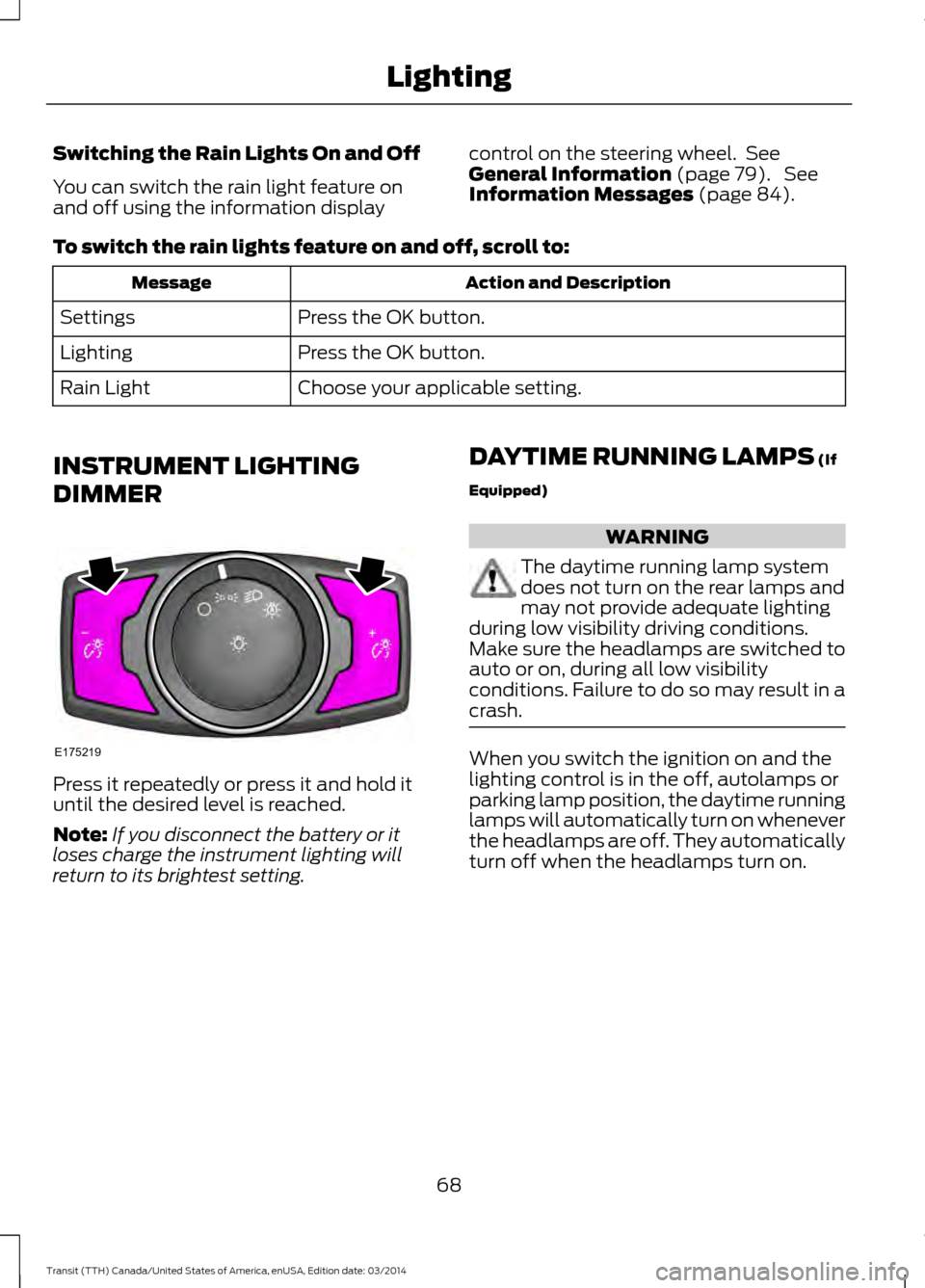
INSTRUMENT LIGHTING
DIMMER Press it repeatedly or press it and hold it
until the desired level is reached.
Note:
If you disconnect the battery or it
loses charge the instrument lighting will
return to its brightest setting. DAYTIME RUNNING LAMPS
(If
Equipped) WARNING
The daytime running lamp system
does not turn on the rear lamps and
may not provide adequate lighting
during low visibility driving conditions.
Make sure the headlamps are switched to
auto or on, during all low visibility
conditions. Failure to do so may result in a
crash. When you switch the ignition on and the
lighting control is in the off, autolamps or
parking lamp position, the daytime running
lamps will automatically turn on whenever
the headlamps are off. They automatically
turn off when the headlamps turn on.
68 Transit (TTH) Canada/United States of America, enUSA, Edition date: 03/2014 LightingE175219
Page 76 of 461
GAUGES
Information display. See Information Displays (page 79).
A
Speedometer.
B
Engine coolant temperature gauge.
C
Tripmeter reset and distance to empty toggle button.
D
Fuel gauge.
E
Tachometer.
F
Information Display
Odometer
Registers the distance your vehicle has
traveled.
Outside Air Temperature
Shows the outside air temperature.
Trip Computer
See
Trip Computer (page 82). Vehicle Settings and Personalization
See
General Information (page 79).
Engine Coolant Temperature
Gauge WARNING
Never remove the coolant reservoir
cap while the engine is running or hot.
At normal operating temperature, the
needle will remain in the center section.
73 Transit (TTH) Canada/United States of America, enUSA, Edition date: 03/2014 Instrument ClusterE184961
Page 77 of 461

If the needle enters the red section, the
engine is overheating. Stop your vehicle as
soon as it is safe to do so and switch the
engine off. Determine the cause once the
engine has cooled down. See Engine
Coolant Check (page 206).
Note: Do not restart the engine until the
cause of overheating has been determined
and resolved.
Tripmeter Reset and Distance to
Empty
(If Equipped)
Press the button to change between the
tripmeter and distance to empty
information. Press and hold the button to
reset the tripmeter.
Fuel Gauge
Note: The fuel gauge may vary slightly
when your vehicle is moving or on a gradient.
Switch the ignition on. The fuel gauge will
indicate approximately how much fuel is
in the fuel tank. The arrow adjacent to the
fuel pump symbol indicates on which side
of your vehicle the fuel filler door is located. The needle should move toward F when
you refuel your vehicle. If the needle points
to E after adding fuel, this indicates your
vehicle needs service soon.
After refueling some variability in needle
position is normal:
•
It may take a short time for the needle
to reach F after leaving the gas station.
This is normal and depends upon the
slope of pavement at the gas station.
• The fuel amount dispensed into the
tank is a little less or more than the
gauge indicated. This is normal and
depends upon the slope of pavement
at the gas station.
• If the gas station nozzle shuts off
before the tank is full, try a different
gas pump nozzle.
Low Fuel Reminder
A low fuel reminder triggers when the fuel
gauge needle is at 1/16th.
Variations: Distance-to-empty
Fuel gauge position
Driving type (fuel economy
conditions)
35 miles to 80 miles (56 kmto 129 km)
1/16th
Highway driving
35 miles (56km)
1/16th
Severe duty driving (trailer
towing, extended idle)
74Transit (TTH) Canada/United States of America, enUSA, Edition date: 03/2014 Instrument Cluster


