2015 FORD TRANSIT battery
[x] Cancel search: batteryPage 100 of 461

MANUAL SEATS
Moving the Seat Backward or
Forward
WARNINGS
Do not place cargo or any objects
behind the seat backrest before
returning it to the original position.
Pull on the seat backrest to make sure that
it has fully latched after returning the seat
backrest to its original position. An
unlatched seat may become dangerous if
you stop suddenly or have a crash. Do not adjust the driver seat when
your vehicle is moving. This may
result in sudden seat movement,
causing the loss of control of your vehicle. Make sure the driver seat fully locks
into place by rocking it backward and
forward.
1. Lift the handle.
2. Move the seat backward or forward to
attain the desired position.
3. Release the handle. Note:
The driver seat has removable stop
bolts on the track to enable access to the
vehicle battery. See Changing the 12V
Battery (page 213).
Adjusting the Lumbar Support 1.
Rotate the handle clockwise or counter
clockwise to attain the desired lumbar
support.
Recline Adjustment WARNINGS
Do not adjust the driver seat backrest
when your vehicle is moving. This
may result in sudden seat
movement, causing the loss of control of
your vehicle. Do not adjust the recliner from inside
your vehicle if the seat is unoccupied.
The seat back may move suddenly
and cause personal injury. 97
Transit (TTH) Canada/United States of America, enUSA, Edition date: 03/2014 SeatsE177638 E146386
Page 101 of 461
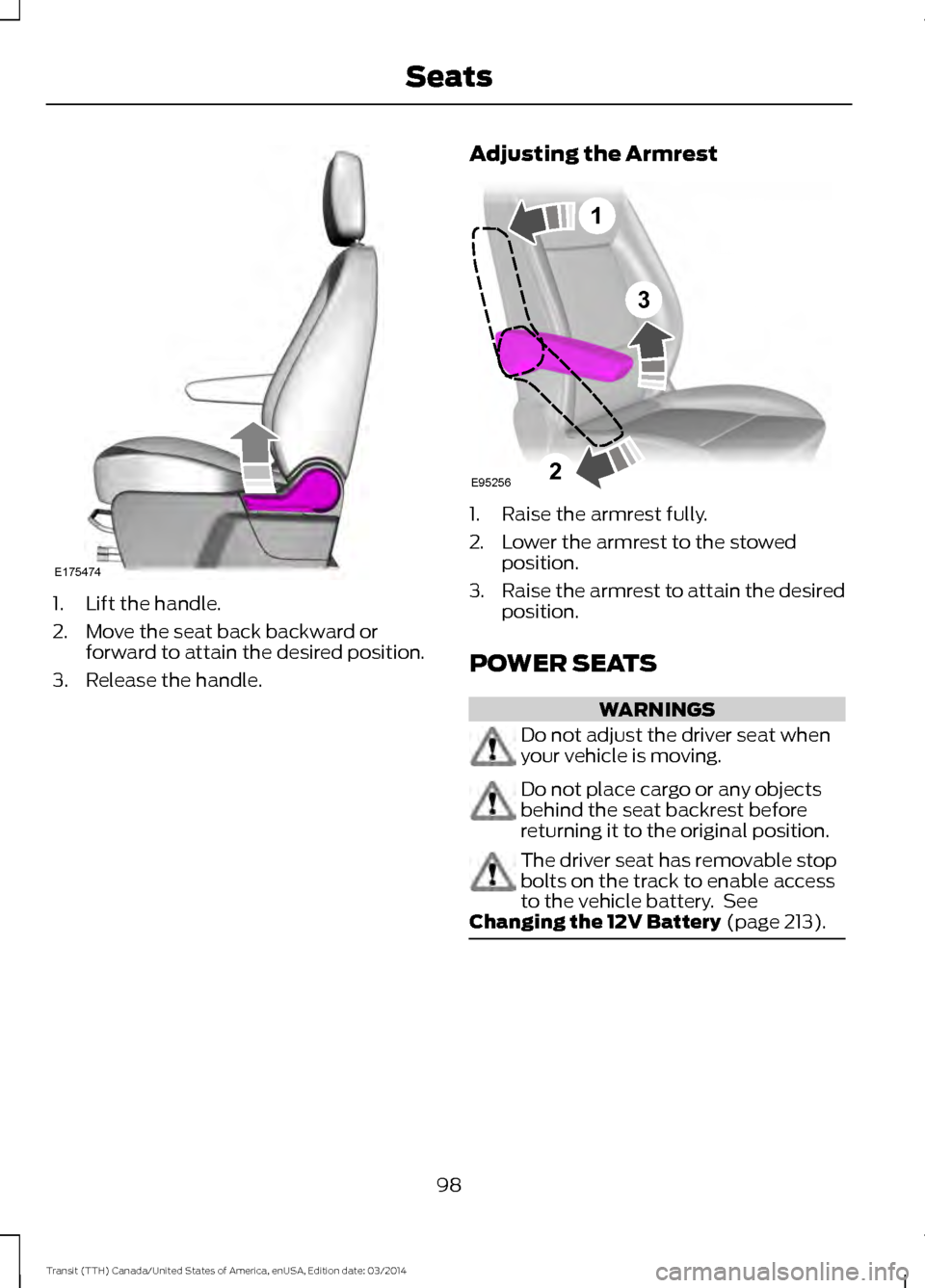
1. Lift the handle.
2. Move the seat back backward or
forward to attain the desired position.
3. Release the handle. Adjusting the Armrest 1. Raise the armrest fully.
2. Lower the armrest to the stowed
position.
3. Raise the armrest to attain the desired
position.
POWER SEATS WARNINGS
Do not adjust the driver seat when
your vehicle is moving.
Do not place cargo or any objects
behind the seat backrest before
returning it to the original position.
The driver seat has removable stop
bolts on the track to enable access
to the vehicle battery. See
Changing the 12V Battery (page 213). 98
Transit (TTH) Canada/United States of America, enUSA, Edition date: 03/2014 SeatsE175474 3
E95256
1
2
Page 106 of 461

WARNINGS
Do not use the power points for
operating a cigar lighter element.
Do not insert objects other than an
accessory plug into the power points.
Run the engine for full capacity use of the
power points.
Note:
Do not use the power points over the
vehicle capacity of 12 volt DC 180 watt or a
fuse may blow.
Note: Do not hang any accessory from the
accessory plug.
Note: Always keep the power point caps
closed when not in use.
Note: Incorrect use of the power points can
cause damage not covered by the vehicle
warranty.
To prevent the battery from running out of
charge:
• Do not use the power points for longer
than necessary when the engine is not
running.
• Do not leave devices plugged in
overnight or when your vehicle is in park
(P) for extended periods of time.
Note: The power point turns off after 30
minutes if you switched the ignition on
without the engine running. Auxiliary Power Point Locations Auxiliary Power Point locations may be:
•
On the instrument panel.
• Inside the floor console storage
compartment.
• Inside the cargo area.
Note: Do not keep electrical devices or
adaptors plugged in to the auxiliary power
point when not in use.
AC Power Point WARNING
Do not use any extension cord with
the AC power point, since it will
defeat the safety protection design
provided by the cap and twist tab. Doing
so may cause the power point to overload
due to powering multiple devices that can
reach beyond the 150 watt load limit and
could result in fire or personal injury. 103
Transit (TTH) Canada/United States of America, enUSA, Edition date: 03/2014 Auxiliary Power PointsE185878
Page 109 of 461

GENERAL INFORMATION
WARNINGS
Extended idling at high engine
speeds can produce very high
temperatures in the engine and
exhaust system, creating the risk of fire or
other damage. Do not park, idle or drive your vehicle
on dry grass or other dry ground
cover. The emission system heats up
the engine compartment and exhaust
system, creating the risk of fire. Do not start the engine in a closed
garage or in other enclosed areas.
Exhaust fumes can be toxic. Always
open the garage door before you start the
engine. If you smell exhaust fumes inside
your vehicle, have your vehicle
checked by an authorized dealer
immediately. Do not drive your vehicle if
you smell exhaust fumes. If you disconnect the battery, your vehicle
may exhibit some unusual driving
characteristics for approximately 5 miles
(8 kilometers) after you reconnect it. This
is because the engine management system
must realign itself with the engine. You can
disregard any unusual driving
characteristics during this period.
The powertrain control system meets all
Canadian interference-causing equipment
standard requirements regulating the
impulse electrical field or radio noise.
When you start the engine, avoid pressing
the accelerator pedal before and during
operation. Only use the accelerator pedal
when you have difficulty starting the
engine. IGNITION SWITCH
0(off) - The ignition is off.
Note: When you switch the ignition off and
leave your vehicle, do not leave your key in
the ignition. This could cause your vehicle
battery to lose charge.
I (accessory) - Allows the electrical
accessories such as the radio to operate
while the engine is not running.
Note: Do not leave the ignition key in
position I or II (without the engine running)
for too long to avoid vehicle battery losing
charge.
II (on) - All electrical circuits operational.
Warning lamps and indicators are
illuminated.
III
(start) - cranks the engine. Release the
key as soon as the engine starts.
STARTING A GASOLINE
ENGINE
Before starting the engine check
the following:
• Make sure all occupants have fastened
their safety belts.
• Make sure the headlamps and
electrical accessories are off.
• Make sure the parking brake is on.
• Move the transmission selector lever
to position park (P).
106 Transit (TTH) Canada/United States of America, enUSA, Edition date: 03/2014Starting and Stopping the EngineE72128
Page 127 of 461
You can correct these temporary
malfunctions by filling the fuel tank with
good quality fuel, correctly closing the fuel
filler door or letting the electrical system
dry out. After three driving cycles without
these or any other temporary malfunctions
present, the service engine soon indicator
should not illuminate. A driving cycle
consists of a cold engine startup followed
by mixed city or highway driving. No
additional vehicle service is required.
If the service engine soon indicator remains
on, have your vehicle serviced at the first
available opportunity. Although some
malfunctions detected by the OBD-II may
not have symptoms that are apparent,
continued driving with the service engine
soon indicator on can result in increased
emissions, lower fuel economy, reduced
engine and transmission smoothness, and
lead to more costly repairs.
Readiness for
Inspection/Maintenance (I/M)
Testing
Some state/provincial and local
governments may have
Inspection/Maintenance (I/M) programs
to inspect the emission control equipment
on your vehicle. Failure to pass this
inspection could prevent you from getting
a vehicle registration.
If the service engine soon
indicator is on or the bulb does
not work, you may need to have
your vehicle serviced. See On-Board
Diagnostics (OBD-II).
Your vehicle may not pass the I/M test if
the service engine soon indicator is on or
not working properly (bulb is burned out),
or if the OBD-II system has determined
that some of the emission control systems
have not been properly checked. In this
case, your vehicle is not ready for I/M
testing. If the vehicle engine or transmission has
just been serviced or the battery has
recently run out of charge or been
replaced, the OBD-II system may indicate
that your vehicle is not ready for I/M
testing. To determine if the vehicle is ready
for I/M testing, switch the ignition on for 15
seconds without cranking the engine. If the
service engine soon indicator flashes on
and off eight times, it means that your
vehicle is not ready for I/M testing; if the
service engine soon indicator illuminates
and remains on, it means that your vehicle
is ready for I/M testing.
The OBD-II system monitors the emission
control system during normal driving. A
complete check may take several days.
If your vehicle is not ready for I/M testing,
you may need to:
•
Drive on an expressway or highway for
a steady 15 minutes, followed by 20
minutes of stop-and-go driving with at
least four 30-second idle periods.
• Allow your vehicle to sit for at least
eight hours without starting the engine.
Then complete the above driving cycle.
The engine must warm up to its normal
operating temperature. Do not switch the
ignition off until the above driving cycle is
complete. If your vehicle is still not ready
for I/M testing, you will have to repeat the
above driving cycle.
Diesel Exhaust System: Oxidation
Catalyst And Diesel Particulate
Filter System
Your vehicle is fitted with a diesel
particulate filter. The diesel particulate
filter is an inline filter in the exhaust system
that reduces carbon emissions by trapping
exhaust particles before they reach the
tailpipe. The diesel particulate filter looks
similar to a traditional exhaust catalyst,
except it is larger, and is part of the exhaust
system under the vehicle. The filter couples
124 Transit (TTH) Canada/United States of America, enUSA, Edition date: 03/2014 Fuel and Refueling
Page 138 of 461
Upshifts when accelerating (recom-
mended for best fuel economy)
Vehicle speed mph( km/h):
Upshift from:
45 (72)
4 - 5
50 (80)
5 - 6
Note: Engine damage may occur if you
maintain an excessive engine speed without
shifting.
Hints on Driving with an Automatic
Transmission WARNING
Do not idle the engine for long
periods in drive (D) with the brakes
applied.
Putting Your Vehicle in Gear
1. Start the engine.
2. Press the brake pedal.
3. Shift the gearshift lever to drive (D),
reverse (R) or manual (M).
4. Release the parking brake.
5. Release the brake pedal and press the
accelerator pedal.
Stopping Your Vehicle
1. Release the accelerator pedal and press the brake pedal.
2. Apply the parking brake.
3. Shift the gearshift lever to neutral (N) or park (P).
4. Switch the ignition off. If Your Vehicle Gets Stuck In Mud or
Snow
If your vehicle is stuck in mud or snow, shift
between drive (D) and reverse (R) pressing
lightly on the accelerator pedal in each
gear. Stop between shifts in a steady
pattern to rock your vehicle.
Note:
Do not rock your vehicle if the engine
is not at normal operating temperature,
damage to the transmission may occur.
Note: Do not rock your vehicle for more
than a minute, damage to the transmission
or tires may occur and the engine may
overheat.
Brake-Shift Interlock WARNINGS
Do not drive your vehicle until you
verify that the brake lamps are
working.
This procedure requires you to shift
the gearshift lever out of park (P)
causing your vehicle to roll. Make
sure you fully set the parking brake before
attempting to shift the gearshift lever out
of park (P). If you release the parking brake and
the brake warning lamp remains
illuminated, the brakes may not be
working correctly. The system has
detected a fault that requires service. Your vehicle has a brake-shift interlock
feature. This prevents you from shifting the
gearshift lever from the park (P) position,
unless the brake pedal is pressed.
In the event of an electrical malfunction,
or if the vehicle battery has run out of
charge, use the following procedure to shift
the gearshift lever from the park (P)
position.
1.
Apply the parking brake and switch the
ignition off.
135 Transit (TTH) Canada/United States of America, enUSA, Edition date: 03/2014 Transmission
Page 168 of 461

When attaching the trailer wiring connector
to your vehicle, only use a correctly fitting
connector that works with the vehicle and
trailer functions. Some seven-position
connectors may have the SAE J2863 logo,
which confirms that it is the correct wiring
connector and works correctly with your
vehicle.
Function
Color
Left turn signal and brake
lamp.
Yellow
Ground (-).
White
Electric brakes.
Blue
Right turn signal and brake
lamp.
Green
Battery (+).
Orange
Running lamps.
Brown
Reverse lamps.
Grey
Tow Hitch
Do not use a tow hitch that either clamps
on to the bumper or attaches to the axle.
You must distribute the load in your trailer
so that between 10% and 15% of the total
weight of the trailer is on the tongue.
Weight Distributing Hitches
A weight distribution hitch is not
recommended for use with your vehicle.
Safety Chains WARNING
Do not attach safety chains to the
bumper.
Always connect the safety chains to the
frame or hook retainers of your vehicle's
tow hitch. To connect the safety chains, cross the
chains under the trailer tongue and allow
enough slack for turning tight corners. Do
not allow the chains to drag on the ground.
Trailer Brakes (If Equipped)
WARNING
Do not connect trailer hydraulic
brake systems directly to the vehicle
brake system. Your vehicle may not
have enough braking power and your
chances of having a crash greatly increase. Electric, manual, automatic or surge-type
trailer brakes are safe if you install them
correctly and adjust them to the
manufacturer's specifications. Trailer
brakes must meet local and federal
regulations.
The rating for the tow vehicle's braking
system operation is at the gross vehicle
weight rating, not the gross combined
weight rating.
Separate functioning brake systems are
required for safe control of towed vehicles
and trailers weighing more than
1500 lb
(680 kg) when loaded.
Integrated Trailer Brake Controller WARNING
The Ford trailer brake controller has
been verified to be compatible with
trailers having electric-actuated
drum brakes (one to four axles) and
electric-over-hydraulic brakes. It will not
turn on the hydraulic surge-style trailer
brakes. It is the responsibility of the
customer to make sure that the trailer
brakes are adjusted appropriately,
functioning normally and all electric
connections are correctly made. Failure to
do so may result in loss of vehicle control,
crash or serious injury. 165
Transit (TTH) Canada/United States of America, enUSA, Edition date: 03/2014 Towing
Page 171 of 461

5. If the trailer wheels lock, indicated by
squealing tires, reduce the gain setting.
If the trailer wheels turn freely, increase
the gain setting. Repeat steps four and
five until the gain setting is at a point just below trailer wheel lock. If towing
a heavier trailer, trailer wheel lock may
not be attainable even with the
maximum gain setting of 10.
System Warning Messages Action and Description
Message
Displays in response to faults sensed by the trailer brake
controller, accompanied by a single tone. If this message
appears, contact an authorized dealer as soon as possible
for diagnosis and repair. The controller may still function, but
performance may be degraded.
Trailer Brake Module
Fault
Displays when there is a short circuit on the electric brake
output wire. If the message displays, accompanied by a single
tone, with no trailer connected, the problem is with your
vehicle wiring between the trailer brake controller and the 7-
pin connector. If the message only displays with a trailer
connected, the problem is with the trailer wiring. Consult a
trailer dealer for assistance. This can be a short to ground,
for example a chaffed wire, short to voltage, for example a
pulled pin on trailer emergency breakaway battery or the
trailer brakes may be drawing too much current.
Wiring Fault on Trailer
Note: An authorized dealer can diagnose the trailer brake controller to determine exactly
which trailer fault has occurred. However, the Ford Warranty does not cover this diagnosis
if the fault is with the trailer.
Points to Remember
• Do not attempt removal of the trailer
brake controller without consulting the
Workshop Manual. Damage to the unit
may result.
• Adjust gain setting before using the
trailer brake controller for the first time.
• Adjust gain setting, using the procedure
above, whenever road, weather and
trailer or vehicle loading conditions
change from when the gain was initially
set. •
Only use the manual control lever for
correct adjustment of the gain during
trailer setup. Misuse, such as
application during trailer sway, could
cause instability of trailer or tow
vehicle.
• Avoid towing in adverse weather
conditions. The trailer brake controller
does not provide anti-lock control of
the trailer wheels. Trailer wheels can
lock up on slippery surfaces, resulting
in instability of trailer or tow vehicle.
168 Transit (TTH) Canada/United States of America, enUSA, Edition date: 03/2014 Towing