2015 FORD TAURUS audio system
[x] Cancel search: audio systemPage 427 of 558
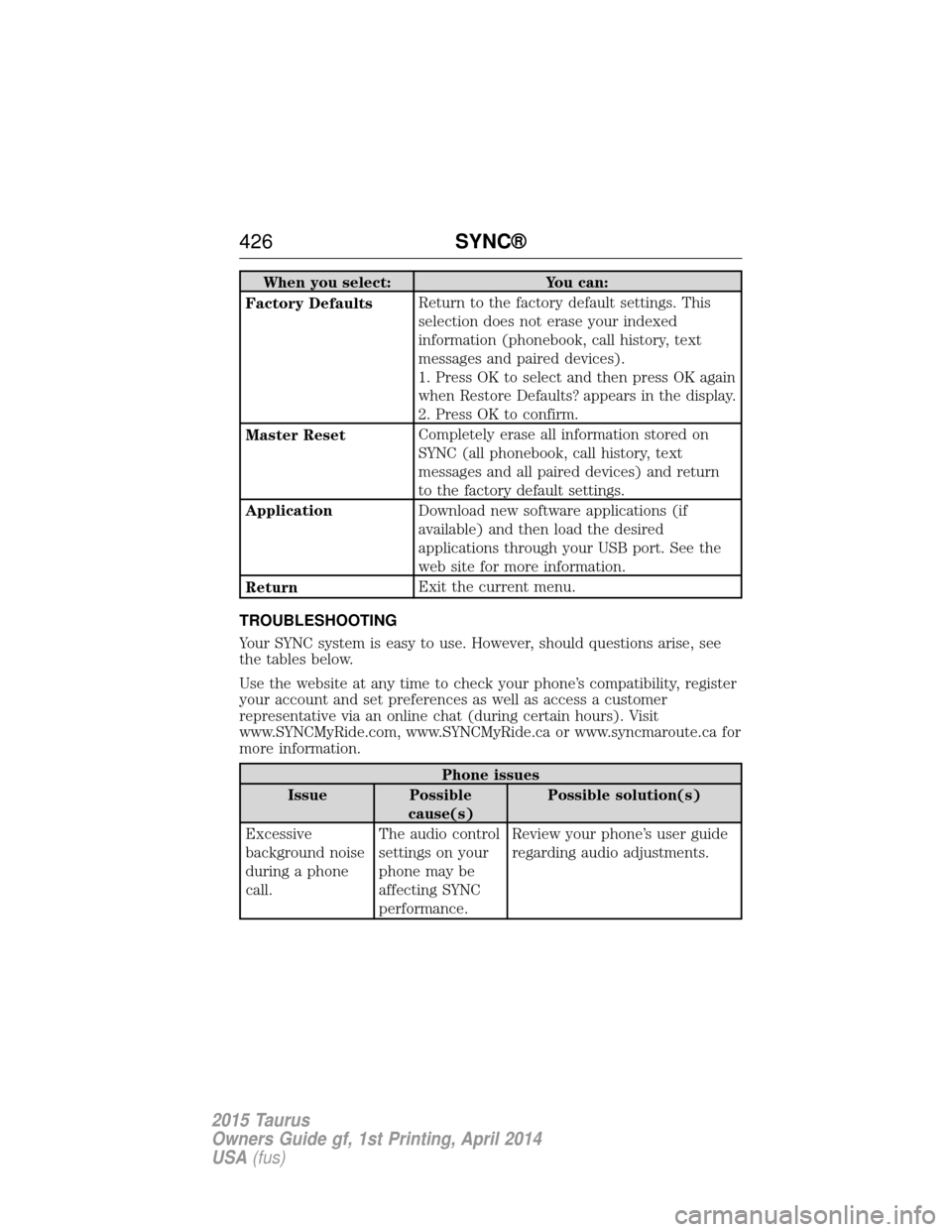
When you select:You can:
Factory Defaults Return to the factory default settings. This
selection does not erase your indexed
information (phonebook, call history, text
messages and paired devices).
1. Press OK to select and then press OK again
when Restore Defaults? appears in the display.
2. Press OK to confirm.
Master Reset Completely erase all information stored on
SYNC (all phonebook, call history, text
messages and all paired devices) and return
to the factory default settings.
Application Download new software applications (if
available) and then load the desired
applications through your USB port. See the
web site for more information.
Return Exit the current menu.
TROUBLESHOOTING
Your SYNC system is easy to use. However, should questions arise, see
the tables below.
Use the website at any time to check your phone’s compatibility, register
your account and set preferences as well as access a customer
representative via an online chat (during certain hours). Visit
www.SYNCMyRide.com, www.SYNCMyRide.ca or www.syncmaroute.ca for
more information.
Phone issues
Issue Possible cause(s) Possible solution(s)
Excessive
background noise
during a phone
call. The audio control
settings on your
phone may be
affecting SYNC
performance.Review your phone’s user guide
regarding audio adjustments.
426
SYNC®
2015 Taurus
Owners Guide gf, 1st Printing, April 2014
USA(fus)
Page 436 of 558

This system uses a four-corner strategy to provide quick access several
vehicle features and settings. The touchscreen provides easy interaction
with your cellular phone, multimedia, climate control and navigation
system. The corners display any active modes within those menus, such
as phone status or the climate temperature.
Note:Some features are not available while your vehicle is moving.
Note: Your system is equipped with a feature that allows you to access
and control audio features for 30 minutes after you switch the ignition
off (and no doors open).
PHONE
Press to select any of the following:
• Making and Receiving Calls
• Quick Dial
• Phonebook
• Call History
• Text Messaging
• Settings
NAVIGATION
Press to select any of the following:
• My Home
• Favorites
• Previous Destinations
• Point of Interest
• Emergency
• Street Address
• Intersection
• City Center
• Map
• Edit Route
• Cancel Route
CLIMATE
Press to select any of the following:
• Driver Settings
• Recirculated Air
• Auto
• Dual
• Passenger Settings
• A/C
• Defrost
MyFord Touch® (If Equipped) 435
2015 Taurus
Owners Guide gf, 1st Printing, April 2014
USA(fus)
Page 438 of 558
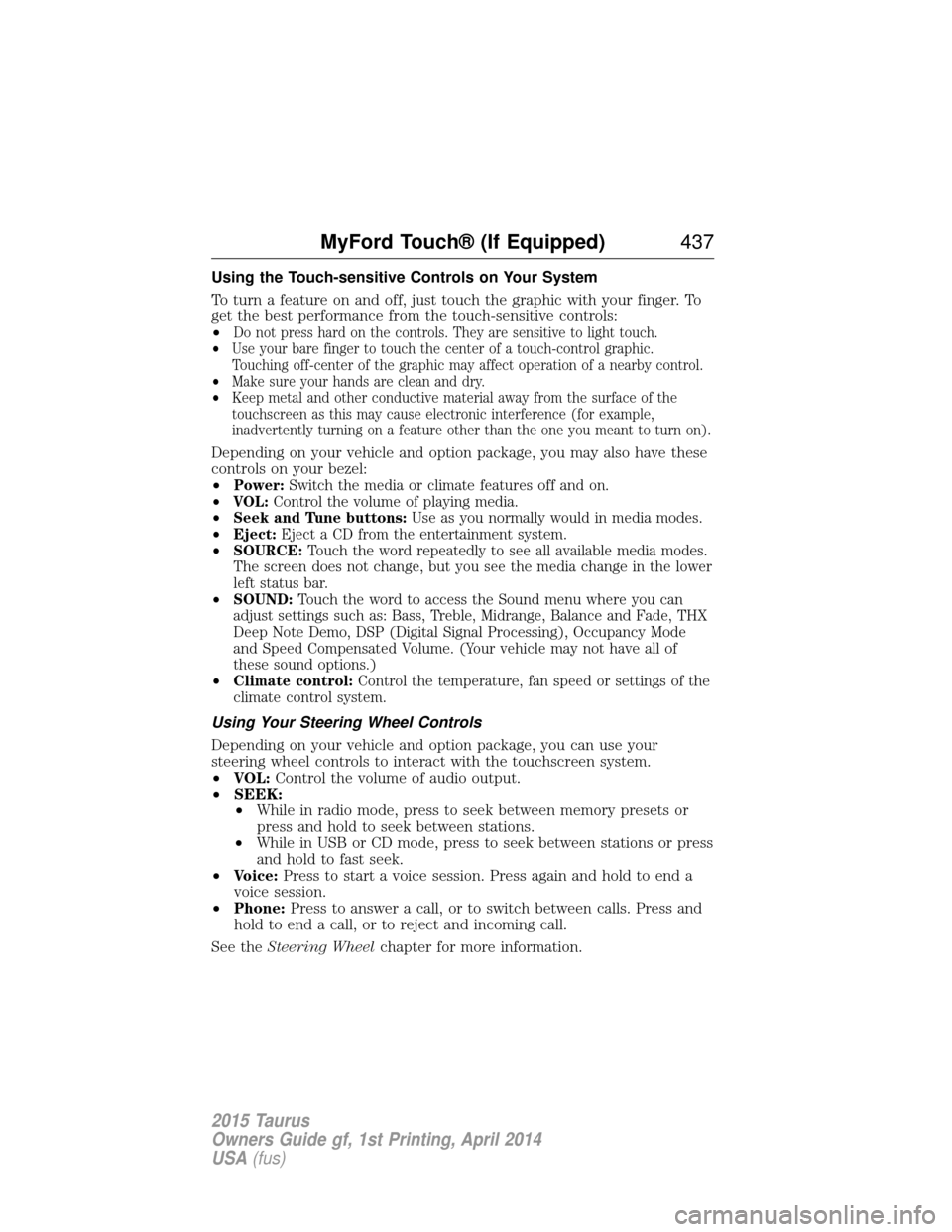
Using the Touch-sensitive Controls on Your System
To turn a feature on and off, just touch the graphic with your finger. To
get the best performance from the touch-sensitive controls:
•
Do not press hard on the controls. They are sensitive to light touch.
• Use your bare finger to touch the center of a touch-control graphic.
Touching off-center of the graphic may affect operation of a nearby control.
• Make sure your hands are clean and dry.
• Keep metal and other conductive material away from the surface of the
touchscreen as this may cause electronic interference (for example,
inadvertently turning on a feature other than the one you meant to turn on).
Depending on your vehicle and option package, you may also have these
controls on your bezel:
•
Power: Switch the media or climate features off and on.
• VOL: Control the volume of playing media.
• Seek and Tune buttons: Use as you normally would in media modes.
• Eject: Eject a CD from the entertainment system.
• SOURCE: Touch the word repeatedly to see all available media modes.
The screen does not change, but you see the media change in the lower
left status bar.
• SOUND: Touch the word to access the Sound menu where you can
adjust settings such as: Bass, Treble, Midrange, Balance and Fade, THX
Deep Note Demo, DSP (Digital Signal Processing), Occupancy Mode
and Speed Compensated Volume. (Your vehicle may not have all of
these sound options.)
• Climate control: Control the temperature, fan speed or settings of the
climate control system.
Using Your Steering Wheel Controls
Depending on your vehicle and option package, you can use your
steering wheel controls to interact with the touchscreen system.
• VOL: Control the volume of audio output.
• SEEK:
• While in radio mode, press to seek between memory presets or
press and hold to seek between stations.
• While in USB or CD mode, press to seek between stations or press
and hold to fast seek.
• Voice: Press to start a voice session. Press again and hold to end a
voice session.
• Phone: Press to answer a call, or to switch between calls. Press and
hold to end a call, or to reject and incoming call.
See the Steering Wheel chapter for more information.
MyFord Touch® (If Equipped) 437
2015 Taurus
Owners Guide gf, 1st Printing, April 2014
USA(fus)
Page 443 of 558

Audio Sources and Memory Presets
Use theOKand arrow buttons on the right side of your steering wheel
to scroll through the available modes.
Use the up and down arrows on the right-hand side 5–way switch in the
current playing screen to scroll through the memory presets
USING VOICE RECOGNITION
This system helps you control many features using voice commands. This
allows you to keep your hands on the wheel and focus on what is in
front of you. The system provides feedback through audible tones,
prompts, questions and spoken confirmations depending on the situation
and the chosen level of interaction (voice settings).
The system also asks short questions (confirmation prompts) when it is
not sure of your request or when there are multiple possible responses
to your request.
When using voice commands, words and icons may appear in the lower
left status bar indicating the status of the voice session (such as
Listening, Success, Failed, Paused or Try Again).
How to Use Voice Commands with Your System
Press the voice icon. After the tone, speak your command
clearly.
These commands can be said at any time. “Cancel”“Exit”
“Go back”
“List of commands” “Main menu”
442 MyFord Touch® (If Equipped)
2015 Taurus
Owners Guide gf, 1st Printing, April 2014
USA(fus)
Page 444 of 558
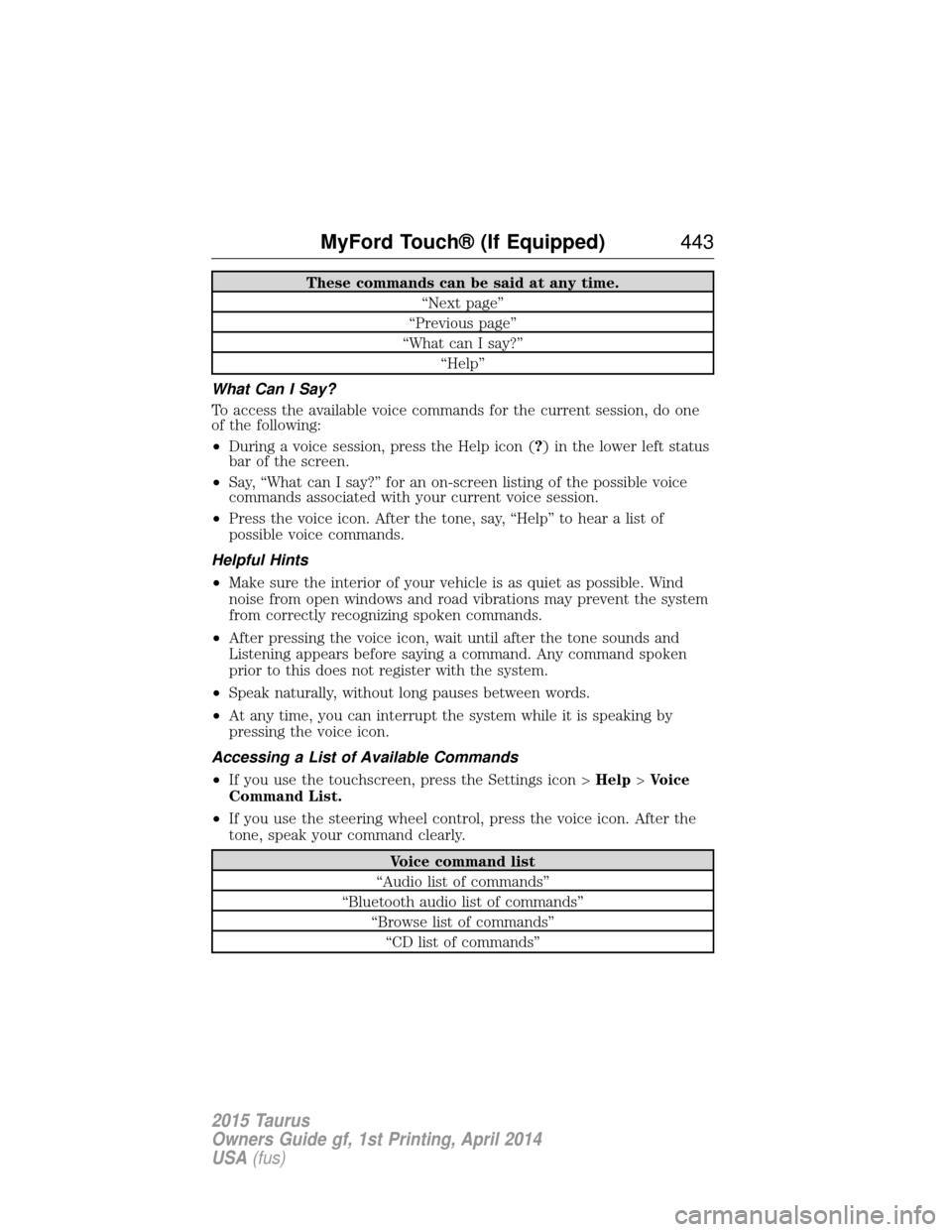
These commands can be said at any time.“Next page”
“Previous page”
“What can I say?” “Help”
What Can I Say?
To access the available voice commands for the current session, do one
of the following:
• During a voice session, press the Help icon ( ?) in the lower left status
bar of the screen.
• Say, “What can I say?” for an on-screen listing of the possible voice
commands associated with your current voice session.
• Press the voice icon. After the tone, say, “Help” to hear a list of
possible voice commands.
Helpful Hints
• Make sure the interior of your vehicle is as quiet as possible. Wind
noise from open windows and road vibrations may prevent the system
from correctly recognizing spoken commands.
• After pressing the voice icon, wait until after the tone sounds and
Listening appears before saying a command. Any command spoken
prior to this does not register with the system.
• Speak naturally, without long pauses between words.
• At any time, you can interrupt the system while it is speaking by
pressing the voice icon.
Accessing a List of Available Commands
• If you use the touchscreen, press the Settings icon > Help>Voice
Command List.
• If you use the steering wheel control, press the voice icon. After the
tone, speak your command clearly.
Voice command list
“Audio list of commands”
“Bluetooth audio list of commands” “Browse list of commands”“CD list of commands”
MyFord Touch® (If Equipped) 443
2015 Taurus
Owners Guide gf, 1st Printing, April 2014
USA(fus)
Page 449 of 558

Your voice system allows you to change audio sources with a simple
voice command. For example, if you are listening to music on a USB
device, then want to switch to a satellite radio channel, simply press the
voice button on the steering wheel controls and say the name of the
Sirius station (such as, “the Highway”). The following voice commands
are available at the top level of the voice session no matter which
current audio source you are listening to (such as a USB device or Sirius
satellite radio).Note:This is only available when your MyFord Touch
system language is set to North American English.
“AM <530 - 1710>” “FM <87.9 – 107.9>”
“<530 - 1710>” “<87.9 – 107.9>”
“Sirius <0-223>”
*“
“Play [genre]
“Play [artist]
“Play [album]
“Play
*
*
This command is only usable if you have an active subscription to Sirius
satellite radio.
**The commands that have [ ] around the word means that the word is
optional. For example, if you say, “Play Metallica”, this is the same as the
voice command, “Play [artist]
AM and FM
Touch the AMorFM tab to listen to the radio.
To change between AM and FM presets, just touch the AMor
FM tab.
Memory Presets
Save a station by pressing and holding one of the memory preset areas.
There is a brief mute while the radio saves the station. Sound returns
when finished.
HD Radio
Touch this button to turn HD Radio on. The light on the button
illuminates when the feature is on. HD Radio allows you to receive radio
broadcasts digitally, where available, providing free, crystal-clear sound.
See HD Radio information later in this chapter.
448MyFord Touch® (If Equipped)
2015 Taurus
Owners Guide gf, 1st Printing, April 2014
USA(fus)
Page 450 of 558

Scan
Touch this button to go to the next strong AM or FM radio station. The
light on the button illuminates when the feature is on.
Options
Sound Settingsallows you to adjust settings for:
• Bass
• Midrange
• Treble
• Balance and Fade
• DSP (Digital Signal Processing)
• Occupancy Mode
• Speed Compensated Volume.
Note: Your vehicle may not have all these sound settings.
Set PTY for Seek/Scan allows you to select a category of music you
would like to search for. You can then choose to either seek or scan for
the stations playing that category.
RDS Text Display allows you to view the information broadcast by FM
stations.
AST allows you to have the system automatically store the six strongest
stations in your current location.
TAG Button is available when HD Radio is on, and allows you to tag a
song to download later. When you select On,TAG appears on-screen
when HD Radio is active. You can touch TA Gto save the information of
the song that is playing. When you plug in your portable music player,
the information transfers, if supported by your device. When you are
connected to iTunes, the tags appear to remind you of the songs you
would like to download. See HD Radio informationlater in this chapter.
Direct Tune
Touch this button to manually enter the desired station number. Touch
Enter when you are done.
HD Radio™ Information (If Available)
Note: HD Radio broadcasts are not available in all markets.
HD Radio technology is the digital evolution of analog AM/FM radio. Your
system has a special receiver that allows it to receive digital broadcasts
(where available) in addition to the analog broadcasts, it already
receives. Digital broadcasts provide a better sound quality than analog
broadcasts with free, crystal-clear audio and no static or distortion. For
MyFord Touch® (If Equipped) 449
2015 Taurus
Owners Guide gf, 1st Printing, April 2014
USA(fus)
Page 451 of 558
more information, and a guide to available stations and programming,
please visit www.hdradio.com.
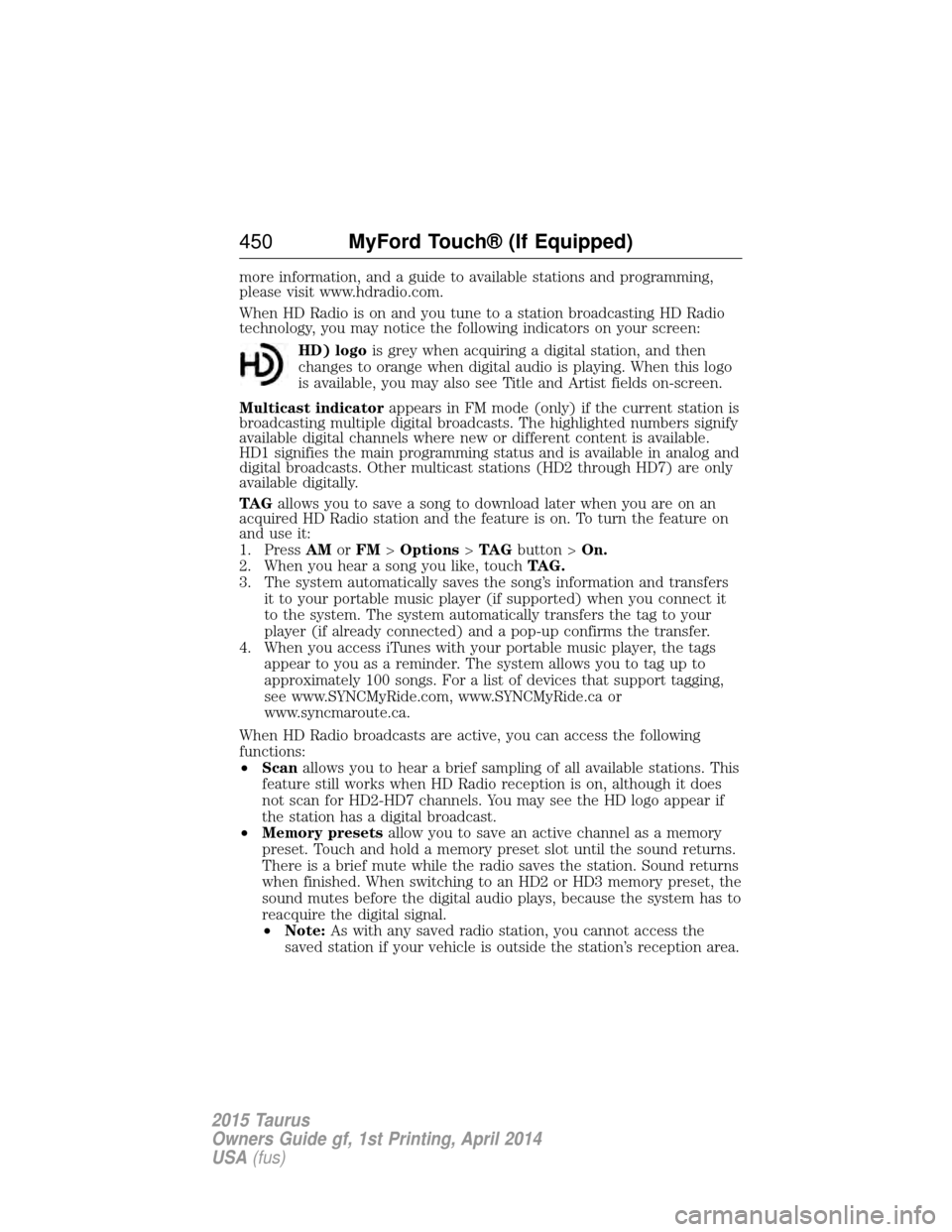
When HD Radio is on and you tune to a station broadcasting HD Radio
technology, you may notice the following indicators on your screen:HD) logo is grey when acquiring a digital station, and then
changes to orange when digital audio is playing. When this logo
is available, you may also see Title and Artist fields on-screen.
Multicast indicator appears in FM mode (only) if the current station is
broadcasting multiple digital broadcasts. The highlighted numbers signify
available digital channels where new or different content is available.
HD1 signifies the main programming status and is available in analog and
digital broadcasts. Other multicast stations (HD2 through HD7) are only
available digitally.
TA G allows you to save a song to download later when you are on an
acquired HD Radio station and the feature is on. To turn the feature on
and use it:
1. Press AMorFM >Options >TA G button > On.
2. When you hear a song you like, touch TAG.
3. The system automatically saves the song’s information and transfers it to your portable music player (if supported) when you connect it
to the system. The system automatically transfers the tag to your
player (if already connected) and a pop-up confirms the transfer.
4. When you access iTunes with your portable music player, the tags appear to you as a reminder. The system allows you to tag up to
approximately 100 songs. For a list of devices that support tagging,
see www.SYNCMyRide.com, www.SYNCMyRide.ca or
www.syncmaroute.ca.
When HD Radio broadcasts are active, you can access the following
functions:
• Scan allows you to hear a brief sampling of all available stations. This
feature still works when HD Radio reception is on, although it does
not scan for HD2-HD7 channels. You may see the HD logo appear if
the station has a digital broadcast.
• Memory presets allow you to save an active channel as a memory
preset. Touch and hold a memory preset slot until the sound returns.
There is a brief mute while the radio saves the station. Sound returns
when finished. When switching to an HD2 or HD3 memory preset, the
sound mutes before the digital audio plays, because the system has to
reacquire the digital signal.
• Note: As with any saved radio station, you cannot access the
saved station if your vehicle is outside the station’s reception area.
450 MyFord Touch® (If Equipped)
2015 Taurus
Owners Guide gf, 1st Printing, April 2014
USA(fus)