2015 FORD TAURUS brake
[x] Cancel search: brakePage 80 of 558

Programming a Spare Intelligent Access Key (If Equipped)
Note:A maximum of four intelligent access keys can be programmed to
your vehicle. You must take your vehicle and all access keys to your
authorized dealer to be erased and reprogrammed if you would like to
replace a previously programmed access key with a new access key, or if
you already have four access keys programmed to your vehicle.
You must have two previously programmed intelligent access keys inside
your vehicle and the new unprogrammed intelligent access keys readily
accessible. See your authorized dealer to have the spare key
programmed if two previously programmed keys are not available.
Make sure that your vehicle is off before beginning this procedure. Make
sure that all doors are closed before beginning and that they remain
closed throughout the procedure. Perform all steps within 30 seconds of
starting the sequence. Stop and wait for at least one minute before
starting again if any steps are performed out of sequence.
Read and understand the entire procedure before you begin.
1. Place the new unprogrammed intelligent
access key in the pocket inside of the
center console with the buttons facing out
and with key ring up.
2. Press the driver or passenger power
door unlock control three times.
3. Press and release the brake pedal one
time.
4. Press the driver or passenger power
door lock control three times.
5. Press and release the brake pedal one time. The indicator on the
START/STOP button should begin to rapidly flash, indicating the
programming mode has been entered and two programmed intelligent
access keys have been detected in your vehicle.
6. Press the START/STOP button within one minute. A message will
appear in the information display indicating that the new intelligent
access key was programmed.
7. Remove the intelligent access key from the center console pocket and
press the unlock button on the newly programmed intelligent access key
to exit programming mode.
8. Verify that the remote entry functions operate (press lock then
unlock, making sure you end in unlock) and that your vehicle starts with
new intelligent access key.
Security 79
2015 Taurus
Owners Guide gf, 1st Printing, April 2014
USA(fus)
Page 87 of 558

ADJUSTABLE PEDALS (IF EQUIPPED)
WARNING:Never adjust the accelerator and brake pedal with
feet on the pedals while the vehicle is moving.
The control is located on the left side of the steering column. Press and
hold the appropriate control to move the pedals. A. Farther
B. Closer
The pedal positions are saved and recalled with the memory feature (if
equipped). Refer to the Seatschapter.
The pedals should only be adjusted when the vehicle is parked.
AB
86 Pedals
2015 Taurus
Owners Guide gf, 1st Printing, April 2014
USA(fus)
Page 106 of 558

WARNING LAMPS AND INDICATORS
These indicators can alert you to a vehicle condition that may become
serious enough to cause expensive repairs. Many lights will illuminate
when you start your vehicle to make sure they work. If any light remains
on after starting the vehicle, refer to the respective system warning light
for additional information.
Note:Some warning indicators are reconfigurable telltales (RTT). These
indicators appear in the information display and function the same as a
warning light, but do not display on startup.
Adaptive cruise control (if equipped) (RTT)
The speed control system indicator light changes color to indicate what
mode the system is in:
• On (white light): Illuminates when the adaptive cruise control system
is turned on. Turns off when the speed control system is turned off.
• Engaged (green light): Illuminates when the adaptive cruise control
system is engaged. Turns off when the speed control system is
disengaged.
Airbag readiness If this light fails to illuminate when the ignition is turned on,
continues to flash or remains on, contact your authorized dealer
as soon as possible. A chime will sound when there is a
malfunction in the indicator light.
Anti-lock brake system
If the ABS light stays illuminated or continues to flash, a
malfunction has been detected. Contact your authorized dealer
as soon as possible. Normal braking is still functional unless the
brake warning light also is illuminated.
Instrument Cluster 105
2015 Taurus
Owners Guide gf, 1st Printing, April 2014
USA(fus)
Page 107 of 558

Brake system warning lightTo confirm the brake system warning light is functional, it will
momentarily illuminate when the ignition is turned to the on
position when the engine is not running, or in a position
between on and start, or by applying the parking brake when the ignition
is turned to the on position.
If it illuminates when you are driving, check that the parking brake is not
engaged. If the parking brake is not engaged, this indicates low brake
fluid level or a brake system malfunction. Have the system checked
immediately by your authorized dealer.
WARNING: Driving a vehicle with the brake system warning
light on is dangerous. A significant decrease in braking
performance may occur. It will take you longer to stop the vehicle.
Have the vehicle checked by your authorized dealer as soon as possible.
Driving extended distances with the parking brake engaged can cause
brake failure and the risk of personal injury.
Charging system (RTT) Illuminates when the battery is not charging properly. If it stays
on while the engine is running, there may be a malfunction with
the charging system. Contact your authorized dealer as soon as
possible. This indicates a problem with the electrical system or a related
component.
Door ajar (RTT)
Displays when the ignition is on and any door is not completely
closed.
Engine oil pressure (RTT) Illuminates when the oil pressure falls below the normal range.
Engine coolant temperature (RTT) Illuminates when the engine coolant temperature is high. Stop
the vehicle as soon as possible, switch off the engine and let
cool.
106 Instrument Cluster
2015 Taurus
Owners Guide gf, 1st Printing, April 2014
USA(fus)
Page 110 of 558

Stability Control SystemDisplays when the AdvanceTrac®/Traction control is active. If
the light remains on, have the system serviced immediately.
Stability Control System Off Illuminates when AdvanceTrac®/Traction control has been
disabled by the driver.
Turn signal Illuminates when the left or right turn signal or the hazard
warning flasher is turned on. If the indicators stay on or flash
faster, check for a burned out bulb.
AUDIBLE WARNINGS AND INDICATORS
Key In Ignition Warning Chime
Sounds when the key is left in the ignition in the off or accessory
position and the driver’s door is opened.
Keyless Warning Alert (If Equipped)
Sounds the horn twice when you exit your vehicle with the intelligent
access key, after the last door is closed and your keyless vehicle is in
RUN, indicating your vehicle is still on.
Headlamps On Warning Chime
Sounds when the headlamps or parking lamps are on, the ignition is off
(the key is not in the ignition) and the driver’s door is opened.
Parking Brake On Warning Chime
Sounds when you have left the parking brake on and drive your vehicle.
If the warning chime remains on after you have released the parking
brake, have the system checked by your authorized dealer immediately.
Instrument Cluster 109
2015 Taurus
Owners Guide gf, 1st Printing, April 2014
USA(fus)
Page 125 of 558

BLIS® MessagesAction / Description
Blindspot Not
Available Sensor
Blocked See Manual Displayed when the blind spot information
system/cross traffic alert system sensors are
blocked. Driver can typically clean the sensor
to resolve.
Blindspot System Fault Displayed when a fault with the blind spot information system has occurred. Contact your
authorized dealer as soon as possible.
Cross Traffic Not
Available Sensor
Blocked Displayed when the blind spot information
system/cross traffic alert system sensors are
blocked. Driver can typically clean the sensor
to resolve.
Cross Traffic System
Fault Displayed when a fault with the cross traffic
alert system has occurred. Contact your
authorized dealer as soon as possible.
Vehicle Coming From
X Displayed when the blind spot information
system with cross traffic alert (CTA) system is
operating and senses a vehicle.
Brake System
Messages Action / Description
Brake Fluid Level
LOW Indicates the brake fluid level is low and the
brake system should be inspected immediately.
Check Brake System Displayed when the brake system needs servicing. If the warning stays on or continues
to come on, contact your authorized dealer as
soon as possible.
Park Brake Engaged Displayed when the parking brake is set, the engine is running and the vehicle is driven
more than 3 mph (5 km/h). If the warning
stays on after the parking brake is released,
contact your authorized dealer as soon as
possible.
124Information Displays
2015 Taurus
Owners Guide gf, 1st Printing, April 2014
USA(fus)
Page 127 of 558
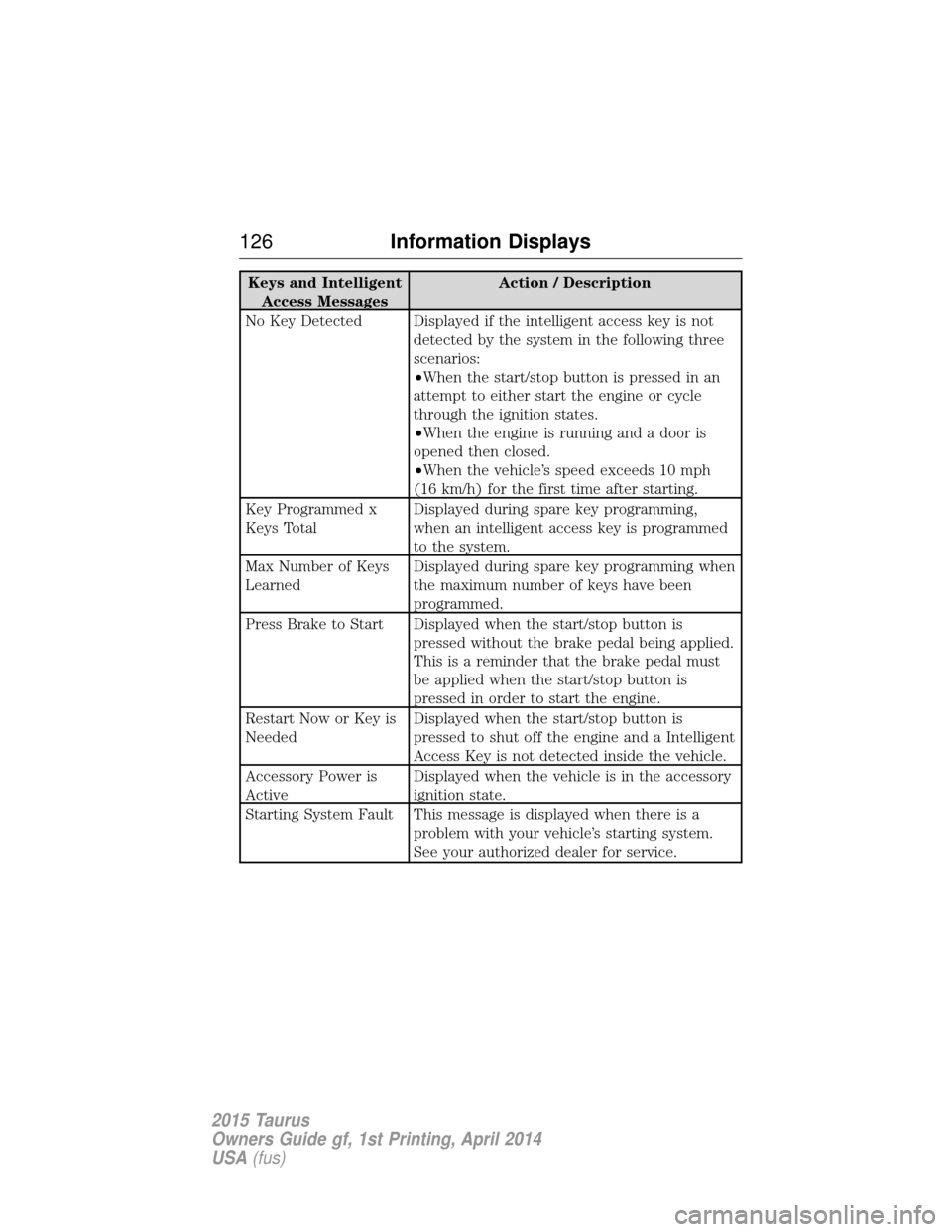
Keys and IntelligentAccess Messages Action / Description
No Key Detected Displayed if the intelligent access key is not detected by the system in the following three
scenarios:
•When the start/stop button is pressed in an
attempt to either start the engine or cycle
through the ignition states.
•When the engine is running and a door is
opened then closed.
•When the vehicle’s speed exceeds 10 mph
(16 km/h) for the first time after starting.
Key Programmed x
Keys Total Displayed during spare key programming,
when an intelligent access key is programmed
to the system.
Max Number of Keys
Learned Displayed during spare key programming when
the maximum number of keys have been
programmed.
Press Brake to Start Displayed when the start/stop button is pressed without the brake pedal being applied.
This is a reminder that the brake pedal must
be applied when the start/stop button is
pressed in order to start the engine.
Restart Now or Key is
Needed Displayed when the start/stop button is
pressed to shut off the engine and a Intelligent
Access Key is not detected inside the vehicle.
Accessory Power is
Active Displayed when the vehicle is in the accessory
ignition state.
Starting System Fault This message is displayed when there is a problem with your vehicle’s starting system.
See your authorized dealer for service.
126Information Displays
2015 Taurus
Owners Guide gf, 1st Printing, April 2014
USA(fus)
Page 167 of 558

Ignition Modes
Off:Turns the ignition off.
• Without applying the brake pedal, press and release the button once
when the ignition is in the on mode, or when the engine is running
but the vehicle is not in motion.
Accessory: Allows some electrical accessories to operate while the
engine is not running.
• Without applying the brake pedal, press and release the button twice.
On: All electrical circuits are operational. Warning lamps and indicators
are illuminated.
• Without applying the brake pedal, press and release the button once
from accessory mode.
• Without applying the brake pedal, press and release the button twice
from off mode.
Start: Starts the engine.
• Press the brake pedal, and then press the button for any length of
time. An indicator light on the button illuminates when then ignition
is on and when the engine starts.
STARTING A GASOLINE ENGINE
When you start the engine, the idle speed increases, this helps to warm
up the engine. If the engine idle speed does not slow down automatically,
have your vehicle checked by an authorized dealer.
Note: You can crank the engine for a total of 60 seconds (without the
engine starting) before the starting system temporarily disables. The
60 seconds does not have to be all at once. For example, if you crank the
engine three times for 20 seconds each time, without the engine starting,
you reached the 60-second time limit. A message appears in the
information display alerting you that you exceeded the cranking time. You
cannot attempt to start the engine for at least 15 minutes. After
15 minutes, you are limited to a 15-second engine cranking time. You need
to wait 60 minutes before you can crank the engine for 60 seconds again.
START STOP
ENGINE
166
Starting and Stopping the Engine
2015 Taurus
Owners Guide gf, 1st Printing, April 2014
USA(fus)