2015 FORD SUPER DUTY brake
[x] Cancel search: brakePage 6 of 470
Rear Axle
Limited Slip Differential.............................160
Electronic Locking Differential................160
Brakes
General Information....................................162
Hints on Driving With Anti-LockBrakes...........................................................162
Parking Brake.................................................163
Hill Start Assist..............................................163
Traction Control
Principle of Operation.................................165
Using Traction Control................................165
Stability Control
Principle of Operation.................................167
Using Stability Control................................167
Terrain Response
Principle of Operation.................................170
Using Hill Descent Control........................170
Parking Aids
Parking Aid.......................................................172
Rear View Camera........................................173
Cruise Control
Principle of Operation.................................176
Using Cruise Control....................................176
Driving Aids
Steering.............................................................177
Load Carrying
Load Limit........................................................178
Tailgate.............................................................185
Towing
Towing a Trailer.............................................189
Trailer Sway Control....................................190
Recommended Towing Weights............190
Essential Towing Checks...........................193
Towing Points...............................................205
Transporting the Vehicle..........................206
Towing the Vehicle on Four Wheels......207
Driving Hints
Breaking-In....................................................208
Economical Driving.....................................208
Driving Through Water..............................209
Floor Mats......................................................209
Snowplowing.................................................210
Roadside Emergencies
Roadside Assistance...................................212
Hazard Warning Flashers...........................213
Fuel Shutoff....................................................213
Jump Starting the Vehicle.........................214
Post-Crash Alert System...........................216
Customer Assistance
Getting the Services You Need................217
In California (U.S. Only).............................218
The Better Business Bureau (BBB) AutoLine Program (U.S. Only)......................219
Utilizing the Mediation/ArbitrationProgram (Canada Only)........................219
Getting Assistance Outside the U.S. andCanada........................................................220
Ordering Additional Owner'sLiterature......................................................221
Reporting Safety Defects (U.S.Only)..............................................................221
Reporting Safety Defects (CanadaOnly).............................................................222
Fuses
Fuse Specification Chart...........................223
3Super Duty (), enUSATable of Contents
Page 7 of 470
Changing a Fuse............................................231
Maintenance
General Information....................................232
Opening and Closing the Hood..............232
Under Hood Overview - 6.2L...................233
Under Hood Overview - 6.8L..................234
Engine Oil Dipstick......................................235
Engine Oil Check..........................................235
Engine Coolant Check...............................236
Automatic Transmission FluidCheck...........................................................240
Transfer Case Fluid Check........................243
Brake Fluid Check........................................243
Power Steering Fluid Check.....................243
Washer Fluid Check....................................244
Fuel Filter........................................................244
Changing the 12V Battery.........................244
Checking the Wiper Blades.....................246
Changing the Wiper Blades.....................246
Adjusting the Headlamps.........................247
Removing a Headlamp.............................248
Changing a Bulb..........................................250
Bulb Specification Chart...........................252
Changing the Engine Air Filter................254
Vehicle Care
General Information...................................256
Cleaning Products.......................................256
Cleaning the Exterior..................................256
Waxing..............................................................257
Cleaning the Engine....................................257
Cleaning the Windows and WiperBlades..........................................................258
Cleaning the Interior...................................258
Cleaning the Instrument Panel andInstrument Cluster Lens.......................258
Cleaning Leather Seats.............................259
Repairing Minor Paint Damage..............260
Cleaning the Alloy Wheels........................261
Vehicle Storage.............................................261
Wheels and Tires
General Information...................................263
Tire Care..........................................................265
Using Snow Chains.....................................282
Tire Pressure Monitoring System...........282
Changing a Road Wheel...........................288
Technical Specifications..........................299
Capacities and Specific-ations
Engine Specifications.................................301
Motorcraft Parts..........................................302
Vehicle Identification Number................303
Vehicle Certification Label.......................303
Transmission Code Designation............304
Technical Specifications..........................305
Audio System
General Information....................................310
Audio unit - Vehicles With: AM/FM.........311
Audio unit - Vehicles With: AM/FM/CD/SYNC.............................................................312
Audio unit - Vehicles With: Sony AM/FM/CD...................................................................315
Digital Radio...................................................316
Satellite Radio...............................................318
Audio Input Jack............................................321
USB Port...........................................................321
Media Hub......................................................322
SYNC™
General Information...................................323
Using Voice Recognition...........................325
Using SYNC™ With Your Phone.............327
SYNC™ Applications and Services......338
Using SYNC™ With Your MediaPlayer...........................................................345
SYNC™ Troubleshooting.........................353
4Super Duty (), enUSATable of Contents
Page 11 of 470
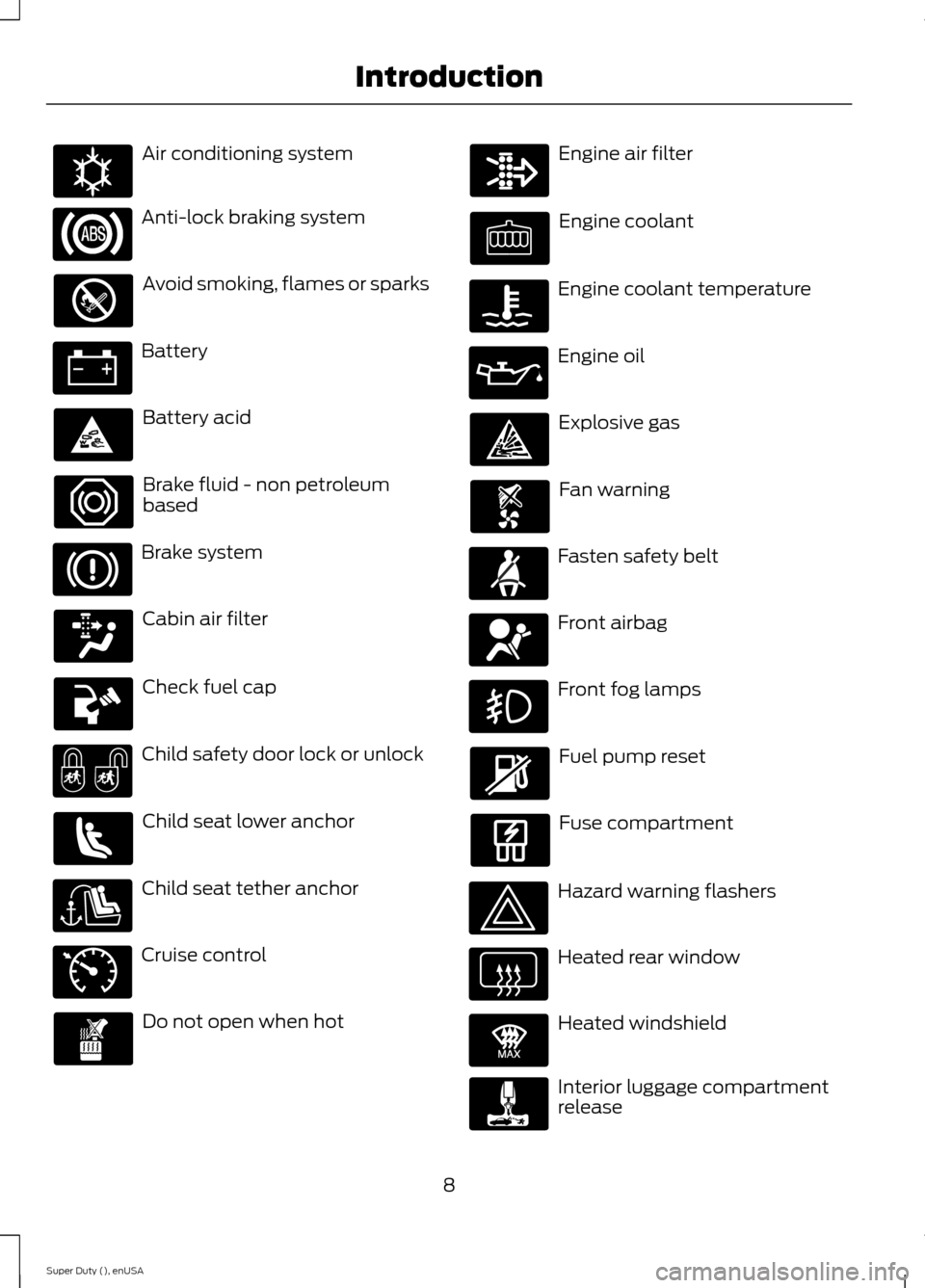
Air conditioning system
Anti-lock braking system
Avoid smoking, flames or sparks
Battery
Battery acid
Brake fluid - non petroleumbased
Brake system
Cabin air filter
Check fuel cap
Child safety door lock or unlock
Child seat lower anchor
Child seat tether anchor
Cruise control
Do not open when hot
Engine air filter
Engine coolant
Engine coolant temperature
Engine oil
Explosive gas
Fan warning
Fasten safety belt
Front airbag
Front fog lamps
Fuel pump reset
Fuse compartment
Hazard warning flashers
Heated rear window
Heated windshield
Interior luggage compartmentrelease
8Super Duty (), enUSAIntroductionE162384 E71340 E91392
Page 12 of 470
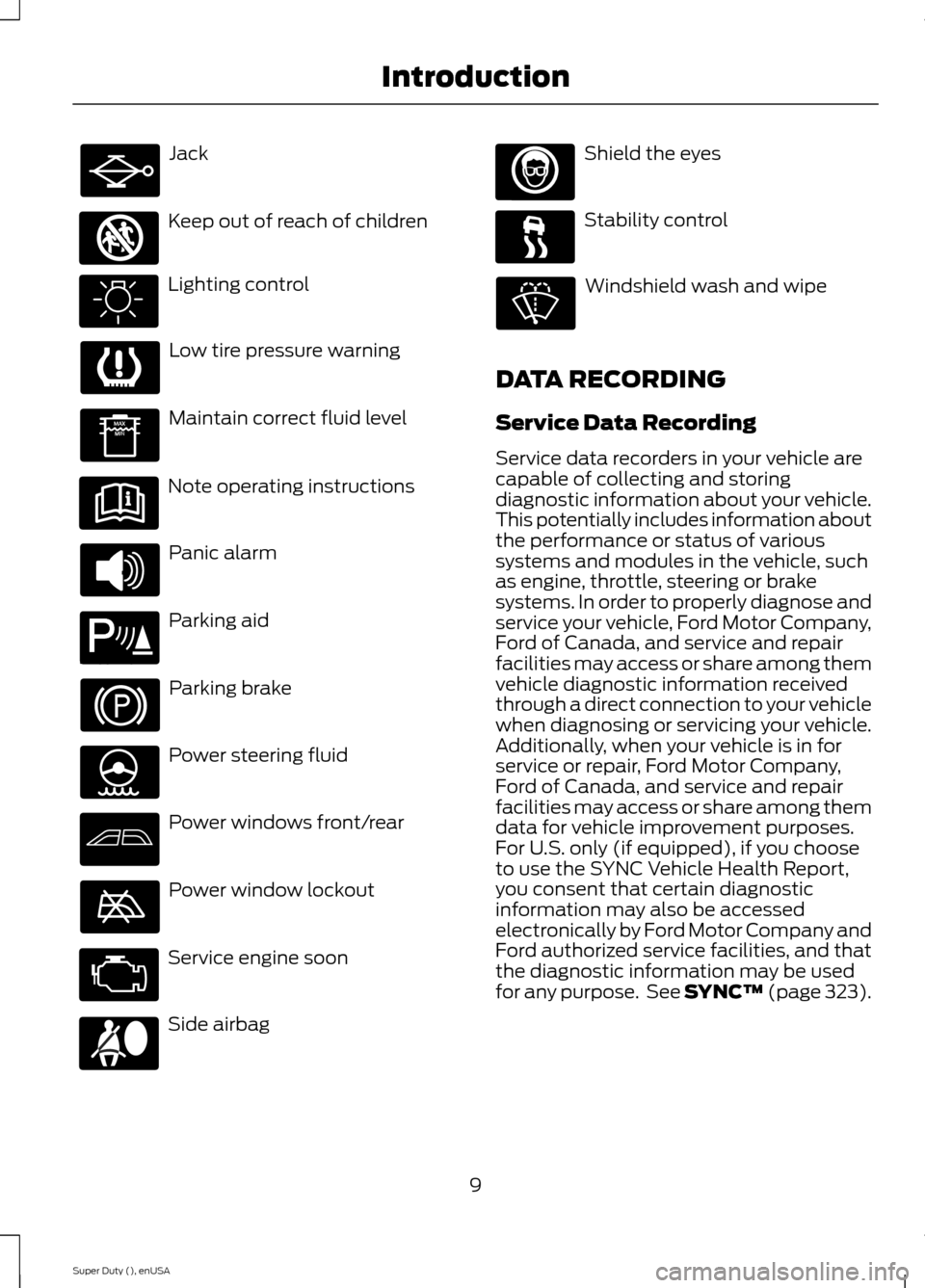
Jack
Keep out of reach of children
Lighting control
Low tire pressure warning
Maintain correct fluid level
Note operating instructions
Panic alarm
Parking aid
Parking brake
Power steering fluid
Power windows front/rear
Power window lockout
Service engine soon
Side airbag
Shield the eyes
Stability control
Windshield wash and wipe
DATA RECORDING
Service Data Recording
Service data recorders in your vehicle arecapable of collecting and storingdiagnostic information about your vehicle.This potentially includes information aboutthe performance or status of varioussystems and modules in the vehicle, suchas engine, throttle, steering or brakesystems. In order to properly diagnose andservice your vehicle, Ford Motor Company,Ford of Canada, and service and repairfacilities may access or share among themvehicle diagnostic information receivedthrough a direct connection to your vehiclewhen diagnosing or servicing your vehicle.Additionally, when your vehicle is in forservice or repair, Ford Motor Company,Ford of Canada, and service and repairfacilities may access or share among themdata for vehicle improvement purposes.For U.S. only (if equipped), if you chooseto use the SYNC Vehicle Health Report,you consent that certain diagnosticinformation may also be accessedelectronically by Ford Motor Company andFord authorized service facilities, and thatthe diagnostic information may be usedfor any purpose. See SYNC™ (page 323).
9Super Duty (), enUSAIntroduction E161353 E139213 E167012
Page 13 of 470
Event Data Recording
This vehicle is equipped with an eventdata recorder. The main purpose of anevent data recorder is to record, incertain crash or near crash-likesituations, such as an airbagdeployment or hitting a road obstacle;this data will assist in understandinghow a vehicle’s systems performed.The event data recorder is designed torecord data related to vehicle dynamicsand safety systems for a short periodof time, typically 30 seconds or less.
The event data recorder in this vehicleis designed to record such data as:
•How various systems in your vehiclewere operating;
•Whether or not the driver andpassenger safety belts werebuckled/fastened;
•How far (if at all) the driver wasdepressing the accelerator and/orthe brake pedal; and
•How fast the vehicle was traveling;and
•Where the driver was positioningthe steering wheel.
This data can help provide a betterunderstanding of the circumstances inwhich crashes and injuries occur.
Note:Event data recorder data isrecorded by your vehicle only if anon-trivial crash situation occurs; no datais recorded by the event data recorderunder normal driving conditions and nopersonal data or information (e.g., name,gender, age, and crash location) isrecorded (see limitations regarding 911Assist and Traffic, directions andInformation privacy below). However,parties, such as law enforcement, couldcombine the event data recorder datawith the type of personally identifyingdata routinely acquired during a crashinvestigation.
To read data recorded by an event datarecorder, special equipment is required,and access to the vehicle or the eventdata recorder is needed. In addition tothe vehicle manufacturer, otherparties, such as law enforcement, thathave such special equipment, can readthe information if they have access tothe vehicle or the event data recorder.Ford Motor Company and Ford ofCanada do not access event datarecorder information without obtainingconsent, unless pursuant to court orderor where required by law enforcement,other government authorities or otherthird parties acting with lawfulauthority. Other parties may seek toaccess the information independentlyof Ford Motor Company and Ford ofCanada.
10Super Duty (), enUSAIntroduction
Page 33 of 470
Fastening the Cinch Tongue
WARNING
The lap belt should fit snugly and aslow as possible around the hips, notacross the waist.
1.Pull the lap and shoulder belt from theretractor so that the shoulder beltportion of the safety belt crosses yourshoulder and chest.
2.Be sure the belt is not twisted. If thebelt is twisted, remove the twist.
3.Insert the belt tongue into the properbuckle for your seating position untilyou hear a snap and feel it latch.
4.Make sure the tongue is securelyfastened to the buckle by pulling onthe tongue.
While you are fastened in the safety belt,the lap and shoulder belt with a cinchtongue adjusts to your movement.However, if you brake hard, turn hard, or ifyour vehicle receives an impact of 5 mph(8 km/h) or more, the safety belt willbecome locked and help reduce yourforward movement.
Using Safety Belts DuringPregnancy
WARNING
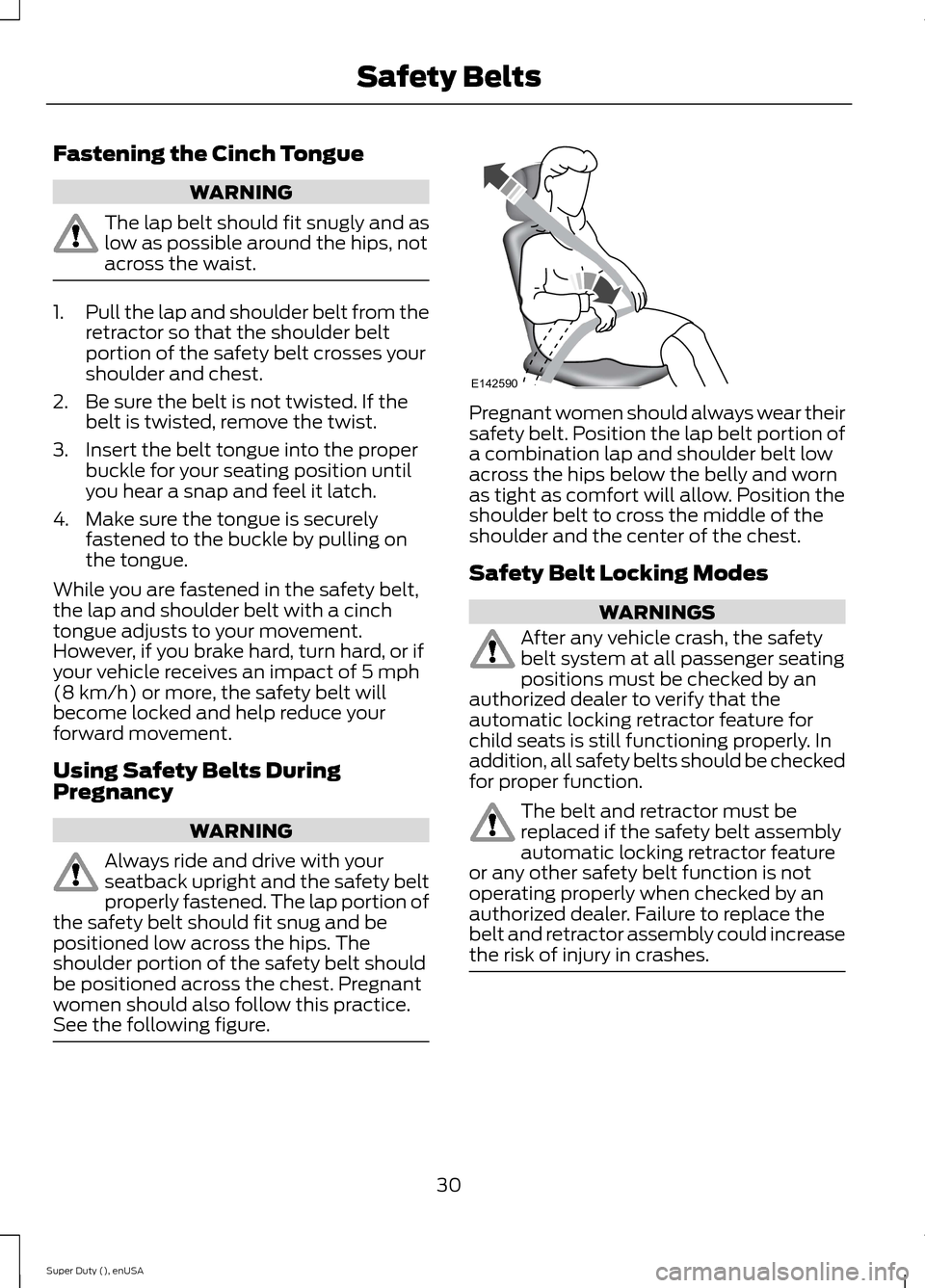
Always ride and drive with yourseatback upright and the safety beltproperly fastened. The lap portion ofthe safety belt should fit snug and bepositioned low across the hips. Theshoulder portion of the safety belt shouldbe positioned across the chest. Pregnantwomen should also follow this practice.See the following figure.
Pregnant women should always wear theirsafety belt. Position the lap belt portion ofa combination lap and shoulder belt lowacross the hips below the belly and wornas tight as comfort will allow. Position theshoulder belt to cross the middle of theshoulder and the center of the chest.
Safety Belt Locking Modes
WARNINGS
After any vehicle crash, the safetybelt system at all passenger seatingpositions must be checked by anauthorized dealer to verify that theautomatic locking retractor feature forchild seats is still functioning properly. Inaddition, all safety belts should be checkedfor proper function.
The belt and retractor must bereplaced if the safety belt assemblyautomatic locking retractor featureor any other safety belt function is notoperating properly when checked by anauthorized dealer. Failure to replace thebelt and retractor assembly could increasethe risk of injury in crashes.
30Super Duty (), enUSASafety BeltsE142590
Page 34 of 470
All safety restraints in the vehicle arecombination lap and shoulder belts. Thedriver safety belt has the first type oflocking mode. The front outboardpassenger and rear outboard seat safetybelts have both types of locking modesdescribed as follows:
Vehicle Sensitive Mode
This is the normal retractor mode, whichallows free shoulder belt lengthadjustment to your movements andlocking in response to vehicle movement.For example, if the driver brakes suddenlyor turns a corner sharply, or the vehiclereceives an impact of about 5 mph(8 km/h) or more, the combination safetybelts will lock to help reduce forwardmovement of the driver and passengers.
In addition, the retractor is designed to lockif the webbing is pulled out too quickly. Ifthis occurs, let the belt retract slightly andpull webbing out again in a slow andcontrolled manner.
Automatic Locking Mode
In this mode, the shoulder belt isautomatically pre-locked. The belt will stillretract to remove any slack in the shoulderbelt. The automatic locking mode is notavailable on the driver safety belt.
When to Use the Automatic LockingMode
Use this mode any time a child safety seat,except a booster, is installed in passengerfront or rear seating positions. You shouldproperly restrain children 12 years old andunder in a rear seating position wheneverpossible. See Child Safety (page 15).
How to Use the Automatic LockingMode
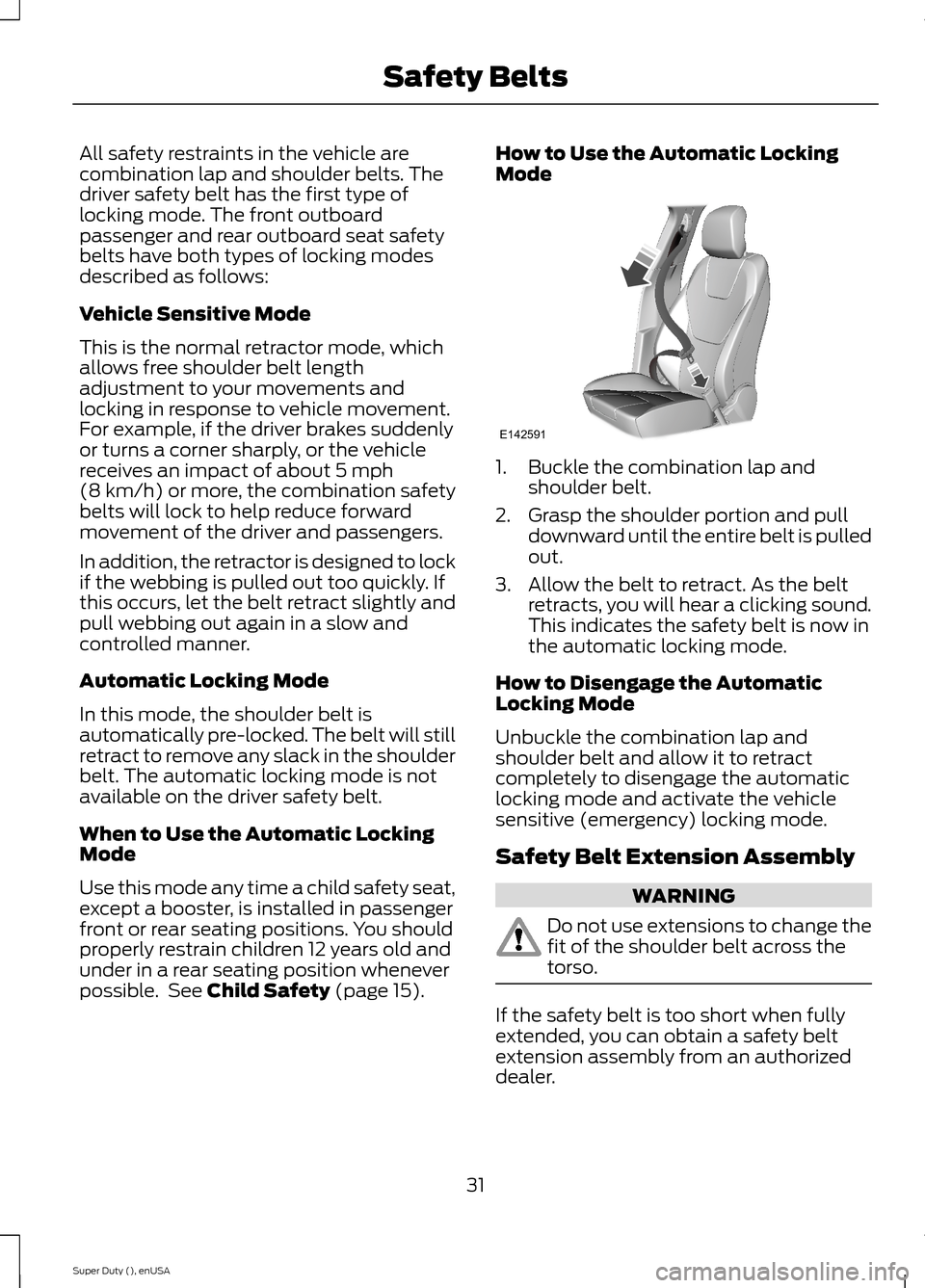
1.Buckle the combination lap andshoulder belt.
2.Grasp the shoulder portion and pulldownward until the entire belt is pulledout.
3.Allow the belt to retract. As the beltretracts, you will hear a clicking sound.This indicates the safety belt is now inthe automatic locking mode.
How to Disengage the AutomaticLocking Mode
Unbuckle the combination lap andshoulder belt and allow it to retractcompletely to disengage the automaticlocking mode and activate the vehiclesensitive (emergency) locking mode.
Safety Belt Extension Assembly
WARNING
Do not use extensions to change thefit of the shoulder belt across thetorso.
If the safety belt is too short when fullyextended, you can obtain a safety beltextension assembly from an authorizeddealer.
31Super Duty (), enUSASafety BeltsE142591
Page 37 of 470
Then...If...
The Belt-Minder feature will not activate.The driver's safety belt is buckled beforethe ignition switch is turned to the on posi-tion or less than 1-2 minutes have elapsedsince the ignition switch has been turnedto on...
The Belt-Minder feature is activated - thesafety belt warning light illuminates andthe warning chime sounds for six secondsevery 25 seconds, repeating for about fiveminutes or until the safety belts arebuckled.
The driver's safety belt is not buckled whenthe vehicle has reached at least 6 mph (9.7km/h) and 1-2 minutes have elapsed sincethe ignition switch has been turned to on...
The Belt-Minder feature is activated - thesafety belt warning light illuminates andthe warning chime sounds for six secondsevery 25 seconds, repeating for about fiveminutes or until the safety belts arebuckled.
The driver's safety belt becomes unbuckledfor about one minute while the vehicle istraveling at least 6 mph (9.7 km/h) andmore than 1-2 minutes have elapsed sincethe ignition switch has been turned to on...
Deactivating and Activating theBelt-Minder Feature (Driver Only)
WARNING
While the system allows you todeactivate it, this system is designedto improve your chances of beingsafely belted and surviving an accident.We recommend you leave the systemactivated for yourself and others who mayuse the vehicle. To reduce the risk of injury,do not deactivate or activate the systemwhile driving the vehicle.
Note:If you are using MyKey, you cannotdisable the Belt-Minder. Also, if theBelt-Minder has been previously disabled,it will be re-enabled during the use ofMyKey. See MyKey™ (page 50).
Read Steps 1 - 4 thoroughly beforeproceeding with the programmingprocedure.
Deactivate or activate the system byperforming the following procedure:
Before following the procedure, make surethat:
•The parking brake is set.
•The transmission is in park (P).
•The ignition is off.
•All vehicle doors are closed.
•The driver's safety belt is unbuckled.
1.Turn the ignition on. Do not start theengine.
2.Wait until the safety belt warning lightturns off (about one minute). Step 3must be completed within 30 secondsafter the safety belt warning light turnsoff.
3.Buckle then unbuckle the safety beltthree times at a moderate speed,ending with the safety belt in theunbuckled state. After Step 3, thesafety belt warning light will turn on.
34Super Duty (), enUSASafety Belts