2015 FORD SUPER DUTY maintenance
[x] Cancel search: maintenancePage 284 of 470
Note:If your tires show unevenwear ask an authorized dealer tocheck for and correct any wheelmisalignment, tire imbalance ormechanical problem involvedbefore tire rotation.
Note:Your vehicle may beequipped with a dissimilar sparewheel and tire assembly. Adissimilar spare wheel and tireassembly is defined as a sparewheel and tire assembly that isdifferent in brand, size orappearance from the road tires andwheels. If you have a dissimilarspare wheel and tire assembly it isintended for temporary use onlyand should not be used in a tirerotation.
Note:After having your tiresrotated, inflation pressure must bechecked and adjusted to thevehicle requirements.
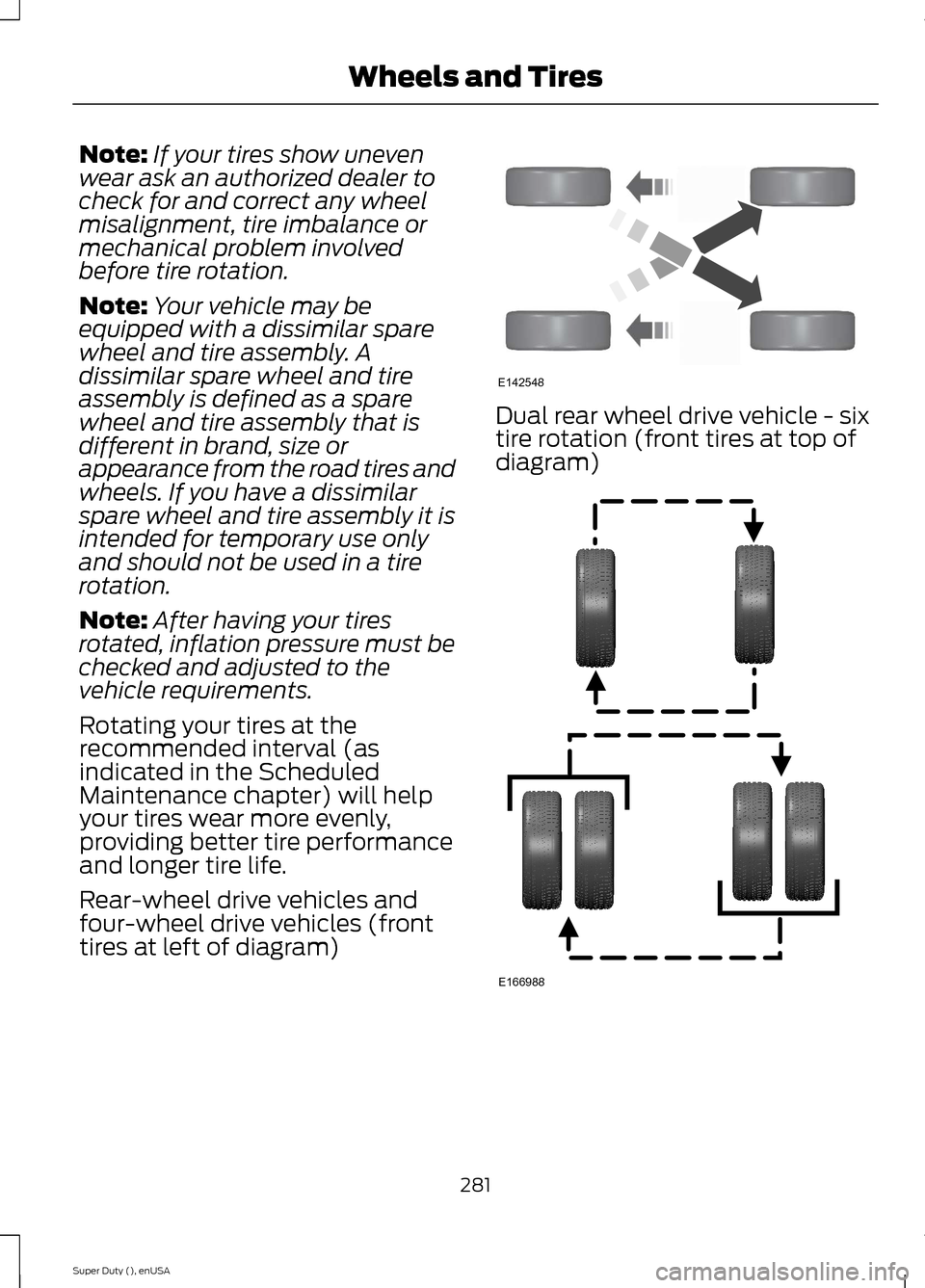
Rotating your tires at therecommended interval (asindicated in the ScheduledMaintenance chapter) will helpyour tires wear more evenly,providing better tire performanceand longer tire life.
Rear-wheel drive vehicles andfour-wheel drive vehicles (fronttires at left of diagram)
Dual rear wheel drive vehicle - sixtire rotation (front tires at top ofdiagram)
281Super Duty (), enUSAWheels and TiresE142548 E166988
Page 286 of 470
Each tire, including the spare (ifprovided), should be checkedmonthly when cold and inflatedto the inflation pressurerecommended by the vehicle manufactureron the vehicle placard or tire inflationpressure label. (If your vehicle has tires ofa different size than the size indicated onthe vehicle placard or tire inflation pressurelabel, you should determine the proper tireinflation pressure for those tires.)
As an added safety feature, your vehiclehas been equipped with a Tire PressureMonitoring System (TPMS) thatilluminates a low tire pressure telltalewhen one or more of your tires issignificantly under-inflated. Accordingly,when the low tire pressure telltaleilluminates, you should stop and checkyour tires as soon as possible, and inflatethem to the proper pressure. Driving on asignificantly under-inflated tire causes thetire to overheat and can lead to tire failure.Under-inflation also reduces fuel efficiencyand tire tread life, and may affect thevehicle’s handling and stopping ability.
Please note that the TPMS is not asubstitute for proper tire maintenance, andit is the driver’s responsibility to maintaincorrect tire pressure, even if under-inflationhas not reached the level to triggerillumination of the TPMS low tire pressuretelltale.
Your vehicle has also been equipped witha TPMS malfunction indicator to indicatewhen the system is not operating properly.The TPMS malfunction indicator iscombined with the low tire pressuretelltale. When the system detects amalfunction, the telltale will flash forapproximately one minute and then remaincontinuously illuminated. This sequencewill continue upon subsequent vehiclestart-ups as long as the malfunction exists.
When the malfunction indicator isilluminated, the system may not be ableto detect or signal low tire pressure asintended. TPMS malfunctions may occurfor a variety of reasons, including theinstallation of replacement or alternatetires or wheels on the vehicle that preventthe TPMS from functioning properly.Always check the TPMS malfunctiontelltale after replacing one or more tires orwheels on your vehicle to ensure that thereplacement or alternate tires and wheelsallow the TPMS to continue to functionproperly.
The tire pressure monitoring systemcomplies with part 15 of the FCC rules andwith RSS-210 of Industry Canada.Operation is subject to the following twoconditions: (1) This device may not causeharmful interference, and (2) This devicemust accept any interference received,including interference that may causeundesired operation.
Changing Tires With a TirePressure Monitoring System
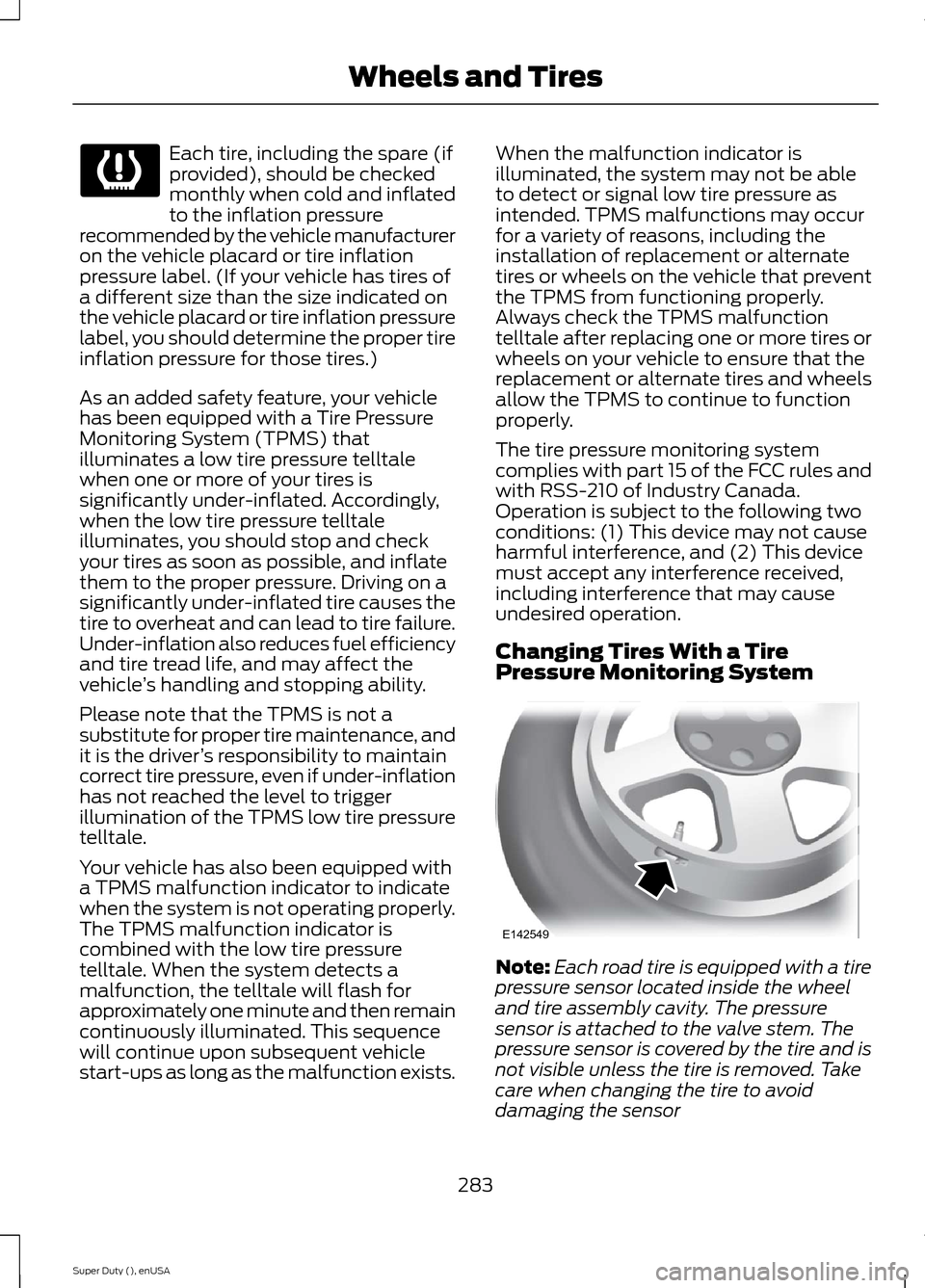
Note:Each road tire is equipped with a tirepressure sensor located inside the wheeland tire assembly cavity. The pressuresensor is attached to the valve stem. Thepressure sensor is covered by the tire and isnot visible unless the tire is removed. Takecare when changing the tire to avoiddamaging the sensor
283Super Duty (), enUSAWheels and Tires E142549
Page 301 of 470
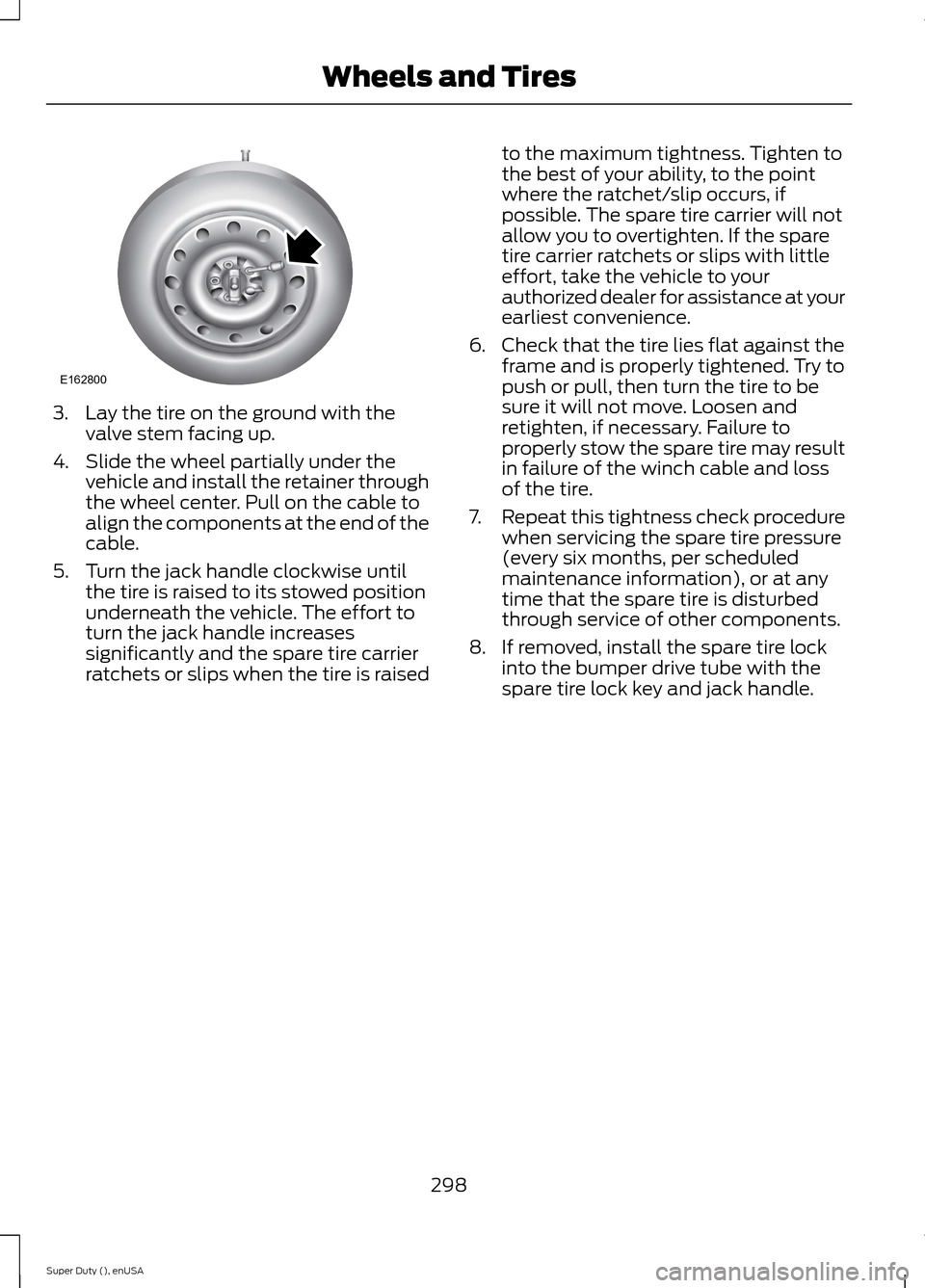
3.Lay the tire on the ground with thevalve stem facing up.
4.Slide the wheel partially under thevehicle and install the retainer throughthe wheel center. Pull on the cable toalign the components at the end of thecable.
5.Turn the jack handle clockwise untilthe tire is raised to its stowed positionunderneath the vehicle. The effort toturn the jack handle increasessignificantly and the spare tire carrierratchets or slips when the tire is raised
to the maximum tightness. Tighten tothe best of your ability, to the pointwhere the ratchet/slip occurs, ifpossible. The spare tire carrier will notallow you to overtighten. If the sparetire carrier ratchets or slips with littleeffort, take the vehicle to yourauthorized dealer for assistance at yourearliest convenience.
6.Check that the tire lies flat against theframe and is properly tightened. Try topush or pull, then turn the tire to besure it will not move. Loosen andretighten, if necessary. Failure toproperly stow the spare tire may resultin failure of the winch cable and lossof the tire.
7.Repeat this tightness check procedurewhen servicing the spare tire pressure(every six months, per scheduledmaintenance information), or at anytime that the spare tire is disturbedthrough service of other components.
8.If removed, install the spare tire lockinto the bumper drive tube with thespare tire lock key and jack handle.
298Super Duty (), enUSAWheels and TiresE162800
Page 305 of 470
MOTORCRAFT PARTS
6.8L V10 engine6.2L V8 engineComponent
FA-1883FA-1883Air filter element
FL-820-SFL-820-SOil filter
BXT-65-650BXT-65-650Battery (standard)
BXT-65-750BXT-65-750Battery (optional)
HJFS-24FP/SP-509CYFS12FP/SP-526Spark plugs-platinum1
FS-104FS-104Seat filter
WW-2201-PWW-2201-PWindshield wiper blade
1For spark plug replacement, see an authorized dealer. Replace the spark plugs at theappropriate intervals. See Scheduled Maintenance (page 440).
Note:Replace the spark plugs with ones that meet Ford material and design specificationsfor your vehicle, such as Motorcraft or equivalent replacement parts. The customer warrantymay be void for any damage to the engine if such spark plugs are not used.
302Super Duty (), enUSACapacities and Specifications
Page 312 of 470
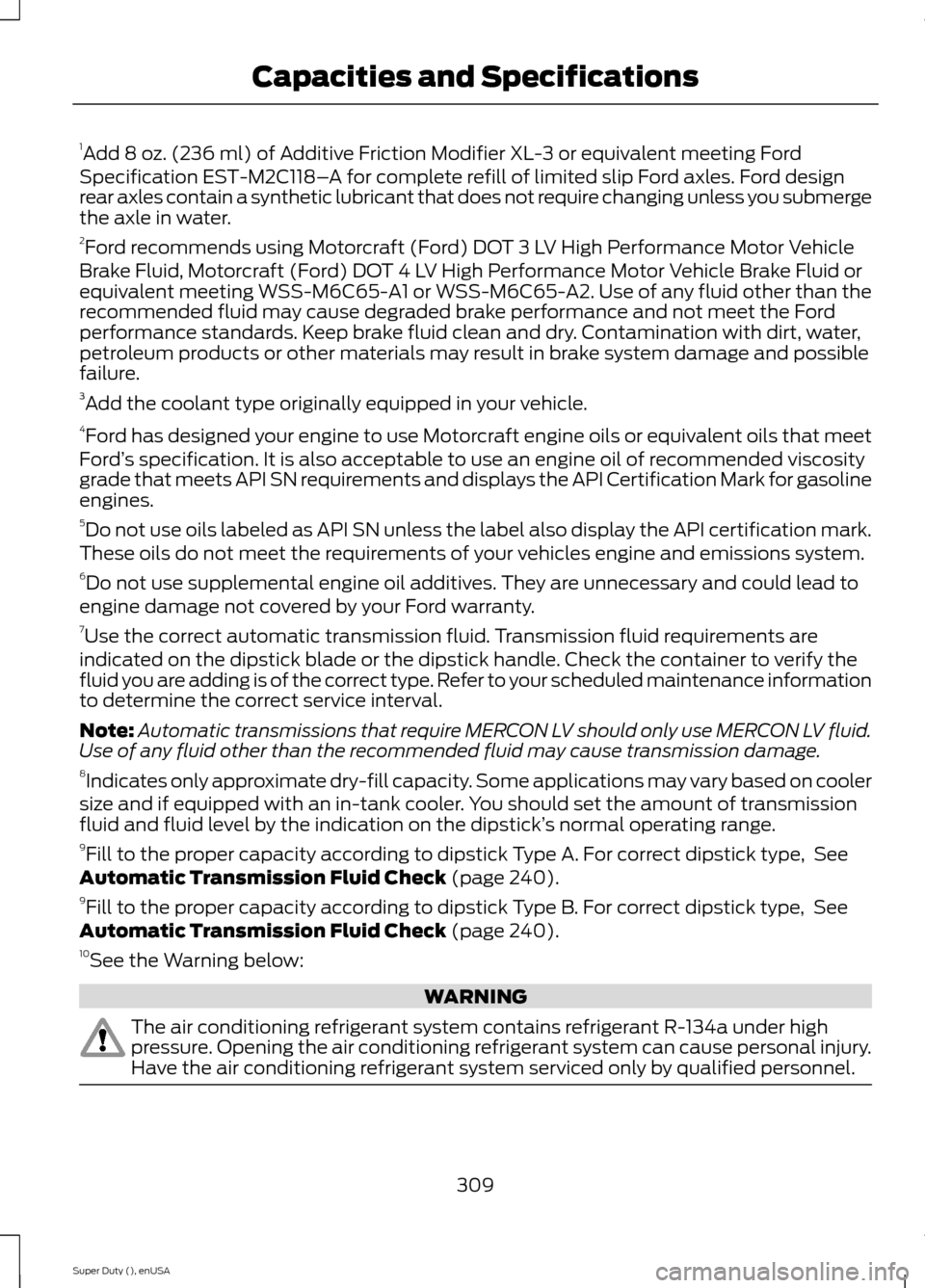
1Add 8 oz. (236 ml) of Additive Friction Modifier XL-3 or equivalent meeting FordSpecification EST-M2C118–A for complete refill of limited slip Ford axles. Ford designrear axles contain a synthetic lubricant that does not require changing unless you submergethe axle in water.2Ford recommends using Motorcraft (Ford) DOT 3 LV High Performance Motor VehicleBrake Fluid, Motorcraft (Ford) DOT 4 LV High Performance Motor Vehicle Brake Fluid orequivalent meeting WSS-M6C65-A1 or WSS-M6C65-A2. Use of any fluid other than therecommended fluid may cause degraded brake performance and not meet the Fordperformance standards. Keep brake fluid clean and dry. Contamination with dirt, water,petroleum products or other materials may result in brake system damage and possiblefailure.3Add the coolant type originally equipped in your vehicle.4Ford has designed your engine to use Motorcraft engine oils or equivalent oils that meetFord’s specification. It is also acceptable to use an engine oil of recommended viscositygrade that meets API SN requirements and displays the API Certification Mark for gasolineengines.5Do not use oils labeled as API SN unless the label also display the API certification mark.These oils do not meet the requirements of your vehicles engine and emissions system.6Do not use supplemental engine oil additives. They are unnecessary and could lead toengine damage not covered by your Ford warranty.7Use the correct automatic transmission fluid. Transmission fluid requirements areindicated on the dipstick blade or the dipstick handle. Check the container to verify thefluid you are adding is of the correct type. Refer to your scheduled maintenance informationto determine the correct service interval.
Note:Automatic transmissions that require MERCON LV should only use MERCON LV fluid.Use of any fluid other than the recommended fluid may cause transmission damage.8Indicates only approximate dry-fill capacity. Some applications may vary based on coolersize and if equipped with an in-tank cooler. You should set the amount of transmissionfluid and fluid level by the indication on the dipstick’s normal operating range.9Fill to the proper capacity according to dipstick Type A. For correct dipstick type, SeeAutomatic Transmission Fluid Check (page 240).9Fill to the proper capacity according to dipstick Type B. For correct dipstick type, SeeAutomatic Transmission Fluid Check (page 240).10See the Warning below:
WARNING
The air conditioning refrigerant system contains refrigerant R-134a under highpressure. Opening the air conditioning refrigerant system can cause personal injury.Have the air conditioning refrigerant system serviced only by qualified personnel.
309Super Duty (), enUSACapacities and Specifications
Page 341 of 470
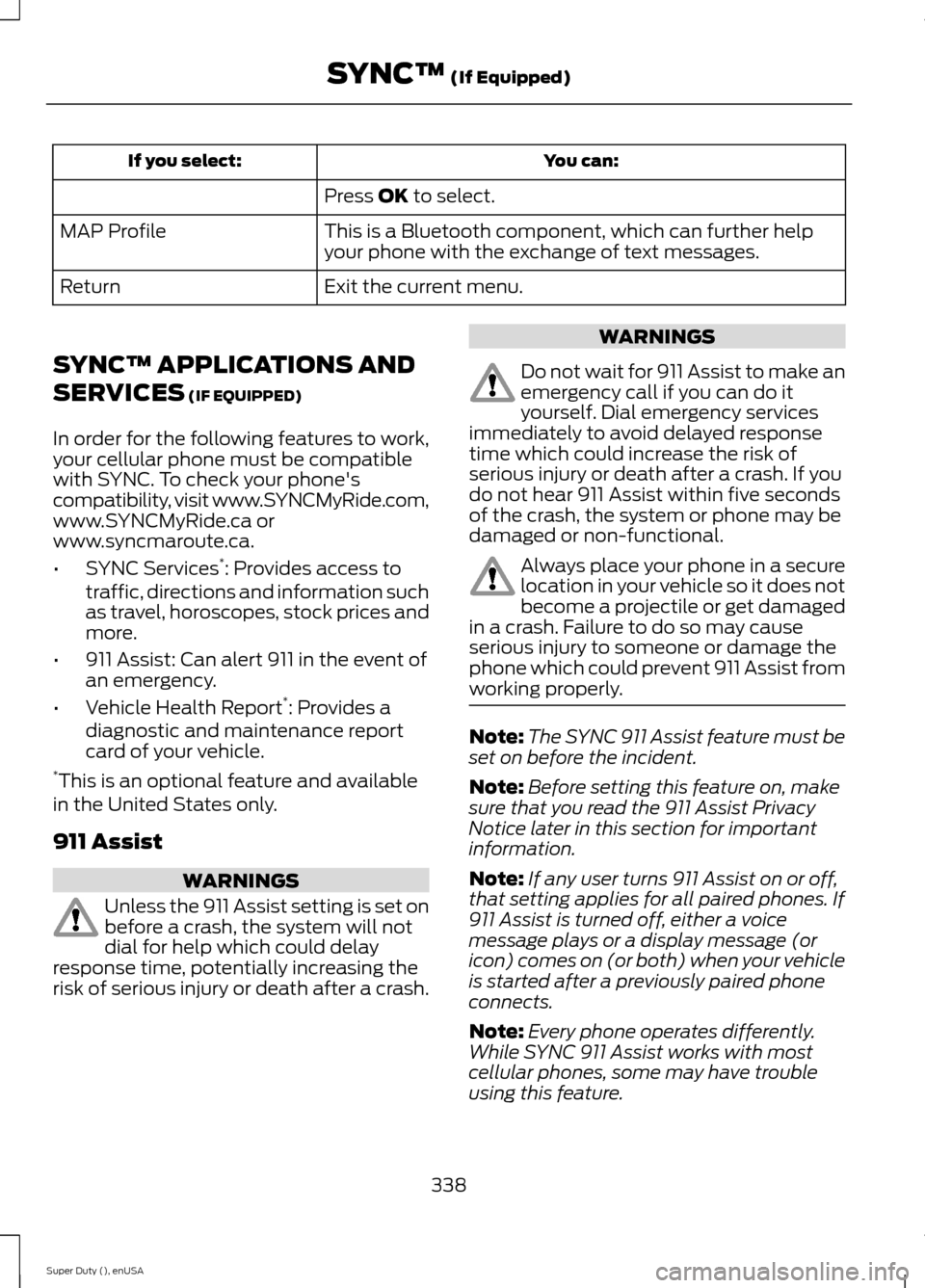
You can:If you select:
Press OK to select.
This is a Bluetooth component, which can further helpyour phone with the exchange of text messages.MAP Profile
Exit the current menu.Return
SYNC™ APPLICATIONS AND
SERVICES (IF EQUIPPED)
In order for the following features to work,your cellular phone must be compatiblewith SYNC. To check your phone'scompatibility, visit www.SYNCMyRide.com,www.SYNCMyRide.ca orwww.syncmaroute.ca.
•SYNC Services*: Provides access totraffic, directions and information suchas travel, horoscopes, stock prices andmore.
•911 Assist: Can alert 911 in the event ofan emergency.
•Vehicle Health Report*: Provides adiagnostic and maintenance reportcard of your vehicle.*This is an optional feature and availablein the United States only.
911 Assist
WARNINGS
Unless the 911 Assist setting is set onbefore a crash, the system will notdial for help which could delayresponse time, potentially increasing therisk of serious injury or death after a crash.
WARNINGS
Do not wait for 911 Assist to make anemergency call if you can do ityourself. Dial emergency servicesimmediately to avoid delayed responsetime which could increase the risk ofserious injury or death after a crash. If youdo not hear 911 Assist within five secondsof the crash, the system or phone may bedamaged or non-functional.
Always place your phone in a securelocation in your vehicle so it does notbecome a projectile or get damagedin a crash. Failure to do so may causeserious injury to someone or damage thephone which could prevent 911 Assist fromworking properly.
Note:The SYNC 911 Assist feature must beset on before the incident.
Note:Before setting this feature on, makesure that you read the 911 Assist PrivacyNotice later in this section for importantinformation.
Note:If any user turns 911 Assist on or off,that setting applies for all paired phones. If911 Assist is turned off, either a voicemessage plays or a display message (oricon) comes on (or both) when your vehicleis started after a previously paired phoneconnects.
Note:Every phone operates differently.While SYNC 911 Assist works with mostcellular phones, some may have troubleusing this feature.
338Super Duty (), enUSASYNC™ (If Equipped)
Page 343 of 470
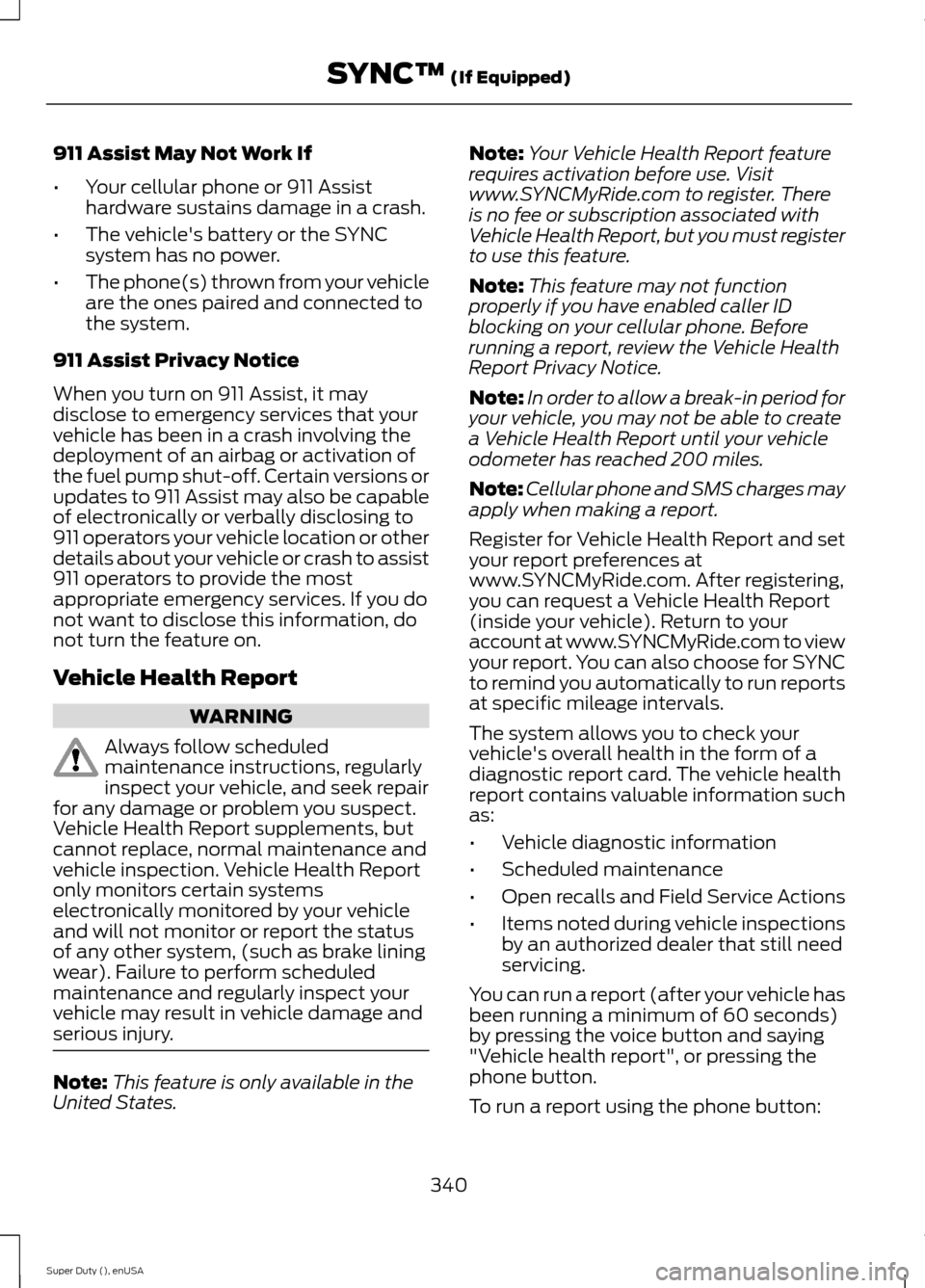
911 Assist May Not Work If
•Your cellular phone or 911 Assisthardware sustains damage in a crash.
•The vehicle's battery or the SYNCsystem has no power.
•The phone(s) thrown from your vehicleare the ones paired and connected tothe system.
911 Assist Privacy Notice
When you turn on 911 Assist, it maydisclose to emergency services that yourvehicle has been in a crash involving thedeployment of an airbag or activation ofthe fuel pump shut-off. Certain versions orupdates to 911 Assist may also be capableof electronically or verbally disclosing to911 operators your vehicle location or otherdetails about your vehicle or crash to assist911 operators to provide the mostappropriate emergency services. If you donot want to disclose this information, donot turn the feature on.
Vehicle Health Report
WARNING
Always follow scheduledmaintenance instructions, regularlyinspect your vehicle, and seek repairfor any damage or problem you suspect.Vehicle Health Report supplements, butcannot replace, normal maintenance andvehicle inspection. Vehicle Health Reportonly monitors certain systemselectronically monitored by your vehicleand will not monitor or report the statusof any other system, (such as brake liningwear). Failure to perform scheduledmaintenance and regularly inspect yourvehicle may result in vehicle damage andserious injury.
Note:This feature is only available in theUnited States.
Note:Your Vehicle Health Report featurerequires activation before use. Visitwww.SYNCMyRide.com to register. Thereis no fee or subscription associated withVehicle Health Report, but you must registerto use this feature.
Note:This feature may not functionproperly if you have enabled caller IDblocking on your cellular phone. Beforerunning a report, review the Vehicle HealthReport Privacy Notice.
Note:In order to allow a break-in period foryour vehicle, you may not be able to createa Vehicle Health Report until your vehicleodometer has reached 200 miles.
Note:Cellular phone and SMS charges mayapply when making a report.
Register for Vehicle Health Report and setyour report preferences atwww.SYNCMyRide.com. After registering,you can request a Vehicle Health Report(inside your vehicle). Return to youraccount at www.SYNCMyRide.com to viewyour report. You can also choose for SYNCto remind you automatically to run reportsat specific mileage intervals.
The system allows you to check yourvehicle's overall health in the form of adiagnostic report card. The vehicle healthreport contains valuable information suchas:
•Vehicle diagnostic information
•Scheduled maintenance
•Open recalls and Field Service Actions
•Items noted during vehicle inspectionsby an authorized dealer that still needservicing.
You can run a report (after your vehicle hasbeen running a minimum of 60 seconds)by pressing the voice button and saying"Vehicle health report", or pressing thephone button.
To run a report using the phone button:
340Super Duty (), enUSASYNC™ (If Equipped)
Page 344 of 470
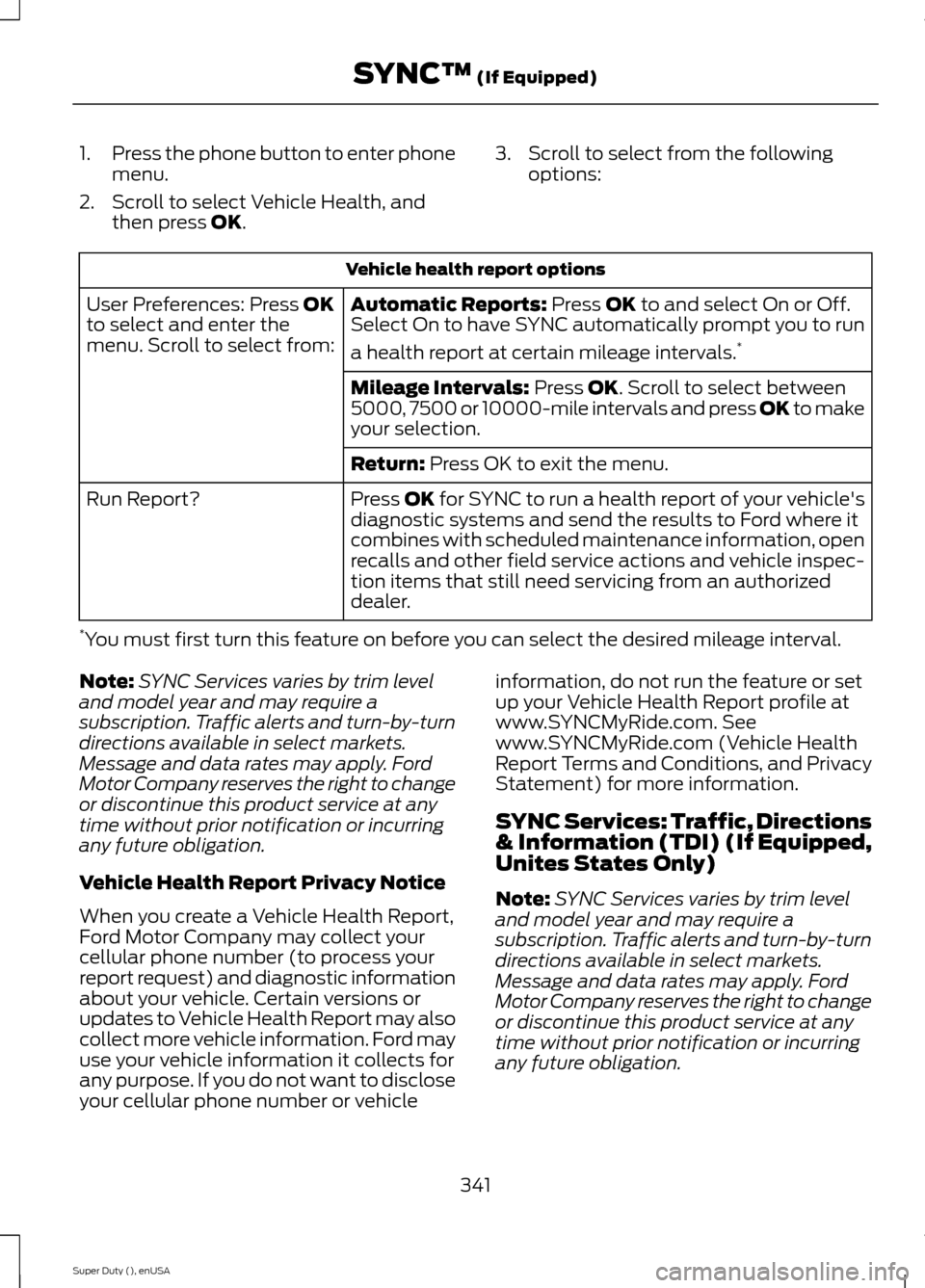
1.Press the phone button to enter phonemenu.
2.Scroll to select Vehicle Health, andthen press OK.
3.Scroll to select from the followingoptions:
Vehicle health report options
Automatic Reports: Press OK to and select On or Off.Select On to have SYNC automatically prompt you to run
a health report at certain mileage intervals.*
User Preferences: Press OKto select and enter themenu. Scroll to select from:
Mileage Intervals: Press OK. Scroll to select between5000, 7500 or 10000-mile intervals and press OK to makeyour selection.
Return: Press OK to exit the menu.
Press OK for SYNC to run a health report of your vehicle'sdiagnostic systems and send the results to Ford where itcombines with scheduled maintenance information, openrecalls and other field service actions and vehicle inspec-tion items that still need servicing from an authorizeddealer.
Run Report?
*You must first turn this feature on before you can select the desired mileage interval.
Note:SYNC Services varies by trim leveland model year and may require asubscription. Traffic alerts and turn-by-turndirections available in select markets.Message and data rates may apply. FordMotor Company reserves the right to changeor discontinue this product service at anytime without prior notification or incurringany future obligation.
Vehicle Health Report Privacy Notice
When you create a Vehicle Health Report,Ford Motor Company may collect yourcellular phone number (to process yourreport request) and diagnostic informationabout your vehicle. Certain versions orupdates to Vehicle Health Report may alsocollect more vehicle information. Ford mayuse your vehicle information it collects forany purpose. If you do not want to discloseyour cellular phone number or vehicle
information, do not run the feature or setup your Vehicle Health Report profile atwww.SYNCMyRide.com. Seewww.SYNCMyRide.com (Vehicle HealthReport Terms and Conditions, and PrivacyStatement) for more information.
SYNC Services: Traffic, Directions& Information (TDI) (If Equipped,Unites States Only)
Note:SYNC Services varies by trim leveland model year and may require asubscription. Traffic alerts and turn-by-turndirections available in select markets.Message and data rates may apply. FordMotor Company reserves the right to changeor discontinue this product service at anytime without prior notification or incurringany future obligation.
341Super Duty (), enUSASYNC™ (If Equipped)