2015 FORD MUSTANG lights
[x] Cancel search: lightsPage 38 of 441

The Personal Safety System provides an
improved overall level of frontal crash
protection to front seat occupants and is
designed to help further reduce the risk of
airbag-related injuries. The system is able
to analyze different occupant conditions
and crash severity before activating the
appropriate safety devices to help better
protect a range of occupants in a variety
of frontal crash situations.
The Vehicle Personal Safety System
consists of:
•
Driver and passenger dual-stage airbag
supplemental restraints.
• Front seat outboard safety belts with
pretensioners, energy management
retractors and safety belt usage
sensors.
• Driver seat position sensor.
• Front passenger sensing system.
• Passenger airbag off and on indicator
lamp.
• Front crash severity sensors.
• Restraints control module with impact
and safing sensors.
• Restraint system warning light and
backup tone.
• The electrical wiring for the airbags,
crash sensors, safety belt
pretensioners, front safety belt usage
sensors, driver seat position sensor,
front passenger sensing system and
indicator lights. How Does the Personal Safety
System Work?
The Personal Safety System can adapt the
deployment strategy of the safety devices
according to crash severity and occupant
conditions. A collection of crash and
occupant sensors provides information to
the restraints control module. During a
crash, the restraints control module may
deploy the safety belt pretensioners, one
or both stages of the dual-stage airbags
based on crash severity and occupant
conditions.
35
Mustang (), enUSA, First Printing Personal Safety System
™
Page 59 of 441
LOCKING AND UNLOCKING
You can use the power door lock control
or the remote control to lock and unlock
your vehicle.
Power Door Locks
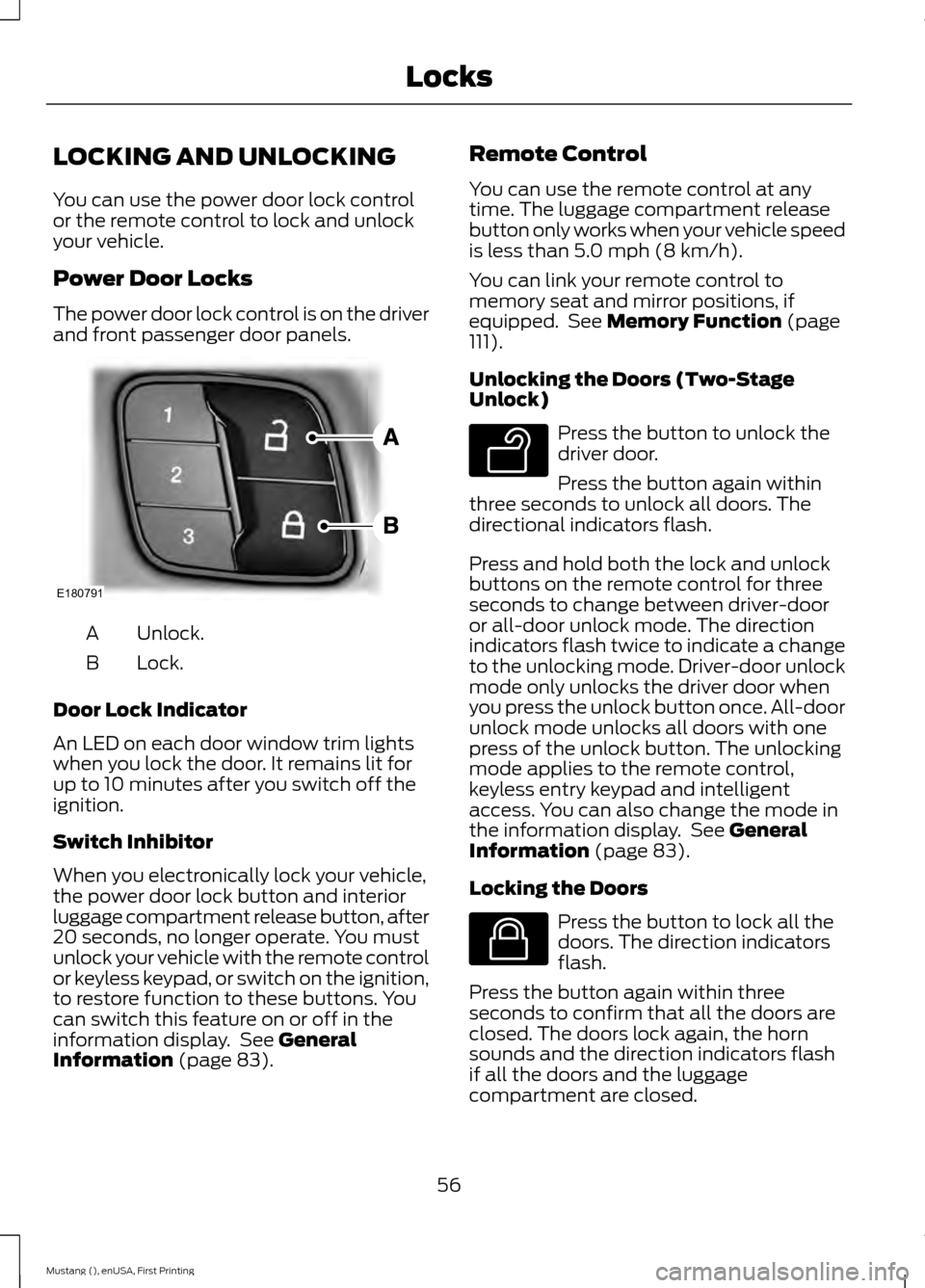
The power door lock control is on the driver
and front passenger door panels.
Unlock.
A
Lock.
B
Door Lock Indicator
An LED on each door window trim lights
when you lock the door. It remains lit for
up to 10 minutes after you switch off the
ignition.
Switch Inhibitor
When you electronically lock your vehicle,
the power door lock button and interior
luggage compartment release button, after
20 seconds, no longer operate. You must
unlock your vehicle with the remote control
or keyless keypad, or switch on the ignition,
to restore function to these buttons. You
can switch this feature on or off in the
information display. See General
Information (page 83). Remote Control
You can use the remote control at any
time. The luggage compartment release
button only works when your vehicle speed
is less than
5.0 mph (8 km/h).
You can link your remote control to
memory seat and mirror positions, if
equipped. See
Memory Function (page
111).
Unlocking the Doors (Two-Stage
Unlock) Press the button to unlock the
driver door.
Press the button again within
three seconds to unlock all doors. The
directional indicators flash.
Press and hold both the lock and unlock
buttons on the remote control for three
seconds to change between driver-door
or all-door unlock mode. The direction
indicators flash twice to indicate a change
to the unlocking mode. Driver-door unlock
mode only unlocks the driver door when
you press the unlock button once. All-door
unlock mode unlocks all doors with one
press of the unlock button. The unlocking
mode applies to the remote control,
keyless entry keypad and intelligent
access. You can also change the mode in
the information display. See
General
Information (page 83).
Locking the Doors Press the button to lock all the
doors. The direction indicators
flash.
Press the button again within three
seconds to confirm that all the doors are
closed. The doors lock again, the horn
sounds and the direction indicators flash
if all the doors and the luggage
compartment are closed.
56
Mustang (), enUSA, First Printing LocksE180791 E138629 E138623
Page 62 of 441
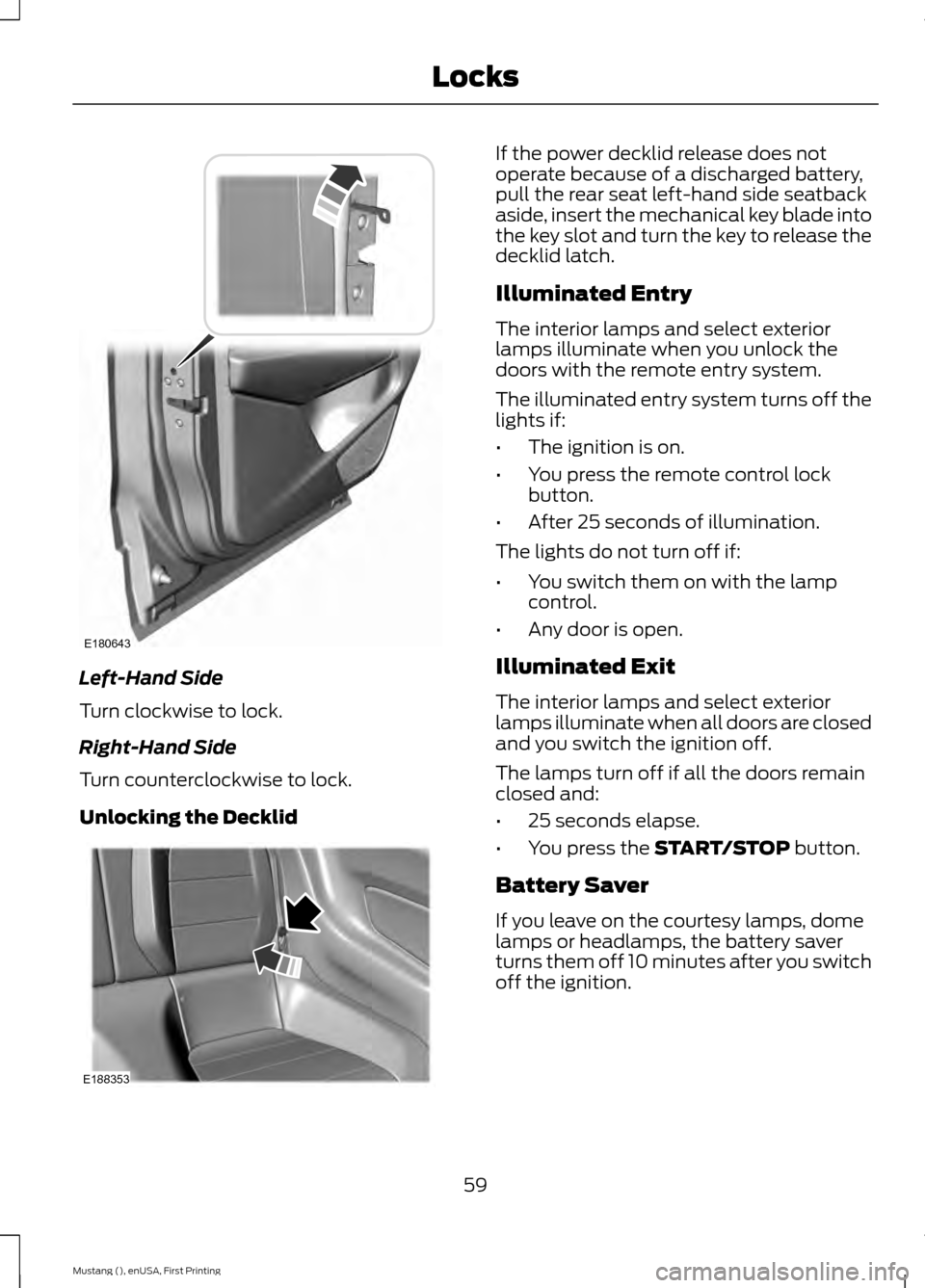
Left-Hand Side
Turn clockwise to lock.
Right-Hand Side
Turn counterclockwise to lock.
Unlocking the Decklid If the power decklid release does not
operate because of a discharged battery,
pull the rear seat left-hand side seatback
aside, insert the mechanical key blade into
the key slot and turn the key to release the
decklid latch.
Illuminated Entry
The interior lamps and select exterior
lamps illuminate when you unlock the
doors with the remote entry system.
The illuminated entry system turns off the
lights if:
•
The ignition is on.
• You press the remote control lock
button.
• After 25 seconds of illumination.
The lights do not turn off if:
• You switch them on with the lamp
control.
• Any door is open.
Illuminated Exit
The interior lamps and select exterior
lamps illuminate when all doors are closed
and you switch the ignition off.
The lamps turn off if all the doors remain
closed and:
• 25 seconds elapse.
• You press the START/STOP button.
Battery Saver
If you leave on the courtesy lamps, dome
lamps or headlamps, the battery saver
turns them off 10 minutes after you switch
off the ignition.
59
Mustang (), enUSA, First Printing LocksE180643 E188353
Page 74 of 441

FRONT FOG LAMPS (If Equipped)
Press the control to switch the fog lamps
on or off.
You can switch the fog lamps on when the
lighting control is in any position except
Off and the high beams are not on.
DIRECTION INDICATORS
Push the lever up or down to use the
direction indicators.
Note:
Tap the lever up or down to make the
direction indicators flash three times to
indicate a lane change. WELCOME LIGHTING (If Equipped)
Pony Projection Lights
The pony projection lights are on the
bottom of the exterior mirror housings.
They will project an image onto the ground
a short distance from your vehicle when
welcome lighting or lighted entry turns on.
Note: Moisture, frost and ice build-up or
other types of contamination on the surface
of the light lens can cause non-permanent
distortion or reduced brightness of the
image. Do not use abrasive materials to
clean the lens.
INTERIOR LAMPS
The lamps turn on when:
• You open any door.
• You press a remote control button.
• You press the buttons on the map
lamps.
Map Lamps Left-hand side map lamp.
A
Right-hand side map lamp.
B
You can switch the lamps on individually
by pressing the buttons.
71
Mustang (), enUSA, First Printing LightingE142453 E169255 E175199
Page 77 of 441
Opening the Windows
You can open the windows for a short time
after you unlock your vehicle with the
remote control. After you unlock your
vehicle, press and hold the remote control
unlock button to open the windows.
Release the button once movement starts.
Press the lock or unlock button to stop
movement.
EXTERIOR MIRRORS
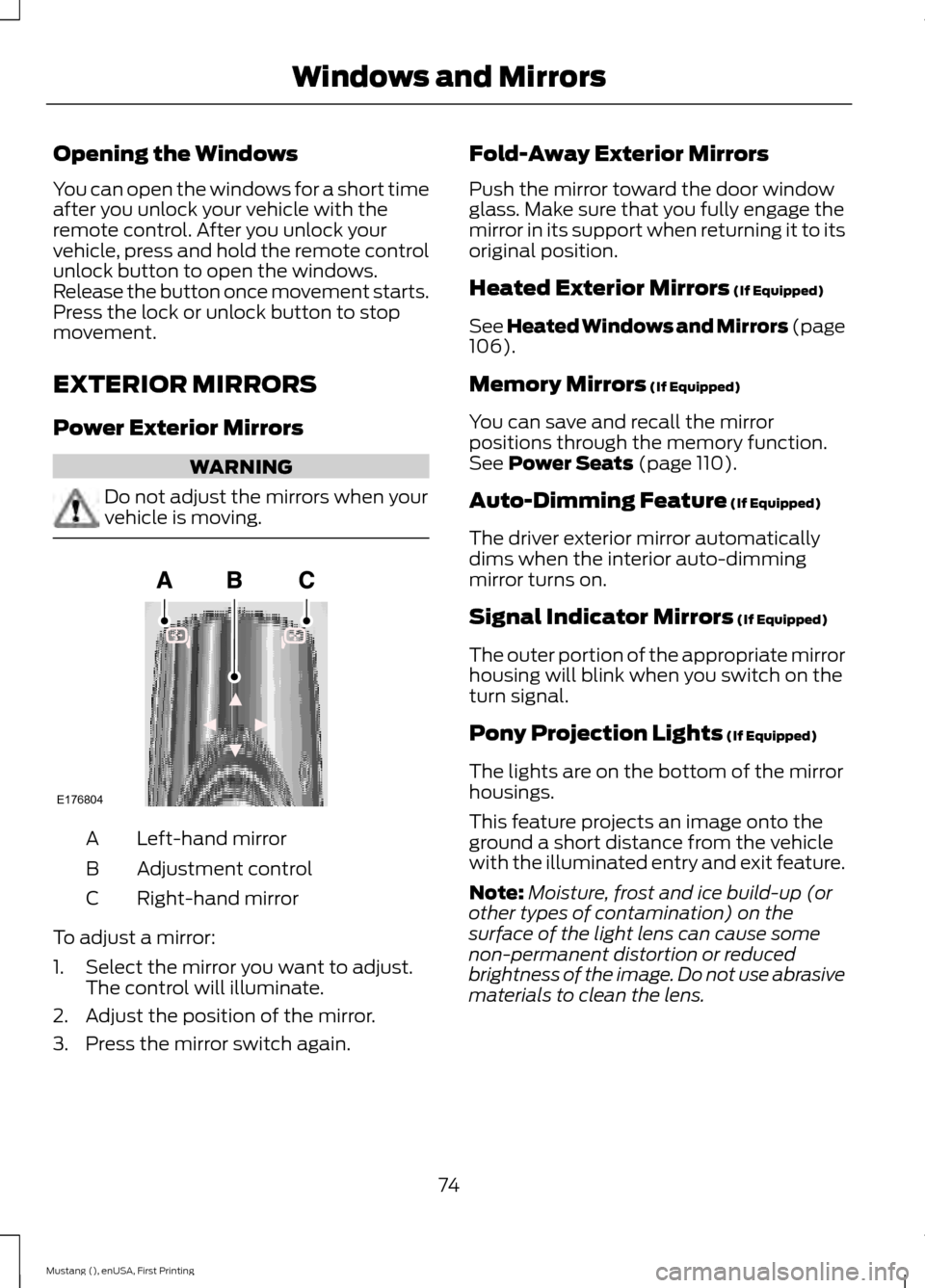
Power Exterior Mirrors
WARNING
Do not adjust the mirrors when your
vehicle is moving.
Left-hand mirror
A
Adjustment control
B
Right-hand mirror
C
To adjust a mirror:
1. Select the mirror you want to adjust. The control will illuminate.
2. Adjust the position of the mirror.
3. Press the mirror switch again. Fold-Away Exterior Mirrors
Push the mirror toward the door window
glass. Make sure that you fully engage the
mirror in its support when returning it to its
original position.
Heated Exterior Mirrors (If Equipped)
See Heated Windows and Mirrors (page
106
).
Memory Mirrors
(If Equipped)
You can save and recall the mirror
positions through the memory function.
See
Power Seats (page 110).
Auto-Dimming Feature
(If Equipped)
The driver exterior mirror automatically
dims when the interior auto-dimming
mirror turns on.
Signal Indicator Mirrors
(If Equipped)
The outer portion of the appropriate mirror
housing will blink when you switch on the
turn signal.
Pony Projection Lights
(If Equipped)
The lights are on the bottom of the mirror
housings.
This feature projects an image onto the
ground a short distance from the vehicle
with the illuminated entry and exit feature.
Note: Moisture, frost and ice build-up (or
other types of contamination) on the
surface of the light lens can cause some
non-permanent distortion or reduced
brightness of the image. Do not use abrasive
materials to clean the lens.
74
Mustang (), enUSA, First Printing Windows and MirrorsE176804
Page 79 of 441
To reduce glare, the mirror dims
automatically when it detects bright lights
from behind your vehicle. It automatically
returns to normal reflection when you
select reverse (R) gear to make sure you
have a clear view when backing up.
SUN VISORS
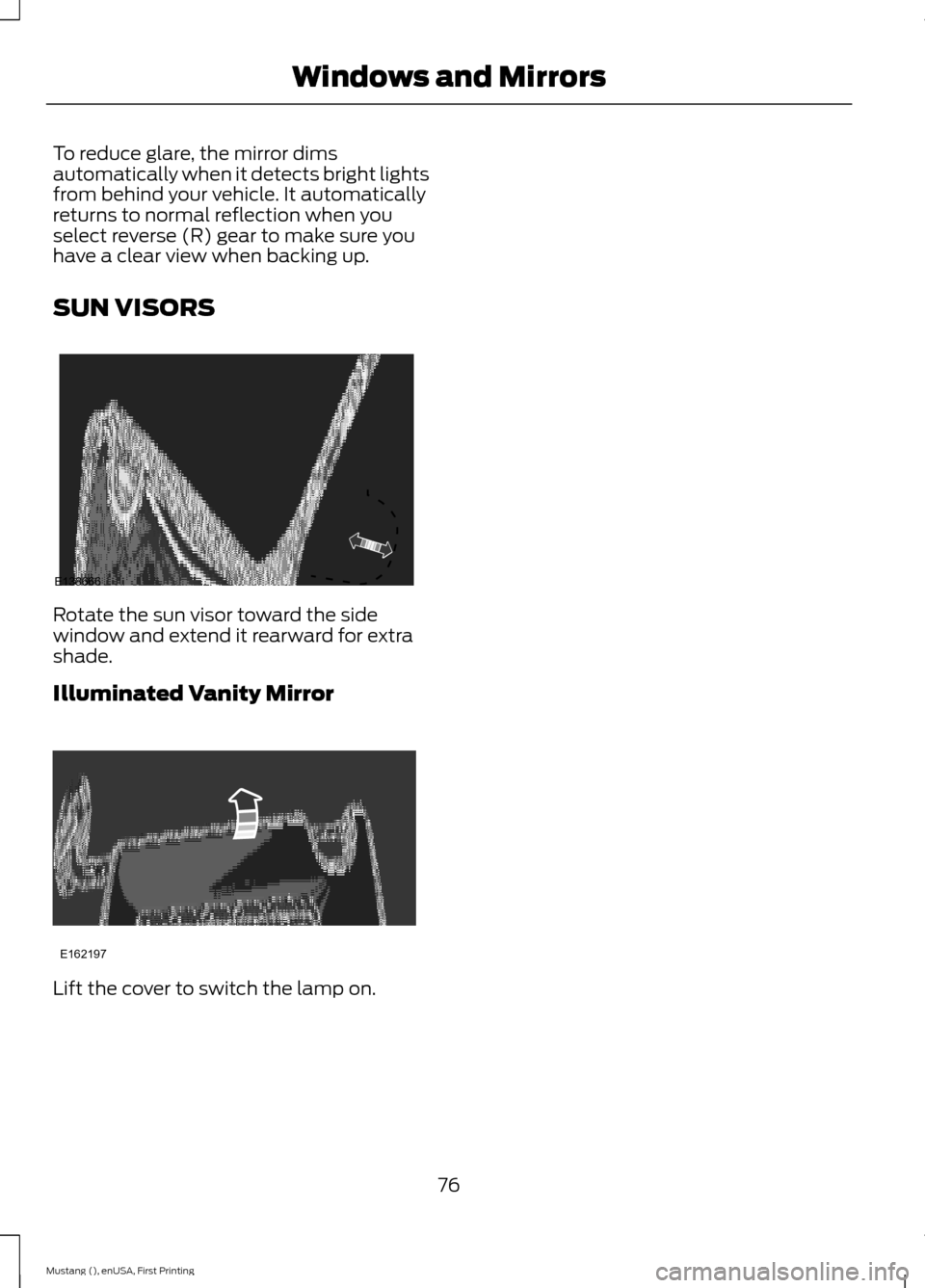
Rotate the sun visor toward the side
window and extend it rearward for extra
shade.
Illuminated Vanity Mirror
Lift the cover to switch the lamp on.
76
Mustang (), enUSA, First Printing Windows and MirrorsE138666 E162197
Page 83 of 441
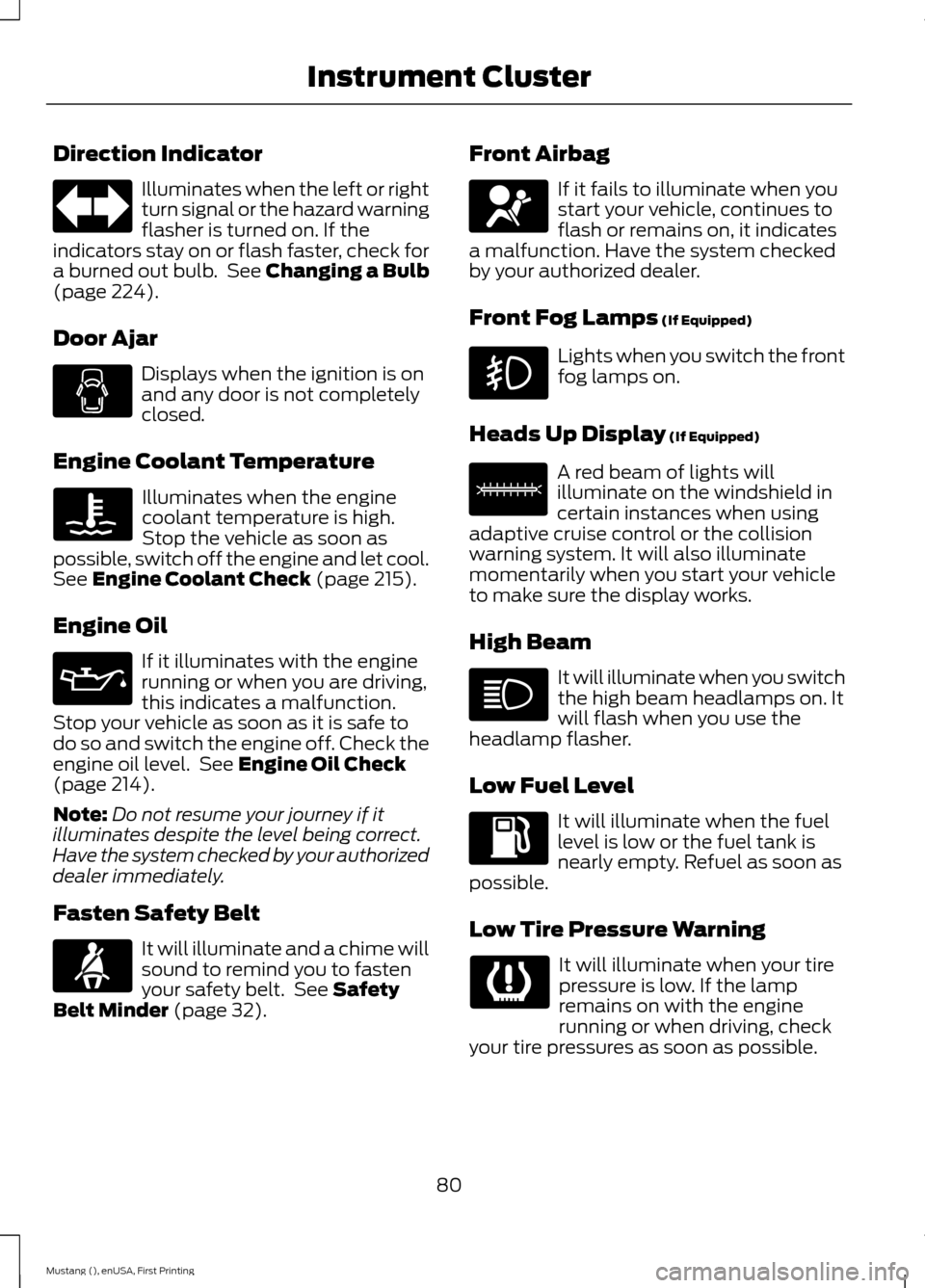
Direction Indicator
Illuminates when the left or right
turn signal or the hazard warning
flasher is turned on. If the
indicators stay on or flash faster, check for
a burned out bulb. See Changing a Bulb
(page 224).
Door Ajar Displays when the ignition is on
and any door is not completely
closed.
Engine Coolant Temperature Illuminates when the engine
coolant temperature is high.
Stop the vehicle as soon as
possible, switch off the engine and let cool.
See
Engine Coolant Check (page 215).
Engine Oil If it illuminates with the engine
running or when you are driving,
this indicates a malfunction.
Stop your vehicle as soon as it is safe to
do so and switch the engine off. Check the
engine oil level. See
Engine Oil Check
(page 214).
Note: Do not resume your journey if it
illuminates despite the level being correct.
Have the system checked by your authorized
dealer immediately.
Fasten Safety Belt It will illuminate and a chime will
sound to remind you to fasten
your safety belt. See
Safety
Belt Minder (page 32). Front Airbag If it fails to illuminate when you
start your vehicle, continues to
flash or remains on, it indicates
a malfunction. Have the system checked
by your authorized dealer.
Front Fog Lamps
(If Equipped) Lights when you switch the front
fog lamps on.
Heads Up Display
(If Equipped) A red beam of lights will
illuminate on the windshield in
certain instances when using
adaptive cruise control or the collision
warning system. It will also illuminate
momentarily when you start your vehicle
to make sure the display works.
High Beam It will illuminate when you switch
the high beam headlamps on. It
will flash when you use the
headlamp flasher.
Low Fuel Level It will illuminate when the fuel
level is low or the fuel tank is
nearly empty. Refuel as soon as
possible.
Low Tire Pressure Warning It will illuminate when your tire
pressure is low. If the lamp
remains on with the engine
running or when driving, check
your tire pressures as soon as possible.
80
Mustang (), enUSA, First Printing Instrument Cluster E156133
Page 92 of 441
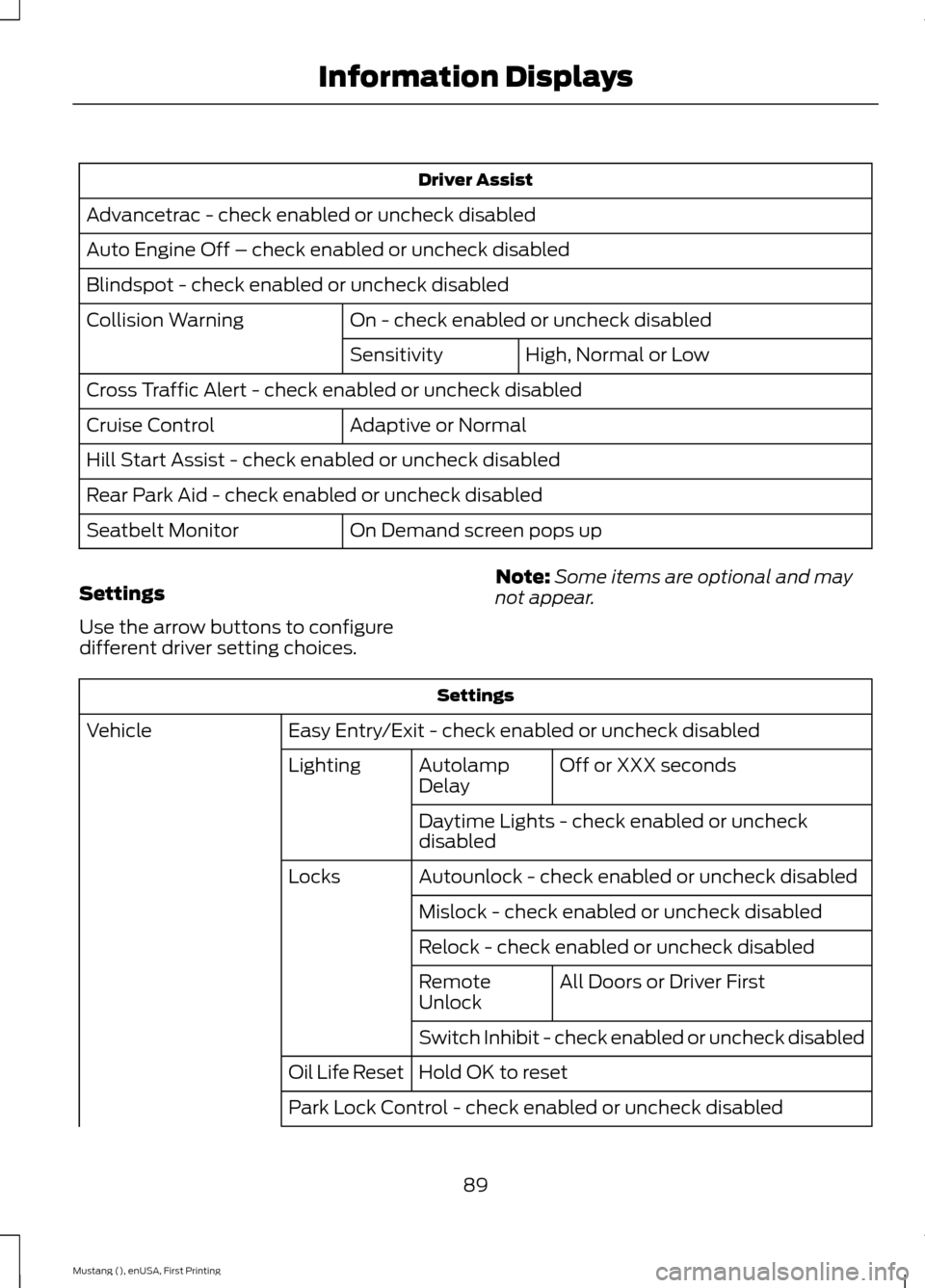
Driver Assist
Advancetrac - check enabled or uncheck disabled
Auto Engine Off – check enabled or uncheck disabled
Blindspot - check enabled or uncheck disabled On - check enabled or uncheck disabled
Collision Warning
High, Normal or Low
Sensitivity
Cross Traffic Alert - check enabled or uncheck disabled Adaptive or Normal
Cruise Control
Hill Start Assist - check enabled or uncheck disabled
Rear Park Aid - check enabled or uncheck disabled
On Demand screen pops up
Seatbelt Monitor
Settings
Use the arrow buttons to configure
different driver setting choices. Note:
Some items are optional and may
not appear. Settings
Easy Entry/Exit - check enabled or uncheck disabled
Vehicle
Off or XXX seconds
Autolamp
Delay
Lighting
Daytime Lights - check enabled or uncheck
disabled
Autounlock - check enabled or uncheck disabled
Locks
Mislock - check enabled or uncheck disabled
Relock - check enabled or uncheck disabled All Doors or Driver First
Remote
Unlock
Switch Inhibit - check enabled or uncheck disabled
Hold OK to reset
Oil Life Reset
Park Lock Control - check enabled or uncheck disabled
89
Mustang (), enUSA, First Printing Information Displays