2015 FORD FOCUS heating
[x] Cancel search: heatingPage 79 of 453
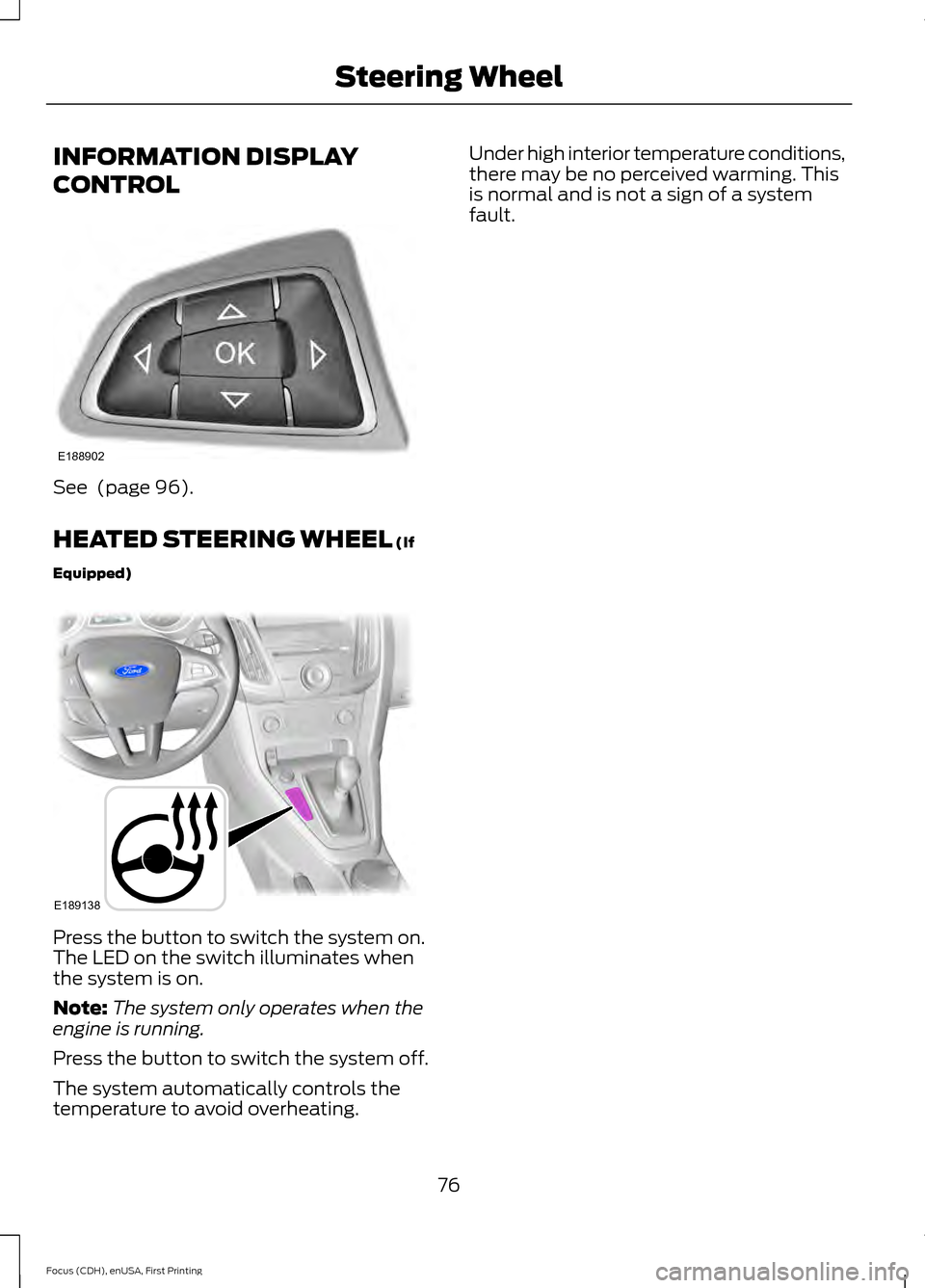
INFORMATION DISPLAY
CONTROL
See (page 96).
HEATED STEERING WHEEL
(If
Equipped) Press the button to switch the system on.
The LED on the switch illuminates when
the system is on.
Note:
The system only operates when the
engine is running.
Press the button to switch the system off.
The system automatically controls the
temperature to avoid overheating. Under high interior temperature conditions,
there may be no perceived warming. This
is normal and is not a sign of a system
fault.
76
Focus (CDH), enUSA, First Printing Steering WheelE188902 E189138
Page 94 of 453

Engine Coolant Temperature
Gauge
WARNING
Never remove the coolant reservoir
cap while the engine is running or hot.
At normal operating temperature, the
needle remains in the center section.
Note:
Do not restart the engine until the
cause of overheating has been determined
and resolved.
If the needle enters the red section, the
engine is overheating. Stop the engine,
switch the ignition off and determine the
cause once the engine has cooled down.
See Engine Coolant Check (page 214).
Fuel Gauge
Note: : The fuel gauge may vary slightly
when your vehicle is moving or on a gradient.
Switch the ignition on. The fuel gauge will
indicate approximately how much fuel is
left in the fuel tank. The arrow adjacent to
the fuel pump symbol indicates on which
side of your vehicle the fuel filler door is
located. The needle should move toward F when
you refuel your vehicle. If the needle points
to E after adding fuel, this indicates your
vehicle needs service soon.
After refueling some variability in needle
position is normal.
Note:
It may take a short time for the
needle to reach F after leaving the gas
station. This is normal and depends upon
the slope of pavement at the gas station.
Note: The fuel amount dispensed into the
tank is a little less or more than the gauge
indicated. This is normal and depends upon
the slope of pavement at the gas station.
Note: If the gas station nozzle shuts off
before the tank is full, try a different gas
pump nozzle.
Low Fuel Level Reminder
Vehicles with no distance-to-empty
display
A low fuel reminder triggers when the fuel
gauge needle is at 1/16th.
Vehicles equipped with distance-to-
empty display
A low fuel reminder triggers when the fuel
gauge needle is at 1/16th or about 35 miles
(56 km) to empty, whichever occurs first.
Variations:
Note: : The low fuel warning and distance-to-empty warning can appear at different fuel
gauge positions depending on fuel economy conditions. This variation is normal. Distance-to-empty
Fuel gauge position
Driving type (fuel economy
conditions)
35 miles to 80 miles (56 kmto 129 km)
1/16th
Highway driving
10 miles to 35 miles (16 kmto 56 km)
1/16th-1/4
Severe duty driving (trailer
towing, extended idle)
91
Focus (CDH), enUSA, First Printing Instrument Cluster
Page 109 of 453

Transmission
Action
Message
See an authorized dealer.
Transmission malfunction
Service now
The transmission is overheating and needs to cool.Stop in a safe place as soon as it’ s possible.
Transmission overheating Stop
safely
Transmission is hot. Wait as needed to let it cool.
Transmission Hot Wait ...
Displays as a reminder to shift into park.
Transmission not in Park Select
P
Displays to request the operator to apply the brake asneeded by the transmission.
Press brake to unlock gearshift
lever
Displays when the transmission shift lever is unlockedand free to select gears.
Gearshift lever unlocked
Tire Pressure Monitoring System Action
Message
Displays when one or more tires on your vehicle havelow tire pressure. See Tire Pressure Monitoring
System (page 253).
Low Tire Pressure
Displays when the tire pressure monitoring system ismalfunctioning. If the warning stays on or continues to come on, contact an authorized dealer.
See Tire
Pressure Monitoring System (page 253).
Tire Pressure Monitor Fault
Displayed when a tire pressure sensor is malfunc-
tioning, or your spare tire is in use. For more information on how the system operates under these conditions,see
See Tire Pressure Monitoring System (page
253). If the warning stays on or continues to come on,
contact an authorized dealer as soon as possible.
Tire Pressure Sensor Fault
Traction Control Action
Message
Displays when the traction control system has been
switched off. See
Using Traction Control (page 151).
Traction control off
106
Focus (CDH), enUSA, First Printing Information Displays
Page 112 of 453
A/C: Press the button to switch the air conditioning on or off. Air conditioning
cools your vehicle using outside air. To improve the time to reach a comfortable
temperature in hot weather, drive with the windows open until you feel cold air
through the air vents.
F
Recirculated air:
Press the button to switch between outside air and
recirculated air. The air currently in the passenger compartment recirculates.
This can reduce the time needed to cool the interior and reduce unwanted odors
from entering your vehicle.
G
Heated seats (if equipped):
Press the button to switch the heated seats on
and off. See Heated Seats (page 119).
H
MAX A/C: Press the button for maximum cooling. Recirculated air flows through
the instrument panel vents, air conditioning automatically turns on and the fan
automatically adjusts to the highest speed.
I
MAX Defrost: Press the button to switch on defrost. Outside air flows through
the windshield vents, air conditioning automatically turns on, and fan
automatically adjusts to the highest speed. You can also use this setting to
defrost and clear the windshield of a thin covering of ice. The heated rear window
also automatically turns on when you select maximum defrost.
J
Power:
Press the button to switch the system on and off. When the system is
off, it prevents outside air from entering the vehicle.
K
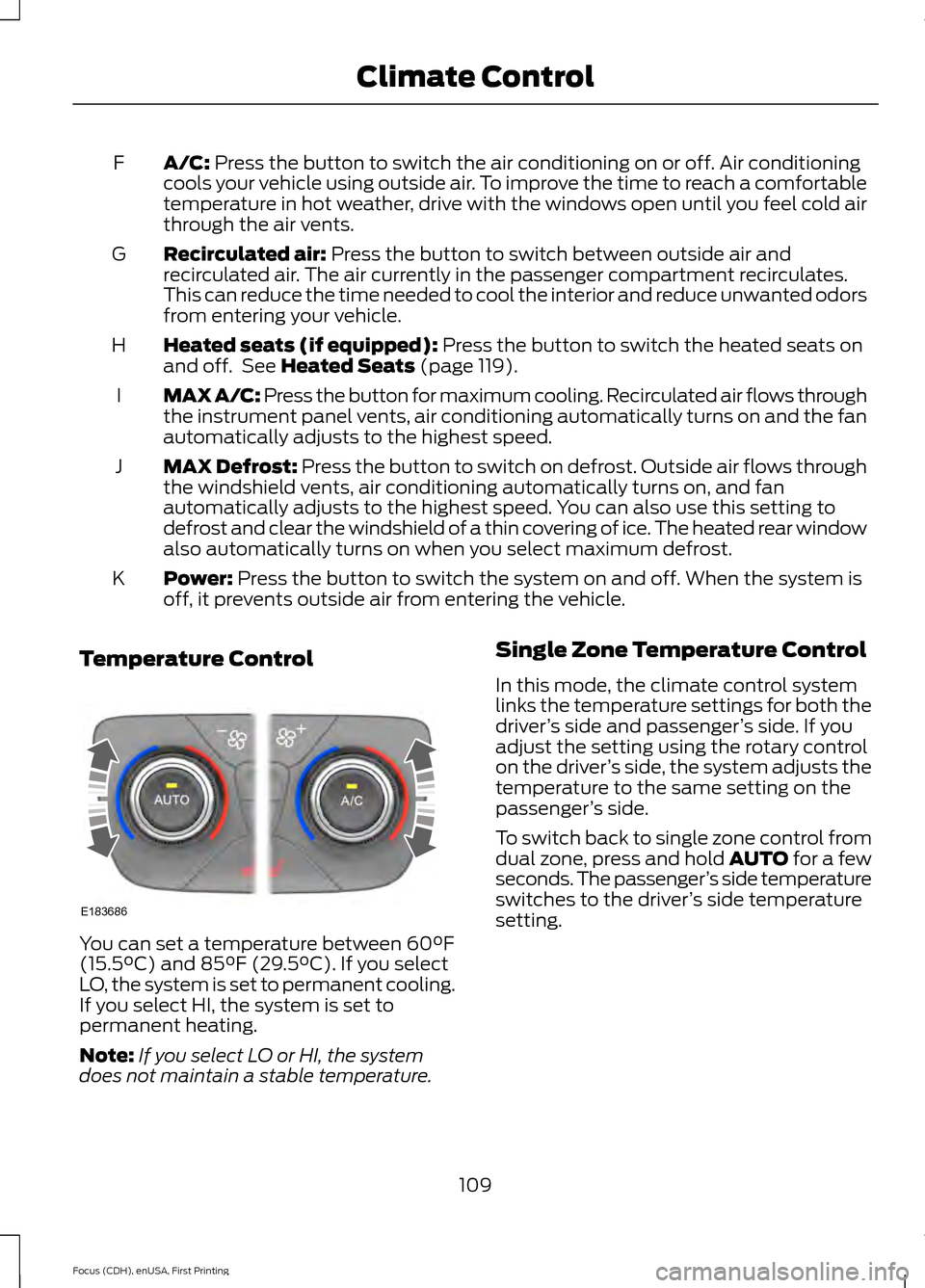
Temperature Control You can set a temperature between
60°F
(15.5°C) and 85°F (29.5°C). If you select
LO, the system is set to permanent cooling.
If you select HI, the system is set to
permanent heating.
Note: If you select LO or HI, the system
does not maintain a stable temperature. Single Zone Temperature Control
In this mode, the climate control system
links the temperature settings for both the
driver
’s side and passenger ’s side. If you
adjust the setting using the rotary control
on the driver ’s side, the system adjusts the
temperature to the same setting on the
passenger ’s side.
To switch back to single zone control from
dual zone, press and hold AUTO for a few
seconds. The passenger ’s side temperature
switches to the driver ’s side temperature
setting.
109
Focus (CDH), enUSA, First Printing Climate ControlE183686
Page 113 of 453

Dual Zone Temperature Control
Select a temperature for the passenger
’s
side using the rotary control on the
passenger ’s side. Single zone temperature
control automatically switches off. The
temperature on the driver ’s side remains
unchanged. You can now adjust the driver ’s
side and passenger ’s side temperatures
independently. The display shows the
temperature settings for each side.
HINTS ON CONTROLLING THE
INTERIOR CLIMATE
General Hints
Note: Prolonged use of recirculated air may
cause the windows to fog up.
Note: To reduce humidity build-up inside
your vehicle, do not drive with the system
switched off or with recirculated air always
switched on.
Note: Do not place objects under the front
seats as this may interfere with the airflow
to the rear seats.
Note: Remove any snow, ice or leaves from
the air intake area at the base of the
windshield. Note:
To improve the time to reach comfort
in hot weather, drive with the windows fully
open until you feel cold air through the air
vents.
Manual Climate Control
Note: To reduce fogging of the windshield
during humid weather, adjust the air
distribution control to the windshield air
vents position.
Automatic Climate Control
Note: Adjusting the settings when your
vehicle interior is extremely hot or cold is
not necessary. The system automatically
adjusts to heat or cool the cabin to your
selected temperature as quickly as possible.
For the system to function efficiently, the
instrument panel and side air vents should
be fully open.
Note: If you select AUTO during cold
outside temperatures, the system directs
airflow to the windshield and side window
vents. In addition, the fan may run at a
slower speed until the engine warms up.
Note: If you select AUTO during hot outside
temperatures, or when the inside of the
vehicle is hot, the system automatically uses
recirculated air to maximize interior cooling.
When the interior reaches the selected
temperature, the system automatically
switches to using outside air.
Heating the Interior Quickly Vehicle with automatic climate control
Vehicle with manual climate control
Press the
AUTO button.
Adjust the temperature control to the
highest setting.
1
Adjust the temperature control to the
desired setting.
Adjust the fan speed to a high speed
setting as soon as you feel warm air.
2
Select the footwell air vents using the
air distribution buttons.
3
110
Focus (CDH), enUSA, First Printing Climate Control
Page 114 of 453
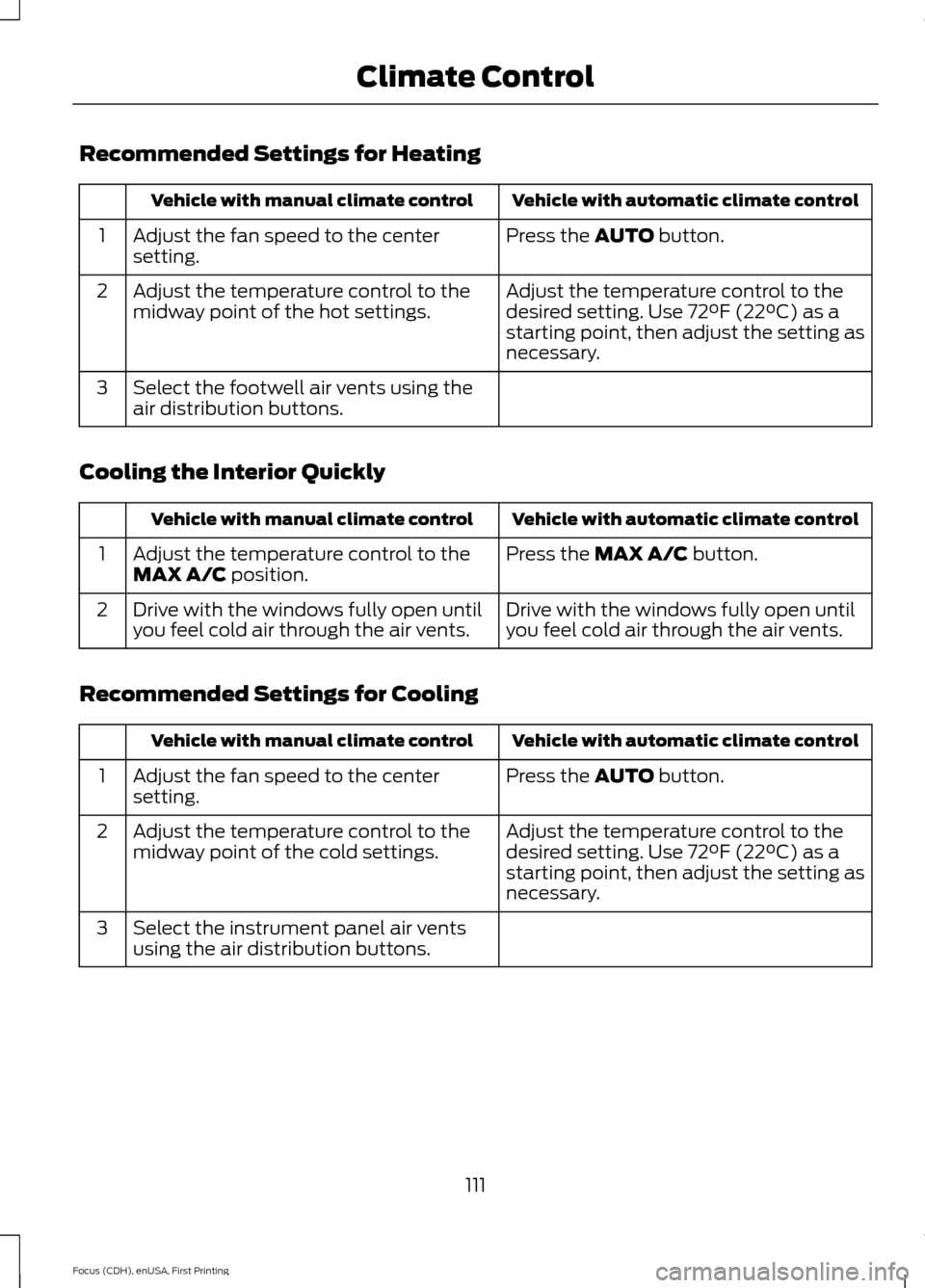
Recommended Settings for Heating
Vehicle with automatic climate control
Vehicle with manual climate control
Press the AUTO button.
Adjust the fan speed to the center
setting.
1
Adjust the temperature control to the
desired setting. Use 72°F (22°C) as a
starting point, then adjust the setting as
necessary.
Adjust the temperature control to the
midway point of the hot settings.
2
Select the footwell air vents using the
air distribution buttons.
3
Cooling the Interior Quickly Vehicle with automatic climate control
Vehicle with manual climate control
Press the
MAX A/C button.
Adjust the temperature control to the
MAX A/C position.
1
Drive with the windows fully open until
you feel cold air through the air vents.
Drive with the windows fully open until
you feel cold air through the air vents.
2
Recommended Settings for Cooling Vehicle with automatic climate control
Vehicle with manual climate control
Press the
AUTO button.
Adjust the fan speed to the center
setting.
1
Adjust the temperature control to the
desired setting. Use 72°F (22°C) as a
starting point, then adjust the setting as
necessary.
Adjust the temperature control to the
midway point of the cold settings.
2
Select the instrument panel air vents
using the air distribution buttons.
3
111
Focus (CDH), enUSA, First Printing Climate Control
Page 122 of 453

HEATED SEATS (If Equipped)
WARNING
People who are unable to feel pain
to their skin because of advanced
age, chronic illness, diabetes, spinal
cord injury, medication, alcohol use,
exhaustion or other physical conditions,
must exercise care when using the heated
seat. The heated seat may cause burns
even at low temperatures, especially if
used for long periods of time. Do not place
anything on the seat that insulates against
heat, such as a blanket or cushion. This
may cause the heated seat to overheat.
Do not puncture the seat with pins, needles
or other pointed objects. This may damage
the heating element which may cause the
heated seat to overheat. An overheated
seat may cause serious personal injury. Do not do the following:
•
Place heavy objects on the seat.
• Operate the heated seat if water or any
other liquid is spilled on the seat. Allow
the seat to dry thoroughly.
• Operate the heated seats unless the
engine is running. Doing so can cause
the battery to lose charge. Press the heated seat symbol to cycle
through the various heat settings and off.
Warmer settings are indicated by more
indicator lights.
119
Focus (CDH), enUSA, First Printing SeatsE146941
Page 175 of 453

Type 1
Gear shifting
A
Anticipation
B
Efficient speed
C
Gear shifting
Use the highest drivable gear appropriate
for the road conditions to improve fuel
consumption.
Anticipation
Adjust your vehicle speed and the distance
to other vehicles to avoid the need for
heavy braking or acceleration to improve
fuel economy.
Efficient speed
Reduce your cruising speed on open roads
to improve economy. Higher speeds use
more fuel.
Type 2 and 3
The relevant information is shown in the
display.
Resetting Eco Mode
Reset the average fuel consumption by
using the information display control.
Note: New values may take a short time to
calculate STEERING
Electric Power Steering WARNING
The electric power steering system
has diagnostic checks that
continuously monitor the system. If
a fault is detected, a message displays in
the information display. Stop your vehicle
as soon as it is safe to do so. Switch the
ignition off. After at least 10 seconds,
switch the ignition on and watch the
information display for a steering system
warning message. If a steering system
warning message returns, have the system
checked by an authorized dealer. Your vehicle has an electric power steering
system. There is no fluid reservoir. No
maintenance is required.
If your vehicle loses electrical power while
you are driving, electric power steering
assistance is lost. The steering system still
operates and you can steer your vehicle
manually. Manually steering your vehicle
requires more effort.
Extreme continuous steering may increase
the effort required for you to steer your
vehicle. This increased effort prevents
overheating and permanent damage to
the steering system. You do not lose the
ability to steer your vehicle manually.
Typical steering and driving maneuvers
allow the system to cool and return to
normal operation.
Steering Tips
If the steering wanders or pulls, check for:
•
Correct tire pressures.
• Uneven tire wear.
• Loose or worn suspension
components.
172
Focus (CDH), enUSA, First Printing Driving AidsE121813CBA