2015 FORD FOCUS service
[x] Cancel search: servicePage 105 of 453

Hill Start Assist
Action
Message
Displays when hill start assist is not available. Contact
an authorized dealer. See Hill Start Assist (page 149).
Hill start assist not available
Keyless Vehicle Action
Message
Displays to remind you that the key is in the trunk. SeeKeyless Starting (page 122).
Ford KeyFree Key inside vehicle
Displayed if the key is not detected by the system. SeeKeyless Starting
(page 122).
Ford KeyFree No key detected
Displayed as a reminder to turn off the vehicle. SeeKeyless Starting
(page 122).
Switch ign. off Press ENGINE
Start/Stop button
Displayed as a reminder to press the brake whilestarting the vehicle.
Press brake to start
Displayed when a valid key is not detected within thevehicle. See
Keyless Starting (page 122).
Ford KeyFree Key not inside car
Displays when the key battery is low. Change the
battery as soon as possible. See
Remote Control
(page 50).
Key Battery low Replace soon
Lane Keeping Aid Action
Message
Displays when the system has detected a condition that
requires service. Have your vehicle checked by an author- ized dealer.
Lane Keeping Sys Fault
Service required
102
Focus (CDH), enUSA, First Printing Information Displays
Page 106 of 453
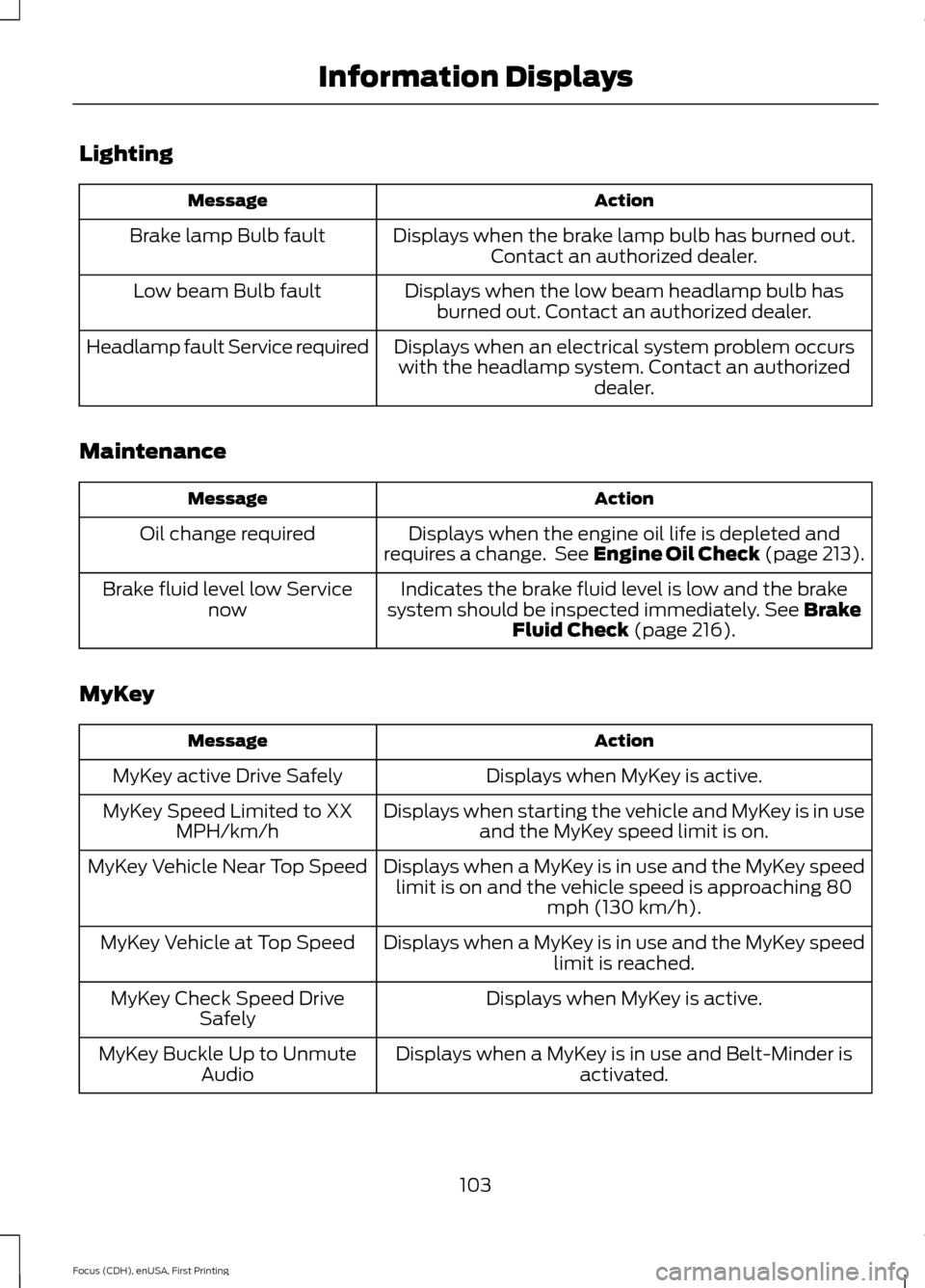
Lighting
Action
Message
Displays when the brake lamp bulb has burned out.Contact an authorized dealer.
Brake lamp Bulb fault
Displays when the low beam headlamp bulb hasburned out. Contact an authorized dealer.
Low beam Bulb fault
Displays when an electrical system problem occurswith the headlamp system. Contact an authorized dealer.
Headlamp fault Service required
Maintenance Action
Message
Displays when the engine oil life is depleted and
requires a change. See Engine Oil Check (page 213).
Oil change required
Indicates the brake fluid level is low and the brake
system should be inspected immediately. See Brake
Fluid Check (page 216).
Brake fluid level low Service
now
MyKey Action
Message
Displays when MyKey is active.
MyKey active Drive Safely
Displays when starting the vehicle and MyKey is in useand the MyKey speed limit is on.
MyKey Speed Limited to XX
MPH/km/h
Displays when a MyKey is in use and the MyKey speedlimit is on and the vehicle speed is approaching 80 mph (130 km/h).
MyKey Vehicle Near Top Speed
Displays when a MyKey is in use and the MyKey speedlimit is reached.
MyKey Vehicle at Top Speed
Displays when MyKey is active.
MyKey Check Speed Drive
Safely
Displays when a MyKey is in use and Belt-Minder isactivated.
MyKey Buckle Up to Unmute
Audio
103
Focus (CDH), enUSA, First Printing Information Displays
Page 107 of 453
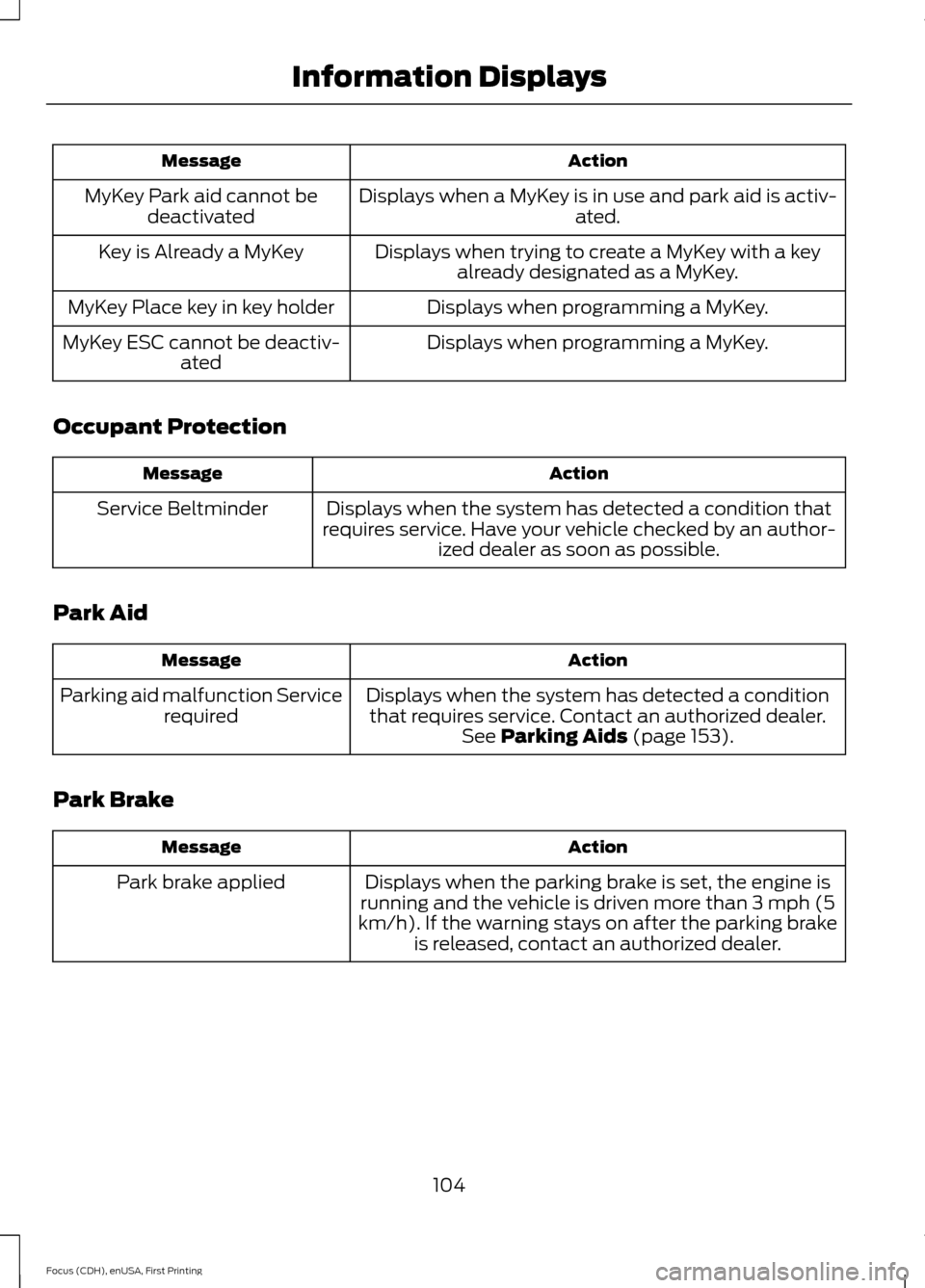
Action
Message
Displays when a MyKey is in use and park aid is activ- ated.
MyKey Park aid cannot be
deactivated
Displays when trying to create a MyKey with a keyalready designated as a MyKey.
Key is Already a MyKey
Displays when programming a MyKey.
MyKey Place key in key holder
Displays when programming a MyKey.
MyKey ESC cannot be deactiv-
ated
Occupant Protection Action
Message
Displays when the system has detected a condition that
requires service. Have your vehicle checked by an author- ized dealer as soon as possible.
Service Beltminder
Park Aid Action
Message
Displays when the system has detected a conditionthat requires service. Contact an authorized dealer. See Parking Aids (page 153).
Parking aid malfunction Service
required
Park Brake Action
Message
Displays when the parking brake is set, the engine is
running and the vehicle is driven more than 3 mph (5
km/h). If the warning stays on after the parking brake is released, contact an authorized dealer.
Park brake applied
104
Focus (CDH), enUSA, First Printing Information Displays
Page 108 of 453

Power Steering
Action
Message
The power steering system is not working. Stop the
vehicle at a safe place. Contact an authorized dealer.
Steering loss Stop safely
The power steering system is not working. Stop the
vehicle at a safe place. Contact an authorized dealer.
Steering assist fault Service
required
The power steering system has detected a condition
within the power steering system, or the passive entry or passive start system requires service. Contact an authorized dealer.
Steering fault Service now
Starting System Action
Message
Displays when starting the vehicle as a reminder toapply the brake.
Press brake to start
Displays when the vehicle fails to start.
Cranking time exceeded
Start-Stop Action
Message
Switch the ignition off before leaving your vehicle if the
system has shut down the engine. See Auto-Start-Stop
(page 130).
Auto StartStop Switch igni-
tion off
Have your vehicle checked by an authorized dealer.
Auto StartStop fault
Service required
The engine needs to be restarted, press the clutch pedalto start. See
Auto-Start-Stop (page 130).
Auto StartStop Press a
pedal to start engine
Select neutral for the system to restart the engine.
See
Auto-Start-Stop (page 130).
Auto StartStop Select
neutral to start engine
The system is not functioning. A manual restart is required.
Auto StartStop Manual
restart required
105
Focus (CDH), enUSA, First Printing Information Displays
Page 109 of 453

Transmission
Action
Message
See an authorized dealer.
Transmission malfunction
Service now
The transmission is overheating and needs to cool.Stop in a safe place as soon as it’ s possible.
Transmission overheating Stop
safely
Transmission is hot. Wait as needed to let it cool.
Transmission Hot Wait ...
Displays as a reminder to shift into park.
Transmission not in Park Select
P
Displays to request the operator to apply the brake asneeded by the transmission.
Press brake to unlock gearshift
lever
Displays when the transmission shift lever is unlockedand free to select gears.
Gearshift lever unlocked
Tire Pressure Monitoring System Action
Message
Displays when one or more tires on your vehicle havelow tire pressure. See Tire Pressure Monitoring
System (page 253).
Low Tire Pressure
Displays when the tire pressure monitoring system ismalfunctioning. If the warning stays on or continues to come on, contact an authorized dealer.
See Tire
Pressure Monitoring System (page 253).
Tire Pressure Monitor Fault
Displayed when a tire pressure sensor is malfunc-
tioning, or your spare tire is in use. For more information on how the system operates under these conditions,see
See Tire Pressure Monitoring System (page
253). If the warning stays on or continues to come on,
contact an authorized dealer as soon as possible.
Tire Pressure Sensor Fault
Traction Control Action
Message
Displays when the traction control system has been
switched off. See
Using Traction Control (page 151).
Traction control off
106
Focus (CDH), enUSA, First Printing Information Displays
Page 136 of 453
FUEL QUALITY - GASOLINE
Choosing the Right Fuel
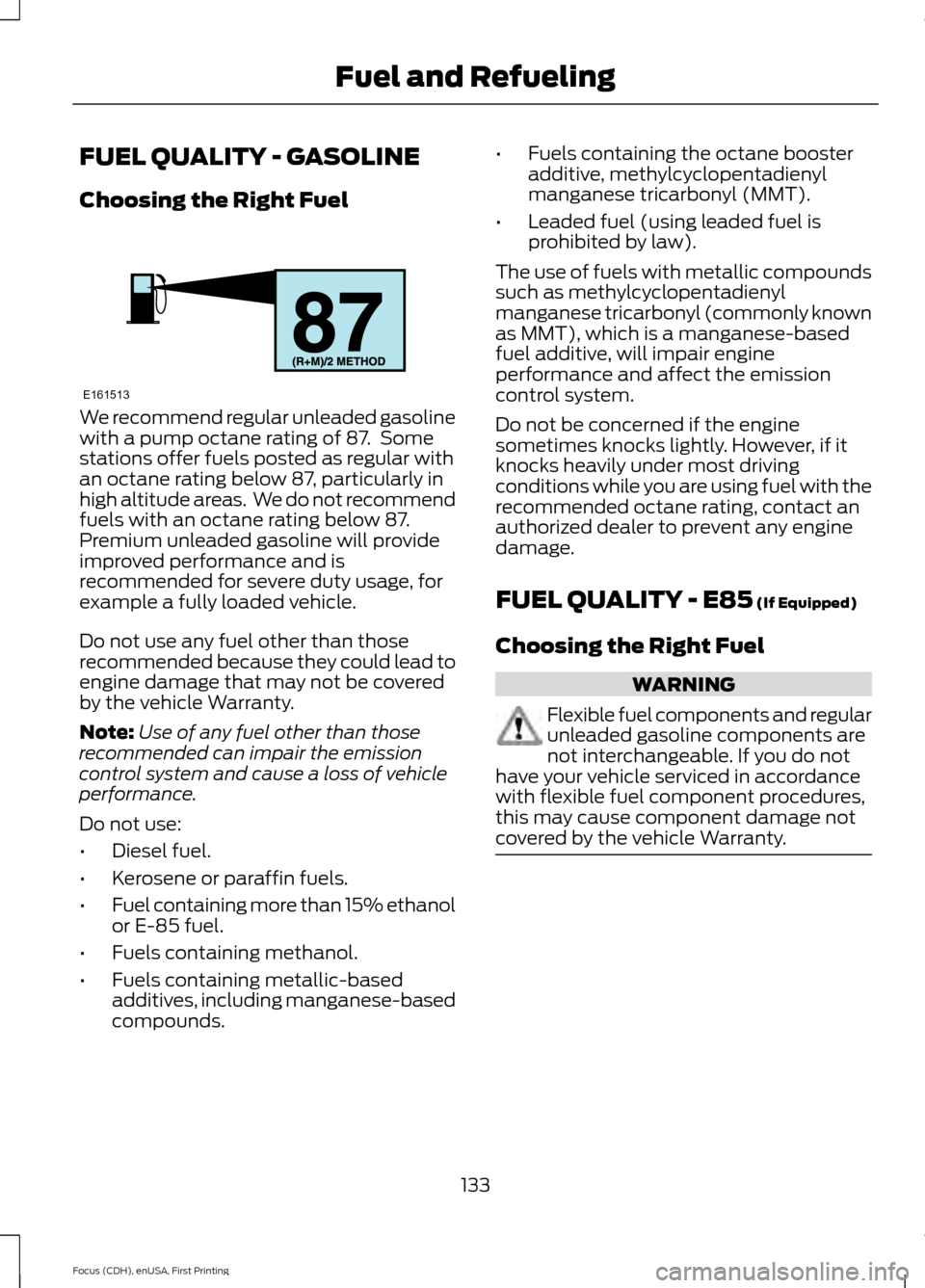
We recommend regular unleaded gasoline
with a pump octane rating of 87. Some
stations offer fuels posted as regular with
an octane rating below 87, particularly in
high altitude areas. We do not recommend
fuels with an octane rating below 87.
Premium unleaded gasoline will provide
improved performance and is
recommended for severe duty usage, for
example a fully loaded vehicle.
Do not use any fuel other than those
recommended because they could lead to
engine damage that may not be covered
by the vehicle Warranty.
Note:
Use of any fuel other than those
recommended can impair the emission
control system and cause a loss of vehicle
performance.
Do not use:
• Diesel fuel.
• Kerosene or paraffin fuels.
• Fuel containing more than 15% ethanol
or E-85 fuel.
• Fuels containing methanol.
• Fuels containing metallic-based
additives, including manganese-based
compounds. •
Fuels containing the octane booster
additive, methylcyclopentadienyl
manganese tricarbonyl (MMT).
• Leaded fuel (using leaded fuel is
prohibited by law).
The use of fuels with metallic compounds
such as methylcyclopentadienyl
manganese tricarbonyl (commonly known
as MMT), which is a manganese-based
fuel additive, will impair engine
performance and affect the emission
control system.
Do not be concerned if the engine
sometimes knocks lightly. However, if it
knocks heavily under most driving
conditions while you are using fuel with the
recommended octane rating, contact an
authorized dealer to prevent any engine
damage.
FUEL QUALITY - E85 (If Equipped)
Choosing the Right Fuel WARNING
Flexible fuel components and regular
unleaded gasoline components are
not interchangeable. If you do not
have your vehicle serviced in accordance
with flexible fuel component procedures,
this may cause component damage not
covered by the vehicle Warranty. 133
Focus (CDH), enUSA, First Printing Fuel and RefuelingE161513
Page 140 of 453

4. Wait at least 10 seconds before
removing the fuel pump nozzle to allow
any residual fuel to drain into the fuel
tank.
Note: A fuel spillage concern may occur if
overfilling the fuel tank. Do not overfill the
tank. The fill pipe is equipped with a drain
hole. Excess fuel due to overfill may drain
through the drain hole and drip onto the
ground.
If the fuel fill inlet was not properly closed,
a service engine warning lamp may appear
on the instrument cluster.
At the next opportunity, do the following:
1. Stop your vehicle as soon as safely possible and shift the transmission into
park (P).
2. Open the fuel filler door and remove any visible debris from the fuel fill
opening.
3. Insert either the fuel fill nozzle or the fuel fill funnel provided with the vehicle
several times to allow the inlet to close
properly. This will dislodge any debris
preventing the inlet from sealing.
If this action corrects the problem, the
message may not reset immediately. It
may take several driving cycles for the
message to turn off. A driving cycle
consists of an engine start-up (after 4 or
more hours with the engine off) followed
by city or highway driving. Continuing to
drive with the message on may cause the
service engine soon lamp to turn on as
well. FUEL CONSUMPTION
Note:
The amount of usable fuel in the
empty reserve varies and should not be
relied upon to increase driving range. When
refueling your vehicle after the fuel gauge
indicates empty, you might not be able to
refuel the full amount of the advertised
capacity of the fuel tank due to the empty
reserve still present in the tank.
Empty reserve is the amount of fuel
remaining in the tank after the fuel gauge
indicates empty. Do not rely on this fuel for
driving. The usable capacity of the fuel
tank is the amount of fuel that can be put
into the tank after the gauge indicates
empty. The advertised capacity is the total
fuel tank size – it is the combined usable
capacity plus the empty reserve.
Filling the Tank
For consistent results when filling the fuel
tank:
• Turn the ignition off before fueling; an
inaccurate reading results if the engine
is left running.
• Use the same fill rate
(low-medium-high) each time the tank
is filled.
• Allow no more than two automatic
click-offs when filling.
Results are most accurate when the filling
method is consistent.
Calculating Fuel Economy
Do not measure fuel economy during the
first 1000 miles (1600 kilometers) of
driving (this is your engine ’s break-in
period); a more accurate measurement is
obtained after 2000 miles - 3000 miles
(3200 kilometers - 4800 kilometers). Also,
fuel expense, frequency of fill ups or fuel
gauge readings are not accurate ways to
measure fuel economy.
137
Focus (CDH), enUSA, First Printing Fuel and Refueling
Page 141 of 453

1.
Fill the fuel tank completely and record
the initial odometer reading.
2. Each time you fill the tank, record the amount of fuel added.
3. After at least three to five tank fill ups, fill the fuel tank and record the current
odometer reading.
4. Subtract your initial odometer reading from the current odometer reading.
5. Calculate fuel economy by dividing miles traveled by gallons used (For
Metric: Multiply liters used by 100, then
divide by kilometers traveled).
Keep a record for at least one month and
record the type of driving (city or highway).
This provides an accurate estimate of the
vehicle ’s fuel economy under current
driving conditions. Additionally, keeping
records during summer and winter show
how temperature impacts fuel economy.
In general, lower temperatures mean lower
fuel economy.
EMISSION CONTROL SYSTEM WARNINGS
Do not park, idle, or drive your vehicle
in dry grass or other dry ground cover.
The emission system heats up the
engine compartment and exhaust system,
which can start a fire. Exhaust leaks may result in entry of
harmful and potentially lethal fumes
into the passenger compartment. If
you smell exhaust fumes inside your
vehicle, have your dealer inspect your
vehicle immediately. Do not drive if you
smell exhaust fumes. Your vehicle is equipped with various
emission control components and a
catalytic converter that will enable your
vehicle to comply with applicable exhaust
emission standards. To make sure that the
catalytic converter and other emission
control components continue to work
properly:
•
Use only the specified fuel listed.
• Avoid running out of fuel.
• Do not turn off the ignition while your
vehicle is moving, especially at high
speeds.
• Have the items listed in scheduled
maintenance information performed
according to the specified schedule.
The scheduled maintenance items listed
in scheduled maintenance information are
essential to the life and performance of
your vehicle and to its emissions system.
If you use parts other than Ford, Motorcraft
or Ford-authorized parts for maintenance
replacements, or for service of
components affecting emission control,
such non-Ford parts should be the
equivalent to genuine Ford Motor Company
parts in performance and durability.
Illumination of the service engine soon
indicator, charging system warning light or
the temperature warning light, fluid leaks,
strange odors, smoke or loss of engine
power could indicate that the emission
control system is not working properly.
An improperly operating or damaged
exhaust system may allow exhaust to
enter the vehicle. Have a damaged or
improperly operating exhaust system
inspected and repaired immediately.
Do not make any unauthorized changes to
your vehicle or engine. By law, vehicle
owners and anyone who manufactures,
repairs, services, sells, leases, trades
vehicles, or supervises a fleet of vehicles
are not permitted to intentionally remove
138
Focus (CDH), enUSA, First Printing Fuel and Refueling