2015 FORD FOCUS buttons
[x] Cancel search: buttonsPage 222 of 453

CHECKING THE WIPER
BLADES
Run the tip of your fingers over the edge of
the blade to check for roughness.
Clean the wiper blades with washer fluid
or water applied with a soft sponge or
cloth.
CHANGING THE WIPER
BLADES
Note:
If streaks or smears appear on the
windshield, clean the windshield and the
wiper blades. See Cleaning the Windows
and Wiper Blades (page 232). If that does
not resolve the issue, install new wiper
blades.
Service Position Set the windshield wipers in the service
position to change the wiper blades. The
windshield wipers return to the starting
position when you switch the ignition on. Note:
You can use the service position in
winter to provide easier access to the wiper
blades for freeing them from snow and ice.
Make sure the windshield is free from snow
and ice before you switch the ignition on.
1. Switch the ignition on. 2. Switch the ignition off and press and
hold the wiper lever in position A within
three seconds.
3. Release the wiper lever when the windshield wipers reach the service
position.
Changing the Windshield Wiper Blades
1. Pull the wiper blade and arm away from the glass. Note:
Make sure that the wiper arm does
not spring back against the glass when the
wiper blade is not attached.
2. Press the locking buttons together.
219
Focus (CDH), enUSA, First Printing MaintenanceE142463 E75184 E129986
A E129990
1
1 2
Page 278 of 453
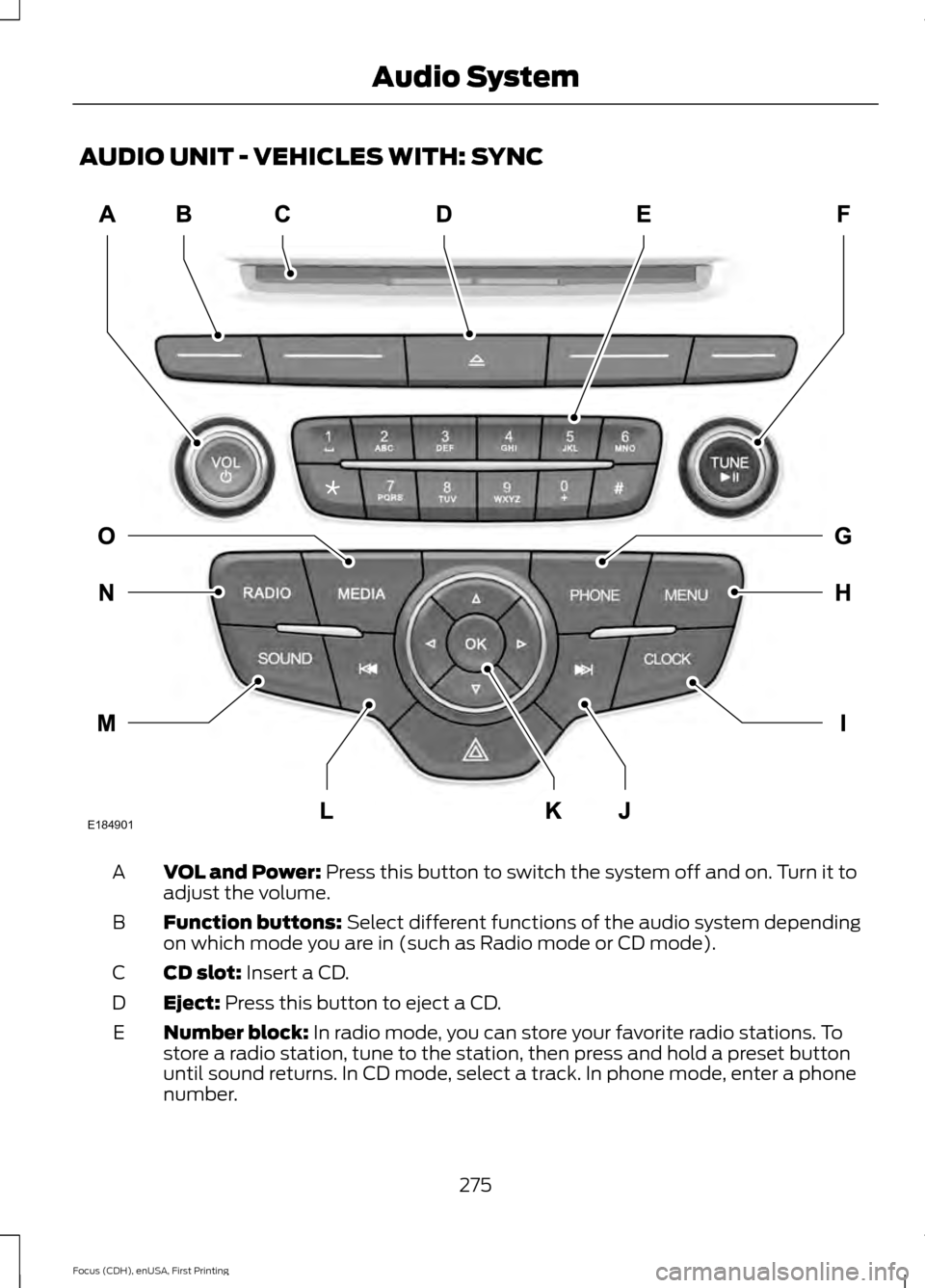
AUDIO UNIT - VEHICLES WITH: SYNC
VOL and Power: Press this button to switch the system off and on. Turn it to
adjust the volume.
A
Function buttons:
Select different functions of the audio system depending
on which mode you are in (such as Radio mode or CD mode).
B
CD slot:
Insert a CD.
C
Eject:
Press this button to eject a CD.
D
Number block:
In radio mode, you can store your favorite radio stations. To
store a radio station, tune to the station, then press and hold a preset button
until sound returns. In CD mode, select a track. In phone mode, enter a phone
number.
E
275
Focus (CDH), enUSA, First Printing Audio SystemE184901
Page 279 of 453

TUNE and Play or Pause: Turn to search the frequency band in individual
increments. Press to either play or pause a track when listening to a CD.
F
PHONE:
Press this button to access the phone features of the SYNC system.
See Using SYNC™ With Your Phone (page 294).
G
MENU:
Press this button to access different audio system features. See Menu
Structure later in this chapter.
H
Clock:
Press this button to access the clock setting. Use the center arrow
controls to change the hours and minutes. You can also set the clock by pressing
the
MENU button and scrolling to Clock Settings.
I
Seek and Fast Forward:
In radio mode, select a frequency band and press
this button. The system stops at the first station up the band. Press and hold
the button to move quickly through the frequency band and advance to next
strong radio station after the button is released. In CD mode, press this button
to select the next track. Press and hold the button to move quickly forward
through the current track.
J
OK and Arrow buttons: Press the OK button to confirm menu selections. Use
the arrow buttons to navigate within menus.
K
Seek and Reverse:
In radio mode, select a frequency band and press this
button. The system stops at the first station down the band. Press and hold
the button to move quickly through the frequency band and advance to next
strong radio station after the button is released. In CD mode, press this button
to select the previous track. Press and hold the button to move quickly backward
through the current track.
L
SOUND:
Press this button to access settings for Treble, Midrange, Bass, Fade
and Balance. Use the up and down arrow buttons to select the various settings.
When you make your selection, press the left and right arrow buttons to change
the settings. Press
OK to set or press MENU to exit. Sound settings can be set
for each audio source independently.
M
RADIO:
Press this button to listen to the radio or change radio frequency bands.
N
MEDIA:
Press this button to change the active media source. To change the
SYNC-Media device (such as switching from a device plugged into the USB
port to a Bluetooth audio device), press
MENU and scroll to Select Source.
O
276
Focus (CDH), enUSA, First Printing Audio System
Page 281 of 453

VOL and Power: Press this button to switch the system off and on. Turn it to
adjust the volume.
A
Function buttons:
Select different functions of the audio system depending
on which mode you are in (such as Radio mode or CD mode).
B
CD slot:
Insert a CD.
C
Eject:
Press this button to eject a CD.
D
Number block:
In radio mode, store your favorite radio stations. To store a
radio station, tune to the station, then press and hold a preset button until sound
returns. In CD mode, select a track. In phone mode, enter a phone number. The
clock button (when not in phone mode) allows you to set the clock. Use the
center arrow controls to change the hours and minutes.
E
278
Focus (CDH), enUSA, First Printing Audio SystemE184902
Page 282 of 453

TUNE and Play or Pause: Turn to search the frequency band in individual
increments. Press to either play or pause a track when listening to a CD.
F
CLOCK:
When not in Phone mode, press this button to access the clock setting.
Use the center arrow controls to change the hours and minutes. You can also
set the clock by pressing the
MENU button and scrolling to Clock Settings.
G
PHONE:
Press this button to access the phone features of the SYNC system.
See Using SYNC™ With Your Phone (page 294).
H
MENU:
Press this button to access different audio system features. See Menu
Structure later in this section.
I
SOUND:
Press this button to access settings for Treble, Midrange, Bass, Fade
and Balance. Use the up and down arrow buttons to select the various settings.
When you make your selection, press the left and right arrow buttons to change
the settings. Press
OK to set or press MENU to exit. Sound settings can be set
for each audio source independently.
J
Seek and Fast Forward:
In radio mode, select a frequency band and press
this button. The system stops at the first station up the band. Press and hold
the button to move quickly through the frequency band and advance to next
strong radio station after the button is released. In CD mode, press this button
to select the next track. Press and hold the button to move quickly forward
through the current track.
K
OK and Arrow buttons: Press the OK button to confirm menu selections. Use
the arrow buttons to navigate within menus.
L
Seek and Reverse:
In radio mode, select a frequency band and press this
button. The system stops at the first station down the band. Press and hold
the button to move quickly through the frequency band and advance to next
strong radio station after the button is released. In CD mode, press this button
to select the previous track. Press and hold the button to move quickly backward
through the current track.
M
SIRIUS:
Press this button to listen to Sirius satellite radio.
N
RADIO:
Press this button to listen to the radio or change radio frequency bands.
O
MEDIA:
Press this button to change the active media source. To change the
SYNC-Media device (such as switching from a device plugged into the USB
port to a Bluetooth audio device), press
MENU and scroll to Select Source.
P
279
Focus (CDH), enUSA, First Printing Audio System
Page 284 of 453
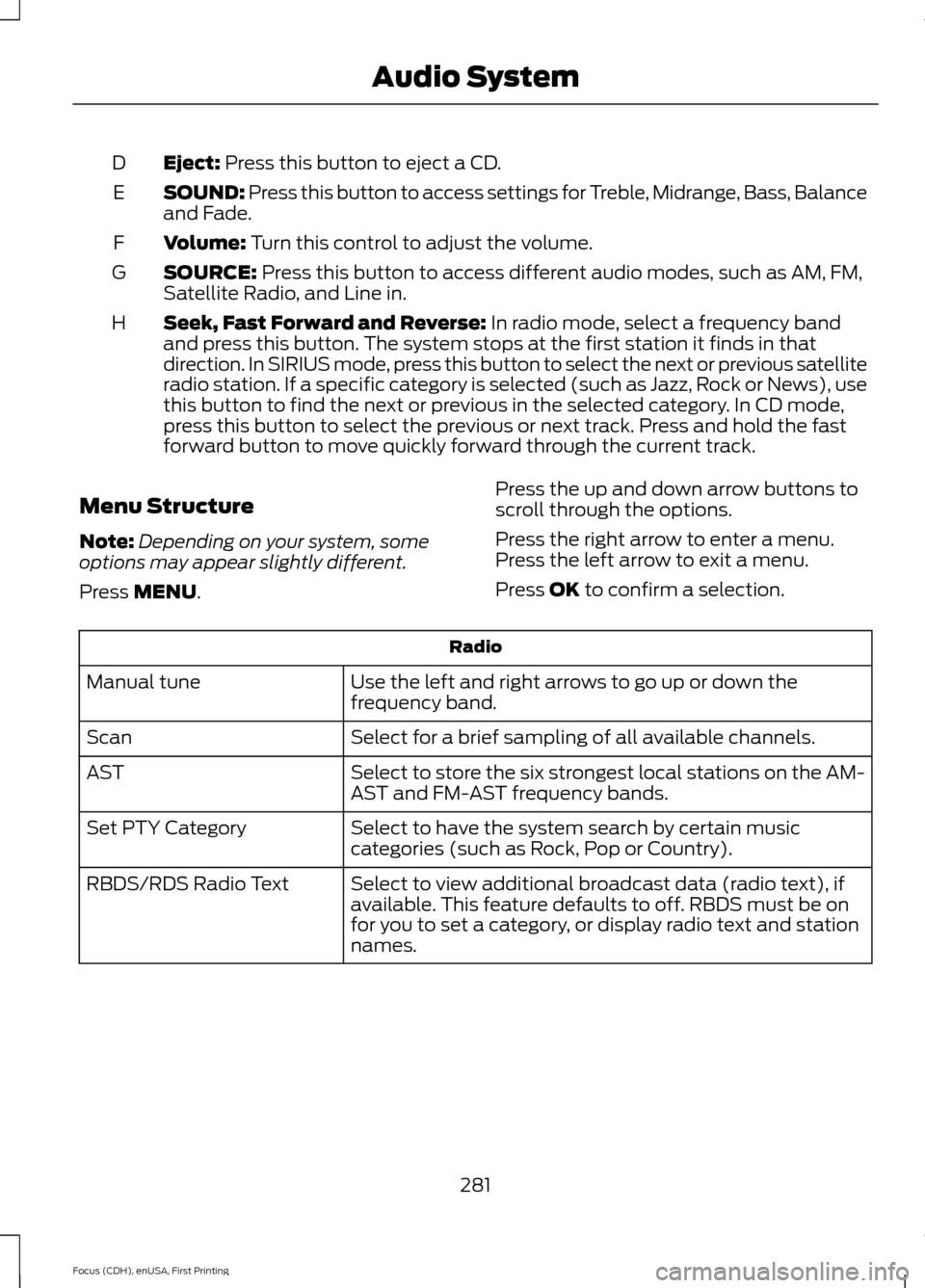
Eject: Press this button to eject a CD.
D
SOUND: Press this button to access settings for Treble, Midrange, Bass, Balance
and Fade.
E
Volume:
Turn this control to adjust the volume.
F
SOURCE:
Press this button to access different audio modes, such as AM, FM,
Satellite Radio, and Line in.
G
Seek, Fast Forward and Reverse:
In radio mode, select a frequency band
and press this button. The system stops at the first station it finds in that
direction. In SIRIUS mode, press this button to select the next or previous satellite
radio station. If a specific category is selected (such as Jazz, Rock or News), use
this button to find the next or previous in the selected category. In CD mode,
press this button to select the previous or next track. Press and hold the fast
forward button to move quickly forward through the current track.
H
Menu Structure
Note: Depending on your system, some
options may appear slightly different.
Press
MENU. Press the up and down arrow buttons to
scroll through the options.
Press the right arrow to enter a menu.
Press the left arrow to exit a menu.
Press OK to confirm a selection. Radio
Use the left and right arrows to go up or down the
frequency band.
Manual tune
Select for a brief sampling of all available channels.
Scan
Select to store the six strongest local stations on the AM-
AST and FM-AST frequency bands.
AST
Select to have the system search by certain music
categories (such as Rock, Pop or Country).
Set PTY Category
Select to view additional broadcast data (radio text), if
available. This feature defaults to off. RBDS must be on
for you to set a category, or display radio text and station
names.
RBDS/RDS Radio Text
281
Focus (CDH), enUSA, First Printing Audio System
Page 304 of 453

Sending a Text Message
Note:
You can only send a text message to
one recipient at a time.
1. Select the send option when the desired selection highlights in the audio
display.
2. Select the confirmation option when the contact appears.
3. Press the OK button again to confirm when the system asks if you want to
send the message. A pre-defined
signature appears on each text
message. Note:
You can send text messages either
by choosing a contact from the phonebook
and selecting the text option from the audio
display or by replying to a received message
in the inbox.
Accessing Your Phone Settings
These are phone-dependent features. Your
phone settings allow you to access and
adjust features such as your ring tone and
text message notification, modify your
phonebook, and set up automatic
download.
1. Press the PHONE button.
2. Scroll until the phone settings option appears, and then press the OK button.
Scroll to select from the following options: Description and action
Menu Item
If this option is checked, the system uses the cellular phone
as the master when there is more than one cellular phone
paired to the system. This option can be changed for all
cellular phones (not only the active phone) using the
Bluetooth Devices menu.
Set as master
See the cellular phone name, provider name, cellular
phone number, and signal level. When done, press the left
arrow buttons to return to the phone status menu.
Phone status
Select which ringtone sounds during an incoming call (one
of the system's tones or your cellular phone's). If your
phone supports in-band ringing, your phone's ringtone
sounds when you choose the cellular phone ringtone
option.
Set ringtone
1. Press the
OK button to select and scroll to hear each
ringtone.
2. Press the
OK button to select a ringtone.
Have the option of hearing an audible tone to notify you
when a text message arrives. Press the
OK button to
switch the audible tone off or on.
Text msg notify
Modify the contents of your phonebook (such as add,
delete or download). Press the
OK button to select and
scroll between the choices in the phonebook preferences
table below.
Phonebook pref.
301
Focus (CDH), enUSA, First Printing SYNC™
Page 307 of 453
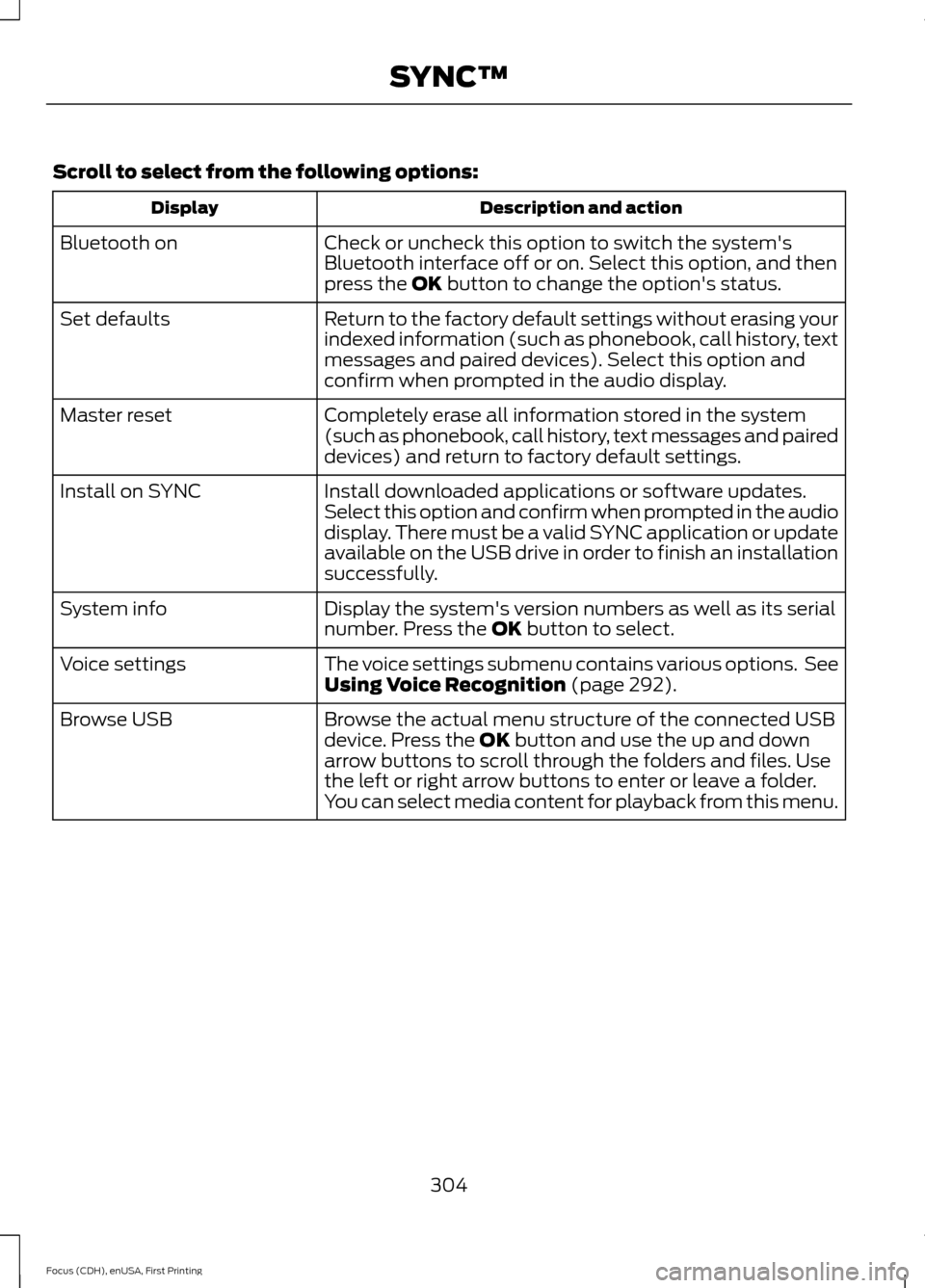
Scroll to select from the following options:
Description and action
Display
Check or uncheck this option to switch the system's
Bluetooth interface off or on. Select this option, and then
press the OK button to change the option's status.
Bluetooth on
Return to the factory default settings without erasing your
indexed information (such as phonebook, call history, text
messages and paired devices). Select this option and
confirm when prompted in the audio display.
Set defaults
Completely erase all information stored in the system
(such as phonebook, call history, text messages and paired
devices) and return to factory default settings.
Master reset
Install downloaded applications or software updates.
Select this option and confirm when prompted in the audio
display. There must be a valid SYNC application or update
available on the USB drive in order to finish an installation
successfully.
Install on SYNC
Display the system's version numbers as well as its serial
number. Press the
OK button to select.
System info
The voice settings submenu contains various options. See
Using Voice Recognition
(page 292).
Voice settings
Browse the actual menu structure of the connected USB
device. Press the
OK button and use the up and down
arrow buttons to scroll through the folders and files. Use
the left or right arrow buttons to enter or leave a folder.
You can select media content for playback from this menu.
Browse USB
304
Focus (CDH), enUSA, First Printing SYNC™