2015 FORD FOCUS buttons
[x] Cancel search: buttonsPage 319 of 453
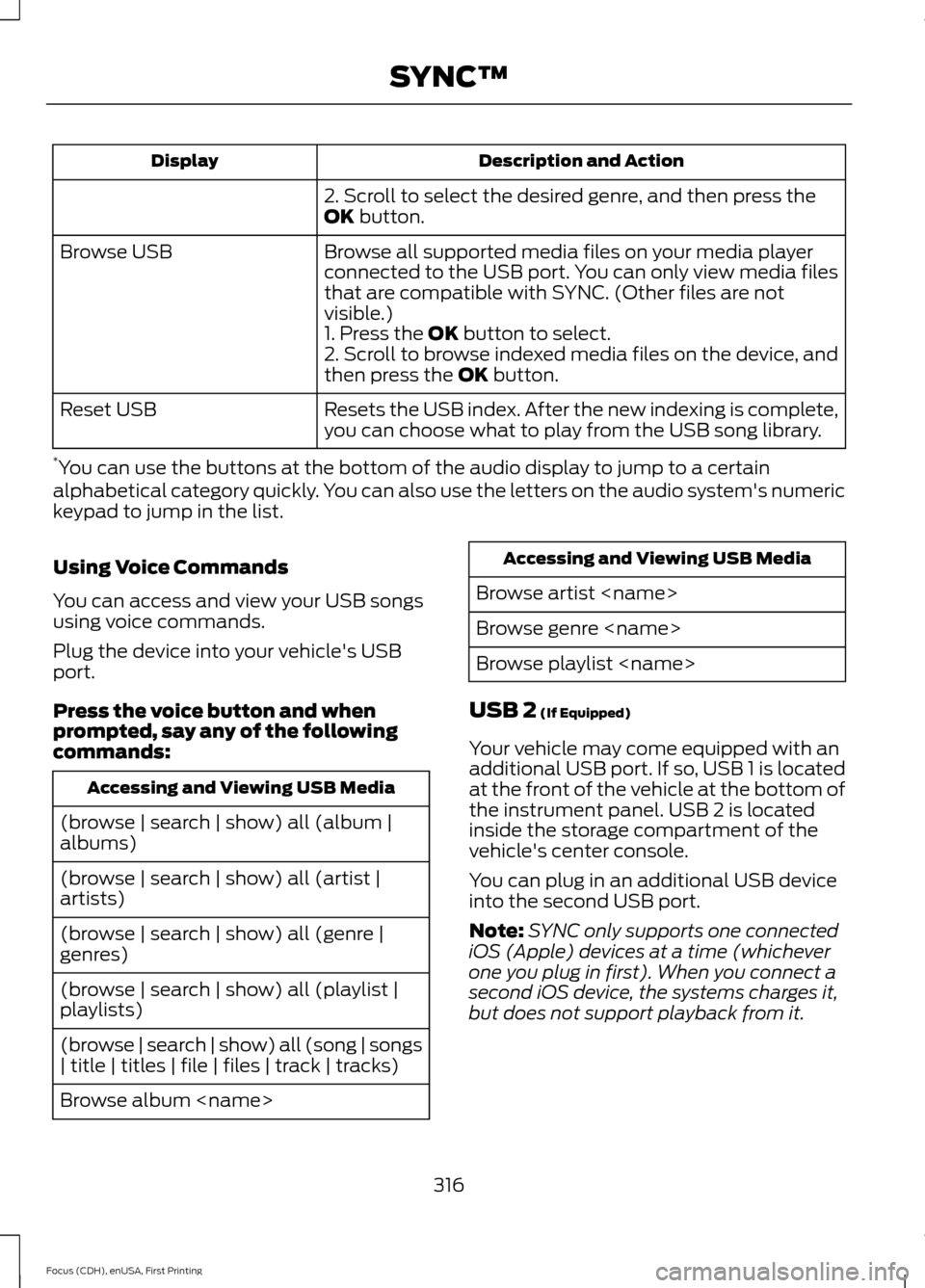
Description and Action
Display
2. Scroll to select the desired genre, and then press the
OK button.
Browse all supported media files on your media player
connected to the USB port. You can only view media files
that are compatible with SYNC. (Other files are not
visible.)
Browse USB
1. Press the
OK button to select.
2. Scroll to browse indexed media files on the device, and
then press the
OK button.
Resets the USB index. After the new indexing is complete,
you can choose what to play from the USB song library.
Reset USB
* You can use the buttons at the bottom of the audio display to jump to a certain
alphabetical category quickly. You can also use the letters on the audio system's numeric
keypad to jump in the list.
Using Voice Commands
You can access and view your USB songs
using voice commands.
Plug the device into your vehicle's USB
port.
Press the voice button and when
prompted, say any of the following
commands: Accessing and Viewing USB Media
(browse | search | show) all (album |
albums)
(browse | search | show) all (artist |
artists)
(browse | search | show) all (genre |
genres)
(browse | search | show) all (playlist |
playlists)
(browse | search | show) all (song | songs
| title | titles | file | files | track | tracks)
Browse album
Browse artist
Browse genre
Browse playlist
USB 2
(If Equipped)
Your vehicle may come equipped with an
additional USB port. If so, USB 1 is located
at the front of the vehicle at the bottom of
the instrument panel. USB 2 is located
inside the storage compartment of the
vehicle's center console.
You can plug in an additional USB device
into the second USB port.
Note: SYNC only supports one connected
iOS (Apple) devices at a time (whichever
one you plug in first). When you connect a
second iOS device, the systems charges it,
but does not support playback from it.
316
Focus (CDH), enUSA, First Printing SYNC™
Page 329 of 453
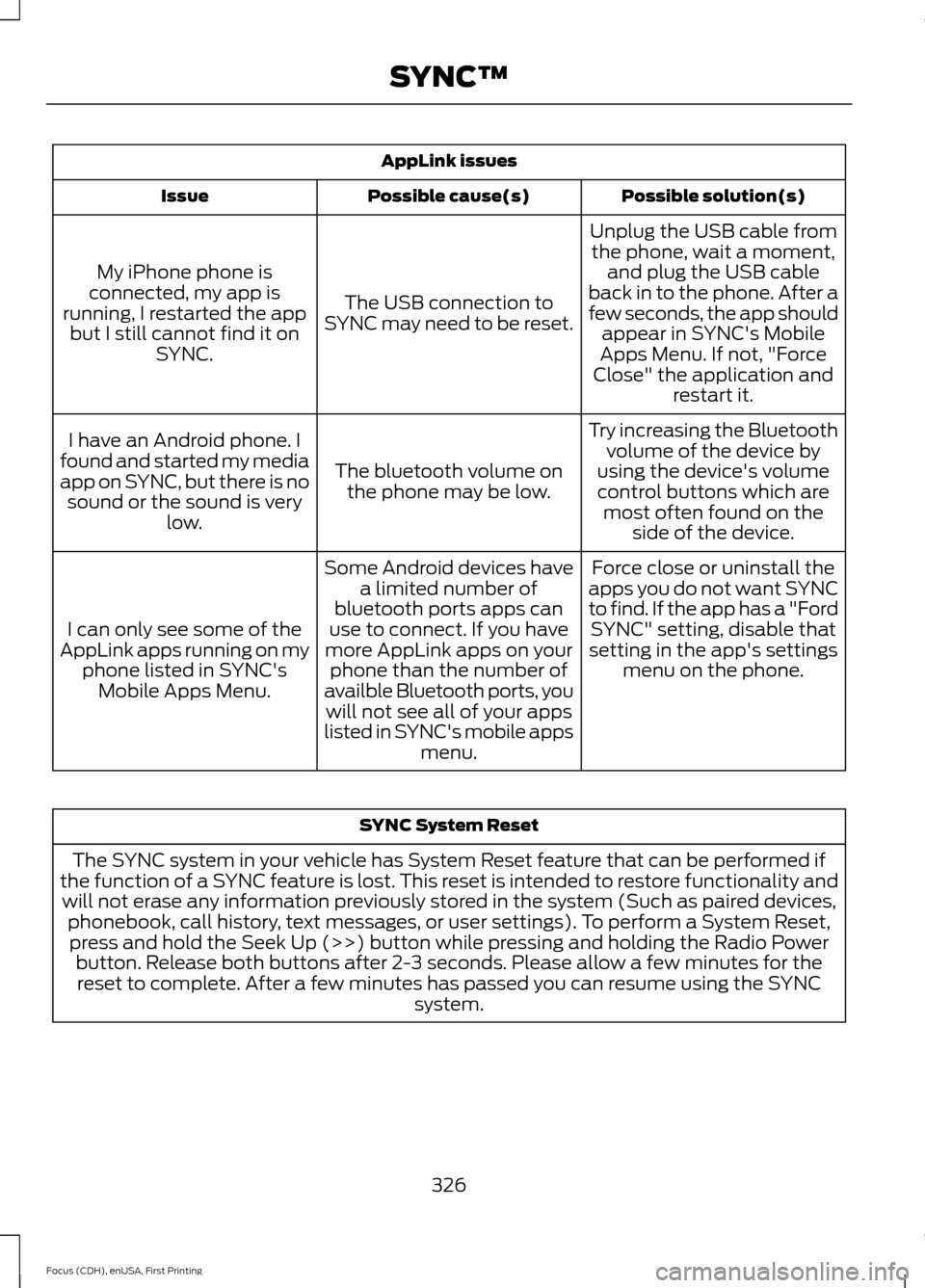
AppLink issues
Possible solution(s)
Possible cause(s)
Issue
Unplug the USB cable fromthe phone, wait a moment, and plug the USB cable
back in to the phone. After a
few seconds, the app should appear in SYNC's Mobile
Apps Menu. If not, "Force
Close" the application and restart it.
The USB connection to
SYNC may need to be reset.
My iPhone phone is
connected, my app is
running, I restarted the app but I still cannot find it on SYNC.
Try increasing the Bluetoothvolume of the device by
using the device's volume control buttons which are most often found on the side of the device.
The bluetooth volume on
the phone may be low.
I have an Android phone. I
found and started my media
app on SYNC, but there is no sound or the sound is very low.
Force close or uninstall the
apps you do not want SYNC
to find. If the app has a "Ford SYNC" setting, disable that
setting in the app's settings menu on the phone.
Some Android devices have
a limited number of
bluetooth ports apps can
use to connect. If you have
more AppLink apps on your phone than the number of
availble Bluetooth ports, you will not see all of your apps
listed in SYNC's mobile apps menu.
I can only see some of the
AppLink apps running on my phone listed in SYNC'sMobile Apps Menu. SYNC System Reset
The SYNC system in your vehicle has System Reset feature that can be performed if
the function of a SYNC feature is lost. This reset is intended to restore functionality and will not erase any information previously stored in the system (Such as paired devices, phonebook, call history, text messages, or user settings). To perform a System Reset,press and hold the Seek Up (>>) button while pressing and holding the Radio Power button. Release both buttons after 2-3 seconds. Please allow a few minutes for thereset to complete. After a few minutes has passed you can resume using the SYNC system.
326
Focus (CDH), enUSA, First Printing SYNC™
Page 350 of 453
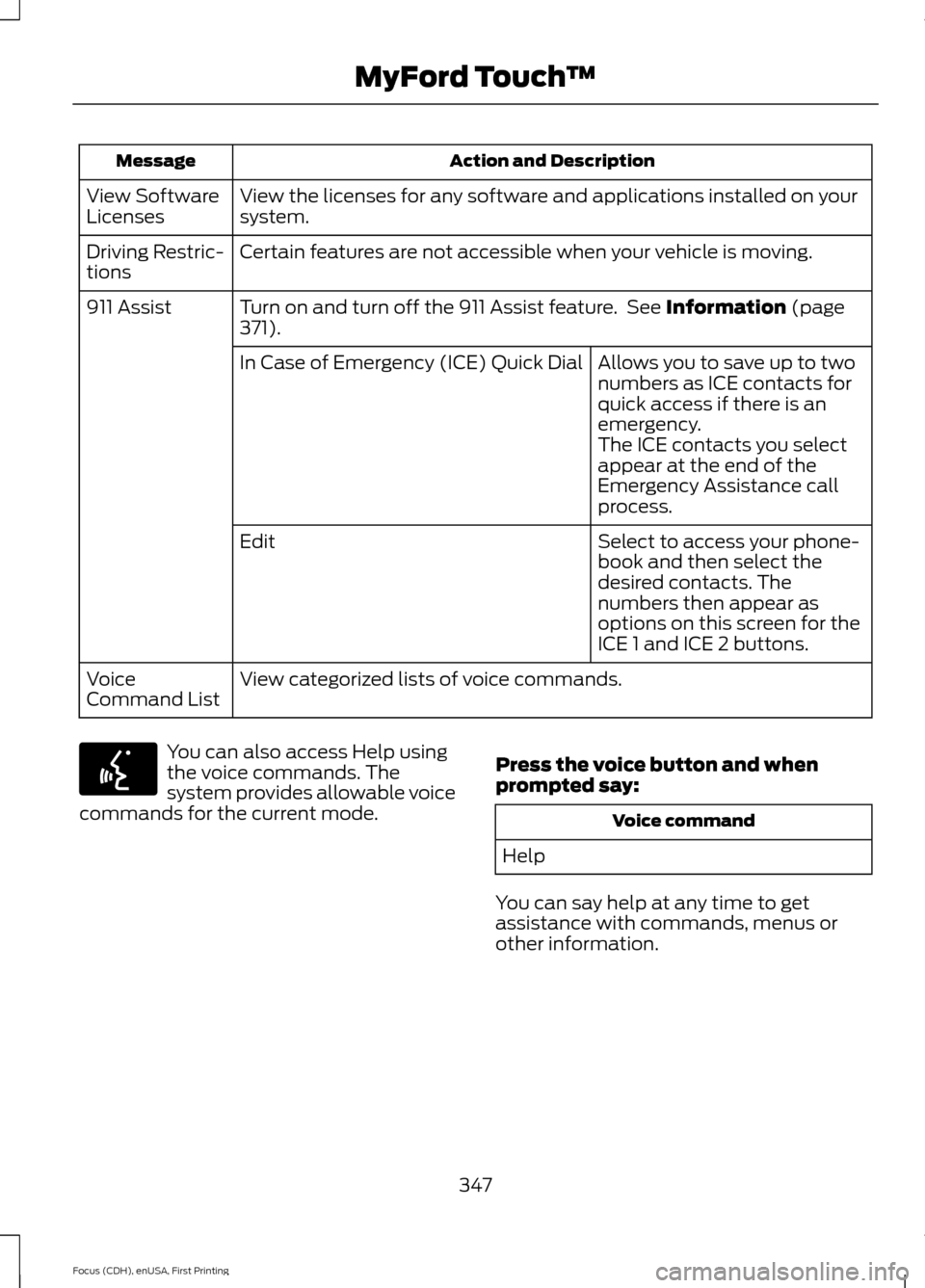
Action and Description
Message
View the licenses for any software and applications installed on your
system.
View Software
Licenses
Certain features are not accessible when your vehicle is moving.
Driving Restric-
tions
Turn on and turn off the 911 Assist feature. See Information (page
371).
911 Assist
Allows you to save up to two
numbers as ICE contacts for
quick access if there is an
emergency.
In Case of Emergency (ICE) Quick Dial
The ICE contacts you select
appear at the end of the
Emergency Assistance call
process.
Select to access your phone-
book and then select the
desired contacts. The
numbers then appear as
options on this screen for the
ICE 1 and ICE 2 buttons.
Edit
View categorized lists of voice commands.
Voice
Command List You can also access Help using
the voice commands. The
system provides allowable voice
commands for the current mode. Press the voice button and when
prompted say: Voice command
Help
You can say help at any time to get
assistance with commands, menus or
other information.
347
Focus (CDH), enUSA, First Printing MyFord Touch
™E142599
Page 351 of 453
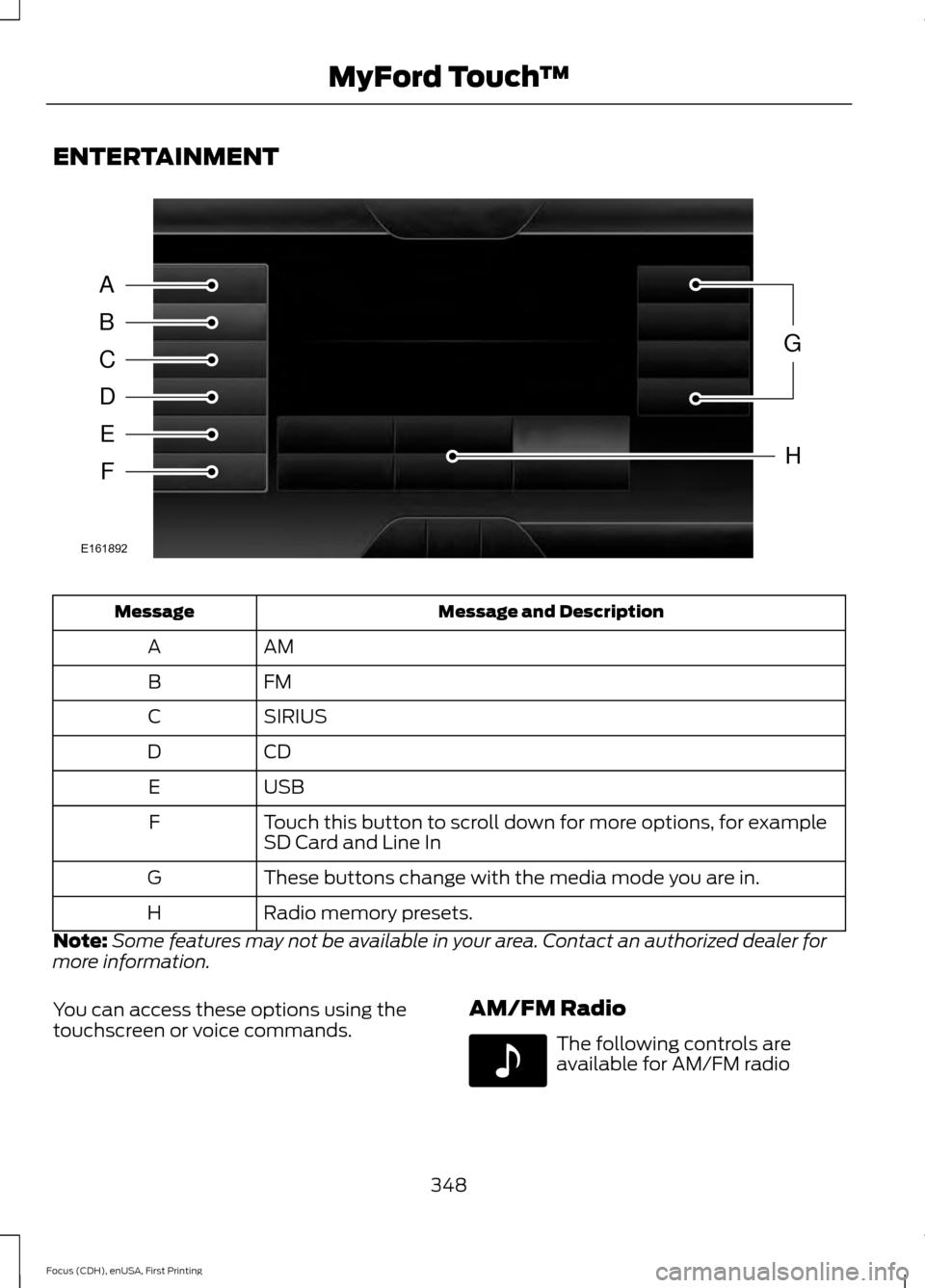
ENTERTAINMENT
Message and Description
Message
AM
A
FM
B
SIRIUS
C
CD
D
USB
E
Touch this button to scroll down for more options, for example
SD Card and Line In
F
These buttons change with the media mode you are in.
G
Radio memory presets.
H
Note: Some features may not be available in your area. Contact an authorized dealer for
more information.
You can access these options using the
touchscreen or voice commands. AM/FM Radio The following controls are
available for AM/FM radio
348
Focus (CDH), enUSA, First Printing MyFord Touch
™A
B
C
D
E
F
G
H
E161892 E142611
Page 357 of 453
SIRIUS® Satellite Radio (If
Activated)
To turn the feature on press the lower left corner of the touchscreen, and then
select:
Action and Description
Menu Item
SIRIUS
You can then select any of the following: Save a channel by pressing and holding one of the memory preset areas.
There is a brief mute while the radio saves the channel. Sound returns
when finished.
Presets
Save the current song, artist, or team as a favorite.
Alerts
If you are listening to music, you can save the song or artist, so the
system can alert you when they are playing on a satellite radio channel.
If you are listening to a sporting event, you can save your favorite teams
so the system can alert you when they are playing on a satellite radio
channel. You can also edit alerts or turn alerts on or off.
When an alert appears on the screen, you can choose to tune to the
channel, cancel the alert or turn off alerts.
Replay audio on the current channel. You can replay approximately 45
minutes of audio as long as you have remained tuned to the current
station. Changing stations erases the previous audio.
Replay
While in replay mode:
Press and release the seek buttons to hear the previous or next song.
Press and hold the seek buttons to reverse or fast forward in the current
track.
Press play or pause to play or pause the audio.
Press the button again to return to live audio.
Touch this button to hear a brief sampling of channels.
Scan
Touch this button to view a list of all available stations. Scroll to see
more categories. Touch the station you want to listen to.
Browse
Note: SIRIUS does not support the Alert feature on all channels. Ford Motor Company shall
not be responsible for Alert feature variation.
354
Focus (CDH), enUSA, First Printing MyFord Touch
™E142611
Page 379 of 453

Sirius Travel Link (If Equipped)
WARNING
Driving while distracted can result in
loss of vehicle control, crash and
injury. We strongly recommend that
you use extreme caution when using any
device that may take your focus off the
road. Your primary responsibility is the safe
operation of your vehicle. We recommend
against the use of any handheld device
while driving and encourage the use of
voice-operated systems when possible.
Make sure you are aware of all applicable
local laws that may affect the use of
electronic devices while driving. Note:
In order to use Sirius Travel Link, your
vehicle must be equipped with navigation
and your navigation SD card must be in the
SD card slot. Note:
A paid subscription is required to
access and use these features. Go to
www.siriusxm.com/travellink for more
information.
Note: Visit www.siriusxm.com/traffic and
click on Coverage map and details for a
complete listing of all traffic areas covered
by Sirius Travel Link.
Note: Neither Sirius nor Ford is responsible
for any errors or inaccuracies in the Sirius
Travel Link services or its use in vehicles.
When you subscribe to Sirius Travel Link,
it can help you locate the best gas prices,
find movie listings, get current traffic alerts,
view the current weather map, get
accurate ski conditions and see scores to
current sports games. Action and Description
Menu Item
Touch these buttons to identify traffic incidents on your route,
nearby your vehicle ’s current location or near any of your
favorite places, if programmed.
Traffic on Route
Traffic Nearby
Touch this button to view fuel prices at stations close to your
vehicle’s location or on an active navigation route.
Fuel Prices
Touch this button to view nearby movie theaters and their
show times, if available.
Movie Listings
Touch this button to view the nearby weather, current weather,
or the five day forecast for the chosen area.
Weather
Select to see the weather map,
which can show storms, radar
information, charts and winds.
Map
376
Focus (CDH), enUSA, First Printing MyFord Touch
™
Page 393 of 453
3D map mode provides an
elevated perspective of the map.
This viewing angle can be adjusted
and the map can be rotated 180
degrees by touching the map twice, and
then dragging your finger along the shaded
bar with arrows at the bottom of the map.
You can also select the following
options: Description
Menu Items
Switches between
full map, street list
and exit view in
route guidance.
View
Displays a pop-up
box that allows
direct access to
navigation settings.
Menu Press the speaker button on the
map to mute route guidance.
When the light on the button
illuminates, the feature is on. The speaker
button appears on the map only when
route guidance is active. Re-center the map by pressing
this icon whenever you scroll the
map away from your vehicle
’s
current location.
Auto Zoom
Press the green bar to access map mode,
then select the + or - zoom button to bring
up the zoom level and Auto buttons on the
touchscreen. When you press
Auto, Auto
Zoom turns on and Auto displays in the
bottom left corner of the screen in the map
scale. The map zoom level then synchronizes with vehicle speed. The
slower your vehicle is traveling, the farther
the map zooms in; the faster your vehicle
is traveling, the farther the map zooms out.
To switch off the feature, just press the
+
or - button again.
In 3D mode, rotate the map view by
swiping your finger across the shaded bar
with the arrows.
The ETA box under the zoom buttons
appears when a route is active and
displays the distance and time to your
destination. If the button is pressed, a pop
up appears with the destination listed (and
waypoint if applicable) along with mileage
and time to destination. You may also
select to have either the estimated time
to reach your destination or your estimated
arrival time.
Map Icons Vehicle mark
shows the current
location of your vehicle. It stays
in the center of the map display,
except when in scroll mode. Scroll cursor
allows you to scroll
the map; the fixed icon is in the
center of the screen. The map
position closest to the cursor is in
a window on the top center part of the
screen. Address book entry default
icon(s)
indicates the location on
the map of an address book entry.
This is the default symbol shown
after the entry has been stored to the
Address Book by any method other than
the map. You can select from any of the
22 icons available. You can use each icon
more than once.
390
Focus (CDH), enUSA, First Printing MyFord Touch
™E142644 E174017 E146188 E142646 E142647 E142648
Page 394 of 453
Home indicates the location on
the map currently stored as the
home position. You can only save
one address from the Address
Book as your Home entry. You cannot
change this icon. POI (Point Of Interest) icons
indicate locations of any point of
interest categories you choose to
display on the map. You can
choose to display three point of interest
categories on the map at one time. Starting point
indicates the
starting point of a planned route. Waypoint
indicates the location
of a waypoint on the map. The
number inside the circle is different
for each waypoint and represents
the position of the waypoint in the route
list. Destination symbol indicates the
ending point of a planned route.
Next maneuver point
indicates
the location of the next turn on the
planned route. No GPS symbol
indicates that
insufficient GPS satellite signals
are available for accurate map
positioning. This icon may display
under normal operation in an area with
poor GPS access.
Quick-touch Buttons
When in map mode, touch anywhere on
the map display to access the following
options: Action and Description
Menu Item
Touch this button to select a scrolled location on the map as
your destination. You may scroll the map by pressing your index
finger on the map display. When you reach the desired location,
simply let go and then touch this button.
Set as Dest
Touch this button to set the current location as a waypoint.
Set as Waypoint
Touch this button to save the current location to your favorites.
Save to Favorites
Touch this button to select icons to display on the map. You
can select up to three icons to display on the map at the same
time. You can switch these features:
POI Icons
Off
On
When on an active route, select any of the following options:
View / Edit Route
View Route
Edit Destination/Waypoints
Edit Turn List
Detour
391
Focus (CDH), enUSA, First Printing MyFord Touch
™E142649 E142650 E142651 E142652 E142653 E142654 E142655