Page 78 of 453
Volume down.
C
Seek down or previous.
D
Type Two Volume up.
A
Seek up or next.
B
Volume down.
C
Seek down or previous.
D
Press to select source.
E
Seek, Next or Previous
Press the seek button to:
• Tune the radio to the next or previous
stored preset.
• Play the next or the previous track.
Press and hold the seek button to:
• Tune the radio to the next station up
or down the frequency band.
• Seek through a track. VOICE CONTROL Press the button to select or deselect voice
control. See Using Voice Recognition
(page 292).
CRUISE CONTROL See
Principle of Operation (page 162).
75
Focus (CDH), enUSA, First Printing Steering WheelE188908 E186744 E144500
Page 79 of 453
INFORMATION DISPLAY
CONTROL
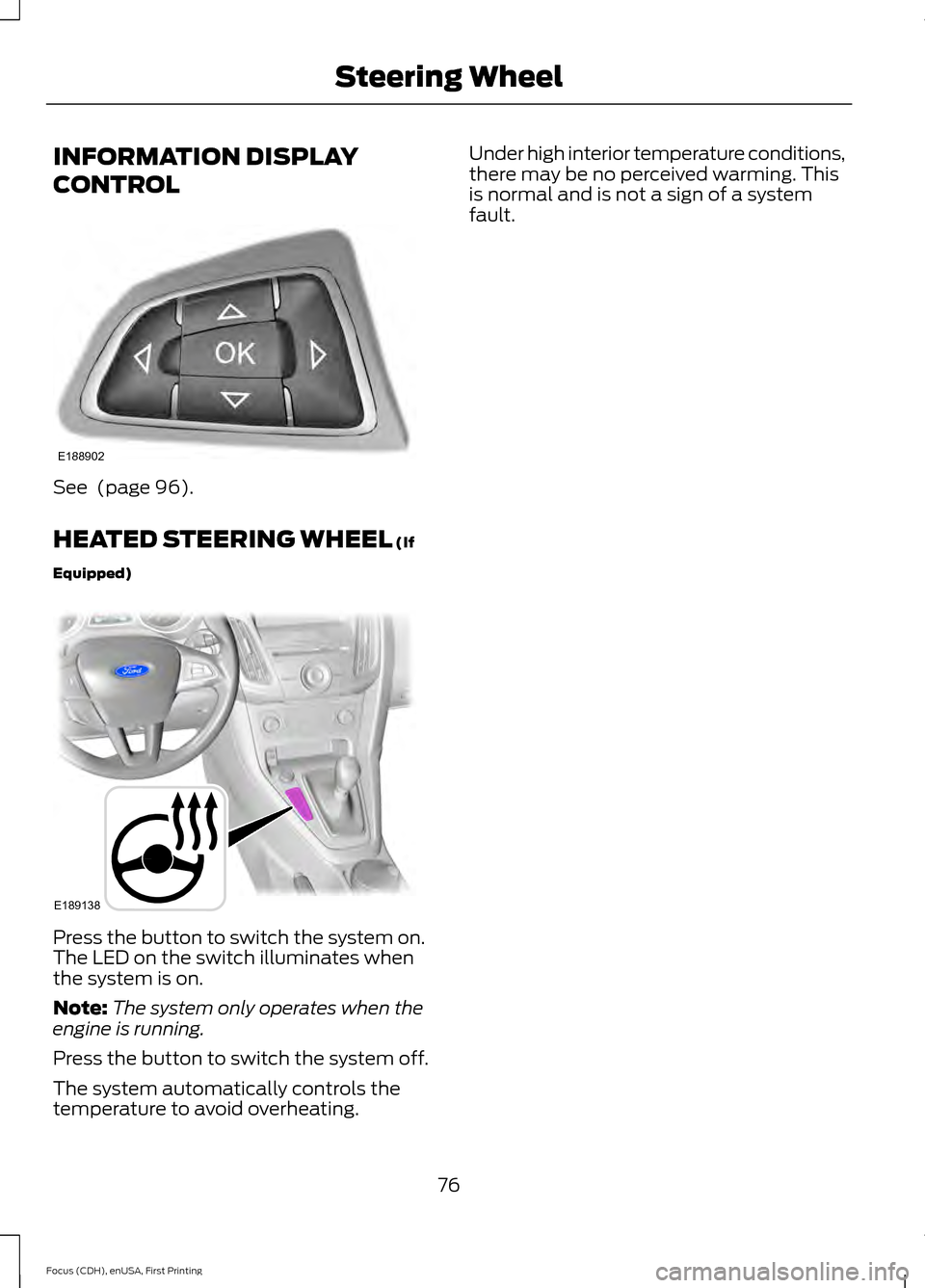
See (page 96).
HEATED STEERING WHEEL
(If
Equipped) Press the button to switch the system on.
The LED on the switch illuminates when
the system is on.
Note:
The system only operates when the
engine is running.
Press the button to switch the system off.
The system automatically controls the
temperature to avoid overheating. Under high interior temperature conditions,
there may be no perceived warming. This
is normal and is not a sign of a system
fault.
76
Focus (CDH), enUSA, First Printing Steering WheelE188902 E189138
Page 99 of 453
GENERAL INFORMATION
WARNING
Driving while distracted can result in
loss of vehicle control, crash and
injury. We strongly recommend that
you use extreme caution when using any
device that may take your focus off the
road. Your primary responsibility is the safe
operation of your vehicle. We recommend
against the use of any hand-held device
while driving and encourage the use of
voice-operated systems when possible.
Make sure you are aware of all applicable
local laws that may affect the use of
electronic devices while driving. You can control various systems on your
vehicle using the information display
controls on the steering wheel.
The information display shows the
corresponding information.
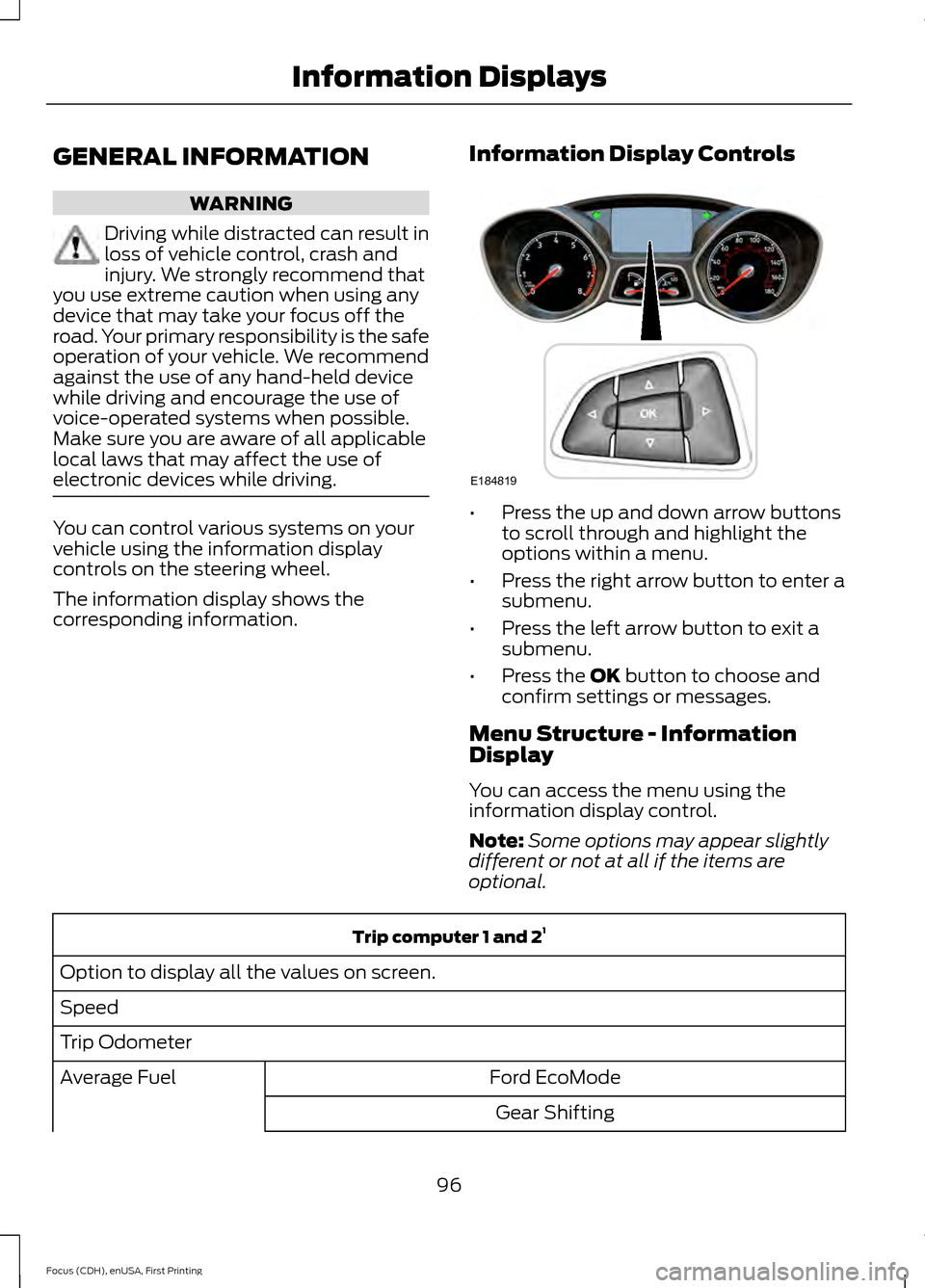
Information Display Controls •
Press the up and down arrow buttons
to scroll through and highlight the
options within a menu.
• Press the right arrow button to enter a
submenu.
• Press the left arrow button to exit a
submenu.
• Press the OK button to choose and
confirm settings or messages.
Menu Structure - Information
Display
You can access the menu using the
information display control.
Note: Some options may appear slightly
different or not at all if the items are
optional. Trip computer 1 and 2
1
Option to display all the values on screen.
Speed
Trip Odometer Ford EcoMode
Average Fuel
Gear Shifting
96
Focus (CDH), enUSA, First Printing Information DisplaysE184819
Page 108 of 453

Power Steering
Action
Message
The power steering system is not working. Stop the
vehicle at a safe place. Contact an authorized dealer.
Steering loss Stop safely
The power steering system is not working. Stop the
vehicle at a safe place. Contact an authorized dealer.
Steering assist fault Service
required
The power steering system has detected a condition
within the power steering system, or the passive entry or passive start system requires service. Contact an authorized dealer.
Steering fault Service now
Starting System Action
Message
Displays when starting the vehicle as a reminder toapply the brake.
Press brake to start
Displays when the vehicle fails to start.
Cranking time exceeded
Start-Stop Action
Message
Switch the ignition off before leaving your vehicle if the
system has shut down the engine. See Auto-Start-Stop
(page 130).
Auto StartStop Switch igni-
tion off
Have your vehicle checked by an authorized dealer.
Auto StartStop fault
Service required
The engine needs to be restarted, press the clutch pedalto start. See
Auto-Start-Stop (page 130).
Auto StartStop Press a
pedal to start engine
Select neutral for the system to restart the engine.
See
Auto-Start-Stop (page 130).
Auto StartStop Select
neutral to start engine
The system is not functioning. A manual restart is required.
Auto StartStop Manual
restart required
105
Focus (CDH), enUSA, First Printing Information Displays
Page 117 of 453
SITTING IN THE CORRECT
POSITION
WARNINGS
Do not recline the seat backrest too
far as this can cause the occupant
to slide under the safety belt,
resulting in serious injury in the event of a
crash. Sitting improperly, out of position or
with the seat backrest reclined too
far, can result in serious injury or
death in the event of a crash. Always sit
upright against your seat backrest, with
your feet on the floor. Do not place objects higher than the
seat backrest to reduce the risk of
serious injury in the event of a crash
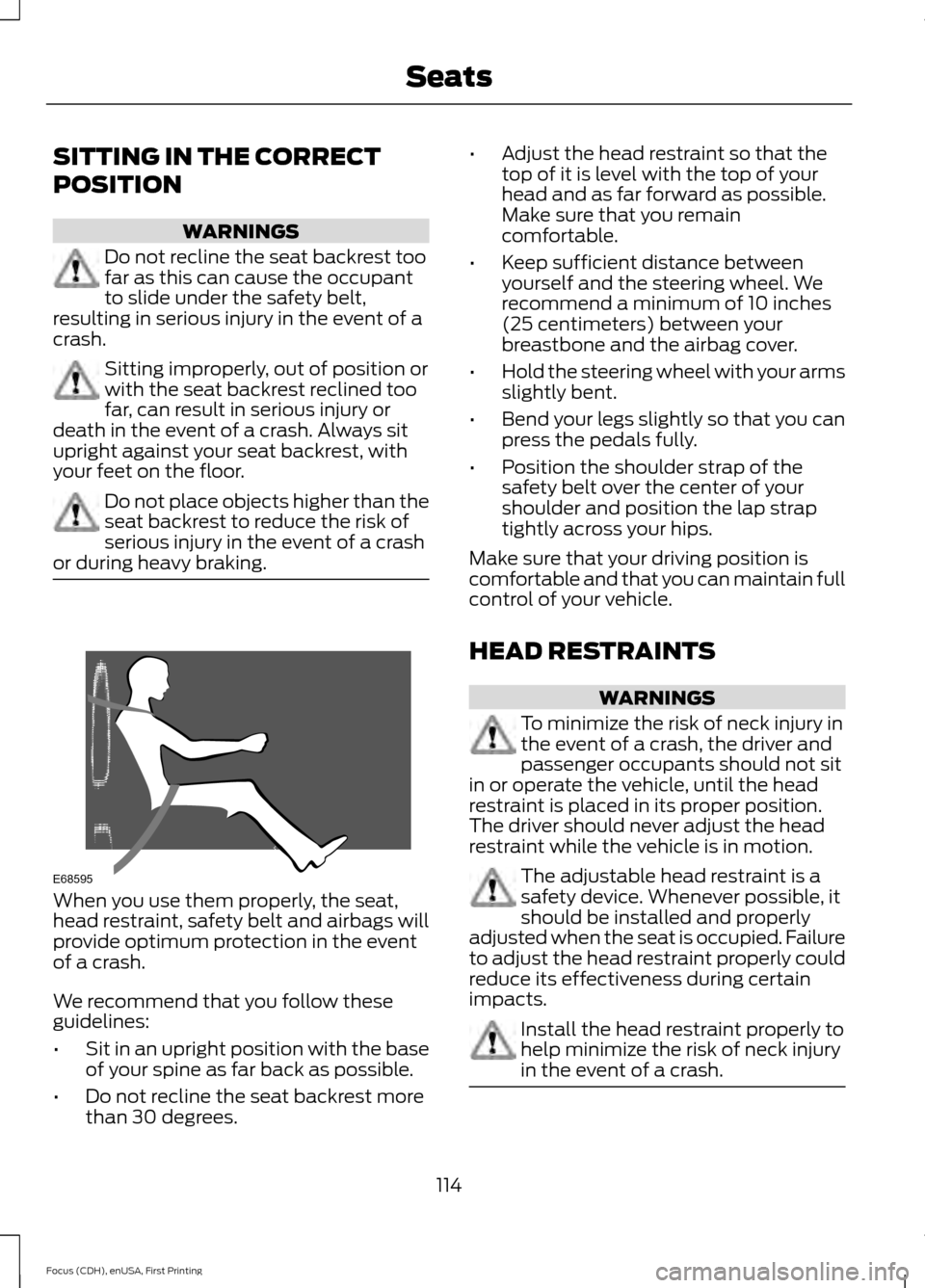
or during heavy braking. When you use them properly, the seat,
head restraint, safety belt and airbags will
provide optimum protection in the event
of a crash.
We recommend that you follow these
guidelines:
•
Sit in an upright position with the base
of your spine as far back as possible.
• Do not recline the seat backrest more
than 30 degrees. •
Adjust the head restraint so that the
top of it is level with the top of your
head and as far forward as possible.
Make sure that you remain
comfortable.
• Keep sufficient distance between
yourself and the steering wheel. We
recommend a minimum of 10 inches
(25 centimeters) between your
breastbone and the airbag cover.
• Hold the steering wheel with your arms
slightly bent.
• Bend your legs slightly so that you can
press the pedals fully.
• Position the shoulder strap of the
safety belt over the center of your
shoulder and position the lap strap
tightly across your hips.
Make sure that your driving position is
comfortable and that you can maintain full
control of your vehicle.
HEAD RESTRAINTS WARNINGS
To minimize the risk of neck injury in
the event of a crash, the driver and
passenger occupants should not sit
in or operate the vehicle, until the head
restraint is placed in its proper position.
The driver should never adjust the head
restraint while the vehicle is in motion. The adjustable head restraint is a
safety device. Whenever possible, it
should be installed and properly
adjusted when the seat is occupied. Failure
to adjust the head restraint properly could
reduce its effectiveness during certain
impacts. Install the head restraint properly to
help minimize the risk of neck injury
in the event of a crash.
114
Focus (CDH), enUSA, First Printing SeatsE68595
Page 124 of 453
CENTER CONSOLE
Stow items in the cupholder carefully as
items may become loose during hard
braking, acceleration or crashes, including
hot drinks which may spill.
Available console features include:
Cupholder with grips and height
adjuster. To use, flip the
removable inset piece.
A
Storage compartment with
auxiliary power point and media
hub.
B
Parking aid, auto-start-stop and
heated steering wheel controls.
C
Auxiliary power point.
D
USB port.
E OVERHEAD CONSOLE Press near the rear edge of the door to
open it.
121
Focus (CDH), enUSA, First Printing Storage CompartmentsE188648 E131605
Page 126 of 453

Switching the Ignition On to
Accessory Mode
Press the push button ignition switch once
without your foot on the brake or clutch
pedal. It is on the instrument panel near
the steering wheel. All electrical circuits
and accessories are operational and the
warning lamps and indicators illuminate.
Press the push button ignition switch again
without your foot on the brake or clutch
pedal to switch the ignition off.
Starting Your Vehicle
Vehicles with Manual Transmission
1. Fully depress the clutch pedal.
2. Press the push button ignition switch
until the engine starts.
Note: Releasing the clutch pedal during
engine starting stops the engine from
cranking.
Vehicles with Automatic Transmission
1. Move the gearshift lever to park (P).
2. Fully depress the brake pedal.
3. Briefly press the push button ignition switch. Note:
Releasing the brake pedal during
engine starting stops the engine cranking.
Failure to Start
The system does not function if:
• The passive key frequencies are
jammed.
• The passive key battery has no charge.
If you are unable to start your vehicle, do
the following: 1. Open the floor console storage
compartment lid.
2. Remove the tray.
123
Focus (CDH), enUSA, First Printing Starting and Stopping the EngineE142555 E184385
21
Page 127 of 453

3. Place the passive key flat on the
symbol at the bottom of the floor
console storage compartment.
4. With the passive key in this position, you can use the push button ignition
switch to switch the ignition on and
start your vehicle.
Vehicles with Manual Transmission
If the engine does not crank when the
clutch pedal has been fully depressed and
the push button ignition switch is pressed,
do the following:
1. Fully depress both the clutch and brake
pedals.
2. Press the push button ignition switch until the engine starts.
Note: Releasing the clutch pedal during
engine starting stops the engine cranking.
A message appears in the information
display.
Stopping the Engine When Your
Vehicle is Stationary
Vehicles with Manual Transmission
Briefly press the push button ignition
switch. Vehicles with Automatic Transmission
1. Move the gearshift lever to park (P).
2. Press the push button ignition switch.
Note:
The ignition, all electrical circuits and
all warning lamps and indicators will be
turned off.
Stopping the Engine When Your
Vehicle is Moving WARNING
Switching off the engine when the
vehicle is still moving will result in a
loss of brake and steering assistance.
The steering will not lock, but higher effort
will be required. When the ignition is
switched off, some electrical circuits,
including air bags, warning lamps and
indicators may also be off. If the ignition
was turned off accidentally, you can shift
into neutral (N) and re-start the engine. 1.
Press and hold the push button ignition
switch until the engine stops, or press
it three times within two seconds.
2. Move the gearshift lever to neutral and
use the brakes to bring your vehicle to
a safe stop.
3. With your vehicle stopped, move the gearshift lever to park (P) and switch
the ignition off.
Fast Restart
The fast restart feature allows you to
restart your vehicle within 10 seconds of
switching it off, even if a valid passive key
is not detected.
Within 10 seconds of switching your vehicle
off, press the brake pedal and press the
push button ignition switch. After 10
seconds, you can no longer start your
vehicle if it does not detect a valid passive
key.
124
Focus (CDH), enUSA, First Printing Starting and Stopping the EngineE184386
3