2015 FORD FOCUS ELECTRIC clock
[x] Cancel search: clockPage 195 of 369
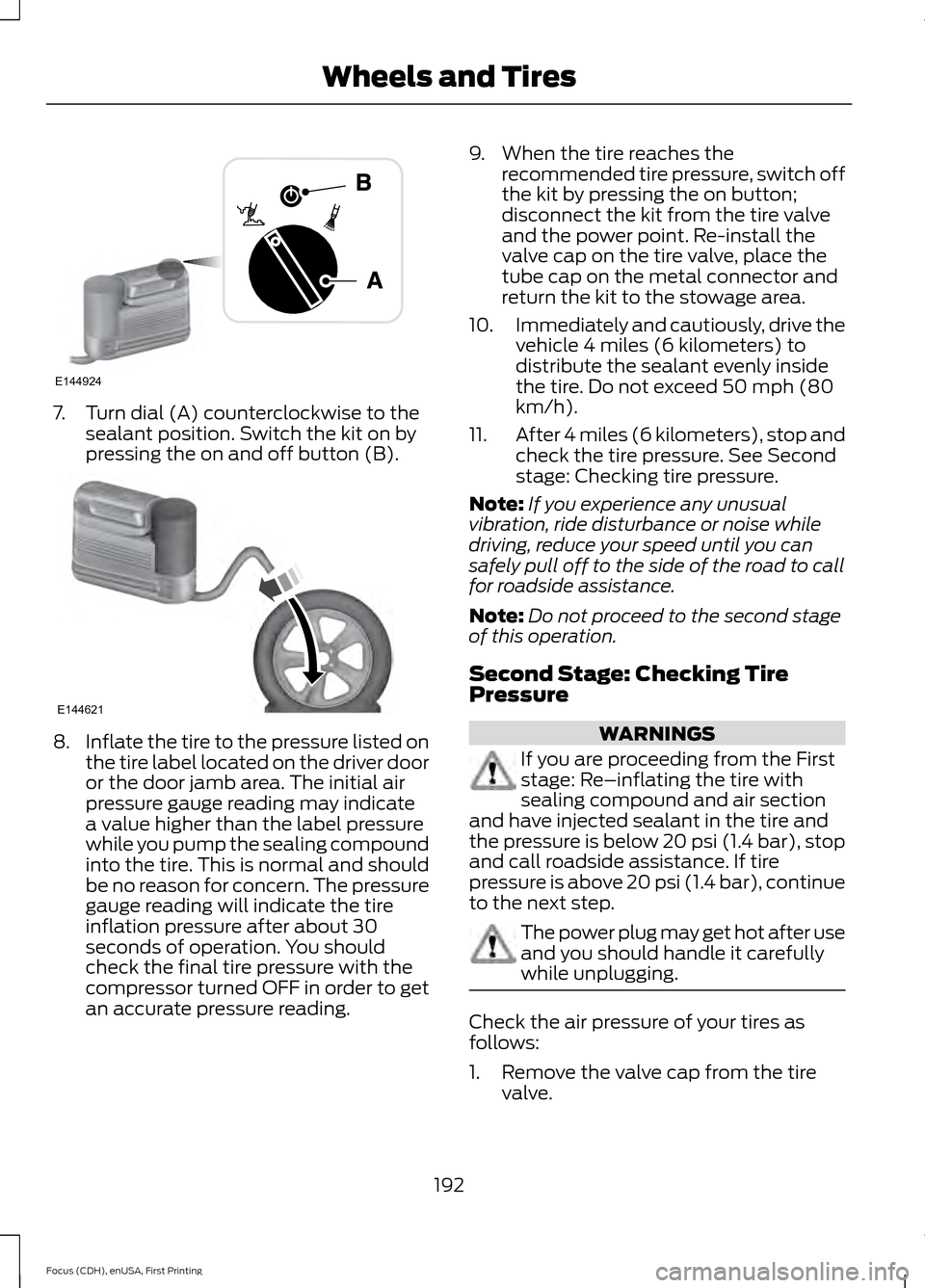
7. Turn dial (A) counterclockwise to the
sealant position. Switch the kit on by
pressing the on and off button (B). 8.
Inflate the tire to the pressure listed on
the tire label located on the driver door
or the door jamb area. The initial air
pressure gauge reading may indicate
a value higher than the label pressure
while you pump the sealing compound
into the tire. This is normal and should
be no reason for concern. The pressure
gauge reading will indicate the tire
inflation pressure after about 30
seconds of operation. You should
check the final tire pressure with the
compressor turned OFF in order to get
an accurate pressure reading. 9. When the tire reaches the
recommended tire pressure, switch off
the kit by pressing the on button;
disconnect the kit from the tire valve
and the power point. Re-install the
valve cap on the tire valve, place the
tube cap on the metal connector and
return the kit to the stowage area.
10. Immediately and cautiously, drive the
vehicle 4 miles (6 kilometers) to
distribute the sealant evenly inside
the tire. Do not exceed 50 mph (80
km/h).
11. After 4 miles (6 kilometers), stop and
check the tire pressure. See Second
stage: Checking tire pressure.
Note: If you experience any unusual
vibration, ride disturbance or noise while
driving, reduce your speed until you can
safely pull off to the side of the road to call
for roadside assistance.
Note: Do not proceed to the second stage
of this operation.
Second Stage: Checking Tire
Pressure WARNINGS
If you are proceeding from the First
stage: Re–inflating the tire with
sealing compound and air section
and have injected sealant in the tire and
the pressure is below 20 psi (1.4 bar), stop
and call roadside assistance. If tire
pressure is above 20 psi (1.4 bar), continue
to the next step. The power plug may get hot after use
and you should handle it carefully
while unplugging.
Check the air pressure of your tires as
follows:
1. Remove the valve cap from the tire
valve.
192
Focus (CDH), enUSA, First Printing Wheels and TiresE144924 E144621
Page 196 of 369
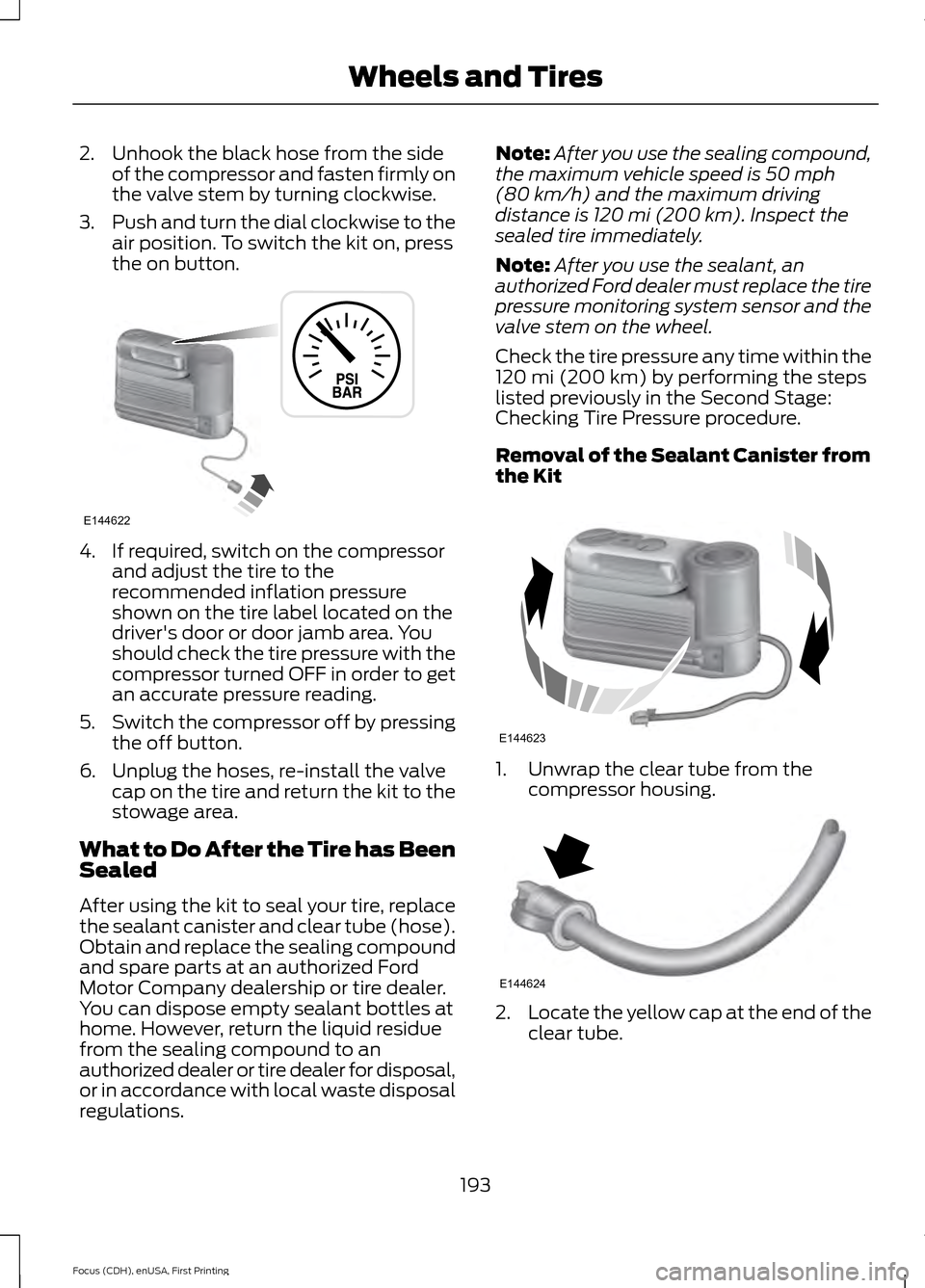
2. Unhook the black hose from the side
of the compressor and fasten firmly on
the valve stem by turning clockwise.
3. Push and turn the dial clockwise to the
air position. To switch the kit on, press
the on button. 4. If required, switch on the compressor
and adjust the tire to the
recommended inflation pressure
shown on the tire label located on the
driver's door or door jamb area. You
should check the tire pressure with the
compressor turned OFF in order to get
an accurate pressure reading.
5. Switch the compressor off by pressing
the off button.
6. Unplug the hoses, re-install the valve cap on the tire and return the kit to the
stowage area.
What to Do After the Tire has Been
Sealed
After using the kit to seal your tire, replace
the sealant canister and clear tube (hose).
Obtain and replace the sealing compound
and spare parts at an authorized Ford
Motor Company dealership or tire dealer.
You can dispose empty sealant bottles at
home. However, return the liquid residue
from the sealing compound to an
authorized dealer or tire dealer for disposal,
or in accordance with local waste disposal
regulations. Note:
After you use the sealing compound,
the maximum vehicle speed is 50 mph
(80 km/h) and the maximum driving
distance is 120 mi (200 km). Inspect the
sealed tire immediately.
Note: After you use the sealant, an
authorized Ford dealer must replace the tire
pressure monitoring system sensor and the
valve stem on the wheel.
Check the tire pressure any time within the
120 mi (200 km)
by performing the steps
listed previously in the Second Stage:
Checking Tire Pressure procedure.
Removal of the Sealant Canister from
the Kit 1. Unwrap the clear tube from the
compressor housing. 2.
Locate the yellow cap at the end of the
clear tube.
193
Focus (CDH), enUSA, First Printing Wheels and TiresE144622 E144623 E144624
Page 200 of 369
Preparation: Park the vehicle in a safe, level
and secure area, away from moving traffic.
Switch the hazard lights on. Apply the
parking brake and switch the engine off.
Inspect the flat tire for visible damage.
Sealant compound contains latex. Use
appropriate precautions to avoid any
allergic reactions.
Do not remove any foreign object that has
pierced the tire. If a puncture is located in
the tire sidewall, stop and call roadside
assistance.
1. Remove the valve cap from the tire
valve.
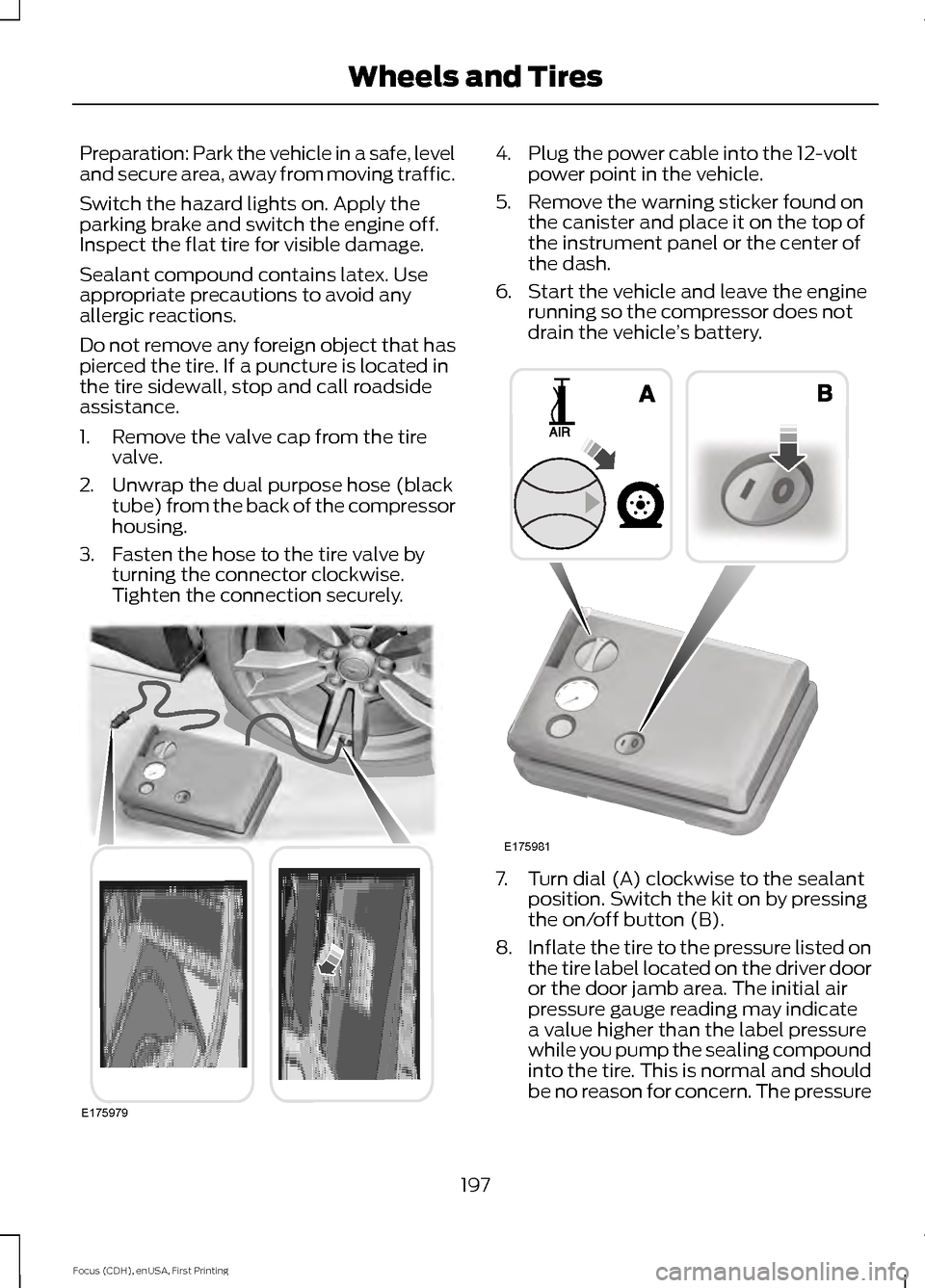
2. Unwrap the dual purpose hose (black tube) from the back of the compressor
housing.
3. Fasten the hose to the tire valve by turning the connector clockwise.
Tighten the connection securely. 4. Plug the power cable into the 12-volt
power point in the vehicle.
5. Remove the warning sticker found on the canister and place it on the top of
the instrument panel or the center of
the dash.
6. Start the vehicle and leave the engine running so the compressor does not
drain the vehicle ’s battery. 7. Turn dial (A) clockwise to the sealant
position. Switch the kit on by pressing
the on/off button (B).
8. Inflate the tire to the pressure listed on
the tire label located on the driver door
or the door jamb area. The initial air
pressure gauge reading may indicate
a value higher than the label pressure
while you pump the sealing compound
into the tire. This is normal and should
be no reason for concern. The pressure
197
Focus (CDH), enUSA, First Printing Wheels and TiresE175979 E175981
Page 201 of 369
gauge reading will indicate the tire
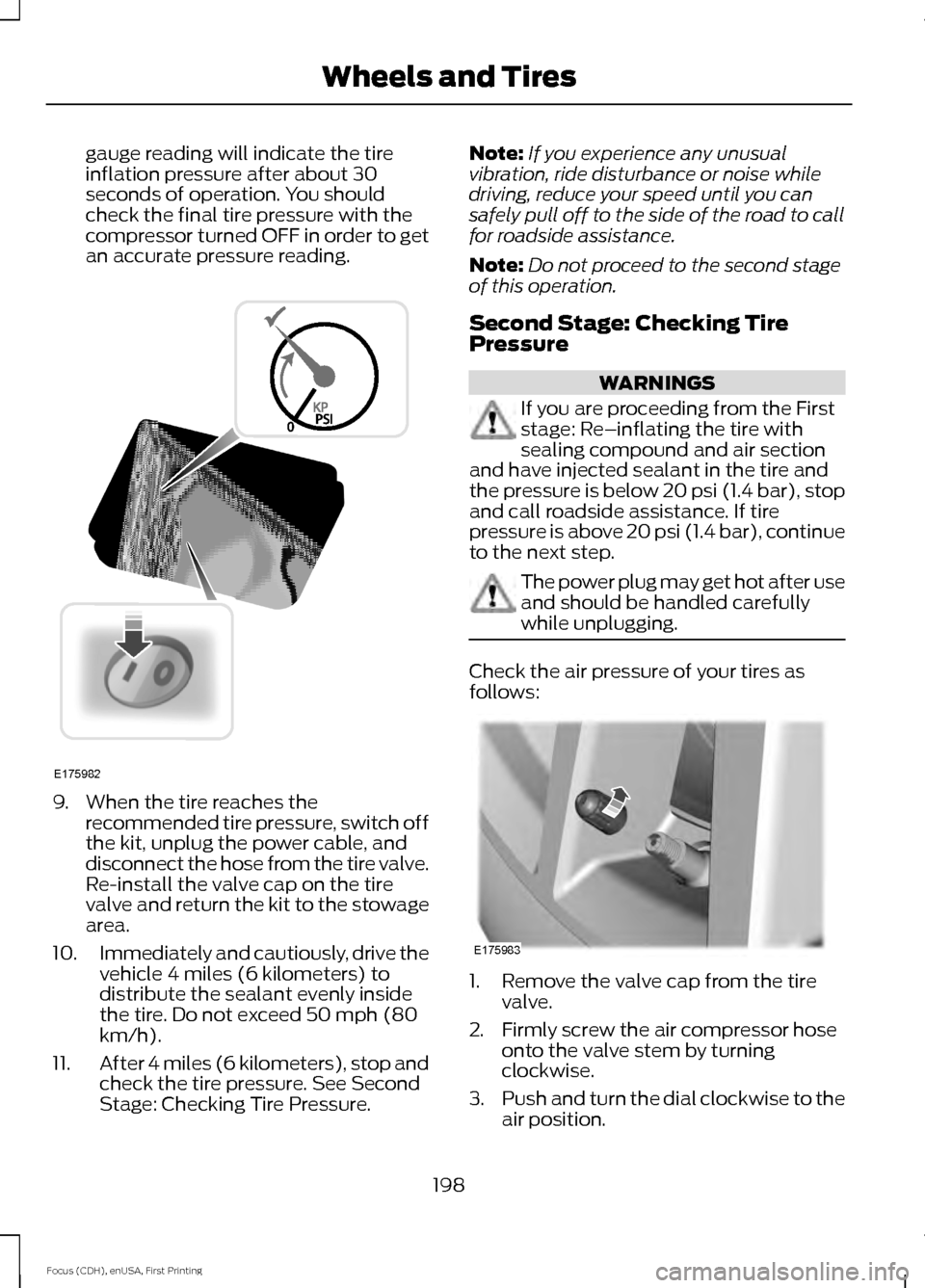
inflation pressure after about 30
seconds of operation. You should
check the final tire pressure with the
compressor turned OFF in order to get
an accurate pressure reading.
9. When the tire reaches the
recommended tire pressure, switch off
the kit, unplug the power cable, and
disconnect the hose from the tire valve.
Re-install the valve cap on the tire
valve and return the kit to the stowage
area.
10. Immediately and cautiously, drive the
vehicle 4 miles (6 kilometers) to
distribute the sealant evenly inside
the tire. Do not exceed 50 mph (80
km/h).
11. After 4 miles (6 kilometers), stop and
check the tire pressure. See Second
Stage: Checking Tire Pressure. Note:
If you experience any unusual
vibration, ride disturbance or noise while
driving, reduce your speed until you can
safely pull off to the side of the road to call
for roadside assistance.
Note: Do not proceed to the second stage
of this operation.
Second Stage: Checking Tire
Pressure WARNINGS
If you are proceeding from the First
stage: Re–inflating the tire with
sealing compound and air section
and have injected sealant in the tire and
the pressure is below 20 psi (1.4 bar), stop
and call roadside assistance. If tire
pressure is above 20 psi (1.4 bar), continue
to the next step. The power plug may get hot after use
and should be handled carefully
while unplugging.
Check the air pressure of your tires as
follows:
1. Remove the valve cap from the tire
valve.
2. Firmly screw the air compressor hose onto the valve stem by turning
clockwise.
3. Push and turn the dial clockwise to the
air position.
198
Focus (CDH), enUSA, First Printing Wheels and TiresE175982 E175983
Page 235 of 369
This system uses a four-corner strategy to
provide quick access to several vehicle
features and settings. The touchscreen
provides easy interaction with your cell
phone, entertainment, information and
system settings. The corners display active
modes within the menus, for example; your
cell phone's status.
Note:
Some features are not available while
your vehicle is moving.
Note: You can access the entertainment
features for 30 minutes after you switch the
ignition off, and no doors are opened.
Phone
Press to select any of the following: Message
Phone
Quick Dial
Phonebook
History
Messaging
Settings
Navigation
Press to select any of the following: Message
My Home
Favorites
Previous Destinations
Point of Interest
Emergency
Street Address
Intersection Message
City Center
Map
Edit Route
Cancel Route
CLIMATE
Press the corresponding icons to control
the following options:
• Driver Settings
• Recirculated Air
• Auto
• Dual
• Passenger Settings
• A/C
• Defrost
Settings Press to select any of the following:
Message
Clock
Display
Sound
Vehicle
Settings
Help
232
Focus (CDH), enUSA, First Printing MyFord Touch
™E142607
Page 244 of 369
Menu Item
Item
Clock
A
Display
B
Sound
C
Vehicle
D
Settings
E
Help
F
Clock Under this menu, you can set the
clock, access and adjust the
display, sound and vehicle
settings as well as access settings for
specific modes or the help feature.
To make adjustments using the touchscreen, select: Action and Description
Menu Item
Press the settings icon.
Settings
Press the + or - to adjust the time.
Clock
From this screen, you can also make other adjustments such
as 12-hour or 24-hour mode, activate GPS time synchroniza-
tion and have the system automatically update new time
zones.
You can also switch the outside air temperature display off
and on. It appears at the top center of the touchscreen, next
to the time and date.
Note: You cannot manually set the date. Your vehicle ’s GPS does this for you.
Note: If the battery has been disconnected, your vehicle needs to acquire a GPS signal to
update the clock. Once your vehicle acquires the signal, it may take a few minutes for the
update to display the correct time.
Display You can adjust the display using
the touchscreen or the voice
button on the steering wheel
controls.
241
Focus (CDH), enUSA, First Printing MyFord Touch
™E142607 E142607
Page 367 of 369

Remote Control..............................................46
Changing the Remote Control Battery.........47
Intelligent Access Key........................................ 46
Locating Your Vehicle.......................................... 47
Programming a New Remote Control..........47
Remote Start......................................................... 48
Sounding the Panic Alarm............................... 48
Remote Start
.................................................103
Removing a Headlamp................................177
Repairing Minor Paint Damage...............186
Replacement Parts Recommendation.........................................9
Collision Repairs...................................................... 9
Scheduled Maintenance and Mechanical Repairs................................................................... 9
Warranty on Replacement Parts.................... 10
Replacing a Lost Key or Remote Control............................................................49
Reporting Safety Defects (Canada Only)...............................................................157
Reporting Safety Defects (U.S. Only)...............................................................156
Roadside Assistance
...................................147
Vehicles Sold in Canada: Getting Roadside
Assistance......................................................... 147
Vehicles Sold in Canada: Using Roadside Assistance......................................................... 147
Vehicles Sold in the United States: Getting Roadside Assistance..................................... 147
Vehicles Sold in the United States: Using Roadside Assistance..................................... 147
Roadside Emergencies...............................147
Running-In See: Breaking-In.................................................. 145
S
Safety Belt Height Adjustment.................32
Safety Belt Minder.........................................33 Belt-Minder™........................................................ 33
Safety Belts
......................................................29
Principle of Operation........................................ 29
Safety Belt Warning Lamp and Indicator Chime...............................................................33
Conditions of operation..................................... 33
Scheduled Maintenance Record............351
Scheduled Maintenance
...........................347
Seats.................................................................104 Security..............................................................64
Settings...........................................................240
Clock........................................................................\
241
Display.................................................................... 241
Settings................................................................. 246
Sound..................................................................... 243
Vehicle.................................................................... 243
Side Airbags
......................................................41
Side Curtain Airbags.....................................43
Sitting in the Correct Position
.................104
Snow Chains See: Using Snow Chains.................................. 216
Special Notices
................................................10
New Vehicle Limited Warranty........................ 10
On-board Diagnostics (OBD-II)...................... 10
Special Instructions............................................. 10
Speed Control See: Cruise Control............................................. 133
Stability Control............................................128 Principle of Operation....................................... 128
Starting and Stopping the Electric Motor...............................................................112
Starting the Electric Motor.........................112 Keyless Starting.................................................... 112
Starting Your Vehicle.......................................... 112
Steering............................................................134 Electric Power Steering.................................... 134
Steering Wheel
................................................67
Storage Compartments...............................111
Sun Visors.........................................................80
Illuminated Vanity Mirror.................................. 80
Supplementary Restraints System..........37 Principle of Operation......................................... 37
Switching Off the Electric Motor..............113
Symbols Glossary.............................................5
T
Tailgate See: Manual Liftgate............................................ 61
Technical Specifications See: Capacities and Specifications.............222
364
Focus (CDH), enUSA, First Printing Index