Page 329 of 423
Action and Description
Message
Sirius satellite radio ESN
Gracenote® Database Information and Library version
View the licenses for any software and applications installed
on your system.
Software Licenses
Certain features are not accessible when your vehicle is
moving.
Driving Restrictions
Turn on and turn off the 911 Assist feature. See Information
(page 352).
911 Assist
In Case of Emergency (ICE) Quick Dial: allows you to save
up to two numbers as ICE contacts for quick access if there
is an emergency. Select
Edit to access your phonebook and
then select the desired contacts. The numbers then appear
as options on this screen for the ICE 1 and ICE 2 buttons. The
ICE contacts you select appear at the end of the 911 Assist
call process.
View categorized lists of voice commands.
Voice Command List
You can also access Help using the voice
commands. The system provides
allowable voice commands for the current
mode. Press the voice button and when
prompted say:
Voice command
Help
326
Fiesta (CCT), enUSA, Second Printing MyFord Touch
™
(If Equipped)E142599
Page 347 of 423
Voice command
*
(browse | search| show) video
playlist
| TV Show playlist name |
Video Podcast playlist name
| Music Video playlist name>
(browse | search| show) video
podcast
TV Show episode name |
Video Podcast Episode name
| Music Video Song name>
Help
* These commands are only available in
USB mode and are device-dependent.
Supported Media Players, Formats
and Metadata Information
SYNC is capable of hosting nearly any
digital media player, including iPod,
Zune ™, plays from device players, and
most USB drives. Supported audio formats
include MP3, WMA, WAV and AAC.
It is also able to organize your indexed
media from your playing device by
metadata tags. Metadata tags, which are
descriptive software identifiers embedded
in the media files, provide information
about the file.
If your indexed media files contain no
information embedded in these metadata
tags, SYNC may classify the empty
metadata tags as unknown. Bluetooth Audio
The system allows you to stream audio
over your vehicle's speakers from your
connected, Bluetooth-enabled cell phone. To access, press the lower left corner
on the touchscreen, then select:
Message
BT Stereo
Bluetooth Audio Voice Commands Press the voice button and when
prompted say:
Voice command
[play] next track
play
pause
[play] previous track
344
Fiesta (CCT), enUSA, Second Printing MyFord Touch
™ (If Equipped)E142611 E142599
Page 348 of 423
PHONE
Message
Item
Phone
A
Quick Dial
B
Phonebook
C
History
D
Messaging
E
Settings
F
Hands-free calling is one of the main
features of SYNC®. Once you pair your cell
phone, you can access many options using
the touchscreen or voice commands. While
the system supports a variety of features,
many are dependent on your cell phone ’s
functionality.
At a minimum, most cell phones with
Bluetooth wireless technology support the
following functions:
• Answering an incoming call.
• Ending a call. •
Using privacy mode.
• Dialing a number.
• Redialing.
• Call waiting notification.
• Caller ID.
Other features, such as text messaging
using Bluetooth and automatic phonebook
download, are cell phone-dependent
features. To check your cell phone ’s
compatibility, see your cell phone ’s user
manual and visit www.SYNCMyRide.com,
www.SYNCMyRide.ca or
www.syncmaroute.ca.
345
Fiesta (CCT), enUSA, Second Printing MyFord Touch
™ (If Equipped)A
B
C
D
E
F
E161968
Page 349 of 423
Pairing Your Cell Phone for the
First Time
WARNING
Driving while distracted can result in
loss of vehicle control, crash and
injury. We strongly recommend that
you use extreme caution when using any
device that may take your focus off the
road. Your primary responsibility is the safe
operation of your vehicle. We recommend
against the use of any handheld device
while driving and encourage the use of
voice-operated systems when possible.
Make sure you are aware of all applicable
local laws that may affect the use of
electronic devices while driving. The first thing you must do to use the
phone features of SYNC is to pair your
Bluetooth-enabled cell phone with SYNC.
This allows you to use your cell phone in a
hands-free manner.
Note:
Put the transmission in position P.
Turn on your vehicle ignition and the radio.
Touch the upper left corner of the touchscreen: Action and Description
Message
Add phone Follow the on-screen instructions.
Find SYNC Begin the
Pairing Process fromyour
Device and PIN Option
will Appear. Make sure that Bluetooth is set to On
and that your cell phone
is in the correct mode. See your cell phone ’s manual if
necessary.
Select
SYNC and a six-digit PIN appears on your device.
If you are prompted to enter a PIN on your device, it does not
support Secure Simple Pairing. To pair, enter the PIN
displayed on the touchscreen. Skip the next step.
When prompted on your cell phone ’s display, confirm that
the PIN provided by SYNC matches the PIN displayed on your
cell phone.
The display indicates when the pairing is successful.
SYNC may prompt you with more cell phone options. For
more information on your cell phone's capability, see your
cell phone's manual and visit the website.
Pairing Subsequent Cell Phones
Note: Move the gearshift lever to park (
P).
Switch your vehicle ignition and the radio
on. Make sure that Bluetooth is set to
On and
that your cell phone is in the correct mode.
See your device's manual if necessary.
346
Fiesta (CCT), enUSA, Second Printing MyFord Touch
™
(If Equipped)
Page 350 of 423
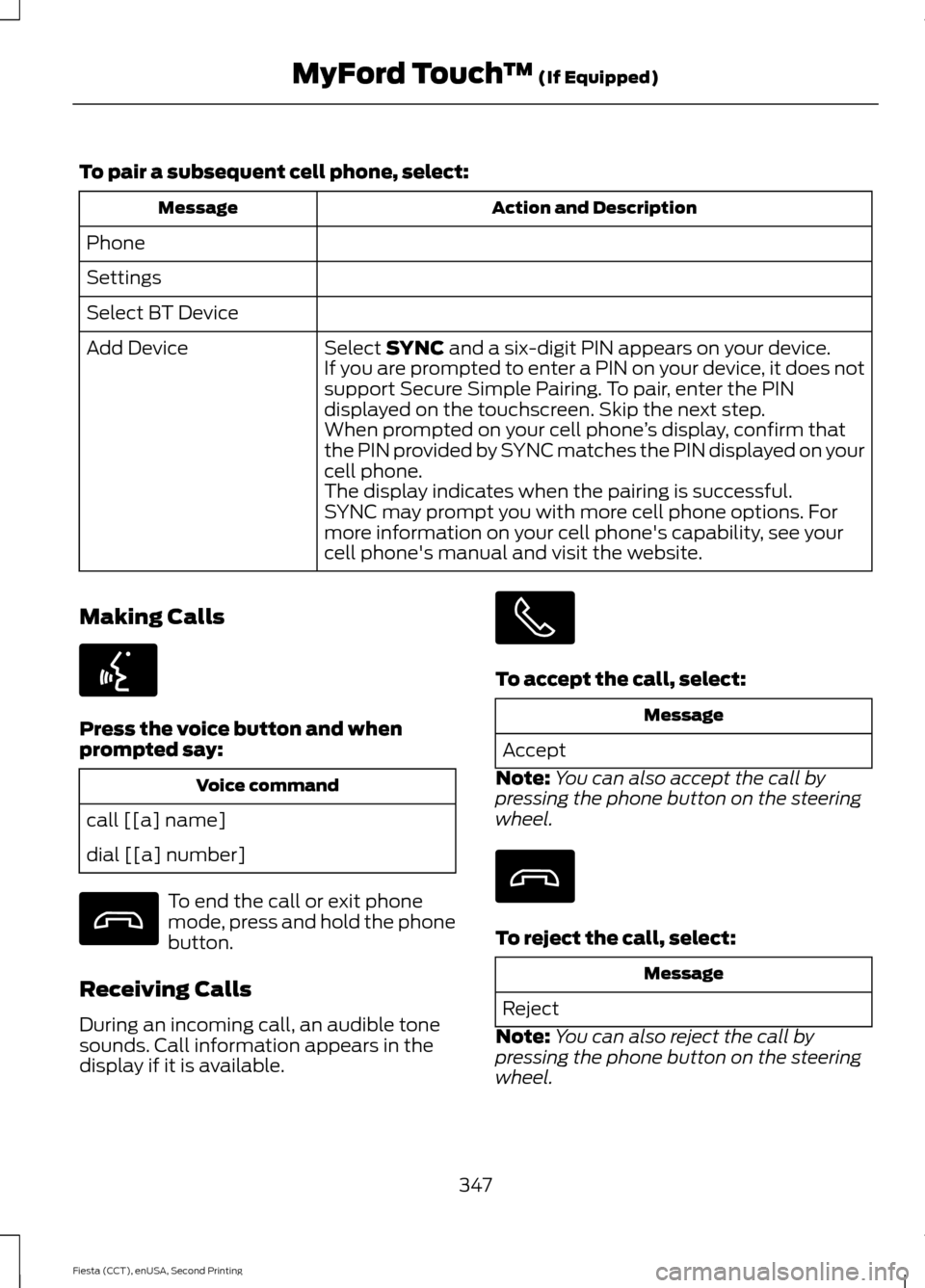
To pair a subsequent cell phone, select:
Action and Description
Message
Phone
Settings
Select BT Device Select SYNC and a six-digit PIN appears on your device.
Add Device
If you are prompted to enter a PIN on your device, it does not
support Secure Simple Pairing. To pair, enter the PIN
displayed on the touchscreen. Skip the next step.
When prompted on your cell phone ’s display, confirm that
the PIN provided by SYNC matches the PIN displayed on your
cell phone.
The display indicates when the pairing is successful.
SYNC may prompt you with more cell phone options. For
more information on your cell phone's capability, see your
cell phone's manual and visit the website.
Making Calls Press the voice button and when
prompted say:
Voice command
call [[a] name]
dial [[a] number] To end the call or exit phone
mode, press and hold the phone
button.
Receiving Calls
During an incoming call, an audible tone
sounds. Call information appears in the
display if it is available. To accept the call, select:
Message
Accept
Note: You can also accept the call by
pressing the phone button on the steering
wheel. To reject the call, select:
Message
Reject
Note: You can also reject the call by
pressing the phone button on the steering
wheel.
347
Fiesta (CCT), enUSA, Second Printing MyFord Touch
™
(If Equipped)E142599
Page 351 of 423
Ignore the call by doing nothing. SYNC logs
it as a missed call.
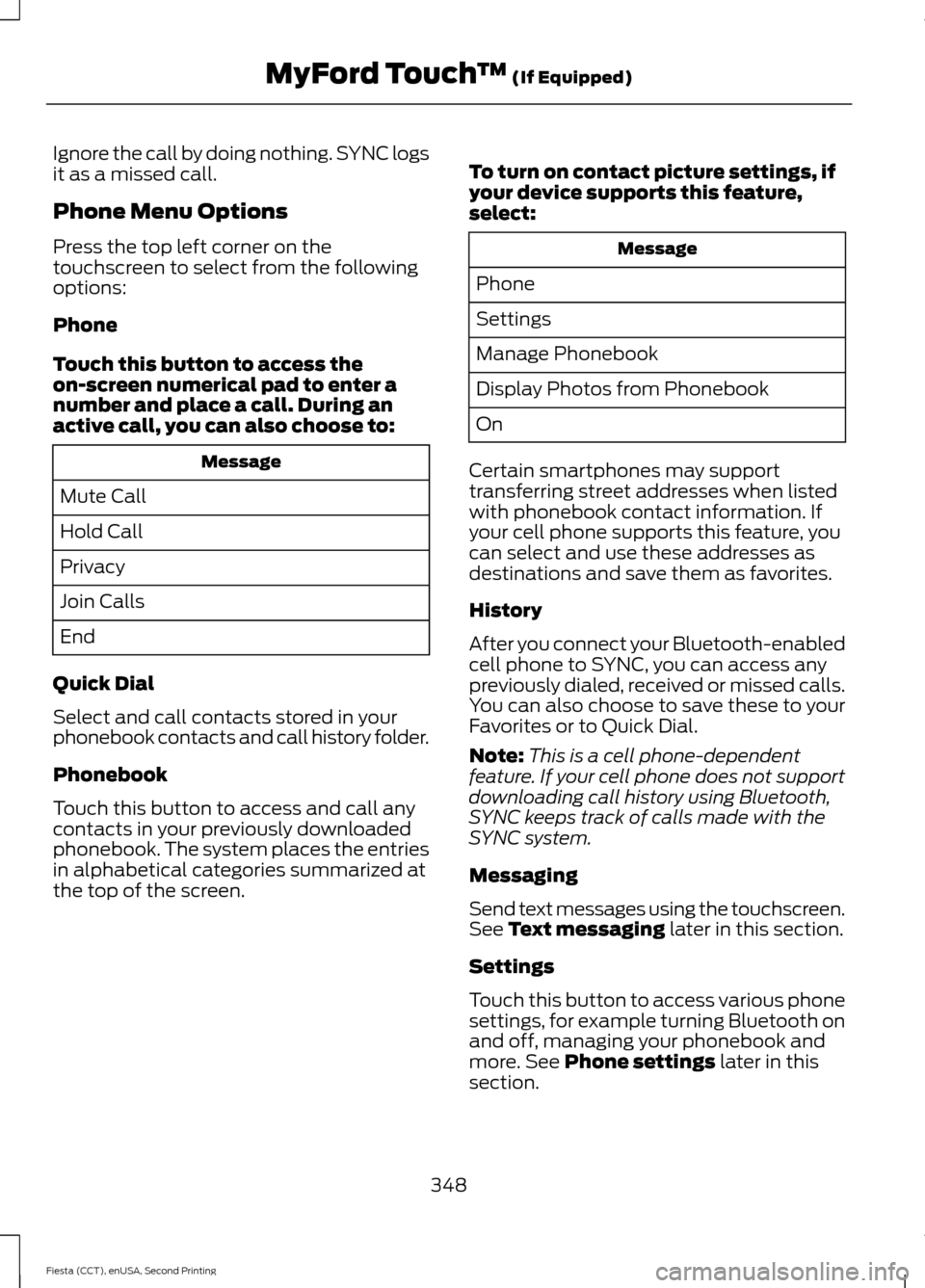
Phone Menu Options
Press the top left corner on the
touchscreen to select from the following
options:
Phone
Touch this button to access the
on-screen numerical pad to enter a
number and place a call. During an
active call, you can also choose to:
Message
Mute Call
Hold Call
Privacy
Join Calls
End
Quick Dial
Select and call contacts stored in your
phonebook contacts and call history folder.
Phonebook
Touch this button to access and call any
contacts in your previously downloaded
phonebook. The system places the entries
in alphabetical categories summarized at
the top of the screen. To turn on contact picture settings, if
your device supports this feature,
select: Message
Phone
Settings
Manage Phonebook
Display Photos from Phonebook
On
Certain smartphones may support
transferring street addresses when listed
with phonebook contact information. If
your cell phone supports this feature, you
can select and use these addresses as
destinations and save them as favorites.
History
After you connect your Bluetooth-enabled
cell phone to SYNC, you can access any
previously dialed, received or missed calls.
You can also choose to save these to your
Favorites or to Quick Dial.
Note: This is a cell phone-dependent
feature. If your cell phone does not support
downloading call history using Bluetooth,
SYNC keeps track of calls made with the
SYNC system.
Messaging
Send text messages using the touchscreen.
See Text messaging later in this section.
Settings
Touch this button to access various phone
settings, for example turning Bluetooth on
and off, managing your phonebook and
more. See
Phone settings later in this
section.
348
Fiesta (CCT), enUSA, Second Printing MyFord Touch
™
(If Equipped)
Page 352 of 423
Text Messaging
Note:
Downloading and sending text
messages using Bluetooth are cell
phone-dependent features.
Note: Certain features in text messaging
are speed-dependent and not available
when your vehicle is traveling at speeds over
3.1 mph (5 km/h).
Note: SYNC does not download read text
messages from your cell phone.
You can send and receive text messages
using Bluetooth, read them aloud and
translate text messaging acronyms, for
example LOL.
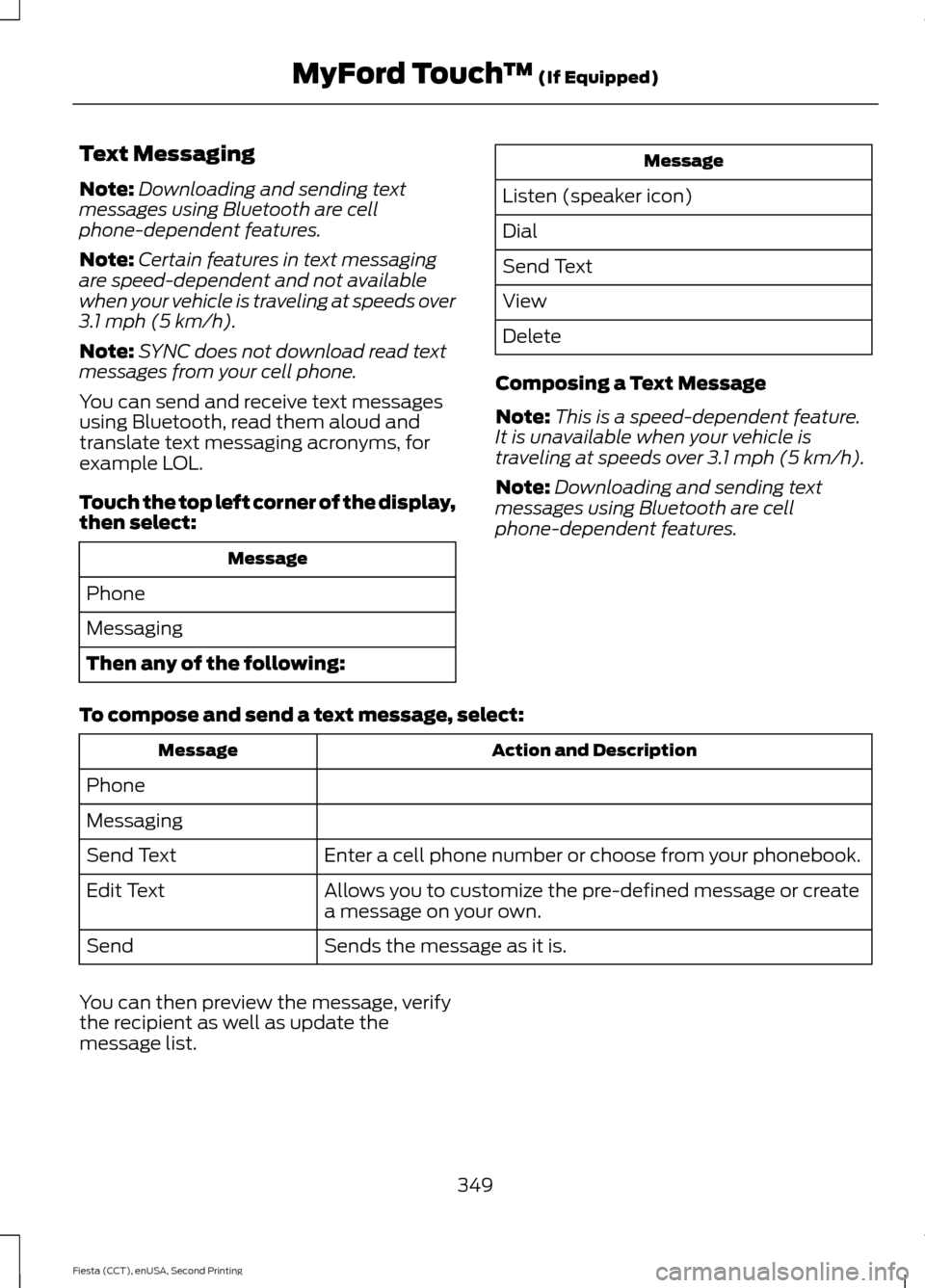
Touch the top left corner of the display,
then select: Message
Phone
Messaging
Then any of the following: Message
Listen (speaker icon)
Dial
Send Text
View
Delete
Composing a Text Message
Note: This is a speed-dependent feature.
It is unavailable when your vehicle is
traveling at speeds over
3.1 mph (5 km/h).
Note: Downloading and sending text
messages using Bluetooth are cell
phone-dependent features.
To compose and send a text message, select: Action and Description
Message
Phone
Messaging Enter a cell phone number or choose from your phonebook.
Send Text
Allows you to customize the pre-defined message or create
a message on your own.
Edit Text
Sends the message as it is.
Send
You can then preview the message, verify
the recipient as well as update the
message list.
349
Fiesta (CCT), enUSA, Second Printing MyFord Touch
™
(If Equipped)
Page 353 of 423
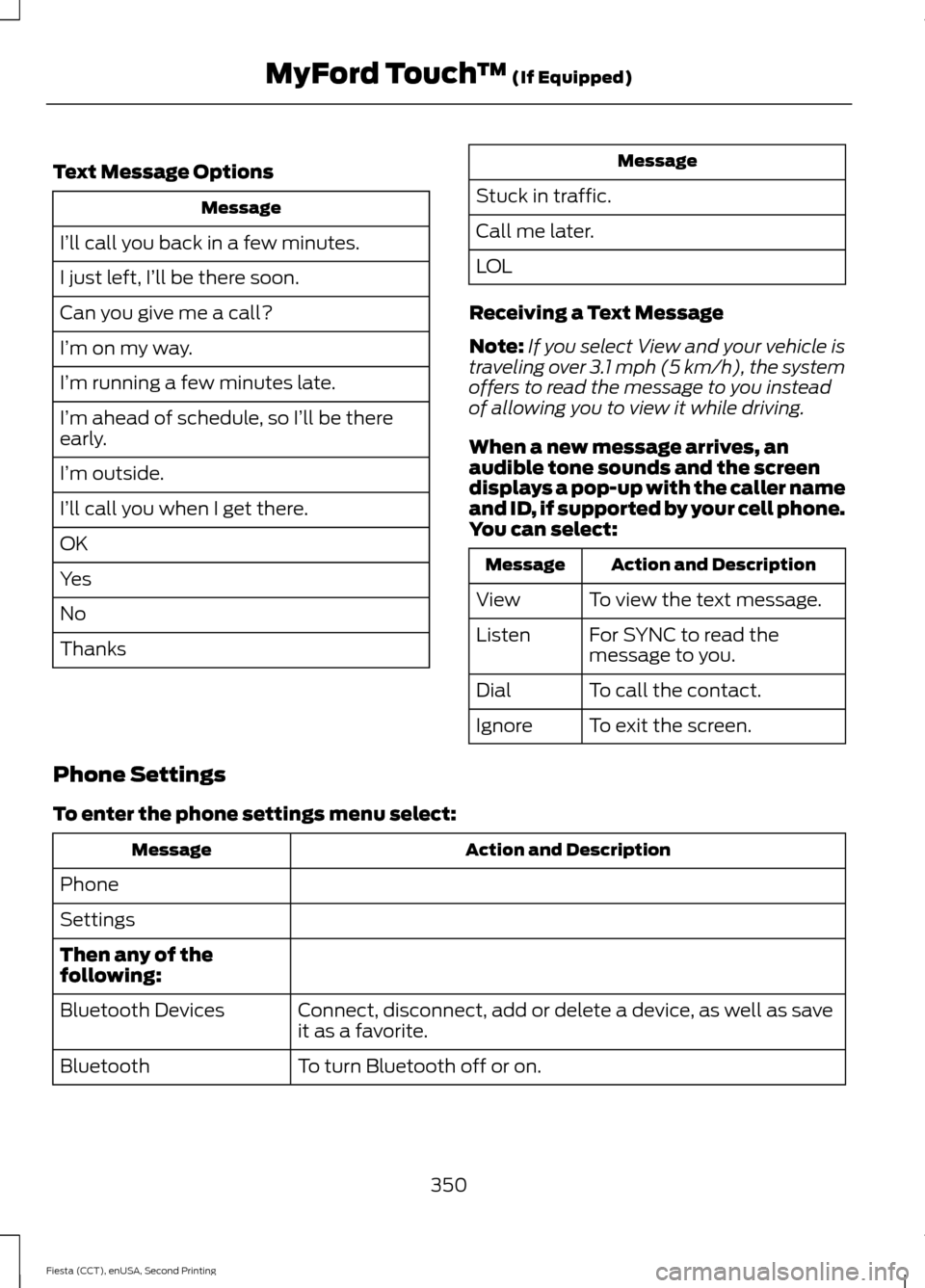
Text Message Options
Message
I’ll call you back in a few minutes.
I just left, I’ll be there soon.
Can you give me a call?
I’m on my way.
I’m running a few minutes late.
I’m ahead of schedule, so I’ll be there
early.
I’m outside.
I’ll call you when I get there.
OK
Yes
No
Thanks Message
Stuck in traffic.
Call me later.
LOL
Receiving a Text Message
Note: If you select View and your vehicle is
traveling over 3.1 mph (5 km/h), the system
offers to read the message to you instead
of allowing you to view it while driving.
When a new message arrives, an
audible tone sounds and the screen
displays a pop-up with the caller name
and ID, if supported by your cell phone.
You can select: Action and Description
Message
To view the text message.
View
For SYNC to read the
message to you.
Listen
To call the contact.
Dial
To exit the screen.
Ignore
Phone Settings
To enter the phone settings menu select: Action and Description
Message
Phone
Settings
Then any of the
following: Connect, disconnect, add or delete a device, as well as save
it as a favorite.
Bluetooth Devices
To turn Bluetooth off or on.
Bluetooth
350
Fiesta (CCT), enUSA, Second Printing MyFord Touch
™ (If Equipped)