2015 FORD FIESTA phone
[x] Cancel search: phonePage 379 of 423
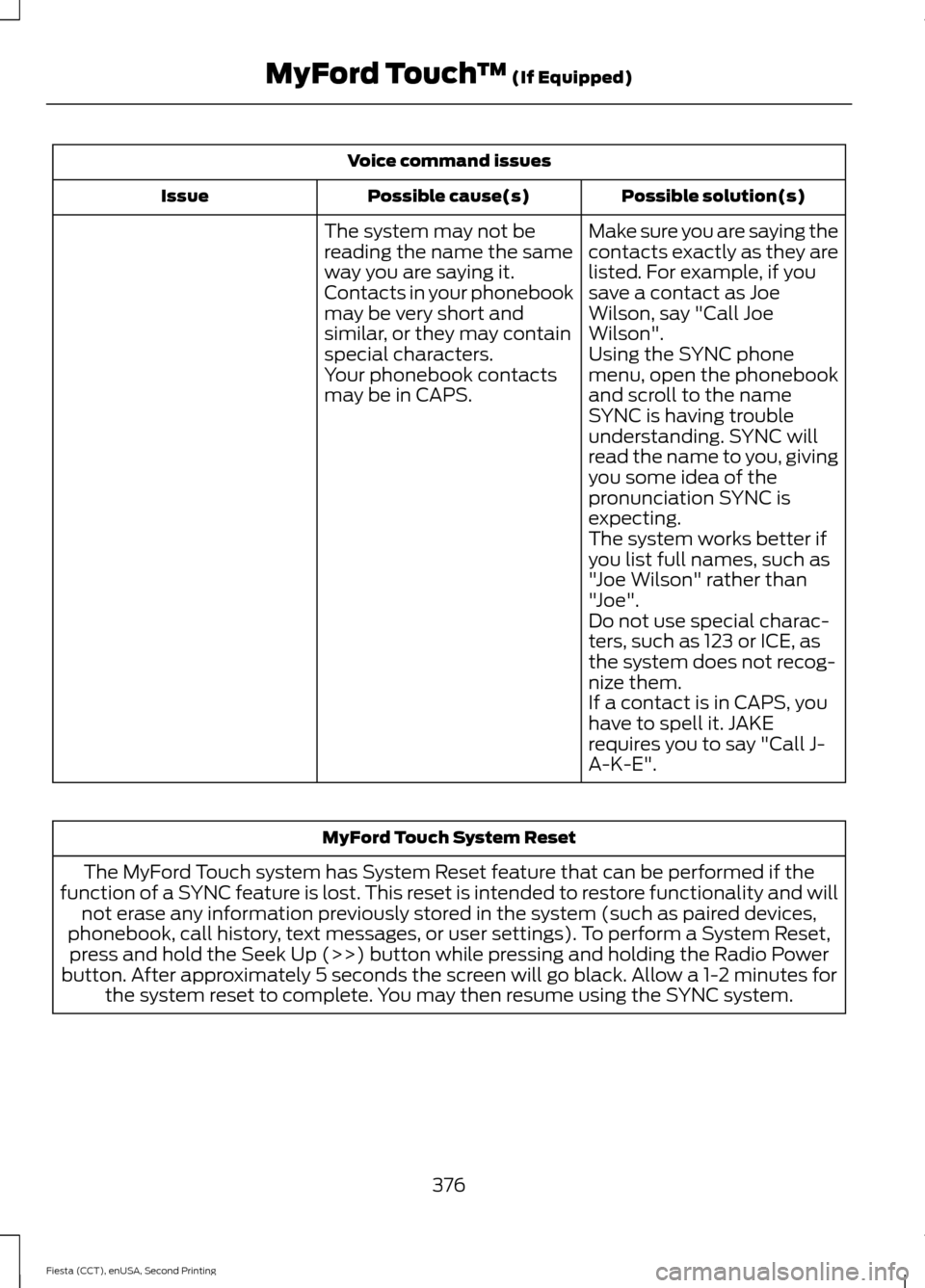
Voice command issues
Possible solution(s)
Possible cause(s)
Issue
Make sure you are saying the
contacts exactly as they are
listed. For example, if you
save a contact as Joe
Wilson, say "Call Joe
Wilson".
The system may not be
reading the name the same
way you are saying it.
Contacts in your phonebook
may be very short and
similar, or they may contain
special characters.
Using the SYNC phone
menu, open the phonebook
and scroll to the name
SYNC is having trouble
understanding. SYNC will
read the name to you, giving
you some idea of the
pronunciation SYNC is
expecting.
Your phonebook contacts
may be in CAPS.
The system works better if
you list full names, such as
"Joe Wilson" rather than
"Joe".
Do not use special charac-
ters, such as 123 or ICE, as
the system does not recog-
nize them.
If a contact is in CAPS, you
have to spell it. JAKE
requires you to say "Call J-
A-K-E". MyFord Touch System Reset
The MyFord Touch system has System Reset feature that can be performed if the
function of a SYNC feature is lost. This reset is intended to restore functionality and will not erase any information previously stored in the system (such as paired devices,
phonebook, call history, text messages, or user settings). To perform a System Reset, press and hold the Seek Up (>>) button while pressing and holding the Radio Power
button. After approximately 5 seconds the screen will go black. Allow a 1-2 minutes for the system reset to complete. You may then resume using the SYNC system.
376
Fiesta (CCT), enUSA, Second Printing MyFord Touch
™ (If Equipped)
Page 381 of 423
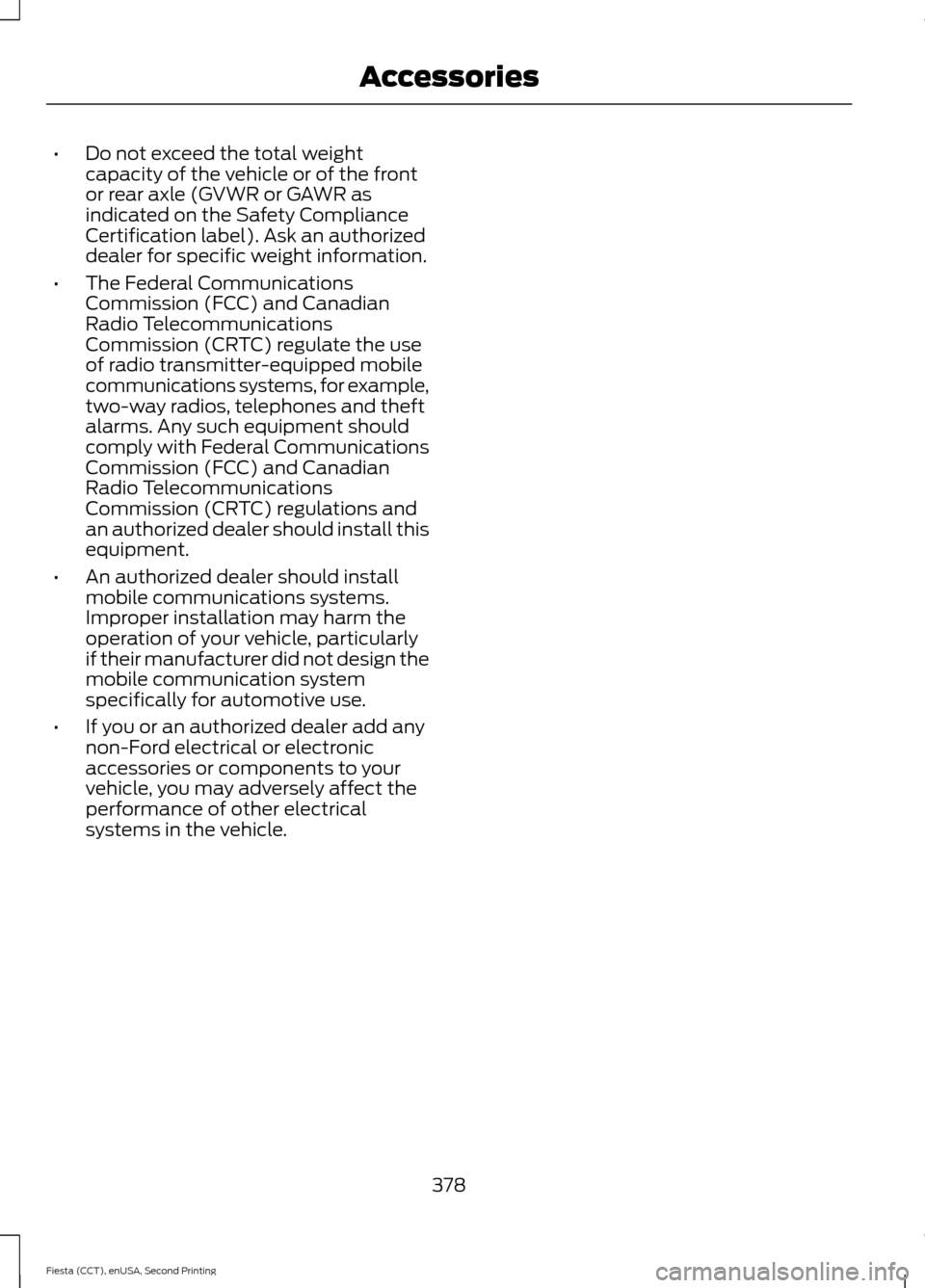
•
Do not exceed the total weight
capacity of the vehicle or of the front
or rear axle (GVWR or GAWR as
indicated on the Safety Compliance
Certification label). Ask an authorized
dealer for specific weight information.
• The Federal Communications
Commission (FCC) and Canadian
Radio Telecommunications
Commission (CRTC) regulate the use
of radio transmitter-equipped mobile
communications systems, for example,
two-way radios, telephones and theft
alarms. Any such equipment should
comply with Federal Communications
Commission (FCC) and Canadian
Radio Telecommunications
Commission (CRTC) regulations and
an authorized dealer should install this
equipment.
• An authorized dealer should install
mobile communications systems.
Improper installation may harm the
operation of your vehicle, particularly
if their manufacturer did not design the
mobile communication system
specifically for automotive use.
• If you or an authorized dealer add any
non-Ford electrical or electronic
accessories or components to your
vehicle, you may adversely affect the
performance of other electrical
systems in the vehicle.
378
Fiesta (CCT), enUSA, Second Printing Accessories
Page 393 of 423
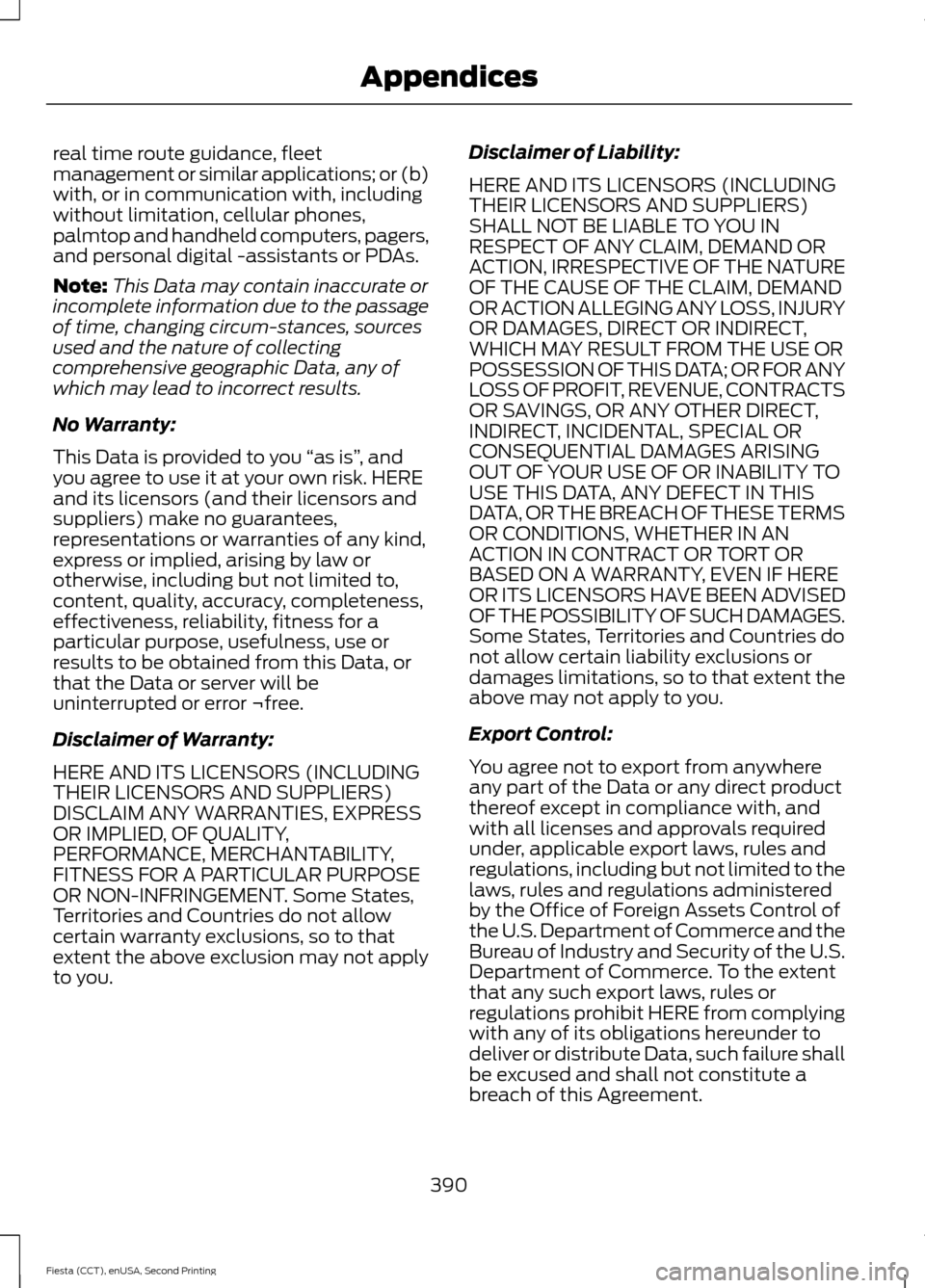
real time route guidance, fleet
management or similar applications; or (b)
with, or in communication with, including
without limitation, cellular phones,
palmtop and handheld computers, pagers,
and personal digital -assistants or PDAs.
Note:
This Data may contain inaccurate or
incomplete information due to the passage
of time, changing circum-stances, sources
used and the nature of collecting
comprehensive geographic Data, any of
which may lead to incorrect results.
No Warranty:
This Data is provided to you “as is” , and
you agree to use it at your own risk. HERE
and its licensors (and their licensors and
suppliers) make no guarantees,
representations or warranties of any kind,
express or implied, arising by law or
otherwise, including but not limited to,
content, quality, accuracy, completeness,
effectiveness, reliability, fitness for a
particular purpose, usefulness, use or
results to be obtained from this Data, or
that the Data or server will be
uninterrupted or error ¬free.
Disclaimer of Warranty:
HERE AND ITS LICENSORS (INCLUDING
THEIR LICENSORS AND SUPPLIERS)
DISCLAIM ANY WARRANTIES, EXPRESS
OR IMPLIED, OF QUALITY,
PERFORMANCE, MERCHANTABILITY,
FITNESS FOR A PARTICULAR PURPOSE
OR NON-INFRINGEMENT. Some States,
Territories and Countries do not allow
certain warranty exclusions, so to that
extent the above exclusion may not apply
to you. Disclaimer of Liability:
HERE AND ITS LICENSORS (INCLUDING
THEIR LICENSORS AND SUPPLIERS)
SHALL NOT BE LIABLE TO YOU IN
RESPECT OF ANY CLAIM, DEMAND OR
ACTION, IRRESPECTIVE OF THE NATURE
OF THE CAUSE OF THE CLAIM, DEMAND
OR ACTION ALLEGING ANY LOSS, INJURY
OR DAMAGES, DIRECT OR INDIRECT,
WHICH MAY RESULT FROM THE USE OR
POSSESSION OF THIS DATA; OR FOR ANY
LOSS OF PROFIT, REVENUE, CONTRACTS
OR SAVINGS, OR ANY OTHER DIRECT,
INDIRECT, INCIDENTAL, SPECIAL OR
CONSEQUENTIAL DAMAGES ARISING
OUT OF YOUR USE OF OR INABILITY TO
USE THIS DATA, ANY DEFECT IN THIS
DATA, OR THE BREACH OF THESE TERMS
OR CONDITIONS, WHETHER IN AN
ACTION IN CONTRACT OR TORT OR
BASED ON A WARRANTY, EVEN IF HERE
OR ITS LICENSORS HAVE BEEN ADVISED
OF THE POSSIBILITY OF SUCH DAMAGES.
Some States, Territories and Countries do
not allow certain liability exclusions or
damages limitations, so to that extent the
above may not apply to you.
Export Control:
You agree not to export from anywhere
any part of the Data or any direct product
thereof except in compliance with, and
with all licenses and approvals required
under, applicable export laws, rules and
regulations, including but not limited to the
laws, rules and regulations administered
by the Office of Foreign Assets Control of
the U.S. Department of Commerce and the
Bureau of Industry and Security of the U.S.
Department of Commerce. To the extent
that any such export laws, rules or
regulations prohibit HERE from complying
with any of its obligations hereunder to
deliver or distribute Data, such failure shall
be excused and shall not constitute a
breach of this Agreement.
390
Fiesta (CCT), enUSA, Second Printing Appendices
Page 420 of 423

Personal Safety System
™..........................33
How Does the Personal Safety System
Work?................................................................... 33
Phone...............................................................345 Making Calls......................................................... 347
Pairing Subsequent Cell Phones.................346
Pairing Your Cell Phone for the First Time.................................................................. 346
Phone Menu Options....................................... 348
Phone Settings................................................... 350
Phone Voice Commands................................. 351
Receiving Calls.................................................... 347
Text Messaging................................................... 349
Power Door Locks See: Locking and Unlocking.............................. 51
Power Steering Fluid Check.....................186
Power Windows
..............................................70
Accessory Delay..................................................... 71
Bounce-Back......................................................... 70
One-Touch Down................................................. 70
One-Touch Up....................................................... 70
Window Lock......................................................... 70
R
Rear Seats.......................................................106 Folding the Seatback....................................... 106
Unfolding the Seatback................................... 107
Rear Under Floor Storage..........................142 Adjustable Load Floor....................................... 142
Rear View Camera........................................137 Turning the Rear View Camera Off..............138
Turning the Rear View Camera On...............137
Using the Display................................................. 137
Rear View Camera See: Rear View Camera.................................... 137
Rear Window Wiper and Washers..........64 Intermittent Wipe................................................ 64
Rear Window Washer......................................... 64
Reverse Gear Wipe.............................................. 64
Refueling...........................................................117 Easy Fuel ™ Capless Fuel System.................118 Remote Control
..............................................42
Car Finder................................................................ 46
Integrated Keyhead Transmitter..................... 42
Intelligent Access Transmitter........................ 43
Replacing the Battery......................................... 43
Reprogramming the Unlocking Function.............................................................. 43
Sounding a Panic Alarm.................................... 46
Removing a Headlamp..............................188
Repairing Minor Paint Damage................214
Replacement Parts Recommendation.........................................11
Collision Repairs..................................................... 11
Scheduled Maintenance and Mechanical Repairs................................................................... 11
Warranty on Replacement Parts..................... 12
Replacing a Lost Key or Remote Control............................................................46
Reporting Safety Defects (Canada Only)...............................................................167
Reporting Safety Defects (U.S. Only)..............................................................166
Roadside Assistance
...................................157
Vehicles Sold in Canada: Getting Roadside
Assistance......................................................... 157
Vehicles Sold in Canada: Using Roadside Assistance......................................................... 157
Vehicles Sold in the United States: Getting Roadside Assistance..................................... 157
Vehicles Sold in the United States: Using Roadside Assistance..................................... 157
Roadside Emergencies...............................157
Running-In See: Breaking-In.................................................. 154
S
Safety Belt Height Adjustment.................29
Safety Belt Minder.........................................30 Belt-Minder™........................................................ 30
Safety Belts......................................................26 Principle of Operation........................................ 26
Safety Belt Warning Lamp and Indicator Chime..............................................................30
Conditions of operation..................................... 30
Safety Precautions
.......................................116
417
Fiesta (CCT), enUSA, Second Printing Index
Page 422 of 423

Tires
See: Wheels and Tires....................................... 217
Towing a Trailer - 1.6L EcoBoost™..........151
Towing the Vehicle on Four Wheels.......151 Emergency Towing.............................................. 151
Recreational Towing.......................................... 152
Towing................................................................151
Traction Control.............................................132
Principle of Operation....................................... 132
Transmission Code Designation
............244
Transmission...................................................122
Transmission See: Transmission............................................... 122
Transporting the Vehicle.............................151
Trip Computer
.................................................86
U
Under Hood Overview - 1.0L EcoBoost™..................................................179
Under Hood Overview - 1.6L Duratec-16V Ti-VCT (Sigma).........................................180
Under Hood Overview - 1.6L EcoBoost™...................................................181
USB Port
.........................................................263
Using Cruise Control....................................139 Switching Cruise Control Off.......................... 139
Switching Cruise Control On.......................... 139
Using MyKey With Remote Start Systems..........................................................49
Using Snow Chains.....................................232
Using Stability Control - 1.6L Duratec-16V Ti-VCT (Sigma)/1.0L
EcoBoost™..................................................134
Using Stability Control - 1.6L EcoBoost™..................................................134
Switching Sport Mode On............................... 134
Switching the System Off............................... 134
Using SYNC™ With Your Media Player............................................................286
Accessing Your Play Menu.............................. 292
Connecting Your Digital Media Player to the USB Port.......................................................... 286
Media Menu Features...................................... 290
Media Voice Commands................................ 288
System Settings................................................. 294
What's Playing?................................................. 288Using SYNC™ With Your Phone............268
Accessing Features through the Phone
Menu................................................................... 272
Accessing Your Phone Settings.................... 275
Making Calls.......................................................... 271
Pairing a Phone for the First Time...............269
Pairing Subsequent Phones.......................... 269
Phone Options during an Active Call...........271
Phone Voice Commands................................ 269
Receiving Calls..................................................... 271
System Settings................................................. 276
Text Messaging................................................... 274
Using Traction Control................................132 Switching the System Off Using a
Switch................................................................. 132
Switching the System Off Using the Information Display Controls.................... 132
System Indicator Lights and Messages.......................................................... 132
Using Voice Recognition...........................266 Initiating a Voice Session................................ 266
System Interaction and Feedback..............267
Using Winter Tires
........................................232
Utilizing the Mediation/Arbitration Program (Canada Only).........................164
V
Vehicle Care
....................................................210
Vehicle Certification Label.......................243
Vehicle Identification Number................243
Vehicle Storage
..............................................214
Battery..................................................................... 215
Body........................................................................\
. 215
Brakes..................................................................... 216
Cooling system.................................................... 215
Engine...................................................................... 215
Fuel system........................................................... 215
General................................................................... 215
Miscellaneous...................................................... 216
Removing Vehicle From Storage.................. 216
Tires........................................................................\
. 216
Ventilation See: Climate Control........................................... 95
Vents See: Air Vents........................................................ 95
VIN See: Vehicle Identification Number............243
419
Fiesta (CCT), enUSA, Second Printing Index