2015 FORD FIESTA USB
[x] Cancel search: USBPage 328 of 423
Action and Description
Message
Instead of using Wi-Fi, your system can also use a USB mobile
broadband connection to access the internet. (You must turn
on your mobile broadband device on your personal computer
before connecting it to the system.) This screen allows you
to set up what is your typical area for your USB mobile
broadband connection. (USB mobile broadband settings
may not display if the device is already on.) You can select
the following: Country, Carrier, Phone Number, User Name
and Password.
USB Mobile Broadband
Shows you the currently paired devices as well as giving you
your typical Bluetooth options to connect, disconnect, set as
favorite, delete and add device. Bluetooth is a registered
trademark of the Bluetooth SIG.
Bluetooth Settings
Choose your connection methods and change them as
needed. You can select to change order and have the system
either always attempt to connect using a USB mobile
broadband or using Wi-Fi.
Prioritize Connection
Methods The Wi-Fi CERTIFIED Logo is a certification
mark of the Wi-Fi Alliance.
Help
To make adjustments using the touchscreen, select:
Action and Description
Message
Press the settings icon.
Settings
Help
Then select from the following:
Touchscreen system serial number
System Information
Your vehicle identification number (VIN)
Touchscreen system software version
Navigation system version
Map database version
325
Fiesta (CCT), enUSA, Second Printing MyFord Touch
™ (If Equipped)E142626 E142607
Page 330 of 423
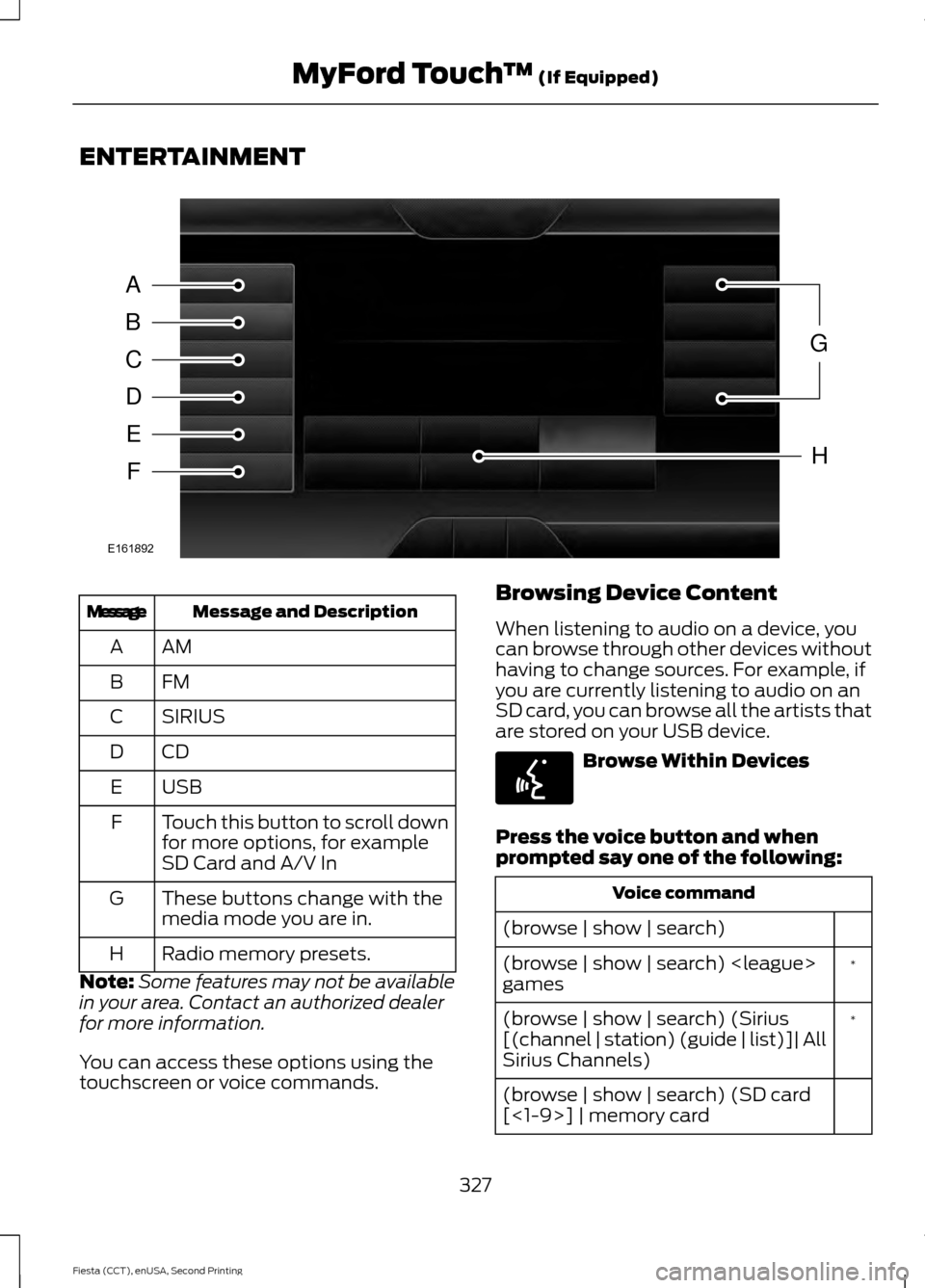
ENTERTAINMENT
Message and Description
Message
AMA
FMB
SIRIUS
C
CDD
USBE
Touch this button to scroll down
for more options, for example
SD Card and A/V In
F
These buttons change with the
media mode you are in.
G
Radio memory presets.
H
Note: Some features may not be available
in your area. Contact an authorized dealer
for more information.
You can access these options using the
touchscreen or voice commands. Browsing Device Content
When listening to audio on a device, you
can browse through other devices without
having to change sources. For example, if
you are currently listening to audio on an
SD card, you can browse all the artists that
are stored on your USB device.
Browse Within Devices
Press the voice button and when
prompted say one of the following: Voice command
(browse | show | search) *
(browse | show | search)
games
*
(browse | show | search) (Sirius
[(channel | station) (guide | list)]| All
Sirius Channels)
(browse | show | search) (SD card
[<1-9>] | memory card
327
Fiesta (CCT), enUSA, Second Printing MyFord Touch
™ (If Equipped)A
B
C
D
E
F
G
H
E161892 E142599
Page 331 of 423
![FORD FIESTA 2015 6.G Owners Manual Voice command
(USB [<1-n>] | iPod | MP3 [player])
(browse | show | search) help
* These commands are only usable if you
have an active subscription to SIRIUS
satellite radio.
The voice system allows y](/manual-img/11/5092/w960_5092-330.png "FORD FIESTA 2015 6.G Owners Manual Voice command
(USB [<1-n>] | iPod | MP3 [player])
(browse | show | search) help
* These commands are only usable if you
have an active subscription to SIRIUS
satellite radio.
The voice system allows y")
Voice command
(USB [<1-n>] | iPod | MP3 [player])
(browse | show | search) help
* These commands are only usable if you
have an active subscription to SIRIUS
satellite radio.
The voice system allows you to change
audio sources with a simple voice
command. For example, if you are listening
to music on a USB device, then want to
switch to a satellite radio channel, simply
press the voice button on the steering
wheel controls and say the name of the
SIRIUS station (for example, "the
Highway"). The following voice commands
are available at the top level of the voice
session no matter which current audio
source you are listening to (for example a
USB device or SIRIUS satellite radio).
Note: This is only available when your
MyFord Touch system language is set to
North American English.
Press the voice button and when
prompted say any of the following: Voice command
[tune [to]] (FM
[tune [to]] (AM
*
[tune [to]] [Sirius]
play (song | track | title | file)
podcast episode name | song name
| audiobook title name> by artist
**
play [artist]
**
play genre
**
play playlist
*
[tune [to]] [Sirius] [channel] <0-
223>
*
[tune [to]] [Sirius] sports (game |
games)
* This command is only usable if you have
an active subscription to SIRIUS satellite
radio.
** The commands that have [ ] around the
word means that the word is optional. For
example, if you say, "Play Metallica", this
is the same as the voice command, "Play
[artist]
AM/FM Radio Touch the AM or FM tab to listen
to the radio.
To change between AM and FM presets,
just touch the AM or FM tab.
Memory Presets
Save a station by pressing and holding one
of the memory preset areas. There is a brief
mute while the radio saves the station.
Sound returns when finished.
HD Radio
Touch this button to turn HD Radio on. The
light on the button illuminates when the
feature is on. HD Radio allows you to
receive radio broadcasts digitally, where
available, providing free, crystal-clear
sound. See HD Radio information later in
this chapter.
328
Fiesta (CCT), enUSA, Second Printing MyFord Touch
™
(If Equipped)E142611
Page 342 of 423
![FORD FIESTA 2015 6.G Owners Manual Action
and
Descrip- tion
Voice command
[play | change] track
[number] <1-512> *
repeat [all | folder | track |
song] off
(shuffle | random | mix) (CD
[player] | disc) [on]
*
(shuffle | random | mix) [](/manual-img/11/5092/w960_5092-341.png "FORD FIESTA 2015 6.G Owners Manual Action
and
Descrip- tion
Voice command
[play | change] track
[number] <1-512> *
repeat [all | folder | track |
song] off
(shuffle | random | mix) (CD
[player] | disc) [on]
*
(shuffle | random | mix) [")
Action
and
Descrip- tion
Voice command
[play | change] track
[number] <1-512> *
repeat [all | folder | track |
song] off
(shuffle | random | mix) (CD
[player] | disc) [on]
*
(shuffle | random | mix) [disc
| CD [player] | folder] off
Help
* This applies to WMA or MP3 files only.
SD Card Slot and USB Port
The SD card slot and USB port are located
in the Media Hub. See Media Hub (page
263).
SD Card
Note: Your SD card slot is spring-loaded.
To remove the SD card, press the card in
and the system ejects it. Do not attempt to
pull the card to remove it as this could cause
damage.
Note: The navigation system also uses this
card slot. See
Navigation (page 362). The SD card slot is located either in the
center console or behind a small access
door in the instrument panel. To access
and play music from your device, press the
lower left corner of the touchscreen.
SD logo is a trademark of SD-3C, LLC.
USB Port
The USB ports are located either in the
center console or behind a small access
door in the instrument panel. To access
and play music from your device, press the
lower left corner of the touchscreen.
339
Fiesta (CCT), enUSA, Second Printing MyFord Touch
™
(If Equipped)E174390 E142620 E174391
Page 343 of 423
This feature allows you to plug in media
playing devices, memory sticks, flash drives
or thumb drives, and charge devices if they
support this feature.
Playing Music from Your Device
Note:
The system is capable of indexing up
to 30,000 songs. Insert your device and select:
Action and Description
Message
Once the system recognizes your USB or SD card you can
then select from the following options:
USB
SD Card
This feature replays the currently playing song or album.
Repeat
Touch this button to play music on the selected album or
folder in random order.
Shuffle
This feature allows you to choose music similar to what is
currently playing.
Similar Music
Touch this button to see disc information, for example current
track, artist name, album and genre.
More Info
Touch this button to view and adjust various media settings.
Options
Sound
Sound settings allows you to adjust settings for: Action and Description
Message
Bass
Midrange
Treble
Set Balance and Fade
DSP
Occupancy Mode
Speed Compensated
Volume Allows you to select more settings, which is under Media
Player. See Settings (page 314).
Media Player Settings
340
Fiesta (CCT), enUSA, Second Printing MyFord Touch
™
(If Equipped)E142611
Page 344 of 423

Action and Description
Message
Displays software and firmware information about the
currently connected media device.
Device Information
Indexes your device when you connect it for the first time and
each time the content changes (for example adding or
removing tracks) to make sure you have the latest voice
commands available for all media on the device.
Update Media Index
Note: Your vehicle may not have all these sound settings.
Browse
This feature allows you to view the
contents of the device. It also allows you
to search by categories, for example genre,
artist or album. If you want to view song information, for
example Title, Artist, File, Folder, Album,
and Genre, touch the on-screen album art.
You can also select: Action and Description
Message
To hear how the system pronounces the current band and
song. This can be helpful when using voice commands to
make sure the system correctly plays your request.
What’
s Playing?
Playing Video from Your Device
To access and play video from your device,
your vehicle's transmission must be in park
(P) with the ignition in accessory mode.
See Starting and Stopping the Engine
(page 111).
USB and SD Card Voice Commands Press the voice button and when
prompted say:
Voice command
(USB [<1-n>] | iPod | MP3
[player])
(SD card | memory card)
Then any of the following:
(browse | show | search) (SD
card [<1-9>] | memory card
[play] next track
pause
play album
Play all
341
Fiesta (CCT), enUSA, Second Printing MyFord Touch
™
(If Equipped)E142599
Page 347 of 423
Voice command
*
(browse | search| show) video
playlist
Video Podcast playlist name
| Music Video playlist name>
(browse | search| show) video
podcast
Video Podcast Episode name
| Music Video Song name>
Help
* These commands are only available in
USB mode and are device-dependent.
Supported Media Players, Formats
and Metadata Information
SYNC is capable of hosting nearly any
digital media player, including iPod,
Zune ™, plays from device players, and
most USB drives. Supported audio formats
include MP3, WMA, WAV and AAC.
It is also able to organize your indexed
media from your playing device by
metadata tags. Metadata tags, which are
descriptive software identifiers embedded
in the media files, provide information
about the file.
If your indexed media files contain no
information embedded in these metadata
tags, SYNC may classify the empty
metadata tags as unknown. Bluetooth Audio
The system allows you to stream audio
over your vehicle's speakers from your
connected, Bluetooth-enabled cell phone. To access, press the lower left corner
on the touchscreen, then select:
Message
BT Stereo
Bluetooth Audio Voice Commands Press the voice button and when
prompted say:
Voice command
[play] next track
play
pause
[play] previous track
344
Fiesta (CCT), enUSA, Second Printing MyFord Touch
™ (If Equipped)E142611 E142599
Page 375 of 423
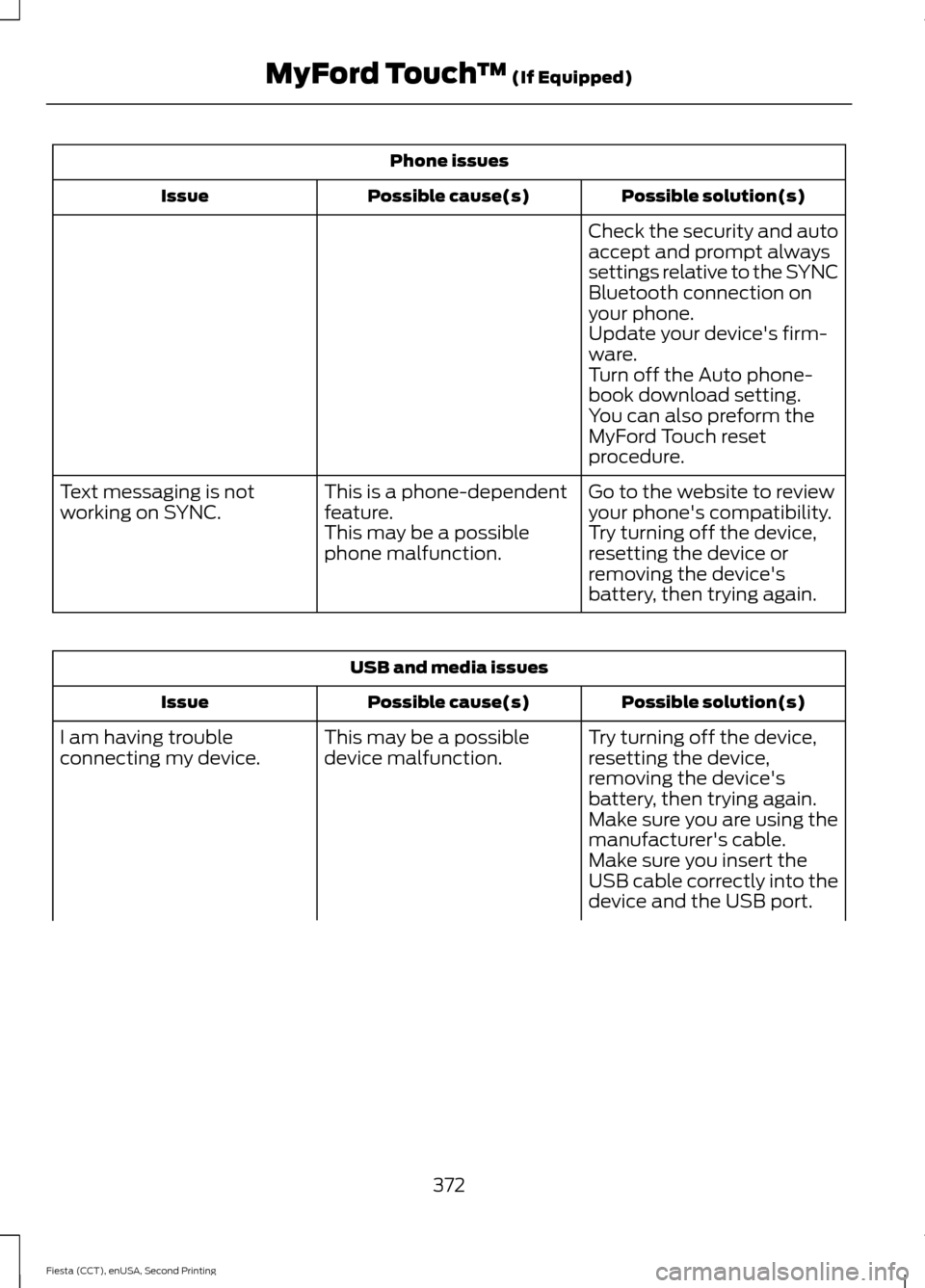
Phone issues
Possible solution(s)
Possible cause(s)
Issue
Check the security and auto
accept and prompt always
settings relative to the SYNC
Bluetooth connection on
your phone.
Update your device's firm-
ware.
Turn off the Auto phone-
book download setting.
You can also preform the
MyFord Touch reset
procedure.
Go to the website to review
your phone's compatibility.
This is a phone-dependent
feature.
Text messaging is not
working on SYNC.
Try turning off the device,
resetting the device or
removing the device's
battery, then trying again.
This may be a possible
phone malfunction. USB and media issues
Possible solution(s)
Possible cause(s)
Issue
Try turning off the device,
resetting the device,
removing the device's
battery, then trying again.
This may be a possible
device malfunction.
I am having trouble
connecting my device.
Make sure you are using the
manufacturer's cable.
Make sure you insert the
USB cable correctly into the
device and the USB port.
372
Fiesta (CCT), enUSA, Second Printing MyFord Touch
™ (If Equipped)