2015 FORD EXPLORER battery
[x] Cancel search: batteryPage 82 of 596
The new open liftgate height will now be recalled when the power
liftgate is opened. To change the programmed height, repeat the above
procedure. Once you open the power liftgate you can manually move it
to a different height.
When operating the power liftgate after a set height lower than full-open
is set, you can fully open the liftgate by manually pushing it upward to
the maximum open position.
Obstacle Detection
When closing:The system will reverse to full open when it detects an
obstacle. A tone will sound three times as the liftgate begins to reopen.
Remove the obstacle to close the liftgate.
Note:Entering the vehicle while the liftgate is closing can cause the
vehicle to bounce and activate obstacle detection. To prevent this, allow
the power liftgate to fully close before entering the vehicle. Before
driving off, check the instrument cluster for a liftgate or door ajar
message or warning indicator. Driving off without first checking for the
liftgate or door ajar message or warning indicator could result in
unintentionally leaving the liftgate open while you are driving.
When opening:The system will stop and a tone will sound three times
when it detects an obstacle. Remove the obstacle to operate the liftgate.
Resetting the Power Liftgate
The liftgate may not operate properly and you may need to reset it if any
of these conditions occur:
•A low voltage or dead battery
•A disconnected battery
•You manually close the liftgate and leave it ajar (unlatched)
To reset the power liftgate:
1. Disconnect the battery for 20 seconds then, reconnect the battery.
2. Manually close and fully latch the liftgate.
3. Power open the liftgate by using the transmitter or the instrument
panel control button.
Locks81
2015 Explorer(exp)
Owners Guide gf, 2nd Printing, September 2014
USA(fus)
Page 101 of 596
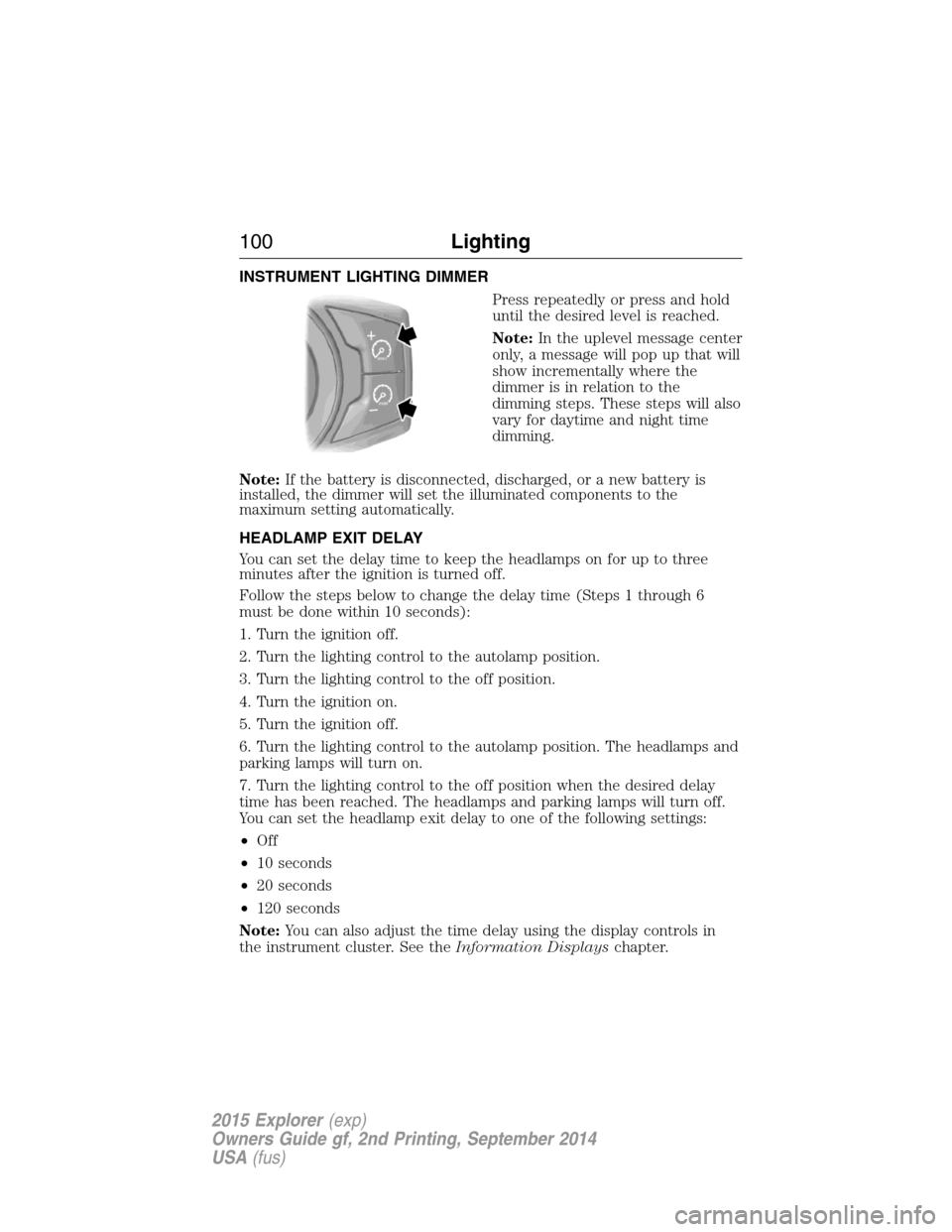
INSTRUMENT LIGHTING DIMMER
Press repeatedly or press and hold
until the desired level is reached.
Note:In the uplevel message center
only, a message will pop up that will
show incrementally where the
dimmer is in relation to the
dimming steps. These steps will also
vary for daytime and night time
dimming.
Note:If the battery is disconnected, discharged, or a new battery is
installed, the dimmer will set the illuminated components to the
maximum setting automatically.
HEADLAMP EXIT DELAY
You can set the delay time to keep the headlamps on for up to three
minutes after the ignition is turned off.
Follow the steps below to change the delay time (Steps 1 through 6
must be done within 10 seconds):
1. Turn the ignition off.
2. Turn the lighting control to the autolamp position.
3. Turn the lighting control to the off position.
4. Turn the ignition on.
5. Turn the ignition off.
6. Turn the lighting control to the autolamp position. The headlamps and
parking lamps will turn on.
7. Turn the lighting control to the off position when the desired delay
time has been reached. The headlamps and parking lamps will turn off.
You can set the headlamp exit delay to one of the following settings:
•Off
•10 seconds
•20 seconds
•120 seconds
Note:You can also adjust the time delay using the display controls in
the instrument cluster. See theInformation Displayschapter.
100Lighting
2015 Explorer(exp)
Owners Guide gf, 2nd Printing, September 2014
USA(fus)
Page 107 of 596
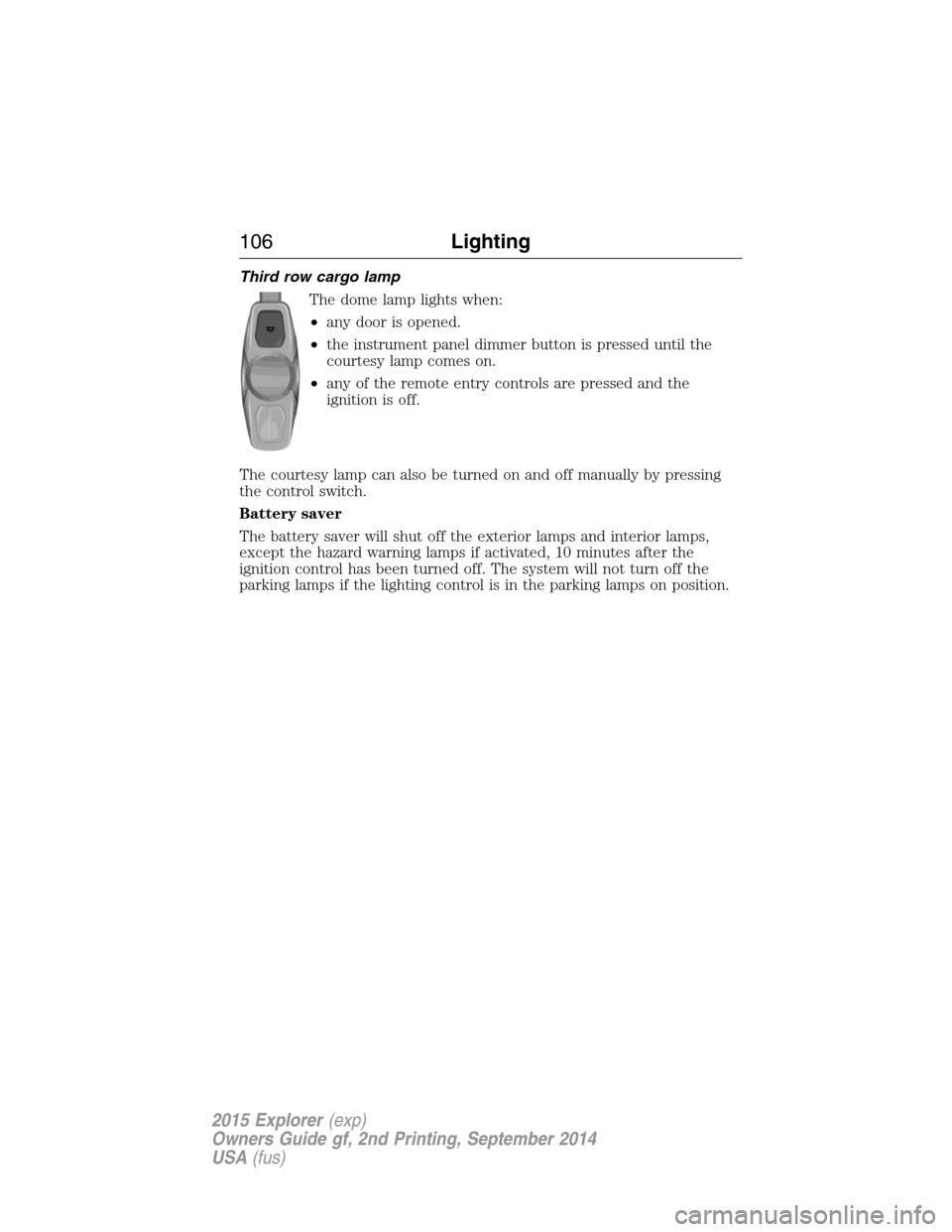
Third row cargo lamp
The dome lamp lights when:
•any door is opened.
•the instrument panel dimmer button is pressed until the
courtesy lamp comes on.
•any of the remote entry controls are pressed and the
ignition is off.
The courtesy lamp can also be turned on and off manually by pressing
the control switch.
Battery saver
The battery saver will shut off the exterior lamps and interior lamps,
except the hazard warning lamps if activated, 10 minutes after the
ignition control has been turned off. The system will not turn off the
parking lamps if the lighting control is in the parking lamps on position.
106Lighting
2015 Explorer(exp)
Owners Guide gf, 2nd Printing, September 2014
USA(fus)
Page 119 of 596

Brake system warning light
To confirm the brake system warning light is functional, it will
momentarily illuminate when the ignition is turned to the on
position when the engine is not running, or in a position
between on and start, or by applying the parking brake when the ignition
is turned to the on position.
If it illuminates when you are driving, check that the parking brake is not
engaged. If the parking brake is not engaged, this indicates low brake
fluid level or a brake system malfunction. Have the system checked
immediately by your authorized dealer.
WARNING:Driving a vehicle with the brake system warning
light on is dangerous. A significant decrease in braking
performance may occur. It will take you longer to stop the vehicle.
Have the vehicle checked by your authorized dealer as soon as possible.
Driving extended distances with the parking brake engaged can cause
brake failure and the risk of personal injury.
Charging system (RTT)
Illuminates when the battery is not charging properly. If it stays
on while the engine is running, there may be a malfunction with
the charging system. Contact your authorized dealer as soon as
possible. This indicates a problem with the electrical system or a related
component.
Door ajar (RTT)
Displays when the ignition is on and any door is not completely
closed.
Engine oil pressure (RTT)
Illuminates when the oil pressure falls below the normal range.
Engine coolant temperature (RTT)
Illuminates when the engine coolant temperature is high. Stop
the vehicle as soon as possible, switch off the engine and let
cool.
11 8Instrument Cluster
2015 Explorer(exp)
Owners Guide gf, 2nd Printing, September 2014
USA(fus)
Page 136 of 596
AWD/4WD Messages Action / Description
AWD Off Displayed when the system has been
automatically disabled to protect itself. This is
caused by operating the vehicle with the
compact spare tire installed or if the system is
overheating. The system will resume normal
function and clear this message after driving a
short distance with the road tire re-installed or
after the system is allowed to cool.
Check AWD Displayed in conjunction with the powertrain
malfunction/reduced power light when the
system is not operating properly. If the
warning stays on or continues to come on,
contact your authorized dealer as soon as
possible.
Battery and
Charging System
MessagesAction / Description
Check Charging
SystemDisplayed when the charging system needs
servicing. If the warning stays on or continues
to come on, contact your authorized dealer as
soon as possible.
Turn Power Off to
Save BatteryDisplayed when the battery management
system determines that:
•the battery is at a low state of charge or,
•the ignition has been in accessory position
or on position with the engine off for
approximately 45 minutes.
Turn the ignition off as soon as possible to
protect the battery. This message will clear
once the vehicle has been started and the
battery state of charge has recovered. Turning
off unnecessary electrical loads will allow
faster battery state-of-charge recovery.
Information Displays135
2015 Explorer(exp)
Owners Guide gf, 2nd Printing, September 2014
USA(fus)
Page 137 of 596
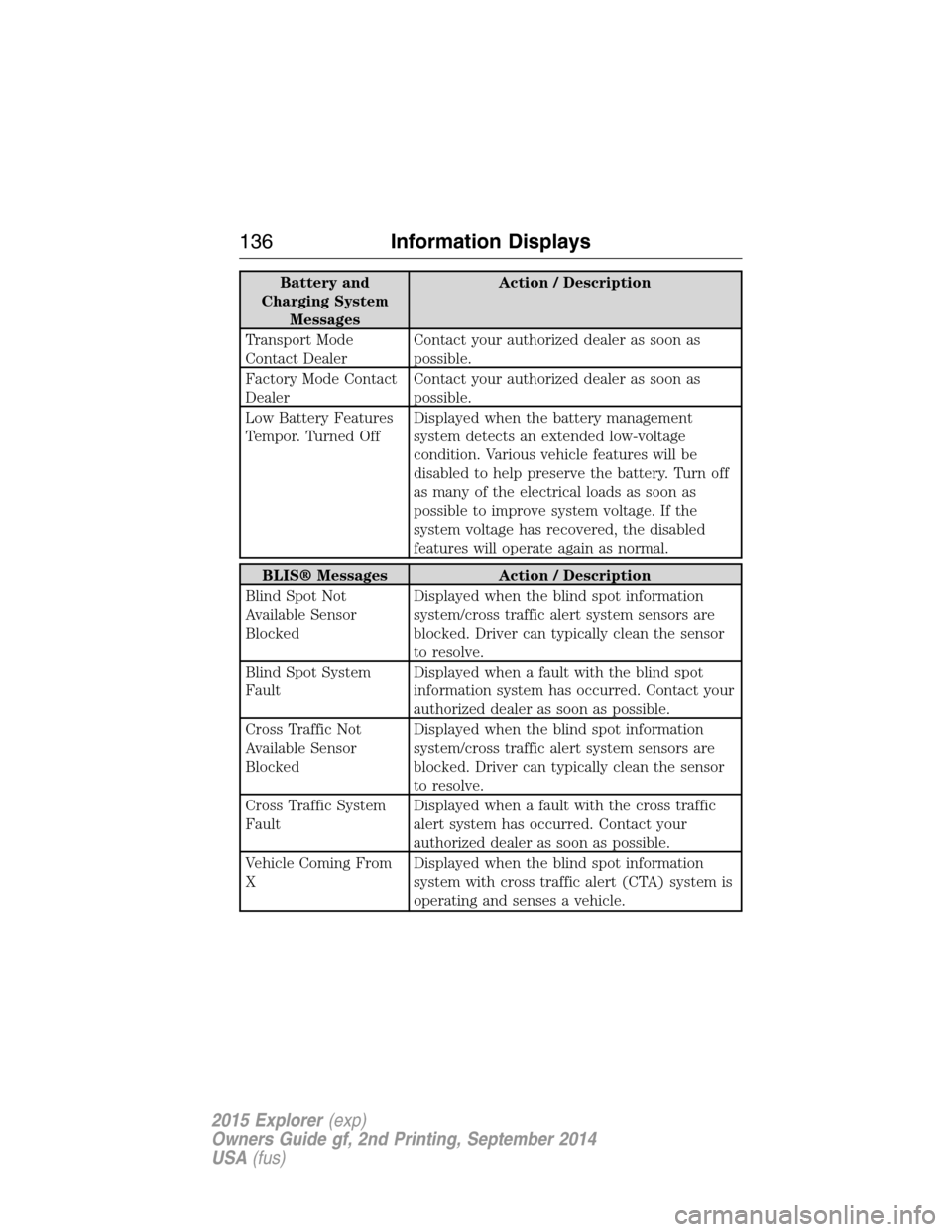
Battery and
Charging System
MessagesAction / Description
Transport Mode
Contact DealerContact your authorized dealer as soon as
possible.
Factory Mode Contact
DealerContact your authorized dealer as soon as
possible.
Low Battery Features
Tempor. Turned OffDisplayed when the battery management
system detects an extended low-voltage
condition. Various vehicle features will be
disabled to help preserve the battery. Turn off
as many of the electrical loads as soon as
possible to improve system voltage. If the
system voltage has recovered, the disabled
features will operate again as normal.
BLIS® Messages Action / Description
Blind Spot Not
Available Sensor
BlockedDisplayed when the blind spot information
system/cross traffic alert system sensors are
blocked. Driver can typically clean the sensor
to resolve.
Blind Spot System
FaultDisplayed when a fault with the blind spot
information system has occurred. Contact your
authorized dealer as soon as possible.
Cross Traffic Not
Available Sensor
BlockedDisplayed when the blind spot information
system/cross traffic alert system sensors are
blocked. Driver can typically clean the sensor
to resolve.
Cross Traffic System
FaultDisplayed when a fault with the cross traffic
alert system has occurred. Contact your
authorized dealer as soon as possible.
Vehicle Coming From
XDisplayed when the blind spot information
system with cross traffic alert (CTA) system is
operating and senses a vehicle.
136Information Displays
2015 Explorer(exp)
Owners Guide gf, 2nd Printing, September 2014
USA(fus)
Page 177 of 596
Note:In order to allow the seat to complete the stowed position, do not
place objects under the seat before stowing. Remove all objects from the
seat and stowage tub.
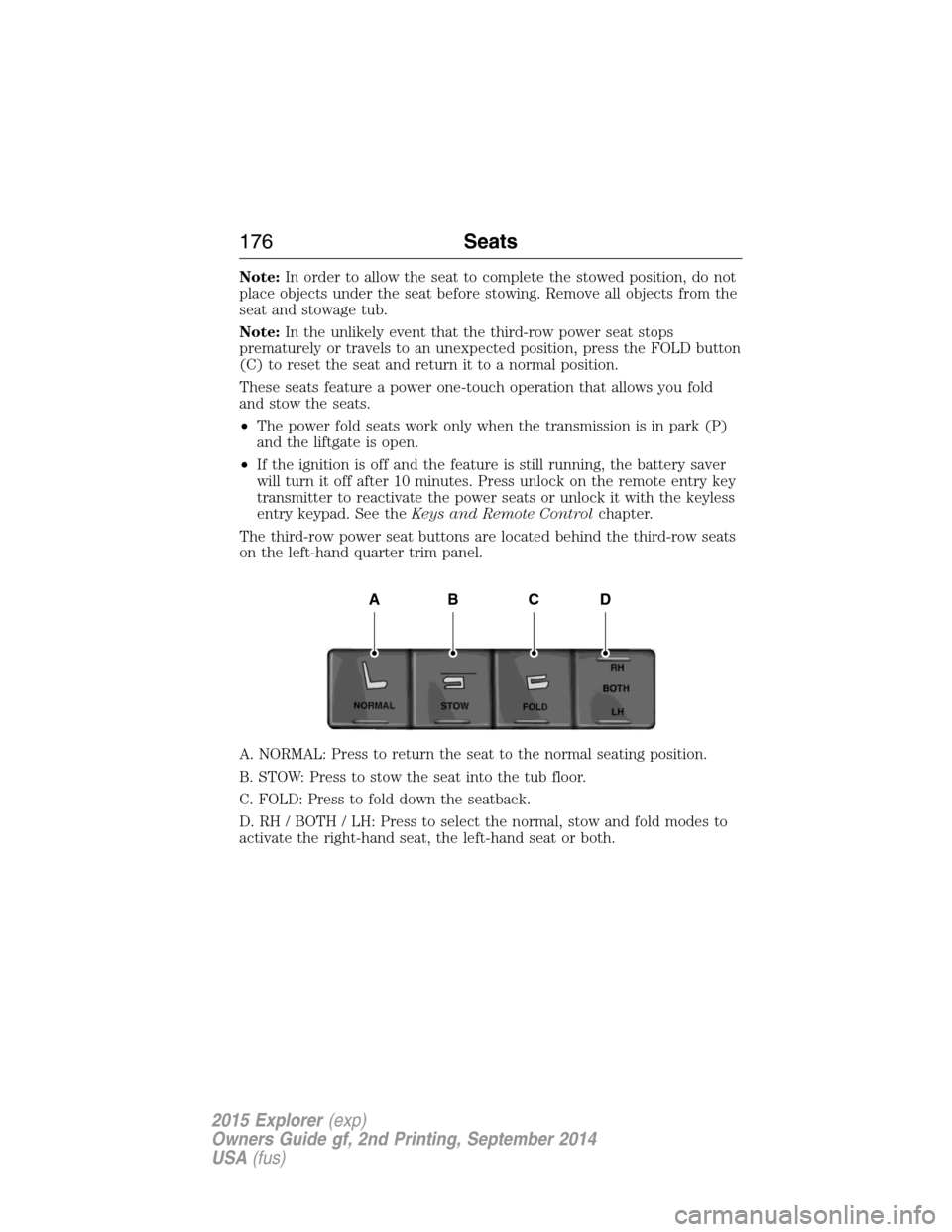
Note:In the unlikely event that the third-row power seat stops
prematurely or travels to an unexpected position, press the FOLD button
(C) to reset the seat and return it to a normal position.
These seats feature a power one-touch operation that allows you fold
and stow the seats.
•The power fold seats work only when the transmission is in park (P)
and the liftgate is open.
•If the ignition is off and the feature is still running, the battery saver
will turn it off after 10 minutes. Press unlock on the remote entry key
transmitter to reactivate the power seats or unlock it with the keyless
entry keypad. See theKeys and Remote Controlchapter.
The third-row power seat buttons are located behind the third-row seats
on the left-hand quarter trim panel.
A. NORMAL: Press to return the seat to the normal seating position.
B. STOW: Press to stow the seat into the tub floor.
C. FOLD: Press to fold down the seatback.
D. RH / BOTH / LH: Press to select the normal, stow and fold modes to
activate the right-hand seat, the left-hand seat or both.
ABCD
176Seats
2015 Explorer(exp)
Owners Guide gf, 2nd Printing, September 2014
USA(fus)
Page 179 of 596
Programming
Note:Put a new battery in the hand-held transmitter. This will ensure
quicker training and accurate transmission of the radio-frequency signal.
1. With your vehicle parked outside of the garage and your key in the
ignition, turn the key so that the ignition is in the on position.
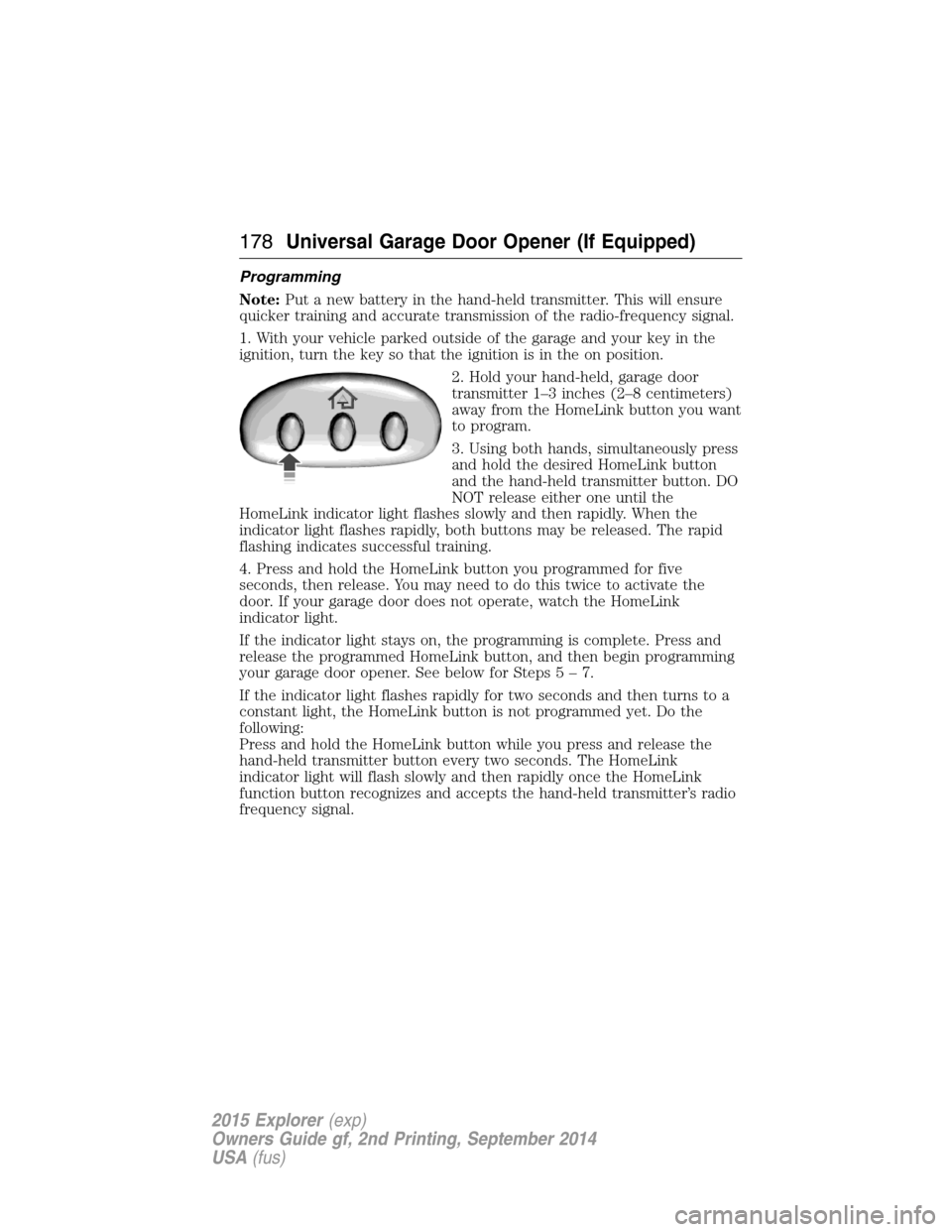
2. Hold your hand-held, garage door
transmitter 1–3 inches (2–8 centimeters)
away from the HomeLink button you want
to program.
3. Using both hands, simultaneously press
and hold the desired HomeLink button
and the hand-held transmitter button. DO
NOT release either one until the
HomeLink indicator light flashes slowly and then rapidly. When the
indicator light flashes rapidly, both buttons may be released. The rapid
flashing indicates successful training.
4. Press and hold the HomeLink button you programmed for five
seconds, then release. You may need to do this twice to activate the
door. If your garage door does not operate, watch the HomeLink
indicator light.
If the indicator light stays on, the programming is complete. Press and
release the programmed HomeLink button, and then begin programming
your garage door opener. See below for Steps5–7.
If the indicator light flashes rapidly for two seconds and then turns to a
constant light, the HomeLink button is not programmed yet. Do the
following:
Press and hold the HomeLink button while you press and release the
hand-held transmitter button every two seconds. The HomeLink
indicator light will flash slowly and then rapidly once the HomeLink
function button recognizes and accepts the hand-held transmitter’s radio
frequency signal.
178Universal Garage Door Opener (If Equipped)
2015 Explorer(exp)
Owners Guide gf, 2nd Printing, September 2014
USA(fus)