2015 FORD EXPEDITION eco mode
[x] Cancel search: eco modePage 206 of 564
•4L (4X4 LOW)provides electronically locked four-wheel drive when
extra power at reduced speeds is required. The message center will
display 4X4 LOW when this mode is selected. This mode is not
recommended for use on dry pavement. Use this mode for off-road
low-speed operation or when extra power is required, such as climbing
steep grades, going through deep sand or pulling a boat out of the
water.
Shifting between system modes
Note:Do not perform these operations if the rear wheels are slipping.
Note:Some noise may be heard as the system shifts or engages.
You can move the control from 2H, 4A or 4H at a stop or while driving.
The information display may display a message indicating a 4X4 shift is
in progress. Once the shift is complete the information display will then
display the system mode selected.
Shifting to/from 4L (4X4 LOW)
1. Bring the vehicle to a rolling speed of 3 mph (5 km/h) or less.
2. Place the gearshift in N (Neutral).
3. Move the 4WD control to the desired mode.
The message center will display a message indicating a 4X4 shift is in
progress. The message center will then display the system mode
selected.
If any of the above shift conditions are not met, the shift will not occur
and the message center will display information guiding the driver
through the proper range of shifting procedures.
IfSHIFT DELAYED PULL FORWARDis displayed in the message
center, transfer case gear tooth blockage is present. To alleviate this
condition, place the transmission in a forward gear, move the vehicle
forward approximately 5 feet (2 meters), and shift the transmission back
to neutral to allow the transfer case to complete the range shift.
Note:4x4 low mode is not intended for use on dry pavement
Four-Wheel Drive (If Equipped)205
2015 Expedition(exd)
Owners Guide gf, 1st Printing, July 2014
USA(fus)
Page 207 of 564
How Your Vehicle Differs From Other Vehicles
WARNING:Vehicles with a higher center of gravity such as
utility and four-wheel drive vehicles handle differently than
vehicles with a lower center of gravity. Utility and four-wheel drive
vehicles arenotdesigned for cornering at speeds as high as passenger
cars any more than low-slung sports cars are designed to perform
satisfactorily under off-road conditions. Avoid sharp turns, excessive
speed and abrupt maneuvers in these vehicles. Failure to drive
cautiously could result in an increased risk of loss of vehicle control,
vehicle rollover, personal injury and death.
Truck and utility vehicles can differ from some other vehicles. Your
vehicle may be higher to allow it to travel over rough terrain without
getting hung up or damaging underbody components.
The differences that make your vehicle so versatile also make it handle
differently than an ordinary passenger car.
Maintain steering wheel control at all times, especially in rough terrain.
Since sudden changes in terrain can result in abrupt steering wheel
motion, make sure you grip the steering wheel from the outside. Do not
grip the spokes.
Drive cautiously to avoid vehicle damage from concealed objects such as
rocks and stumps.
You should either know the terrain or examine maps of the area before
driving. Map out your route before driving in the area. To maintain
steering and braking control of your vehicle, you must have all four
wheels on the ground and they must be rolling, not sliding or spinning.
Driving Off-Road With Truck and Utility Vehicles
Note:On some 4WD models, the initial shift from two-wheel drive to
four-wheel drive while the vehicle is moving can cause some momentary
clunk and ratcheting sounds. This is the front drivetrain coming up to
speed and the automatic locking hubs engaging and is not cause for
concern.
Note:Your vehicle may be equipped with a front air dam that can
become damaged (due to reduced ground clearance) when taking your
vehicle off-road. This air dam can be taken off by removing two bolts.
4WD vehicles are specially equipped for driving on sand, snow, mud and
rough terrain and have operating characteristics that are somewhat
different from conventional vehicles, both on and off the road.
206Four-Wheel Drive (If Equipped)
2015 Expedition(exd)
Owners Guide gf, 1st Printing, July 2014
USA(fus)
Page 208 of 564
Power is supplied to all four wheels through a transfer case. On 4WD
vehicles, the transfer case allows you to select 4WD when necessary.
Information on transfer case operation and shifting procedures can be
found in this chapter. Information on transfer case maintenance can be
found in theMaintenancechapter. You should become thoroughly
familiar with this information before you operate your vehicle.
4WD (when you select a 4WD mode) uses all four wheels to power the
vehicle. This increases traction, enabling you to drive over terrain and
road conditions that a conventional two-wheel drive vehicle cannot.
Basic Operating Principles In Special Conditions
•Do not use 4H or 4L on dry, hard surfaced roads. Doing so will
produce excessive noise, increase tire wear and may damage drive
components. 4H or 4L modes are only intended for consistently
slippery or loose surfaces.
•Drive slower in strong crosswinds which can affect the normal steering
characteristics of your vehicle.
•Be extremely careful when driving on pavement made slippery by
loose sand, water, gravel, snow or ice.
If your vehicle goes off the edge of the pavement
•If your vehicle goes off the edge of the pavement, slow down, but
avoid severe brake application, ease the vehicle back onto the
pavement only after reducing your speed. Do not turn the steering
wheel too sharply while returning to the road surface.
•It may be safer to stay on the apron or shoulder of the road and slow
down gradually before returning to the pavement. You may lose
control if you do not slow down or if you turn the steering wheel too
sharply or abruptly.
•It often may be less risky to strike small objects, such as highway
reflectors, with minor damage to your vehicle rather than attempt a
sudden return to the pavement which could cause the vehicle to slide
sideways out of control or roll over. Remember, your safety and the
safety of others should be your primary concern.
Four-Wheel Drive (If Equipped)207
2015 Expedition(exd)
Owners Guide gf, 1st Printing, July 2014
USA(fus)
Page 219 of 564
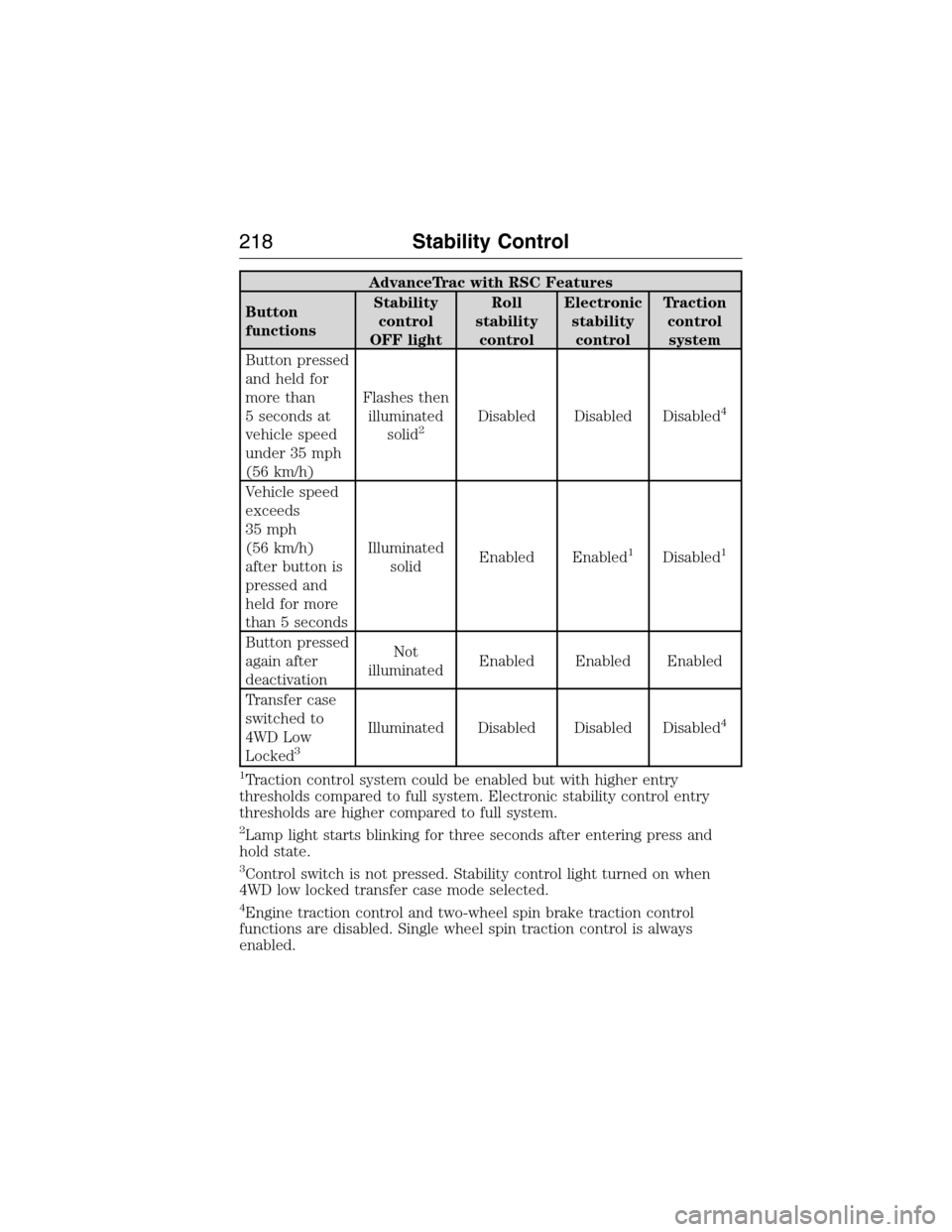
AdvanceTrac with RSC Features
Button
functionsStability
control
OFF lightRoll
stability
controlElectronic
stability
controlTraction
control
system
Button pressed
and held for
more than
5 seconds at
vehicle speed
under 35 mph
(56 km/h)Flashes then
illuminated
solid
2Disabled Disabled Disabled4
Vehicle speed
exceeds
35 mph
(56 km/h)
after button is
pressed and
held for more
than 5 secondsIlluminated
solidEnabled Enabled
1Disabled1
Button pressed
again after
deactivationNot
illuminatedEnabled Enabled Enabled
Transfer case
switched to
4WD Low
Locked
3
Illuminated Disabled Disabled Disabled4
1
Traction control system could be enabled but with higher entry
thresholds compared to full system. Electronic stability control entry
thresholds are higher compared to full system.
2Lamp light starts blinking for three seconds after entering press and
hold state.
3Control switch is not pressed. Stability control light turned on when
4WD low locked transfer case mode selected.
4Engine traction control and two-wheel spin brake traction control
functions are disabled. Single wheel spin traction control is always
enabled.
218Stability Control
2015 Expedition(exd)
Owners Guide gf, 1st Printing, July 2014
USA(fus)
Page 221 of 564
Note:Noise from the ABS pump motor may be observed during hill
descent control operation. This is a normal characteristic of the ABS and
should be no reason for concern.
Hill descent modes
•At speeds below 20 mph (32 km/h): When the HDC button is pressed
and HDC is active, HILL DESCENT CONTROL ACTIVE will appear in
the message center for several seconds.
•At speeds below 20 mph (32 km/h): When the HDC button is pressed
and conditions are not correct for hill descent activation, the HDC
system will be enabled, the light on the button will be on solid and
HILL DESCENT CONTROL READY will be displayed in the message
center for several seconds.
•At speeds above 20 mph (32 km/h): When the HDC button is pressed,
the HDC system will be enabled, the light on the button will be
illuminated, and FOR HILL CNTRL, 20 MPH OR LESS will be
displayed in the message center for several seconds.
•For HDC to enable, the vehicle must be in a drive gear or (R)
Reverse. If the vehicle is in P (Park) or N (Neutral) and the HDC
button is pressed, FOR HILL CNTRL, SELECT GEAR will be displayed
in the message center for several seconds.
Refer toWarning lamps and indicatorsin theInstrument Cluster
chapter for hill descent control messages.
220Terrain Response
2015 Expedition(exd)
Owners Guide gf, 1st Printing, July 2014
USA(fus)
Page 248 of 564
Automatic Power Deploy
The running boards will extend down and out when the doors are opened.
Automatic Power Stow
The running boards will return to the stowed position after a two second
delay when the doors are closed.
Manual Power Deploy
To manually operate the running boards, refer to theInformation
Displayschapter.
•This feature can manually set the running boards in the deployed
(OUT) position for access to the roof.
•When running boards are manually set in the deployed position, they
will return to the stowed position and enter automatic mode when the
vehicle speed exceeds 5 mph (8 km/h).
Enable and Disable
To enable and disable the power running board feature, refer to the
Information Displayschapter.
•When this feature is disabled (OFF), the running boards will move to
the stowed position regardless of the position of the doors.
•When this feature is enabled (AUTO), the running boards will move
back to the correct positions based off of the door positions.
Bounce-Back
If an object is in the way of the moving running board, it will reverse
direction and move to the end of travel.
Load Carrying247
2015 Expedition(exd)
Owners Guide gf, 1st Printing, July 2014
USA(fus)
Page 266 of 564
BREAKING-IN
You need to break in new tires for approximately 300 miles
(480 kilometers). During this time, your vehicle may exhibit some unique
driving characteristics. Avoid driving too fast during the first 1000 miles
(1600 kilometers). Vary your speed frequently and change up through
the gears early. Do not labor the engine. Do not tow during the first
1000 miles (1600 kilometers).
ECONOMICAL DRIVING
Fuel economy is affected by several things, such as how you drive, the
conditions you drive under and how you maintain your vehicle.
There are some things to keep in mind that may improve your fuel
economy:
•Accelerate and slow down in a smooth, moderate fashion.
•Drive at steady speeds without stopping.
•Anticipate stops; slowing down may eliminate the need to stop.
•Combine errands and minimize stop-and-go driving.
•Close the windows for high-speed driving.
•Drive at reasonable speeds (traveling at 55 mph [88 km/h] uses 15%
less fuel than traveling at 65 mph [105 km/h]).
•Keep the tires properly inflated and use only the recommended size.
•Use the recommended engine oil.
•Perform all regularly scheduled maintenance.
There are also some things you may not want to do because they may
reduce your fuel economy:
•Sudden or hard accelerations.
•Rev the engine before turning it off.
•Idle for periods longer than one minute.
•Warm up your vehicle on cold mornings.
•Use the air conditioner or front defroster.
•Use the speed control in hilly terrain.
•Rest your foot on the brake pedal while driving.
•Drive a heavily loaded vehicle or tow a trailer.
•Carry unnecessary weight (approximately 1 mpg [0.4 km/L] is lost for
every 400 pounds [180 kilograms] of weight carried).
Driving Hints265
2015 Expedition(exd)
Owners Guide gf, 1st Printing, July 2014
USA(fus)
Page 271 of 564
HAZARD WARNING FLASHERS
The hazard flasher control is located on the instrument panel
by the radio. Use it when your vehicle is disabled and is
creating a safety hazard for other motorists.
•Press the flasher control and all front and rear direction signals will
flash.
•Press the flasher control again to turn them off.
Note:With extended use, the flashers may run down your 12–volt
battery.
FUEL SHUTOFF
WARNING:Failure to inspect and, if necessary, repair fuel leaks
after a collision may increase the risk of fire and serious injury.
Ford Motor Company recommends that the fuel system be inspected by
an authorized dealer after any collision.
In the event of a moderate to severe collision, this vehicle includes a fuel
pump shut-off feature that stops the flow of fuel to the engine. Not every
impact will cause a shut off.
Should your vehicle shut off after a collision, you may restart your
vehicle by doing the following:
1. Switch off the ignition.
2. Switch on the ignition.
3. Repeat Steps 1 and 2 to re-enable the fuel pump.
For vehicles equipped with a push button start system:
1. Press the START/STOP button to switch off the ignition.
2. Press the brake pedal and press the START/STOP button to start the
vehicle.
3. Remove your foot from the brake pedal and press the START/STOP
button to switch off the ignition.
4. You can either attempt to start the engine by pressing the brake pedal
and the START/STOP button, or switch on the ignition only by pressing
the START/STOP button without pressing the brake pedal. Both ways
re-enable the fuel system.
270Roadside Emergencies
2015 Expedition(exd)
Owners Guide gf, 1st Printing, July 2014
USA(fus)