Page 499 of 564
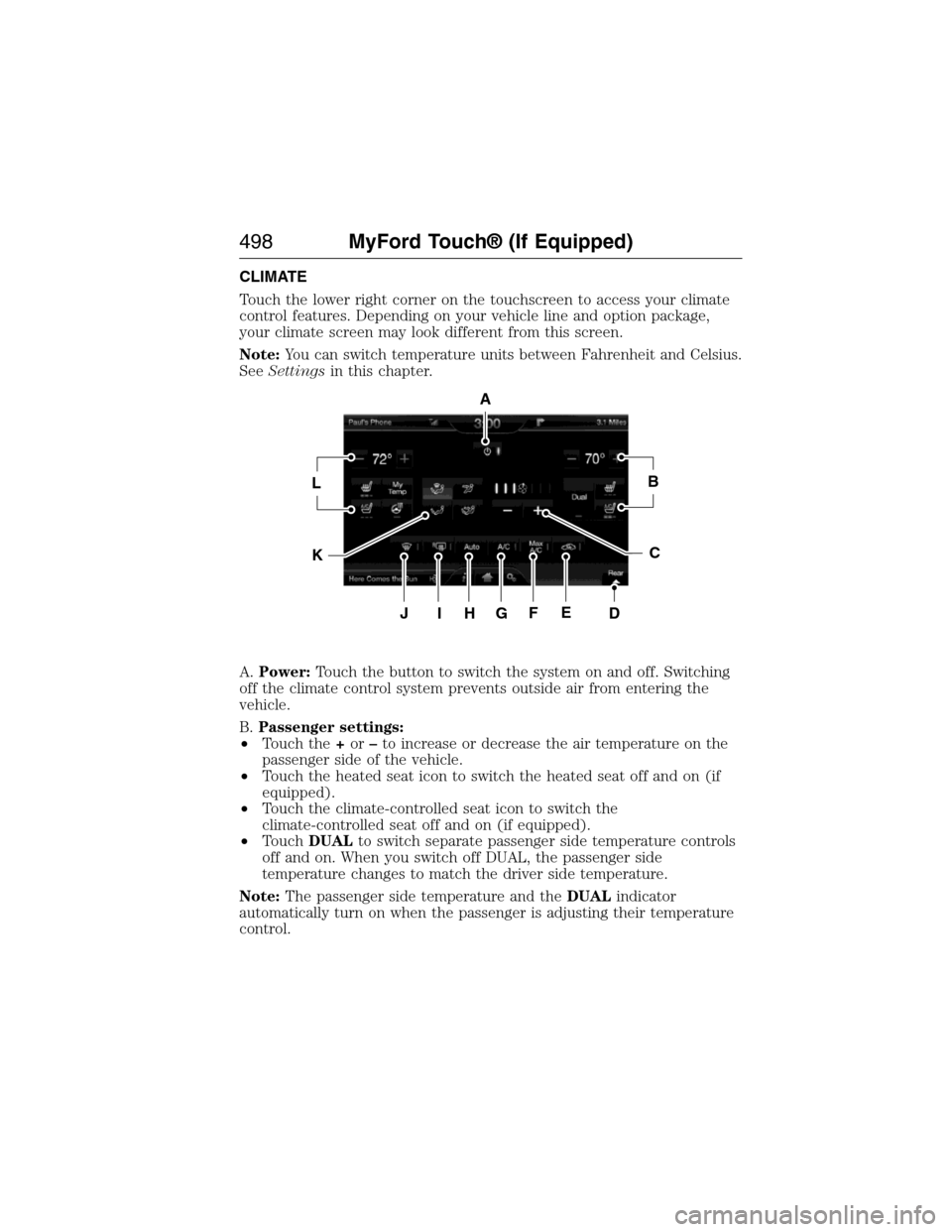
CLIMATE
Touch the lower right corner on the touchscreen to access your climate
control features. Depending on your vehicle line and option package,
your climate screen may look different from this screen.
Note:You can switch temperature units between Fahrenheit and Celsius.
SeeSettingsin this chapter.
A.Power:Touch the button to switch the system on and off. Switching
off the climate control system prevents outside air from entering the
vehicle.
B.Passenger settings:
•Touch the+or–to increase or decrease the air temperature on the
passenger side of the vehicle.
•Touch the heated seat icon to switch the heated seat off and on (if
equipped).
•Touch the climate-controlled seat icon to switch the
climate-controlled seat off and on (if equipped).
•TouchDUALto switch separate passenger side temperature controls
off and on. When you switch off DUAL, the passenger side
temperature changes to match the driver side temperature.
Note:The passenger side temperature and theDUALindicator
automatically turn on when the passenger is adjusting their temperature
control.
A
LB
KC
JIHGFED
498MyFord Touch® (If Equipped)
2015 Expedition(exd)
Owners Guide gf, 1st Printing, July 2014
USA(fus)
Page 500 of 564
C.Fan speed:Touch+or-to increase or decrease the volume of air
circulated in your vehicle.
Note:When the system is controlling the fan speed automatically, all
the fan speed indicators turn off.
D.Rear:Touch to access the rear climate control. Rear climate control
settings appear at the bottom of the screen.
•Touch the power icon to turn the rear climate control functions off
and on.
•TouchRear Controlto allow the rear seat passengers to adjust the
rear climate settings. Touch it again to prevent the rear seat
passengers from adjusting the settings.Rear Controlautomatically
turns off when you use the touchscreen to adjust the rear climate
settings.
•Touch+or–to adjust the temperature.
•To adjust fan speed, touch+or–next to the fan icon.
•TouchRearagain to close the rear controls. Closing the rear climate
control functions does not affect their current settings.
E.Recirculated air:Touch the button to switch between outside air
and recirculated air. When you select recirculated air, the air currently in
the passenger compartment recirculates. This may reduce the time
needed to cool the interior (when used withA/C) and may reduce
unwanted odors from entering your vehicle.
Note:Recirculated air may turn off automatically (or be prevented
from turning on) in all airflow modes exceptMAX A/Cto reduce risk
of fogging.
F.MAX A/C:Touch the button to maximize cooling. Recirculated air
flows through the instrument panel vents, air conditioning automatically
turns on, and the fan automatically adjusts to the highest speed.
G.A/C:Touch the button to switch the air conditioning compressor on
or off. Use air conditioning with recirculated air to improve cooling
performance and efficiency.
Note:In certain conditions, the air conditioning compressor may
continue to operate even after you switch off the air conditioning with
theA/Cbutton.
H.AUTO:Touch the button to switch on automatic operation. Select the
desired temperature using the temperature control. The system adjusts
fan speed, air distribution, air conditioning operation, and selects outside
air or recirculated air to heat or cool the vehicle in order to maintain the
desired temperature. You can also use theAUTObutton to switch off
dual zone operation by touching and holding the button for more than
two seconds.
MyFord Touch® (If Equipped)499
2015 Expedition(exd)
Owners Guide gf, 1st Printing, July 2014
USA(fus)
Page 501 of 564
I.Heated rear window:Turns the heated rear window on and off. See
Heated windows and mirrorsin theClimate Controlchapter.
J.Defrost:Touch the button to distribute air to the windshield vents
and de-mister. Air distribution to instrument panel and footwell vents
turn off. You can use this setting to defog and clear the windshield of a
thin covering of ice.
K.Manual controls:Touch these buttons to switch airflow from the
windshield, instrument panel, or footwell vents on or off. The system can
distribute air through any combination of these vents.
L.Driver settings:Depending on your vehicle and option package, you
may have the following features:
•Touch the+or–to increase or decrease the air temperature on the
passenger side of the vehicle.
•Touch the heated seat icon to switch the heated seat off and on (if
equipped).
•Touch the climate-controlled seat icon to switch the
climate-controlled seat off and on (if equipped).
•TouchMyTempto select your preset temperature setpoint. Touch
and holdMyTempto save a new preset temperature setpoint.
•If your vehicle is equipped with a heated steering wheel, touch the
heated steering wheel icon to warm the steering wheel.
Note:If your vehicle is equipped with a wood-trimmed steering wheel, it
does not heat between the 10 o’clock and 2 o’clock positions.
Climate Control Voice Commands
The following voice commands are available at the main menu
level of a voice session. For example, press the voice button
and after the prompt, “Say a command”; say any of the
following commands:
Climate control voice commands
“Climate automatic”
“Climate my temperature”
“Climate off”
“Climate on”
“Climate temperature <15.5–29.5> degrees”
“Climate temperature <60–85> degrees”
“Help”
500MyFord Touch® (If Equipped)
2015 Expedition(exd)
Owners Guide gf, 1st Printing, July 2014
USA(fus)
Page 563 of 564
SecuriCode keyless entry
system ..........................................77
SecuriLock passive anti-theft
system ..........................................79
Selecting your media source
(USB, Line in, BT audio) .........418
Sending new text messages .....471
Setting a destination ................502
Setting a destination by
voice ...........................................502
Settings ......................................486
Setting the clock ...............370, 486
Side air curtain ...........................50
Side-curtain airbags system .......50
SIRIUS® satellite radio ....370, 455
SIRIUS satellite radio voice
commands .................................457
SIRIUS Travel Link ...................478
SIRIUS Travel Link voice
commands .................................480
Snowplowing ...............................15
SOS Post Crash Alert .................46
Spark plugs,
specifications .....................355, 360
Special notice
ambulance conversions ............15
Specification chart,
lubricants ...................................356
Stability system .........................217
Starting your vehicle ................179
jump starting ..........................271
push button start system .......178
Steering wheel ............................83
controls ......................................85
tilting .........................................83Sun visor ....................................102
Supplemental Restraint System
(SRS) (see airbags) ....................47
Supported media file types ......464
Supported player, media
formats and metadata
information ................................464
Suspension ................................236
SYNC® AppLink™ ...................413
SYNC® customer
support ..............................387, 440
SYNC® Services ................410, 474
System settings .........................489
T
Temperature control
(see Climate control) ..............136,
138, 140, 498
Text messaging .................398, 470
Text messaging (sending,
downloading, deleting) .....398, 400
Third-row power fold seat .......167
Tilt steering wheel ......................83
Tires ...........................326–327, 347
alignment ................................340
care ..........................................326
changing ..........................347, 349
checking the pressure ............336
inflating ...................................334
label .........................................333
replacing ..................................338
rotating ....................................341
safety practices .......................340
sidewall information ...............329
snow tires and chains ............341
spare tire .................................347
terminology .............................328
562Index
2015 Expedition(exd)
Owners Guide gf, 1st Printing, July 2014
USA(fus)
Page:
< prev 1-8 9-16 17-24