2015 FORD E SERIES light
[x] Cancel search: lightPage 236 of 360

When you believe your system is not operating properly
The main function of the tire pressure monitoring system is to warn you
when your tires need air. It can also warn you in the event the system is
no longer capable of functioning as intended. See the following chart for
information concerning your tire pressure monitoring system:
Low tire
pressure
warning lightPossible
causeCustomer action required
Solid warning light Tire(s)
under-inflated1. Make sure tires are at the
proper pressure. SeeInflating
your tiresin this chapter.
2. After inflating your tires to the
manufacturer’s recommended
pressure as shown on the Tire
Label (located on the edge of
driver’s door or the B-Pillar), the
vehicle must be driven for at least
two minutes over 20 mph
(32 km/h) before the light turns
off.
Spare tire in
useRepair the damaged road wheel
and tire asssembly and reinstall it
on the vehicle to restore system
function. For a description on how
the system functions, seeWhen
your temporary spare tire is
installedin this section.
TPMS
malfunctionIf the tires are properly inflated
and the spare tire is not in use but
the light remains on, contact your
authorized dealer as soon as
possible.
Tire rotation
without sensor
trainingOn vehicles with different front
and rear tire pressures, the tire
pressure monitoring system must
be retrained following every tire
rotation. SeeTire rotationin this
chapter.
Wheels and Tires235
2015 Econoline(eco)
Owners Guide gf, 1st Printing, June 2014
USA(fus)
Page 237 of 360
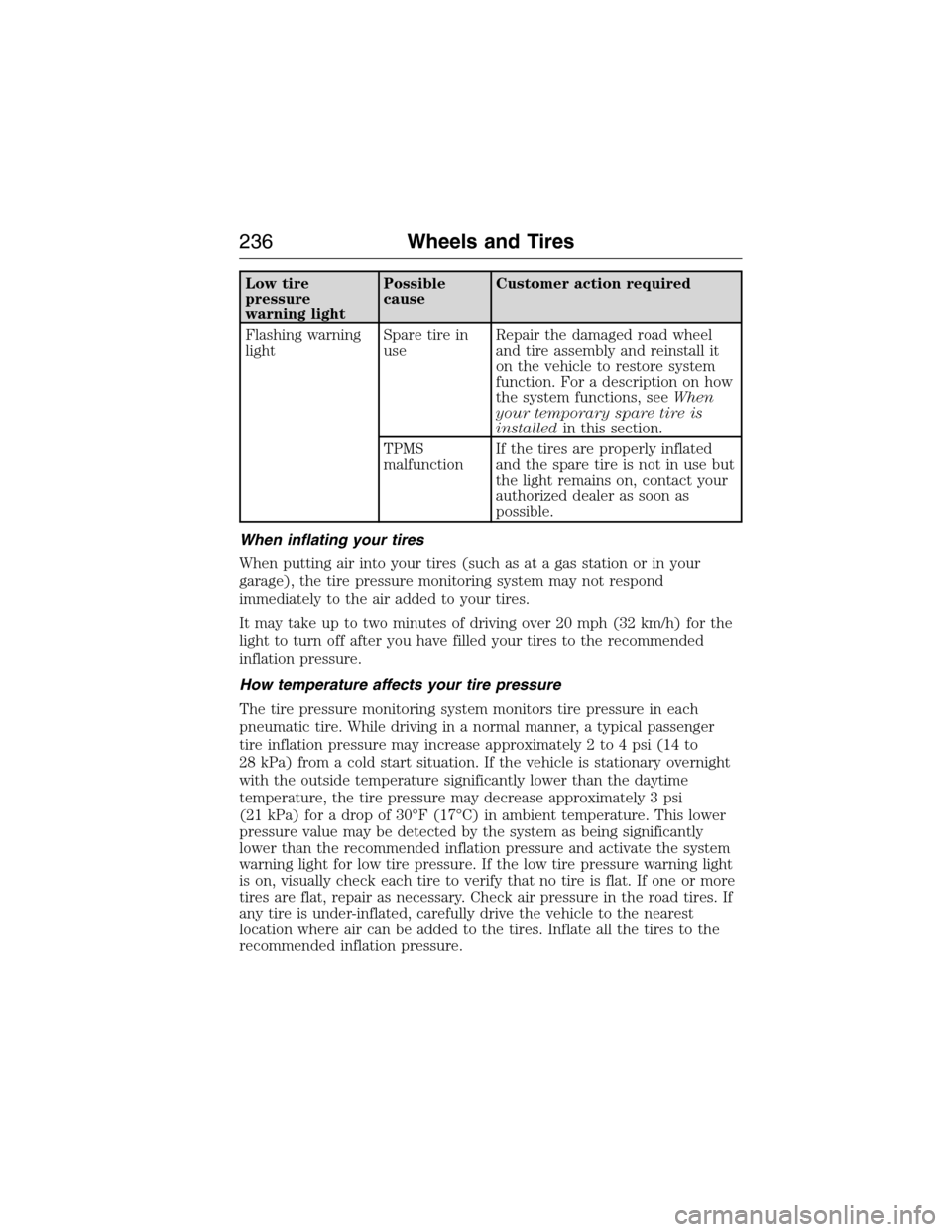
Low tire
pressure
warning lightPossible
causeCustomer action required
Flashing warning
lightSpare tire in
useRepair the damaged road wheel
and tire assembly and reinstall it
on the vehicle to restore system
function. For a description on how
the system functions, seeWhen
your temporary spare tire is
installedin this section.
TPMS
malfunctionIf the tires are properly inflated
and the spare tire is not in use but
the light remains on, contact your
authorized dealer as soon as
possible.
When inflating your tires
When putting air into your tires (such as at a gas station or in your
garage), the tire pressure monitoring system may not respond
immediately to the air added to your tires.
It may take up to two minutes of driving over 20 mph (32 km/h) for the
light to turn off after you have filled your tires to the recommended
inflation pressure.
How temperature affects your tire pressure
The tire pressure monitoring system monitors tire pressure in each
pneumatic tire. While driving in a normal manner, a typical passenger
tire inflation pressure may increase approximately 2 to 4 psi (14 to
28 kPa) from a cold start situation. If the vehicle is stationary overnight
with the outside temperature significantly lower than the daytime
temperature, the tire pressure may decrease approximately 3 psi
(21 kPa) for a drop of 30°F (17°C) in ambient temperature. This lower
pressure value may be detected by the system as being significantly
lower than the recommended inflation pressure and activate the system
warning light for low tire pressure. If the low tire pressure warning light
is on, visually check each tire to verify that no tire is flat. If one or more
tires are flat, repair as necessary. Check air pressure in the road tires. If
any tire is under-inflated, carefully drive the vehicle to the nearest
location where air can be added to the tires. Inflate all the tires to the
recommended inflation pressure.
236Wheels and Tires
2015 Econoline(eco)
Owners Guide gf, 1st Printing, June 2014
USA(fus)
Page 238 of 360

Tire Pressure Monitoring System Reset Procedure
WARNING:To determine the required pressure(s) for your
vehicle, see the Safety Compliance Certification Label (affixed to
either the door hinge pillar, door-latch post, or the door edge that
meets the door-latch post, next to the driver’s seating position), or Tire
Label located on the B-Pillar or the edge of the driver’s door. See the
Load Carryingchapter for more information.
Note:The system reset procedure needs to be performed after each tire
rotation on vehicles that require different recommended tire pressures in
the front tires as compared to the rear tires.
Overview
To provide the vehicle’s load carrying capability, some vehicles require
different recommended tire pressures in the front tires as compared to
the rear tires. The tire pressure monitoring system equipped on these
vehicles is designed to illuminate the low tire pressure warning light at
two different pressures; one for the front tires and one for the rear tires.
Since tires need to be rotated to provide consistent performance and
maximum tire life, the tire pressure monitoring system needs to know
when the tires are rotated to determine which set of tires are on the
front and which are on the rear. With this information, the system can
detect and properly warn of low tire pressures.
System reset tips:
•To reduce the chances of interference from another vehicle, the
system reset procedure should be performed at least three feet (one
meter) away from another Ford Motor Company vehicle undergoing
the system reset procedure at the same time.
•Do not wait more than two minutes between resetting each tire sensor
or the system will time-out and the entire procedure will have to be
repeated on all four wheels.
•A double horn chirp indicates the need to repeat the procedure.
Performing the System Reset Procedure
It is recommended that you read the entire procedure before attempting.
1. Drive the vehicle above 20 mph (32 km/h) for at least two minutes
and then park in a safe location where you can easily get to all four tires
and have access to an air pump.
2. Place the ignition in the off position and keep the key in the ignition.
Wheels and Tires237
2015 Econoline(eco)
Owners Guide gf, 1st Printing, June 2014
USA(fus)
Page 240 of 360

If after repeating the procedure and two short beeps are heard when the
ignition is turned to off, seek assistance from your authorized dealer.
11. Set all four tires to the recommended air pressure as indicated on
the Safety Compliance Certification Label or Tire Label.
Full-size matching spare tire and wheel information
This spare tire and wheel will match the road tire and wheel. When
driving with the full size matching spare tire and wheel, do not exceed
70 mph (113 km/h). It is intended for temporary use only. This means if
you need to use it, you should replace it as soon as possible.
CHANGING A ROAD WHEEL
WARNING:The use of tire sealant may damage your tire
pressure monitoring system and should only be used in roadside
emergencies. If you must use a sealant, the Ford Tire Mobility Kit
sealant should be used. The tire pressure monitoring system sensor and
valve stem on the wheel must be replaced by an authorized dealer after
use of the sealant.
WARNING:SeeTire Pressure Monitoring Systemin this
chapter for important information. If the tire pressure monitoring
sensor becomes damaged, it will no longer function.
Note:The tire pressure monitoring system indicator light will illuminate
when the spare tire is in use. To restore the full function of the
monitoring system, all road wheels equipped with tire pressure
monitoring sensors must be mounted on this vehicle.
If you get a flat tire while driving, do not apply the brake heavily.
Instead, gradually decrease your speed. Hold the steering wheel firmly
and slowly move to a safe place on the side of the road.
Have a flat serviced by an authorized dealer in order to prevent damage
to the system sensors. SeeTire Pressure Monitoring Systemearlier in
this chapter. Replace the spare tire with a road tire as soon as possible.
During repairing or replacing of the flat tire, have the authorized dealer
inspect the tire pressure monitoring system sensor for damage.
Wheels and Tires239
2015 Econoline(eco)
Owners Guide gf, 1st Printing, June 2014
USA(fus)
Page 265 of 360
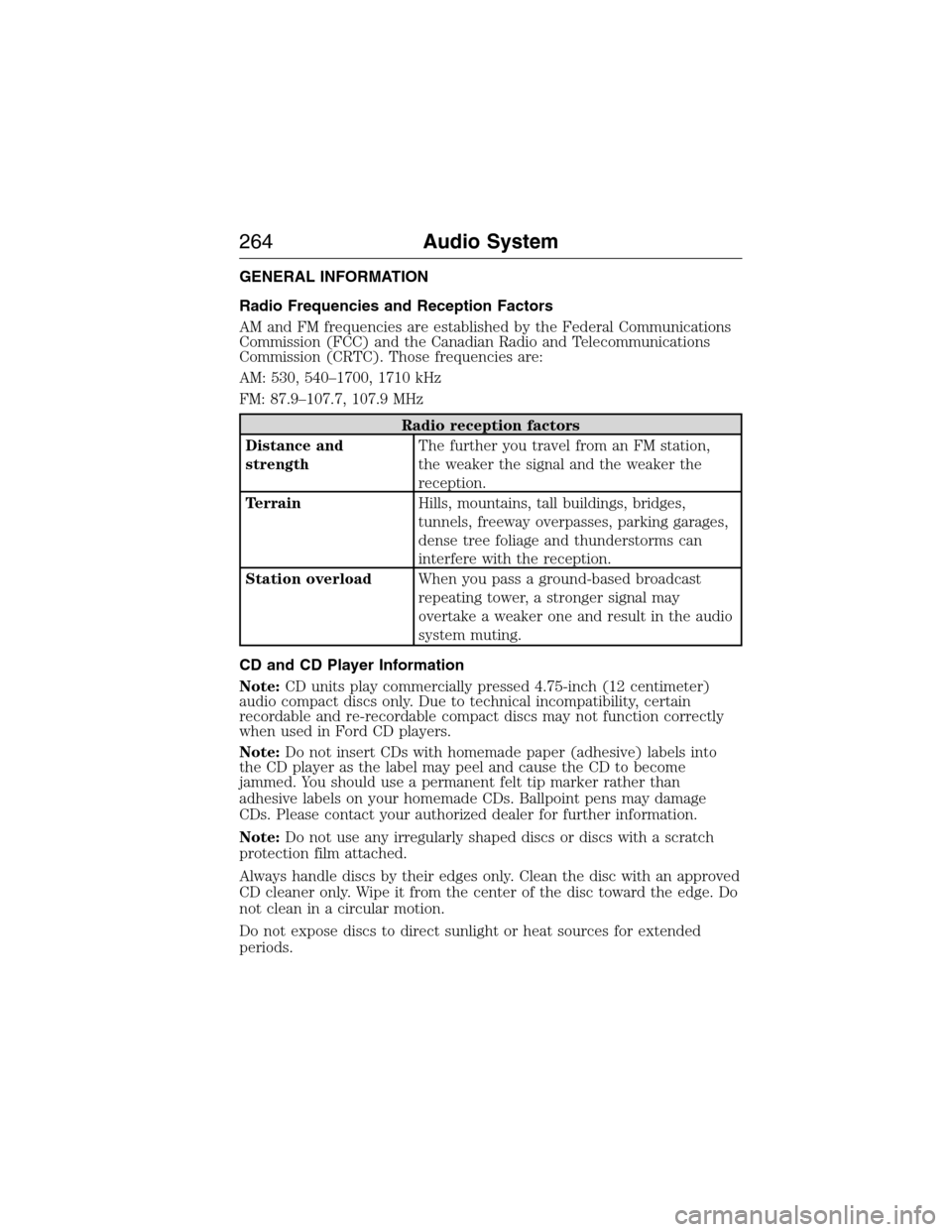
GENERAL INFORMATION
Radio Frequencies and Reception Factors
AM and FM frequencies are established by the Federal Communications
Commission (FCC) and the Canadian Radio and Telecommunications
Commission (CRTC). Those frequencies are:
AM: 530, 540–1700, 1710 kHz
FM: 87.9–107.7, 107.9 MHz
Radio reception factors
Distance and
strengthThe further you travel from an FM station,
the weaker the signal and the weaker the
reception.
TerrainHills, mountains, tall buildings, bridges,
tunnels, freeway overpasses, parking garages,
dense tree foliage and thunderstorms can
interfere with the reception.
Station overloadWhen you pass a ground-based broadcast
repeating tower, a stronger signal may
overtake a weaker one and result in the audio
system muting.
CD and CD Player Information
Note:CD units play commercially pressed 4.75-inch (12 centimeter)
audio compact discs only. Due to technical incompatibility, certain
recordable and re-recordable compact discs may not function correctly
when used in Ford CD players.
Note:Do not insert CDs with homemade paper (adhesive) labels into
the CD player as the label may peel and cause the CD to become
jammed. You should use a permanent felt tip marker rather than
adhesive labels on your homemade CDs. Ballpoint pens may damage
CDs. Please contact your authorized dealer for further information.
Note:Do not use any irregularly shaped discs or discs with a scratch
protection film attached.
Always handle discs by their edges only. Clean the disc with an approved
CD cleaner only. Wipe it from the center of the disc toward the edge. Do
not clean in a circular motion.
Do not expose discs to direct sunlight or heat sources for extended
periods.
264Audio System
2015 Econoline(eco)
Owners Guide gf, 1st Printing, June 2014
USA(fus)
Page 341 of 360

Owner Checks and Services
Certain basic maintenance checks and inspections should be performed
every month or at six month intervals.
Check every month
Engine oil level.
Function of all interior and exterior lights.
Tires (including spare) for wear and proper pressure.
Windshield washer fluid level.
Check every six months
Battery connections. Clean if necessary.
Body and door drain holes for obstructions. Clean if necessary.
Cooling system fluid level and coolant strength.
Door weatherstrips for wear. Lubricate if necessary.
Hinges, latches and outside locks for proper operation. Lubricate if
necessary.
Parking brake for proper operation.
Safety belts and seat latches for wear and function.
Safety warning lamps (brake, ABS, airbag, safety belt) for operation.
Washer spray and wiper operation. Clean or replace blades as
necessary.
340Scheduled Maintenance
2015 Econoline(eco)
Owners Guide gf, 1st Printing, June 2014
USA(fus)
Page 353 of 360

EXCEPTIONS
Normal Vehicle Axle Maintenance
Rear axles and power take-off units with synthetic fluid and light-duty
trucks equipped with Ford-design axles are lubricated for life; do not
check or change fluid unless a leak is suspected, service is required or
the assembly has been submerged in water. During long periods of trailer
towing with outside temperatures above 70°F (21°C) and at wide-open
throttle for long periods above 45 mph (72 km/h), non-synthetic rear
axle fluids should be changed every 3000 miles (4800 kilometers) or
three months, whichever comes first. This interval can be waived if the
axle is filled with 75W140 synthetic gear fluid meeting Ford specification
WSL-M2C192-A, part number F1TZ-19580-B or equivalent. Add friction
modifier XL-3 (EST-M2C118-A) or equivalent for complete refill of
Traction-Lok rear axles (seeTechnical specificationsin theCapacities
and Specificationschapter for details).
Axle Maintenance
Change the axle fluid anytime an axle is submerged in water.
California Fuel Filter Replacement
If you register your vehicle in California, the California Air Resources
Board has determined that the failure to perform this maintenance item
does not nullify the emission warranty or limit recall liability before the
completion of your vehicle’s useful life. Ford Motor Company, however,
urges you to have all recommended maintenance services performed at
the specified intervals and to record all vehicle service.
Hot Climate Oil Change Intervals
Vehicles operating in the Middle East, North Africa, Sub-Saharan Africa
or locations with similar climates using an American Petroleum Institute
(API) Certified for Gasoline Engines (Certification mark) oil of SM or SN
quality, the normal oil change interval is 3000 miles (5000 kilometers).
If the available API SM or SN oils are not available, then the oil change
interval is 1800 miles (3000 kilometers).
Engine Air Filter and Cabin Air Filter Replacement
The life of the engine air filter and cabin air filter is dependent on
exposure to dusty and dirty conditions. Vehicles operated in these
conditions require frequent inspection and replacement of the engine air
filter and cabin air filter.
352Scheduled Maintenance
2015 Econoline(eco)
Owners Guide gf, 1st Printing, June 2014
USA(fus)
Page 355 of 360

911 Assist™ ..............................296
A
ABS (see Brakes) .....................113
Accessing call history/phone
book during active call .............284
Accessing your media menu
features ......................................308
Accessing your phone menu
features ......................................286
Accessory delay ..........................63
Active call menu options .........284
Advanced menu options ...294, 315
Advanced menu options
(prompts, languages, defaults,
master reset, installing
applications) ..............................294
Airbag supplemental restraint
system ..........................................40
and child safety seats ..............41
description ................................40
disposal ......................................47
driver airbag ..............................40
passenger airbag .......................40
passenger deactivation
switch ........................................41
side airbag .................................40
Air cleaner filter .......190–191, 255
Air conditioning ....................82–83
manual heating and air
conditioning system ...........82–83
Ambulance packages ..................14
Antifreeze (see Engine
coolant) .....................................172
Anti-lock brake system (see
Brakes) ......................................113Anti-theft system ........................55
arming the system ....................56
AppLink™ .................................303
Audio system
Single CD ........................266–267
Audio system
(see Radio) ........................266–267
Automatic transmission
driving an automatic
overdrive .................................108
fluid, adding ............................177
fluid, checking ........................177
fluid, refill capacities ..............250
fluid, specification ..................250
Auxiliary input jack (Line in) ..272
Auxiliary powerpoint ..................90
Axle
lubricant specifications ..........250
refill capacities ........................250
traction lok ..............................112
B
Battery .......................................186
acid, treating emergencies .....186
jumping a disabled battery ....148
maintenance-free ....................186
replacement, specifications ...255
servicing ..................................186
Booster seats ...............................21
Brakes ........................................113
anti-lock ...................................113
anti-lock brake system (ABS)
warning light ...........................113
brake warning light ................113
fluid, checking and adding ....184
fluid, refill capacities ..............250
fluid, specifications .................250
lubricant specifications ..........250
354Index
2015 Econoline(eco)
Owners Guide gf, 1st Printing, June 2014
USA(fus)