2015 FORD E SERIES ECU
[x] Cancel search: ECUPage 233 of 360

USING SNOW CHAINS
WARNING:Snow tires must be the same size, load index, speed
rating as those originally provided by Ford. Use of any tire or
wheel not recommended by Ford can affect the safety and performance
of your vehicle, which could result in an increased risk of loss of vehicle
control, vehicle rollover, personal injury and death. Additionally, the use
of non-recommended tires and wheels could cause steering, suspension,
axle, transfer case or power transfer unit failure.
The tires on your vehicle have all-weather treads to provide traction in
rain and snow. However, in some climates, you may need to use snow
tires and chains. If you need to use chains, it is recommended that steel
wheels (of the same size and specifications) be used, as chains may chip
aluminum wheels.
Note:The suspension insulation and bumpers will help prevent vehicle
damage. Do not remove these components from your vehicle when using
snow tires and chains.
Follow these guidelines when using snow tires and chains:
•If possible, avoid fully loading your vehicle.
•Use only SAE Class S chains.
•Install chains securely, verifying that the chains do not touch any
wiring, brake lines or fuel lines.
•Drive cautiously. If you hear the chains rub or bang against your
vehicle, stop and retighten the chains. If this does not work, remove
the chains to prevent damage to your vehicle.
•Remove the tire chains when they are no longer needed. Do not use
tire chains on dry roads.
TIRE PRESSURE MONITORING SYSTEM
WARNING:The tire pressure monitoring system is NOT a
substitute for manually checking tire pressure. The tire pressure
should be checked periodically (at least monthly) using a tire gauge.
SeeInflating Your Tiresin this chapter. Failure to properly maintain
your tire pressure could increase the risk of tire failure, loss of control,
vehicle rollover and personal injury.
232Wheels and Tires
2015 Econoline(eco)
Owners Guide gf, 1st Printing, June 2014
USA(fus)
Page 236 of 360

When you believe your system is not operating properly
The main function of the tire pressure monitoring system is to warn you
when your tires need air. It can also warn you in the event the system is
no longer capable of functioning as intended. See the following chart for
information concerning your tire pressure monitoring system:
Low tire
pressure
warning lightPossible
causeCustomer action required
Solid warning light Tire(s)
under-inflated1. Make sure tires are at the
proper pressure. SeeInflating
your tiresin this chapter.
2. After inflating your tires to the
manufacturer’s recommended
pressure as shown on the Tire
Label (located on the edge of
driver’s door or the B-Pillar), the
vehicle must be driven for at least
two minutes over 20 mph
(32 km/h) before the light turns
off.
Spare tire in
useRepair the damaged road wheel
and tire asssembly and reinstall it
on the vehicle to restore system
function. For a description on how
the system functions, seeWhen
your temporary spare tire is
installedin this section.
TPMS
malfunctionIf the tires are properly inflated
and the spare tire is not in use but
the light remains on, contact your
authorized dealer as soon as
possible.
Tire rotation
without sensor
trainingOn vehicles with different front
and rear tire pressures, the tire
pressure monitoring system must
be retrained following every tire
rotation. SeeTire rotationin this
chapter.
Wheels and Tires235
2015 Econoline(eco)
Owners Guide gf, 1st Printing, June 2014
USA(fus)
Page 237 of 360
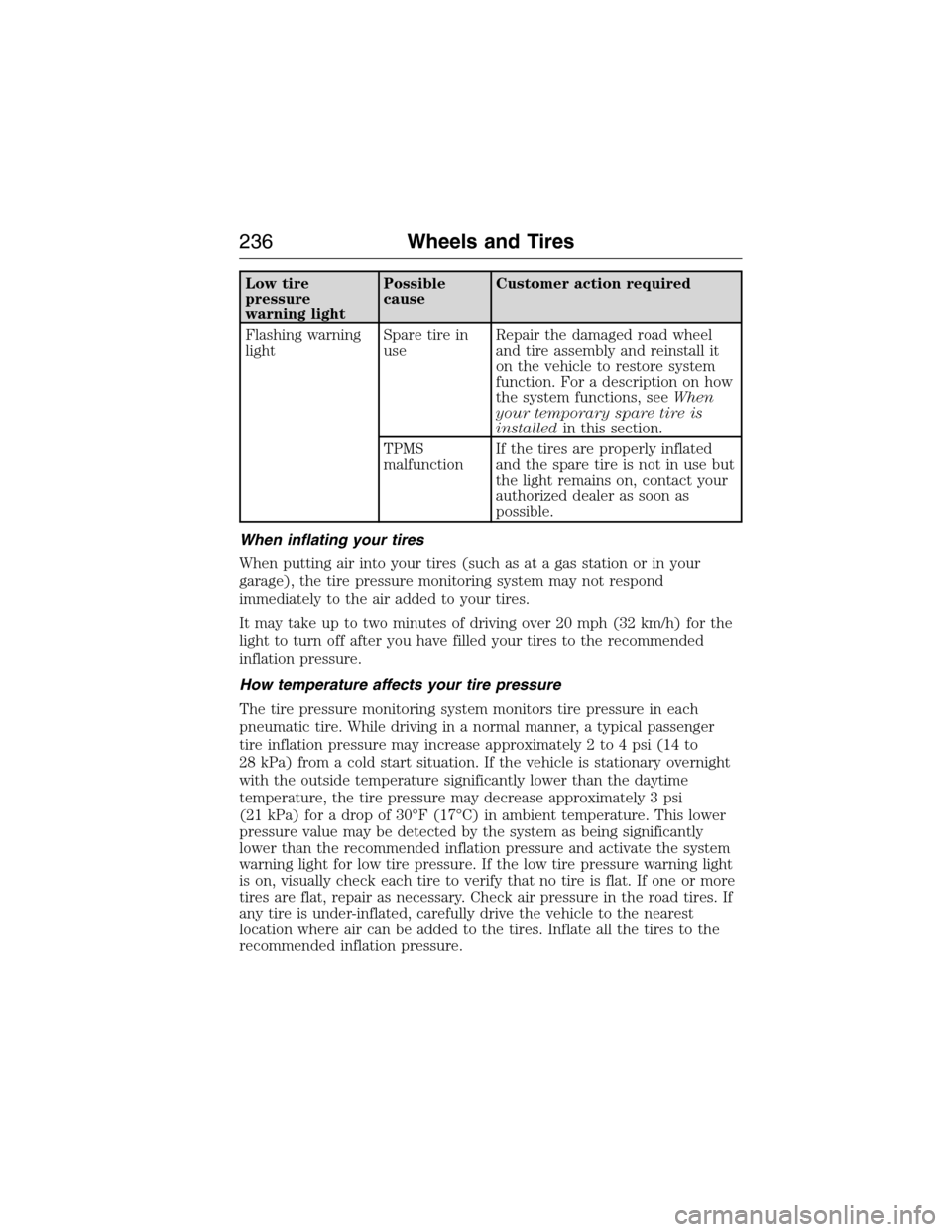
Low tire
pressure
warning lightPossible
causeCustomer action required
Flashing warning
lightSpare tire in
useRepair the damaged road wheel
and tire assembly and reinstall it
on the vehicle to restore system
function. For a description on how
the system functions, seeWhen
your temporary spare tire is
installedin this section.
TPMS
malfunctionIf the tires are properly inflated
and the spare tire is not in use but
the light remains on, contact your
authorized dealer as soon as
possible.
When inflating your tires
When putting air into your tires (such as at a gas station or in your
garage), the tire pressure monitoring system may not respond
immediately to the air added to your tires.
It may take up to two minutes of driving over 20 mph (32 km/h) for the
light to turn off after you have filled your tires to the recommended
inflation pressure.
How temperature affects your tire pressure
The tire pressure monitoring system monitors tire pressure in each
pneumatic tire. While driving in a normal manner, a typical passenger
tire inflation pressure may increase approximately 2 to 4 psi (14 to
28 kPa) from a cold start situation. If the vehicle is stationary overnight
with the outside temperature significantly lower than the daytime
temperature, the tire pressure may decrease approximately 3 psi
(21 kPa) for a drop of 30°F (17°C) in ambient temperature. This lower
pressure value may be detected by the system as being significantly
lower than the recommended inflation pressure and activate the system
warning light for low tire pressure. If the low tire pressure warning light
is on, visually check each tire to verify that no tire is flat. If one or more
tires are flat, repair as necessary. Check air pressure in the road tires. If
any tire is under-inflated, carefully drive the vehicle to the nearest
location where air can be added to the tires. Inflate all the tires to the
recommended inflation pressure.
236Wheels and Tires
2015 Econoline(eco)
Owners Guide gf, 1st Printing, June 2014
USA(fus)
Page 247 of 360

4. Check that the tire lies flat against the frame and is properly
tightened. Try to push or pull, then turn the tire to be sure it will not
move. Loosen and retighten, if necessary. Failure to properly stow the
spare tire may result in failure of the winch cable and loss of the tire.
5. Repeat this tightness check procedure when servicing the spare tire
pressure (every six months, as per yourscheduled maintenance
information),or at any time that the spare tire is disturbed through
service of other components.
6. If removed, install the spare tire lock into the bumper drive tube with
the spare tire lock key and jack handle.
TECHNICAL SPECIFICATIONS
Wheel Lug Nut Torque Specifications
WARNING:When a wheel is installed, always remove any
corrosion, dirt or foreign materials present on the mounting
surfaces of the wheel or the surface of the wheel hub, brake drum or
brake disc that contacts the wheel. Make sure that any fasteners that
attach the rotor to the hub are secured so they do not interfere with
the mounting surfaces of the wheel. Installing wheels without correct
metal-to-metal contact at the wheel mounting surfaces can cause the
wheel nuts to loosen and the wheel to come off while the vehicle is in
motion, resulting in loss of control.
On vehicles equipped with single rear wheels, retighten the lug nuts to
the specified torque at 100 miles (160 kilometers) after any wheel
disturbance (such as tire rotation, changing a flat tire, wheel removal).
On vehicles equipped with dual rear wheels, retighten the wheel lug nuts
to the specified torque at 100 miles (160 kilometers), and again at
500 miles (800 kilometers) of new vehicle operation and after any wheel
disturbance (such as tire rotation, changing a flat tire, wheel removal).
246Wheels and Tires
2015 Econoline(eco)
Owners Guide gf, 1st Printing, June 2014
USA(fus)
Page 259 of 360

ACCESSORIES
For a complete listing of the accessories that are available for your
vehicle, please contact an authorized dealer or visit our online store at
www.Accessories.Ford.com (United States only).
Ford Motor Company will repair or replace any properly authorized
dealer-installed Ford Genuine Accessory found to be defective in
factory-supplied materials or workmanship during the warranty period, as
well as any component damaged by the defective accessories.
Ford Motor Company will warrant your accessory through the warranty
that provides the greatest benefit:
•24 months, unlimited mileage.
•The remainder of your new vehicle limited warranty.
Contact an authorized dealer for details and a copy of the warranty.
Interior style
•Carpeted floor mats•All-weather floor mats
•Interior mirrors with
electrochromic compass and
temperature•Seat covers*
Lifestyle
Peace of mind
•Keyless entry keypad•Back up alarm*
•Remote start•Bumper mounted parking
sensors*
•Vehicle security systems
*The accessory manufacturer designs, develops and therefore warrants
Ford Licensed Accessories, and does not design or test these accessories
to Ford Motor Company engineering requirements. Contact an
authorized Ford dealer for the manufacturer’s limited warranty details,
and request a copy of the Ford Licensed Accessories product limited
warranty from the accessory manufacturer.
258Accessories
2015 Econoline(eco)
Owners Guide gf, 1st Printing, June 2014
USA(fus)
Page 264 of 360

Interest Free Finance Options Available
Take advantage of our interest free installment payment plan. Just a 10%
down payment will provide you with an affordable, no interest, no fee
payment program allowing you all the security and benefits Ford ESP
has to offer while paying over time. You are pre-approved with no credit
checks, no hassles! To learn more, call our Ford ESP specialists at
800-367-3377.
Ford ESP
P.O. Box 8072
Royal Oak, MI 48068-0039
SERVICE PLANS (CANADA ONLY)
You can get more protection for your vehicle by purchasing a Ford
Extended Service Plan. Ford Extended Service Plan is the only service
contract backed by Ford Motor Company of Canada, Limited. Depending
on the plan you purchase, Ford Extended Service Plan provides benefits
such as:
•Rental reimbursement
•Coverage for certain maintenance and wear items
•Protection against repair costs after your New Vehicle Limited
Warranty Coverage expires
•Roadside Assistance benefits
There are several Ford Extended Service Plans available in various time,
distance and deductible combinations. Each plan is tailored to fit your
own driving needs, including reimbursement for towing and rental. When
you purchase Ford Extended Service Plan, you receive added
peace-of-mind protection throughout Canada and the United States,
provided by a network of participating authorized Ford Motor Company
dealers.
Note:Repairs performed outside of Canada and the United States are
not eligible for Ford Extended Service Plan coverage.
This information is subject to change. For more information, visit your
local Ford of Canada dealer or www.ford.ca to find the Ford Extended
Service Plan that is right for you.
Extended Service Plan263
2015 Econoline(eco)
Owners Guide gf, 1st Printing, June 2014
USA(fus)
Page 273 of 360

Radio display Condition Possible action
Call SIRIUS
1–888–539–7474Your satellite service is
no longer available.Call Sirius at
1–888–539–7474 to
resolve subscription
issues.
None Found. Check
Channel Guide.All the channels in the
selected category are
either skipped or
locked.Use the channel guide
to turn off the Lock or
Skip function on that
station.
Subscription Updated Sirius has updated the
channels available for
your vehicle.No action required.
AUXILIARY INPUT JACK
WARNING:Driving while distracted can result in loss of vehicle
control, crash and injury. We strongly recommend that you use
extreme caution when using any device that may take your focus off
the road. Your primary responsibility is the safe operation of your
vehicle. We recommend against the use of any hand-held device while
driving and encourage the use of voice-operated systems when possible.
Make sure you are aware of all applicable local laws that may affect the
use of electronic devices while driving.
WARNING:For safety reasons, do not connect or adjust the
settings on your portable music player while your vehicle is
moving.
WARNING:Store the portable music player in a secure location,
such as the center console or the glove box, when your vehicle is
moving. Hard objects may become projectiles in a crash or sudden stop,
which may increase the risk of serious injury. The audio extension cable
must be long enough to allow the portable music player to be safely
stored while your vehicle is moving.
272Audio System
2015 Econoline(eco)
Owners Guide gf, 1st Printing, June 2014
USA(fus)
Page 297 of 360

911 Assist®
WARNING:Unless the 911 Assist setting is set on prior to a
crash, the system will not dial for help which could delay
response time, potentially increasing the risk of serious injury or death
after a crash.
WARNING:Do not wait for 911 Assist to make an emergency
call if you can do it yourself. Dial emergency services
immediately to avoid delayed response time which could increase the
risk of serious injury or death after a crash. If you do not hear 911
Assist within five seconds of the crash, the system or phone may be
damaged or non-functional.
WARNING:Always place your phone in a secure location in the
vehicle so it does not become a projectile or get damaged in a
crash. Failure to do so may cause serious injury to someone or damage
the phone which could prevent 911 Assist from working properly.
Note:SYNC 911 Assist feature must be set on prior to the incident.
Note:Before setting this feature on, ensure that you read the 911 Assist
privacy notice later in this section for important information.
Note:If 911 Assist is turned on or off by any user, that setting applies
for all paired phones. If 911 Assist is turned off, a voice message plays
and/or a display message/icon comes on when the vehicle is started after
a previously paired phone connects.
Note:Every phone operates differently. While SYNC 911 Assist works
with most cellular phones, some may have trouble using this feature.
If a crash deploys an airbag (excludes knee airbags and rear inflatable
safety belts [if equipped]) or activates the fuel pump shut-off, your SYNC
equipped vehicle may be able to contact emergency services by dialing
911 through a paired and connected Bluetooth-enabled phone. For more
information about 911 Assist, visit www.SYNCMyRide.com,
www.SYNCMyRide.ca or www.syncmaroute.ca.
•For information on airbag deployment, see theSupplementary
Restraints Systemchapter.
•For information on the fuel pump shut-off, see theRoadside
Emergencieschapter.
296SYNC®
2015 Econoline(eco)
Owners Guide gf, 1st Printing, June 2014
USA(fus)