2015 FIAT 500X display
[x] Cancel search: displayPage 61 of 240

Symbol What it means
FUEL LEVEL SENSOR FAILURE
The symbol switches on in the event of fuel level sensor failure. Contact a Fiat Dealership.ENGINE OIL DETERIORATED
(where provided)
Diesel versions: the symbol turns on and is displayed for 3 minute cycles and intervals of 5 seconds until
the oil is changed.
The symbol is displayed until the problem is solved.
Petrol versions: the symbol switches on and then is not displayed when the display cycle is completed.
IMPORTANT After the first indication, each time the engine is started the symbol will continue to switch on
as described above until the oil is changed.
If the symbol flashes, this does not mean that there is a fault on the vehicle, rather it simply reports that it is
now necessary to change the oil as a result of regular use of the vehicle.
The deterioration of engine oil is accelerated by using the vehicle for short drives, preventing the engine
from reaching operating temperature.
Contact a Fiat Dealership as soon as possible.
20) 21)
WARNING
20)Deteriorated engine oil should be replaced as soon as possible after the symbol is switched on, and never more than 500 km after it first
switches on. Failure to observe the above indications may result in severe damage to the engine and invalidate the warranty. The switching
on of this symbol is not correlated to the quantity of oil in the engine; therefore if it flashes you do not need to top up the engine oil.
21)If the symbol flashes whilst driving, contact a Fiat Dealership.
59
15-12-2014 8:23 Pagina 59
Page 62 of 240

Symbol What it means
GENERAL FAILURE
The switching on of this symbol signals: engine oil pressure sensor failure. Contact a Fiat Dealership as
soon as possible.SCHEDULED SERVICING (SERVICE)
When the next scheduled service is approaching, the symbol will be displayed, followed by the number of
kilometres/miles or days (where provided) left, when the ignition device is turned to MAR.
Go to a Fiat Dealership, where the "Scheduled Servicing Plan" operations will be performed and the
message will be reset.The switching on of this symbol indicates that the clutch pedal must be pressed for starting enablement.The switching on of this indication is equivalent to the suggestion to engage a higher gear (upshifting).The switching on of this indication is equivalent to the suggestion to engage a lower gear (downshifting).SPEED LIMIT EXCEEDED
The (white) symbol switches on when the speed limit (e.g. 110 km/h) set through the menu of the display is
exceeded (the inner value updates according to the set speed).
For versions/markets, where provided, the (red) symbol switches on when the speed limit set through the
menu of the display is exceeded: for these versions the value is set to 120.
60
KNOWING THE INSTRUMENT PANEL
15-12-2014 8:23 Pagina 60
Page 70 of 240

The system activation is signalled to the
driver by means of a visual and
acoustic warning.
IMPORTANT If the sensors are covered
by objects or vehicles, the system will
not warn the driver.Operating modeThe system can be activated/
deactivated by operating on the display
Menu, or via theUconnect™system
(for further information see the
dedicated Supplement)."Blind Spot Assist", "Visual" modeWhen this mode is active, the BSA
system sends a visual warning to the
relevant door mirror, depending on the
detected object.
However, when operating in RCP
mode, the system sends visual and
acoustic warnings when the presence
of an object is detected.
When an acoustic warning is sent, the
Uconnect™volume is lowered."Blind Spot Assist", "Visual and
acoustic" modeWhen this mode has been activated,
the BSA system sends a visual warning
to the relevant door mirror, depending
on the detected object.If the direction indicator on the side
where an obstacle has been detected is
activated, an acoustic warning is
emitted as well.
When a direction indicator is active and
an object is simultaneously detected
on the same side, both the acoustic
and visual warnings are emitted. The
Uconnect™volume is also lowered.
During "RCP" operating mode, the
system sends acoustic and visual
warnings if the presence of an object is
detected. When an acoustic warning
is sent, theUconnect™volume is also
lowered.
"Blind Spot Assist" function
deactivationWhen the system is deactivated ("Blind
spot alert" mode at "OFF"), the BSA
or RCP systems will not emit neither
acoustic nor visual warnings.
The BSA system will store the operating
mode running when the engine was
switched off. Each time the engine
is started, the operating mode stored
previously will be recalled and used.IMPORTANT The system is an aid for
vehicle driving, it DOES NOT warn
the driver about incoming vehicles
outside of the detection areas. The
driver must always maintain a sufficient
level of attention to the traffic and
road conditions and for controlling the
trajectory of the vehicle.
FULL BRAKE CONTROL
SYSTEM
58) 59) 60) 61)22) 23) 24) 25) 26) 27) 28) 29) 30)
The vehicle can be equipped with the
"Full Brake Control" system. This is
a driving assistance system which
comprises a radar located behind the
front bumper fig. 57 and a camera
located in the central part of the
windscreen fig. 58.57
F1B0095C
68
SAFETY
15-12-2014 8:23 Pagina 68
Page 71 of 240
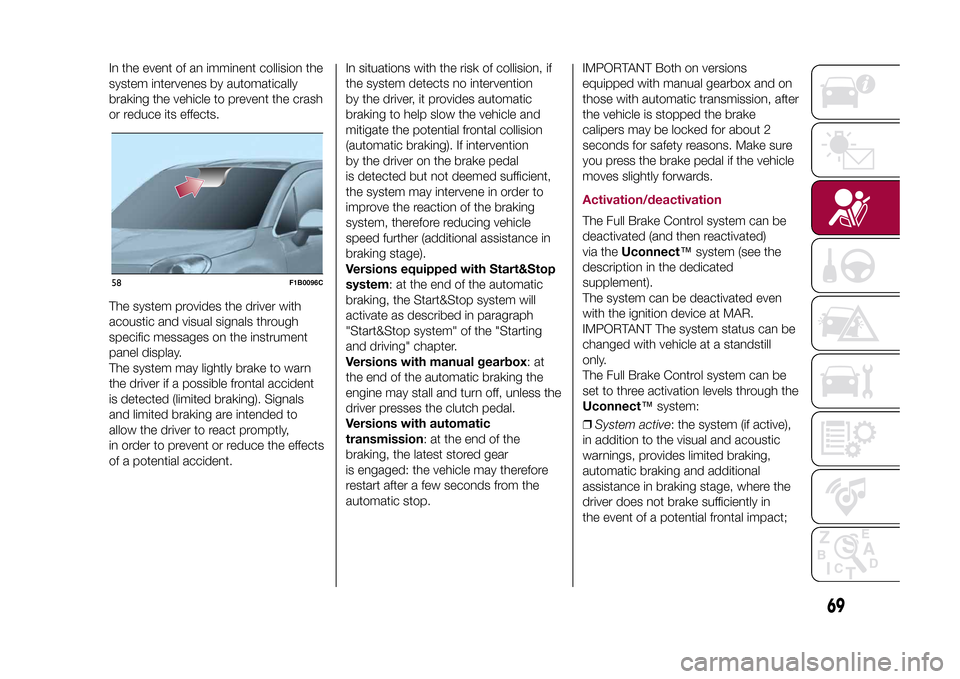
In the event of an imminent collision the
system intervenes by automatically
braking the vehicle to prevent the crash
or reduce its effects.
The system provides the driver with
acoustic and visual signals through
specific messages on the instrument
panel display.
The system may lightly brake to warn
the driver if a possible frontal accident
is detected (limited braking). Signals
and limited braking are intended to
allow the driver to react promptly,
in order to prevent or reduce the effects
of a potential accident.In situations with the risk of collision, if
the system detects no intervention
by the driver, it provides automatic
braking to help slow the vehicle and
mitigate the potential frontal collision
(automatic braking). If intervention
by the driver on the brake pedal
is detected but not deemed sufficient,
the system may intervene in order to
improve the reaction of the braking
system, therefore reducing vehicle
speed further (additional assistance in
braking stage).
Versions equipped with Start&Stop
system: at the end of the automatic
braking, the Start&Stop system will
activate as described in paragraph
"Start&Stop system" of the "Starting
and driving" chapter.
Versions with manual gearbox:at
the end of the automatic braking the
engine may stall and turn off, unless the
driver presses the clutch pedal.
Versions with automatic
transmission: at the end of the
braking, the latest stored gear
is engaged: the vehicle may therefore
restart after a few seconds from the
automatic stop.IMPORTANT Both on versions
equipped with manual gearbox and on
those with automatic transmission, after
the vehicle is stopped the brake
calipers may be locked for about 2
seconds for safety reasons. Make sure
you press the brake pedal if the vehicle
moves slightly forwards.
Activation/deactivationThe Full Brake Control system can be
deactivated (and then reactivated)
via theUconnect™system (see the
description in the dedicated
supplement).
The system can be deactivated even
with the ignition device at MAR.
IMPORTANT The system status can be
changed with vehicle at a standstill
only.
The Full Brake Control system can be
set to three activation levels through the
Uconnect™system:
❒System active: the system (if active),
in addition to the visual and acoustic
warnings, provides limited braking,
automatic braking and additional
assistance in braking stage, where the
driver does not brake sufficiently in
the event of a potential frontal impact;
58
F1B0096C
69
15-12-2014 8:23 Pagina 69
Page 72 of 240

❒System partially active: the system (if
active) does not provide limited braking,
but guarantees automatic braking or
additional assistance in braking stage,
where the driver does not brake at all or
not sufficiently in the event of a
potential frontal impact. The visual and
acoustic warnings are deactivated,
and will not be provided;
❒System deactivated: the system
does not provide visual and acoustic
warnings, limited braking, automatic
braking or additional assistance in
braking stage. The system will therefore
provide no indication of a possible
accident.Activation/deactivationIf the Full Brake Control system has
been correctly activated with the
Uconnect™system, this will be active
each time the engine is started.
Following a deactivation, the system will
not warn the driver about the possible
collision with the preceding vehicle,
regardless of the setting selected with
theUconnect™system.
The system deactivation status will not
be stored when the engine is switched
off: if the system is deactivated when
the engine is switched off, it will be
active when it is next started.This function is not active at a speed
lower than 7 km/h or higher than 200
km/h.
The system is only active if:
❒it is correctly activated via the
Uconnect™system;
❒the ignition device is at MAR;
❒the vehicle speed is between 7 and
200 km/h;
❒the front seat belts are fastened.
Changing the system sensitivityThe sensitivity of the system can be
changed through theUconnect™
system menu, choosing from one of the
following three options: "Near", "Med"
or "Far". See the description in the
Uconnect™supplement for how to
change the settings.
The pre-set option is "Med". With this
setting, the system warns the driver
of a possible collision with the vehicle in
front when that vehicle is at a standard
distance, between that of the other
two settings.With the system sensitivity set to "Far",
the system will warn the driver of a
possible collision with the vehicle in
front when that vehicle is at a greater
distance, thus providing the possibility
of acting on the brakes more lightly and
gradually. This setting provides the
drivers with the maximum possible
reaction time to prevent a potential
accident.
With the option set to "Near", the
system will warn the driver of a possible
collision with the vehicle in front when
that vehicle is close. This setting offers
the driver a lower reaction time
compared to the "Med" and "Far"
settings, in the event of a potential
collision, but permits more dynamic
driving of the vehicle.
The system sensitivity setting is kept in
the memory when the engine is
switched off.
System limited operation signalIf the dedicated message is displayed,
a condition limiting the system
operation may have occurred. The
possible reasons of this limitation are
something blocking the camera view or
a fault.
If an obstruction is signalled, clean the
area of the windscreen indicated in
fig. 58 and check that the message has
disappeared.
70
SAFETY
15-12-2014 8:23 Pagina 70
Page 73 of 240

Although the vehicle can still be driven
in normal conditions, the system may
be not completely available.
When the conditions limiting the system
functions end, this will go back to
normal and complete operation. Should
the fault persist, contact a Fiat
Dealership.System failure signallingIf the system switches off and a
dedicated message is shown on the
display, it means that there is a fault on
the system.
In this case, it is still possible to drive
the vehicle, but you are advised to
contact a Fiat Dealership as soon as
possible.Radar indication not availableIf conditions are such that the radar
cannot detect obstacles correctly, the
system is deactivated and a dedicated
message appears on the display.
This generally occurs in the event of
poor visibility, such as when it is
snowing or raining heavily. When the
conditions limiting the system functions
end, this will go back to normal and
complete operation.
Frontal collision alarm with active
braking(where provided)
If this function is selected, the brakes
are operated to reduce the speed of the
vehicle in the event of potential frontal
impact
This function applies an additional
braking pressure if the braking pressure
applied by the driver does not suffice
to prevent potential frontal impact.
The function is active with speed above
7 km/h.Driving in special conditionsIn certain driving conditions, such as,
for example:
❒driving close to a bend;
❒vehicles with small dimensions
and/or not aligned in the driving lane;
❒lane change by other vehicles;
❒vehicles travelling at right angles to
the vehicle.
system intervention might be
unexpected or delayed. The driver must
therefore be very careful, keeping
control of the vehicle to drive in
complete safety.
IMPORTANT In particularly complex
traffic conditions, the driver can
deactivate the system through the
Uconnect™system.
Driving close to a bendWhen tackling a wide bend, the system
may detect the presence of a vehicle
in front you, but not running on the
same driving lane fig. 59. In cases such
as these, the system may intervene.Vehicles with small dimensions
and/or not aligned in the driving
laneThe system cannot detect vehicles in
front of you but outside the range of the
radar sensor and may therefore not
react in the presence of small vehicles,
such as bicycles or motorcycles fig. 60.Lane change by other vehiclesVehicles suddenly changing lane,
entering the driving lane of the vehicle
fig. 61 and inside the radar sensor
operating range, may cause system
activation.59
F1B0097C
71
15-12-2014 8:23 Pagina 71
Page 74 of 240

Vehicles travelling at right angles to
the vehicleThe system may temporarily react to a
vehicle that is passing through the radar
sensor’s operating range at right angles
fig. 62.
Important❒The system has not been designed
to prevent impacts and cannot detect
possible conditions leading to an
accident in advance. Failure to take into
account this warning may lead to
serious or fatal injuries.
❒The system may activate, assessing
the trajectory of the vehicle, due to
the presence of reflective metal objects
different from other vehicles, such as
safety barriers, road signs, barriers
before parking lots, tollgates, level
crossings, gates, railways, objects near
road constructions sites or higher
than the vehicle (e.g. a flyover). In the
same way, the system may intervene
inside multi-storey car parks or tunnels,
or due to a glare on the road surface.
These possible activations follow the
normal operating logic of the system
and must not be regarded as faults.❒The system has been designed for
road use only. If the vehicle is driven
off-road, the system must be
deactivated, to avoid unnecessary
warnings. Automatic deactivation is
signalled by the dedicated warning
light/icon switching on in the instrument
panel (see the instructions in the
"Warning lights and messages"
paragraph, "Knowing the instrument
panel" chapter).
iTPMS (indirect Tyre
Pressure Monitoring
System)
62) 63) 64) 65) 66) 67)31)
DescriptionThe vehicle can be equipped with the
iTPMS (indirect Tyre Pressure
Monitoring System) which monitors the
tyre inflation status thanks to wheel
speed sensors.Correct tyre pressureIf the pressure of all the tyres
corresponds to the correct value, the
display shows the vehicle with "OK"
beside each wheel.
60
F1B0098C
61
F1B0099C
62
F1B0100C
72
SAFETY
15-12-2014 8:23 Pagina 72
Page 75 of 240

Low tyre pressureThe system warns the driver if one or
more tyres are flat by switching on
the
warning light on the instrument
panel and a warning message on
the display, along with an acoustic
signal. .
If the system does not recognise the
pressure value of one or more tyres, the
display will show dashes "– –"
This indication is displayed also when
turning the engine off and on again until
the RESET procedure is carried out.
Reset procedureThe iTPMS needs an initial "self-
learning" phase (with length depending
on the driving style and road conditions:
optimal conditions being driving on a
straight road at 80 km/h for at least 20
minutes) which starts when the RESET
procedure is carried out.
The RESET procedure must be carried
out:
❒whenever the tyre pressure is
modified;
❒when even only one tyre is changed;
❒when tyres are rotated/inverted;
❒when the space-saver wheel is fitted.Before carrying out the RESET
procedure, inflate the tyres to the rated
pressure values specified in the inflation
pressure table (see "Wheels" paragraph
in the "Technical specifications"
chapter).
If the RESET is not carried out, in all
above cases, the
warning light may
give false indications on one or more
tyres.
To carry out the RESET procedure, with
the vehicle stopped and the ignition
device at MAR, use the Main Menu as
follows:
❒go to "Vehicle info" and then to
"Reset tyre pressure"
❒press the "OK" and hold down (more
than 2 seconds)
❒the display will show the procedure
progress (with a graphic bar) till the
RESET is completed.
At the end of the RESET procedure the
display will show the "Reset saved"
message, indicating that the self-
learning has been started.
Working conditionsThe system is active for speeds above
15 km/h.In a few situations such as sporty
driving, particular conditions of the road
surface (e.g. icy, snowy, unsurfaced
roads...) the signalling may be delayed
or partial in detecting the contemporary
deflation of more than one tyre.
Under special conditions (e.g. vehicle
loaded asymmetrically on one side,
damaged or worn tyre, fitting the
space-saver wheel, fitting snow chains,
fitting different tyres on the axles) the
system may give false indications or be
temporarily deactivated.
If the system is temporarily deactivated
the
warning light flashes for about
75 seconds and then is continuously
on; at the same time, the display shows
a warning message.
This indication is displayed also after
the engine has been switched off and
then on again if the correct operating
conditions are not restored.
WARNING
57)The system is an aid for vehicle driving,
it DOES NOT warn the driver about
incoming vehicles outside of the detection
areas. The driver must always maintain a
sufficient level of attention to the traffic and
road conditions and for controlling the
trajectory of the vehicle.
73
15-12-2014 8:23 Pagina 73