2015 FIAT 500E climate control
[x] Cancel search: climate controlPage 206 of 367
are selected. This allows the front occupants to control
the volume of air circulated in the vehicle and cancel the
AUTO mode.
The operator can also select the direction of the airflow
by selecting one of the following positions.
5. Mix Mode
Air is directed through the floor, defrost, and side
window demister outlets. This setting works best
in cold or snowy conditions that require extra heat to the
windshield. This setting is good for maintaining comfort
while reducing moisture on the windshield. Performing
this function will cause the ATC to switch into manual
mode.
6. Front Defrost
Push and release to change the current airflow
setting to Defrost mode. The indicator illuminates
when this feature is ON. Air comes from the windshield
and side window demist outlets. When the defrost but-
ton is selected, the blower level will increase. Use Defrost
mode with maximum temperature settings for best wind-
shield and side window defrosting and defogging. Per-
forming this function will cause the ATC to switch into
manual mode. If the front defrost mode is turned off the
climate system will return the previous setting.
7. Floor Mode
Air is directed through the floor outlets with a
small amount flowing through the defrost and
side window demister outlets. Performing this function
will cause the ATC to switch into manual mode.
8. Panel Mode
Air is directed through the outlets in the instru-
ment panel. These outlets can be adjusted to direct
airflow. Performing this function will cause the ATC to
switch into manual mode.
204 UNDERSTANDING YOUR INSTRUMENT PANEL
Page 207 of 367

NOTE:The center instrument panel outlets can be aimed
so that they are directed toward the rear seat passengers
for maximum airflow to the rear.
9. Bi-Level
Air is directed through the panel and floor outlets.
Press and release the Panel mode button and Floor
mode button to enter Bi-Level mode, the indicators
illuminate when ON. Performing this function will cause
the ATC to switch into manual mode.
10. Temperature Control Down Button
Provides temperature down control. Push the button for
cooler temperature settings.
NOTE:If the temperature is lowered until#Lo#is dis-
played, all high voltage Heating, Ventilation, and Air
Conditioning (HVAC) systems are deactivated and am-
bient air is circulated according to the Heating, Ventila-
tion, and Air Conditioning (HVAC) control settings.
11. Climate Control ON/OFF Button
Push and release to turn the Climate Control ON or OFF.
12. Recirculation Control Button
Push and release to change the current setting. The
indicator illuminates when ON.
NOTE:When in Defrost mode, the Recirculation button
will flash if pushed. This indicates that you can not
proceed to this mode due to fogging risk.
Climate Control Functions
Air Conditioning (A/C)
The Air Conditioning (A/C) button allows the operator to
manually activate or deactivate the air conditioning system.
When in A/C mode with the ATC set to a cool temperature,
dehumidified air flows through the air outlets. If Economy
mode is desired, push the A/C button to turn off the A/C
mode in the ATC display and deactivate the A/C system.
4
UNDERSTANDING YOUR INSTRUMENT PANEL 205
Page 208 of 367

NOTE:
•If the system is in Mix or Defrost Mode, the A/C can
be turned off, but the A/C system shall remain active
to prevent fogging of the windows.
•If fog or mist appears on the windshield or side glass,
select Defrost mode and adjust blower speed if
needed.
Recirculation Control
When outside air contains smoke, odors, or high
humidity, or if rapid cooling is desired, you may
wish to recirculate interior air by pushing the RECIRCU-
LATION control button. Recirculation mode should only
be used temporarily. The recirculation LED will illumi-
nate when this button is selected. Push the button a
second time to turn off the Recirculation mode LED and
allow outside air into the vehicle.
NOTE:In cold weather, use of Recirculation mode may lead
to excessive window fogging. The recirculation feature may
be unavailable (indicator light shall blink) if conditions exist
that could create fogging on the inside of the windshield. On
systems with Manual Climate Controls, the Recirculation
mode is not allowed in Defrost mode to improve window
clearing operation. Recirculation will be disabled automati-
cally if this mode is selected. Attempting to use Recirculation
while in this mode will cause the LED in the control button
to blink and then turn off.
Automatic Operation
1. Push the AUTO button on the Automatic Temperature
Control (ATC) Panel, the indicator will illuminate
when on.
2.Next, adjust the temperature you would like the system
to maintain by adjusting the temperature control buttons.
Once the desired temperature is displayed, the system
will achieve and automatically maintain that comfort
level.
206 UNDERSTANDING YOUR INSTRUMENT PANEL
Page 210 of 367
Operating Tips
NOTE:Refer to the chart at the end of this section for
suggested control settings for various weather condi-
tions.
Window Fogging
Windows will fog on the inside when the humidity inside
the vehicle is high. This often occurs in mild or cool
temperatures when it’s rainy or humid. In most cases,
turning the air conditioning (pressing the A/C button) on
will clear the fog. Adjust the temperature control, air
direction, and blower speed to maintain comfort.
As the temperature gets colder, it may be necessary to
direct air onto the windshield. Adjust the temperature
control and blower speed to maintain comfort. Higher
blower speeds will reduce fogging. Interior fogging on
the windshield can be quickly removed by selecting the
Defrost mode.
Regular cleaning of the inside of the windows with a
non-filming cleaning solution (vinegar and water works
very well) will help prevent contaminates (cigarette
smoke, perfumes, etc.) from sticking to the windows.
Contaminates increase the rate of window fogging.
NOTE:Automatic Temperature Controls (ATC) will au-
tomatically adjust the climate control settings to reduce
or eliminate window fogging on the front windshield.
When this occurs, recirculation will be unavailable.
208 UNDERSTANDING YOUR INSTRUMENT PANEL
Page 273 of 367
The 500e uses high voltage components to heat and cool
the cabin, so when using automatic climate control,
consider setting temperatures a few degrees higher or
lower during hot and cold days. If your 500e has been
soaking in hot or cold temperatures for an extended
period, it is recommended that the car be preconditioned
using the FIAT Access smartphone app while still
plugged into a charging source. This will allow 500e to
use external power to establish a comfortable cabin
temperature before the drive and allow the battery to
maintain the temperature at significantly lower energy
levels.
Additional tips:
•Keep tires properly inflated
•When practical, choose surface streets over the high-
way, and work to maintain a steady speed
•Avoid carrying nonessential cargo
•Be mindful of adding external accessories that may
increase aerodynamic drag
•Perform all scheduled maintenance at recommended
intervals
Driver Behavior Gauge
To help the driver extend the driving range of the high
voltage battery your vehicle is equipped with a Driver
Behavior Gauge. The Driver Behavior Gauge is located
on the right side of the instrument cluster and contains
three driving ranges:
•Power
The needle will move into the Power range when under
acceleration.
•ECO
The needle will move into the ECO range when you are
maximizing the driving range of the high voltage battery.
5
STARTING AND OPERATING 271
Page 324 of 367
Interior Fuses
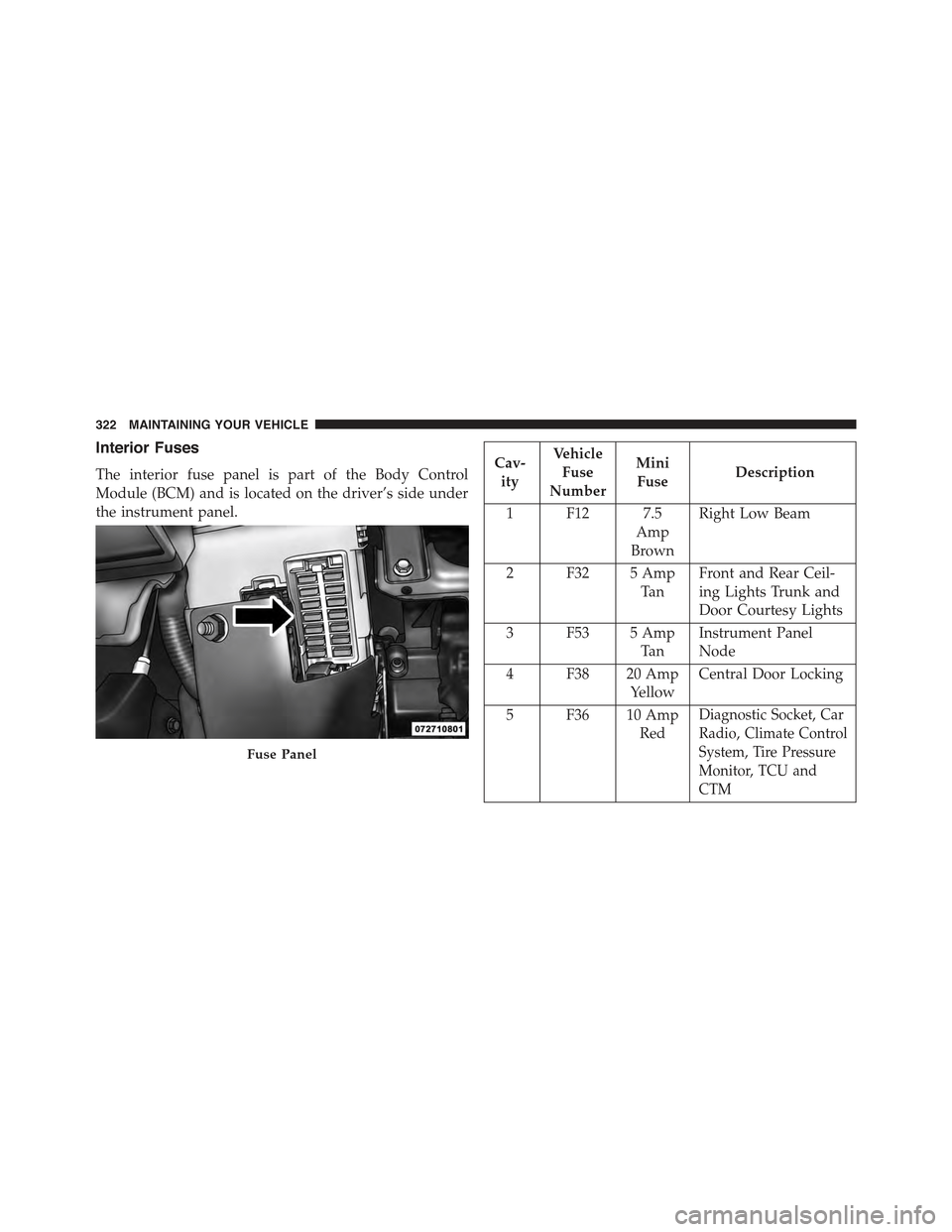
The interior fuse panel is part of the Body Control
Module (BCM) and is located on the driver’s side under
the instrument panel.
Cav-
ity
Vehicle
Fuse
Number
Mini
FuseDescription
1 F12 7.5
Amp
Brown
Right Low Beam
2 F32 5 Amp
Ta n
Front and Rear Ceil-
ing Lights Trunk and
Door Courtesy Lights
3 F53 5 Amp
Ta n
Instrument Panel
Node
4 F38 20 Amp
Yellow
Central Door Locking
5 F36 10 Amp
Red
Diagnostic Socket, Car
Radio, Climate Control
System, Tire Pressure
Monitor, TCU and
CTM
Fuse Panel
322 MAINTAINING YOUR VEHICLE
Page 353 of 367
Treadwear
The Treadwear grade is a comparative rating, based on
the wear rate of the tire when tested under controlled
conditions on a specified government test course. For
example, a tire graded 150 would wear one and one-half
times as well on the government course as a tire graded
100. The relative performance of tires depends upon the
actual conditions of their use, however, and may depart
significantly from the norm due to variations in driving
habits, service practices, and differences in road charac-
teristics and climate.
Traction Grades
The Traction grades, from highest to lowest, are AA, A, B,
and C. These grades represent the tire’s ability to stop on
wet pavement, as measured under controlled conditions
on specified government test surfaces of asphalt and
concrete. A tire marked C may have poor traction perfor-
mance.
WARNING!
The traction grade assigned to this tire is based on
straight-ahead braking traction tests, and does not
include acceleration, cornering, hydroplaning, or
peak traction characteristics.
Temperature Grades
The temperature grades are A (the highest), B, and C,
representing the tire’s resistance to the generation of heat
and its ability to dissipate heat, when tested under
controlled conditions on a specified indoor laboratory
test wheel. Sustained high temperature can cause the
material of the tire to degenerate and reduce tire life, and
excessive temperature can lead to sudden tire failure.9
IF YOU NEED CONSUMER ASSISTANCE 351
Page 357 of 367

Brake System............................312
Anti-Lock (ABS)........................228
Master Cylinder........................312
Parking..............................226
Warning Light.........................158
Bulb Replacement.........................329
Bulbs, Light..............................98
Capacities, Fluid..........................333
Cargo Area Features.......................149
Car Washes.............................315
CD (Compact Disc) Player...................173
Cellular Phone...........................202
Chart, Tire Sizing.........................236
Checking Your Vehicle For Safety...............95
Checks, Safety............................95
Child Restraint............................76
Child Restraints
Booster Seats...........................81
Child Restraints.........................76
Child Seat Installation.....................92
How To Stow An Unused ALR Seat Belt........89
Infants And Child Restraints................79
Install A LATCH-compatible Child Restraint.....88
Installing Child Restraints Using The Vehicle Seat
Belt..................................90
Lower Anchors And Tethers For Children.......83
Older Children And Child Restraints..........79
Seating Positions........................82
Cleaning
Wheels...............................316
Climate Control..........................202
Clutch.................................312
Clutch Fluid.............................312
Compact Disc (CD) Maintenance..............201
Compact Spare Tire........................254
Connector
UCI . . . . . . . . . . . . . . . . . . . . . . . . . . . . . . . ..199
10
INDEX 355