Page 226 of 367
Shallow Standing Water
Although your vehicle is capable of driving through
shallow standing water, consider the following Caution
and Warning before doing so.
CAUTION!
•Always check the depth of the standing water
before driving through it. Never drive through
standing water that is deeper than the bottom of
the tire rims mounted on the vehicle.
•Determine the condition of the road or the path
that is under water and if there are any obstacles in
the way before driving through the standing water.
•Do not exceed 5 mph (8 km/h) when driving
through standing water. This will minimize wave
effects.
(Continued)
CAUTION!(Continued)
•Driving through standing water may cause damage
to your vehicle’s drivetrain components. Always
inspect your vehicle’s fluids (i.e., transmission,
coolant, etc.) for signs of contamination (i.e., fluid
that is milky or foamy in appearance) after driving
through standing water. Do not continue to operate
the vehicle if any fluid appears contaminated, as
this may result in further damage. Such damage is
not covered by the New Vehicle Limited Warranty.
•Driving through standing water limits your vehi-
cle’s traction capabilities. Do not exceed 5 mph
(8 km/h) when driving through standing water.
(Continued)
224 STARTING AND OPERATING
Page 297 of 367
MAINTAINING YOUR VEHICLE
CONTENTS
!UNDERHOOD COMPARTMENT...........297
!REPLACEMENT PARTS..................298
!DEALER SERVICE......................298
!MAINTENANCE PROCEDURES...........299
▫Power Electronics And Battery Thermal
Management Systems...................300
▫Power Electronics and Battery Thermal
Management Systems — Coolant Level
Check..............................300
▫Power Electronics and Battery Thermal
Management Systems — Cooling Pressure
Caps...............................302
▫Selection Of Coolant...................303
▫Adding Coolant.......................304
▫Power Electronics and Battery Thermal
Management Systems — Drain, Flush And
Refill..............................305
▫Disposal Of Used Power Electronics and Battery
Thermal Management Systems Coolant......305
7
Page 299 of 367
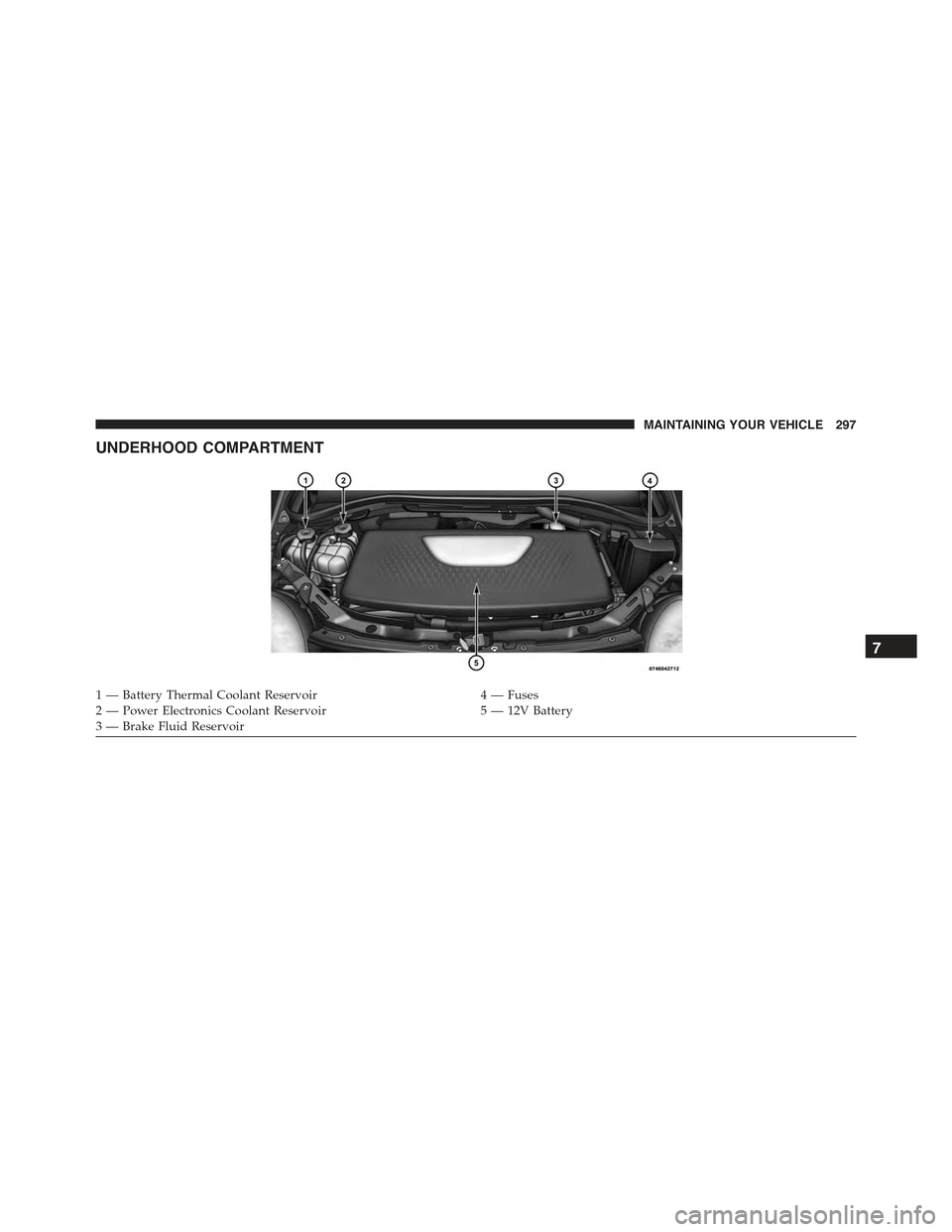
UNDERHOOD COMPARTMENT
1 — Battery Thermal Coolant Reservoir4 — Fuses2 — Power Electronics Coolant Reservoir5 — 12V Battery3 — Brake Fluid Reservoir
7
MAINTAINING YOUR VEHICLE 297
Page 302 of 367
CAUTION!(Continued)
•Your vehicle has been built with improved fluids
that protect the performance and durability of your
vehicle and also allow extended maintenance inter-
vals. Do not use chemical flushes in these compo-
nents as the chemicals can damage them. Such
damage is not covered by the New Vehicle Limited
Warranty. If a flush is needed because of compo-
nent malfunction, use only the specified fluid for
the flushing procedure.
Power Electronics And Battery Thermal
Management Systems
The Power Electronics and Battery Thermal Management
Systems are completely separate and designed to regu-
late temperature for the high voltage battery and the
electric components.
Power Electronics and Battery Thermal
Management Systems — Coolant Level Check
The coolant expansion bottles provides a quick visual
method for determining that the coolant level is ad-
equate. With the vehicle off and coolant at ambient
temperature, the level of the coolant (antifreeze) in the
bottles should be between the bottom and top lines
marked “MIN-MAX FILL RANGE”.
300 MAINTAINING YOUR VEHICLE
Page 303 of 367
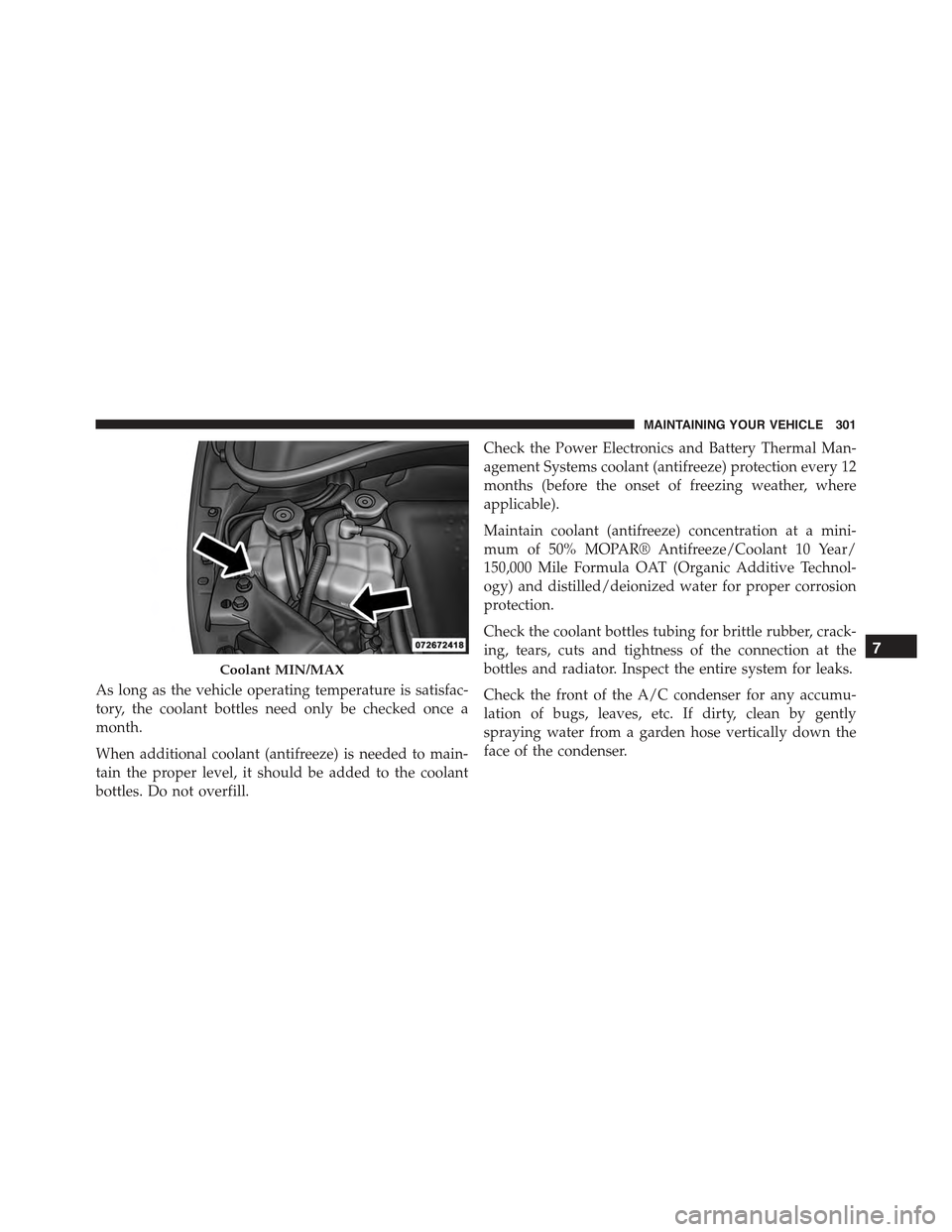
As long as the vehicle operating temperature is satisfac-
tory, the coolant bottles need only be checked once a
month.
When additional coolant (antifreeze) is needed to main-
tain the proper level, it should be added to the coolant
bottles. Do not overfill.
Check the Power Electronics and Battery Thermal Man-
agement Systems coolant (antifreeze) protection every 12
months (before the onset of freezing weather, where
applicable).
Maintain coolant (antifreeze) concentration at a mini-
mum of 50% MOPAR® Antifreeze/Coolant 10 Year/
150,000 Mile Formula OAT (Organic Additive Technol-
ogy) and distilled/deionized water for proper corrosion
protection.
Check the coolant bottles tubing for brittle rubber, crack-
ing, tears, cuts and tightness of the connection at the
bottles and radiator. Inspect the entire system for leaks.
Check the front of the A/C condenser for any accumu-
lation of bugs, leaves, etc. If dirty, clean by gently
spraying water from a garden hose vertically down the
face of the condenser.
Coolant MIN/MAX
7
MAINTAINING YOUR VEHICLE 301
Page 304 of 367
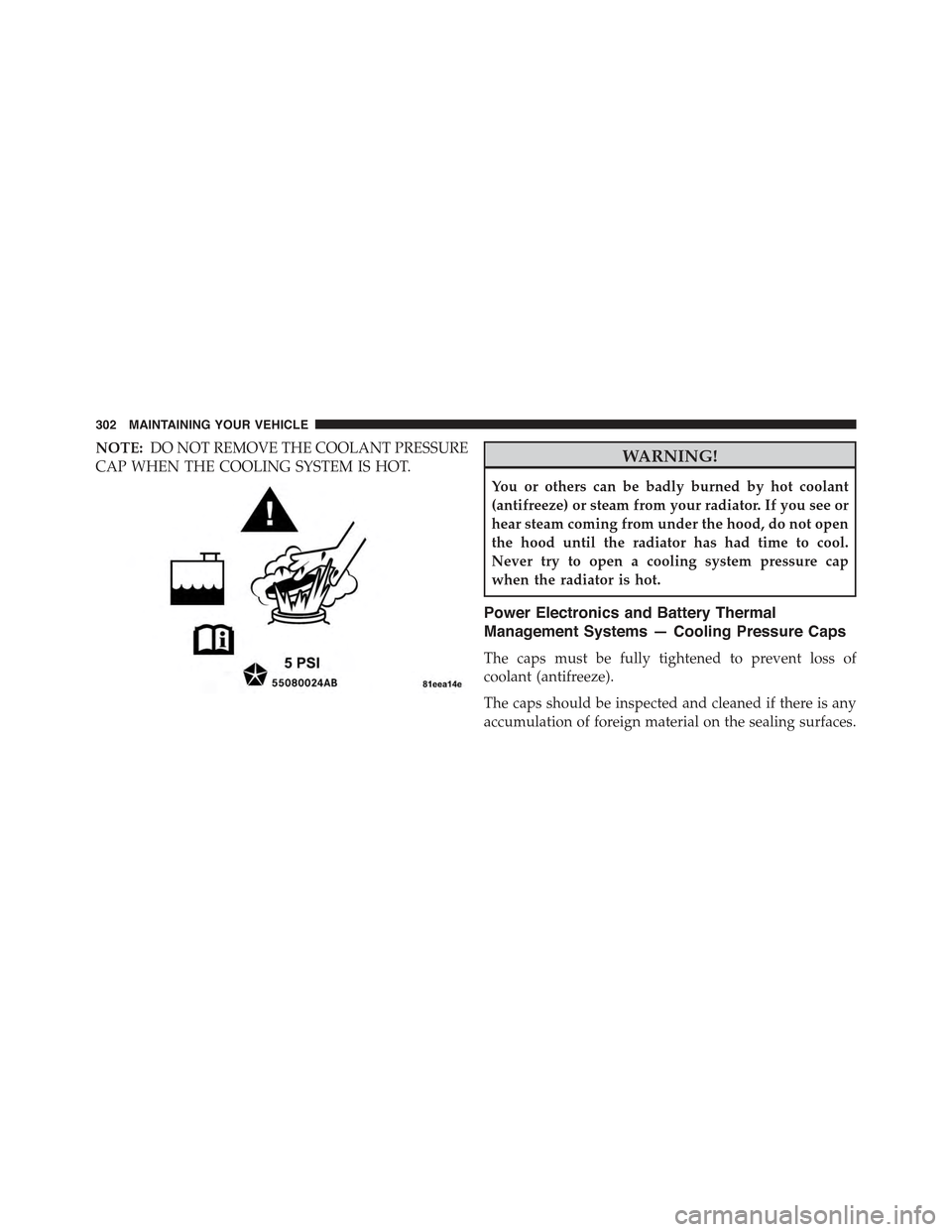
NOTE:DO NOT REMOVE THE COOLANT PRESSURE
CAP WHEN THE COOLING SYSTEM IS HOT.WARNING!
You or others can be badly burned by hot coolant
(antifreeze) or steam from your radiator. If you see or
hear steam coming from under the hood, do not open
the hood until the radiator has had time to cool.
Never try to open a cooling system pressure cap
when the radiator is hot.
Power Electronics and Battery Thermal
Management Systems — Cooling Pressure Caps
The caps must be fully tightened to prevent loss of
coolant (antifreeze).
The caps should be inspected and cleaned if there is any
accumulation of foreign material on the sealing surfaces.
302 MAINTAINING YOUR VEHICLE
Page 305 of 367

NOTE:
•The pressure caps on the reservoirs are unique and
rated at 5 PSI caps.
•Use only Mopar® replacement parts.
WARNING!
•The warning words “DO NOT OPEN HOT” on the
cooling system pressure cap are a safety precaution.
Never add coolant (antifreeze) when the cooling sys-
tem is overheated. Do not loosen or remove the cap to
cool an overheated cooling system. Heat causes pres-
sure to build up in the cooling system. To prevent
scalding or injury, do not remove the pressure cap
while the system is hot or under pressure.
•Do not use a pressure cap other than the one
specified for your vehicle. Personal injury or ve-
hicle damage may result.
Selection Of Coolant
Refer to “Fluids, Lubricants, and Genuine Parts” in
“Maintaining Your Vehicle” for further information.
CAUTION!
•Mixing of coolant (antifreeze) other than specified
Organic Additive Technology (OAT) coolant (anti-
freeze), may result in cooling system damage and
may decrease corrosion protection. Organic Addi-
tive Technology (OAT) coolant is different and
should not be mixed with Hybrid Organic Additive
Technology (HOAT) coolant (antifreeze). If a non-
OAT coolant (antifreeze) is introduced into the
cooling system in an emergency, it should be re-
placed with the specified coolant (antifreeze) as
soon as possible.
(Continued)
7
MAINTAINING YOUR VEHICLE 303
Page 306 of 367

CAUTION!(Continued)
•Do not use water alone or alcohol-based coolant
(antifreeze) products. Do not use additional rust
inhibitors or antirust products, as they may not be
compatible with the radiator coolant and may plug
the radiator.
•This vehicle has not been designed for use with
propylene glycol-based coolant (antifreeze). Use of
propylene glycol-based coolant (antifreeze) is not
recommended.
Adding Coolant
Your vehicle has been built with cooling systems that allow
extended maintenance intervals. This coolant (antifreeze)
can be used up to ten years or 150,000 miles (240,000 km)
before replacement. To prevent reducing this extended
maintenance period, it is important that you use the same
coolant (antifreeze) throughout the life of your vehicle.
Please review these recommendations for using Organic
Additive Technology (OAT) coolant (antifreeze).
When adding coolant (antifreeze):
•The manufacturer recommends using MOPAR®
Antifreeze/Coolant 10 Year/150,000 Mile Formula
OAT (Organic Additive Technology).
•Mix a minimum solution of 50% OAT coolant (anti-
freeze) and distilled water. Use higher concentrations
(not to exceed 70%) if temperatures below -34ºF (-37ºC)
are anticipated.
•Use only high purity water such as distilled or deion-
ized water when mixing the water and coolant (anti-
freeze) solution. The use of lower quality water will
reduce the amount of corrosion protection in the
cooling systems.
304 MAINTAINING YOUR VEHICLE