Page 372 of 603
displayed in the instrument cluster, along with a high-
lighted#M#(Manual) indication. When the shift lever is
in the MANUAL (M) position, tap the shift lever forward
(-) (or tap the (-) shift paddle on the steering wheel, if
equipped) to downshift the transmission to the next
lower gear, or tap the lever rearward (+) (or tap the (+)
shift paddle, if equipped) to command an upshift.
NOTE:Tapping one of the steering wheel-mounted shift
paddles (+/-), if equipped, while the shift lever is in
DRIVE, will activate a temporary AutoStick® mode.
Tapping (-) to enter AutoStick® mode will downshift the
transmission to the next lower gear, while using (+) to
enter AutoStick® mode will retain the current gear. The
current gear will be displayed in the instrument cluster,
but the#M#will not be highlighted. The transmission will
revert back to normal operation (if the shift lever remains
in DRIVE) after a period of time, depending on accelera-
tor pedal activity.
In AutoStick® mode, the transmission will shift up or
down when (+/-) is manually selected by the driver
(using the shift lever, or the shift paddles [if equipped]),
unless an engine lugging or overspeed condition would
result. It will remain in the selected gear until another
upshift or downshift is chosen, except as described
below.
•In temporary AutoStick® mode (shift lever in DRIVE),
the transmission will automatically shift up when
maximum engine speed is reached. If the accelerator is
fully depressed, the transmission will downshift when
possible (based on current vehicle speed and gear).
Lack of accelerator pedal activity will cause the trans-
mission to revert to automatic operation.
•If normal AutoStick® mode is engaged (shift lever in
MANUAL position), manual gear selection will be
maintained until the shift lever is returned to DRIVE,
or as described below. The transmission will not
370 STARTING AND OPERATING
Page 373 of 603

upshift automatically at redline in this mode, nor will
downshifts be obtained if the accelerator pedal is
pressed to the floor.
•The transmission will automatically downshift as the
vehicle slows (to prevent engine lugging) and will
display the current gear.
•The transmission will automatically downshift to first
gear when coming to a stop. After a stop, the driver
should manually upshift (+) the transmission as the
vehicle is accelerated.
•You can start out, from a stop, in first or second gear.
Tapping (+) (at a stop) will allow starting in second
gear. Starting out in second gear can be helpful in
snowy or icy conditions.
•If a requested downshift would cause the engine to
over-speed, that shift will not occur.
•The system will ignore attempts to upshift at too low
of a vehicle speed.
•Holding the (-) paddle depressed (if equipped), or
holding the shift lever in the (-) position, will down-
shift the transmission to the lowest gear possible at the
current speed.
•Transmission shifting will be more noticeable when
AutoStick® is engaged.
•The system may revert to automatic shift mode if a
fault or overheat condition is detected.
To disengage AutoStick® mode, return the shift lever to
the DRIVE position, or press and hold the (+) shift paddle
(if equipped, and the shift lever is already in DRIVE)
until “D” is once again indicated in the instrument
cluster. You can shift in or out of the AutoStick® mode at
any time without taking your foot off the accelerator
pedal.
5
STARTING AND OPERATING 371
Page 374 of 603
WARNING!
Do not downshift for additional engine braking on a
slippery surface. The drive wheels could lose their
grip and the vehicle could skid, causing a collision or
personal injury.
SPORT MODE — WITHOUT PERFORMANCE
CONTROL
Your vehicle is equipped with a Sport Mode feature. This
mode is a configuration set up for typical enthusiast
driving. The engine, transmission (when equipped with
automatic transmission), and steering systems are all set
to their SPORT settings. Sport Mode will provide im-
proved throttle response and modified shifting for an
enhanced driving experience, as well the greatest amount
of steering feel. This mode may be activated and deacti-
vated by pressing the Sport button on the instrument
panel switch bank.
For vehicles equipped with Drive Modes, Refer to “Per-
formance Control — If Equipped” within “Uconnect
Settings” in “Understanding Your Instrument Panel”
chapter for further information.
DRIVING ON SLIPPERY SURFACES
Acceleration
Rapid acceleration on snow covered, wet, or other slip-
pery surfaces may cause the driving wheels to pull
erratically to the right or left. This phenomenon occurs
when there is a difference in the surface traction under
the rear (driving) wheels.
WARNING!
Rapid acceleration on slippery surfaces is dangerous.
Unequal traction can cause sudden pulling of the rear
(Continued)
372 STARTING AND OPERATING
Page 379 of 603
NOTE:
•Even if the power steering assistance is no longer
operational, it is still possible to steer the vehicle.
Under these conditions there will be a substantial
increase in steering effort, especially at low speeds and
during parking maneuvers.
•If the condition persists, see your authorized dealer for
service.
FUEL SAVER TECHNOLOGY 5.7L/6.4L ENGINES
ONLY — IF EQUIPPED
This feature offers improved fuel economy by shutting
off four of the engine’s eight cylinders during light load
and cruise conditions. The system is automatic with no
driver inputs or additional driving skills required.
NOTE:This system may take some time to return to full
functionality after a battery disconnect.
PARKING BRAKE
Before leaving the vehicle, make sure that the parking
brake is fully applied and place the shift lever in the
PARK or REVERSE (manual transmission only) position.
When the parking brake is applied and the ignition
switch is in the ON position (RUN position with Keyless
Enter-N-Go™), the “Brake Warning Light” in the instru-
ment cluster will illuminate.
NOTE:
•When the parking brake is applied and the transmis-
sion is placed in gear, the “Brake Warning Light” will
flash. If vehicle speed is detected, a chime will sound
to alert the driver. Fully release the parking brake
before attempting to move the vehicle.
•This light only shows that the parking brake is ap-
plied. It does not show the degree of brake application.
5
STARTING AND OPERATING 377
Page 380 of 603
When parking on a hill, it is important to turn the front
wheels toward the curb on a downhill grade and away
from the curb on an uphill grade. For vehicles equipped
with an automatic transmission, apply the parking brake
before placing the shift lever in PARK, otherwise the load
on the transmission locking mechanism may make it
difficult to move the shift lever out of PARK. The parking
brake should always be applied whenever the driver is
not in the vehicle.
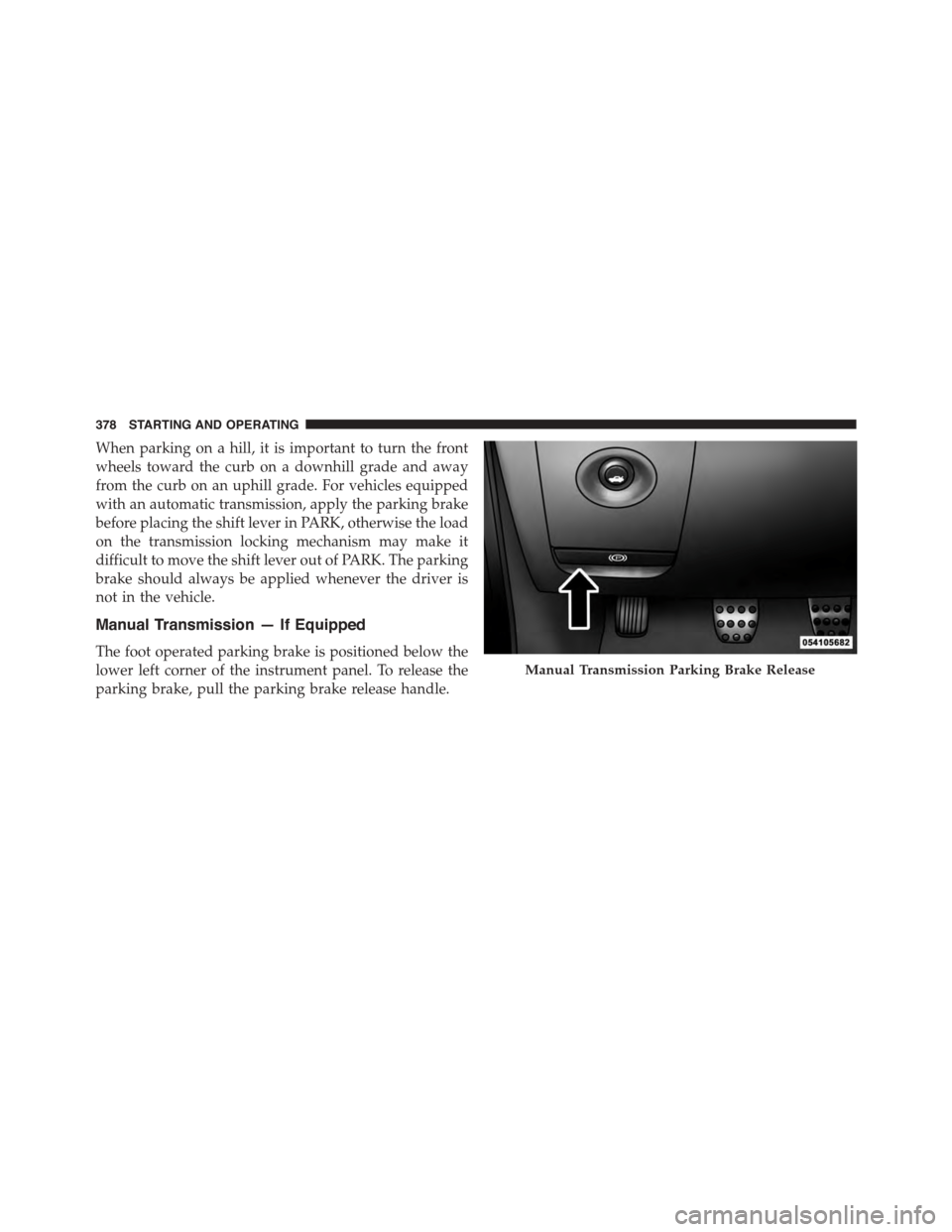
Manual Transmission — If Equipped
The foot operated parking brake is positioned below the
lower left corner of the instrument panel. To release the
parking brake, pull the parking brake release handle.
Manual Transmission Parking Brake Release
378 STARTING AND OPERATING
Page 381 of 603
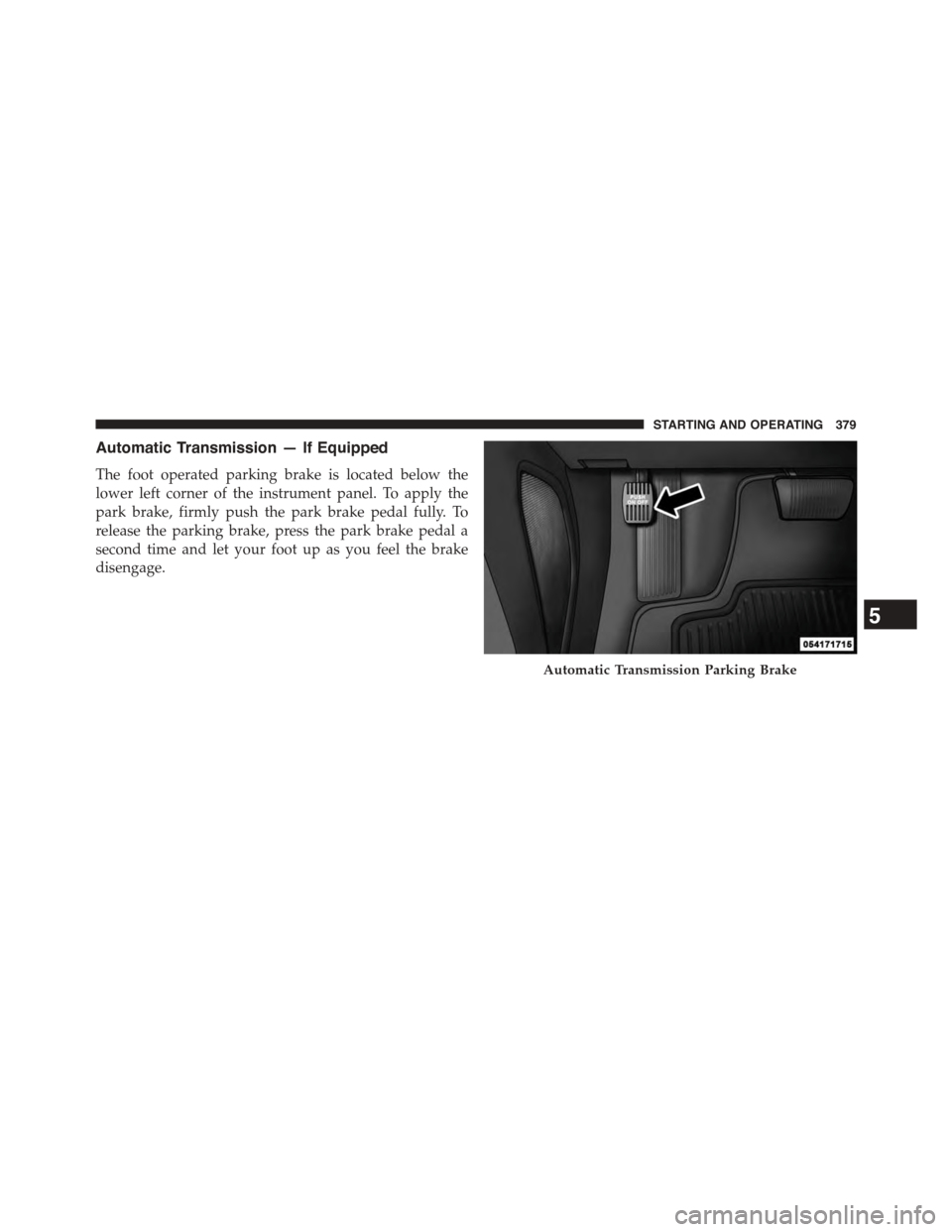
Automatic Transmission — If Equipped
The foot operated parking brake is located below the
lower left corner of the instrument panel. To apply the
park brake, firmly push the park brake pedal fully. To
release the parking brake, press the park brake pedal a
second time and let your foot up as you feel the brake
disengage.
Automatic Transmission Parking Brake
5
STARTING AND OPERATING 379
Page 388 of 603

system will release brake pressure in proportion to
amount of throttle applied as the vehicle starts to move in
the intended direction of travel.
HSA Activation Criteria
The following criteria must be met in order for HSA to
activate:
•Vehicle must be stopped.
•Vehicle must be on a 3% (approximate) for manual
transmission and 6% (approximate) for automatic
transmissions.
•Gear selection matches vehicle uphill direction (i.e.,
vehicle facing uphill is in forward gear; vehicle back-
ing uphill is in REVERSE gear).
WARNING!
There may be situations on minor hills with a loaded
vehicle, or while pulling a trailer, when the system
will not activate and slight rolling may occur. This
could cause a collision with another vehicle or object.
Always remember the driver is responsible for brak-
ing the vehicle.
HSA Off
If you wish to turn off the HSA system, it can be done in
the Uconnect® settings. Refer to#Uconnect® Settings#in
#Understanding Your Instrument Panel#for further infor-
mation.
Electronic Stability Control (ESC)
This system enhances directional control and stability of
the vehicle under various driving conditions. The ESC
corrects for oversteering and understeering the vehicle
386 STARTING AND OPERATING
Page 427 of 603
FUEL REQUIREMENTS
3.6L Engine — If Equipped
This engine is designed to meet all emis-
sions regulations and provide excellent
fuel economy and performance when us-
ing high-quality unleaded “regular” gaso-
line having an octane rating of 87. The use
of premium gasoline is not recommended, as it will not
provide any benefit over regular gasoline in these
engines.
Light spark knock at low engine speeds is not harmful to
your engine. However, continued heavy spark knock at
high speeds can cause damage and immediate service is
required. Poor quality gasoline can cause problems such
as hard starting, stalling, and hesitations. If you experi-
ence these symptoms, try another brand of gasoline
before considering service for the vehicle.
Over 40 auto manufacturers worldwide have issued and
endorsed consistent gasoline specifications (the World-
wide Fuel Charter, WWFC) which define fuel properties
necessary to deliver enhanced emissions, performance,
and durability for your vehicle. The manufacturer recom-
mends the use of gasolines that meet the WWFC speci-
fications if they are available.
5.7L Engine (With Automatic Transmission)
The 5.7L engine (with automatic transmis-
sion) is designed to meet all emissions
regulations and provide satisfactory fuel
economy and performance when using
high-quality unleaded gasoline having an
octane range of 87 to 89. The manufacturer recommends
the use of 89 octane for optimum performance. The use of
5
STARTING AND OPERATING 425