2015 Citroen C4 phone
[x] Cancel search: phonePage 395 of 494

393
C4-2_en_Chap14_index-alpha_ed01-2015
C4-2_en_Chap14_index-alpha_ed01-2015
ABS and EBFD systems ...............................1 51ac
cessories .............................. ...................273
ac
cessory position
...................................... 16
8
Accessory
socket, 12V
.........1
02, 105, 112, 115
a
dditive, a d
blu
e
.............................. 2
3, 221-228
Adjusting
h
eadlamps
................................... 12
5
Adjusting
head restraints
...............................93
A
djusting seat belt height
....................15
4,
15
6
Adjusting
the steering
wheel .......................................................... 10 0
Advice
on driving
..............................
...........162
Airbags
...............
.................................... 22, 158
Airbags,
c
urtain
.................................... 16
0,
16
1
Airbags,
front.........................................159, 161
Airbags,
la
teral
..................................... 16
0,
16
1
Air
c
onditioning
...............................
...............10
Air
c
onditioning,
d
igital
...................... 8
0, 81, 84
Air
c
onditioning,
m
anual
.......................... 8
0, 82
ai
r filter
...............
........................................... 219
ai
r flow
..............................
....................... 82, 86
ai
r vents
..............................
...........................79
Alarm
.............................................................. 67
A
nti-lock braking system (ABS)
....................1
51
an
ti-pinch
................................................. 7
6, 78
ant
i-theft
..............................
........................169
Armrest,
front
........................................ 10
7,
10
8
Armrest,
rear
................................................. 11
2
as
sistance call
............................. 1
53, 287, 288
Audible
w
arning
........................................... 15
0
au
dio cable
...........................................3
10, 372
Audio
streaming
(Bluetooth)
......................... 3
06, 309, 374, 376
Audio
system
...............................
..... 37, 39, 359
bat
tery
...............................
............ 219, 256 -259
Battery,
c
harging
...............................
... 258, 259
Battery,
r
emote
c
ontrol
.............................................. 5
8, 63, 64
Black
pan
el..................................................... 36
bl
ind spot sensors
.......................................19
6
b
lueH
di ...............................
..........189,
2
21-228
b
luetooth
(hands-free)
............................... 3
46, 347, 375
Bluetooth
(
telephone)
................... 3
46, 347, 375
bo
nnet
...............
............................................212
bo
nnet stay
...................................................2
12
b
oot
........
.................................................. 72, 73
Boot
lamp
..............................................1
15, 134
Brake
discs
...................................................2
20
Brake
lamps
...............................
..................248
Brake
p
ads
...............................
....................220
Braking
assistance system
...........................1
51
A
B
Automatic illumination of headlamps .................................. 1 19, 123, 124
Automatic
operation of hazard
warning
lam
ps
........................................... 15
0
Automatic
rain sensitive
windscreen wipers
............................. 12
8,
12
9
Auxiliary
socket
.................... 1
03, 306, 310, 373Capacity,
fuel tank .............................. .........208
C
d ..............................
.......................... 306, 368
CD
MP3
................
........................ 306, 369, 370
Central
locking
................................... 5
5, 60, 65
Centre console
............................................. 10
4
Changing
a bu
lb
....................................2
42-250
Changing
a f
use
....................................25
1-255
Changing
a wheel
...............................
..234-240
Changing
a wiper blade
........................1
31, 261
Changing
the date
.............................. 3
8, 43, 48
Changing
the remote
control battery .................................. 58,
63, 64
Changing
t
he
t
ime
........................ 3
4, 38, 43, 48
Checking
levels
.....................................21
5 -218
Checking
the engine
oil level
...............
.................................. 29, 215
Checking
tyre pressures
(using
the kit)
..............................
...............233
Checks
...............
...................................213 -2 28
Child
lock
...............................
.......................149
Children
...............................
...135 -149, 157, 159
Child seats
..............................
.............13 5 -14 8
Child seats, conventional
.............................. 1
41
Child seats, IS
oF
IX
..............................14
5 -147
C
ITR
oËn L
ocalised a
s
sistance Call
..........28
8
C
ITR
oËn
Localised Emergency Call.........288
CITROËN
M
ULTICITY
C
ONNECT
..............3
41
Clock
...............
...............................................34
Closing
the boot
...............................
.........7 2 -74
Closing
the doors
...............................
.............71
Cold
climate screen
.....................................2
62
Colour screen
...............................
........ 290, 291
Connectors, audio
........ 1
03, 306, 310, 371, 373
C
.
alphabetical index
Page 399 of 494

397
C4-2_en_Chap14_index-alpha_ed01-2015
C4-2_en_Chap14_index-alpha_ed01-2015
Reversing lamps .......................................... 24 8
Risk areas (update) ...................................... 3
21
Roof bars
...................................................... 2
62
Roof blind
...............................
........................78
Routine
checks
.................................... 2
19, 220
Running
out of fuel (Diesel)
..........................2
11Ski
flap .............................. ............................112
Snow chains .................................................. 2
41
Spare wheel
...............................
..................235
Speakers
(
fitting)
..........................................2
72
Speed
l
imiter
...............................
......... 199, 201
Speedometer
..............................
...............12-14
Spotlamps,
si
de
....................................1
24, 247
Starting
the engine
......................................16
3
Starting
using another battery
.....................2
57
Steering
mounted controls................... 293, 361
Stop & Start
........................................5
2, 85, 89,
192,
208, 212, 219, 256
Storage
................
.. 101, 102, 104, 107, 108, 113
Storage
c
ompartments
................................10
4
Storage
d
rawer
..............................
...............111
Storage
n
et
....................................................11
3
Storing
driving
positions ....................................................... 95
Stowing
r
ings
..............................
..................113
Sun visor
...................................................... 10
2
Switching
off
the
eng
ine
...............................
...................163
Synchronising
the remote
control
.................................................... 5
8, 63
Synthesiser, voice
........................................ 3
31
System
se
ttings
............................................339
T
able of weights
....................................2
77, 281
Tables
of engines
...............................
.. 275, 279
Safety for children
..................1
35 -149, 157, 159
Screen
menu map
........2
94, 296, 298, 312, 314,
316,
332, 342, 344, 385 -387
Screen,
m
onochrome
...................... 3
7, 39, 385
Screen,
m
ultifunction
(
with audio equipment)
.................. 3
7, 39, 362
Screenwash, front
........................................ 13
0
SCR
(Selective Catalytic
Reduction)
................................................. 2
21
Seat
adjustment
...............................
........ 91, 92
Seat belts
..............................1
41, 154, 156, 157
Seats, electric
................................................ 92
S
eats, rear
...................................................... 96
S
erial number, vehicle
.................................28
6
Service indicator
............................................ 3
0
Service
warning
lamp
...............
.............................................. 19
Servicing
...............................
.........................10
Setting
the clock
.......................... 3
4, 38, 43, 48
Sidelamps
.................... 1
18, 122, 242, 246, 248
Side repeater
..............................
.................247
S
T
Tables of fuses .............................................. 2 51
Tank, AdBlue® additive ........................ 2 21, 226
Tank,
fuel
............................... ....................... 210
Technical data
....................................... 2
75 -286
Telephone
.....................................3
46 -349, 351
Temperature
control for
heated seats
................................................ 93
T
emporary
puncture repair kit
.....................2
29
Ticket
holder
................................................ 10
1
TMC
(Traffic
info)
......................................... 32
6
To o l s
................
............................................. 234
To r c h
..............................
............................... 115
Total distance recorder
.................................. 33
T
ouch screen .................................... 44- 48,
289
Touch screen tablet ( M e nu s)
...............................
................. 44, 290
To w b a r
................
.......................................... 265
Towbar
with
quickly detachable
towball
...............................
......................... 267
Towed loads
......................................... 2
75, 279
Towing
another vehicle
................................ 26
4
Traction
control (ASR)
................................. 15
2
Traffic
information (TA)
........................ 3
27, 364
Traffic
information (TMC)
............................. 32
6
Tr a i l e r
...............
............................................ 265
Trajectory
control systems
........................... 15
2
Trip
computer
............................................ 4
9-52
Trip distance recorder
.................................... 33
T
yre pressures
..............................
...............286
Ty r e s
..............................................................
.10
Tyre under-inflation detection
...............
..................................... 19 0
.
alphabetical index
Page 405 of 494
2
Multifunction screens1
C4-2-add_en_Chap02_ecran-multifonction_ed01-2015
Touch screen tablet
General operation
Principles
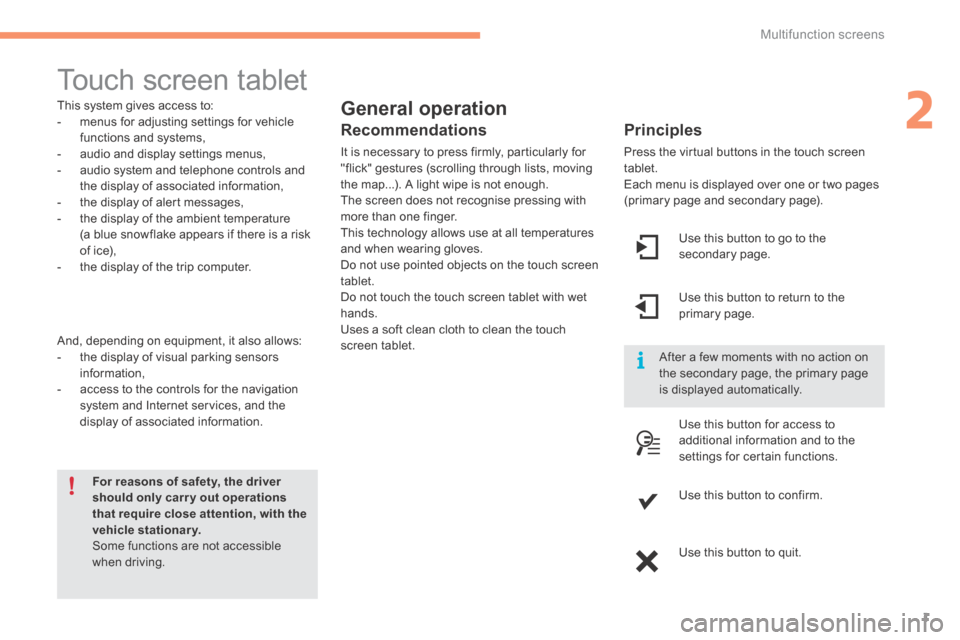
Press the virtual buttons in the touch screen tablet. Each menu is displayed over one or two pages (primary page and secondary page).
For reasons of safety, the driver should only carr y out operations that require close attention, with the vehicle stationary. Some functions are not accessible when driving.
This system gives access to: - menus for adjusting settings for vehicle functions and systems, - audio and display settings menus, - audio system and telephone controls and the display of associated information, - the display of alert messages, - the display of the ambient temperature
(a blue snowflake appears if there is a risk of ice), - the display of the trip computer.
And, depending on equipment, it also allows: - the display of visual parking sensors information, - access to the controls for the navigation system and Internet services, and the display of associated information.
Recommendations
It is necessary to press firmly, particularly for "flick" gestures (scrolling through lists, moving the map...). A light wipe is not enough. The screen does not recognise pressing with more than one finger.
This technology allows use at all temperatures and when wearing gloves. Do not use pointed objects on the touch screen tablet. Do not touch the touch screen tablet with wet hands. Uses a soft clean cloth to clean the touch screen tablet.
Use this button to go to the secondary page.
After a few moments with no action on the secondary page, the primary page is displayed automatically.
Use this button to return to the primary page.
Use this button for access to
additional information and to the settings for certain functions.
Use this button to confirm.
Use this button to quit.
Page 406 of 494

Multifunction screens
2
C4-2-add_en_Chap02_ecran-multifonction_ed01-2015
Menus
Press one of the buttons on the control panel for direct access to a particular menu.
Driving. Gives access to the trip computer and, depending on version, allows settings to be adjusted for certain functions. See the corresponding section.
Navigation . Depending on trim level or country of sale, navigation can be not available, an option or standard. See the "Audio and telematics" section.
Radio Media . See the "Audio and telematics" section.
Telephone . See the "Audio and telematics" section.
Internet . The connected services are accessible using the Bluetooth, Wi-Fi or MirrorLink™ connections. See the "Audio and telematics" section.
Settings . Allows configuration of the display and the system.
1. Volume / mute. See the "Audio and telematics" section.
Page 408 of 494

Fittings
4
C4-2-add_en_Chap05_amenagement_ed01-2015
12 V accessory socket
To connect a 12 V accessory (max power: 120 W), lift the cover and connect a suitable adaptor.
USB Player
This connection box comprises a USB port and a Jack auxiliary socket.
When connected to the USB port, the portable device charges automatically. While charging, a message is displayed if the power consumption of the portable device exceeds the current delivered by the vehicle.
The connection of an electrical device not approved by CITROËN, such as a USB charger, may adversely affect the operation of vehicle electrical systems, causing faults such as poor telephone reception or inter ference with displays in the screens.
USB port
The USB port allows the connection of a portable device, such as a digital audio player of the iPod ® type or a USB memory stick. ® type or a USB memory stick. ®
The USB player reads your audio files, which are transmitted to your audio system and played via the vehicle's speakers. The management of these files is from the steering mounted controls or the audio system.
Jack auxiliary socket
The Jack auxiliary socket allows the connection of a portable device, such as a digital audio player, so that your audio files can be heard through the vehicle's speakers. The management of these files is from the portable device.
For more information, refer to the corresponding part of the "Audio and telematics" section.
The USB also allows a telephone to be connected by a MirrorLink™ connection, so that use can be made in the touch screen tablet of certain applications on the telephone.
Page 424 of 494

.
Audio and Telematics 21
C4-2-add_en_Chap13b_SMEGplus_ed01-2015
7-inch touch screen tablet
GPS satellite navigation - Multimedia audio - Bluetooth ® GPS satellite navigation - Multimedia audio - Bluetooth ® GPS satellite navigation - Multimedia audio - Bluetooth telephone ® telephone ®
Contents First steps 22
Steering mounted controls 24
Menus 25
Navigation 26
Navigation - Guidance 34
T r a f fi c 3 8
Radio Media 40
Radio 46
DAB (Digital Audio Broadcasting) radio 48
Media 50
Settings 54
Internet 62
Internet browser 63
MirrorLinkTM 66
Telephone 68
Frequently asked questions 76
The system is protected in such a way that it will only operate in your vehicle.
As a safety measure, the driver should only carry out operations which require prolonged attention while the vehicle is stationary. The display of the energy economy mode message signals that the system is about to go into standby. Refer to the Energy economy (mode) section.
Page 426 of 494
.
Audio and Telematics 23
C4-2-add_en_Chap13b_SMEGplus_ed01-2015
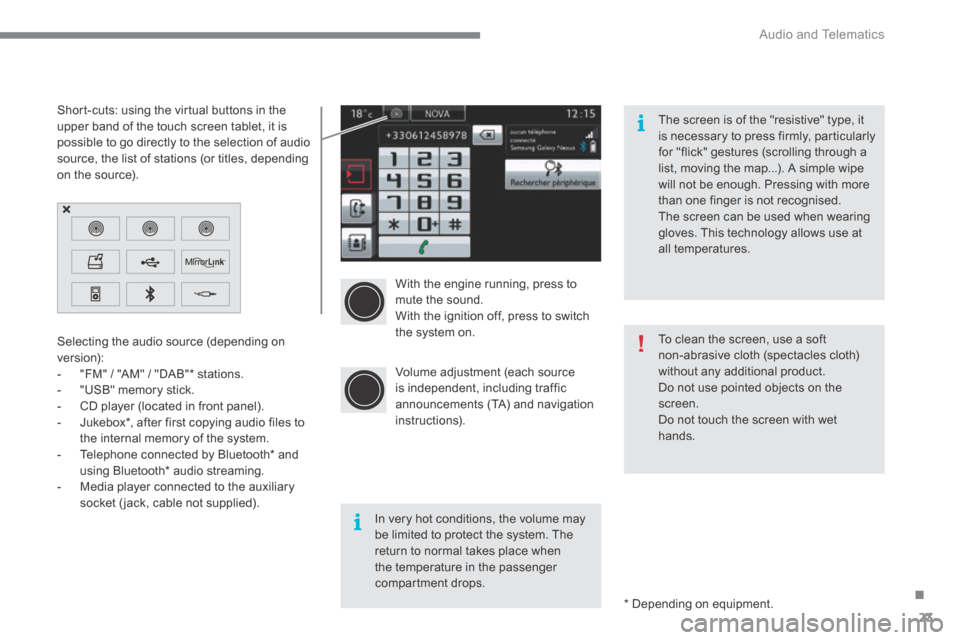
With the engine running, press to mute the sound. With the ignition off, press to switch the system on.
Volume adjustment (each source is independent, including traffic announcements (TA) and navigation instructions).
Selecting the audio source (depending on version): - "FM" / "AM" / "DAB" * stations. - "USB" memory stick. - CD player (located in front panel). - Jukebox * , after first copying audio files to
the internal memory of the system. - Telephone connected by Bluetooth * and using Bluetooth * audio streaming. - Media player connected to the auxiliary socket (jack, cable not supplied).
* Depending on equipment.
Short-cuts: using the virtual buttons in the upper band of the touch screen tablet, it is possible to go directly to the selection of audio source, the list of stations (or titles, depending on the source).
The screen is of the "resistive" type, it is necessary to press firmly, particularly for "flick" gestures (scrolling through a list, moving the map...). A simple wipe will not be enough. Pressing with more than one finger is not recognised. The screen can be used when wearing gloves. This technology allows use at all temperatures.
In very hot conditions, the volume may be limited to protect the system. The return to normal takes place when the temperature in the passenger compartment drops.
To clean the screen, use a soft non-abrasive cloth (spectacles cloth) without any additional product. Do not use pointed objects on the screen. Do not touch the screen with wet
hands.
Page 427 of 494

Audio and Telematics
24
C4-2-add_en_Chap13b_SMEGplus_ed01-2015
Steering mounted controls
Media: change the multimedia source. Telephone: start a call. Call in progress: access to the telephone menu (End call, Secret mode, Hands-free mode). Telephone, press and hold: reject an incoming call, end a call in progress; other than a call in progress, access to the telephone menu. Decrease volume.
Radio, turn: automatic search for the previous / next station. Media, turn: previous / next track. Press: confirm a selection.
Radio: display the list of stations. Media: display the list of tracks. Radio, press and hold: update the list of stations received.
Increase volume.