2015 CHEVROLET IMPALA turn signal
[x] Cancel search: turn signalPage 10 of 413

Black plate (3,1)Chevrolet Impala Owner Manual (GMNA-Localizing-U.S./Canada-7576026) -
2015 - crc 2nd edition - 8/21/14
In Brief 1-3
1.Instrument Panel Illumination
Control on page 6-4.
2. Air Vents on page 8-7.
3. Trunk Release. See Trunk on
page 2-15.
Parking Assist Button. See
Assistance Systems for Parking
or Backing on page 9-44 (If
Equipped).
Lane Departure Warning (LDW)
Button. See Lane Departure
Warning (LDW) on page 9-52.
4. Turn Signal Lever. See Turn and
Lane-Change Signals on
page 6-4.
5. Instrument Cluster on page 5-9.
Driver Information Center (DIC)
on page 5-25.
6. Windshield Wiper/Washer on
page 5-4.
7. Hazard Warning Flashers on
page 6-3.
8. Light Sensor. See Automatic
Headlamp System on page 6-2. 9. Storage Area with USB Port
Inside (If Equipped). See
Instrument Panel Storage on
page 4-1 andUSB Port on
page 7-14.
10. Infotainment on page 7-1.
11. CD Player on page 7-11.
12. Electric Parking Brake. See Parking Brake on page 9-29.
13. Data Link Connector (Out of View). See Malfunction
Indicator Lamp on page 5-17.
14. Hood Release. See Hood on
page 10-4.
15. Instrument Panel Storage on
page 4-1 (If Equipped).
Fuse Cover. See Instrument
Panel Fuse Block on
page 10-35. 16.
Cruise Control on page 9-33 (If
Equipped).
Adaptive Cruise Control on
page 9-35 (If Equipped).
Heated Steering Wheel on
page 5-3 (If Equipped).
Forward Collision Alert (FCA)
System on page 9-46 (If
Equipped).
17. Steering Wheel Controls on
page 5-3 (Out of View).
18. Steering Wheel Adjustment on
page 5-2.
19. Horn on page 5-3.
20. Steering Wheel Controls on
page 5-3.
Driver Information Center
Buttons. See Driver Information
Center (DIC) on page 5-25.
21. Ignition Positions (Keyless
Access) on page 9-14 or
Ignition Positions (Key Access)
on page 9-16.
Page 12 of 413

Black plate (5,1)Chevrolet Impala Owner Manual (GMNA-Localizing-U.S./Canada-7576026) -
2015 - crc 2nd edition - 8/21/14
In Brief 1-5
7:Press and release one time to
initiate vehicle locator. Press and
hold for at least three seconds to
sound the panic alarm. Press again
to cancel the panic alarm.
See Keys on page 2-1 andRemote
Keyless Entry (RKE) System
Operation on page 2-3.
Remote Vehicle Start
If equipped, the engine can be
started from outside of the vehicle.
Starting the Vehicle
1. Aim the RKE transmitter at the vehicle.
2. Press and release
Q.
3. Immediately, press and hold
/
for at least four seconds or until
the turn signal lamps flash.
When the vehicle starts, the parking
lamps will turn on and remain on as
long as the engine is running. The
doors will be locked and the climate
control system may come on. The engine will continue to run for
10 minutes. After 30 seconds,
repeat the steps if a 10-minute
extension is desired. Remote start
can be extended only once.
Canceling a Remote Start
To cancel a remote start, do one of
the following:
.Aim the RKE transmitter at the
vehicle and press and hold
/
until the parking lamps turn off.
.Turn on the hazard warning
flashers.
.Turn the vehicle on and then off.
See Remote Vehicle Start on
page 2-9.
Door Locks
Keyless Access
If equipped, use the Keyless Access
system to lock and unlock the door.
When the doors are locked and the
Remote Keyless Entry (RKE)
transmitter is within 1 m (3 ft) of the
driver door handle, press the lock/
unlock button. When unlocking from
the driver door, the first press
unlocks that door; press again
within five seconds to unlock all
Page 21 of 413
Black plate (14,1)Chevrolet Impala Owner Manual (GMNA-Localizing-U.S./Canada-7576026) -
2015 - crc 2nd edition - 8/21/14
1-14 In Brief
Exterior Lighting
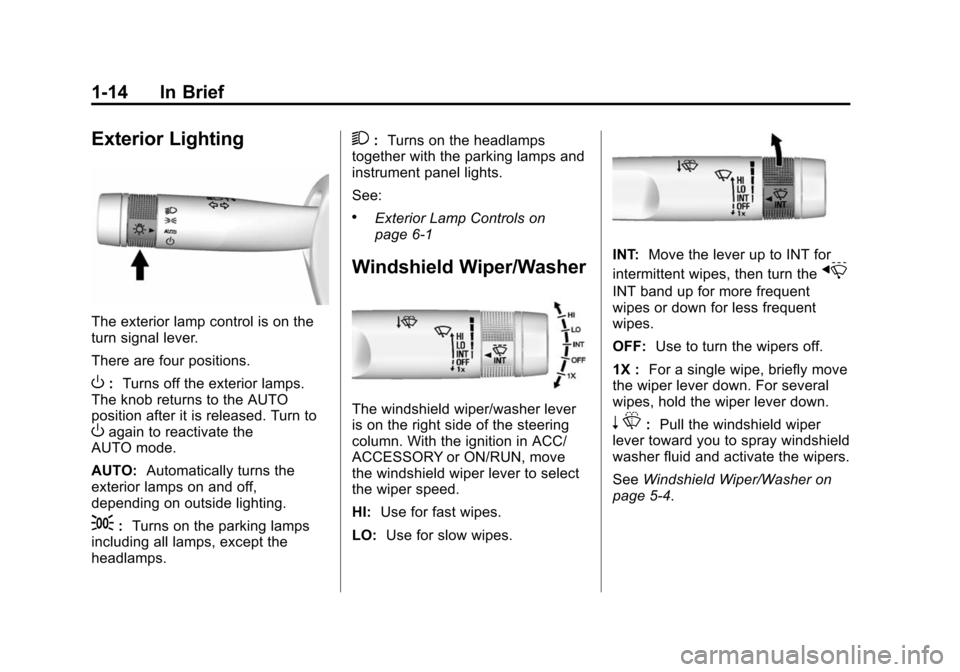
The exterior lamp control is on the
turn signal lever.
There are four positions.
O:Turns off the exterior lamps.
The knob returns to the AUTO
position after it is released. Turn to
Oagain to reactivate the
AUTO mode.
AUTO: Automatically turns the
exterior lamps on and off,
depending on outside lighting.
;: Turns on the parking lamps
including all lamps, except the
headlamps.
2: Turns on the headlamps
together with the parking lamps and
instrument panel lights.
See:
.Exterior Lamp Controls on
page 6-1
Windshield Wiper/Washer
The windshield wiper/washer lever
is on the right side of the steering
column. With the ignition in ACC/
ACCESSORY or ON/RUN, move
the windshield wiper lever to select
the wiper speed.
HI: Use for fast wipes.
LO: Use for slow wipes.
INT: Move the lever up to INT for
intermittent wipes, then turn the
x
INT band up for more frequent
wipes or down for less frequent
wipes.
OFF: Use to turn the wipers off.
1X : For a single wipe, briefly move
the wiper lever down. For several
wipes, hold the wiper lever down.
n L: Pull the windshield wiper
lever toward you to spray windshield
washer fluid and activate the wipers.
See Windshield Wiper/Washer on
page 5-4.
Page 27 of 413

Black plate (20,1)Chevrolet Impala Owner Manual (GMNA-Localizing-U.S./Canada-7576026) -
2015 - crc 2nd edition - 8/21/14
1-20 In Brief
SeeInstrument Cluster on page 5-9
and Driver Information Center (DIC)
on page 5-25.
Forward Collision Alert
(FCA) System
If equipped, FCA may help avoid or
reduce the harm caused by
front-end crashes. FCA provides a
green indicator,
V, when a vehicle
is detected ahead. This indicator
displays amber if you follow a
vehicle much too closely. When
approaching a vehicle ahead too
quickly, FCA provides a red flashing
alert on the windshield and rapidly
beeps.
See Forward Collision Alert (FCA)
System on page 9-46.
Lane Departure
Warning (LDW)
If equipped, LDW may help avoid
unintentional lane departures at
speeds of 56 km/h (35 mph) or
greater. LDW uses a camera sensor to detect the lane markings. The
LDW light,
@, is green if a lane
marking is detected. If the vehicle
departs the lane, the light will
change to amber and flash. In
addition, beeps will sound.
See Lane Departure Warning (LDW)
on page 9-52.
Side Blind Zone
Alert (SBZA)
If equipped, SBZA will detect
vehicles in the next lane over in the
vehicle's side blind zone area.
When this happens, the SBZA
display will light up in the
corresponding outside side mirror
and will flash if the turn signal is on.
See Side Blind Zone Alert (SBZA)
on page 9-50.
Rear Vision
Camera (RVC)
If equipped, RVC displays a view of
the area behind the vehicle on the
center stack display when the
vehicle is shifted into R (Reverse) to
aid with parking and low-speed
backing maneuvers.
See Assistance Systems for Parking
or Backing on page 9-44.
Parking Assist
If equipped, Rear Parking Assist
(RPA) uses sensors on the rear
bumper to assist with parking and
avoiding objects while in
R (Reverse). It operates at speeds
less than 8 km/h (5 mph). RPA may
display a warning triangle on the
Rear Vision Camera screen and/or
a graphic on the instrument cluster
to provide the object distance. In
addition, multiple beeps may occur
if very close to an object.
See Assistance Systems for Parking
or Backing on page 9-44.
Page 35 of 413
Black plate (2,1)Chevrolet Impala Owner Manual (GMNA-Localizing-U.S./Canada-7576026) -
2015 - crc 2nd edition - 8/21/14
2-2 Keys, Doors, and Windows
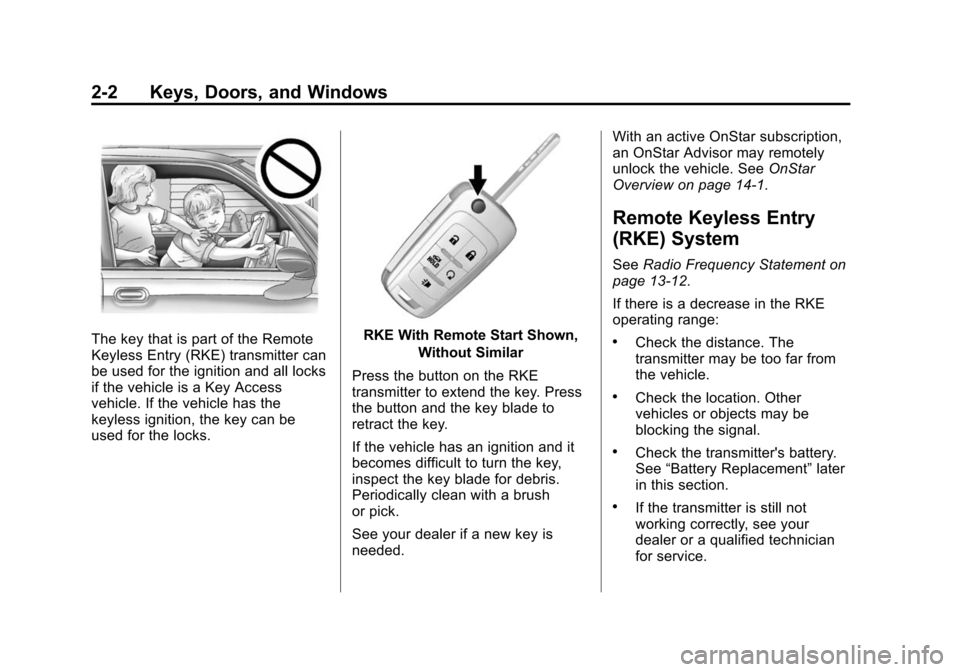
The key that is part of the Remote
Keyless Entry (RKE) transmitter can
be used for the ignition and all locks
if the vehicle is a Key Access
vehicle. If the vehicle has the
keyless ignition, the key can be
used for the locks.RKE With Remote Start Shown,Without Similar
Press the button on the RKE
transmitter to extend the key. Press
the button and the key blade to
retract the key.
If the vehicle has an ignition and it
becomes difficult to turn the key,
inspect the key blade for debris.
Periodically clean with a brush
or pick.
See your dealer if a new key is
needed. With an active OnStar subscription,
an OnStar Advisor may remotely
unlock the vehicle. See
OnStar
Overview on page 14-1.
Remote Keyless Entry
(RKE) System
See Radio Frequency Statement on
page 13-12.
If there is a decrease in the RKE
operating range:
.Check the distance. The
transmitter may be too far from
the vehicle.
.Check the location. Other
vehicles or objects may be
blocking the signal.
.Check the transmitter's battery.
See “Battery Replacement” later
in this section.
.If the transmitter is still not
working correctly, see your
dealer or a qualified technician
for service.
Page 36 of 413

Black plate (3,1)Chevrolet Impala Owner Manual (GMNA-Localizing-U.S./Canada-7576026) -
2015 - crc 2nd edition - 8/21/14
Keys, Doors, and Windows 2-3
Remote Keyless Entry
(RKE) System Operation
The transmitter functions may work
up to 60 m (197 ft) away from the
vehicle.
Keep in mind that other conditions,
such as those previously stated, can
impact the performance of the
transmitter.
With Remote Start Shown
Q(Lock):Press to lock all doors.
The turn signal indicators may flash
and/or the horn may sound on the
second press to indicate locking. See
“Remote Lock, Unlock, Start”
under Vehicle Personalization on
page 5-37.
If Unlocked Door Anti-Lockout is
enabled through Vehicle
Personalization and the driver door
is open when
Qis pressed, all
doors lock and the driver door will
immediately unlock. See “Remote
Lock, Unlock, Start” underVehicle
Personalization on page 5-37.
If the passenger door is open when
Qis pressed, all doors lock.
Pressing
Qmay also arm the alarm
system. See Vehicle Alarm System
on page 2-16.
K(Unlock): Press to unlock the
driver door or all doors. See “Power
Door Locks” underVehicle
Personalization on page 5-37.
The turn signal indicators may flash
to indicate unlocking. See “Remote
Unlock Light Feedback” under
Vehicle Personalization on
page 5-37. Pressing
Kwill disarm the alarm
system. See Vehicle Alarm System
on page 2-16.
Memory seat positions may be
recalled when unlocking the vehicle.
See Memory Seats on page 3-7 and
“Auto Memory Recall” underVehicle
Personalization on page 5-37.
Y(Remote Trunk Release):
Press and hold to release the trunk.
7(Vehicle Locator/Panic
Alarm): Press and release one
time to initiate vehicle locator. The
exterior lamps flash and the horn
chirps three times.
Press and hold
7for at least
three seconds to sound the panic
alarm. The horn sounds and the
turn signals flash for about
30 seconds until
7is pressed again
or the vehicle is started.
/(Remote Vehicle Start):
If equipped, press
Qand release
and then immediately press and
hold
/for at least four seconds to
Page 38 of 413
Black plate (5,1)Chevrolet Impala Owner Manual (GMNA-Localizing-U.S./Canada-7576026) -
2015 - crc 2nd edition - 8/21/14
Keys, Doors, and Windows 2-5
Keyless Unlocking/Locking from
Passenger Doors
When the doors are locked and the
RKE transmitter is within 1 m (3 ft)
of the door handle, pressing the
lock/unlock button on that door
handle will unlock all doors.
Pressing the lock/unlock button will
cause all doors to lock if any of the
following occur:
.The lock/unlock button was used
to unlock all doors.
.Any vehicle door has opened
and all doors are now closed.
Passive Locking
If equipped with Keyless Access,
the vehicle will lock several seconds
after all doors are closed if the
vehicle is off and at least one
transmitter has been removed or
none remain in the vehicle.
If other electronic devices interfere
with the RKE transmitter signal, the
vehicle may not detect the RKE
transmitter inside the vehicle.If passive locking is enabled, the
doors may lock with the RKE
transmitter inside the vehicle. Do
not leave the RKE transmitter in an
unattended vehicle.
Temporarily Disable Passive
Locking Feature
Temporarily disable the locking
feature by pressing and holding
K
on the door for several seconds with
a door open. Passive locking will
then remain disabled until
Qis
pressed, or until the vehicle is
turned on.
To customize whether the doors
automatically lock when you exit the
vehicle, see “Remote Lock, Unlock,
Start” under Vehicle Personalization
on page 5-37.
Keyless Trunk Opening
Press the touch pad on the trunk lid
to open the trunk if the RKE
transmitter is within 1 m (3 ft) of the
trunk.
Programming Transmitters to
the Vehicle
Only RKE transmitters programmed
to the vehicle will work. If a
transmitter is lost or stolen, a
replacement can be purchased and
programmed through your dealer.
The vehicle can be reprogrammed
so that lost or stolen transmitters no
longer work. Any remaining
transmitters will need to be
reprogrammed. Each vehicle can
have up to eight transmitters
matched to it.
Programming with a Recognized
Transmitter (Key Vehicles Only)
To program a new key:
1. Insert the original, already programmed key in the ignition
and turn to the key to the ON/
RUN position.
2. Turn the key to LOCK/OFF, and remove the key.
Page 43 of 413
Black plate (10,1)Chevrolet Impala Owner Manual (GMNA-Localizing-U.S./Canada-7576026) -
2015 - crc 2nd edition - 8/21/14
2-10 Keys, Doors, and Windows
to have the vehicle in view. Check
local regulations for any
requirements.
Other conditions can affect the
performance of the transmitter. See
Remote Keyless Entry (RKE)
System on page 2-2.
Starting the Vehicle
To start the engine using the remote
start feature:
1. Aim the RKE transmitter at thevehicle.
2. Press and release
Q.
3. Immediately after completing Step 2, press and hold
/for at
least four seconds or until the
turn signal lamps flash. The turn
signal lamps flashing confirms
the request to remote start the
vehicle has been received.
When the engine starts, the parking
lamps will turn on and remain on as
long as the engine is running. The
doors will be locked and the climate
control system may come on. The engine will continue to run for
10 minutes. After 30 seconds,
repeat the steps if a 10-minute
extension is desired. Remote start
can be extended only once.
To drive the vehicle, turn the ignition
to ON/RUN for Key Access
vehicles, or press the brake pedal
and the ENGINE START/STOP
button for Keyless Access vehicles.
Extending Engine Run Time
The engine run time can also be
extended by another 10 minutes,
if during the first 10 minutes
Steps 1–3 are repeated while the
engine is still running. An extension
can be requested, 30 seconds after
starting. This provides a total of
20 minutes.
The remote start can only be
extended once.
When the remote start is extended,
the second 10-minute period is
added on to the first 10 minutes and
the engine will run for a total of
20 minutes.
A maximum of two remote starts,
or a remote start with an extension,
is allowed between ignition cycles.
The vehicle's ignition must be
changed to ON/RUN/START and
then back to OFF before the remote
start procedure can be used again.
Canceling a Remote Start
To cancel a remote start, do one of
the following:
.Aim the RKE transmitter at the
vehicle and press and hold
/
until the parking lamps turn off.
.Turn on the hazard warning
flashers.
.Turn the vehicle on and then off.
Conditions in Which Remote Start
Will Not Work
The remote vehicle start feature will
not operate if:
.The key is in the ignition (Key
Access) or if the key is in the
vehicle (Keyless Access).
.The hood is not closed.