2015 AUDI TT ROADSTER warning light
[x] Cancel search: warning lightPage 20 of 244
18 Instruments and warning/indicator lights
If the J.J.) indicator lamp illuminates, the sys
tem has switched the ESC
off. In this case, you
can switch the ignition
off and then on to
switch the ESC on again. The system is func
tioning completely when the indicator lamp
switches
off .
If the II indicator lamp illuminates, the ESC
was switched
off with the [!I button.
Stabilization program and ABS fault! See
owner 's manual
If the DJ indicator lamp and the riJ ABS indi
cator lamp illuminate and the driver message
appears, the ABS or e lectronic differential lock
is ma lfunctioning. This also interrupts the
ESC. The brakes st ill function with their nor
mal power, but ABS is not active.
Drive to your authorized Audi dea ler immedi
ately to have the malfunction corrected .
For more informat ion about the ESC
<=>page 141.
ABS/ (8 ) Anti-lock brake system
This warning/indicator light monitors the ABS
and the electronic differential lock (EDL).
The warning/indicator light 1111 (USA mod-
e ls)
;riJ (Canada models) will come on for a
few seconds when the ignition is switched on .
The light will go o ut after an automatic check
sequence is completed.
There is a malfunction in the ABS when:
-The warning/indicator light does not illumi
nate when you switch the ign ition on.
- The warning/indicator light does not go out
after a few seconds .
- The warning/indicator light illuminates
wh ile driving .
The ESC indicator light also illuminates if
there is a malfunction in the ABS . The mes
sage
Stabilization program and ABS: fault!
See owner's manual
also appears in the in
strument cluster display and a warning tone
sounds .
The brake system will still respond even
without the assistance of the ABS system.
See your authorized Audi dealer as soon as
possible to restore full braking performance.
For more information regarding the ABS
<=>page 141.
Malfunction in the brake system
If the brake warning light r=> page 14 and the
ABS warning illuminate
together there may be
a malfunction in the ABS, and there may also
be a malfunction in the brake system itself
r=> &.. The ABS will not work and you will no
tice a change in braking response and per
formance.
In the event of a malfunction in the brake
system
the warning/ind icator light . (USA
models)/ . (Canada models) in the instru
ment cluster flashes
r=> page 14 .
Malfunction in the electronic differential
lock (EDL)
The EDL works together w ith the ABS . The
ABS warning light wi ll come on if there is a
malfunction in the EDL system
r=> page 141.
See your authorized Audi dealer as soon as
possible .
_& WARNING
-If the Ill (USA models)/11] (Canada
models) warning light does not go out,
or if it comes on whi le driving, the ABS
system is not work ing properly. The vehi
cle can then be stopped only wit h the
standard brakes (without ABS). You w ill
not have the protect ion ABS provides.
Contact your Audi dea le r as soon as pos
sible.
- USA models: If the . warning light, the
G1 warning light and the 1111 warning
light come on together, the rear wheels
could lock up fi rst under hard braking .
Rear wheel lock -up can cause loss o f ve
hicle control and an accident. Have your
vehicle repaired immediately by your au
thorized Audi dealer or a qualified work
shop. Drive s low ly and avoid sudden,
hard brake applications. ..,.
Page 21 of 244

Instrument s and warnin g/indic ator ligh ts 19
- Canada models:
If the brake warn ing
light ., the
J;.J warning light and the
ABS warning light
riJ come on together,
the rear wheels could lock up first under
hard braking. Rear wheel lock-up can
cause loss of vehicle control and an acci
dent. Have you r vehicle repaired immed i
a tely by your au thorized A udi dealer or a
qualified workshop . Dr ive slowly and
avoid sudden, hard brake applications.
( 0 ) Worn brake pads
llJ Check brake pad s!
If the war ning light illum inates, immediately
contact your au thori zed A udi dealer or quali
fied workshop to have all brake pads inspect
ed . On USA models the warning light
llJ
comes on together with the warning light •.
Both sets of brake pads on an axle must al
ways be rep laced at the same time.
A WARNING
Dr iv ing with bad brakes can cause a coll i
sion and serious personal injury .
-If the warning light llJ and the warning
light
. ll with the message Brake pads!
comes on in the inst rument cluste r dis
play, immediately contact your author
ized Audi dea le r or q ualified wor kshop to
have all br ake pads checked or rep laced if
necessary.
EPC Electronic power control
This warning/indicator light monitors the
electronic power control .
The [m warning/ind icator lig ht ( Electronic
P owe r Control) illuminates when you switch
on the igni tion as a fu nction check .
@ Tips
If this wa rning/i ndicator light ill uminates
while you are dr iving, then the re is a mal
fu nction in the engine elec tron ics. Have
1) .: USA mode ls onl y
the malfunct ion corrected as soon as pos
sible by your authorized A udi dealer or
q ualified works hop.
~ Malfunction Indicator Lamp (MIL)
The Ma lfunction Indicator Lamp (MIL) is part
of the On-Board Diagnostic (OBD II) system .
The symbol
II lights up when the ignition is
turned on and will turn off after the eng ine
has started and has settled at constant id le
speed . This indi cates that the M IL is work ing
properly.
The wa rning lig ht illuminates when the re is a
malfu nction in the eng ine electron ic system .
Contact your a uthorized Audi dea le r and have
t h e mal func tion cor rected.
An improperly closed fuel filler cap may also
cause the MIL light to illuminate
~ page 162.
For more information ~ page 30 .
!?') Engine speed limitation
App lies to veh icles : w it h eng ine speed limitatio n
(II Do not e xceed ma x. engine speed of
XXXX rpm
The (Pl symbol illuminates when there is an
engine con trol malfunct io n. The indicator
li ght
[mi n the instrum ent cluster also illum i
nates. The engi ne speed is limited to the
speed displayed in the d river i nformat ion sys
tem. Keep in mind that the engine speed w ill
not exceed the val ue d isplayed in the driver in
format ion system, for example when down
shifting.
Please go to an authorized A udi dealer or oth
er qualified wo rkshop to have the malfunct ion
repaired .
~ .. Checking the engine oil level
II Please add max . 1 qt of engine oil!
Page 22 of 244

20 Instruments and warning/indicator lights
If the Ill symbol comes on, add 1 quart (1 li
ter) of oil at the next opportunity
c:::> page 169.
'.!2" .... Engine oil sensor defective
If the. symbol illuminates, contact your au
thorized Audi dealer and have the oil sensor inspected.
Bil Fuel supply too low
When the D symbol illuminates, this means
there are about 1.9 gallons (7 liters) of fuel
left in the fuel tank. Time to refuel!
c:::> page 161.
If the symbol lights up, even when there is
ample fuel in the tank, and the text
Tank sys
tem malfunction! Please contact workshop
appears in the display, there is a fault in the
system. Contact a qualified workshop to have
the fault rectified.
co Windshield washer fluid level too
low
If the B symbol illuminates, add windshield
washer fluid to the washer system
c:::> page 179.
® Defective light bulb warning
If a defective bulb has been detected by the
system or a light bulb burns out, the
&:J sym
bol with a message appears in the display to
tell you which bulb is burnt out and where it is
located. For example:
Rear left turn signal
After 5 seconds, the message disappears . If
you want to recall the message into the dis
play, press the CH ECK button
c:::> page 10,
fig. 3(i) .
There are three reasons why the defective
bulb message would appear in the display:
- The light bulb has burnt out
r:> page 215.
-The fuse is "blown" r:> page 212, Replacing
fuses .
-The wire connection to the light bulb is de-
fective.
Have the bulb replaced or the connection re
paired by your authorized Audi Service depart
ment.
A WARNING
- Light bulbs are pressurized and could ex
plode while they are being changed caus
ing serious personal injury.
- Work with due care when handling the
high-voltage section of gas discharge
(xenon) lamps. Failing to do so could re
sult in death or serious injury!
BRAKE LIGHT!<®> Brake light defective
In case of a malfunction or component fail
ure, the symbol. (USA models)/Kf' ~» (Canada
models) can appear. The following electrical
components should be checked, repaired or
replaced, as necessary:
- Brake light bulbs
- All wiring connections
- Brake light switch
Contact your authorized Audi dealer for assis
tance if necessary.
(D Tips
The brake light switch is only inspected as
part of the functional check after the en
gine is started.
~CD Headlight range control defective
Applies to vehicles: wit h dynamic headlight range adjust·
ment
If the II illuminates, the dynamic headlight
range control is no longer working properly.
Have the system checked and repaired at your
authorized Audi dealer.
~O Adaptive light defective
Applies to vehicles: with Adapt ive Lig ht
m;J Adaptive light defective
Page 23 of 244

Instruments and warning/indicator lights 21
When this symbo l ml illuminates, it means
that Adaptive Light is defective. Go to a quali
f ied workshop to have the headlights or the
control unit for the Adaptive Light repaired.
(j__ o Light/rain sensor defective
App lies to vehicles: with a utomat ic headlights
If the symbol illuminates, the light sensor has
fa iled. For safety reasons, the low beams are
turned on permanently with the switch in
AU
TO .
Howeve r, you can continue to turn the
lights on and off using the lig ht switch . In the
case of a defect in the rain senso r, the w ind
shie ld wiper lever functions are sti ll available.
Have the light/rain sensor checked as soon as
possible at an authorized Audi dealer .
; Audi magnetic ride
Applies to vehicles: with Audi magnetic ride
The indicator light monitors vehicle damping .
The indicato r light R ill uminates when the
i gnit io n is switched on as a function check .
(D Tips
If the indicator lamp illum inates while you
are driving, there is a malfunct ion in the
veh icle damping. The chassis should be in
spected immediately by an authorized
Audi dea ler .
-::}. Rear spoiler
The warning/indicator light monitors the
electrically retractable rear spoiler.
The warning/indicator light 1,1 has the fol
l owing functions:
- It comes on for about 3 seconds as a func
t ion check when the ignition is sw itched on.
- It comes on if there is a malfunction in the
electrically retractable rear spoiler.
Addit ional information about the electrically
retractable rear spoiler<=>
page 143.
¢ Q Turn signals
The indicator light blinks when you use either
turn signal .
Whenever you use the left. or the right B
turn signal, the indicator light blinks. When
you use the emergency flasher, both indicator lights flash.
If one of the turn signa l light bulbs burn out,
the turn signal will blink twice as fast as nor
mal.
Additional information on the turn s ignals
<=> page 50.
CRUISE/ 0" Cruise control
The . (USA models)/ . (Canada models)
warning/indicator light illuminates when the
cruise control is activated .
Page 24 of 244

22 Driver in formation sy ste m
Driver information
system
Introduction
The Driver information display inside the in
strument cluster provides you, the driver ,
with important information.
Fig . 6 In strum en t cl ust er: center display
Fig. 7 Wiper le ver: con trols fo r the menu disp lay
Cent er d ispla y
With the igni tion on, the display in the Dr iver
I nformation System shows the fol low ing in
formation :
- CD* inserted or Radio* station set
- Outs ide temperature* : At temperatures be-
low 41 °F ( +S °C), a snowflake symbol ap
pears in front of the temperatu re d isplay
c::> .&_ .
- Warning when a door, the engine compa rt-
ment lid or the trunk lid is not closed .
Additional functions
You can open the following functions in the
Driver Information Sys tem disp lay by p ressing
the
! R ESE T I button c::> fig. 7 one or more times:
Digital speedometer *
T ire pressure monitoring
c::> page 198
Trip computer c::> page 23
Menu d isplay c::> page 24
Efficiency program c::> page 27
Service interval disp lay
c::> page 28
Lap timer* c::> page 28
Speed warn ing <=:> page 75
Auto Check Control
Some f unct ions and vehicle components are
scanned for their operati ng sta tus when yo u
switch the ign ition on and whi le you a re driv
ing. Malfunctions or req uired service proce
dures ar e signaled audib ly and indicated by
red and yellow i lluminated symbols and re
m inders in the display.
A WARNING -
- Never rely exclusively on the outside
temperature display to determine if a
road surface is icy or not . K eep in m ind
that road surfaces, espec ially br idges
and overp asses, co uld be ice covered and
slippe ry even at an outside tempe ra tu re
above 4 1 °F (+5 °C).
- Always remembe r, even if the "snow
f lake" symbo l (ice warning) does not ap
pear in the disp lay, black ice could be on
the road .
- A lways reduce your speed and d rive with
specia l care in cold weather cond itions
when the chance of encountering icy
road surfaces increases.
(D Tips
- If the vehicle is stationary, or if you are
dr iving at a very low speed, the tempera
t u re s hown in the d isp lay m ight be
slightly h igher than the actual o utside
temperature. Th is is caused by the heat
being radiated from the engine .
- On vehicles with Audi Nav igat ion sys
tem *, the displays may differ from their
normal appearance during navigation .
Page 27 of 244

Set Clock ¢ page 2 5
Computer¢ page 25
Acoustic par k assist* ¢ page 79
Speed warning ¢ page 77
Language ¢
page 2 5
Units (distance, fue l consump-
tion, temperature) ¢
page 25
Tire press ure moni toring
c> page 198
Lap timer* c>page 28
Lighting* ¢ page 48
Wiper (service pos it io n)
¢page 56
Window c> page 40
Doors (unlo ck ing and locking
mode, for example Auto- lock)
¢ page 34, c> page 34
Check
Service c> page 28
Chassis numbe r c> page 2 22
Engine oil temperature*
¢
page 26, c> page 26
Registe red keys ¢ page 32
Menu off
All of the messages shown in
vehicles withou t menu display ap-
pe ar o n the display screen.
Navigating the menu
Use the rocker switch on the windshield wiper
lever and the
I Reset ! button to operate the
menu and carry out inquiries and selections.
~-- @
Fig. 1 2 Wiper leve r: Controls for the men u disp lay
To open the menu
.. Press the I Reset ! button @ until the menu
display
i=> page 24 , fig . 11 appears
Dr iver in formation system 25
Selections and settings
.. Press the rocker switch @to reac h a men u
disp lay. The swi tch is operated the same as
the display (up/down).
Entering and confirming
.,. Press the I Reset I butto n @ .
Returning to the Start menu
.. Press the I Reset I button longer tha n 2 sec
onds to return from any menu level to the
Sta rt menu .
U sing the rocker switc h, you can select the
menus in the display or change settings. A
cursor appea rs on the left in front of these
lected values .
By pressing the
I Reset! button, you activate
the selection you made or confirm the values
you set.
Selected fu nctions are identified wit h
a check mark or ar e car ried out directly .
Selecting settings
Fig. 13 D isplay: Menu Sett ings, co mpute r selected
(page
l)
Se lect you r settings a s foll ows:
.,. Press the
I Reset I butto n. The Sta rt menu ap
pears ¢
page 24 , fig . 11 .
.. Press the rocker switch unt il Set is dis
played .
.. Press the
I Reset I butto n. All the menu s a p
pe a r .
.. Press the rocker switch until the desire d line
is highlig hted (curso r)
¢ fig . 13 .
.. Press the I Reset I button.
.. If necessary, scro ll by selecting and activat
ing the symbol for "Next page" o r "Previous
page" .
~
Page 28 of 244
26 Driver information system
When you have selected the Computer menu
and activated it by pressing the
I Reset! but
ton, two computer levels appear (computer 1
and computer 2). Now you have to select the
level you want using the rocker switch and ac
tivate it w ith the
! Reset I button .
Engine oil temperature display
Applies to vehicles: with engine temperature control dis
play
Engine oil
Temperature
176 °F
•Back
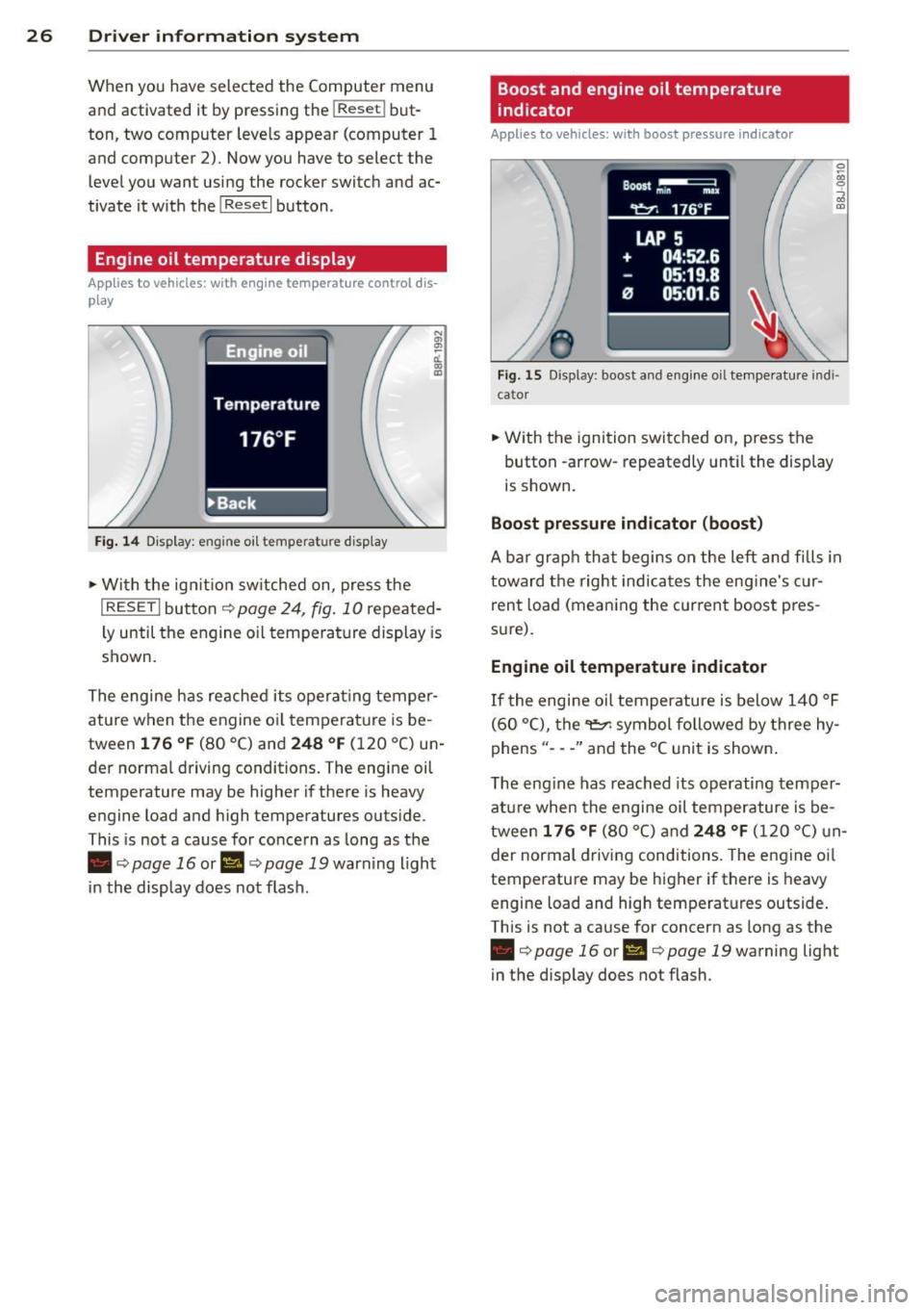
Fig. 14 Display: engine o il temperature d isp lay
• With the ign ition sw itched on, press the
N
"' l!! a'.. 0) (D
I RESET I button¢ page 24, fig. 10 repeated
ly until the engine oil temperature display is
shown.
The engine has reached its operating temper
ature when the engine oil temperature is be
tween
176 °F (80 °C) and 248 °F (120 °C) un
der normal driving conditions. The engine oil
temperature may be higher if there is heavy
engine load and high temperatures outside.
This is not a cause for concern as long as the
• ¢
page 16 or Ill¢ page 19 warn ing light
in the display does not flash.
Boost and engine oil temperature
indicator
Applies to vehicles: with boost pressure indicator
0 /xi 0
;;i OJ
Fig. 15 Display: boost and engine oi l temperature indi·
ca tor
• With the ignition switched on, press the
button -arrow· repeatedly until the display
is shown.
Boost pressure indicator (boost)
A bar graph that begins on the left and fills in
toward the right indicates the eng ine's c ur
rent load (meaning the current boost pres
s ur e).
Engine oil temperature indicator
If the engine oil temperature is below 140 °F
(60 °C), the
"t::?1 symbol followed by three hy
phens"- --" and the °C unit is shown .
The engine has reached its operating temper
ature when the engine oil temperature is be
tween
176 °F (80 °() and 248 °F (120 °() un
der normal driving conditions. The engine oil
temperature may be higher if there is heavy
engine load and high temperatures outside.
This is not a cause for concern as long as the
• ¢page 16 orl'I c::;,page 19 warning light
in the display does not flash.
Page 32 of 244
30 Driver information system
@ Tips
-Saved lap times cannot be individually
deleted from the total results.
- The saved lap timer values will not be
lost after turning the ignition off .
On-Board Diagnostic
system (OBD)
Malfunction Indicator Lamp (MIL)
The Malfunction Indicator Lamp (MIL) Ill in
the instrument cluster is part of the On-Board
Diagnostic (OBD II) system.
The warning/indicator light illuminates when
the ignition is switched on and goes o ut after
the engine starts and the idle has stabilized.
This indicates that the MIL is working proper
ly.
If the light does not go out after the engine
is started, or illuminates whi le you are driv
ing, a ma lfunction may exist in the engine sys
tem. If the light illuminates, the catalytic con
verter could be damaged.
Continue driving
with reduced power (avoid
ing sustained high speeds and/or rapid accel
erations) and have the condition corrected.
Contact your authorized Audi dealer .
If the light illuminates, the electronic speed limiter may also be malfunctioning. For more
information ¢
page 30, Electronic speed
limiter.
An improperly closed fuel filler cap may also
cause the MIL light to illuminate
¢page 162.
On-Board Diagnostics
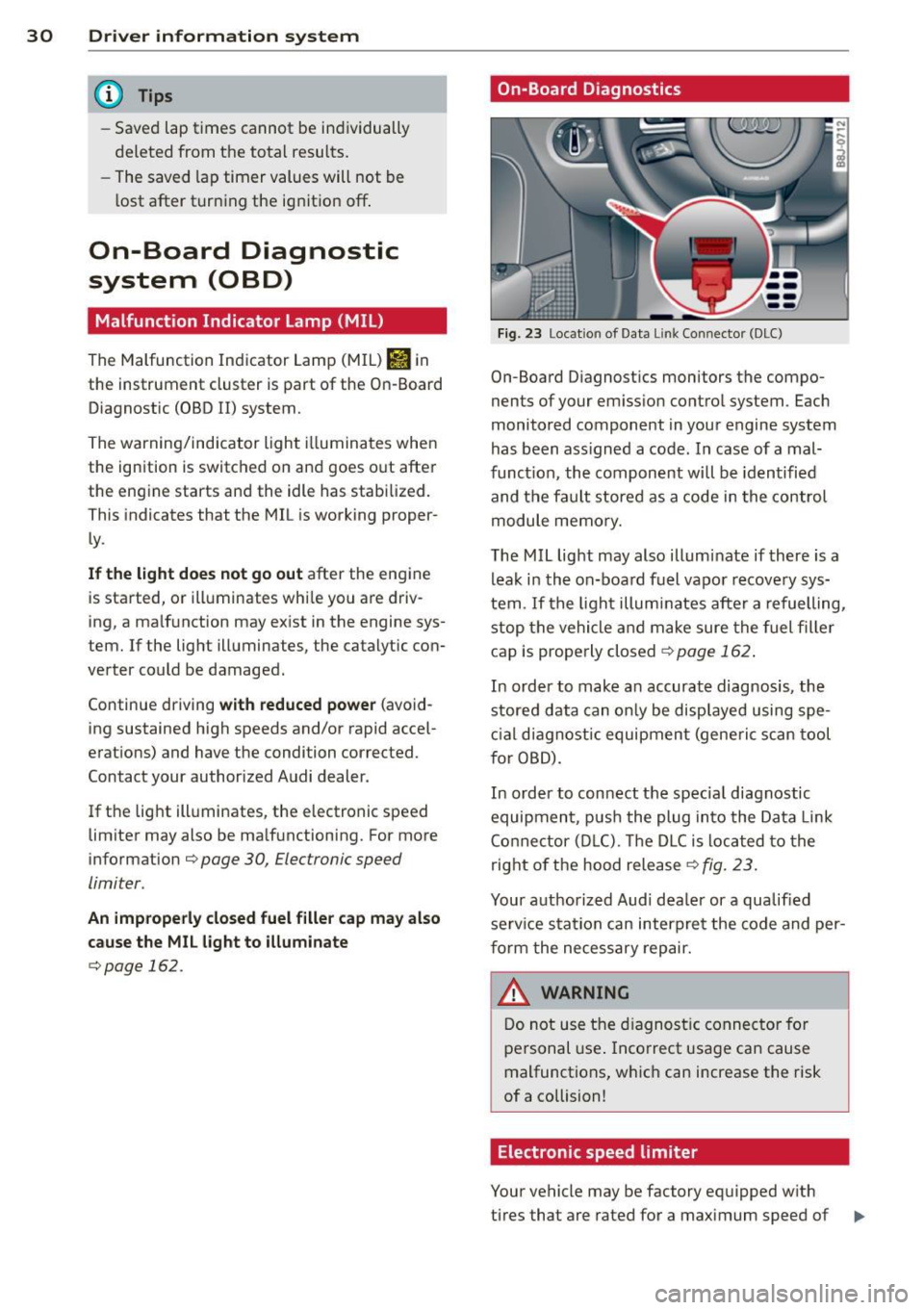
Fig. 23 Location of Data Lin k Co nn ector (DLC)
On-Board D iagnostics monitors the compo
nents of your emission control system . Each
monitored component in your engine system
has been ass igned a code. In case of a mal
funct ion, the component will be identified
and the fault stored as a code in the control
module memory.
The MIL light may also illuminate if there is a
leak in the on-board fuel vapor recovery sys
tem .
If the light illuminates after a refuelling,
stop the vehicle and make sure the fuel filler
cap is properly closed¢
page 162 .
In order to make a n accurate diagnosis, the
stored data can only be displayed using spe
cial diagn ostic equipment (generi c scan tool
f or OBD).
In order to connect the spec ial diagnostic
equipment , push the plug into the Data Link
Connector (DLC). Th e DLC is located to the
right of the hood release
¢fig. 23.
Your authorized Audi dealer or a qualified
service s ta tion can interpret the code and per
form the necessary repair.
~ARNING
Do not use the diagnostic connector for
personal use . Incorrect usage can cause
malfunctions, which can increase the risk
of a collision!
Electronic speed limiter
Your vehicle may be factory equipped w ith
-
tires that are rated for a maximum speed of .,..