2015 AUDI S6 lock
[x] Cancel search: lockPage 41 of 314

M N
0 I.J "". rl I.O
"' rl
"' rl
Child safety lock for
the rear doors
The power child safety lock locks the rear win
dows and prevent the rear doors from being
opened from the inside .
Fig. 30 Sectio n fr om driv er' s door : child sa fety lock
b uttons
• To activate the child safety lock for the left/
right rear door, press the left/right button
[!l
in the driver's door¢ fig. 30. The light in the
button w ill turn on.
• To deactivate the child safety lock for the
left/right rear door , press the left/right but
ton [!] in the driver's door. The light in the
button turns off.
The following features are switched off:
- The interior door handles in the rear doors,
- The power windows in the rear doors .
In order to activate the ch ild safety lock on
the left and the right side , press the two safe
ty buttons
[!l in succession .
Power windows
Controls
The driver can control all power windows.
Fig . 31 Sectio n of t he dr iv er 's d oor: Control s
Opening and closing 39
All power window switches are prov ided with
a two-po sition function :
Opening the windows
• Press the switch to the first stop and hold it
until the window reaches the desired posi
tion.
• Press the switch briefly to the
second stop
to automatically open the window.
Closing the windows
• Pull the switch to the first stop and hold it
until the window reaches the desired posi
tion.
• Pull the switch briefly to the
second stop to
automatically close the window.
Power window switches
@ Driver's door
® Passenger's door
© Left rear door
@ Right rear door
& WARNING
-When you leave your vehicle -even if on
ly briefly -always take the ignition key
with you . This applies particularly when
children remain in the vehicle. Otherwise
the children could start the engine or op
erate electrical equipment (e .g . power
windows). The power windows are func
tional until the driver's door or passeng
er's door has been opened.
- Be careful when clos ing the w indows .
Check to see that no one is in the way, or
serious injury could result!
- When locking the vehicle from outside,
the vehicle must be unoccupied since the
windows can no longer be opened in an
emergency.
(D Tips
After the ignition has been switched off,
the windows can still be opened or closed
for about 10 minu tes. The power windows
are not switched off until the driver's door
or passenger's door has been opened.
Page 42 of 314

40 Opening and clo sing
What to do after a malfunction
The one-touch open and close function must
be reactivated if the battery has been discon
nected .
,. Pull and hold the power window switch until
the window is fully closed .
,. Release the switch and then pull it again for
at least one second.
Valet parking
The valet parking feature protects the lug
gage compartment from unauthorized ac cess.
Fig. 32 Luggage compartment : valet park ing button
W ith "valet parking" activated, the rear lid
cannot be opened.
... Remove the mechan ical key
¢ page 32.
"' Open the glove compartment and activate
<=> fig. 32 the "valet parking" feature by
pressing the
I VA LET I button. The ind icator
light in the switch illuminates .
,. Close the glove compartment and lock it
with the mechanica l key .
"' Lock both rea r seatbacks with the mechani
c a l key ¢
page 64.
"' Leave the master key wi th the service per
sonnel for parking and keep the mechanical
key with you.
When the "vale t parking" fea ture is activa ted :
- the u nlocking button for the rear lid c:;, in
the d river's doo r is inactive
- the b utton c:;, on the maste r key is inact ive
- the opening hand le in the rear lid is inactive. T
he vehicle can be driven and locked and un
locked with the master key . Access to the lug
gage compartment is b locked .
When the valet pa rking func tion is switched
on, the message
Valet parking acti vated ap
pears in the instrument cluste r display when
you sw itch the ignition on .
Sliding/tilting sunroof
Operation
Fig . 33 Sect io n of th e headl iner : Sl idi ng/t ilti ng su nroof
but ton
@ Tilting and sliding
,. To t ilt the sunroof completely , press the
sw itch br iefly to the second level b riefly.
"' To close the su nroof comp letely, pull the
sw itch br iefly to the second level¢,& .
"' To select an intermediate pos it ion, press/
pull the switch to the first level until t he de
sired position is reached.
@ Opening /sliding (version 1 )
"'To move the roof into the reduced w ind
noise posit ion, press the button back brief ly
to the second leve l. The roof will ope n all
the way if you press the button back to the second level again .
"' To close the sunroof completely, press the
sw itch forward briefly to the second level
¢ £ .
,. To select an intermediate pos it ion, press/
pull the switch forwa rd/back to the first lev
el unti l the desired posi tion is reached.
@ Opening /sliding (version 2)
"' To open the sunroof completely, p ress the
sw itch back to j ust before the second level. ..,_
Page 47 of 314
M N
0 I.J "". rl I.O
"' rl
"' rl
Automatic headlights
You can adjust the following settings in the
Automatic headlights menu:
Headlights activation time -You can adjust if
the headlights switch on
Early, Med . or Late
according to the sensitivity of the ligh t sensor.
Audi adaptive light* -You can switch adaptive
light
On and Off.
Daytime running lights
USA models:
You can switch the dayt ime run
n ing lights
on and off .
Canada models :
The function cannot be
turned off . It is activated automatically each
time the ignition is switched on. This menu
item is shown "greyed out" .
Coming home, Leaving home
The coming home function illuminates the
area outside the vehicle when you switch the
ignition off and open the driver's door. To turn
the function on, select
Lights when leaving
car > On .
The leaving home function illuminates the
area outside the vehicle when you un lock the
vehicle. To turn the funct ion on, select
Lights
when unlocking car > On .
The coming home and leaving home functions
only operate when it is dark and the light
switch is in the
AUTO position. Clear
vision 45
Turn signals and high beam lever
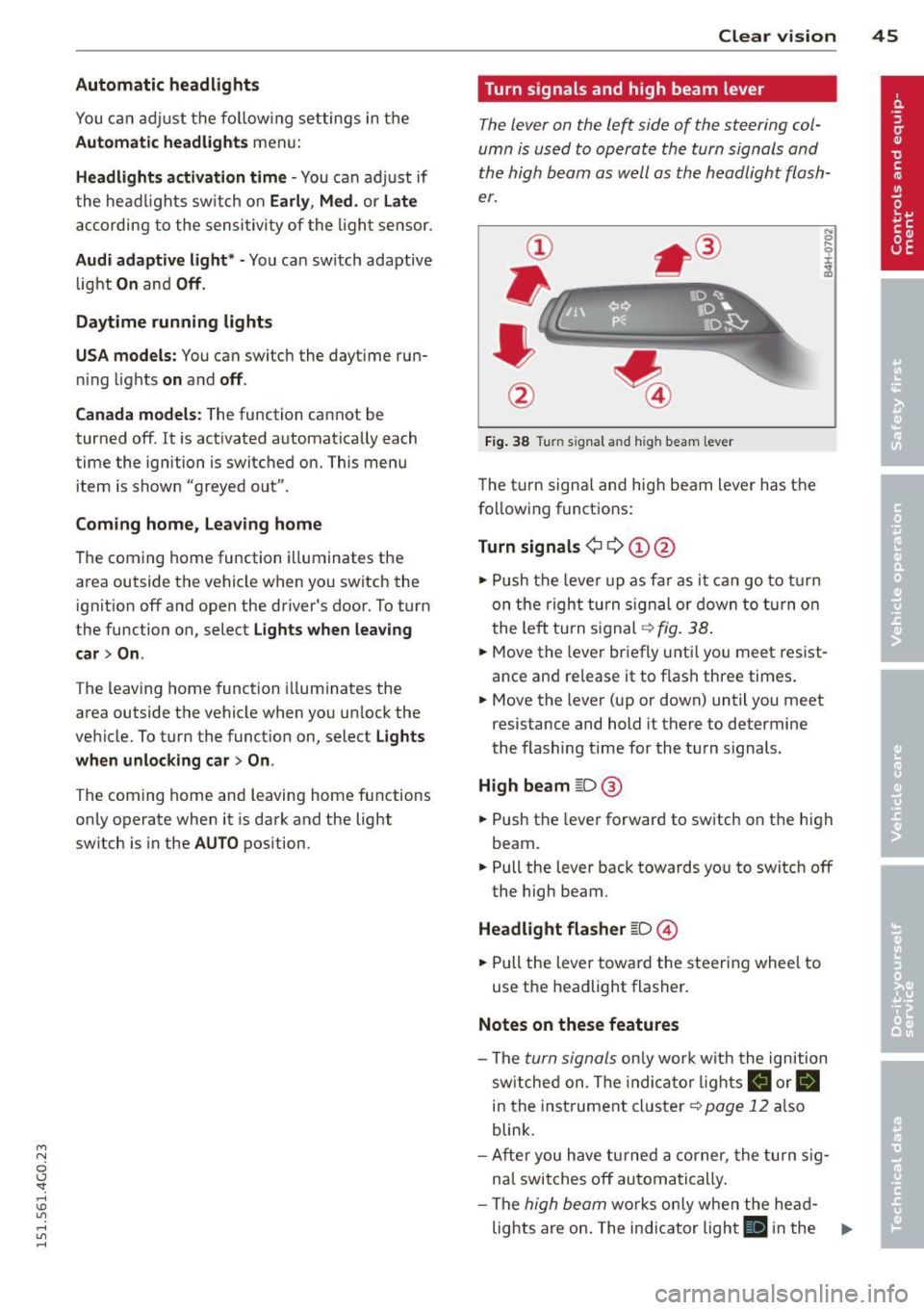
The lever on the left side of the steering col
umn is used to operate the turn signals and
the high beam as well as
the headlight flash
er.
Fig. 38 Tu rn signal and high beam lever
The turn signal and high beam lever has the
following functions:
Turn signals ¢ 9 ©@
.,. Push the lever up as fa r as it can go to turn
on the right turn signa l or down to turn on
the left tu rn s ignal ¢
fig. 38.
.. 0 ....
~
... Move the lever briefly unti l you meet resist
ance and re lease it to flash three times.
.,. Move the lever (up or down) until you meet
resistance and hold it there to determine
the flashing time for the turn signals.
High beam ~D @
... Push the lever forward to switch on the high
beam .
.,. Pull the lever back towards you to switch off
the high beam.
Headlight flasher ~D ©
... Pull the lever toward the steering wheel to
use the headlight flasher.
Notes on these features
-The turn signals on ly work w ith the ignition
sw itched on. The indica tor l ights
a or.
in the instrument cluster¢
page 12 also
blink.
- After you have turned a corner, the turn sig
nal switches off automatically .
- The
high beam works only when the he ad-
lights are on . The indicator light
El in the ..,.
Page 48 of 314

46 Clear vis ion
instrument cluste r illuminates when the
high beams are on.
- T he
headlight flash er works only as long as
yo u hold the lever - even if there are no
l ights turned on. The indicator light
II in
the instrument cluster il luminates when you
use the headlight flasher.
A WARNING
Do not use the high beam or headlight
flasher if you know that these could blind
oncoming traffic.
Interior lights
Front and rear interior lighting
Fi g. 39 Headliner: Front interior ligh ts
Fig . 40 Re ar headli ne r: Readi ng light
Press the appropriate button q fig. 39:
El-Interior lighting on/off
I]]-Door contac t sw itch . The inter ior lighting
turns on automatica lly when you unlock the
vehicle, open a door or switch the ignition off.
The interior lighting turns off several seconds
after you close the doors, when you lock the
vehicle or when you sw itch the ignition on.
When a door is open, the light t urns off afte r
a few minutes.
L:!l -Read ing lights on/off
~ - Switching the rear read ing lights on/off
from the cockpi t.
I" REARI * -Switching the rear reading lights
on/off from the cockpit.
Ambience lighting
Applies to vehicles: w ith amb ience lighting
You can adjust the br ightness for the ambi
ence ligh tin g.
.. Select in the MMI:
ICA RI function button>
(Car )* sys tem s control button > Vehicle set
ting s
> Interi or lighting > Brightne ss.
.. To increase or reduce the b rightness, turn
t he knob and press it .
T he ambience light ing tu rns on when you turn
the headlights on wh ile the ign ition is switc h
ed on.
(D Tips
The setting is automati cally sto red and as
s igned to the remo te contr ol key t hat i s in
u se.
Instrument illumination
You can adjust the brightness of the instru
men t and display illumination a s well as the
Head-up Display*.
Fi g. 41 Instrume nt illumina tion
... Press the knob to release it.
.. Turn the knob toward"-" or"+" to reduce or
increase the br ightness .
.. Press the knob aga in to return it to its o rigi-
na l posit ion . ...
Page 51 of 314

M N
0 <.J 'SI: ,...., \!) 1.1'1 ,...., 1.1'1 ,....,
rain sensor function. Check your
windshield wiper b lades regularly.
- The washer fluid nozzles of the wind
sh ield washer system are heated at low
temperatures when the ignit ion is on .
- When stopping temporarily, e .g . at a
traffic light , the set speed of the wind
shield wipers is automatically red uced by
one speed.
Cleaning windshield wiper blades
Clean the wind shield wiper bl ades when they
begin to leave streaks . Use a soft cloth and
glass cleaner to clean the windsh ield wiper
b lades.
.,. Pl ace the wind shield wiper arm s in the serv
ice position . Refer to ¢
page 49.
.,. Lift the w iper arm away from the front win
dow.
_& WARNING
Dirty w indshie ld w iper blades can imp air
your view. This can lead to accidents.
Replacing windshield wiper blades
Fig. 46 Re movi ng winds hield w ipe r blade s
-
Wiper ser vice position /blade replacement
position
.,. Switch the ign ition off and move the w ind
shield wipe r lever to posit io n @ ¢
page 48,
fig. 45. The windshield wipers move into the
service position.
.,. To b ring th e wipe rs back into the original
position, switch the ignition on and press
the windshie ld wipe r lever.
Clear v is ion 49
You can also t urn the se rv ice position on or off
in the MMI:
.,. Switch the windsh ie ld wipers off (position
@ ¢ page 48, fig. 45) .
.,. Select: !CAR ! function but ton> (Car )* sy s
tem s control button > Servicing & check s >
Wiper service po sition > On /Off .
Remo ving th e wiper bl ade
.,. Lift the windsh ie ld wipe r arm up from the
w indshield.
.,. Press the locking knob
(D ¢ fig. 46 on the
w iper blade. Hold the wiper blade firmly .
.,. Remove the wiper blade in the direction of
the arrow .
Attaching the wipe r blade
.,. Install the new wiper blade in the reta iner
on the wipe r arm @unti l you hear it click in
to place on the w iper arm .
.,. Place the w iper arm back on the windshield .
.,. Tu rn the se rvice position off.
_& WARNING
-
F or your safety, you s hou ld rep lace the
wiper b lades once or twice a yea r. See your
authorized Audi dea ler for replacement
b la d es .
Q) Note
- Th e windsh ie ld wiper b lades must only
be folded away when in the service posi
tion! Otherwise, yo u ris k damaging the
paint on the hood or the windshie ld wip
er motor.
- Yo u should not move your vehicle or
press the windshield wiper lever when
the wiper arms are folded away from the
w indshield . The windsh ield wipers wou ld
move back into their original position
and could damage the hood a nd wind
shield .
- To help prevent damage to the w iper sys
tem, always loosen blades w hich are fro
zen to the windshield before operating
w ipers. ..,.
Page 52 of 314

50 Clear vision
-To help prevent damage to wiper blades,
do not use gasoline, kerosene, paint
thinner, or other solvents on or near the
wiper blades.
- To help prevent damage to the wiper
arms or other components, do not at
tempt to move the wipers by hand.
@ Tips
- Commercial hot waxes applied by auto
matic car washes affect the cleanability
of the windshield .
- You can also use the service position, for
example, if you want to protect the
windshield from icing by using a cover .
- You cannot activate the service position
when the hood is open.
Mirrors
Adjusting the exterior mirrors
Fig . 47 Fo rw ar d sect ion of driver's a rmrest: power mir
r or co ntrols
Turn the knob to the desired position :
Q/P -In this position, you can adjust the
driver's and front passenger's exterior mirrors
by turning the knob in the desired direction .
4ill-The mirrors are heated depending on the
outside temperature .
8 -The exterior mirrors fold in. In the MMI,
you can select if the mirrors fold in automati
cally when you lock the vehicle ¢
page 34.
Tilt function for the passenger's mirror
To help you see the curb when backing into a
parking space, the surface of the mirror tilts slightly.
The knob must be in the P position
for this to happen.
You can adjust the tilted mirror surface by
turning the knob in the desired direction.
When you move out of reverse and into anoth
er gear, the new mirror posit ion is stored and
assigned to the key you are using.
The mirror goes back into its original position
once you drive forward faster than 9 mph (15
km/h) or switch the ignition
off.
.&_ WARNING
--
-Curved (i.e. convex) mirror surfaces in-
crease your field of view. Remember that
vehicles or other objects will appear
smaller and farther away than when seen in a flat mirror. If you use this mirror to
estimate distances of following vehicles
when changing lanes, you could estimate
incorrectly and cause an accident.
(D Note
-If the mirror housing is moved uninten
tionally (for example, while parking your
vehicle), then you must first fold the mir
ror electrically. Do not readjust the mir
ror housing manually. You could damage
the motor which controls the mirror.
- If you wash the vehicle in an automatic
car wash, you must fold the exterior mir
rors in to reduce the risk of damage to
the mirrors. Never fold power folding ex
terior mirrors* by hand . Only fold them
in and out using the power controls.
(D Tips
- The exterior mirror settings are stored
with the memory function*¢
page 56.
-If there is a malfunction in the electrical
system, you can still adjust the exterior
mirrors by pressing the edge of the mir
ror.
Page 57 of 314

M N
0 I.J "". rl I.O
"' rl
"' rl
Armrest
There is a storage compartment under the
armrest .
Fig. 51 Cockp it: center armrest
Adjusting th e armrest
.. To adjust the angle, raise the armrest from
the start ing pos ition detent by detent.
.. To b ring the armrest back into its origina l
position, lift it above the top position and
then fold it back down.
Opening th e st orag e co mpartment
.. Press the button -arrow- upward.
Please note that the driver's arm movements
may be restr icted w ith the armrest folded
down. Fo r this reason, the armrest should not
be folded down when driving in c ity traffic.
Head restraints
Front head restraints
Applies to vehicles: with adjustable head restraints
Head restraints that ore adjusted according
to body size, along with the seat belt, offer
effective protection.
F ig. 52 Front seat: Adjusting the head restra int
S ea ts a nd s to rage 55
Adjust the head restraint so the upper edge is
as even as possible with the top of your head.
If that is not possible, try to adjust the head
restraint so that it is as close to this position
as possible. Move the head restraint so that it
is as close to the back of the head as possible .
.. To move the head restra int up or forward,
slide it until it locks into p lace .
.. To move the head restraint down or back,
press the side button -arrow-
c:> fig. 52 and
slide the head rest raint until it locks into
place .
Refer to
c:> page 130, Proper adjustment of
head restraints
for guidelines on how to ad
just the height of the front head restraints to
su it the occupant's body size.
.&_ WARNING
- Driving without head restraints or with
head restra ints that a re not proper ly ad
justed increases the risk of serious or fa
tal neck injury dramatica lly .
- Read and heed all WARN INGS
i=> page 130, Proper adjustment of head
restraints.
(D Tips
Correct ly adjusted head restraints and
safety be lts are an extreme ly effective
combination of safety features.
-
Page 58 of 314

56 Seats and storage
Rear head restraints
Fig. 53 Rear seats: Head restra int
. .
Fig . 54 Rear head restraints: release
If there is a passenger on the rear center seat
ing position, slide the center head restraint
upward at least to the next notch
c::> A in
Proper adjustment of head restraints on
page 130 .
Adjusting the he ad restr aint s
• To move the head restraint up, hold it at the
s ides with both hands and slide it upward
until you feel it lock into place.
• To move the head restraint down, press the
button -ar row-
c::> fig. 53 and slide the head
rest raint downward.
Rem oving the head re straints
• Move the head restraint upward as far as it
can go.
• Press the release
c::> fig. 54 with the mechan
ical key
c::> page 32 and the button -ar row-
c::> fig. 53. Pu ll the head rest raint out of the
backrest at the same time
c::> .,&. .
Install ing th e he ad re str aints
• Slide the posts on the head restraint down
into the guides until you feel the posts lock
i nto place. •
Press the b utton -arrow-
c::> fig. 53 and slide
the head restraint all the way down . You
should not be able to pull the head restraint
out of the backrest.
So that the dr iver can have a better view to
the rear, the head restraints should be p ushed
down completely when the rear seats are not
occupied.
A WARNING
-- On ly remove the rear seat head restraints
when necessary in order to install a child
seat . Install the head restraint agai n im
mediately once the child seat is removed.
Dr iving without head rest rain ts or wi th
head restra ints tha t a re no t properly ad
justed increases the risk of ser ious or fa
tal neck injury dramatically .
- Read and heed all WARN INGS
c::> page 130 .
Seat memory
Description
Applies to vehicles: with memory function
The memory function allows you to quickly
and easily stor e and recall pe rsonal seati ng
profiles for the d river an d front passenger *.
T he memory f un ction is opera ted th ro ugh the
mas ter key and the memory buttons in the
driver's/front passenger's* doors .
T he driver's seat ing profile is stored and as
s igned to the master key ea ch time the vehicle
i s lo cked. When yo u open the door, the sea t
i ng profile is automatically reca lled . If two
people use one vehicle, it is recommended
that each person always uses "their own"
master key.
T wo sea ting profiles can be stored in each of
the d river's/front passenger's * doors. Once
stored, these seating profiles can be recalled
at any time.
T he following sett ings a re stored: