2015 AUDI S3 SEDAN light
[x] Cancel search: lightPage 52 of 282
Light and Vi sion
- Do not use the wipers to remove ice from
the windows. Using windshie ld wipers as ice
scrapers destroys the wiper blades.
(D Tips
- The windshield wipers are switched off
when the ignition is turned off. Activate the
windsh ield wipers after the ignition is
switched back on by moving the windsh ield
wiper lever to any pos it ion.
- Worn or dirty windshie ld wiper b lades result
i n streaking. This can affect the rain sensor
funct ion. Check your windshield wiper
blades regularly .
- The washer fluid nozzles in the w indshield
washer system are heated* at low tempera
tures when the ignit io n is on.
- When stopp ing temporarily, such as at a
traffic light, the speed of the windsh ield
wipers automatically reduces by one level.
- In vehicles with an MMI, you can switch the
rain sensor or off in the
Dri ver ass istanc e
menu.
Cleaning windshield wiper blades
Clea n the wiper blades when you see wipe r
s treaks. Use a soft cloth and a glass cleaner.
.., Place the w indshield wiper arms in the serv ice
pos ition ¢
page 50 .
.., Fo ld the windshield wipe r arms away from the
winds hield .
A WARNING
Dirty windshie ld wiper blades can impai r vi
sion , which increases the risk of an accident.
(D Note
If you see streaks aga in after cleaning the
w iper blades, the b lades must be replaced
¢page SO.
so
-
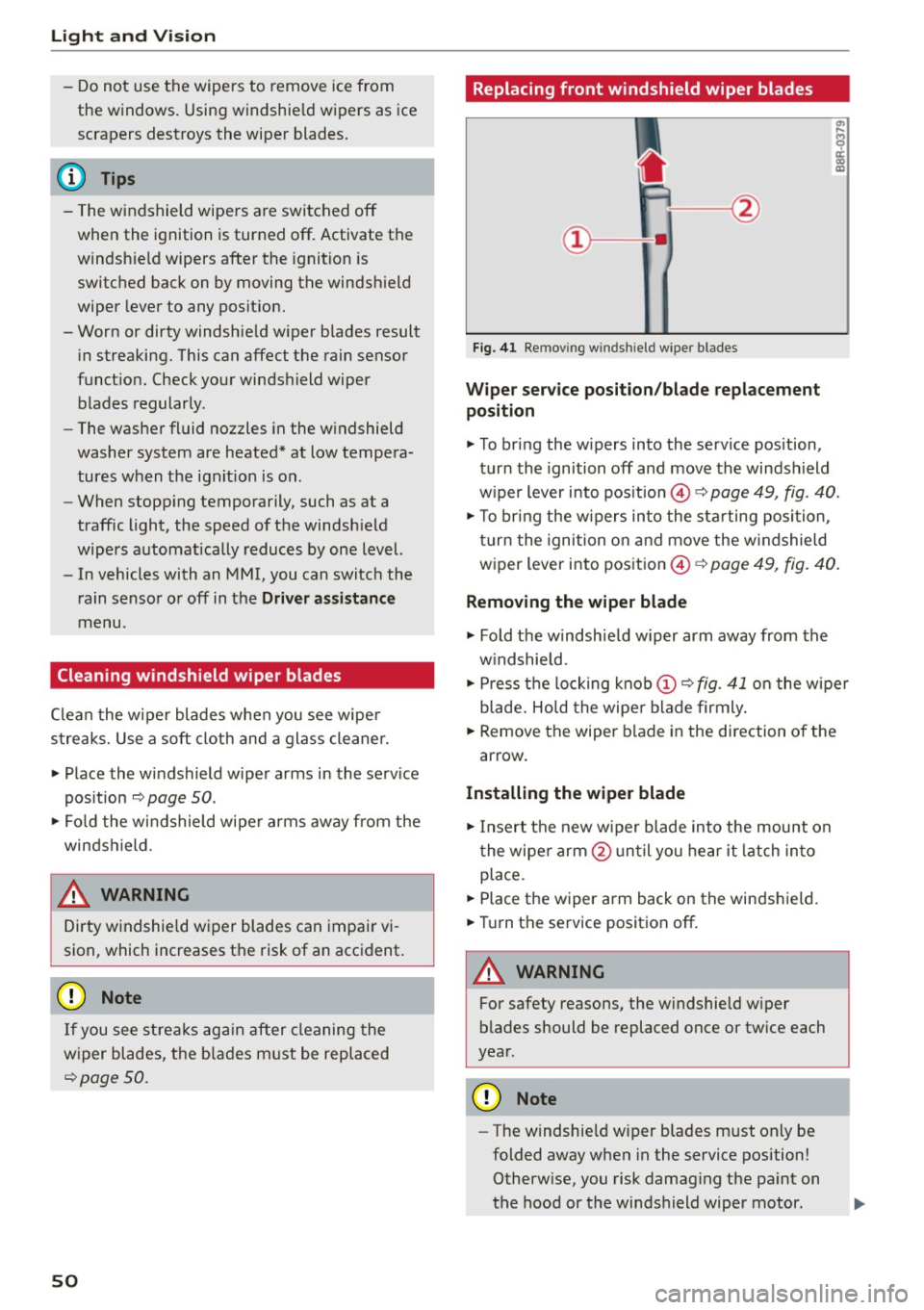
Replacing front windshield wiper blades
F ig. 41 Re mov ing wind shi eld w iper blades
Wiper service po sit ion /blade repl acement
position
.., To br ing the w ipers into the service pos ition,
turn the ignition off and move the windsh ield
w iper lever into position @¢
page 49, fig. 40.
.., To br ing the w ipers into the sta rting position ,
turn the ignition on and move the w indshield
wiper lever into position ©¢
page 49, fig. 40.
Removing the wiper blade
... Fold the windshie ld w iper arm away from the
w indshield.
.., Press the locking knob
(D C? fig . 41 o n the wiper
blade . Hold the wipe r blade firmly.
... Remove the wiper blade in the direction of the
arrow .
Installing the wipe r blade
.., Insert the new wiper blade into the mount on
the wiper arm @unt il you hear it latch in to
place.
... Place the wiper arm back on the windshield.
... Turn th e service position off .
A WARNING
-
For safety reasons, the w indshie ld w iper
b lades should be replaced once or tw ice each
year .
Q) Note
-The windshie ld w iper blades must only be
folded away when in the service position!
Otherw ise, you risk damag ing the pa int on
the hood or the windshield wiper motor .
Page 53 of 282
....,
N
0 > co
rl I.O
"'
"'
"'
rl
-You should not drive your vehicle or press
the windshie ld wiper lever when the wiper
arms are folded away from the w indshield.
The windshield wipers would move back in
to their original position and could damage
the hood and windshield .
- To prevent damage to the windshield wash
er system, a lways loosen wiper blades that
have frozen to the windsh ield before turn
i ng the wipers on .
- To prevent damage to the wiper blades, do
not apply gasoline, petro leum, th inning
agents or other solvents on the wiper b lades or near them.
- To prevent damage to the wiper arms or
othe r components, do not try to move the
windsh ield wipers by hand.
@ Tips
- Commerc ial hot wax such as the types used
by car washe s make it more difficult t o clean
the w indshie ld.
- You can also use the service pos ition, for ex
ample, if you want to p rotect the w indshie ld
from i cing by us ing a cover.
- You cannot activate the service pos it ion
whe n the hood is open.
Digital compass
Switching the compass on and off
Ap plies to vehicles: w ith digi tal compass
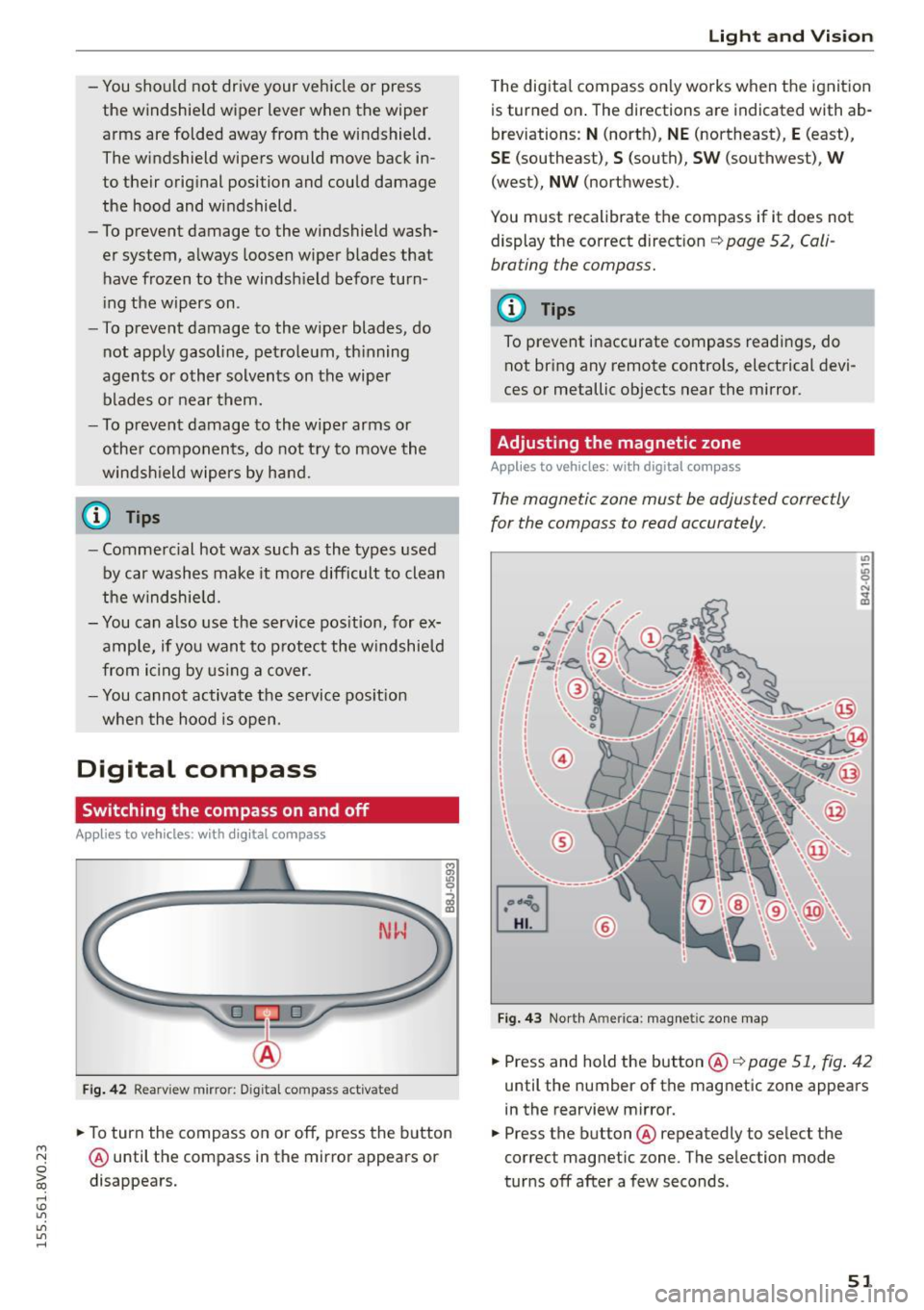
Fig. 4 2 Rearview mirro r: Dig ital compass act ivated
... To turn the compass on or off, press the button
@ until the compass in the mirror appears or
disappears.
Light and Visio n
The dig ita l compass on ly works when the ignit ion
is turned on . The directions a re indicated with ab
breviations:
N (nort h), NE (northeast), E (east),
SE (southeast), S (south), SW (southwest), W
(west), NW (northwest).
You must recalibrate t he compass if it does not
display the correct direct ion
¢ page 52, Cali
brating the compass.
(D Tips
To prevent inaccurate compass readings, do not br ing any remote controls, electrical devi
ces or metallic objects near the mirror.
Adjusting the magnetic zone
Appl ies to vehicles: wit h digita l co mp ass
The magnetic zone must be adjusted correctly
for the compass to read accurately.
®
Fig. 4 3 Nor th Ameri ca: magnet ic zone map
... Press and hold the button @ ¢page 51, fig . 42
until the number of the mag netic zone appears
in the rearview mirror .
... Press the butt on @ repeatedly to select the
correct magnetic zone. The se lection mode
tur ns off after a few seconds .
51
Page 54 of 282
Light and Vi sion
Calibrating the compass
Appl ies to veh icles: w ith digital compass
You must recalibrate the compass if it does not
display the correct direction .
.,. Press and hold the button ® c:> page 51, fig. 42
until a C appears in the rearview mirror .
.,. Drive in a circle at about 5 mph (10 km/h) until
a d irect ion is displayed in the rearv iew m irror .
A WARNING
- To avoid endanger ing yourself and othe r
dr ivers, calibrate the compass in an area
where there is no traffic.
-
- T he dig ita l compass shou ld only be used as
an orientation aid .
If you want to check the
compass while driving, you must still pay at
tention to traffic, the road, the weather and any other possible hazards.
52
Page 55 of 282
M N
0 > co ...... \!) 1.1'1
1.1'1
1.1'1
......
Seats and storage
General information
Important information
A WARNING
Refer to the chapter Driving Safely
c::> page 130, Driving safety for important in
formation, tips, suggestions and warnings
that you should read and follow for your own
safety and the safety of your passengers.
Why is your seat adjustment so important?
The safety belts and the airbag system con only
provide maximum protection if the front seats
ore correctly adjusted.
There are various ways of adjusting the front
seats to provide safe and comfortable support
for the driver and the front passenger. Adjust
your seat properly so that:
- you can easily and quickly reach all the switches
and controls in the instrument panel
-your body is properly supported thus reducing
physical stress and fatigue
- the safety belts and airbag system can offer
maximum protection
c::> page 148.
In the following sections, you will see exactly
how you can best adjust your seats.
There are special regulations and instructions for
installing a child seat on the front passenger's
seat . Always follow the information regarding
child safety provided in
c::> page 172, Child safe
ty.
A WARNING
Incorrect seating position of the driver and all
other passengers can result in serious person
al injury.
- Always keep your feet on the floor when the
vehicle is in motion -never put your feet on
top of the instrument panel, out of the win
dow or on top of the seat cushion. This ap
plies especially to the passengers. If your
seating position is incorrect, you increase
Seats and storage
the risk of injury in the case of sudden brak
ing or an accident.
If the airbag inflates and
the seating position is incorrect, this could result in personal injury or even death.
- It is important for both the driver and front
passenger to keep a distance of at least
10 inches (25 cm) between themselves and
the steering wheel and/or instrument panel.
If you're sitting any closer than this, the air
bag system cannot protect you properly. In
addition, the front seats and head restraints
must be adjusted to your body height so
that they can give you maximum protection.
- Always try to keep as much distance as pos
sible between yourself and the steering
wheel or instrument panel.
- Do not adjust the driver's or front passeng
er's seat while the vehicle is moving. Your
seat may move unexpectedly, causing sud
den loss of vehicle control and personal in
jury. If you adjust your seat while the vehicle is moving, you are out of position .
Driver's seat
The correct seat position is important for safe
and relaxed driving.
We recommend that you adjust the driver's seat
in the following manner:
.,. Adjust the seat in fore and aft direction so that
you can easily push the pedals to the floor
while keeping your knees slightly bent
c::, A in
Why is your seat adjustment so important? on
page
53.
.,. Adjust the backrest so that when you sit with
your back against the backrest, you can still grasp the top of the steering wheel.
.,. For adjustable head restraints: adjust the head
restraint so the upper edge is as even as possi
ble with the top of your head.
If that is not pos
sible, try to adjust the head restraint so that it
is as close to this position as possible
c::> page 56. Move the head restraint so that it
is as close to the back of the head as possible. ..,.
53
Page 61 of 282
....,
N
0 > co
rl I.O
"'
"'
"'
rl
_& WARNING
Always leave the lid on the glove compartment cover closed while driving to reduce the
risk of injury.
Additional storage compartments
There are additional storage compartments,
compartments and holders at other locations in
the vehicle :
- In the upper part of the glove compartment.
- In the center console under the center arm-
rest* .
- On the back of the right front seat . The com
partment* can hold a maximum weight of
2 lbs
(1 kg).
- Garment hooks on the B-pillar ¢
&.
_& WARNING
-Do not place any objects on the instrument
panel. Objects that are not stored securely
can slide around in the vehicle while driving,
when accelerating or braking or when turn
ing.
- Make sure that objects cannot fall out of the
center console storage compartment or oth
er compartments and into the footwell
while driving. These objects could prevent
you from braking or accelerating during sud
den braking maneuvers.
- Garments hung on the hooks must not ob
struct the driver's view. The garment hooks
are only designed for light objects . Do not
hang any garments with hard, sharp or
heavy objects in the pockets on the garment
hooks . These objects could injure vehicle oc
cupants during sudden brak ing or in a colli
sion - especially if the airbags deploy.
- Always keep the glove compartment closed
while driving to reduce the risk of injury dur
ing a collision or heavy brak ing.
- Read and following the WARNINGS in
¢ page 168, Important safety instructions
on the side airbag system.
-Hang garments so that they do not obstruct
the driver's view.
Seats and storage
-The garment hooks should only be used for
light articles of clothing . Do not leave any
heavy or sharp-edged objects in the pockets
that could interfere with the side airbags unfolding and cause injuries in the event of
a collision .
- Do not use coat hangers to hang garments,
because this could reduce the effectiveness
of the side curtain airbags.
- Do not hang any heavy objects on the gar
ment hooks, because they could cause injury
during heavy braking.
- Because of their load capacity, the hooks
should only be used to secure objects that
weigh a max imum of 10 lb (5 kg). Heavy ob
jects will not be secured sufficiently, and
this increases the risk of injury.
luggage compartment
Loading luggage compartment
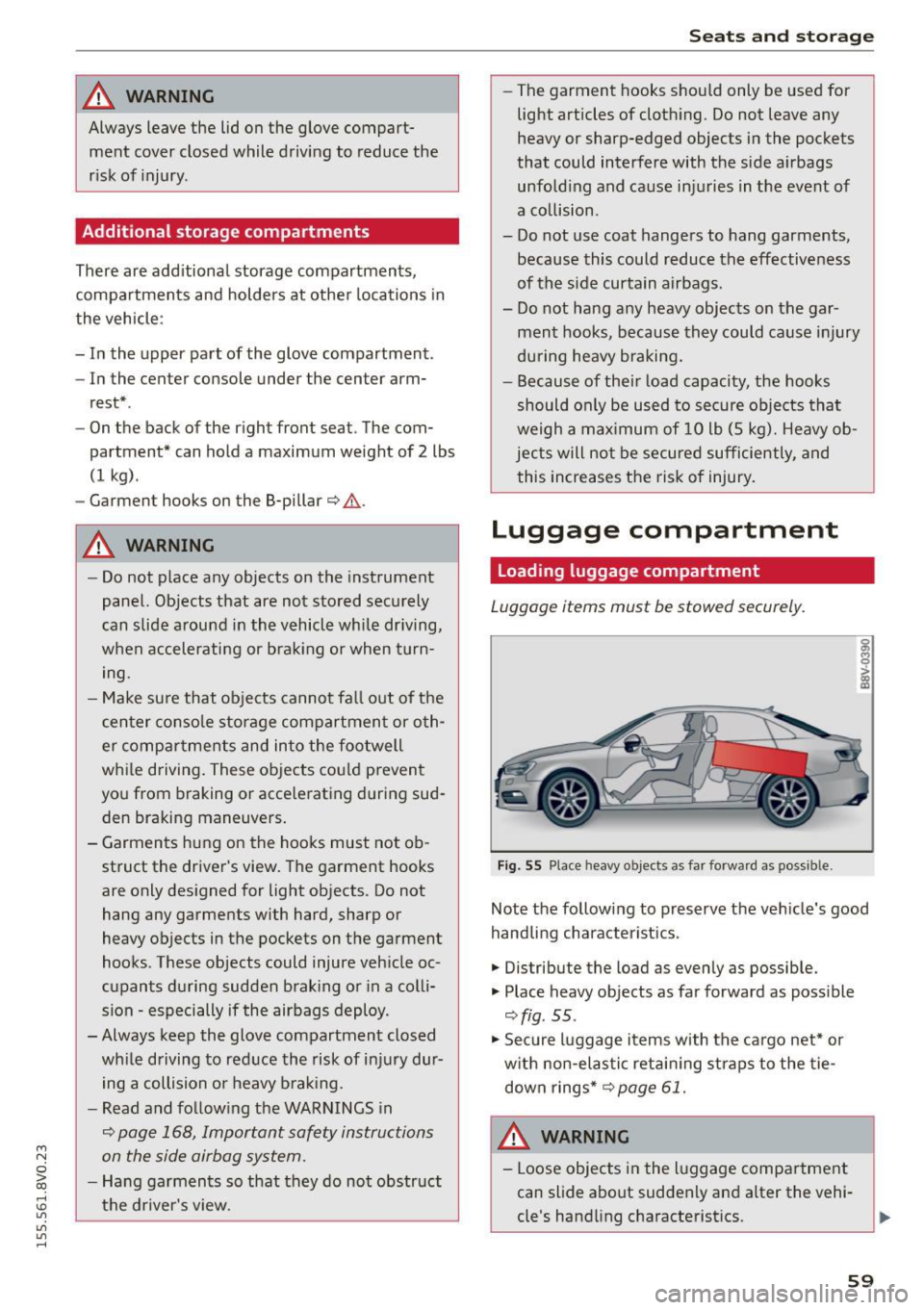
Luggage items must be stowed securely.
Fig. 55 Place heavy objects as far forward as poss ib le.
Note the following to preserve the vehicle's good
handling characteristics .
.,. Distribute the load as evenly as possible.
.,. Place heavy objects as far forward as possible
¢ fig . 55 .
.,. Secure luggage items with the cargo net* or
with non-elastic retaining straps to the tie
down rings* ¢
page 61.
WARNING
-Loose objects in the luggage compartment
can slide about suddenly and alter the vehi
cle's handling characteristics.
59
Page 67 of 282
....,
N
0 > co
rl I.O
"'
"'
"'
rl
Climate control system controls
Applies to vehicles: with manual climate control system
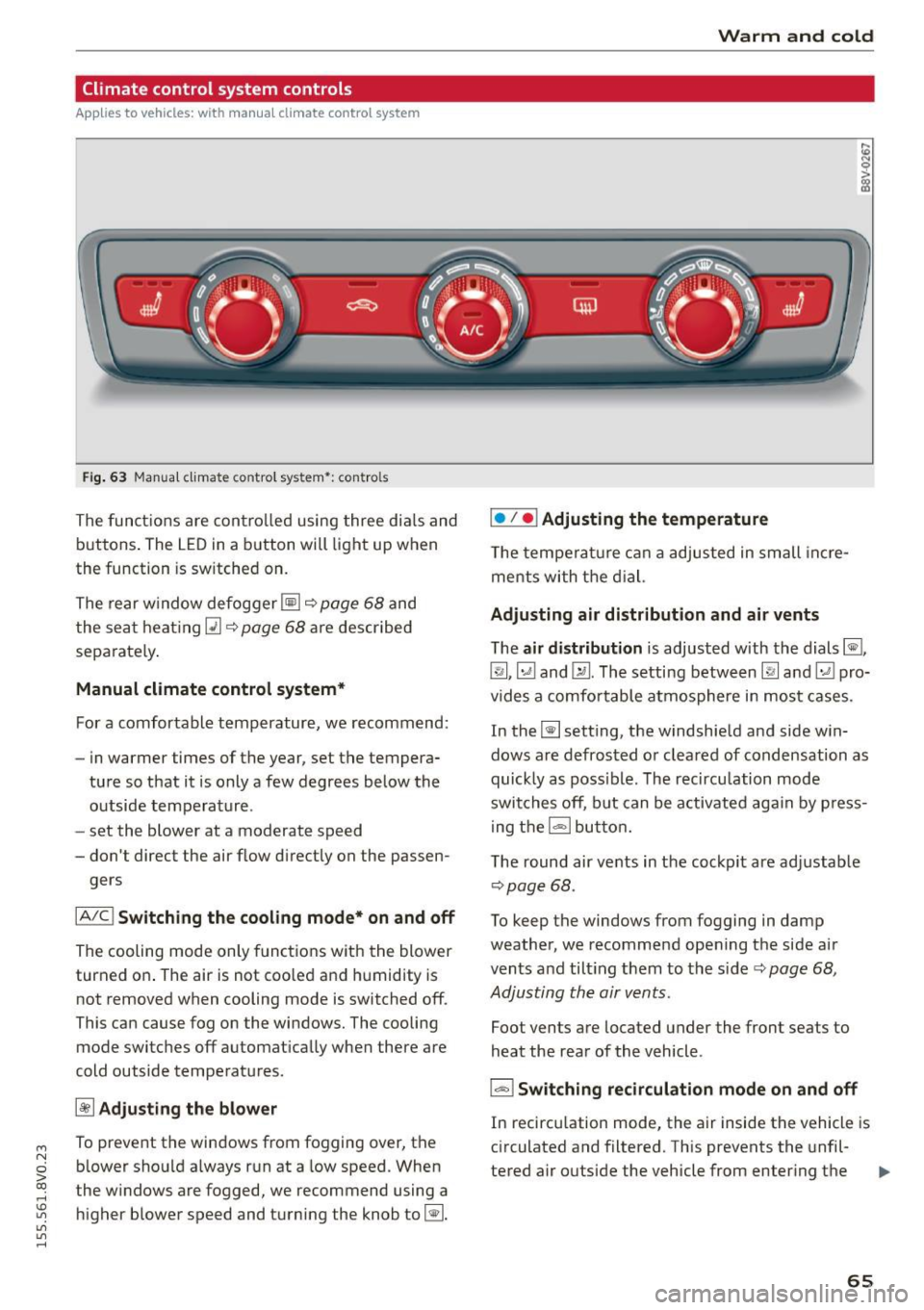
F ig. 63 Manua l clima te co ntro l system *: contro ls
The functions are controlled using three dia ls and
buttons . The LED
in a button will light up when
the function is sw itched on.
The rear window defogger ~~
page 68 and
the seat heating~~
page 68 are described
sepa rately .
Manual climate control system*
For a comfortable temperature, we recommend:
- in warmer time s of the year, set the tempera-
ture so that it is only a few degrees below the outside temperature .
- set the blower at a moderate speed
- don't direct the air flow d irectly on the passen-
gers
IA/C l Switching the cooling mode* on and off
The cooling mode only functions with the blower
turned on . The air is not coo led and humidity is
not removed when cooling mode is switched off .
This can cause fog on the windows. The cooling
mode switches off automat ically when there are
cold outside temperatures.
~ Adjusting the blower
To prevent the windows from fogging over, the b lower should a lways run at a low speed. When
t he w indows are fogged, we recommend using a
higher blower speed and turning the knob to~-
Warm and cold
I• I • I Adjusting the temperature
T he temperature can a adjusted in small incre
me nts with the dial.
Adjusting air distribution and air vents
The air distribution is adjusted with the dials ~.
~.~ and~-The setting between
IR! and ~ pro
vides a comfo rtable atmosphere in most cases.
In the~ setting, the windshield and side win
dows are defrosted or cleared of condensation as
quickly as poss ible. The recircu lation mode
switches off, but can be activated again by press
ing the
l = I button.
The round air vents in the cockpit are adjustab le
¢ page 68 .
To keep the windows from fogging in damp
weather, we recommend opening the side air
vents and tilt ing them to the side ¢
page 68,
Adjusting the air vents .
Foot vents are located under the front seats to
heat the rear of the vehicle .
I-I Switching recirculation mode on and off
In recirculation mode, the air inside the vehicle is
circulated and filtered. This prevents the unfil-
tered air outside the vehicle from enter ing the .,..
65
Page 68 of 282
Warm and col d
vehicle interior . We recommend switching recir
culation mode on when driving through a tunne l
or when s itting in traffic¢.&. .
Recircula tion mode is sw itched off in the defrost
setting ~.
Automatic climate control system controls
Applies to vehicles: with automatic air conditioner
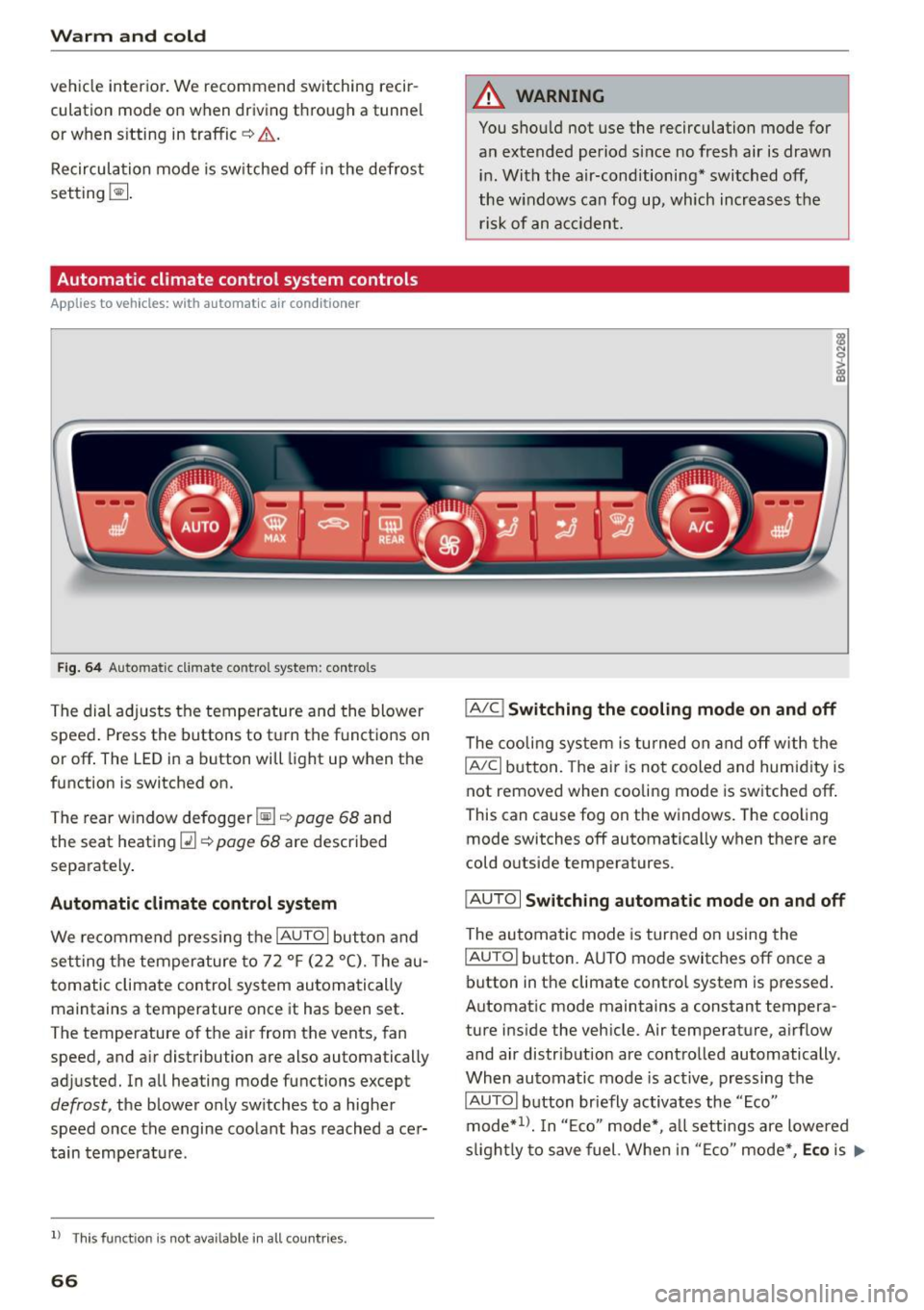
Fig. 6 4 Automa tic climat e co ntro l system : contro ls
The dial ad justs the temperature and the blower
speed . Press the buttons to turn the functions on
or off . The LED in a button will light up when the
function is switched on.
T he rear w indow defogger ~¢
page 68 and
the seat heat ing
Q] ¢ page 68 are described
separately .
Automatic climate cont rol system
We recommend p ress ing t he IAU TOI button and
se tting the temperature to 72
°F (22 °(). T he au
tomatic climate control system au tomatically
maintains a temperature once it has been set .
The temperature of the ai r from the vents, fan
speed, and a ir distribution are also automatically
adjusted. In all heating mode functions except
defrost, the b lower only sw itches to a higher
speed once the engine coo lant has reached ace r
tain tempe rat ure.
ll Thi s fun ctio n is not ava ilable in a ll countries.
66
A WARNING
You shou ld not use the recirculation mode for
an extended period s ince no fresh air is drawn
i n . With the air-conditioning* switched off,
the w indows can fog up, which increases the
risk of an a cciden t.
IA/C l Switching the cooling mode on and off
The cooli ng sys tem is turned on a nd off with the
IAJC I button. The ai r is no t cooled and humid ity is
not removed when cooling mode is switched off .
This can cause fog on the windows. The coo ling
mode switches off automatically when there are
cold o utside temperatures.
IAU TO I Switching automatic mode on and off
The au tomatic mode is turned on using the
IAU TO I button. A UTO mode switches off once a
button in the climate contro l system is pressed.
Automat ic mode maintains a constant tempera
ture i nside the vehicle. Air temperature, a irflow
and air distribut ion are contro lled automatically.
When automatic mode is active, pressing the
IAUTOI b utton briefly activates the "Eco"
mode*
1> . I n "E co" mode*, a ll setti ngs are lowered
s ligh tly to save fuel. Whe n in "E co" mode *,
Eco is .,..
Page 69 of 282
shown in the disp lay. To exit "Eco" mode*, press
the
! AUTO ! button again .
I• I • I Setting the temperature
The temperature can be adjusted individually for
the dr iver and front passenger using the dials.
Tempe ratures between 60 °F ( +16 °C) and 84 ° F
(+28 °C) can be set. If outside of this range, LO or
HI will appear in the climate control system dis
p lay. In both settings, the climate contro l runs
with constantly at the maximum cooling or heat ing level. The temperature is not regulated.
Synchronization: by pressing the IAUTO I button
for two seconds, the temperature setting for the
driver is transferred to the front passenger's side.
This applies a temperature change to the front
passenger's side.
~ Adjusting the blower
To prevent the windows from fogging over, the b lower sho uld a lways ru n at a low speed. You can
ad just the volume of air generated by the b lower
to your preference. To have the blower regu lated
automatically, press the !AU TO I button .
Adjusting the air distribution
The air distribution is adjusted with the~, U!i
and ~ buttons. To have the air d istr ibut ion regu
lated automatically, press the
IAUTOI button.
The round air vents in the cockpit are adjustable
¢page 68.
To keep the windows from fogging in damp
weather, we recommend opening the side air
vents and ti lting them to the side
~ page 68,
Adjusting the air vents .
Foot vents are located under the front seats and
adjustable vents on the end o f the center console
to heat the rear of the vehicle .
~ Switching the defroster on and off
The windshield and side windows are defrosted
or cleared of condensation as quickly as possible .
The maximum amount of air flows main ly from
M
N the vents below the windshie ld. Recirculation 0
iii mode switches off . The temperat ure is contro lled
~ automatically. In the Ii] sett ing, the IA/C i cooling
Vl
Vl
......
Warm and cold
mode switches on automatically, depending on
the outside air temperat ure.
T he
IAUTO ! button switches the defroster off.
l"""I Switching recirculation mode on and off
The recircu lation mode can be turned on manual
ly or automatically* .
- Switching manual recirculation mode on and
off : press
1.,,.,1 The LED light up when switched
on .
- Automatic* recirculation mode: the auto recir
culat ion must be act ivated in the MMI. Select:
the
I MENU I button > Car > Systems* control
button
> AC > Auto recirculation . The air quali
ty sensor that is designed for diesel and gaso
line exhaust automatically switches the recircu
lation mode on or off depending on the level of
pollutants in the outside air .
In recircu lation mode, the air inside the vehicle is
c ir cula ted and filtered. This prevents the unfil
tered air outside the vehicle from entering the
vehicle interior. We recommend switching recir
cu lation mode on when driving through a tunnel
or when sitting in traffic~ &.
T he
1-1 button, !AUTO ! or the [ii bu tton switches
recirculation mode off.
T he system switches to recirculation mode when
driv ing in reverse when the engine is cold.
_&. WARNING
You should not use the recirculation mode for
an extended period sin ce no fresh air is drawn
in. With the air-conditioning switched off, the
windows can fog up, which increases the risk
of an acc ident.
67