2015 AUDI S3 SEDAN tow
[x] Cancel search: towPage 97 of 282
....,
N
0 > co
rl I.O
"'
"'
"'
rl
-Please note that unconsciously "resting"
your foot on the accelerator pedal prevents the cruise control from braking. This is due
to the control system be ing overr idden by
the driver 's acceleration .
-If there is a b rake system malfunction such
as overheating when the speed warning sys
tem is switched on, the braking function in
the system will be deactivated. The remain
ing speed warni ng system fu nctions will re
ma in active, as long as the~ (USA mod
els) /. (Canada models) indicator light is
on .
{i) Tips
-The cruise cont ro l system is idea l for
stretches with speed limits. The driver i s re
spons ible for adhering to the cor rect speed.
- The cruise cont ro l rema ins active when
s hift ing ge ars.
- The brake lights turn on when the bra kes
are activated.
Switching on
Applies to vehicles: with c ruise contro l system
0
f
®t
0
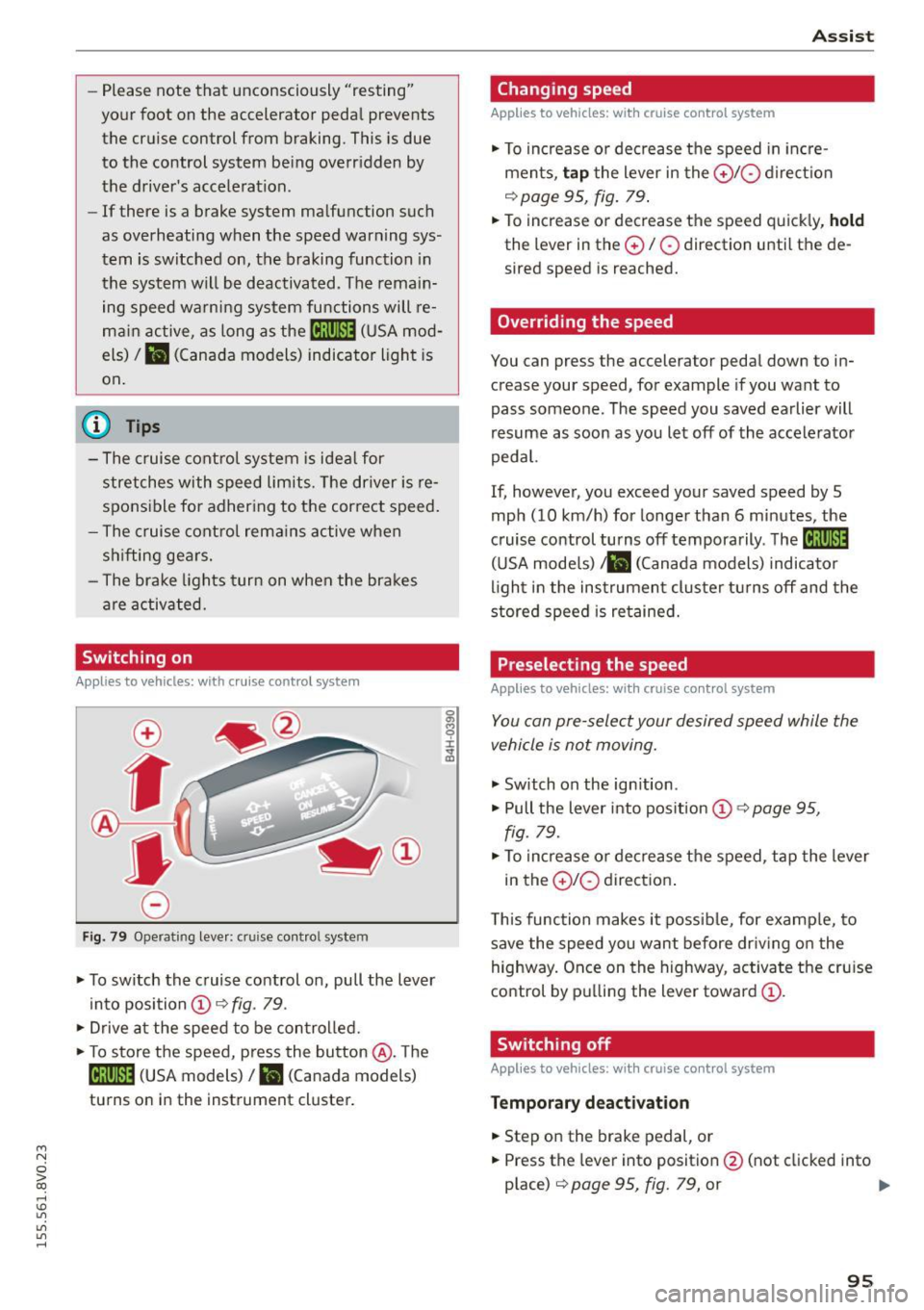
Fi g. 7 9 Operating leve r: cruise co ntro l system
.. To switch th e cruise control on, pull the lever
in to posi tion @~
fig. 79 .
., Drive a t the speed to be con trolled.
.. To store the speed, press the button @. T he
[ij;\1)~14 (USA models)/ Ii.I (Canada models)
tu rns o n in the instrument cluster.
A ssi st
Changing speed
Applies to vehicles: with cruise control system
., To increase o r dec rease the speed in in cre
ments,
tap t he lever in the 0 10 d ire ct io n
q page 95, fig . 79 .
.. To increase or decrease the speed quick ly, hold
the lever in the 0 / 0 direction u ntil the de
sired speed is reached.
Overriding the speed
You can press the accelerator pedal down to in
crease your speed, for example if you want to
pass someone. The speed you saved earlier will
resume as soon as you let off of the accele rato r
pedal.
If, howeve r, you exceed your saved speed by 5
mph (10 km/h) for longe r than 6 minutes, the
c ruise control turns off temporarily . The
M;\1)~14
(U SA mode ls) ;lB (Canada models) indicator
li ght in the instrumen t cluster t urns off and the
stored speed is re tained.
Preselecting the speed
Applies to vehicles: with cruise control system
You can pre-select your desired speed while the
vehicle is not moving.
., Switch on the ign ition .
.. Pull the lever into pos ition
(D 9 page 95,
fig. 79 .
., To increase or de crease t he speed, tap the lever
in the
0 10 direction .
T his function makes it poss ible, for examp le, to
save the speed you want before dr iv ing o n the
highway. Once on the h ighway, activa te the cru ise
control by p ulling the lever toward
(D .
Switching off
Appl ies to vehicles: with cruise cont rol system
Temporary deactivat ion
.. Step on the brake pedal, or
.. Press the lever into position @(not clicked into
place)
q page 95, fig. 79, or ..,
95
Page 101 of 282

M N
0 > co ,...., \!) 1.1'1
1.1'1
1.1'1
,....,
Switching adaptive cruise control on
"'Pull the lever toward yo u into posit ion (!)
¢fig. 84. ACC: sta ndb y appears in the instru
ment cluster disp lay .
Saving the speed and activating regulation
"'T o save the current speed, press the !SETI
¢ fig. 84 button . T he stored speed is s hown in
the tachomete r LED line @and appears briefly
in the information line @¢
fig. 85.
"' To activate the reg ulation while stationary, you
must press the brake pedal.
Sw itching adaptiv e cruise c ontrol off
"' Push the lever away from you into position @
u nt il it clicks into place. The message
ACC : off
appears .
The stored speed in the L ED line is erased.
@ Indicato r light s
II-adaptive cruise contro l is switched o n. Ob
jects ahead are not detected. The stored speed is
maintained.
• -An object ahead was detected . The adaptive
cruise control system regu lates the speed and
d istance to the object ahead and brakes/acceler
ates automatica lly.
f:i -adaptive cru ise contro l is switched o n. An
object ahead was detected. Yo ur vehicle remains
stopped and w ill not start dr iving automatica lly.
• -The automatic brak ing is no t eno ugh to
maintain a sufficient distance to an object ahead .
You must intervene ¢
page 102, Request for
driver intervention.
© Instrument clu ster display
If adaptive cruise control is not shown in the in
strument cluster display, yo u can call i t up using
the mu ltifunc tion steering wheel buttons
¢page 28.
Based on the g raphics in the display, you can de
termine if the system is ma inta ining a distance to
a vehicle ahead and what that dis tance to this ve
h icle is:
No vehi cle -No object ahead was detected .
Ass is t
White vehicle -An object ahead was de tected .
Re d vehi cle -Request fo r the d river to take action
¢page 102.
Both arrows on the scale© indicate the d istance
to the object ahead. No arrow appears when the
vehicle is on an open road and the re is no object
ahead. If a n object is detected ahead, the a rrow
moves on the sca le.
T he green zone on the sca le indicates the store
distance. For i nformat ion on changing the dis
t a nce, refer to ¢
page 101. If the distance se
l ected is ex ceeded or not reached, the arrow
moves into the red zone on the scale .
_& WARNING
-Using adaptive cruise contro l incorrectly can
cause collisions, other accidents and serious in ju ries.
- If you press the
ISETI button when driving at
speeds be low 20 mph (30 km/h), the vehi
cle acce lerates automatically up to 20 mph
(30 km/h), which is the mi nimum speed
that can be set.
{!) Tips
- If you switch the ignit ion or the adaptive
cruise contro l system off, the set speed is
erased for safety reason.
- The Electronic Stabilization Control (ESC) and Anti-Slip Regulat ion (ASR) both sw itch
on when the adaptive cruise contro l is
switched on . ESC and ASR ca nnot be switch
e d off when adaptive c ruise cont ro l is
sw itched on.
- With the adaptive c ruise control activated
the ESC sport mode cannot be activated .
99
Page 103 of 282
M N
0 > co ,...., \!) 1.1'1
1.1'1
1.1'1
,....,
Overriding cruise control
Overriding means exceeding the selected speed
when adaptive cruise contro l is active, for exam
p le when pressing the acce lerator pedal when
passing.
"'T o accelerate man ua lly, pull the lever towa rd
you into position @and ho ld it there. The mes
sage
ACC: o ve rride appears . Or
"' press the accelerator peda l.
"' To resume cruise control, release the lever or
take your foot off the acce lerator pedal.
Int errupting c ruis e contr ol w hil e driving
"'Move the lever into position @. The message
ACC: stand by appears. Or
"' press the brake peda l.
"' To resume the stored speed, move the lever in
to posit ion @.
Int errupting c rui se contr ol wh en stopped
"' Push the lever away from you into position @.
The message
ACC: s ta ndby appears.
"' To resume cruise control, press the brake peda l
and pull the lever toward you into position@.
A WARNING
It is dangerous to act ivate cru ise contro l and
resume the stored speed when the current
road, traff ic or weather condit ions do not per
m it this. This could result in a c rash.
Setting the distance
A ppl ies to vehicles: with Audi adaptive cruise co ntrol
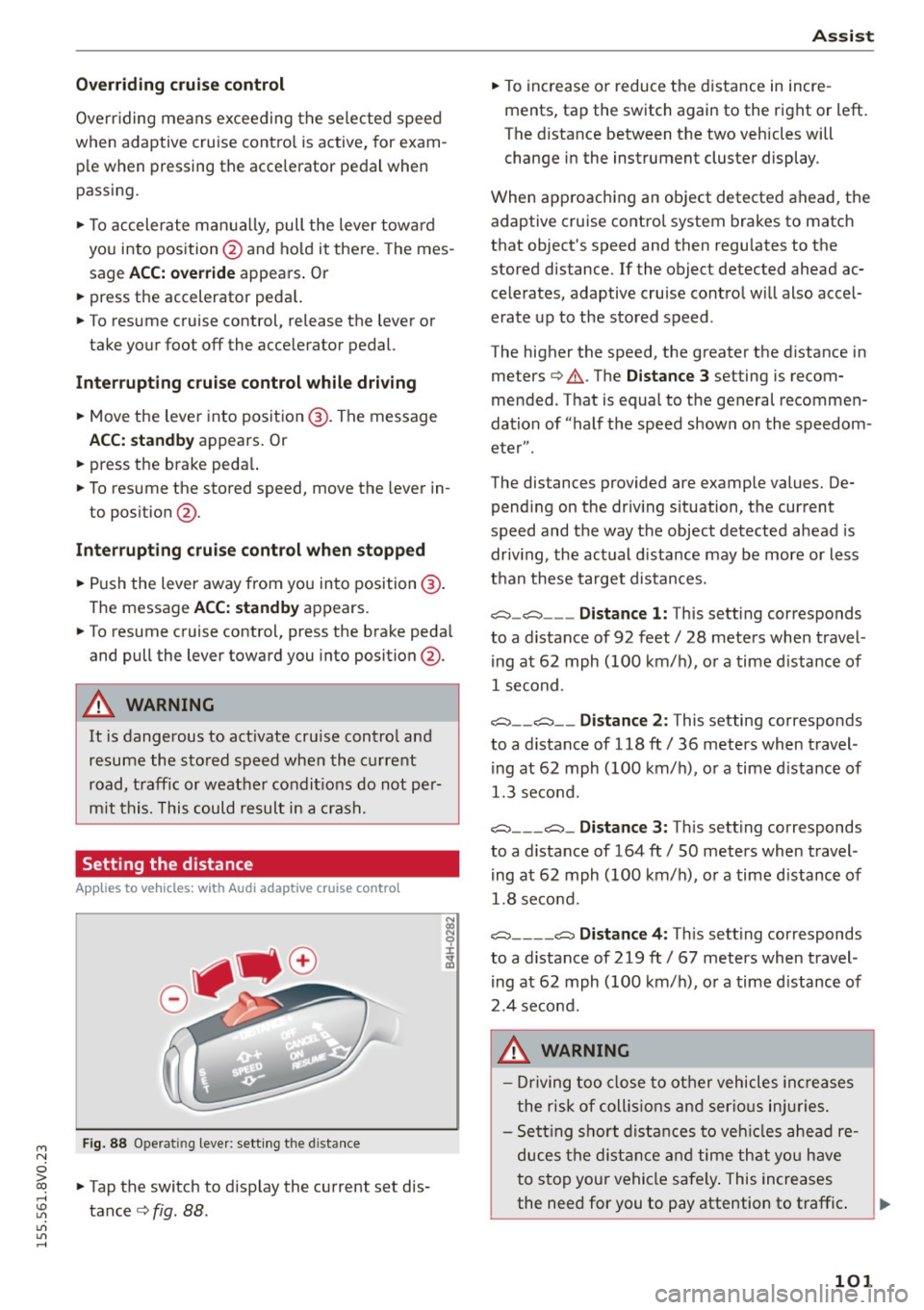
Fig. 88 Ope rat ing leve r: sett ing the d istance
"' Tap the switch to d isplay the current set dis
tance
c> fig. 88 .
Ass is t
"' To increase or reduce the d istance in incre
ments, tap the switch again to the right or left.
The distance between the two vehicles will
change in the instrument cluster display .
When approaching an object detected ahead, the adaptive cruise contro l system brakes to match
that object's speed and then regu lates to the
stored distance. If the object detected ahead ac
celerates, adaptive cruise control will also accel
erate up to the stored speed .
The higher the speed, the greater the distance in meters
c> .&. . The Distanc e 3 setting is recom
mended. That is equal to the general recommen
dation of "half the speed shown on the speedom
eter" .
The distances provided are example values. De pending on the driv ing s ituation, the current
speed and the way the object detected ahead is
driv ing, the actual d istance may be more or less
than these target distances.
c::::::, _c::::::, ___ Distance 1: This setting corresponds
to a distance of 92 feet/ 28 meters when travel
ing at 62 mph (100 km/ h), or a time d istance of
1 second.
c::::::, __ c::::::, __ Distance 2 : This setting corresponds
to a distance of 118 ft/ 36 meters when travel
ing at 62 mph (100 km/ h), or a time d istance of
1.3 second.
c::::::, ___ c::::::,_ Distanc e 3: Th is sett ing corresponds
to a distance of 164 ft/ 50 meters when travel
ing at 62 mph (100 km/ h), or a time d istance of
1.8 second.
c::::::, ____ c::::::, Distance 4: This sett ing corresponds
to a distance of 219 ft/ 67 meters when travel
ing at 62 mph (100 km/h), or a time d istance of
2.4 second.
A WARNING
- Driving too close to other vehicles inc reases
the risk of coll is ions and ser io us in juries.
- Sett ing s ho rt distances to veh icles ahead re
duces the dist ance and time that you have
to stop your vehicle safe ly . This increases
the need for you to pay attention to traffic. .,,.
101
Page 111 of 282
....,
N
0 > co
rl I.O
"'
"'
"'
rl
_& WARNING
With the vibration warning switched off, no
visible warning will appear in t he instrument
cluster dis play when crossing a lane ma rker.
(D Tips
Ma rket-specific: your settings are automati
cally stored and assigned to the remote con
trol key being used .
Audi side assist
Description
Applies to vehicles: with Audi side assist
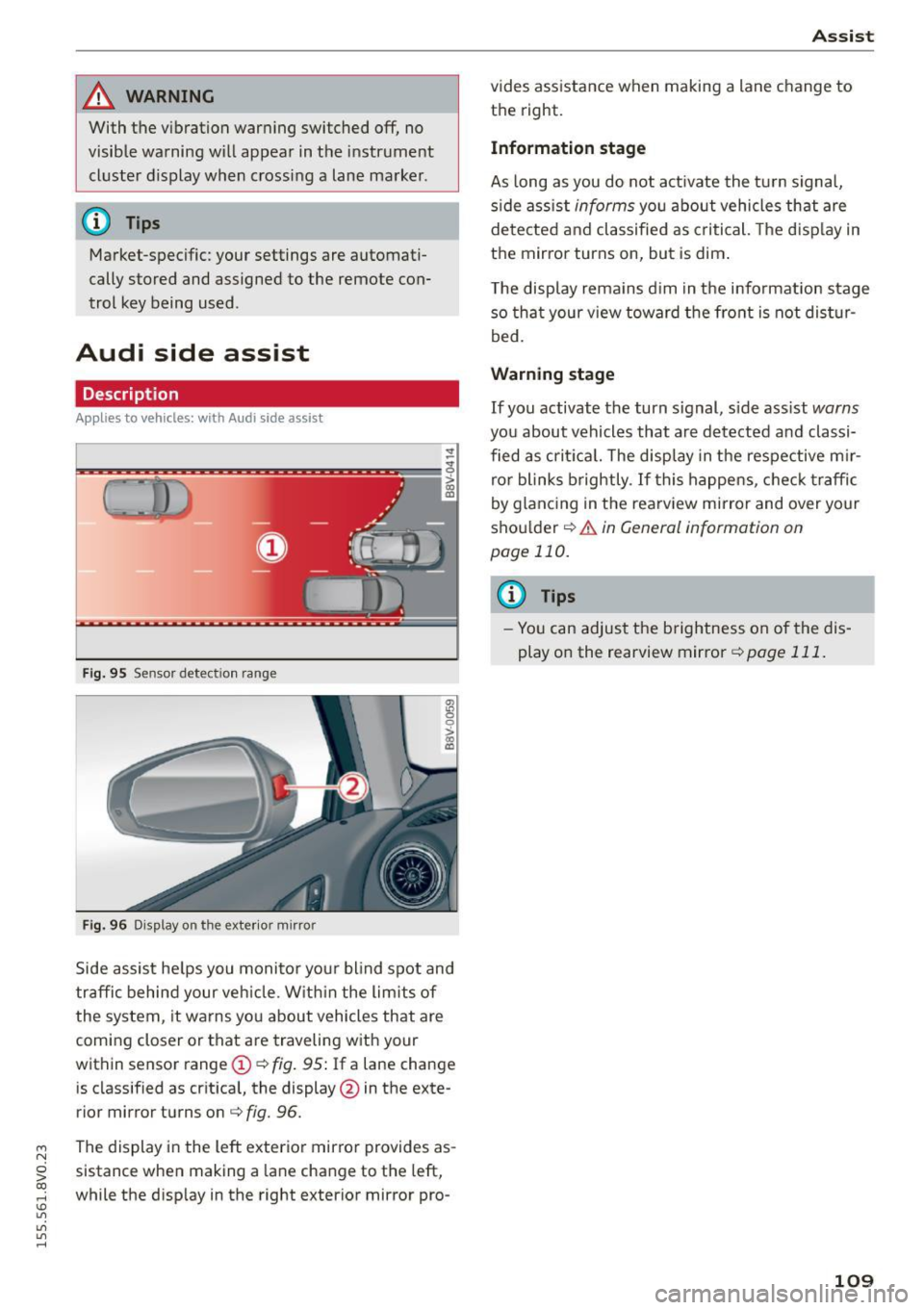
Fig . 9 5 Sensor detect io n range
Fig . 96 Display on the exterior mirror
fR 0
0
> CX)
traffic behind your ve hicle. W it hi n the limit s of
the system, it warns yo u about vehicles that are
coming closer or that are traveling with your
within sensor range
(D ¢ fig . 95: If a lane change
is classified as cr it ica l, the display @in the exte
rior mirror turns on
c:> fig. 96.
The display in the left exterior mirro r provides as
sistance when making a la ne change to the left,
while the d isp lay in the right exterior mirror pro-
A ssi st
vides assistance when making a lane change to
th e right.
Information stage
As long as you do not act ivate the tu rn signa l,
s ide ass ist
informs yo u about vehicles that are
de te cted a nd classified as criti cal. The d is pl ay in
the mirror turns on, but is dim .
T he display rema ins d im in the info rmation stage
so tha t your v iew toward the front is not dis tur
bed.
Warn ing stage
If you activate the turn s ignal, s ide ass ist warns
you about vehicles that are de tected and classi
fied as cri tica l. The display in the respective m ir
ro r blinks brightly . If this happe ns, che ck tr affi c
by glanc ing in the rearv iew mirror and over your
sho ulder
c:> .&. in General information on
page 110.
@ Tips
- Yo u can adjust the brightness on of the dis
play on the rearview mirror
c:> page 111 .
109
Page 120 of 282
Parking syste m s
General information
App lies to vehicles: with parking system p lus with rearview
camera
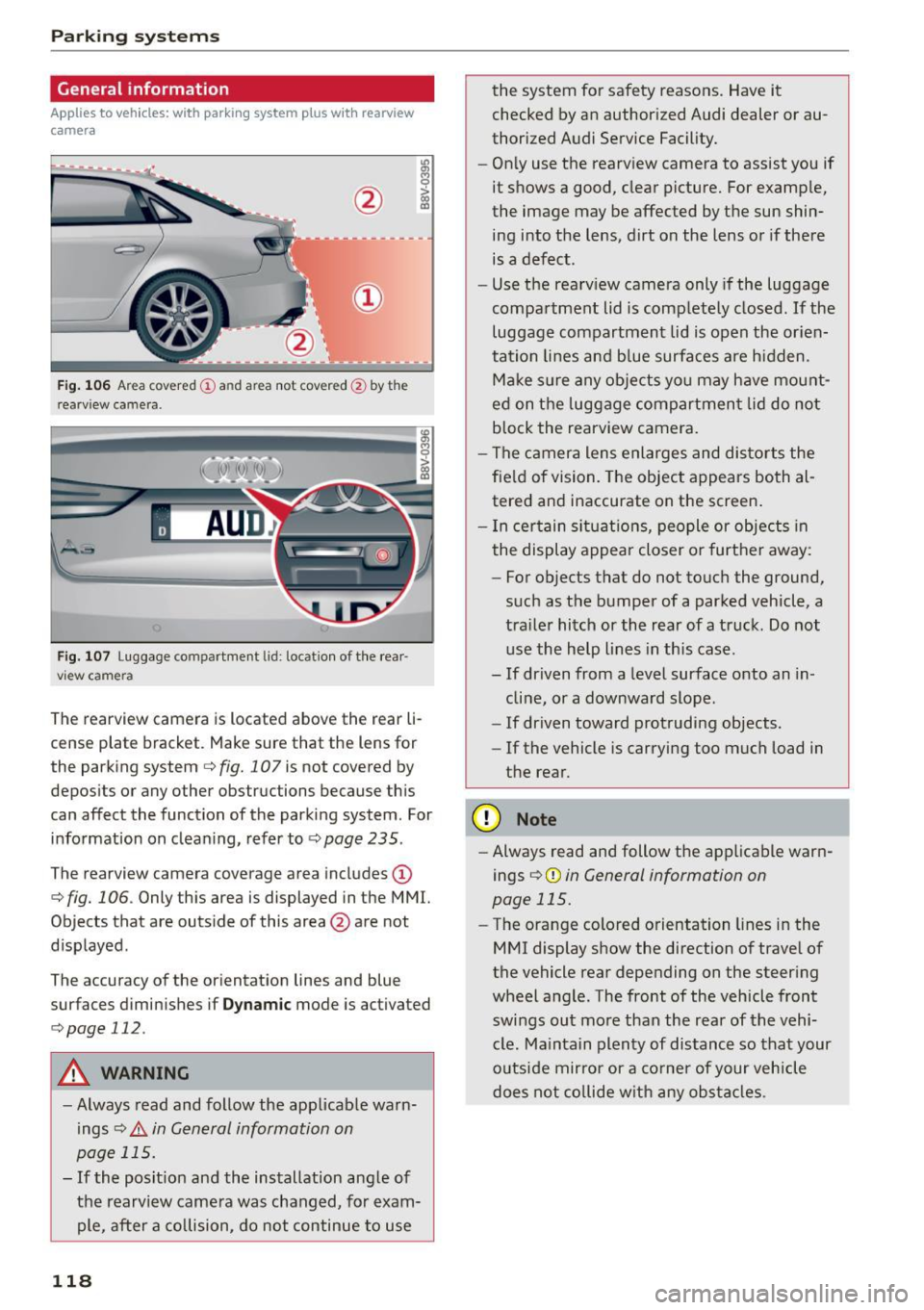
F ig . 106 Ar ea covered (!) an d area not cove red@ by th e
r earv iew ca mera .
Fig. 107 Luggage compartment lid : locat ion of the rear
vi ew came ra
The rearview camera is located above the rear li
cense plate bracket . Make sure that the lens for
the parking system
c::> fig. 107 is not covered by
deposits or any other obstructions because th is
can affect the function of the parking system . For
information on cleaning, refer to
c::> page 235 .
The rearview camera coverage area includes (D
c::> fig. 106. Only this area is displayed in the MMI.
Objects that are outside of this area @are not
displayed .
The accuracy of the or ientation lines and blue
surfaces diminishes if
D yn am ic mode is activated
c::> page 112.
A WARNING
-Always read and follow the app licable warn
ings
c::> .&. in General information on
page 115.
- If the posit ion and the installation ang le of
the rearview camera was changed, for exam ple, after a co llision, do not continue to use
118
the system for safety reasons. Have it
checked by an author ized Audi dealer or au
thorized Audi Service Facility.
- On ly use the rearview camera to assist you if
it shows a good, clear picture. For examp le,
the image may be affected by the sun shin
ing into the lens, dirt on the lens or if there
is a defect.
- Use the rearv iew camera only if the luggage
compartment lid is completely closed.
If the
luggage compartment lid is open the or ien
tation lines and b lue surfaces are h idden.
Make s ure any objects yo u may have mount
ed on t he luggage compartmen t lid do not
block the rearview camera.
- The camera lens enlarges and distorts the
fie ld of vision. The object appears both al
tered and inaccurate on the screen .
- I n ce rtain si tuat ions, people or objects in
the display appea r closer or further away:
- For objects that do not to uch the ground,
such as the bumper of a parked vehicle, a
tra ile r hitch or the rear of a truck. Do not
use the help lines in this case.
- If driven from a level surface onto an in
cline, or a downward slope .
- If driven toward protruding objects.
- If the vehicle is carrying too much load in
the rear.
(D Note
- Always read and follow the applicable warn
ings
c::> (D in General information on
page 115.
- The orange colored o rientation lines in the
MMI display show the direction of trave l of
the vehicle rear depending on the steer ing
wheel a ngle . The front of the vehicle front
swings out more than the rear of the vehi
cle. Ma intain plenty of distance so that your
o utside mirror or a co rne r of your vehicle
does not co llide w ith any ob stacl es .
Page 128 of 282

Intelligent Technology
& WARNING
-New brake pads do not achieve their full
braking effect during the first 250 mi
(400 km). They must be "broken in" first .
However, you can compensate for the slight·
ly reduced braking force by pressing firmly
on the brake pedal. Avoid heavy braking dur·
ing the break-in period.
- Alway apply the brakes for the purpose of
cleaning the brake system when road and
traffic conditions permit. You must not en·
danger other road users. This increases the
risk of an accident.
- On steep slopes , reduce the speed and se
lect a lower gear or lower selector lever po·
sition. Drive as little as possible while press· ing the brake pedal and avoid putting your
left foot on the brake pedal while driving.
This could cause the brakes to overheat and impair the efficiency of the brakes .
- Do not let the brakes "grind" by always
keeping your foot on the brake pedal. This
can cause the brakes to overheat, increase
wear and increase braking distance unneces·
sarily.
- Certain weather and operating conditions
such as driving through water, driving in
heavy rain or driving after washing your
ve·
hide can impair the effectiveness of the
brakes. In the winter, ice may build up on
the brake pads, rotors and drums. Check
these components by braking carefully. Ap·
plying the brakes carefully several times
dries the brakes and removes ice build-up .
- The efficiency of the brakes can also be im·
paired by driving for long stretches on roads
covered with salt without using the brakes.
You can
remove salt deposits from the brake
rotors and pads by carefully applying the
brakes several times.
- If the front spoiler is damaged or you install
another spoiler, make sure the front wheel
brakes are ventilated properly . Otherwise,
the brake system could overheat, which re·
duces their effectiveness.
- Failure of a brake circuit impairs braking
performance, which increases braking dis·
126
tance. Avoid driving the vehicle and have it
towed it to the nearest authorized Audi
dealer or authorized Audi Service Facility .
- Never let the vehicle roll while the engine is
stopped because this increases the risk of an
accident .
-If the brake booster is not working, you will
have to press much harder on the brake ped·
al to compensate for the lack of the booster .
(D Note
-Never let the brakes "rub" by pressing the
pedal lightly when braking is not really nee·
essary. This causes the brakes to overheat
and increases braking distance and causes
wear .
- Before driving on a long stretch with steep
slopes, reduce your speed and shift to the
next lower gear This makes use of the en·
gine braking effect and relieves the brakes .
If you need to brake additionally, brake in
intervals and not continuously.
(D Tips
-If the brake booster is not working, you
must press the brake pedal with much more
force then normal.
- If you retrofit your vehicle with a front spoil·
er, wheel covers or similar items, make sure
that the air flow to the front wheels is not
interrupted. Otherwise the brake system
can become too hot.
Electromechanical
steering
The electromechanical steering supports the
driver's steering movements .
Power steering adapts electronically based on
the vehicle speed.
T he vehicle still has full steering functionality if
the power steering fails or when the engine is
stopped (towing). To steer, you must apply much
more force than usual.
Indicator lights and messages
• Do not drive vehicle: steering defective
Page 129 of 282
M N
0 > co ,...., \!) 1.1'1
1.1'1
1.1'1
,....,
If th is indicator light turns on and stays on and
this message appears, the power steering may have failed .
Do
not continue driving. See an authorized Aud i
dea ler or autho rized Audi Service Facility for as
sistance.
• Do not drive vehicle: steering defective
There is a malfunction in the electron ic steering
l ock. You cannot turn the ignition on .
Do
not tow your vehicle because it cannot be
steered. See an authorized Aud i dealer or author
ized Audi Service Fac ility for assistance .
'-:r,ij Steering malfunction: you can continue driv
ing
If the indicator light turns on, the steering whee l
may be more difficult to move or more sensitive
than usual. The steering wheel may also be at an
angle when dr iving straight.
Drive slow ly to an authorized Audi dealer or au
thor ized Audi Se rvice Facility to have the ma l
function corrected.
!II Steering lock: system fault! Please contact
Service
There is a malfunct ion in the electron ic steering
l oc k.
Drive to an authorized Aud i dealer or authorized
Aud i Service Facility immediately to have the
malfunction corrected.
_& WARNING
-
Have the system malfunction corrected as
soon as possible by an authorized Audi dealer
or authorized Audi Service Faci lity, as th is in
creases the risk of an accident .
(D Tips
If
the . or ,-:r-n indicator light only stays on
for a short time, you may continue driving.
Intelligent Technology
All wheel drive (quattro)
Applies to vehicles: with all w heel drive
In all wheel drive, all four wheels are powered.
General information
In all wheel dr ive, the dr iv in g power is divided be
tween all four whee ls . T his happens automatical
ly depending on your driving behavior as well as
the current road conditions . Refer to¢
page 123,
Electronic stabilization control (ESC).
The all wheel drive concept is designed for high
engine power. Your vehicle is exceptionally pow
erfu l and has excellent driving characteristics
both under normal driving conditions and on
snow and ice. Always read and follow safety pre cautions
q ,& .
Winter tires
By using all wheel drive, your vehicle has good
forward motion with standard tires in winter con
ditions. However, in winter we recommend using
winter or all season tires on
all four wheels, be
cause this will improve the
braking effect .
Snow chains
If
there are snow chain laws, snow chains must
also be used on vehicles with all wheel drive
q page 230, Snow chains.
Replacing tires
For vehicles with all wheel d rive, only wheels wi th
the same rolling circumference should be used.
Avoid wheels with different tread depths
qpage 221.
Offroad vehicle?
Your Audi is not an offroad vehicle -there is not
enough ground clearance. For this reason, avoid
difficult terra in. Refer to¢
page 259.
_& WARNING ~
-Also, in vehicles with a ll wheel drive, adapt
your driving style to the current road and
traffic cond itions . Do not let the increased
safety provided tempt you into taking risks.
- The braking ability of your veh icle is limited
to the tract ion of the wheels. In th is way, it
127
Page 134 of 282
Driving safety
is as close to this position as possible. Move the
head restraint so that it is as close to the back
of the head as possible.
.. Fa sten and wear safety belt s correctly
<=> page 143.
.. Always keep both feet in the footwell so that
you are in control of the veh icle at all times.
For detailed information on how to adjust the
driver's seat, see
<=> page 55 .
A WARNING
Drivers who are unbelted, out of position or
too close to the airbag can be seriously in
jured by an airbag as it unfolds. To help re
duce the risk of serious personal injury:
- Always adjust the dr iver's seat and the
steering wheel so that there are at least
10 inches (25 cm) between your breastbone
and the steering wheel.
- Always adjust the driver's seat and the
steering wheel so that there are at least
4 inches (10 cm) between the knees and the
lower part of the instrument panel.
- Always hold the steering wheel on the out
side of the steering wheel rim with your
hands at the 9 o'clock and 3 o'clock posi
tions to help reduce the risk of personal in
jury if the driver's airbag inflates .
- Never hold the steering wheel at the
12 o'clock position or with your hands at
other positions inside the steering wheel
rim or on the steering wheel hub . Holding
the steering wheel the wrong way can cause
serious injuries to the hands, arms and head
if the driver's airbag inflates.
- Pointing the steering wheel toward your
face decreases the ability of the supplemen
tal driver's airbag to protect you in a colli
sion.
- Always sit in an upright position and never
lean against or place any part of your body
too close to the area where the airbags are
located.
- Before driving, always adjust the front seats
properly and make sure that all passengers
are properly restrained.
132
- For adjustable head restraints: before driv
ing, always also adjust the head restraints
properly .
- Never adjust the seats while the vehicle is
moving. Your seat may move unexpectedly
and you could lose control of the vehicle.
- Never drive with the backrest reclined or tilted far back! The farther the backrests are
tilted back, the greater the risk of injury due
to incorrect positioning of the safety belt
and improper seating position .
- Children must always ride in child seats
<=> page 172 . Special precautions apply
when installing a child seat on the front pas senger seat<=>
page 148.
· Proper seating position for the front
passenger
The proper front passenger seating position is
important for safe , relaxed driving.
For your own safety and to reduce the risk of in
jury in the event of an accident, we recommend
that you adjust the seat for the front passenger
to the following position :
.. Adjust the angle of the seatback so that it is in
an upright position and your back comes in full
contact with it whenever the vehicle is moving .
.. For adjustab le head restraints: adjust the head
restraint so the upper edge is as even as possi
ble with the top of your head. If that is not pos
sible, try to adjust the head restraint so that it
is as close to this position as possible
<=> page 134 . Move the head restraint so that it
is as close to the back of the head as possible.
.. Keep both feet flat on the floor in front of the
front passenger seat .
.. Fasten and wear safety belts correctly
<=> page 143.
For detailed information on how to adjust the
front passenger's seat, see
c> page 54.
A WARNING
Front seat passengers who are unbelted, out
of position or too close to the airbag can be